
How to Use Vulnerability Assessment in Asset Management - AnySecura Manual
This guide will show you how the Vulnerability Assessment feature within AnySecura's Asset Management module helps you automatically discover and understand security risks across your network. You'll see how it continuously scans your computers, compiling clear statistics so you can monitor your overall security posture.
We'll then walk through how to use the console to view these vulnerabilities, either by risk type or by specific computer, and take timely action. You'll learn how to interpret the severity levels and access detailed remediation steps to effectively strengthen your system's defenses.
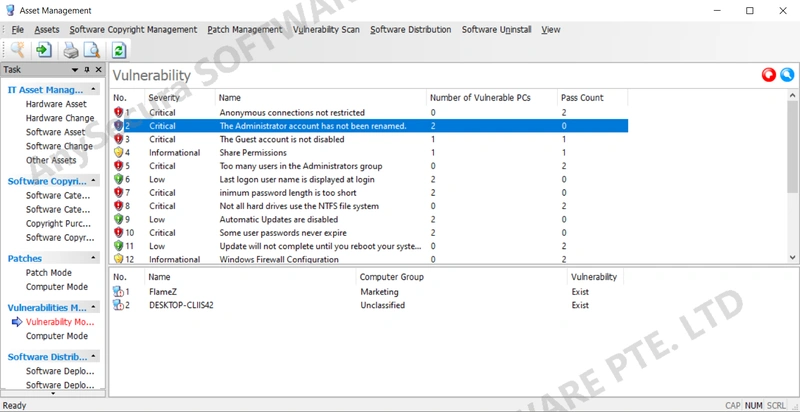
The Vulnerability Management feature automatically scans all computers within the network for vulnerabilities and compiles statistics, enabling network administrators to monitor and evaluate security risks. It also helps take timely actions to remediate vulnerabilities, thereby enhancing overall system security.
Clients with the software installed will automatically scan for vulnerabilities. Administrators can also initiate scans directly from the console. Click the Command button " " to start a vulnerability scan immediately, or click the Scope button "
 " to select a specific computer group or individual computer to view vulnerability information.
13.4.1 View by Vulnerability Mode
Under Vulnerability Management → Vulnerability Mode, you can view the list of vulnerabilities and which computers are affected. The vulnerability list includes the following information:
| Attribute | Description |
|---|---|
| Severity Level | The risk level of the vulnerability: Information, Medium, or Critical. |
| Name | A brief summary of the vulnerability. |
| Vulnerable PCs | Number of client machines that have this vulnerability. |
| Pass Count | Number of client machines not affected by this vulnerability. |
| Additional Details | Right-click a vulnerability and select Details to view a detailed description and recommended remediation steps. Administrators can manually fix vulnerabilities based on these solutions. |
13.4.2 View by Computer Mode
In Vulnerability Management → Computer Mode, you can view computer information along with detailed vulnerability records.
Computer information includes: computer name, computer group, network address, and operating system.
Vulnerability details include: severity level, name, and whether the vulnerability exists.
Double-click a vulnerability to view its detailed information and recommended remediation steps.