
How to Use Security Check Policies - AnySecura Manual
This guide will help you configure security check policies within the AnySecura Security Check module. You'll learn how to set up rules that verify specific security items on your client machines, ensuring they meet your organization's standards.
We'll then explore how to define the actions for non-compliant devices, such as sending alerts or blocking network access. By the end, you'll be able to create effective policies that automatically enforce compliance and protect your network.
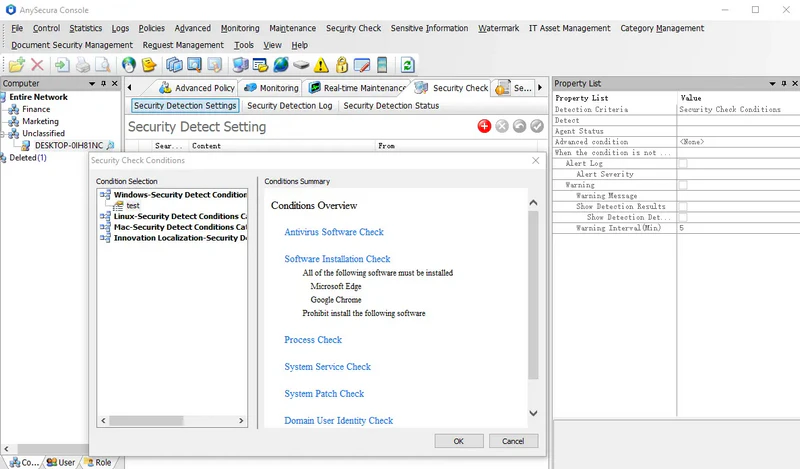
Select Security Check → Security Check Settings to configure security check policies. These policies verify specified security items on client machines. Clients that fail the checks can have their network access blocked, ensuring compliance with management rules.
Policy Attributes Description:
| Attribute | Description |
|---|---|
| Detection Condition | When adding a policy, you must first select a security check condition. Each policy can include only one condition. Once selected, the condition will be displayed here. Click the  to view an overview of the condition.
Conditions are system-specific: for example, a Windows security condition in a policy applied to both Windows and Linux clients will only be executed on Windows clients. to view an overview of the condition.
Conditions are system-specific: for example, a Windows security condition in a policy applied to both Windows and Linux clients will only be executed on Windows clients. |
| Detect | Options: Detect or Do Not Detect. Selecting Detect triggers a check based on the selected condition. Selecting Do Not Detect disables security checking and related settings below. |
| Agent Status | Options: All, Online Only, Offline Only. All executes the policy regardless of client status. Online Only executes only when clients are online. Offline Only executes only when clients are offline. |
| Alert Log | Enable to display an alert on the console when a client fails a security check. |
| Alert Severity | Sets the severity of the alarm: Low, Important, Critical. |
| Warning | Enable to show a warning when detection mode is Detect and the check fails. |
| Warning Message | Configure which warning messages are displayed. Warnings appear in both the tooltip bubble and the security check results window. |
| Show Detection Results | Enable to display the detection results. |
| Show Detection Details | Enable to display detailed detection results. When conditions use wildcards or have multiple matches, multiple details are shown. |
| Warning Interval | Sets the interval (in minutes) for warning pop-ups on clients that fail the check. |
| Block Network | Enable to prevent network access when detection mode is Detect and the client fails the check. |
| Exception Addresses | Specify exception addresses, separated by commas. Blocked clients can still access these addresses. |
| Block Access | This option appears only if AnySecura is connected to an access control device. Enable to block clients from network access when they fail the check. |
Note:
- When the alarm function is enabled in a security check policy:
- 1. If a single policy has multiple failed conditions, only one alarm will be triggered, generating a single alert message.
- 2. If multiple policies fail, only the policy with the highest alarm level will trigger an alert.