
How to Use Permission Management in Software Center - AnySecura Manual
This guide will help you navigate the Permission Management feature within AnySecura's Software Center, showing you how to precisely control what different administrators can see and do.
You'll learn to assign specific roles, from managing software listings to overseeing user accounts, ensuring your team has the right access to maintain a secure and organized application environment.
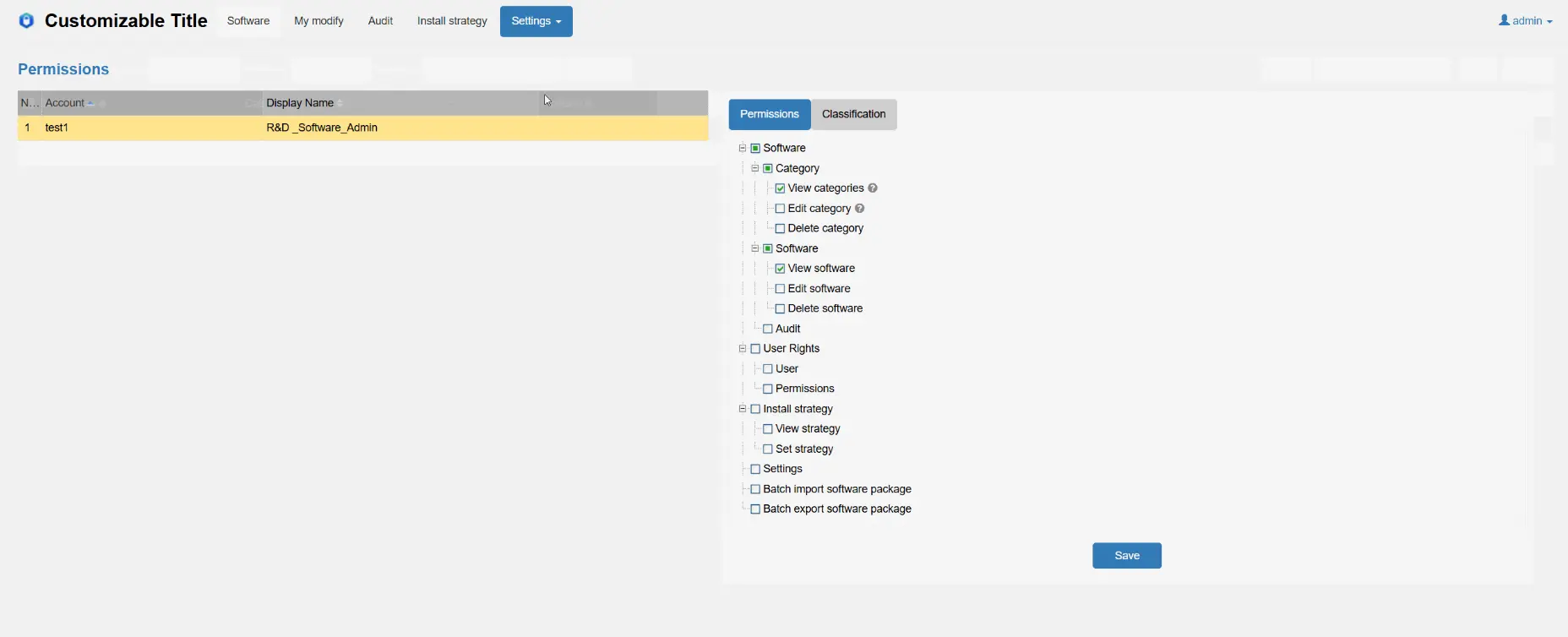
Select Settings -> Permission Management to enter the Permission Management page, where you can assign permissions to users.
User permissions are divided into two major modules: Function Permissions and Category Management Scope.
Function Permissions
| Permission | Description |
|---|---|
| Software Management | Permissions related to software management. |
| Category Management | Permissions for viewing and managing software categories, including View Category, Edit Category, and Delete Category. |
| Software Management | Permissions for viewing and managing software in the software management page, including View Software, Edit Software, and Delete Software. |
| Software Review | Permissions for reviewing software listing applications. Administrators with this permission can approve software listing applications, and new software added by them will be listed directly without requiring review. Administrators without this permission will need to wait for approval before their newly added software is listed.; |
| User Permissions | Permissions related to user management. |
| User Management | Administrators with this permission can add, edit, and delete users in the User Management page. |
| Permission Management | Permissions to manage user permissions in the Permission Management page. |
| Installation Management Policy | Permissions for viewing and setting installation management policies, including View Policy and Set Policy. |
| Advanced Settings | Administrators with this permission can make settings in the Advanced Settings page. |
| Batch Import | Administrators with this permission can perform batch import operations. |
| Batch Export | Administrators with this permission can perform batch export operations. |
Management Scope
Select the management scope for the user; this field cannot be left empty. Administrators can only view software information for categories within their own permission scope. When adding software, they can only select categories within their permitted management scope.