
How to Use Basic Information Statistics in Web Console - AnySecura Manual
Welcome to the AnySecura Web Console, where you can easily monitor your environment's key assets. This guide will show you how to use the Basic Information statistics to get a clear overview of your computers, users, and their roles.
You'll learn to expand the resource tree and use the search function to quickly find specific devices or accounts. This allows you to view detailed, up-to-date information that matches what you see in the main console, putting essential data right at your fingertips.
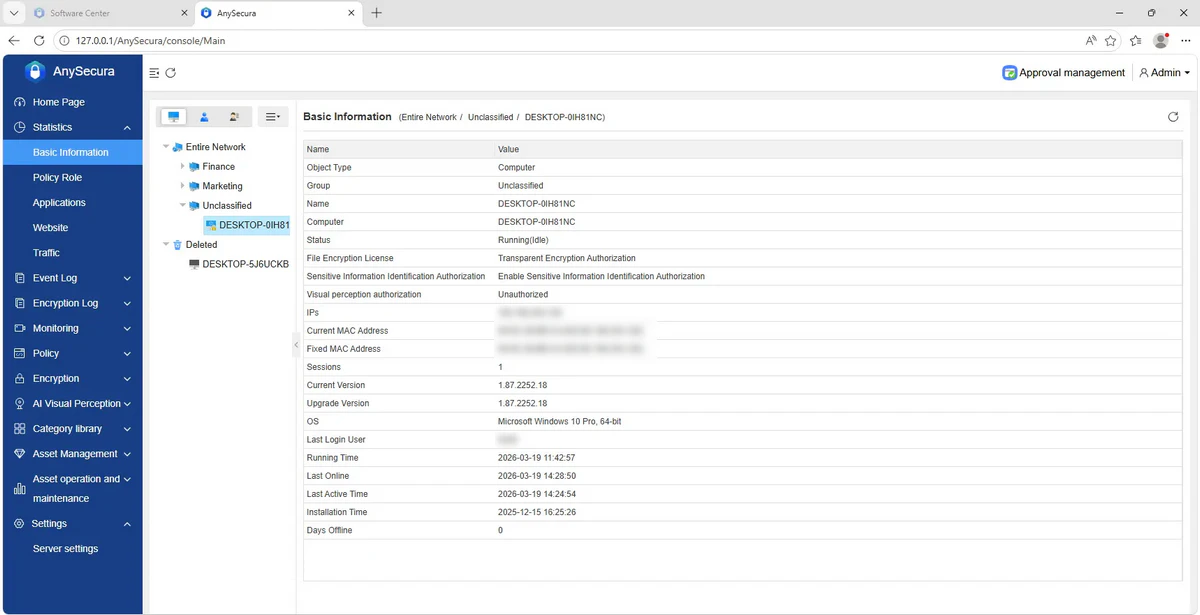
Click the button  in the first row of the data display area to expand the default-hidden computer and user tree.
Currently, only basic information viewing and searching are supported for computers and users.
View Basic Information
In the navigation bar, select "Statistics → Basic Information", then choose a computer (group), user(group), or role to view basic information. The content of basic information matches that in the console.
Search
Click the  above the tree view to quickly locate a specified computer or user and view its related data.