
Many parents feel helpless when it comes to cyberbullying. They do not know it is happening until their child comes home upset, withdraws from friends, or refuses to use their device.
Official guides often share general advice that does not fit daily family life, while this guide focuses on realistic, repeatable actions you can start today to prevent cyberbullying, helping you protect your kids online safety without invading trust or causing unnecessary conflict. Let's jump in.
What Is Cyberbullying?
Briefly speaking, cyberbullying is repeated, intentional harm done through digital devices and online platforms.
It includes mean messages, rumors, exclusion from group chats, sharing private photos without permission, fake accounts, and targeted harassment in gaming lobbies or comment sections. It differs from offline bullying because the speed of internet viral is overwhelmingly fast. It can follow a child home, happen at any hour, and be seen by many peers quickly. As a result, it often leaves a permanent digital trail that can extend harm over weeks or months.
Compared to obvious insults, sometimes "soft bullying" is more pressured, which parents easily ignore and mix with joking. Here is an example of a kid suffering in an Instagram post comment:
User 1: you really posted this? 😭
User 2: bold of you
User 3: not everyone needs to see this lol
...
You can see that these comments may look harmless on the surface, but when multiple peers join in, it creates pressure and embarrassment for the person posting. As a parent, we are unable to stay around kids all the time, so we should build a prevention wall. Many ask if I should monitor my kids messages, and our answer is yes, not for intruding on privacy, but only for protection.
Don't know the meaning of the words kids are saying? Look at this newest teen slang dictionary for parents and stay connected with your kids. Learn more>>
Why Cyberbullying Is Hard to Control
This fast-paced digital world makes cyberbullying more subtle and harder to control.
Parents should know that cyberbullying does not stay on one app or platform. It moves between Instagram, Snapchat, TikTok, Discord, game chats, and anonymous apps that you may not recognize. Thus, when you set limits that only cover certain apps or devices, gaps are still left that allow harmful interactions to continue.
Even if schools and platforms can set rules for kids, they cannot watch every interaction or stop every hurtful message before it appears. Additionally, we noticed that there are silent kids who often hide what is happening, because they fear losing device access, feeling ashamed, or worrying the situation will get worse. See a Discord voice chat:
Player 1: bro why did you even queue with him
Player 2: he literally threw the game
Player 3: yeah just kick him next round
...
Player 2: don't invite him again
Player 1: fr he's useless
This kind of behavior often happens in gaming environments. Needless to say, the repeated exclusion and blaming can make a child feel isolated very quickly. In this case, parental control software is necessary. Watch your kids' device screen remotely, know who they are chatting with, and what they are sharing in real-time. So don't worry. Cyberbullying can be prevented and controlled if you take the right measures.

Signs of Cyberbullying
Then in daily life, how do you know that your kids might be suffering from online bullying? You can judge it from the following two warning signs. If you notice your kids exhibiting unusual behavior, you can intervene before it gets worse.
Behavioral Signs
- Your child may show sudden shifts in mood such as increased irritability, sadness, or anxiety after using a phone or tablet.
- Child may avoid friends, skip school events, or become reluctant to participate in activities they once enjoyed.
- Some children stop eating or sleeping well "for no reason".
- Kids become unusually secretive about their screen time.
- Children may panic if they cannot find their device or refuse to leave it unattended.
- Simply don't want to use the device, texting, posting or chatting.
Digital Signs
- On your kids' social media, there may be sudden changes in private group chats, new unknown accounts following or messaging your child.
- You may notice the increased use of hidden apps on their phone or computer.
- Your child may delete messages immediately, clear history often, or receive late-night notifications.
- Receive suspicious screenshots or forwarded messages from peers, while you can't access.
Practical Steps Parents Can Take to Prevent Cyberbullying
Have you ever seen your kids' private messages? Words like "you better not come to school tomorrow", "people are talking about you ", "just stay quiet if you know what's good" can really make your child anxious and fearful. In case your kids encounter any negative communication, do something right now. Refer to the following practical steps and prevent cyberbullying from today.
1. Start Conversations
Honest and age-appropriate conversations can always shorten the distance between parents and children. Talk with your child regularly about their online experiences using calm, open and neutral questions. Instead of asking general questions like "Is everything okay online?", try asking about specific situations your child deals with every day. For instance:
- What funny group chats have you joined in recently?
- Who do you usually talk to in group chats?
- Has anyone ever been left out on purpose?
- How do you treat each other?
- Do people ever screenshot messages and share them?
Many children won't describe something as "bullying", but they will talk about situations if you ask concretely. So parents should guide and let them share small frustrations so they feel safe coming to you with bigger problems. One most important thing, avoid judgment or quick lectures. Our goal is to build a habit of sharing so you know about tensions before they become bullying. And never overreact.
2. Review Privacy & Security Settings Together
After having an open conversation, you can also sit down with your kids and adjust privacy settings on all their social media and gaming apps. Remember, instead of changing the settings behind your kids, you should go through them together. Try to start with:
- Sometimes strangers can reach out without you realizing. Let's check who can message you...
On social media or gaming platforms, such as Instagram, TikTok, Snapchat, you can set your kids' profiles to private, limit who can send messages, who can add them to group chats, turn off location sharing, disable comments from unknown people, restrict friend requests and more. Walk through each setting so your child understands why it matters and feels part of the process.
Setting Examples:
Instagram: go to Settings, Privacy, Messages to limit your kids' chats and then enable Private Account under Privacy
TikTok: visit Settings and privacy, Privacy, to manage comments, direct messages, and download permissions
Snapchat: navigate to Settings, Contact Me, and change it to My Friends, then enable Ghost Mode to hide real-time location sharing
Discord: tap User Settings, Privacy & Safety, and disable direct messages from members you do not know
3. Set Screen Time Limits
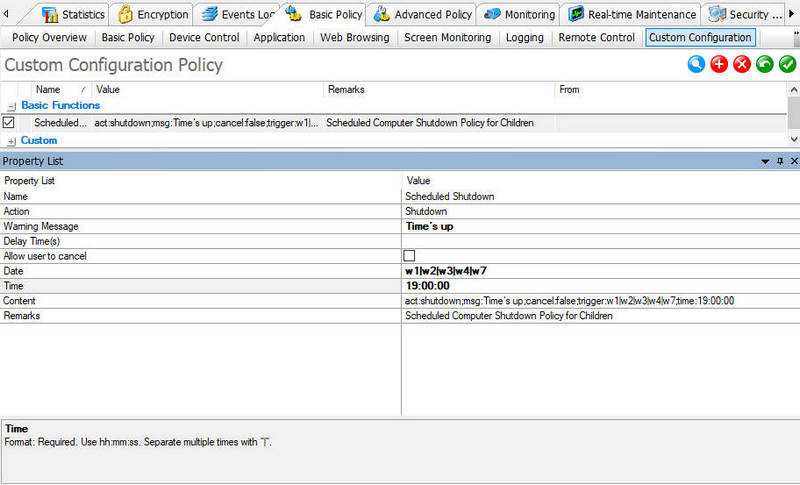
Cyberbullying can easily happen when kids' devices are not controlled, so one effective step to prevent cyberbullying is to set screen time limits, reducing their online exposure. For iOS and Android devices, you can use their built-in parental tools to create screen time schedules. While on computers, laptops, or certain tablets, use all-in-one parental control software to manage time across devices.
Here we have set some rules using parental control for kids. You can simply follow our procedures to keep your kids safe online. Block unsupervised access to platforms like YouTube, TikTok, and X all day; block instant messaging or gaming apps during meals and homework hours; only set online time during the day for kids, device off after 19:00.
4. Monitor Kids Online Activity
Even with Screen Time limits and parental controls in place, there are still major blind spots. Most online interactions happen in private spaces without supervision, especially in direct messages and group chats. What makes cyberbullying even more concerning is that many children and teenagers do not report it or choose not to tell the truth. According to studies, nearly 60% of teenage victims remain silent because they fear losing their reputation or access to their devices. Thus, by appropriately monitoring kids' online activity while maintaining trust and open communication, we can help detect warning signs early and prevent many cases of cyberbullying before they escalate.
Most parents choose AnySecura to stay aware of kids' digital behavior without constant intrusion. For a soft control, you can just set a harmful keyword library to spot early warning signs such as hostile language, repeated exclusion, or secretive chat patterns. When your kids chat on IM apps and trigger these keywords, you will receive the alert in real-time. Next, you can choose to block their further access. If you need additional guidance tools to help kids develop a healthy digital wellbeing, AnySecura Parental Control Solution also provides optional activity insights, such as app usage trends, screen time, and website activity, helping you better support your children.
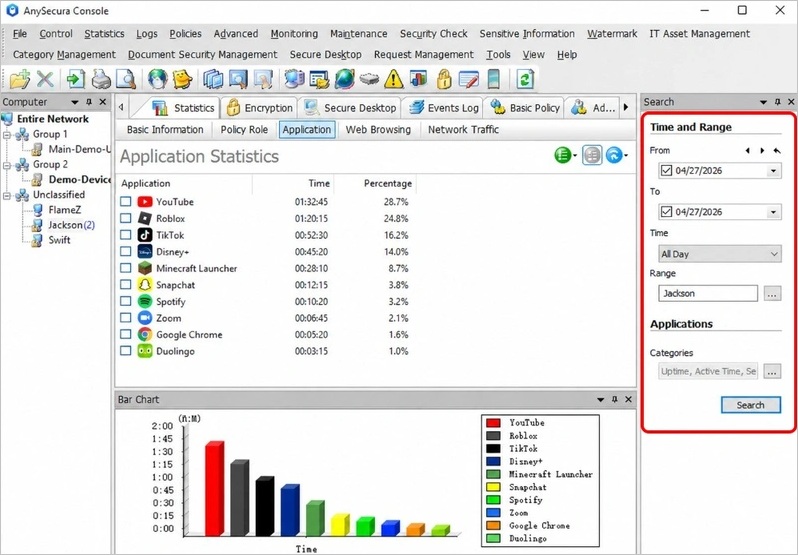
AnySecura lets you protect your kids online safety across multiple devices within a central dashboard. But the goal is not to read every message, you can be transparent if you decide to monitor kids online activity. Words like "I'm not trying to spy on you. I just want to make sure you are safe and nothing harmful is happening." can help eliminate many conflicts.
5. Teach Kids Digital Citizenship
To prevent cyberbullying, one last strategy that you can't miss is to teach kids digital citizenship, because prevention is not just about protecting your child, it's also about how they treat others online. Let kids learn to think before posting, not sharing rumors, and standing up for peers who are treated unfairly. Ask them "If you saw someone being made fun of in a group chat, what would you do?" This can teach them to disengage from mean conversations, block hurtful users, and tell a trusted adult right away. Gradually, they will develop a responsibility, lowering the chance they will be involved in bullying either as a target or a participant.
What to Do If Cyberbullying Already Happens
Since we have enough preparations to prevent kids from cyberbullying, what if something unfortunate still happens? Don't panic. Do as we suggest.
Listen and Offer Support
When cyberbullying has already happened, show your support first, say something like "I'm glad you told me. We will figure this out together." Validate their emotions and let them know they are not to blame. Meanwhile, reassure kids you will handle the situation together. Note that when kids are talking to you and share their feelings, do not interrupt.
Do not Respond
Next, if you figure out what's going on there, tell your child not to reply to hurtful messages or engage with the person causing harm. Responding often makes the behavior continue and can create more evidence that spreads quickly online.
Block It Immediately
Furthermore, you can block the user or accounts responsible across all platforms. Most social and gaing apps let you block messages, comments, and further contact. This step stops direct harm and helps your child feel safer right away.
Keep Records
Now after comforting kids, you can take the necessary steps. You should save screenshots of harmful messages, posts, profiles, and timestamps. These records help if you need to involve platform support teams or authorities later. If it involves classmates, contact school. Do not ignore this or simply solve it by blocking. Practical actions can make kids feel cared and trust you.
Report It
Finally, you can report the cyberbullying behavior to the social media or gaming platform using their official tools. Besides, schools also have clear policies for cyberbullying that can address. If there are serious cases involving threats or illegal behavior, you should contact local law enforcement for guidance.
FAQs About How to Prevent Cyberbullying
How can social media bullying be prevented?
You can prevent social media bullying with private profiles, limited contact settings and clear family rules. Besides, teach your kids to remove themselves from toxic chats, block harmful users, and tell you right away when something does not feel right. If you are still worried after taking these, it is recommended to use AnySecura parental control to monitor kids online activity. Once harmful messages are detected, block them immediately and keep the record for reporting.
What are the best ways to stop cyberbullying?
The best way to stop cyberbullying is the combination of monitored screen time, early intervention, supportive communication, and clear reporting steps. Acting quickly and calmly helps stop harm before it spreads and affects your kids long term.
Can parental control software help prevent cyberbullying?
Yes. Many parents agree that parental control tools can help prevent cyberbullying by spotting unusual activity, limiting device use, and alerting to potential risks. AnySecura provides both gentle and strong monitoring so you can guide your kids in time rather than reacting after harm occurs.
Final Words
Preventing cyberbullying is about communication, boundaries, and awareness. It works best when you combine honest talks, smart settings, reasonable limits and appropriate monitoring. Tools like AnySecura support parents like you by helping notice risks early and keep protection across devices. With customized controls, you can help your kids create a clean and safe online environment effortlessly.


