





Telecom Network Security Risks in Daily Operations

Engineer Resignations
Topology maps and IP plans bulk-downloaded to personal email before departure.
On-Site Contractors
Equipment room schematics photographed on personal devices — no audit trail.
Tender Document Sharing
Technical proposals sent to integrators, then redistributed to competitors.
Instant Messaging Leaks
Config scripts sent to external contacts via IM, outside audit coverage.
Telecom Network Security Scenario

How AnySecura Protects Network Design Documents for Telecom Operators

Telecom network design files move across engineers, devices, and external partners, requiring full lifecycle visibility and control.
Employee Offboarding

How to Prevent Network File Theft by Departing Employees

Network engineers need access to topology maps and IP plans — that's part of their job. However, access should not mean the freedom to take sensitive design documents outside the organization.

When an engineer copies out confidential design documents before resignation, AnySecura flags the activity in real time. Files are also transparently encrypted from creation — sent to email, uploaded to cloud storage, or copied to USB, they stay unreadable on any unauthorized device.

Behavior-based Risk Detection

Detects abnormal operations on sensitive design files before risk becomes a leak.

Transparent File Encryption

Ensures files remain unreadable outside authorized endpoints, even after exfiltration attempts.
File Protection
External Sharing

Network Design Files Sent via Email or IM Tools

In telecom operations, engineers frequently share sensitive files such as configuration scripts, network topology diagrams, and IP planning documents via email or instant messaging. Once sent to external contacts or personal channels, these files immediately leave the operator’s control.

AnySecura monitors all outbound file transfers in real time, capturing sender, file name, channel, and timestamp. Transfers can be allowed, blocked, or logged based on security policies, ensuring all network data movements remain traceable and controllable.
Real-Time Monitoring

Monitors all network file transfers across email and IM in real time.

Outbound Control

Controls, blocks, or audits sensitive file sharing based on policy.

Telecom Network File Transfer Monitoring
Contractor Access

Preventing Contractor Photo Leaks of Network Schematics

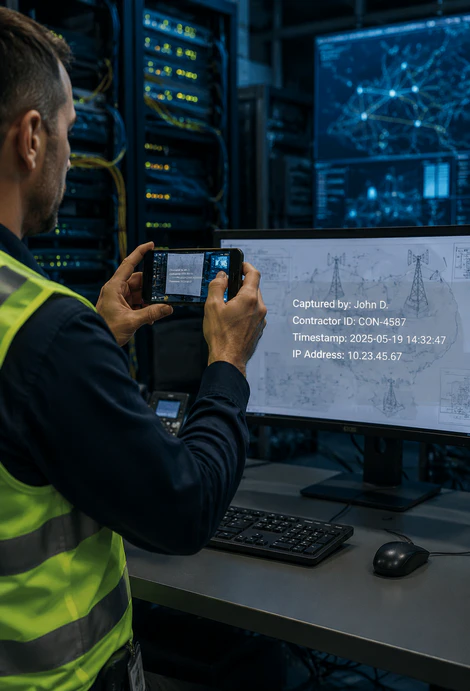
On-site contractors involved in tower deployment and equipment room operations frequently access network schematics, floor plans, and installation documents. Since personal mobile devices are often outside operator control, photographing screens remains one of the hardest forms of data leakage to prevent and investigate.
Screen Capture
Prevention
Dynamic
Watermarking
AnySecura responds two ways: endpoints detect photographing attempts and auto-lock the display, while protected files carry a dynamic watermark — name, ID, timestamp, and IP embedded in real time. Even a captured photo retains the watermark as traceable evidence.
Preventing Contractor Photo Leaks of Network Documents
IM Security

Blocking Config File Leaks via Instant Messaging

Engineers routinely share configuration scripts and troubleshooting logs through instant messaging tools. These files often contain device configurations, port settings, and authentication details that can expose critical network infrastructure if shared externally.

AnySecura monitors file transfers across major IM platforms in real time. When a protected file is sent to an external contact, the action can be automatically blocked based on policy, while a complete audit trail is recorded for security and compliance teams.
Real-Time Monitoring
IM Transfer Control
Instant Messaging File Transfer Control
Vendor Collaboration

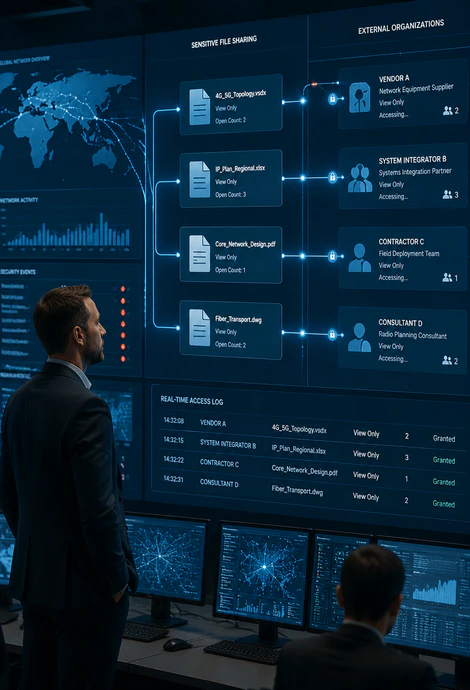
Controlling File Access Across Multiple Vendors

Telecom network projects often require sharing design files with equipment vendors, system integrators, and construction contractors. Once files are distributed across multiple organizations, operators typically lose visibility into who can access, retain, or redistribute them.

AnySecura applies granular permissions to every shared file, including view-only access and open-count limits. Every access event is recorded, providing complete visibility into file usage throughout the collaboration process.
Telecom Vendor File Collaboration Security
TELECOM SECURITY BENEFITS

What Changes After Deploying AnySecura?

Compare how telecom operators improve visibility, control, auditing, and response capabilities across sensitive network documents.

Security Area Before AnySecura After AnySecura
Response Time Leaks discovered after the damage is done Real-time alerts enable immediate action
Vendor Collaboration Limited visibility into contractor activity Contractor actions remain fully traceable
Compliance Audits Manual collection of audit records Audit-ready logs generated automatically
Employee Experience Security depends on user behavior Protection works transparently in the background
File Visibility Little insight into file activity Full visibility across file lifecycle
SIMPLE DEPLOYMENT

Secure Telecom Documents in Three Steps

Deploy document security controls across the organization without disrupting existing workflows or network operations.

01

Unified Agent Deployment

Install the AnySecura agent across employee endpoints through centralized management, without manual device-by-device deployment.

02

Configure Security Policies

Define encryption and access rules by department or user group — with granular control over who can view, edit, or share each file.

03

Monitor & Audit Activities

Security teams gain real-time visibility into alerts, file activity, and audit logs through a centralized console.

  • Do we still need AnySecura if we already use VPN and access control?
    VPN and access control manage entry permissions, but cannot control what happens after access. AnySecura protects files throughout their lifecycle, preventing unauthorized sharing and leakage of telecom network documents.
  • Will encryption affect employee productivity or collaboration?
    No. Transparent encryption runs automatically in the background. Authorized users work normally, with protection applied only when files leave trusted environments.
  • Can sensitive file transfers be blocked in real time?
    Yes. AnySecura can block unauthorized file transfers in real time and generate instant security alerts. All transfer activities are fully logged for audit and compliance review.
  • Why do telecom network architecture files still leak after being stored internally?
    Most leaks happen after legitimate access through email, IM tools, USB transfers, downloads, or employee departures. Traditional access control only protects entry, while AnySecura continuously protects files throughout their lifecycle.
Telecom Document Security FAQ

Telecom Network Document Security & Protection FAQ

File Access Control
Control access to network design documents across engineers, contractors, and vendors.
Lifecycle Protection
Protect sensitive files beyond access control, across sharing, transfer, and endpoint usage.

Never lose control of your network design files.