
How to Use Network Port Categories in Category Management - AnySecura Manual
This guide introduces you to the Network Port categories within AnySecura's Category Management module. You'll see how the system organizes common protocols into helpful groups like Email and Web, giving you a clear starting point for managing traffic.
You can then build upon these foundations by tailoring the flexible categories or creating entirely new ones with custom port ranges. This puts you in control, allowing you to define network access in a way that perfectly matches your organization's unique security policies.
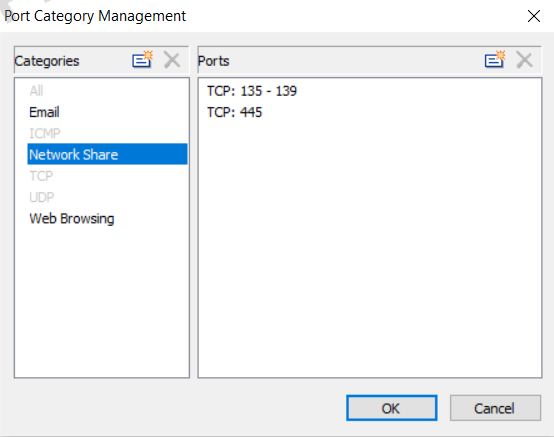
Go to Category Management → Network Port to define port categories. The system provides the following defaults: All, ICMP, TCP, UDP, Email, Web, and Network Sharing.
- All, ICMP, TCP, and UDP cannot be modified or extended.
- Email, Web, and Network Sharing allow administrators to add or adjust port ranges.
In addition to these system-defined categories, administrators can manually create new port categories with custom port ranges. System-defined categories cannot be deleted or renamed, while manually created categories can be both deleted and renamed.