
How to Use Burning Operation Logs in AnySecura | User Guide
This guide will help you understand how AnySecura's burning operation logs provide a clear audit trail for data leaving your network on physical media. You'll see how these logs capture every step of a CD or DVD burning task, from start to finish.
We'll then walk through accessing these logs and using the powerful query tools to quickly find specific activities. This knowledge will enable you to effectively monitor and investigate potential data leaks through burning operations.
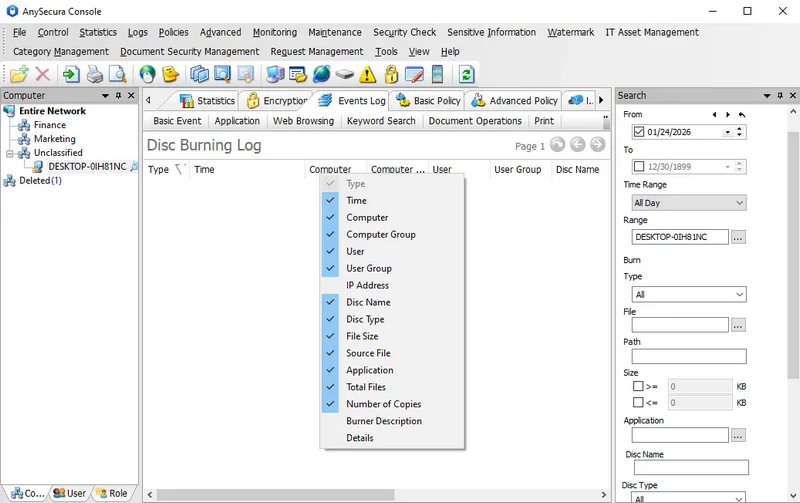
CD/DVD burning operation logs record information about the user's use of dedicated burning tools on the client machine. Administrators can review these logs to track users' burning activities and provide audit trails for investigating potential data leaks.
To view the burning operation logs, select Menu → Logs → Burning Operation. The logged details include:
| Property Name | Description |
|---|---|
| Operation Type | Includes: Task Start, Burning, Burn Success/Failure, Task Complete. For a burning task containing N files, the following logs are generated: ① One entry with operation type "Task Start"; ② N entries with operation type "Burning"; ③ One entry with operation type "Burn Success" (or "Burn Failure"); ④ One entry with operation type "Task Complete". |
| Disc Name | Name of the disc being burned. |
| Disc Type | Type of disc being burned, CD or DVD. |
| File Size | Size of the file being burned. |
| Source File | Name of the source file for the burning operation. |
| Application | Process name of the application used for burning the file. |
| Total Files | Total number of files in this burning task. Logs of type "Burning" record only a single file and do not include total file count. |
| Number of Copies | Number of copies burned in this task. Logs of type "Burning" record only a single file and do not include copy count. |
| Burner Description | Description of the burning device. |
| Details | Detailed information of the log entry. |
In document control policies, if operation types "Modify" and "Copy/Move to Backup" are enabled, any file burned that triggers these policies will also appear in the document operation logs as a backup burn log, marked with the icon  .
.
The system displays all burning operation logs by default, and administrators can set various query conditions for selective searches.
| Query Condition | Description |
|---|---|
| Time and Range | Common query condition. |
| Type | Default is all types. You can select one or multiple operation types from the dropdown, including: Task Start, Burning, Burn Success, Burn Failure, Task Complete. |
| File | Name of the document being burned. You can select from the default types or manually add a type name. |
| Path | Source path of the document being burned. |
| Size | Specify a file size range to query burning records within that size range. |
| Application | Name of the application used for burning. You can manually enter a name or select a category/application from the application classification. |
| Disc Name | Name of the disc being burned. |
| Disc Type | Default is all types; options include CD and DVD. |
| Burner Description | Description of the burning device. |
| Total Files | Total number of files in this burning task. |
| Number of Copies | Number of copies burned in this task. |