
How to Use Email Records in Monitoring with AnySecura | User Guide
This guide will show you how the AnySecura Monitoring module captures email activity across different platforms, giving you clear visibility into your organization's communications. You'll understand what types of emails are recorded and the specific details captured for each message.
With this knowledge, you can effectively search through these records and export important emails for review, helping you maintain oversight and enforce communication policies.
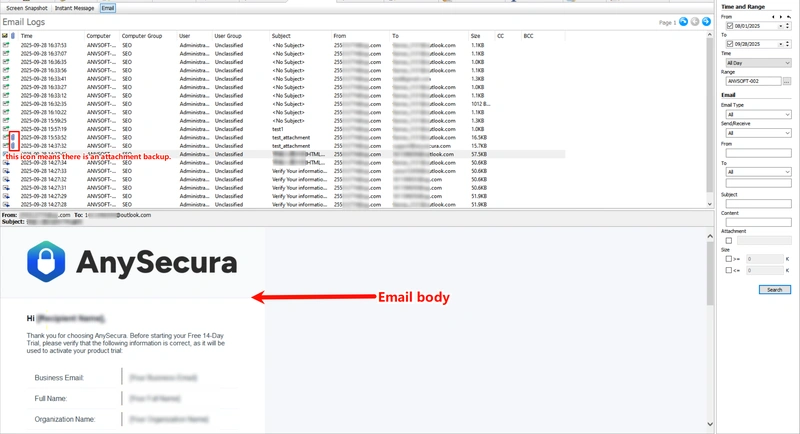
Email records capture messages sent and received on client machines to allow administrators to monitor email activity and prevent unauthorized content.
Supported email types include: Standard Email, Exchange Email, Webmail, and Lotus Email.
- Standard and Exchange emails: record both sent and received messages.
- Webmail and Lotus email: record only sent messages.
Email Record Details
The contents included in the email record are:
| Attribute Name | Description |
|---|---|
| Send/Receive | " " indicates a sent email record, while " " indicates a sent email record, while " "indicates a received email record. "indicates a received email record. |
| Subject | The email's subject line. |
| From | The sender's email address. |
| To | The recipient's email addresses, including CC and BCC; viewable in the email record properties. |
| Attachment | " " indicates the email contains an attachment. The system automatically backs up the attachment, and clicking the " " indicates the email contains an attachment. The system automatically backs up the attachment, and clicking the " " button allows you to view or save the attached file. " button allows you to view or save the attached file. |
| Size | The size of the email. |
| Body | Select an email to view its content in the preview pane. |
Saving Email Content
Administrators can export email files for archiving or review.
- Select an email and right-click Export EML File to save it as an .eml file, which can be opened directly in Outlook.
- Multiple emails can be selected and exported simultaneously.
Email Search
Emails and their contents can be queried using the following criteria:
| Query Criteria | Description |
|---|---|
| Email Type | Search by email type. Default is all. You can select a specific type from the dropdown. |
| Send/Receive | Filter emails to include only sent or received messages. |
| From | Search by the sender's email address. |
| To | Search by the recipient's email address. You can filter by type: all, To, Bcc, or Cc. Multiple addresses can be entered using ";" or ",". Only emails matching all specified recipients are included. |
| Subject | Search by email subject, filtering messages containing specified keywords. |
| Content | Search email body for specific keywords to quickly locate relevant messages. |
| Contains Attachment | If unchecked, all emails are included. If checked, only emails with attachments are returned. |
| Attachment Name | Filter emails containing attachments whose filenames include specified keywords. |
| Size | Specify a size range to filter emails within that range. |