AnySecura Removable Media Control Step-by-Step | Enterprise USB Security
Learn how to secure sensitive data on USB drives and removable media.
Watch Now
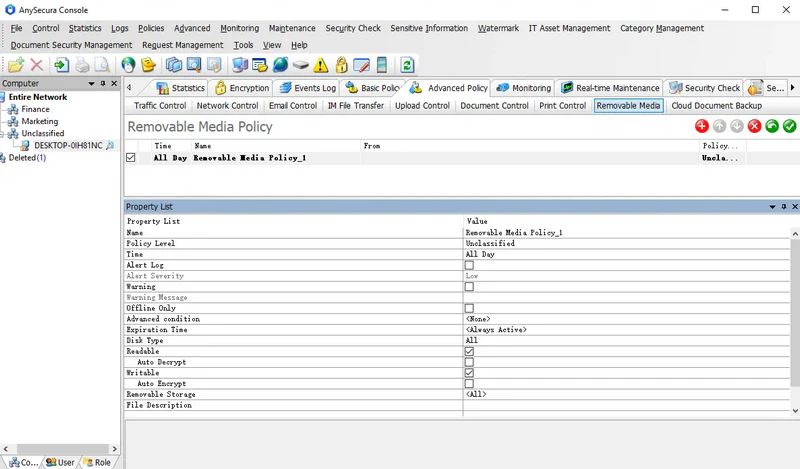
This guide will help you master the Removable Storage Authorization feature within the AnySecura Policies module. You'll learn how to create precise rules that control exactly how USB drives and other removable media can be used, balancing security with necessary workflow.
By understanding the key policy attributes, you can prevent data leaks by making drives read-only or automatically encrypting files as they are copied. This ensures sensitive information remains protected, even when it needs to be moved outside your secure environment.
Learn how to secure sensitive data on USB drives and removable media.
Watch NowTo manage the use of removable drives within the enterprise and prevent leaks of confidential data, administrators can assign different permissions to different drives. Files copied to removable drives can also be encrypted, ensuring they can only be opened in authorized environments.
Before creating policies, administrators should categorize all removable drives in the organization. Refer to Classification Management → Removable Storage Classification for guidance.
Removable Storage Types and Permissions:
| Attribute | Description |
|---|---|
| Disk Type | Default is "All." Use the dropdown to select Encrypted Drives, Non-encrypted Drives, or Secure USB Drives. Policies apply only to the selected type. |
| Readable | Allows any application to read the drive in read-only mode. Only if this is selected are the following three attributes effective. |
| Auto Decrypt | Allows files copied from the removable drive to local or network locations via File Explorer to be automatically decrypted. Other applications cannot auto-decrypt. |
| Writable | Allows any application to write to the removable drive. If not selected, copying, saving, deleting, or renaming files on the drive is prohibited. Auto encryption is only effective if this is selected. |
| Auto Encrypt | Prevents any program other than File Explorer from writing to the removable drive. Files copied via File Explorer are automatically encrypted. |
| Removable Storage Category | Default is <All>, covering all drives. To target specific drives, select a category or a specific drive in the classification list. |
| Device Description | Match drives by device description. |
Note: