
With the rise of remote and hybrid work, companies increasingly rely on employees' online activity data to evaluate productivity. Most systems assume that as long as the mouse is moving and the device is active, the employee is working.
However, the reality is changing. More employees are using mouse jigglers to fake mouse activity, making the system think they are always online and falsifying work hours. This kind of simulated mouse movement makes traditional activity tracking systems unreliable. For companies, the question of how to detect a mouse jiggler and identify fake activity has become crucial to restoring true work efficiency. Before diving in, let’s first understand what a mouse jiggler is.
What Is a Mouse Jiggler?
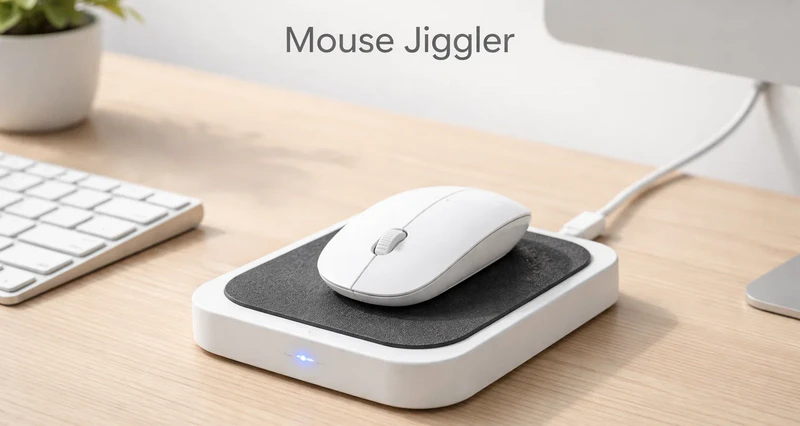
A mouse jiggler, also called a mouse mover, is a hardware or software tool that simulates mouse movement to keep a device active. Its main function is to let the system or applications detect mouse activity without human operation, preventing the computer from going idle, locking the screen, or triggering an "idle" alert in employee monitoring systems.
Originally, mouse jigglers were used for legitimate purposes, such as long presentations, remote meetings, automated testing, or large file downloads, to prevent screen locking or system sleep. However, in enterprise environments, these tools are increasingly used to simulate work activity, making the system think the employee is continuously working.
Why Employees Use Mouse Jigglers
Employees do not use mouse jigglers for a single reason. It is often a result of work habits, management practices, and technical monitoring combined. When companies use online status tracking, work hour logging, and behavioral analysis tools, employees may feel the need to maintain activity to meet the company’s expectations of "being productive". Common reasons include:
Maintain online visibility
On platforms like Microsoft Teams or Slack, being “online” is often seen as a direct signal of working. If the status shows "away" or "idle", employees may be perceived as not working, so some use mouse jigglers to stay online and avoid unnecessary scrutiny.
Hide short breaks or irregular work patterns
Employees may need to step away, answer calls, or handle personal matters. In systems that strictly count work hours based on mouse and keyboard activity, these actions are recorded as idle time. Sometimes, employees have periods of high workload and periods of low activity, but the company still expects certain work hours. Mouse jigglers help them meet these work hour standards.
Handle high-focus, low-interaction tasks
In roles like R&D or data analysis, employees may spend long periods reading, thinking, or debugging with minimal mouse activity. This "low input, high cognitive" work style can be misinterpreted as inactivity, prompting employees to use mouse jigglers.
Avoid attendance or performance penalties
In environments where attendance, performance, and online time are closely linked, employees may worry that idle time will affect evaluations, bonuses, or promotions. Using a mouse jiggler can create the illusion of continuous work.
Although mouse jigglers can be used to prevent screen lock or meeting interruptions, in most enterprises, this behavior is considered fake mouse activity. Long-term use can reduce the reliability of productivity data, make it hard to distinguish real work from abnormal cursor behavior, disrupt management decisions, and negatively affect team collaboration and transparency.
👉Want to learn more about employee monitoring tools? Click to read.
3 Common Types of Mouse Jigglers in the Enterprise
Mouse jigglers now come in various forms. Understanding their types and mechanisms helps companies implement targeted detection methods.The following are three common types of mouse jigglers:
Hardware Mouse Jigglers (USB Devices)
Hardware mouse jigglers are usually USB devices. Once plugged in, they are recognized by the system as standard input devices and continuously generate slight, random mouse movements to prevent the system from going idle or locking the screen. These devices are plug-and-play, require no software installation, and are compatible with multiple systems, making them common in remote or BYOD(Bring Your Own Device) scenarios. From a corporate perspective, USB mouse jigglers are relatively easy to manage with endpoint control tools and are one of the key types to monitor.
Software-Based Mouse Jigglers
Software mouse jigglers run as local programs, scripts, or background processes, simulating mouse actions through system calls. Users can set movement frequency and patterns, making detection harder. Without relying on external hardware, these jigglers are more discreet, especially in environments without application monitoring. However, they often display abnormal mouse movement, such as fixed intervals, only moving the mouse with no keyboard activity, or lacking associated business actions. Companies can detect them through behavioral analysis and background process auditing.
Browser Extension Mouse Jigglers
Browser extension mouse jigglers run on Chrome, Edge, or other browsers, simulating mouse movement or scrolling within web pages. They mainly target web-based activity monitoring systems, like online time trackers or browser-based collaboration tools. Compared to standalone software, extensions are harder for employees to notice as "unauthorized tools", but traces remain in the browser extension list or abnormal web interactions. Strengthening browser policies and extension management is key to controlling this type.
How to Detect A Mouse Jiggler Effectively
Single indicators cannot reliably show if an employee is truly working. Effective detection should combine behavior, devices, and business results to identify fake mouse activity and ensure data accuracy.
Check Whether Online Time Matches Real Output
Being online does not equal productivity. Compare online status and active time with actual results, such as task completion, ticket handling, code commits, or project milestones. If someone shows long "active" periods but delivers little output or lags behind the team, this may be an early sign of fake mouse activity and warrants further investigation.
Identify Abnormal Mouse Movement Patterns
Real users’ mouse movements are random, affected by task, habits, and focus. Mouse jigglers often show:
- Fixed movement intervals
- Repetitive or simple loop patterns
- Only mouse movement, no keyboard input
Using behavioral analysis models to spot these abnormal patterns is central to How to Detect A Mouse Jiggler accurately.
Monitor USB Device Connections
Hardware mouse jigglers usually connect via USB and appear as standard input devices. Companies can track:
- Use of unauthorized USB devices
- Rare or non-essential devices
- Frequent activity from input devices outside working hours
Regular USB audits are effective for USB mouse jiggler detection and help locate potential hardware risks.
Use Endpoint Management Software
Endpoint management software offers a broader view of fake mouse activity beyond simple “online” metrics. For example, the AnySecura platform uses device control, application control, screen monitoring, and endpoint activity auditing to prevent employees from using tools to simulate mouse movement and falsify attendance. Key features include:
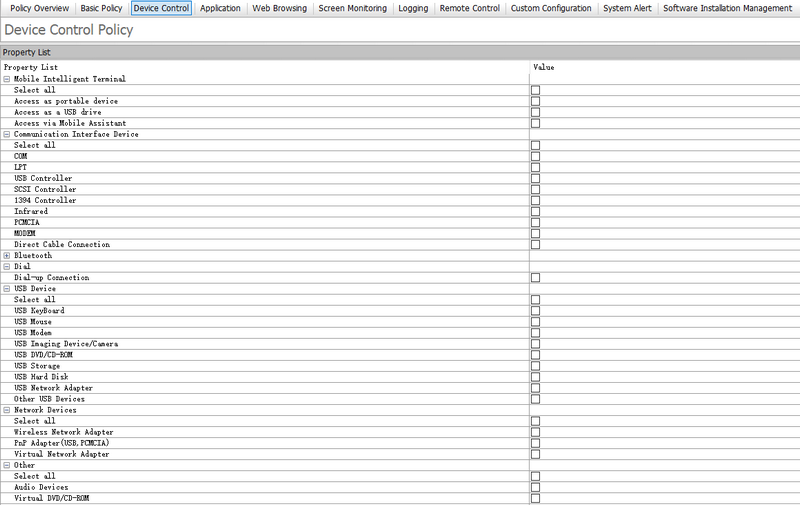
Device Control
AnySecura manages all connected devices. Employees must submit a request and get admin approval before using USB or other external devices. This ensures devices are used compliantly and all actions are fully traceable.
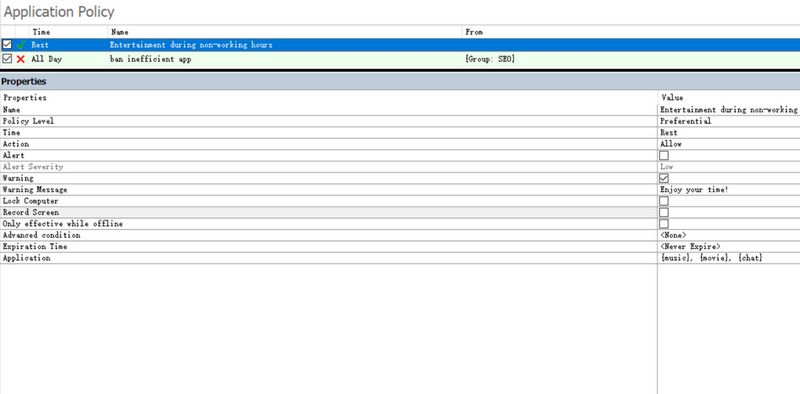
Application Control
With application and process control, AnySecura prevents employees from installing or running unauthorized software, stopping tools like mouse jigglers or auto-clickers from operating in the background. This proactive approach intercepts such activity before it happens, making it far more efficient than after-the-fact analysis and significantly reducing the impact of fake mouse activity on productivity data.
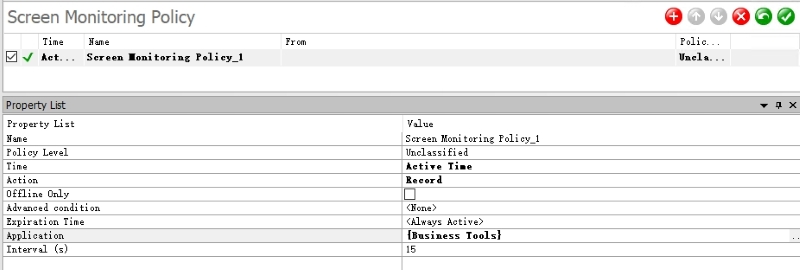
Screen Monitoring
AnySecura allows real-time screen viewing and centralized monitoring of multiple endpoints. Managers can easily spot abnormal cursor movement that is unrelated to work. The system can also record screens at set intervals or during specific applications, helping to reproduce key activity while staying compliant. This provides more direct evidence for detecting unusual behavior, beyond just relying on logs.
Behavior Auditing
AnySecura audits software use, device connections, and web browsing. Combined with IT Asset Management, it automatically tracks hardware and software on endpoints. This helps companies quickly identify suspicious tools or devices and provides data for early risk detection and root cause analysis.
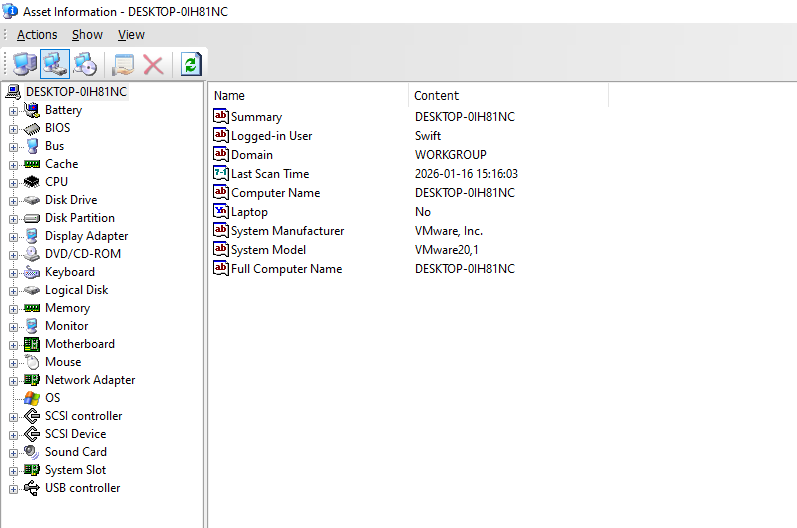
By combining these functions, AnySecura not only identifies abnormal mouse behavior but also builds a management system that increases transparency and avoids reliance on simple “online” status.

Compare top endpoint management software in 2026, including Intune, Workspace ONE, ManageEngine, Ivanti, and AnySecura, for secure device management and DLP.Learn more>>
Best Practices for Enterprises to Address This Issue
Technology alone cannot establish trust in the workplace. Companies should integrate policy, management, and culture to build a healthy, sustainable environment.
Set clear and enforceable rules
Companies should clearly prohibit unauthorized mouse jigglers, auto-clickers, and similar tools in their security or endpoint policies. They should also define which behaviors are considered violations and specify consequences, such as warnings or performance deductions. Clear and predictable rules help reduce the incentive for employees to cross the line.
Conduct regular system and endpoint checks
Use endpoint management and security tools to regularly inspect employee devices. Focus on unusual applications, suspicious browser extensions, and unauthorized USB devices. These checks should be routine, not just triggered after problems appear. Detecting and addressing risks early prevents fake activity from affecting attendance, performance, and management decisions over time.
Adopt flexible, results-oriented performance evaluations
Relying only on online time or activity status can push employees to use mouse jigglers. Companies should gradually shift performance evaluation toward actual results and work quality, such as project progress, deliverables, or business metrics. Flexible performance assessments reduce dependence on activity tracking and encourage employees to focus on meaningful work, lowering the chances of fake mouse activity.
Provide periodic employee training on security and compliance
Employees often underestimate the risks of tools like mouse jigglers. Training should explain how fake mouse activity can distort productivity data and create security or compliance risks. Topics can include endpoint security, data protection, company evaluation principles, and effective communication. This helps employees manage work pressure and time responsibly and in compliance with rules.
Combining policies, technology, and culture helps companies curb mouse jiggler use and foster a transparent, trust-based environment focused on real results.
FAQs about Mouse Jigglers
Can mouse jigglers pose security risks?
Yes. Mouse jigglers can create security and management risks. Both USB and software versions simulate mouse movements that generate abnormal cursor behavior. This can distort employees’ real work data and compromise audit records, making it harder for companies to meet compliance requirements.
What tools can help with fake mouse activity detection?
Endpoint management or behavioral analytics tools can detect abnormal mouse movement, identify USB mouse jigglers, and combine this with endpoint activity auditing. These tools help distinguish real work from fake activity.
Why do employees use mouse jigglers?
Employees use mouse jigglers mainly to deal with challenges in current work setups and management systems. Common reasons include maintaining an “online” status, avoiding being flagged as idle, or meeting time-tracking requirements.
Conclusion
With remote and hybrid work becoming standard, companies face the challenge of verifying employees’ true work activity, not just "online" status. Mouse jigglers can create false activity, affecting attendance, performance data, and management decisions.
By combining device control, application control, screen monitoring, and audit logs, companies can better identify abnormal mouse activity and prevent fake activity from affecting work evaluation. Effective endpoint control is not about stricter surveillance but building a transparent, reliable data foundation that reflects real work and output.

