
In enterprise information systems, functions such as network connectivity testing, file compression, log export, and file upload are extremely common. These functions are usually presented as simple buttons in the interface, easy to operate, and rarely considered sources of security risk.
However, these functions do not exist in isolation. In most cases, they rely on capabilities provided by the operating system itself and are implemented by executing system-level commands. It is precisely this reliance on operating system commands that, if handled improperly, can lead to serious security issues. One of the most typical and often underestimated risks is OS Command Injection.
What Is OS Command Injection?
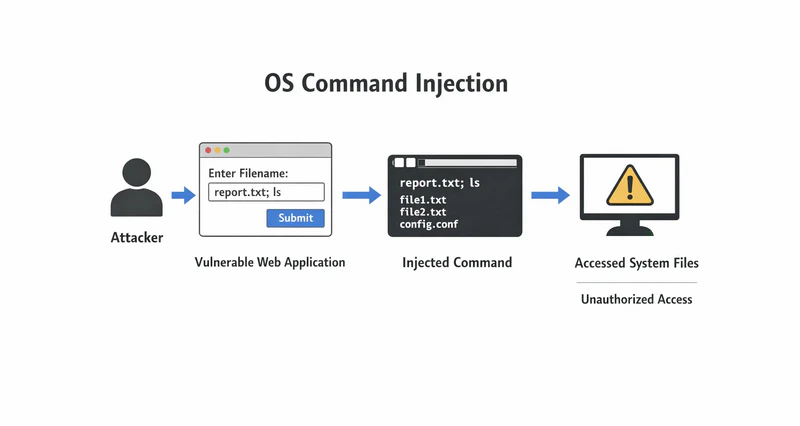
OS Command Injection occurs when an application calls operating system commands without properly validating or restricting user input, allowing an attacker to inject additional malicious system commands that are then executed by the operating system.
In simple terms, a system is originally designed to execute only predefined, legitimate operations. But because user input is not properly validated, the system becomes "too obedient" and executes not only the intended command, but also attacker-controlled instructions.
The risk of OS Command Injection is particularly severe because it occurs at the boundary between the application and the operating system. Once exploited, the impact extends beyond application logic and directly affects the operating system itself.
Why Do These Common Functions Involve "Commands"?
To understand command injection, it is necessary to first understand how applications normally interact with the operating system.
Many people may wonder: Why are these seemingly simple application functions related to operating system commands at all? The reason is that operating systems already provide mature tools and low-level commands. Developers therefore do not reimplement all functionality from scratch. Instead, they leverage existing system capabilities and wrap them with user-friendly graphical interfaces.
As a result, end users never see command execution directly and only see the final outcome. Below are three typical examples:
• Network Connectivity Testing
Network connectivity tests are a basic operating system function. The goal is to determine whether a device can reach a target address (such as a server or another host). Operating systems provide mature commands like ping and traceroute. Applications simply call these commands and present the results to users in readable text or charts.
• Log Export and File Compression
From a user's perspective, exporting logs or compressing files is as simple as clicking a button. Behind the scenes, the application accepts parameters such as file names and output paths, then invokes system commands like find (file search) and tar/zip (archiving and compression). The operating system performs the actual work and returns the results to the application.
• System Diagnostics and Status Monitoring
Functions such as viewing running processes, checking disk usage, or monitoring CPU and memory consumption are essentially wrappers around system commands like ps, df, and top. Applications convert command output into user-friendly visual information such as process lists or resource usage dashboards.
A Typical Scenario Example
Take network connectivity testing as an example.
To determine whether an address is reachable, the system executes logic similar to:
ping + user input IPIf the user inputs 127.0.0.1, the executed command is:
ping 127.0.0.1Everything works as expected.
However, if the application does not properly restrict user input, an attacker can exploit this weakness. For example, the input may be changed to:
127.0.0.1 && rm -rf /The final command becomes:
ping 127.0.0.1 && rm -rf /
Here, && is a command chaining operator that means "execute the next command only if the previous one succeeds". As a result, after completing the ping operation, the system will execute rm -rf /—a Linux command that deletes all files—leading to immediate and catastrophic data loss.
How Serious Is OS Command Injection?
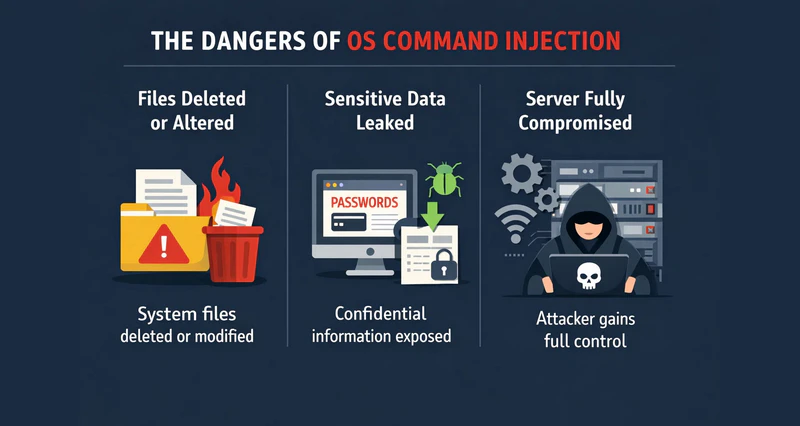
Application-level permissions and impact scopes are usually limited. The operating system, however, controls core resources such as files, processes, networking, and system services.Once an application mistakenly hands execution control to an attacker, the damage is amplified and can trigger a chain reaction:
1. System Files Are Deleted or Modified
System files not only store business data but also support application execution, service startup, and system management. If system files, application binaries, or critical logs are deleted or altered, system stability and integrity are directly compromised. Consequences include:
- Applications failing to start
- System configurations becoming corrupted and difficult to recover
- Missing logs, making troubleshooting and post-incident audits extremely difficult
2. Leakage of Sensitive Information
A large amount of sensitive enterprise information—such as service credentials, access control parameters, and encryption keys—is not stored in databases, but in local configuration files. Once exposed, this information can enable privilege escalation, identity impersonation, and long-term attacker persistence.
3. Complete Server Compromise
Once system execution behavior is manipulated, attackers can continuously influence server operations—for example, modifying runtime environments, interfering with scheduled tasks, or disrupting external services.
At this point, the server may still be running, but it no longer behaves according to administrative intent. The risk is no longer confined to a single system; it expands across systems and networks, greatly increasing impact scope and remediation complexity.
Where Does OS Command Injection Commonly Occur?
OS Command Injection rarely appears in complex business logic. Instead, it often hides in seemingly simple, low-risk administrative or auxiliary features. These vulnerabilities are easily overlooked because they do not directly affect business outcomes, yet they possess direct system execution capabilities.
Common high-risk scenarios include:
1. Network Device or System Management Interfaces
Network device consoles and server management panels frequently interact with underlying systems to perform configuration checks, connectivity tests, and status queries. Improper input handling directly affects execution layers, with impacts far exceeding the interface itself.
2. Operations and Management Backends
Operations platforms are designed for system maintenance and troubleshooting and often include many "one-click" actions such as diagnostics or task execution. These systems are typically used by internal or privileged users, making command injection vulnerabilities particularly dangerous.
3. File Processing Functions
File search, compression, upload, and format conversion functions naturally interact with the file system and rely heavily on operating system capabilities. If file paths or names are not strictly constrained, command execution scope can expand unintentionally, creating injection risks.
Security Measures Non-Technical Personnel Can Take
OS Command Injection is not a problem that only technical staff can help prevent. Many risks are introduced during process design and management decision-making stages. Even non-technical personnel can mitigate risks through proper awareness and governance.
1. Standardize Input Behavior
When using operations consoles, device management interfaces, or internal tools:
- Enter only required, valid content
- Avoid copying and pasting unknown strings
- Use only allowed file formats
- Input clear keywords rather than long or complex strings
These habits help reduce the likelihood of triggering hidden command execution logic.
2. Restrict System Execution Permissions
From a management perspective, system permissions should be carefully planned. Evaluate whether high privileges are truly necessary and apply the principle of least privilege. Excessive permissions significantly increase the impact of both user errors and account compromise.
3. Detect Abnormal Behavior Early
Pay attention to unusual system behavior, such as:
- Strange error messages after normal input
- Unexpected delays or abnormal results after simple operations
- “Command executed successfully” messages without executing any command
Such anomalies should be reported to technical teams immediately for investigation.
4. Leverage Endpoint Security Tools
Human controls alone are insufficient. Professional endpoint security tools can provide an additional protection layer. For command injection–prone scenarios, AnySecura can help by:
- Application Control: Restricting unauthorized or high-risk applications to reduce available attack tools.
- Permission Management: Assigning granular endpoint permissions based on job roles.
- Behavior Monitoring and Auditing: Recording abnormal terminal actions for investigation and traceability.
- Patch and Vulnerability Management: Scanning and deploying patches, detecting vulnerabilities across the network.
- File and Registry Protection: Controlling file access (read, modify, delete) and preventing malicious registry changes.
By combining user discipline with technical controls, enterprises can build a layered defense system. Even if user mistakes occur or internal tools contain design flaws, permissions, application controls, and audit mechanisms can keep risks within manageable boundaries and protect critical data and system environments.

Discover top 5 employee monitoring software in 2026. Compare pros and cons to find the perfect tool for workforce management. Learn more>>
Conclusion
OS Command Injection is not a sophisticated attack technique. It often stems from excessive trust in system commands and underestimation of input risks. When an application has the ability to execute system commands on behalf of users, every input becomes a potential attack vector.
Effective prevention does not mean avoiding system functionality. Instead, it requires end-to-end security awareness and layered defenses. By controlling risks at the earliest stages, enterprises can protect their core data and system environments to the greatest extent possible.


