- [email protected]
- 15 Scotts Road, #03-12, Singapore
Stop Data Leaks at Every Endpoint: Control Transfers, Track Every Move
As digital transformation continues to accelerate, endpoint devices have become the central nodes for information exchange within companies. Document transfer is becoming more frequent and complex. To meet the demands of efficient work, businesses often need to open up resources like networks, USB drives, and printers. However, this convenience comes with significant risks, particularly the potential leakage of confidential information.
Confidential data can easily be leaked via network transmissions, USB copies, printing, or sharing. Relying solely on employee awareness or administrative measures is not enough to ensure secure document transfers. Therefore, creating a comprehensive and efficient document transfer security management system is crucial for defending against information security risks.
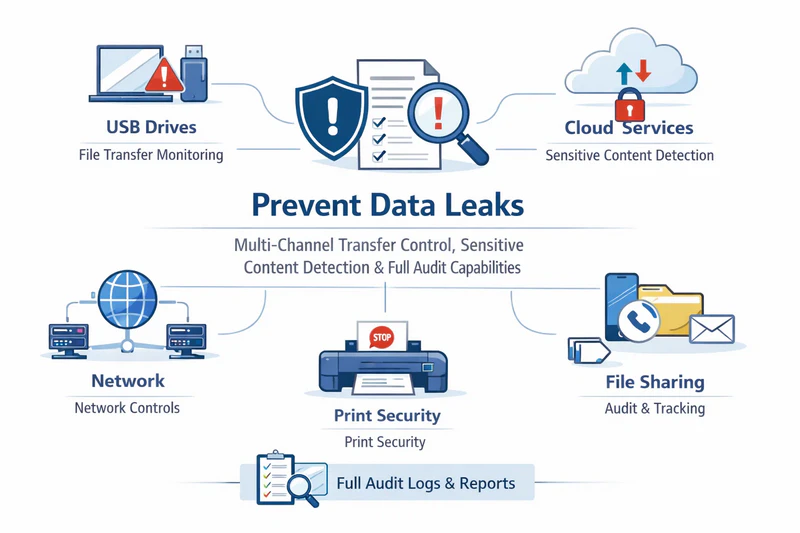
AnySecura addresses these challenges by offering precise controls and a full auditing system for multi-channel document transfers, providing companies with strong protection for their confidential information.
Comprehensive Multi-Channel Protection: Full Control Over Document Transfers
USB Copy Control
AnySecura strictly controls the behavior of copying documents to USB drives. It links document operations with access controls and records detailed logs of which documents are copied to USB drives. Administrators can use AnySecura’s data dashboard to analyze USB usage across the internal network and quickly spot any unusual activity.
Network Transmission Control
For common communication tools, AnySecura can manage document, image, and screenshot transfers. It also covers document uploads from office applications like meeting clients and cloud note-taking apps, ensuring that confidential data cannot be leaked through these channels. Additionally, email transmission can be controlled, restricting emails to specific accounts and preventing attachments from being sent, giving businesses full control over document flow via network channels.
Cloud/Online Storage Upload Control
AnySecura helps control uploads to public cloud platforms and websites, preventing sensitive documents from being uploaded to external platforms. Documents can be encrypted in advance, ensuring that even if a document is uploaded illegally, it remains protected and unreadable to unauthorized individuals.
Printing Permissions Control
AnySecura allows complete management of printing permissions across various printers, with the ability to set different permissions for departments and roles. It logs every print action, allowing for retrospective tracing. Additionally, the system can add watermarks to printed documents, enhancing document traceability.
Preventing Data Leakage via Sharing
AnySecura helps close unnecessary file-sharing channels and reduces the risk of data leakage. It also standardizes employee access to resources like file servers to prevent confidential information from being shared or leaked.
Smart Control: Identifying and Blocking Sensitive Information from Being Leaked
AnySecura's sensitive content inspection system can intelligently manage document transfers. When documents containing sensitive information are copied to USB drives, uploaded to cloud storage, sent via instant messaging, or emailed, AnySecura can automatically block the transfer.
It can also trigger actions such as sending alerts, warning notifications, backing up copies, or adding watermarks to sensitive documents being transferred. This ensures traceability for future auditing. Non-sensitive documents can continue to circulate normally without interrupting work.
Auditing and Traceability: Full Visibility into Document Transfers
Document Transfer Traceability
AnySecura supports embedding both visible and invisible watermarks in documents. These watermarks travel with the document throughout its journey. When documents are shared externally, transfer details are recorded, tracking the flow of documents across multiple computer nodes. In the event of a leak, watermarks and transfer information make it easy to trace back the document’s journey—identifying individuals, actions, and timestamps to quickly pinpoint the source of the leak.
Document Transfer Auditing
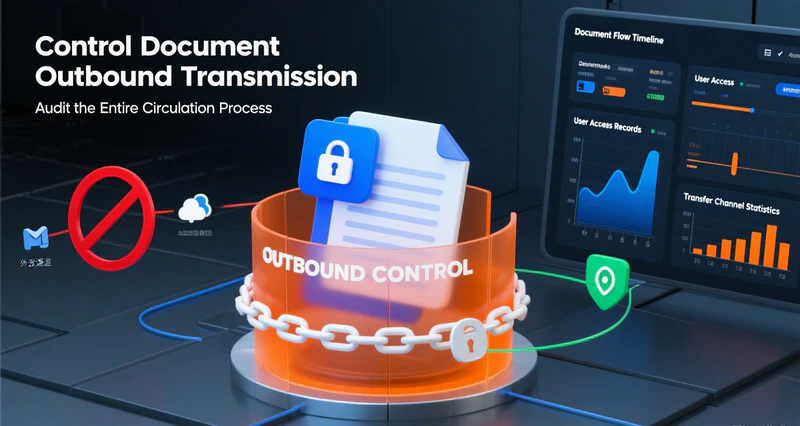
AnySecura can record the entire document transfer process. Coupled with AnySecura's data analytics platform, it allows administrators to analyze massive amounts of transfer logs. For example, it can model behaviors like copying documents to USB drives or uploading them to networks, and display detailed data on the number of transfers, file sizes, risk events, and risk personnel involved. Administrators can easily visualize transfer statistics and focus on high-risk areas.
Triggered Screen Recording
AnySecura supports automatic screen capture during sensitive actions. When a user attempts to send an email, transfer files via instant messaging, upload documents to a website, move or copy documents, or engage in other sensitive activities, the system captures the screen and saves an image of the action. If abnormal behavior is detected in audit logs, administrators can quickly review the screen capture from that moment, providing a visual record of what occurred. This intuitive approach helps auditors quickly grasp the full picture and enhances audit efficiency.
A Complete Security System for Endpoint Document Transfers
AnySecura uses multi-channel protection to block data leaks, combines sensitive content inspection for precise control, and leverages full auditing capabilities for traceability and post-event analysis. By providing a complete endpoint document transfer management system, AnySecura helps businesses avoid the risk of confidential data leakage and supports secure, compliant operations in a digital workplace.