
How to Use Authorized Software in Document Security Management - AnySecura Manual
This guide will show you how to manage the applications that can securely open your protected files. You'll start by navigating to the Authorized Software section within AnySecura's Document Security Management module to see the pre-configured options.
If your essential software isn't listed, you'll learn how to seamlessly add it as a custom entry. This ensures your documents remain encrypted and secure, yet fully accessible within your preferred workflow.
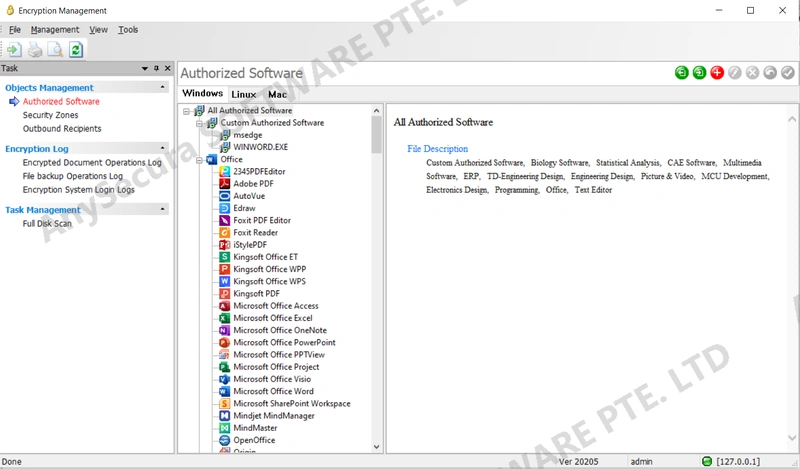
From the menu bar, select Document Security Management to open the encryption management main window. Then choose Management → Authorized Software to view the currently supported authorized software for Windows, Mac, and Linux.
| Icon | Button | Action |
|---|---|---|
 |
Import | Import authorized software library |
 |
Export | Export authorized software library |
 |
Add | Add custom authorized software |
 |
Edit | Edit custom authorized software settings |
 |
Delete | Delete custom authorized software |
 |
Restore | Restore custom authorized software settings |
 |
Save | Save changes |
If the required authorized software is not in the software library, you can add it as custom authorized software.
| Field | Description |
|---|---|
| Name | Custom software name (editable, cannot be empty). |
| Icon | Click "…" to select an icon for the custom software. |
| Description | Description of the custom software. |
| Associated Processes |
Processes linked to the software. One software can match multiple processes, separated by ";". [Advanced Use] To match version information, use format: Key1=Value1|Key2=Value2|Key3=Value3|Key4=Value4 (multiple entries separated by ";").If "=" is omitted, it refers to the process name. |
| Encrypted Files | Files that open decrypted automatically and are saved encrypted; multiple entries separated by ";". |
| Decryption-Only Files | Files that open decrypted automatically but are not encrypted when saved; multiple entries separated by ";". |