
How to Use Removable Storage Logs in Logs - AnySecura Manual
This guide will help you master the Removable Storage logs within the AnySecura Logs module. You'll learn how this feature provides a detailed audit trail of every USB drive or portable device connected to your network, from simple insertions to specific file operations.
Understanding these logs allows you to strengthen document security by monitoring data movement. We'll walk through how to access the log viewer and use its powerful filters to quickly investigate activities, giving you clear visibility into removable media usage.
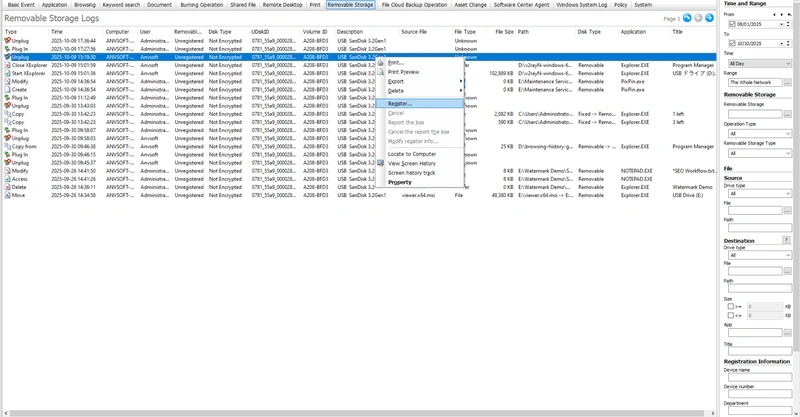
Removable storage logs track all insertions, removals, and operations of portable storage devices on client machines. They provide comprehensive monitoring of usage within the network, enhancing document security.
To view these logs, go to "Logs → Removable Media". The logs include the following attributes:
| Attribute | Description |
|---|---|
| Operation Type | Actions related to removable drives, including: insert, remove, create, copy to, move to, rename, restore, delete, access, modify, upload, download, burn, copy out, move out, start XExplore, close XExplore, upgrade success, upgrade failure. |
| IP Address | IP address of the client using the removable device. |
| Removable Storage Category | Category assigned to the removable device. |
| Disk Type | Type of device: encrypted drive, non-encrypted drive, secure USB. |
| UDisk ID | Unique identifier for each removable device; remains unchanged even after formatting. |
| Volume ID | Serial number of the device; may change if the device is formatted. |
| Device Description | Descriptive information about the removable device. |
| Volume Label | Label of the removable drive. |
| Source File | Name of the file involved in the operation. |
| File Type | Type of the file involved in the operation. |
| Path | File path; if moved, displayed as "source path → target path". |
| Disk Type | Type of disk involved in the operation: hard drive, CD/DVD, floppy, removable disk. |
| Application | Name of the application used to perform the operation. |
| Title | Window title of the application during the operation. |
| Remarks | Optional remarks for easier identification, such as user or asset number; default is empty. Enter via right-click "Edit Notes". |
| Device Name | Name of the removable device. |
| Device Number | Identification number of the device. |
| Department | Department associated with the device. |
| Device User | Name of the device user. |
| Position | Job title of the device user. |
| Contact Info | Contact information of the device user. |
| Host Info | Only for secure USB interaction logs: if the machine uploading to the secure USB interaction area is a non-client, its IP is recorded here; otherwise, left empty. |
The removable storage logs can be filtered using the following criteria:
| Query Condition | Description |
|---|---|
| Time & Range | Standard filter for specifying the time period. |
| Removable Storage | Query logs for a specific device or category within the storage classification. |
| Operation Type | Default is all; can select Insert or Remove to quickly locate all inserted devices on a client machine. |
| Removable Storage Type | Filter by encrypted or non-encrypted drives; default is all. |
| Source Drive Type | Default is all; can select one or more drive types to filter logs by the source drive. |
| Source File | Name of the operated file; supports default type selection or manual entry. |
| Source Path | Source file path. |
| Target Drive Type | Only applies to operations with source and target paths (e.g., copy, move); filter by target drive type. |
| Target File | Name of the target file; supports default type selection or manual entry. |
| Target Path | Target file path. |
| File Size | Filter by file size range. |
| Application | Filter by application name; can manually enter or select from application categories. |
| Window Title | Filter by application window title during operation; leaving blank searches all titles. |
| Device Name (Registration) | Query by the registered device name. |
| Device Number (Registration) | Query by the registered device number. |
| Department (Registration) | Query by the registered department. |
| Device User (Registration) | Query by the registered user. |
| Position (Registration) | Query by the registered user's job title. |
| Contact Info (Registration) | Query by the registered user's contact information. |