
System Alerts for Real-Time Network Monitoring in AnySecura
Stay informed about your network's health with AnySecura's real-time system alerts. You'll learn how these notifications instantly inform you of critical changes, from hardware modifications to software updates, allowing for swift administrative action.
By configuring these alerts within the Policies module, you gain the ability to monitor everything from unauthorized device connections to low disk space. This proactive oversight helps maintain your LAN's stability and security, turning potential problems into manageable tasks.
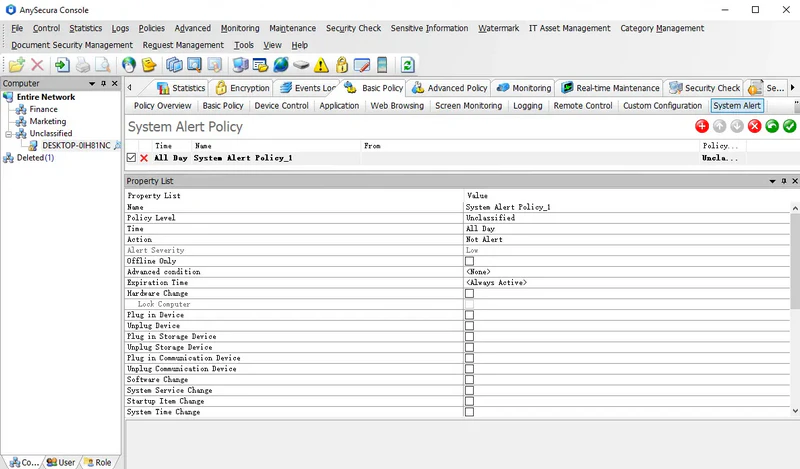
System alerts provide real-time notifications for changes in hardware, software, and critical system settings, enabling administrators to quickly detect changes within the network and take appropriate action, improving maintainability of LAN computers.
The supported alert items include:
| Alert Item | Description |
|---|---|
| Hardware Changes | Alerts triggered by any changes in hardware assets, helping administrators maintain network hardware inventory. |
| Lock Computer | If checked, the computer will be locked when a hardware change occurs. |
| Plug in Device | Alerts when an external device is connected, recording the device name. |
| Unplug Device | Alerts when an external device is disconnected, corresponding to insertion alerts. |
| Plug in Storage Device | Alerts when a storage device is used, recording the device name to prevent unauthorized use. |
| Unplug Storage Device | Alerts corresponding to storage device removal. |
| Plug in Communication Device | Alerts when a communication device is used, recording the device name to prevent unauthorized use. |
| Unplug Communication Device | Alerts corresponding to communication device removal. |
| Software Changes | Alerts for addition, deletion, or modification of software assets, aiding software maintenance. |
| System Service Changes | Alerts for addition or removal of system services, assisting in virus or system issue detection. |
| Startup Item Changes | Alerts for addition, deletion, or modification of system startup items to help detect malware or system issues. |
| System Time Changes | Alerts when the system time is modified. |
| Computer Name Changes | Alerts when the computer name is changed, notifying administrators and preventing unauthorized operations. |
| Network Configuration Changes | Alerts for changes in network properties to help identify network issues. |
| Low Disk Space | Alerts when system disk space falls below a set threshold. |
| Abnormal Disk Power | Alerts when disk power-on count is abnormal, helping detect unauthorized hard drive use. |
The alert details include both the alert type and a descriptive message, enabling administrators to quickly locate and resolve issues.