
How to Use Desktop Request Document Upload Settings in Request Management - AnySecura Manual
This guide will help you configure the desktop request document upload settings within AnySecura's Request Management module. You'll learn how to define the precise conditions under which files are securely uploaded to your Request Document Storage Server.
We'll walk through each setting, from enabling the feature to specifying file types and size limits, giving you full control over what documents are captured and stored. By the end, you'll be able to confidently tailor this policy for specific users or computers.
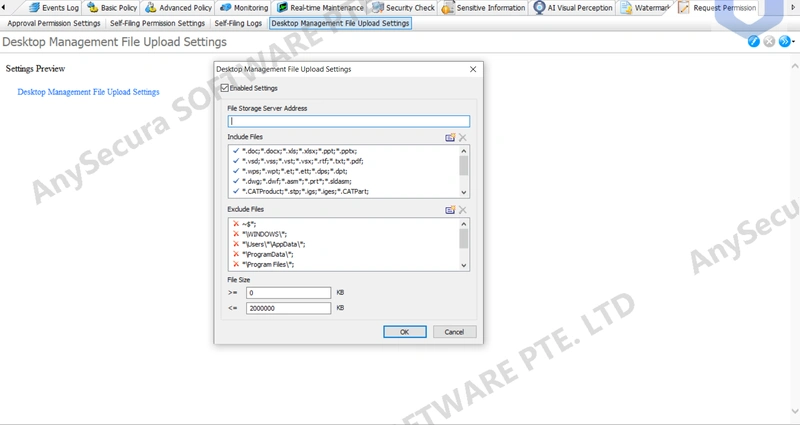
Settings for desktop request documents allow files that meet the specified conditions to be uploaded to the Request Document Storage Server. This requires integration with the storage server.
| Icon Button | Description |
|---|---|
 |
Edit the document upload settings for the selected computer or user. |
 |
Delete the document upload settings for the selected computer or user. |
 |
Export policy files, import policy files, or copy the current policy to other clients. |
Desktop Request Document Upload Settings: Options
| Setting Option | Description |
|---|---|
| Enable Setting | Enable or disable uploading request documents to the document storage server. |
| Document Storage Server Address | Enter the address of the document storage server (HTTPS only; use the corresponding HTTPS port). |
| Include Files | Files within this scope will be uploaded to the storage server. Choose from predefined file types or manually enter paths using the button. Supports wildcards, e.g., *.doc, C:\*, D:\test\*.txt. |
| Exclude Files | Files within this scope will not be uploaded. Choose from predefined file types or manually enter paths using the button. Supports wildcards, e.g., *.doc, C:\*, D:\test\*.txt. |
| File Size | Set the size range for files to be uploaded. Custom sizes are allowed, within 0–2,000,000 KB. |
Note:
- Supported requests include: External Transmission of Sensitive Files, External Transmission Without Document Watermark, and Copy to Removable Drive.