
Trust is essential. But trust without visibility creates operational risk.
Based on experience implementing remote work policies across multiple organizations, the question is not whether to monitor. Instead, the focus has shifted to how to monitor employees working from home—specifically, determining what to monitor, to what extent, and how to do so without undermining employee morale or legal compliance.
This guide addresses these questions directly.

What Is Work-from-Home Employee Monitoring?
Work-from-home employee monitoring refers to the systematic tracking of remote work activity, productivity measurement, and data protection. In enterprise environments, this is commonly known as User Activity Monitoring (UAM).
UAM typically includes:
- Application and website usage tracking
- File access and transfer logging
- Communication monitoring (Slack, Teams, email)
- Behavioral analytics for anomaly detection
For business decision-makers, the objective is not surveillance. It is operational visibility—maintaining awareness of distributed workforce activity without resorting to micromanagement.
Why Businesses Need Remote Employee Monitoring
Many leaders express concerns about trust and workplace culture. However, the more significant risk is a lack of visibility.
Monitoring someone at home is not the same exercise as monitoring them in an office. In a shared workspace you notice blockers in passing—a stalled project, a teammate who hasn't taken a day off in months, a conversation that reveals a process gap. Remote work strips away that ambient context. What remains is whatever you deliberately track, which is why WFH monitoring tends to fail when it only measures presence.
Home offices introduce their own friction. Company laptops often run on consumer Wi-Fi shared with family devices. Files may get forwarded to personal email because someone needs to print from home. Contractors sometimes log into CRM systems from shared tablets or PCs others in the household can access. These are often workarounds, not malice—but they are exactly how accidental data leaks start. For roles handling sensitive data, endpoint security and file-transfer logging usually deserve more attention than login-time alone; for shift-based or client-facing roles, agreed availability windows still matter.
Flexible schedules make the picture harder still. A stand-up that works for the office may collide with school drop-off across time zones. Judging remote employees on office-hour attendance when their role does not require it drives away strong performers faster than any productivity dip. WFH monitoring works when it respects how remote work actually runs: agreed deliverables, async updates, and response windows everyone understands—not a surveillance version of nine-to-five.
1. Insider Threats Are More Difficult to Detect Remotely
Insider threats—whether malicious or accidental—pose detection challenges in home environments. An employee may copy a client list to a personal USB drive. Another might email a financial report to an incorrect external address. Without visibility, such incidents are discovered only after damage has occurred.
According to Gartner, insider risk (employees or contractors) remains a major source of significant cyber incidents. Remote work does not reduce that exposure—it often removes the physical and social controls that catch problems early. Visibility into remote devices is one part of a broader insider-risk program, not a substitute for access controls and training.
2. Compliance Obligations Do Not Pause for Remote Work
Industries including finance, healthcare, and legal services face strict compliance requirements such as HIPAA, SOX, GDPR, and CCPA. Most regulations mandate audit trails documenting who accessed what data, from where, and when. Remote work increases compliance difficulty. Monitoring provides the necessary records.
3. Burnout Carries Significant Financial Costs
Behavioral analytics can identify indicators of overwork—late-night logins, weekend work, sustained high activity without breaks. These are burnout indicators. Early identification enables intervention. Replacing a burned-out senior employee typically costs 100-150 percent of annual salary.
4. Operational Inefficiencies Are Revealed Through Data
Monitoring data frequently exposes process inefficiencies rather than employee underperformance. In some organizations, teams spend three hours daily entering data into three separate systems. This is a workflow problem. Monitoring helps identify and address such issues.
Productivity Tracking vs. Security Monitoring
The following distinction informs tool selection and implementation strategy.
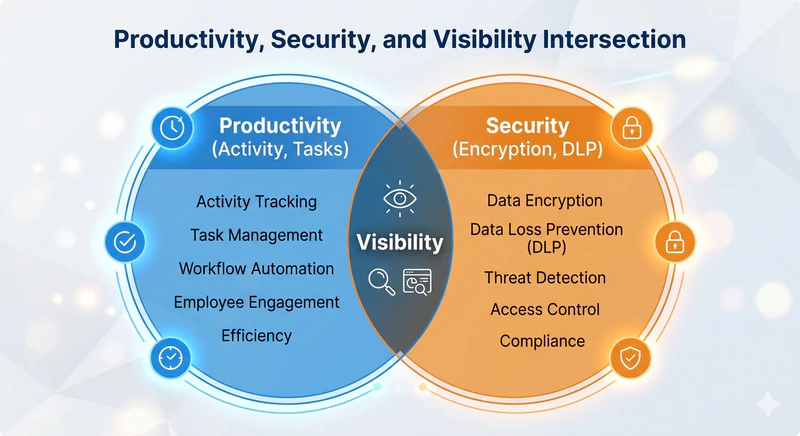
| Aspect | Productivity Tracking | Security Monitoring (DLP / UAM) |
|---|---|---|
| Primary goal | Improve output | Prevent data leaks |
| What it tracks | Active time, applications, tasks | File transfers, USB usage, external emails |
| Employee perception | Often viewed as controlling | More acceptable when framed as protection |
| Legal risk | Higher in some jurisdictions (especially intrusive tracking) | Still subject to privacy and notification rules, but often aligned with security/compliance duties |
| Best suited for | General teams | Finance, R&D, legal, healthcare |
Most organizations require both categories but should implement them differently.
7 Practical Approaches to Remote Employee Monitoring
Method 1 – Measure Deliverables, Not Hours Logged
Let's be honest: outcome-based tracking is hard. If your KPIs are vague, this method will fail within a week.
Online time is a terrible proxy for productivity. I've watched employees stay "active" for ten hours and produce almost nothing. I've also seen people work four focused hours and deliver exceptional results. The difference is not about hours. It's about clarity of expectations.
Set clear weekly or sprint-based goals. Review what got done. Ignore idle time unless it becomes a recurring pattern. That's the whole system.
Here's where most leaders mess this up. They announce "we're switching to outcome-based tracking" but still check login times. Hybrid systems confuse everyone. Employees don't know what actually matters. The smart ones optimize for the metric that gets them in trouble. The cynical ones assume you're lying about trusting them.
If your goals are vague—"work on the client report" instead of "deliver the first draft by Friday"—this approach collapses immediately. Specificity is not optional.
Method 2 – Watch the Communication Channels That Matter
Most remote teams live inside Slack, Teams, and email. So why wouldn't you pay attention to what flows through them?
I'm not suggesting you read every message. That's a waste of time and a fast way to lose trust. But tracking patterns—response times to clients, volume of internal versus external messages, file attachments—can flag problems early.
Here's a concrete example. An employee suddenly starts emailing large files to a personal Gmail address. That's not a productivity issue. That's a potential data leak. You want to know about that before the client calls you.
But some managers use communication monitoring to police response times down to the minute. "You took twelve minutes to reply to my Slack?" That's how you get employees who are scared to take a bathroom break. It's also how you train people to send meaningless "OK" messages just to show they're alive.
If you monitor communication channels, inform employees first. In regulated industries, this is standard practice. In others, surprise surveillance destroys morale overnight.
Method 3 – Let AI Flag the Weird Stuff
You don't have time to review logs for fifty employees. I certainly don't.
Behavioral analytics solves this. The software learns normal patterns for each person—typical login times, file access behavior, application usage. When something deviates significantly—like downloading 500 customer records at 2 AM—the system sends an alert.
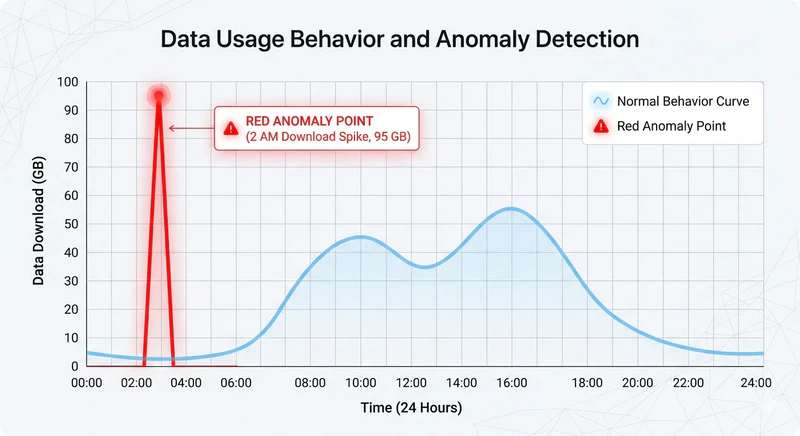
I saw this play out at a mid-sized SaaS company. An employee who normally logged off at 6 PM started working until midnight for two weeks straight. The system flagged the pattern. A manager checked in. Turned out the employee was overwhelmed and afraid to say so. Early intervention prevented a resignation—exact savings depend on role and market, but replacing a senior hire is rarely cheap.
But here's the catch. Some vendors will sell you AI as a magic box. It's not. The alerts are only as good as the baseline data. If you deploy it and ignore the alerts for three months, don't blame the software.
Also, don't buy behavioral analytics if you don't have managers who will act on the data. Alerts without follow-up are just expensive noise. I've seen companies spend $30k on deployment and never review a single log.
Method 4 – Make Work Visible Through Task Boards
You don't need to watch people. You need to watch the work.
Tools like Asana, Trello, Jira, and ClickUp make tasks visible. Each task gets a status: To Do, In Progress, Done. Managers check the "Done" column weekly. That's it.
The magic happens when peer-level accountability kicks in. When a teammate sees a blocked task, they offer help. You don't have to play traffic cop. The team self-organizes around visible work.
But I've seen teams spend more time updating task statuses than doing actual work. If your board becomes a bureaucratic exercise—requiring three approvals to move a card to "Done"—people will game it. They'll mark things complete early. They'll create fake tasks to look busy.
One more thing. Task boards work for teams with defined deliverables. For creative or exploratory roles—researchers, designers, strategists—this method is less effective. Don't force it where it doesn't fit. You'll just frustrate your best people.
Method 5 – Structured Check-Ins Beat Random Surveillance
Secret screenshot reviews are a great way to make everyone hate you. There, I said it.
Structured check-ins work better. Three formats I've seen succeed:
- Daily 15-minute stand-up meetings (keep them short)
- End-of-day written summaries (three done, one blocked)
- Weekly one-on-one video calls
Employees choose how to report. Managers review the summary. The employee owns the process. That's the key difference—you're not pulling data from them. They're giving it to you.
The daily stand-up becomes a 45-minute status theater. The written summary turns into a novel. The weekly one-on-one gets canceled three weeks in a row.
Set a timer for stand-ups. Cap written summaries at five bullet points. Show up for the one-on-ones. If you treat these check-ins as optional, so will your team.
Method 6 – Lock Down Data Leaks at the Endpoint Level
This is the one area where I don't compromise.
Endpoint DLP (Data Loss Prevention) blocks specific actions. USB copying of customer lists? Blocked. Emailing financial data to external addresses? Blocked. Uploading sensitive files to personal Google Drive or Dropbox? Blocked. Unauthorized printing of confidential documents? Logged.
Here's a real scenario. A salesperson wants to review client notes on their personal laptop. Without DLP, they email the file to themselves. With DLP, the email is blocked. They use an approved secure method instead. No drama. No data leak. No one gets fired.
General-purpose productivity trackers won't protect data on a home laptop. Organizations handling customer records, source code, or regulated information need endpoint DLP that encrypts files in place, controls USB and cloud uploads, and produces audit trails your compliance team can actually use—deployed and updated remotely without visiting every home office.
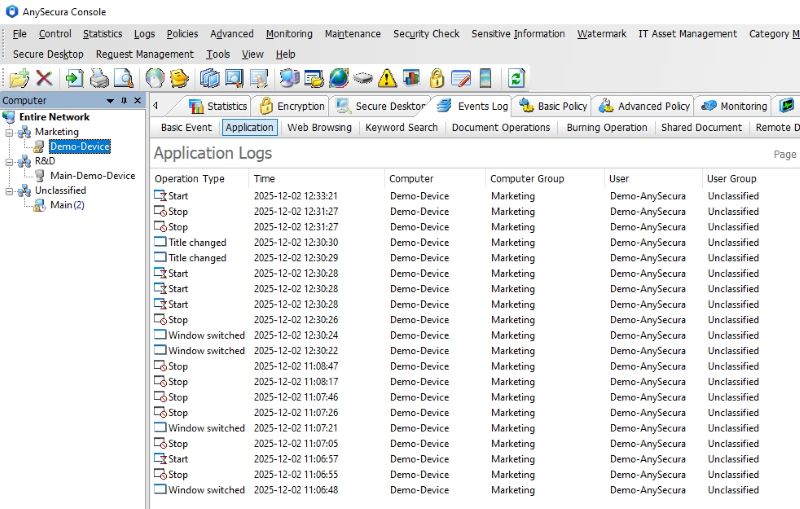

Encrypt sensitive documents, block unauthorized USB and cloud uploads, and maintain audit-ready logs across every home office device—from one central console.
Finance, healthcare, legal, and R&D teams typically need this layer. Some regulated organizations prefer or contractually require on-premise deployment so activity data stays under their direct control—but many others use compliant cloud hosting with proper agreements. If your organization does not handle sensitive data, lighter tools may be enough; where compliance obligations or valuable IP are involved, endpoint DLP warrants serious evaluation at the leadership level, not only within IT.
Deploy DLP with a clear explanation: it protects client data and satisfies legal requirements, not employee keystrokes. And if you buy it, review the alerts. Companies that spend tens of thousands on deployment and never open a log are paying for theater.
Method 7 – Use Activity Ratios, Skip the Screenshots
Let me be blunt. Most employees hate screenshots. And honestly? I don't blame them.
Screenshots prove presence, not productivity. A person can stare at a spreadsheet for an hour and accomplish nothing. Another can close the laptop, think through a problem while walking the dog, and come back with the solution. The screenshot misses all of that.
What works better. Activity ratios—keyboard and mouse activity as a percentage of logged time. Say, 70 percent active during work hours.
How to use it. A single low-activity afternoon? Ignore it. Three consecutive low-activity days? That's a signal. Maybe internet issues. Maybe illness. Maybe disengagement. The data gives you a reason to ask, not a reason to punish.
Now for the real talk. We've all seen managers who treat a 60 percent activity ratio as a crime. Those managers lose their best people. High performers resent being treated like suspects. They will leave. And they will tell their network exactly why.
Here's the common failure mode. Using activity ratios as a daily scorecard. "Your ratio was 68 percent yesterday, but Sarah's was 82 percent." This is how you create a culture of mouse-jiggling and fake productivity. Employees will spend more energy tricking the system than doing their jobs.
If you can't resist the urge to check daily numbers, don't buy activity tracking. Stick with output-based reviews. Some management styles are simply not compatible with this kind of data. That's not a judgment. It's just a fact.
What to Look for in Remote Monitoring Software
Feature lists grow long fast. For WFH teams, a few capabilities matter more than the rest. Raw activity logs are nearly useless at scale—you need software that surfaces anomalies automatically, so managers spend time on people instead of scrolling through timestamps. Coverage should span the channels remote work actually runs through: Slack, Teams, email, and file transfers. Siloed tools leave the same blind spots you had before buying software.
Privacy controls are non-negotiable for home-based staff. Blurred screenshots or activity-only modes reduce the sense that someone is watching their living room. Role-based access matters too: managers see their team, HR sees attendance patterns, IT sees security logs—no single account with god-mode access to everything.
If you operate under GDPR, CCPA, HIPAA, or SOX, the tool must produce audit-ready reports without a manual export scramble before every review. That requirement alone separates enterprise-grade platforms from lightweight trackers built for time sheets.
Best Practices for Ethical and Legally Compliant Monitoring
Ethical monitoring is a requirement for successful implementation and legal protection.
Full transparency. Publish a clear remote work monitoring policy in the employee handbook. Specify what is tracked, why, data retention periods, and access rights. Obtain written acknowledgment from every employee.
Local privacy law compliance. Different jurisdictions have different requirements. Under GDPR (Europe), employee monitoring must have a valid legal basis—often legitimate interest or legal obligation—not merely checkbox consent, because employment relationships rarely allow freely given consent. CCPA (California) grants employees the right to know what data is collected. Some countries restrict or ban continuous screenshots and certain types of surveillance. Legal counsel should be consulted before deployment.
Remote work adds wrinkles that office policies rarely cover. If employees use personal devices, you generally cannot install full monitoring agents without a separate work profile or a written BYOD agreement that limits collection to business hours and business apps. Home networks may sit in jurisdictions different from your headquarters—know where monitoring data is stored and processed before you roll out globally. A policy that says "we may monitor company devices" is a starting point; it should also explain what is never collected (personal browsing on BYOD, off-duty hours, webcam or microphone access) so employees understand the boundary.
No micromanagement with data. Reviewing what an employee did at 10:15 AM is not productive use of monitoring data. Data should be used for weekly or monthly reviews only.
Separation of security and performance monitoring. Security monitoring (DLP) applies uniformly to all employees. Performance monitoring should be lighter and tied to goals. Combining the two creates confusion and resentment. If you need both, look for platforms that enforce strict role-based separation between security and productivity views.
Pattern-based review, not incident-based. A single late login has no significance. Ten late logins combined with missed deadlines warrant attention. Managers should be trained to identify patterns.
FAQs about Remote Employee Monitoring
What if an employee refuses to install monitoring software on a company device?
On company-issued devices, installation is a condition of device use. For BYOD (bring your own device), require a separate work profile or limit access to non-sensitive systems only—full monitoring on personal hardware raises consent and privacy issues in most jurisdictions.
Is screenshot monitoring necessary?
Rarely. Screenshots should be avoided unless required for compliance (for example, regulated financial services). Removing them significantly reduces employee resistance. If your compliance team insists on visual verification, blurred screenshots or activity ratios are less invasive alternatives.
How can organizations prevent employees from faking activity with mouse jigglers?
Focus on output. If someone invests more effort deceiving the system than doing their job, the performance framework needs revision—not another surveillance layer. Security monitoring that tracks file access and data transfers is harder to game than presence metrics; see our guide on detecting mouse jigglers for context.
Can monitoring data be used for termination?
Yes, but with caution. Monitoring data should serve as supporting evidence, not the sole justification. DLP logs carry weight for serious violations like data theft. For low productivity, missed goals and documented warnings are more defensible than idle-time screenshots.
What is the difference between UAM and DLP?
User Activity Monitoring (UAM) tracks user actions—applications used, files accessed, websites visited. Data Loss Prevention (DLP) specifically blocks or logs data transfers—USB copies, email attachments, cloud uploads. Many enterprise platforms combine both; the distinction matters because employees usually accept DLP more readily when it is framed as data protection rather than performance policing.
Can monitoring software run on remote employee devices without slowing them down?
It depends on the tool and policy set. Lightweight productivity trackers usually have minimal impact. Full DLP agents can use more resources during heavy file activity, though many stay in the low single-digit CPU range on modern hardware when tuned correctly. Run a pilot with a small remote group before company-wide rollout—home internet speeds vary, and lag during a client call is the fastest way to lose buy-in.
Conclusion
Visibility is necessary for management. But excessive surveillance destroys the culture you've built.
A practical two-layer approach:
- Security layer (non-negotiable): Deploy endpoint DLP to prevent data leaks on home devices. This layer protects against insider threats and satisfies compliance requirements.
- Performance layer (light-touch): Use project management tools and activity ratios. Focus on output. Disregard minor idle time. And for the love of good management, don't check the numbers daily.
How to choose between them:
| Your primary concern | Recommended approach |
|---|---|
| Data leaks, compliance audits, insider threats | Endpoint DLP (e.g., AnySecura) |
| Team productivity, task visibility | Asana, Trello, or ClickUp |
| Time tracking and activity measurement | Hubstaff, WebWork, or ActivTrak |
| Both security and productivity | Separate tools for each layer, or DLP plus lightweight task management |
Start by assessing your risk profile. Teams handling customer data, intellectual property, or regulated information should prioritize endpoint DLP before debating screenshot policies. General teams can begin with task management and add activity tracking only when deliverables slip without an obvious cause. Publish a written policy before rollout—what is tracked, why, how long data is kept, and who can access it—and get acknowledgment from every remote employee. Train managers to review patterns weekly or monthly, not hourly dashboards.
The objective is not surveillance. It is removing guesswork from remote management so you can make better calls on promotion, process improvement, and risk prevention.
Discover 13 daily work habits, focus strategies, and lightweight tools to improve efficiency at work without burning out. Learn more>>


