If you're evaluating Proofpoint competitors, the first thing worth knowing is that the phrase means different things to different people. Some searchers want an email security alternative. Others want a security awareness training platform. This guide is for the third group: teams comparing Proofpoint's DLP and Insider Threat Management (ITM) capabilities against dedicated alternatives — because your sensitive documents don't just leak through email, they leak through USB drives, personal cloud storage, screenshots, and the apps your employees use every day.
This guide walks through 11 dedicated Proofpoint alternatives using a three-layer framework that mirrors how data actually gets protected: prevention, control, and audit. We cover each product on its own terms — what it actually does in each layer, where it's strong, where it leaves gaps — then pull everything together into a comparison and some practical buying guidance at the end.
How the Proofpoint Alternatives Compare
Here's the full side-by-side view up front — each vendor scored across the same three layers as complete DLP protection: Prevention (classification and tagging), Control (encryption, permissions, and monitoring), and Audit (logs, watermarking, and API access). The product-by-product breakdown below goes deeper on each one.
| Vendor | Prevention | Control | Audit | Watermark | Pricing Model |
|---|---|---|---|---|---|
| Teramind | Strong compliance templates | OCR + behavior recording, most specialized | Mature forensic tools, no watermark | None | Published tiers: Starter ~$14/user/mo, UAM ~$28, DLP ~$32, Enterprise on request |
| DTEX | Essentially blank | Score-triggered, weaker enforcement | Data-lineage map is a standout | None | Quote-only |
| AnySecura | Multi-rule + sensitivity tiers | Full-spectrum channels + response options + screen-photo detection | Logs + traceability + watermark + open API; built-in reporting fairly basic | Visible + invisible | Published: enterprise subscription from $420/seat/yr, plus modular pricing and lifetime license |
| Symantec DLP | Type-detection | Broadest channel + OS coverage incl. Linux | Logs + user attribution | None | Quote-only |
| Cyberhaven | Type-detection | Broad monitoring, no encryption/permissions | Best-in-class data lineage | None | Bundled contract (not per-seat), ~$30-48K/yr |
| Forcepoint | 1,800+ classifiers | DLP + dedicated ITM video line | Video-playback style audit | None | Quote-only |
| Strac | Modern ML+OCR | Widest cloud-app coverage, privacy-first (no screenshots) | Data lineage, no watermark | None | Quote-only |
| Securonix | None (upstream-dependent) | None (connector-dependent) | Strong security analytics, not document-level | None | Two-axis: SIEM by event volume + UEBA by user count, ~$67K+/yr plus compute |
| Safetica | Solid classification | Granular USB control, encryption via BitLocker | Full reporting/API, no watermark | None | ~$4.50-5/user/mo (est.) |
| Digital Guardian | Deepest 3-mode classification | Windows-strong, weaker Mac/Linux | Strong forensics, no watermark | None | Quote-only |
| Microsoft Purview | Modern label stack | Deep on Win/macOS, zero Linux | Forensic-grade logging | Visible only | Bundled in E5 (~$60/user/mo), or E3 (~$39/user/mo) + Purview Suite add-on (~$12/user/mo) |
DLP vs. Insider Threat vs. SIEM: Know the Difference
Before going product by product, it's worth clearing up a confusion that runs through most existing "Proofpoint alternatives" content: DLP, Insider Threat Management, and SIEM/UEBA are related but distinct categories, and conflating them leads to bad purchases.
- DLP (Data Loss Prevention) stops sensitive data from leaving your organization — through content inspection, classification, and policy enforcement (block, encrypt, redact) at the point of exfiltration.
- Insider Threat Management (ITM) focuses on detecting risky behavior patterns from trusted users — anomaly detection, session recording, risk scoring — whether or not a specific policy was technically violated.
- SIEM/UEBA is a security analytics layer that ingests events (including DLP and ITM alerts) from other systems and correlates them for broader threat detection. It doesn't generate the underlying data-protection events itself.
This distinction matters because one of the products commonly listed as a "Proofpoint competitor," Securonix, is actually a SIEM/UEBA platform, not a DLP tool. It needs a third-party connector to ingest DLP events from a separate product like Forcepoint rather than generating that data natively. Buy it expecting Proofpoint-style DLP, and you'll still need to license and deploy a separate DLP product — plus budget for Securonix's own two-axis pricing (SIEM by events-per-second, UEBA by monitored users) and the compute/storage bill that runs the platform underneath it, which typically adds another 30-60% on top of the base license for mid-size deployments.
Proofpoint itself, notably, treats DLP and Insider Threat Management as two separate (if integrated) product lines — Proofpoint Enterprise DLP and Proofpoint ITM. That's a useful signal: even Proofpoint doesn't claim one engine does both jobs identically.
The Framework: A 3-Layer DLP Lifecycle
Most "Proofpoint alternatives" roundups compare feature checklists. That's useful for spotting gaps, but it misses the bigger question: does a product cover the full lifecycle of protecting sensitive data, or just one stage of it?
Every product below gets evaluated against the same three layers:
| Layer | What It Covers |
|---|---|
| Prevention | Multi-rule identification and classification of sensitive content; automatic labeling and sensitivity-level tagging for unified governance |
| Control | Transparent document encryption; granular department/scenario-based permissions (read, write, screenshot, copy, print, outbound transfer); full-spectrum behavior monitoring (web, apps, device access — USB/NIC/mobile — printing, IM/email); policy-triggered response (block, warn, admin alert, auto-screenshot, workstation lock) |
| Audit | Detailed behavior logs and document flow/traceability logs; visible and invisible watermarking for provenance tracking; open API for integration into existing business systems |
A product that's excellent at Prevention but weak at Audit will classify your data correctly and then leave you unable to prove what happened to it after a leak. A product that's excellent at Control but skips Prevention will enforce policies on data it never properly classified in the first place. The strongest programs cover all three — or at least know clearly which layer they're strong in and which layer needs a second tool.
Breaking Down Each Proofpoint Alternative
1. Teramind: Most specialized OCR and behavior-recording capability
👍 Best for
Teams whose core need is seeing exactly what employees are doing on screen, not full document-lifecycle protection. See our full AnySecura vs Teramind comparison for a deeper feature-by-feature breakdown.
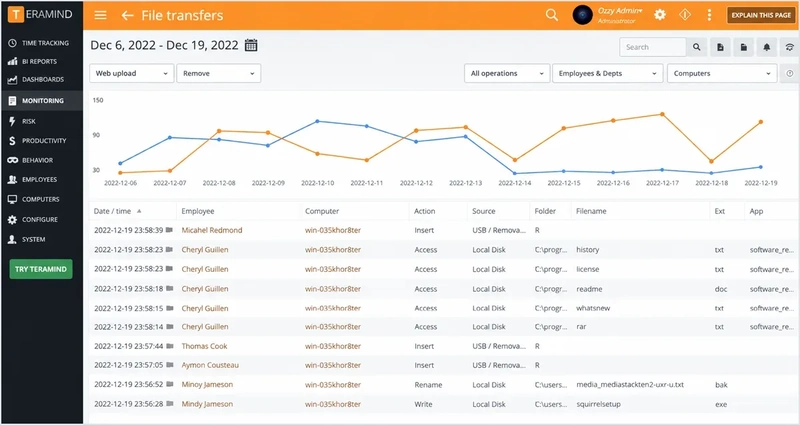
Teramind's positioning is clear: push the Control layer as far as it goes, especially OCR and behavior recording, rather than trying to be a broad DLP generalist like Proofpoint.
It's also the most budget-transparent product in this roundup — one of only two vendors here (AnySecura being the other) that publishes real pricing tiers instead of routing everyone through a sales call, which makes it unusually easy to shortlist without a demo first.
Capability Breakdown:
Prevention
- Automated classification with PII/PHI/PFI templates
- File fingerprinting to catch copies or leaks of specific files
- Classification leans compliance-type labels rather than multi-tier sensitivity management
Control
- Patent-pending OCR engine continuously captures, indexes, and analyzes user desktops across multiple monitors, virtual desktops, and RDP sessions
- Configurable detection thresholds with forensic search inside images and video
- Every tier includes activity video recording; higher tiers can switch to violation-triggered-only recording to save storage
- "Encryption" protects its own recorded session data, not source documents — no document-level transparent encryption or department-scoped permissions, and no workstation-lock action
Audit
- Solid forensic and reporting tools for compliance needs
- SIEM integration
- No watermarking, no general business-system API
Hands-on Impressions
Watching Teramind's OCR engine index a recorded desktop session in near real time and then searching inside it for a specific string of text — and getting a hit — felt closer to using a forensic tool than a policy dashboard. Switching a test policy over to violation-triggered-only recording to cut the storage bill was a one-click setting, not a support ticket, and the agent itself was running within the hour.
Pricing
Published tiers: Starter around $14/user/month, UAM (unlimited behavior rules, SIEM integration, anomaly detection) around $28/user/month, DLP around $32/user/month, and Enterprise on request — one of the few products here you can budget against without a sales call.
- Most specialized OCR/behavior-recording engine in this category
- Transparent, published pricing tiers — rare in this list
- Not a full document-protection platform — no document-level encryption or granular permissions
- No watermarking or general business-system API
2. DTEX: Behavior-first anomaly detection with a standout data-lineage map
👍 Best for
Teams that already have a content-classification/DLP tool and want to add behavioral anomaly detection and investigation on top — not a fit as a standalone DLP replacement.
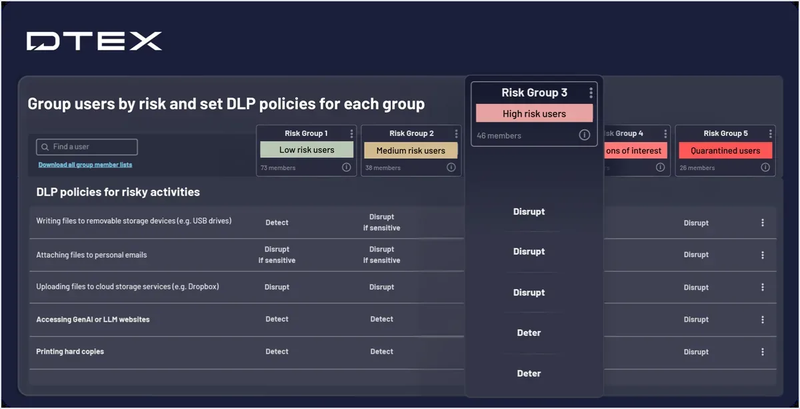
DTEX takes a fundamentally different approach from most of this list: behavior-first, not content-first — it monitors what people do and flags anomalies, rather than starting from classifying what data is sensitive.
That design choice has a real trade-off baked in: DTEX doesn't try to be a content-classification tool at all, so it works best layered on top of an existing DLP product rather than replacing one outright.
Capability Breakdown:
Prevention
- Essentially none — DTEX doesn't classify or tier data before controlling access to it; if your starting point is "tag sensitive documents, then control who touches them," it isn't built for that entry point
Control
- Continuous behavioral analysis builds a per-user baseline
- Blocks specific application processes and unapproved network connections once a risk score crosses a threshold — a reactive, score-triggered response rather than content-triggered prevention
- No document-level encryption, no granular permission system
- Enforcement is generally regarded as its weakest layer relative to its detection strength
Audit
- Interactive data-lineage map tracking a file's full history across in-use, in-transit, and at-rest states — its standout feature
- Automatic user investigation reports to speed up evidence-gathering
- Privacy-conscious metadata-collection design, useful for GDPR-relevant deployments
- No watermarking
Hands-on Impressions
Clicking through DTEX's data-lineage map on a flagged test user was the standout moment — watching a single file's trail branch out across copies, renames, and a transfer in one interactive graph is a genuinely different way to investigate than scrolling a flat log. Looking for a way to actually stop that transfer before it happened came up empty, though; there's no obvious path in the console from "we see the anomaly" to "we blocked it," which took some adjustment coming from a prevention-first tool.
Pricing
Subscription-based, tiered by users/endpoints, with no public numbers — DTEX requires a quote. PeerSpot users score its pricing 4 out of 10 on their affordability scale (1 = priciest), which lines up with what a quote-only enterprise product usually means: this isn't a budget play.
- Standout data-lineage map for tracing a file's full history
- Privacy-conscious design that helps in GDPR-relevant deployments
- Essentially no content-classification/prevention layer
- Enforcement is weaker than its detection strength; no document encryption or permission controls
3. AnySecura: Balanced DLP lifecycle with visible + invisible watermarking
👍 Best for
Teams wanting a single, balanced policy engine across the full prevention-control-audit lifecycle, with real post-leak traceability as the standout — worth verifying hands-on with a trial rather than relying on a feature list alone.
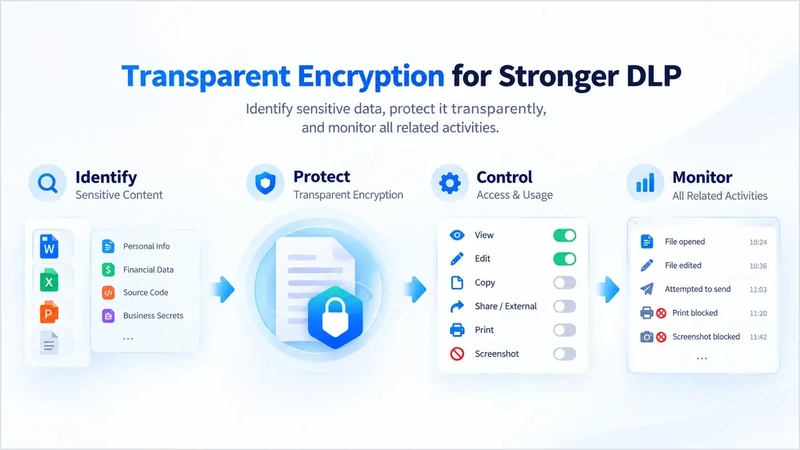
AnySecura runs DLP and Insider Threat Management inside a single policy engine, built around the prevention-control-audit lifecycle from the ground up rather than bolting one layer onto a product designed for another.
The clearest differentiator against the rest of this list is post-leak traceability — invisible, steganographic watermarking that survives a file being renamed or reformatted, a capability only Microsoft Purview partially matches (visible-only) and nobody else here offers at all.
That watermarking edge comes with a deployment trade-off worth knowing upfront, though: today it's on-premises, cloud, or hybrid only — there's no SaaS version yet, which is a real gap against a 10-minute agentless tool like Strac, and worth budgeting into implementation cost alongside the license itself.
Capability Breakdown:
Prevention
- Multiple rule-based identification and classification of sensitive content
- Automatic labeling and sensitivity-level tagging designed to fit an organization's own internal tiering system (e.g., Internal/Confidential/Restricted), not just type-detection
Control
- Transparent encryption applied to sensitive documents, with granular department- and scenario-based permissions (read, write, screenshot, copy, print, outbound transfer) controlled independently
- Behavior monitoring spans web browsing, application use, device access (USB storage, network cards, mobile terminals, any device that can connect to the endpoint), printing, and IM/email
- Can detect someone photographing the screen with a phone — a data-exfiltration path that bypasses copy/print restrictions entirely and most tools in this category simply can't catch
- Policy triggers can block, warn, send an admin alert (local notification or email), automatically capture the screen at the moment of violation, or lock the workstation
Audit
- Detailed behavior audit logs and document flow/traceability logs
- Visible and invisible (steganographic) watermarking to trace a document back to its source after it leaves the monitored environment
- Open API supports integration into an organization's existing business systems
Hands-on Impressions
Photographing a monitor with a phone and watching AnySecura's console log the attempt itself — not just a copy/paste or print event, the physical photo — is the single feature hardest to find anywhere else on this list, and seeing it actually fire made clear why it's worth leading with. Pulling an invisible watermark back out of a document after deliberately renaming and re-saving it worked exactly as described, though the built-in report that surfaced the result felt more like a raw log than a report — usable, but visibly less polished than the detection itself.
Pricing
One of the few vendors in this category with public pricing — enterprise DLP subscriptions start at $420/seat/year, with module-based pricing also available. A lifetime license option exists too; contact [email protected] for a quote on that.
- Only vendor here (besides Purview, visible-only) offering post-leak traceability — visible plus invisible watermarking
- Published, transparent pricing — no mandatory sales call to get a number
- Full-spectrum behavior monitoring, including phone-camera screen photography detection, which most competitors can't catch
- No SaaS deployment option yet — on-prem/cloud/hybrid only, so infrastructure cost is on you
- Built-in reporting is fairly basic in presentation compared to specialized analytics-heavy platforms like Securonix
4. Symantec DLP: Broadest channel and OS coverage, including Linux
👍 Best for
Large enterprises needing Linux coverage and broad channel reach that can budget for a longer configuration cycle and dedicated tuning.
Symantec DLP (now under Broadcom) is a legacy DLP incumbent, and channel coverage plus platform breadth are its strongest cards.
It's also one of the few products in this category with confirmed native Linux support alongside Windows and macOS — a real differentiator for organizations running heterogeneous environments, though that breadth comes with a real configuration and cost commitment.
Capability Breakdown:
Prevention
- Automated classification with comprehensive content detection, leaning type-identification rather than sensitivity-tiering
Control
- Covers endpoint, network file shares, databases, email, and cloud apps including unauthorized SaaS
- Confirmed native Linux support alongside Windows/macOS/Windows Server
- Response actions include local/remote file quarantine, policy-based encryption, and DRM
- Whether encryption is "transparent" at the individual-document level isn't clearly specified
Audit
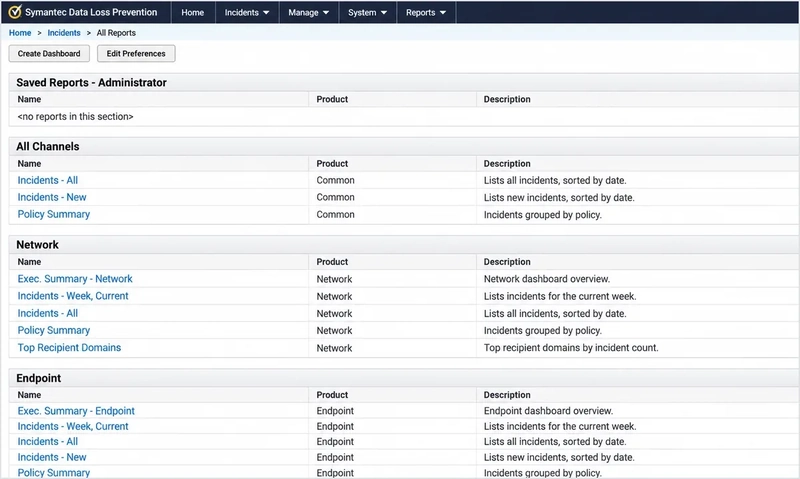
- Data-loss events tied back to a specific user
- Solid reporting tools
- No watermarking — audit stays at the "logs plus user attribution" level
Hands-on Impressions
Confirming Linux endpoint coverage in Symantec's console took more digging than it should have — it's there, sitting quietly alongside the Windows/macOS options rather than called out anywhere as a differentiator, which undersells what's actually a real strength. The incident report view is dense with detail on first look, almost too dense, and it's easy to see how that density tips into alert fatigue if the initial policy set isn't tuned down before go-live.
Pricing
Quote-only. User feedback consistently describes it as expensive relative to peers, especially for smaller organizations — budget for a longer configuration cycle too.
- Broadest channel and OS coverage in this list, including confirmed native Linux support
- Mature, established incumbent with solid reporting
- High false-positive rates and involved configuration are common complaints
- No watermarking; pricing is a real stretch for smaller organizations
5. Cyberhaven: Most sophisticated data-lineage/forensic tracing
👍 Best for
Teams whose top priority is tracing exactly where a file has traveled — pair it with a second tool for encryption and permission control.
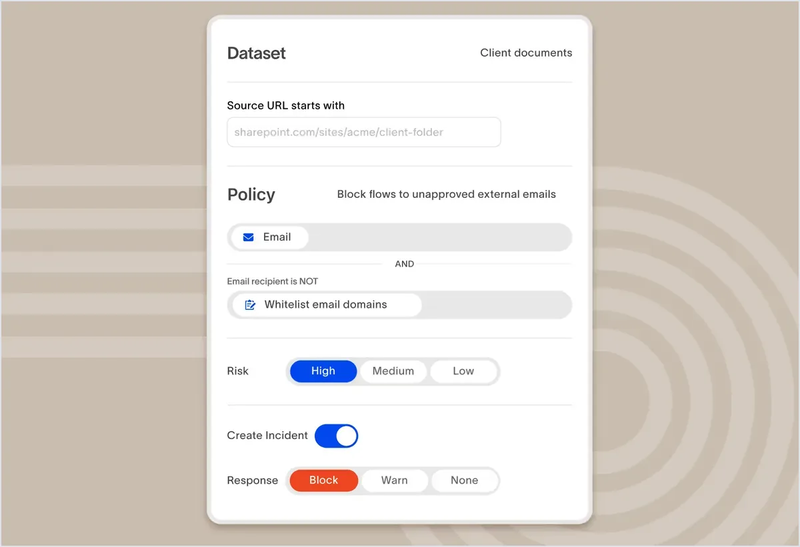
Cyberhaven is betting on a different technical approach entirely: data lineage — tracking a file's identity and sensitivity through every copy, edit, rename, and move, rather than re-scanning content at each checkpoint.
That lineage-first design makes it fundamentally a detection-and-response platform rather than a prevention-and-control one, which shows clearly in what it does and doesn't offer across the three layers.
Capability Breakdown:
Prevention
- Built-in PII/PCI/PHI identifiers plus custom pattern matching — competent, not a standout classification engine
Control
- Broad monitoring across USB/removable storage, cloud apps, email, websites, AirDrop, and IM
- Combines behavioral signals with data lineage to keep false positives low and speed up investigation
- No transparent encryption; no active granular permission control (read/screenshot/print/copy set independently) — only passive tracking of permission changes
Audit
- Data lineage records every move, copy, edit, and share of a file — Cyberhaven's real strength
- Classification tags persist even after a file is renamed, reformatted, or relocated, and can trigger a real-time block
- Open API exposes events to third-party tools, with native SIEM connectors
- No watermarking — tracing depends entirely on the lineage graph as a single technical approach
Hands-on Impressions
Tracing a single test spreadsheet through three renames and a folder move in Cyberhaven's lineage graph, then watching it still get flagged and blocked at the final copy attempt, is the clearest demonstration of what the product actually sells — persistence of identity, not just a scan at the door. Looking for a way to set document-level read/write permissions from that same console came up short; that control has to live in a separate tool entirely.
Pricing
Not a per-seat linear model — core data-protection features are bundled into a flat contract, typically $30-48K/year, with add-on connectors or overage pushing the number higher.
- Most sophisticated data-lineage/forensic tracing in this category
- One of the few vendors with an actual pricing range instead of pure quote-only
- No transparent encryption or active granular permission control — needs a second tool for those
- No watermarking; tracing depends entirely on the lineage graph as a single approach
6. Forcepoint: Traditional DLP plus a dedicated Insider Threat video line
👍 Best for
Organizations wanting both a traditional DLP and a dedicated Insider Threat product line under one vendor. See our Forcepoint DLP vs AnySecura comparison for more detail.
Forcepoint is unusual in running both a traditional DLP line and a separate Insider Threat line (formerly SureView) — most vendors on this list pick one lane.
That dual-line structure lets a single vendor cover both "stop data leaving through a defined channel" and "record what a flagged user is actually doing on screen," though it comes with a heavier endpoint footprint than most competitors here.
Capability Breakdown:
Prevention
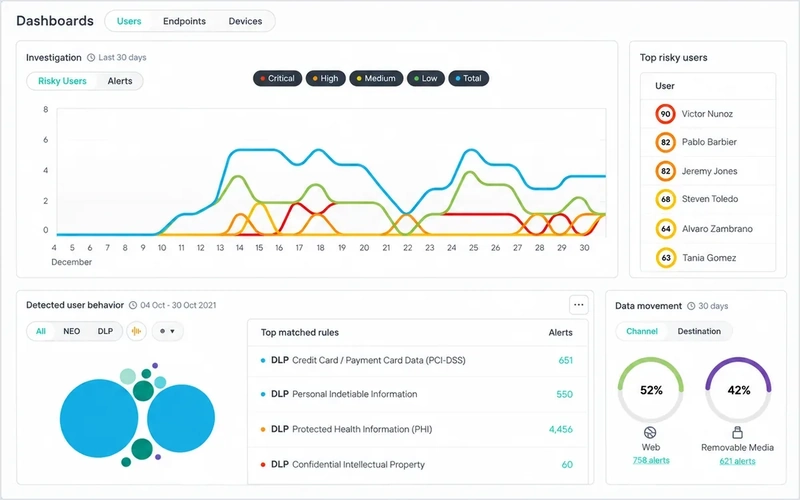
- 1,800+ classifiers and policy templates — the most specific classification count in this category
- Still oriented around type-identification rather than sensitivity tiering
Control
- DLP line covers copy/paste, save-as, print, screen capture, and writes to USB or other removable storage — one of the few products naming screen capture as its own monitored dimension
- Policy response includes block, quarantine, encrypt, or user coaching prompts
- Insider Threat line adds continuous video capture with "over-the-shoulder" playback — more persistent than trigger-based screenshots
Audit
- Real-time monitoring/alerting, incident management, compliance reporting
- Insider Threat line's video playback is a distinctive audit mechanism, tracking "what the user did" rather than "where the document went"
- No document-level flow tracing, no watermarking
- Open API access via CASB integration for cloud services
Hands-on Impressions
Scrubbing through the Insider Threat line's "over-the-shoulder" video playback on a flagged test session is a genuinely different investigative experience from a log line — you're watching what someone did, not inferring it from timestamps. The trade-off shows up just as fast on the endpoint side: with continuous recording switched on, the client visibly runs heavier than the DLP-only agent does on its own.
Pricing
Quote-only, consistent with other enterprise DLP incumbents like Symantec DLP and Proofpoint itself — contact sales for a number.
- One of the few vendors offering both a traditional DLP line and a dedicated Insider Threat video line
- Names screen capture as its own monitored dimension, more explicit than most competitors
- Endpoint client runs heavier than most competitors; continuous video capture adds real storage cost
- No document-level flow tracing or watermarking; pricing is quote-only
7. Strac: Widest native SaaS/cloud-app coverage, privacy-first design
👍 Best for
Cloud-office-heavy teams worried about sensitive data leaving through Slack or ChatGPT — not the right choice if you need screenshot forensics or device-level USB control.
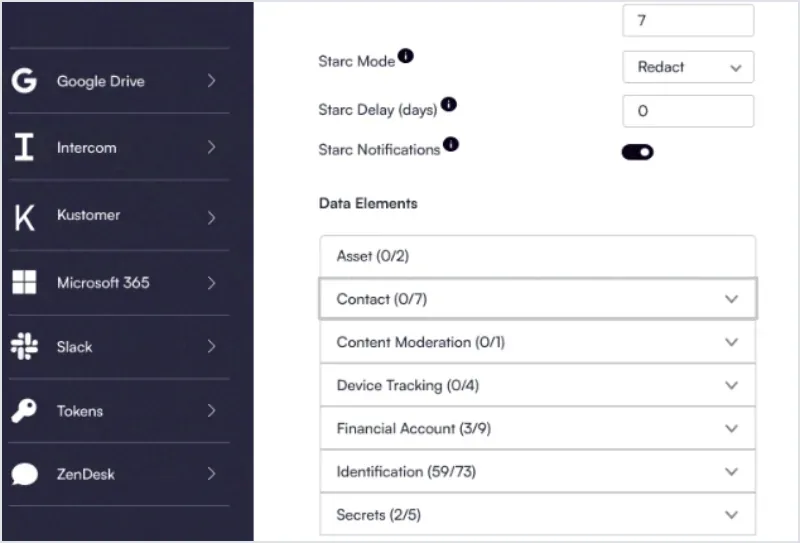
Strac represents the modern SaaS-native DLP approach, built on the premise that corporate data doesn't just live in email anymore — it lives in Slack threads, Notion pages, and increasingly in GenAI chat windows.
That SaaS-native focus comes paired with a privacy-first design that's a deliberate trade-off, not a missing feature: Strac doesn't use screenshots or keystroke logging, which limits its forensic evidence compared to screen-recording-heavy competitors like Teramind, but appeals to organizations wary of that level of surveillance.
Capability Breakdown:
Prevention
- ML + OCR models identify PII/PHI/PCI/source code/IP across PDF, DOCX, PNG, JPEG, XLS, and more
Control
- Widest cloud-app coverage in this category: Slack, Gmail, Office 365, Zendesk, Salesforce, Jira, Notion, Google Drive, OneDrive, Box, Intercom, and GenAI platforms like ChatGPT
- USB handling focuses on encrypting outbound data rather than device-level access control
- Printing has policy enforcement; clipboard copying of sensitive data can be blocked
- Deliberately no screenshots or keystroke logging — a privacy-first design choice, and no workstation-lock action
Audit
- Audit logs and file-level data-lineage tracking
- No watermarking
- What's marketed as an "API" is an MCP layer protecting AI-agent data interactions within its own product, not a general business-system integration API
Hands-on Impressions
Connecting a test Slack workspace to Strac and watching the first PII match get flagged happened well inside the advertised 10-minute window — the agentless approach genuinely delivers on speed, a different world from the weeks-long policy rollouts elsewhere on this list. Looking for a screenshot of the violation moment afterward, there isn't one to find; that's the deliberate privacy-first trade-off, not a missing feature.
Pricing
No public pricing — a scope-based quote covering which apps/platforms you protect, integration count, protected headcount, and historical scan-data volume, with no penalty for unused seats.
- Widest native SaaS/cloud-app coverage on this list, including GenAI platforms
- Agentless deployment advertised at under 10 minutes
- No screenshot/keystroke-based forensic evidence — a deliberate trade-off, but a real limitation if you need it
- No device-level USB control or watermarking; its "API" is scoped to AI-agent protection, not general integration
8. Securonix: SIEM/UEBA analytics layer, not a DLP replacement
👍 Best for
Organizations that already run a dedicated DLP tool and want to add an analytics/correlation layer on top — not a fit if you're evaluating it as a Proofpoint DLP replacement.
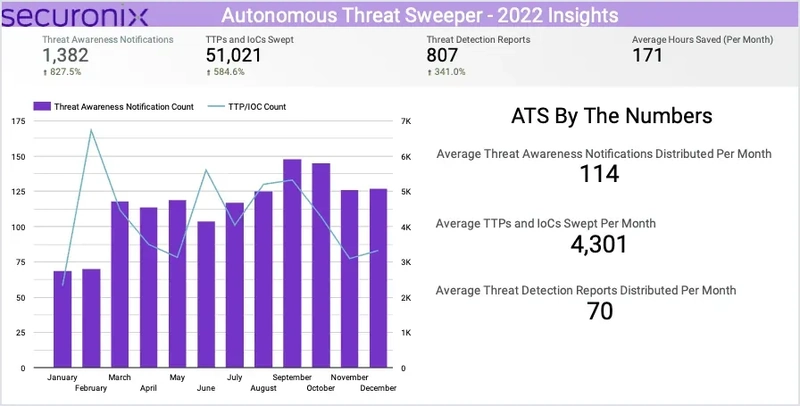
Easily mistaken for a DLP product because it keeps showing up in "Proofpoint alternatives" lists, Securonix is actually a Unified Defense SIEM + UEBA platform with no independent DLP line of its own.
That distinction matters for the buying decision, not just the category label: Securonix ingests DLP events through connectors — a Forcepoint DLP connector, for instance — rather than generating that data itself, so buying it doesn't remove the need to license a separate DLP product.
Capability Breakdown:
Prevention
- None — no sensitive-content identification, classification, labeling, or sensitivity-tiering; depends entirely on an upstream DLP product
Control
- None natively — no transparent encryption, no granular permission management, no native device/channel monitoring
- Ingests data through connectors (e.g., a Forcepoint DLP connector) rather than producing it itself
Audit
- UEBA anomaly detection and SOAR automated response — genuinely strong for correlating security events
- That's security-event analysis, not document-level audit logs, flow-tracing, or watermarking
- No open API oriented at business systems — only connectors into the security-ops ecosystem
Hands-on Impressions
Feeding Securonix a login anomaly and a separate data-access event and seeing them correlate into a single risk score is where the platform actually earns its SIEM/UEBA label — that kind of cross-event correlation isn't something a standalone DLP tool attempts. Tracing that same risk score back to which specific file was touched came up short, though: that detail lives inside whatever DLP connector fed the event, not inside Securonix itself, and setting up that connector was the first real piece of configuration work before anything correlated at all.
Pricing
Two-axis model — SIEM priced by event volume, UEBA by monitored users. Starting around $67,331/year at the base tier, with a 5,000-EPS mid-size deployment landing roughly $120K-$180K/year at the Foundational tier. Budget beyond that base license too: the compute/storage bill running underneath the platform typically adds another 30-60% on top for mid-size deployments.
- Genuinely strong UEBA anomaly detection and SOAR automation for correlating security events
- Useful analytics layer on top of an existing DLP tool if you already have one
- Not a DLP replacement in any layer — Prevention and Control are both entirely dependent on upstream tools
- Real total cost tends to run well above the base license once compute/storage is included
9. Safetica: Granular USB device control for SMBs
👍 Best for
SMBs prioritizing granular USB device control above all else — the BitLocker dependency is a real architectural limitation worth confirming for non-Windows environments.
Safetica targets the SMB market and is one of the few vendors on this list that genuinely merges DLP and Insider Threat protection into a single product rather than running them as separate lines.
USB device control is where it clearly leads the field, but that strength sits alongside a real architectural limitation worth knowing before you buy: its encryption leans on Windows' own BitLocker rather than a proprietary engine.
Capability Breakdown:
Prevention
- AI-driven smart tagging for automatic classification
- Static-data discovery, OCR for image-based sensitive content
- Predefined and customizable templates
Control
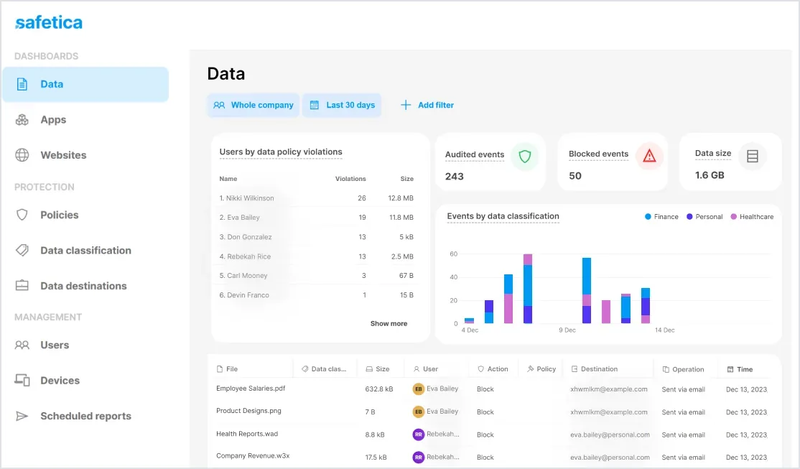
- USB device control is the sharpest edge — policies by device type or specific device, allow/block controls, forced encryption, full transfer logging, automatic scanning of connected external devices
- Broad email, web, and app monitoring, with real Microsoft 365 / Google Workspace coverage
- Encryption relies on Windows' built-in BitLocker, not a proprietary document-level engine — coverage on non-Windows systems is uncertain
- Print, screenshot, and clipboard control are less granular than the USB story
Audit
- Behavior logs, data-flow auditing, SIEM integration
- Data-analytics API feeding Power BI/Tableau reporting
- No watermarking; API is reporting-oriented, not a business-system integration point
Hands-on Impressions
Setting a device-specific USB policy in Safetica — allow this one drive by serial number, block everything else — took a couple of clicks and immediately felt like the most polished corner of the console. Checking whether that same forced-encryption policy holds on a non-Windows endpoint is where the BitLocker dependency becomes obvious fast: there's no equivalent toggle once you're off Windows, and rolling the same policy out across a larger batch of test endpoints took noticeably more repetitive clicking than the "fast deployment" framing implies.
Pricing
No official published rate card. Third-party estimates put entry-level pricing around $4.50-5/user/month, with full pricing requiring a sales quote.
- Sharpest granular USB device control in this category, well-suited to SMBs
- One of the few vendors genuinely merging DLP and Insider Threat into a single product
- Encryption depends on Windows' native BitLocker rather than a proprietary cross-platform engine
- Configuration effort at larger scale tends to exceed the "fast deployment" marketing
10. Digital Guardian: Deepest classification engine plus network-layer DLP
👍 Best for
Enterprises that want the deepest classification depth and a network-layer control point, and can absorb deployment complexity and premium pricing to get it.
Digital Guardian, now under Fortra, is a legacy enterprise DLP player with the deepest classification engine in this category — three distinct classification modes rather than the single content-scan approach most competitors use.
It's also one of the few products here with a genuine network-layer DLP appliance, monitoring and controlling data in motion at the network level rather than relying solely on an endpoint agent — a control point most SaaS-native competitors on this list simply don't have.
Capability Breakdown:
Prevention
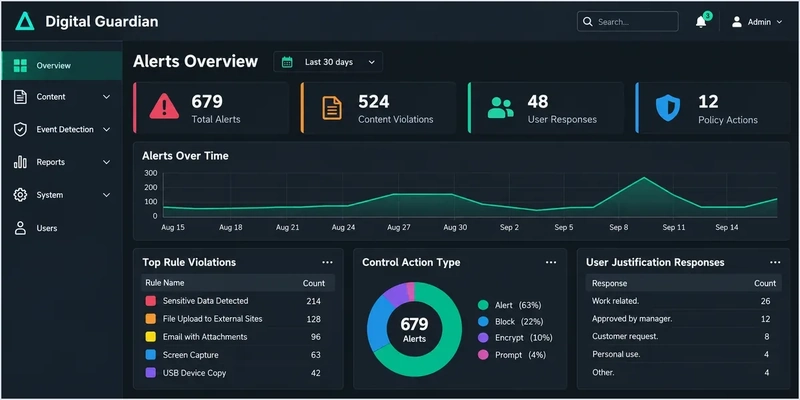
- Three classification modes: content-based, context-based (app/location/creator metadata), and user-based manual tagging
- Sensitivity directly influences alert priority rather than acting as a static label
Control
- USB/removable-media control is fairly granular: automatic logging, blocking, requiring business justification, or forced encryption, with limits by file type and data volume per time window
- Endpoint agent blocks suspicious insider or outsider activity in real time
- Separate network DLP appliance monitors/controls data in motion
- Mac and Linux get fewer features than Windows, with some control types Windows-only
Audit
- Well-regarded reporting and forensics
- Mature SIEM integration (ArcSight, QRadar, Splunk), syslog forwarding, open APIs for incident-response automation
- No watermarking — labeling operates at the metadata level, not as a mark embedded on the document
- API is oriented at SIEM/cloud-storage inspection integration, not general business-system integration
Hands-on Impressions
Tagging the same test file three different ways in Digital Guardian's classification console — by a content match, by the app that created it, and by a manual override — is where the "3-mode" claim actually holds up: each mode visibly moved the alert priority rather than just adding another label. Getting to that point took real setup time, though; the initial policy configuration was noticeably more involved than any of the SaaS-native tools on this list.
Pricing
Not publicly listed. Priced per protected endpoint, with a custom quote based on org size and DLP scope — consistent with most enterprise DLP incumbents on this list, but a real disadvantage next to Teramind's published tiers.
- Deepest classification engine in this category, across three distinct modes
- Rare network-layer DLP appliance most SaaS-native competitors don't offer
- Real Mac/Linux feature gap versus Windows; no watermarking
- Opaque, per-endpoint quote-only pricing described by reviewers as "very pricey"
11. Microsoft Purview DLP: The "already included in M365 E5" baseline
👍 Best for
Organizations already on Microsoft 365 that are Windows/macOS-heavy and don't rely on Slack, WhatsApp, Linux endpoints, or mobile-device DLP — for anyone outside that footprint, budget for a second tool.
For any organization already on Microsoft 365, Purview DLP is almost always the first "free baseline" compared against a dedicated DLP tool — and on Windows and macOS specifically, it's more capable than that framing suggests.
The catch is what sits outside its reach: the coverage that looks deep on paper — sensitivity labels, forensic-grade logging, live watermarking — stops cleanly at the edge of the Microsoft ecosystem, which is exactly where several of the gaps below start to matter.
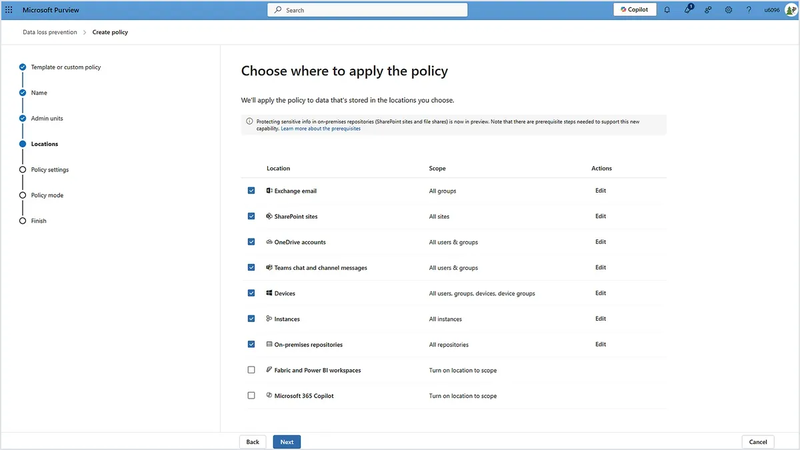
Capability Breakdown:
Prevention
- Sensitivity labels are the classification backbone — travel with the file/email, can trigger encryption, add visual markings
- Files scanned against sensitive-information types and labels on creation/modification, re-evaluated on read if policy changes
- Supports fingerprinting, exact data match, trainable classifiers, named-entity recognition
- Blind spot: a file never saved locally first (e.g., written directly to USB) can't be scanned or classified by endpoint DLP at all
Control
- Deep coverage on Windows and macOS: USB copy, network-share copy, print (including redirected printers on virtual desktops), clipboard copy (intra-app allowed, cross-app blocked), restricted cloud-service upload, Bluetooth transfer, RDP copy/paste (Windows only), screen-capture detection
- Zero Linux support — endpoint DLP only covers Windows 10/11, Windows Server 2019+, and the last few macOS versions
- Third-party IM sits outside native monitoring — Teams/Exchange Online/SharePoint/OneDrive covered, Slack and WhatsApp are not
- Mobile terminals sit entirely outside this DLP policy engine — device management there belongs to Intune, a separate mechanism
Audit
- Dynamic visible watermarking is fully live (not a preview) — overlays user-specific info on Word/Excel/PowerPoint files
- Forensic-grade audit logging: client IP, file path, timestamp, matched sensitive-info type, file hash, and (for USB events) device manufacturer/model/serial number
- No invisible/steganographic watermarking found
- Integration sits mainly inside the Microsoft security stack (Defender XDR, Sentinel) rather than a general third-party API
Hands-on Impressions
The moment a sensitivity label added a live, diagonal watermark to a test Word file — instantly, no separate policy push required — was the most satisfying thing to test in Purview: visible proof the label was actually doing something. That satisfaction faded fast once the same test file was shared from a Slack-connected device instead of Teams; the policy simply never saw it. Turning on endpoint DLP itself, at least, took minutes, since it's already sitting inside the Microsoft 365 admin center with no separate agent to install.
Pricing
Bundled into Microsoft 365 E5, which lists at roughly $60/user/month as the full subscription price — not an increment over E3 — with Purview DLP included alongside other security add-ons like Defender P2 and Entra P2. Already on E3 (roughly $39/user/month on its own)? The standalone Microsoft Purview Suite add-on brings Purview DLP on top of that for roughly $12/user/month more, without the full E5 upgrade.
- Genuinely deep coverage on Windows/macOS, including live visible watermarking — rare in this category
- Already bundled for any organization on M365 E5, with a lighter-weight E3 add-on option
- Zero Linux support; Slack and WhatsApp sit outside native monitoring
- Mobile devices are handled by a separate mechanism (Intune), not this DLP policy engine
How to Choose: A Few Practical Calls
Having gone through all 11 Proofpoint alternatives, a few conclusions stand out:
- Teramind and AnySecura are the only two here with self-serve, per-seat pricing you can calculate on your own. Teramind runs tiered pricing ($14-32/user/month); AnySecura publishes per-seat annual pricing ($420/seat/year, plus modular pricing and a lifetime-license option). Microsoft Purview and Cyberhaven have real numbers too — Purview through Microsoft's M365 license tiers, Cyberhaven through a typical flat-contract range — but neither is a simple per-seat calculator, and the rest of the list routes through a sales call before you see any number at all.
- For heterogeneous environments involving Linux, don't overthink it: Symantec DLP and Strac's endpoint agent are the ones with confirmed Linux coverage. Microsoft Purview is actually the weakest here — Linux users sit entirely outside its protection.
- If you're already on Microsoft 365 E5, don't assume that's "enough." Purview genuinely performs on Windows/macOS with solid watermarking and audit depth, but Slack/WhatsApp, mobile terminals, and Linux endpoints are simply outside its reach — if any of those apply to your environment, you'll still need a second tool.
- For pure "where did this file actually go" forensic needs, Cyberhaven's data-lineage technology is currently the most sophisticated — but it needs to be paired with a tool that handles encryption and permissions.
- Don't evaluate Securonix as a DLP product. It's a SIEM/UEBA analytics layer; even after buying it, you'll still need to source DLP separately.
- For post-leak traceability, only AnySecura (visible + invisible watermarking) and Microsoft Purview (visible only) can do it — the other 9 products in this list can't, which is a narrow but genuinely practical filter.
- If you want one platform covering classification, encryption, full-spectrum device monitoring, and post-leak forensics without stitching together multiple tools, that's exactly the gap a balanced three-layer product like AnySecura is built to close — but verify it hands-on with a trial rather than deciding from a feature list alone.
If your core requirement is managing a sensitive document's entire lifecycle — from creation through to tracing it back to a person after a leak — AnySecura's DLP solution is worth a look against your own environment.
FAQs about Proofpoint Alternatives
What are the main limitations of Proofpoint's DLP and Insider Threat products?
Channel coverage is broad (email, endpoint, cloud apps, USB, print), but a few specific capabilities are thin: encryption operates at the infrastructure level rather than per-document, there's no sensitivity-level tagging system, and there's no watermarking or general-purpose open API. Pricing requires a sales conversation.
Is Proofpoint a DLP tool or an Insider Threat tool?
Both — but as two separate, if integrated, product lines: Proofpoint Enterprise DLP (content/email-centric) and Proofpoint Insider Threat Management (endpoint behavior-centric). Clarify which line — or both — you're actually evaluating against alternatives.
What's the difference between DLP and email security?
Email security focuses on stopping inbound threats — phishing, malware, business email compromise. DLP focuses on preventing outbound data loss across any channel — email included, but also USB, cloud apps, printing, and screen capture. A product can be strong at one and weak at the other.
Does Proofpoint support geolocation tracking or OCR?
Geolocation tracking isn't a Proofpoint strength — it's one of the gaps competitors like Teramind specifically target. OCR support is limited; confirm the specific scenario you need with sales rather than relying on a feature list alone.
Can Proofpoint alternatives monitor cloud apps like Slack and Google Drive?
Strac has the widest native SaaS/cloud coverage in this category (Slack, Gmail, Google Drive, OneDrive, Box, Salesforce, Notion, Intercom, and GenAI platforms). Microsoft Purview covers its own ecosystem deeply but doesn't natively monitor Slack or WhatsApp. Proofpoint covers cloud apps at a general level, with less SaaS-specific granularity than Strac.
If I already have Microsoft 365 E5, do I still need a dedicated DLP tool?
Often, yes. Purview DLP is genuinely capable on Windows and macOS, with strong audit logs and live watermarking. But it has zero Linux support, doesn't natively monitor third-party IM tools like Slack or WhatsApp, and handles mobile devices through a separate mechanism entirely. If your environment touches any of those, "it's already included in my license" doesn't fully hold up.
How long does it take to implement a Proofpoint alternative?
Deployment timelines run longer for the enterprise incumbents (Symantec DLP, Digital Guardian, Forcepoint) — initial policy configuration tends to be involved. Lighter, SaaS-native tools — Strac in particular — advertise agentless deployment in under 10 minutes, though that scope is narrower: cloud apps rather than full endpoint/device control.
Can Insider Threat Management tools trace a leaked document back to its source?
Only AnySecura (visible and invisible watermarking) and Microsoft Purview (visible only) offer this. Cyberhaven takes a different approach — tracking a file's movement history rather than embedding an identifying mark. The rest, including Proofpoint, Teramind, and Forcepoint, don't have an equivalent traceability capability.
Conclusion
Proofpoint remains a reasonable baseline for teams that want one vendor spanning both DLP and insider threat management, but its own product pages already show where the gaps sit — no document-level encryption, no sensitivity tiering, no watermarking. That's exactly why a market of Proofpoint alternatives exists, and why the right one depends on which layer — prevention, control, or audit — your current setup is actually missing, not on which name shows up most often in search results.
If the gap you're trying to close is proving where a sensitive document actually went after it left your environment, that's the specific problem AnySecura is built around: transparent encryption and full-spectrum device monitoring paired with visible and invisible watermarking for post-leak traceability. Compare AnySecura's DLP solution against your own environment before committing to a longer evaluation cycle with the bigger incumbents on this list.