
A removable media policy is the set of rules that decides which USB drives, external disks, memory cards and other portable storage may connect to company computers, who may use them, and what data may travel on them. Without one, every employee, contractor and engineer makes that call alone, and the choice is usually whatever is fastest.
That is a problem because a drive moves data in both directions. It carries malware in and confidential files out, and it does both without touching the firewall, the email gateway or the cloud access rules. This guide explains what a removable media policy should include, which risks matter most in each environment (OT, R&D, shared office PCs, vendors), and how to turn each clause into a technical control. A free Word template is at the end.
📌Quick answer: A removable media policy should answer three questions: which devices are allowed (registration), what they may do (read, write, and which data), and whether you can prove it afterwards (logs).
- Default to deny: block every unregistered drive and open access by exception.
- Control data, not just devices: restrict what classified files can be copied and encrypt what leaves.
- Close the other exits: phones, Bluetooth and disc burning bypass a USB block.
What Is a Removable Media Policy?
A removable media policy is a written security policy that governs how portable storage devices are approved, registered, used, monitored and retired. It is not a ban on USB drives. A good one states which devices are allowed, for whom, with what permissions, and what happens when something goes wrong, so that the rules can be enforced by software and checked in an audit.
Types of Removable Media a Policy Must Cover
Do not write the policy around USB flash drives alone. Anything that can carry files out of the building belongs in scope:
| Device type | Typical use | Why it needs a rule |
|---|---|---|
| USB flash drives | Everyday file transfer | Easy to lose, easy to share between machines |
| External hard disks and SSDs | Backups, large design or media files | Large capacity means a large leak in one copy |
| SD and microSD cards, card readers | Cameras, industrial equipment, handhelds | Often forgotten, common in OT and field work |
| CD, DVD and Blu-ray discs | Offline distribution | Burning tools are an exit most USB policies miss |
| Smartphones and tablets | Connected as portable devices or USB storage | Behave like removable storage when plugged in |
One boundary is worth stating in the policy itself: not every USB device is storage. Keyboards, mice, webcams and USB network adapters are peripherals with different risks, and they need their own control. For that side of the problem, see what BadUSB is and how to prevent it.
What a Removable Media Policy Governs
| Dimension | The policy decides |
|---|---|
| Device authorization | Which devices may connect, and how they are registered and owned |
| User permissions | Which people, departments and computers may use them |
| Access level | Blocked, read-only, read/write, or time-limited |
| Data protection | Which data classes may be copied, and what must be encrypted |
| Monitoring and audit | What is logged, for how long, and who reviews it |
| Exceptions and incidents | How temporary access is approved, and what to do when a drive is lost or infected |
Why You Need a Removable Media Policy: Risks by Environment
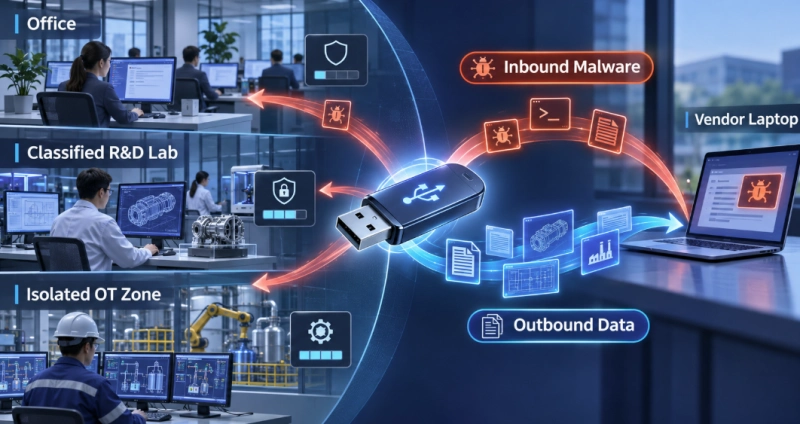
A drive is a two-way channel, so the risk runs in two directions. Inbound, it brings malicious code into a network. Outbound, it carries confidential data out. Which direction dominates depends on the environment, which is why a single blanket rule rarely fits.
Removable Media Security in OT and Industrial Environments
Operational technology (OT) networks run physical processes such as production lines, building systems and refrigeration, and they are usually segmented or air-gapped. That isolation is why a drive becomes the most likely way in: engineers and vendors still have to carry updates, configurations and logs across the gap. For the wider picture, see what OT security is.
Honeywell's 2022 report, drawn from hundreds of industrial facilities, found that 52% of threats were designed to use removable media and that 81% of the malware could disrupt industrial control systems. NIST's 2025 guide, SP 1334, treats outside media as untrusted and recommends inventorying approved drives, disabling unneeded ports, scanning before and after use, write-protecting read-only media and alerting on insertion.
The cost of an OT compromise is physical. In early November 2026, fridges and freezers in European supermarkets were reported to have warmed after being remotely taken over, and the French blood establishment EFS said extreme temperature thresholds had been set at three plasma storage sites, caught in time with no blood products compromised. This was not a USB attack; reports point to remote access to connected equipment and no attribution has been published. The lesson is narrower: an isolated environment is only as strong as its least-managed entry point, and in an air-gapped network that is often a drive.

An OT policy should therefore be stricter than the office version:
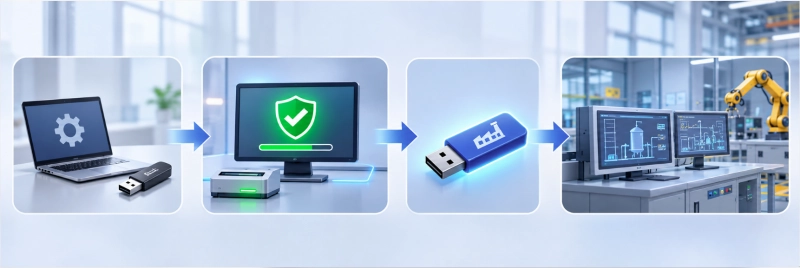
- Zone-dedicated media, labelled, stored securely and reformatted before moving to other equipment.
- A clean station outside the zone where every drive is scanned first.
- No vendor drives plugged in directly; files are inspected and loaded on company-owned media.
- Unused ports closed, with an alert on any insertion.
Preventing Data Leakage from Classified Departments and R&D Teams
For R&D, legal, finance and any department handling classified material, the danger runs the other way. Firewalls, mail gateways and cloud controls can all be in place while a design file, source code or customer list still leaves on a pocket-sized drive. Many of these events are not malicious: someone copies a file to work from home. The policy therefore has to do three things: allow only registered company drives, restrict which data classes may be copied, and require encryption on whatever does go out. Each rule needs a log behind it, or it cannot be audited.
Reducing Malware Reinfection and IT Support Load on Shared Office PCs
In an ordinary office the cost is quieter. When dozens of people share drives, borrow them from home computers, or plug in a supplier's stick, one infected device spreads across desks. IT then spends its time on repeated cleanups, reimaged laptops and lost working hours. A removable media policy is as much an IT operations tool as a security one: fewer unknown devices means fewer tickets. Note that blocking and registering devices limits what connects, but it does not scan what is on a drive, so the policy should also require malware inspection for external media.
Controlling Contractor, Vendor and Remote Worker USB Drives
Third parties bring their own devices into your environment, and employees working remotely carry drives between home and office machines you do not manage. The policy should say that outside drives are not plugged into company systems, that vendor files arrive by an approved route and are inspected, and that any temporary exception has a named approver and an end date.
Compliance: ISO 27001 and NIST Removable Media Requirements
Auditors rarely ask for a document and stop there; they ask how you know it works. ISO/IEC 27001:2022 treats storage media as its own control (A.7.10), and NIST SP 800-53 covers media use in its Media Protection family. Both expect rules for approval, handling, transport and disposal, and evidence that the rules are followed, which is why registration and logging belong in the policy, not just in a tool.
What to Include in a Removable Media Policy
The environments above differ in what they stress, but the policy that governs them has the same backbone. A policy that fits on a page is usually too vague to enforce, so these ten clauses are the minimum. Each maps to a section of the free template at the end of this guide, and the settings table below shows how to tune them per environment.
| Clause | What it must say | Template section |
|---|---|---|
| Scope and definitions | Who and what is covered, including phones and discs | 1–2 |
| Default-deny principle | Unregistered media is blocked; access is by exception | 3 |
| Device registration | Every approved device is recorded with a named owner | 5 |
| Access levels | Blocked, read-only, read/write or time-limited, per user and system | 6 |
| Data classification and transfer | Which data classes may be copied to media | 7 |
| Encryption | What must be encrypted, and how | 7 |
| Malware inspection | External media is scanned before first use | 9 |
| Monitoring and audit | What is logged, retained and reviewed | 10 |
| Exceptions | Who approves, for how long, and how it expires | 11 |
| Incidents and violations | How to report loss or infection, and the consequences | 12–13 |
Removable Media Policy Settings by Environment
One policy can carry different settings for different environments. A practical starting point:
| Environment | Default | Access | Encryption | Approval |
|---|---|---|---|---|
| General office | Registered company drives only | Read/write by department | Required for Confidential data | Line manager |
| R&D and classified departments | Registered drives only; classified files blocked from copying | Read-only unless justified | Enforced | Security team |
| OT and industrial | Blocked except zone-dedicated media | Time-limited, per task | Enforced | OT lead and security |
| Contractors and vendors | Their own drives blocked | Read-only or company-issued media | Applied to anything leaving | Sponsor, with expiry date |
Removable Media Encryption: Encrypt the Drive or Encrypt the Files?
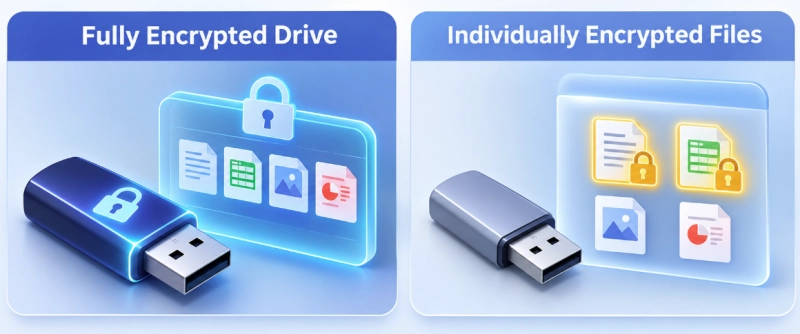
Almost every removable media policy says sensitive data must be encrypted. Fewer say how, and there are two quite different models. The right choice depends on whether the drive is for company use only or has to serve both work and personal files.
| Encrypt the drive | Encrypt the files | |
|---|---|---|
| How it works | The whole drive is formatted as an encrypted disk that only managed computers can read | Files written to a registered drive are encrypted automatically; the drive itself stays ordinary |
| If the drive is lost | Nothing can be read | Company files cannot be opened; personal files are untouched |
| Best for | Company-issued drives used only inside the organization | Drives that serve both work and personal use |
| Trade-off | Unusable on outside computers, by design | Company files open only on authorized terminals |
AnySecura's Removable Media Control supports both. In the Removable Storage policy, Disk Type selects the kind of drive the rule applies to, and Readable and Writable set what is permitted. An encrypted disk can be given read and write access for company use:
For drives that mix work and personal files, tick Auto Encrypt under Writable instead. Files copied onto the drive are then encrypted transparently, so they cannot be opened on outside computers, while the drive stays usable for everything else:
Enforcing a Removable Media Policy with Technical Controls
A rule relies on goodwill until a technical control enforces it, so every clause needs one, plus a record that proves it held. For each clause, ask: what control makes this true, and what record proves it?
| Policy requirement | Technical control | Evidence it leaves | AnySecura module |
|---|---|---|---|
| Only registered devices are used | Device registration; unregistered and personal drives are blocked | Device register, connection log | Removable Media Control |
| Access by role | Read and write rights per department or user, limited to chosen computers | Policy list, change history | Removable Media Control |
| Classified data cannot leave | Block copying of files by security level, label or sensitive content to removable storage | Blocked-copy alerts, optional backup copy | Sensitive Content Inspection, Document Tagging |
| Encryption on drives | Encrypted disks, or automatic encryption of files written to a drive | Policy settings; files unreadable off-network | Removable Media Control |
| Other exits are closed | Phone, Bluetooth, disc-burning and hotspot control | Device logs, blocked attempts | Device Control |
| Temporary exceptions expire | Access requests or self-declaration with an expiry time | Request records | Removable Media Control |
| Lost drives are neutralized | Report a drive lost and deregister it | Lifecycle record | Removable Media Control |
| Everything is auditable | Log insertion, removal and file operations on removable storage | Removable storage logs | Removable Media Control |
For classified teams, the row that matters most is "Classified data cannot leave." The blunt way to meet it is to block every USB drive, which also stops the ordinary work that has nothing to do with classified material. A narrower approach is to block only the files that must not leave. In a Sensitive Information Outbound Control policy, set Action to Block, name the security levels to cover, and tick Copy to Removable Storage. Everyone else keeps working as normal, and when a block catches someone with a legitimate need, Quick request lets them ask for a one-off approval instead of looking for a workaround.
How to Implement a Removable Media Policy in 5 Steps
- Take inventory. Find out which drives are actually connecting today and who uses them. The list is almost always longer than expected.
- Write the policy. Start from the clause list above, set the default to deny, and define access levels per environment.
- Group and assign. Register approved devices, assign owners, and set permissions by department, user and computer group. Run in audit mode first if you can, so you see what would be blocked before it is.
- Add the exception path and train people. A fast, documented way to ask for temporary access is what stops staff from working around the rules.
- Review on a schedule. Reconcile the register against what is observed, expire stale exceptions, and revisit the policy at least annually and after any incident.
AnySecura's Removable Media Control maps onto these steps directly: device registration and per-computer, per-user policies cover steps 1 to 3, a log-only action lets you see what would be blocked before you enforce it, and temporary access requests in step 4 are approved and recorded in the same console. The removable storage logs then give you the evidence step 5 reviews.
Removable Media Policy FAQ
What is a removable media policy?
It is a written security policy that sets the rules for portable storage such as USB drives, external disks, memory cards and discs: which devices are allowed, who may use them, what data may be copied, and how use is logged and reviewed.
What should a removable media policy include?
At a minimum: scope and definitions, a default-deny principle, device registration, access levels, data transfer and encryption rules, malware inspection, monitoring, an exception process, and incident reporting. The template below has all of these.
Is a smartphone removable media?
It can be. A phone connected as a portable device or in USB storage mode lets files be copied just like a drive, so the policy should name phones and say how they are handled.
Does blocking USB storage also block keyboards and mice?
It should not. Storage and input devices are different device classes. Set the rule for storage specifically, and control keyboards, mice and network adapters through a separate peripheral device rule.
Can employees use personal USB drives?
By default, no. Personal drives are unregistered and cannot be tied to an owner or a purpose. If a business need exists, register the drive, apply the same permissions and encryption rules, and give the exception an end date.
How should we handle a vendor's or contractor's USB drive?
Do not plug it into company systems. Ask the vendor to deliver files by an approved route, inspect them, and load them on company-owned media. Where a vendor drive is unavoidable, approve it per visit and supervise the connection.
Does a removable media policy need to require encryption?
For anything beyond public data, yes. Encryption means a lost drive does not become a data breach. The policy should say what must be encrypted and by what method, rather than just "use encryption".
How often should a removable media policy be reviewed?
At least once a year, and after any incident, a major change to your IT or OT environment, or a change in the rules you operate under.
Free Removable Media Policy Template (Word Download)
Writing a removable media policy from scratch takes time, and most free templates are a page or two of general statements. Ours is an editable Word document with 14 policy sections and 6 appendices: a device register, an access and exception request form, an implementation checklist, a pre-use checklist, an incident report form, and a standards mapping to ISO/IEC 27001:2022, NIST SP 800-53 and NIST SP 1334. It includes the OT requirements discussed above, and every recommended value is marked as a recommendation, not a standard.
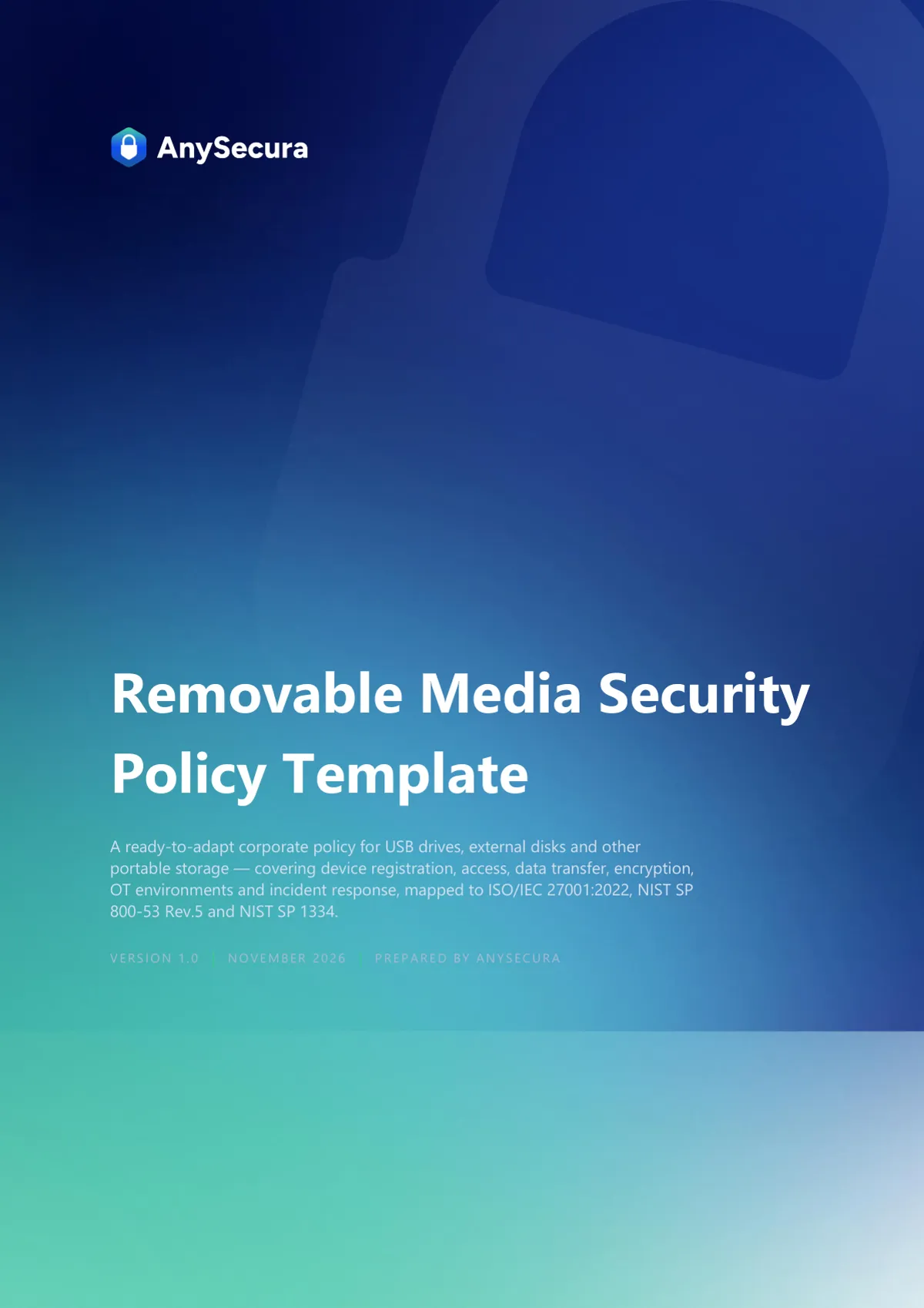
An editable Word policy for USB drives, external disks and other portable storage, with OT requirements and ready-to-use forms. Get the template>>
The template is general reference material, not legal advice, so have legal and compliance review it before you publish. Once the policy is written, AnySecura's Removable Media Control is built to enforce it.