
BadUSB is an attack that reprograms the firmware of a USB device so it pretends to be something else, most often a keyboard, and then types commands into the computer it is plugged into. Nothing malicious has to sit on the device as a file, which is why a BadUSB device can look like an ordinary flash drive, webcam, or cable and still take over a machine in seconds.
That is what separates BadUSB from the USB malware most security training covers. The danger is not what a USB device stores but what the operating system believes the device is. This guide explains what BadUSB is, how the attack works, how it has evolved from 2014 to today (including the 2025 BadCam research on Lenovo webcams), and what a business can do to block it and respond when something slips through.
📌Quick answer: BadUSB turns a trusted-looking USB device into a keyboard or network adapter controlled by an attacker. Antivirus rarely sees it because the attack lives in firmware and in keystrokes, not in files.
- Prevent: allow only approved device types, and stop unknown programs from running.
- Respond: when a device is suspected, IT needs to see what was just connected and kill what it launched.
What Is BadUSB?
BadUSB is a class of attack in which a USB device's controller firmware is rewritten, or a purpose-built device is made, so that it tells the computer "I am a keyboard" (or a network card) when it connects. Operating systems trust that self-description, load a driver, and accept input from the device without asking the user.
The term is often stretched to cover every USB threat, which makes the defenses harder to choose. These five are related but different:
| Threat | How it attacks | What the computer sees |
|---|---|---|
| BadUSB | Firmware of an ordinary USB device is reprogrammed to impersonate another device type | A keyboard, network adapter, or other device the user never meant to add |
| USB HID injection (Rubber Ducky, Bash Bunny) | A purpose-built gadget enumerates as a keyboard and plays back pre-written keystrokes | A keyboard |
| Malicious USB cable (O.MG-style) | A tiny implant hidden inside the cable injects keystrokes | A keyboard, from a cable that looks normal |
| USB malware | Infected files on a USB drive run when the user opens them or autorun triggers | A normal storage drive |
| Malicious charger (ChoiceJacking) | A charger fakes user input to approve a phone's data-access prompt | A charger that quietly becomes a host |
BadUSB and HID injection overlap, since both end with fake keystrokes, but HID injection does not need a hijacked legitimate device. Not every USB device is vulnerable to BadUSB: the attack needs firmware that can be rewritten without cryptographic signature checks, and a payload written for that specific controller.
How Does a BadUSB Attack Work?
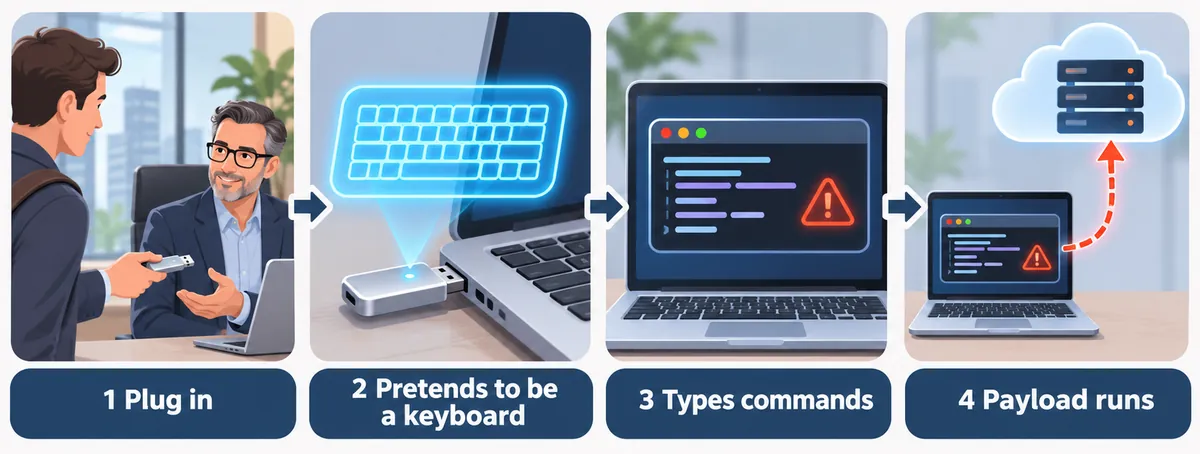
A BadUSB attack follows the same four steps whether the device is a flash drive, a webcam, or a cable:
- Device manipulation. The attacker rewrites the device's firmware, or builds a gadget with malicious firmware from the start.
- Device impersonation. When it is plugged in, the device reports a different identity to the computer, typically as a keyboard (HID) or a network adapter.
- Command injection. A fake keyboard types faster than any person: it can open a terminal or the Run dialog and enter commands in a few seconds.
- Malicious action. Those commands download and run a payload, open a remote connection, change settings, or copy data out.
Picture an office: a visitor "lends" an employee a USB drive with a presentation, or a promotional USB gadget arrives in the mail. The employee plugs it in. A security tool that only watches for infected files sees nothing, yet the computer has just accepted a new keyboard and typed a PowerShell command nobody wrote.
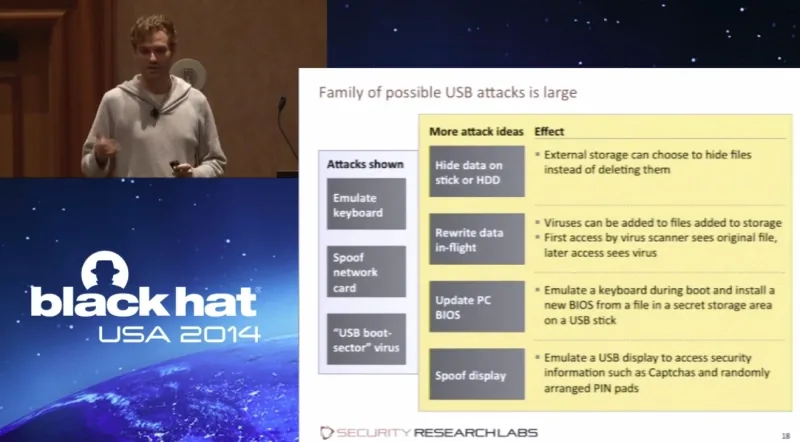
The same trick works with network adapters. The original 2014 research came from Karsten Nohl and Jakob Lell of Security Research Labs (SR Labs), a Berlin security research firm, who presented it at Black Hat USA 2014. Their demonstration showed that a device posing as a network card can redirect traffic, so the attack is not limited to typed commands.
BadUSB Timeline: From 2014 to Today
BadUSB did not stay a one-time conference stunt. Each stage below pushed the idea further from "a trick with a flash drive" toward "any peripheral can be a risk."
- 2014: the original research. At Black Hat USA 2014, Karsten Nohl and Jakob Lell of SR Labs showed that USB controller chips could be reprogrammed to hide attack code. They tested controllers from Phison, which disputed the findings at the time, and argued that malware scanners cannot read device firmware. Coverage from that week also records that the attack had not been seen in the wild.
- 2015 to 2023: purpose-built tools. USB Rubber Ducky, Bash Bunny, and O.MG-style cables made keystroke injection cheap and repeatable. They are not firmware-hijack BadUSB in the strict sense, but they exploit the same trust: a computer accepts whatever a USB device says it is.
- 2024: defenses get smarter. The USBIPS framework proposed combining a device allowlist with per-device-class behavior analysis, partly because an attacker can copy the descriptor of an allowlisted device onto cheap hardware.
- 2025: ChoiceJacking. Researchers at Graz University of Technology presented ChoiceJacking at USENIX Security 2025: a malicious charger that injects fake input to approve a phone's "trust this computer" prompt. It is an adjacent attack, not classic BadUSB, but it comes from the same weakness in the USB trust model.
- 2025: BadCam. Eclypsium showed that certain Lenovo webcams could be reflashed into keyboards. This is the case that matters most for offices, so it gets its own section below.
Case Study: BadCam, When a Webcam Becomes a Keyboard
BadCam is the clearest recent demonstration that BadUSB is not only about suspicious flash drives. The affected devices are the Lenovo 510 FHD and Lenovo Performance FHD webcams, which run Linux on a SigmaStar chip. Eclypsium found that their firmware update mechanism did not verify signatures (tracked as CVE-2025-4371), and presented the research at DEF CON 33 in August 2025. The Hacker News and SecurityWeek both covered it.
Here is why that matters for a company:
- It passes an allowlist. The webcam was bought through normal procurement and is on the approved device list, so a policy that trusts known hardware lets it through. The risk is not a stranger's device but a trusted one that has changed what it does.
- Malware on the PC can start it. In Eclypsium's scenario, an attacker who already controls a computer reflashes the connected webcam, which then acts as a keyboard and types commands on its own. Lenovo's advisory describes a narrower case, where the attacker needs physical access and writes firmware over USB.
- A cleaned PC may not stay clean. Wiping the malware from the computer does not touch the webcam's firmware, so a modified camera can attack the same computer again.
- A fix exists. Lenovo released firmware 4.8.0 to address the issue, so affected webcams should be updated.
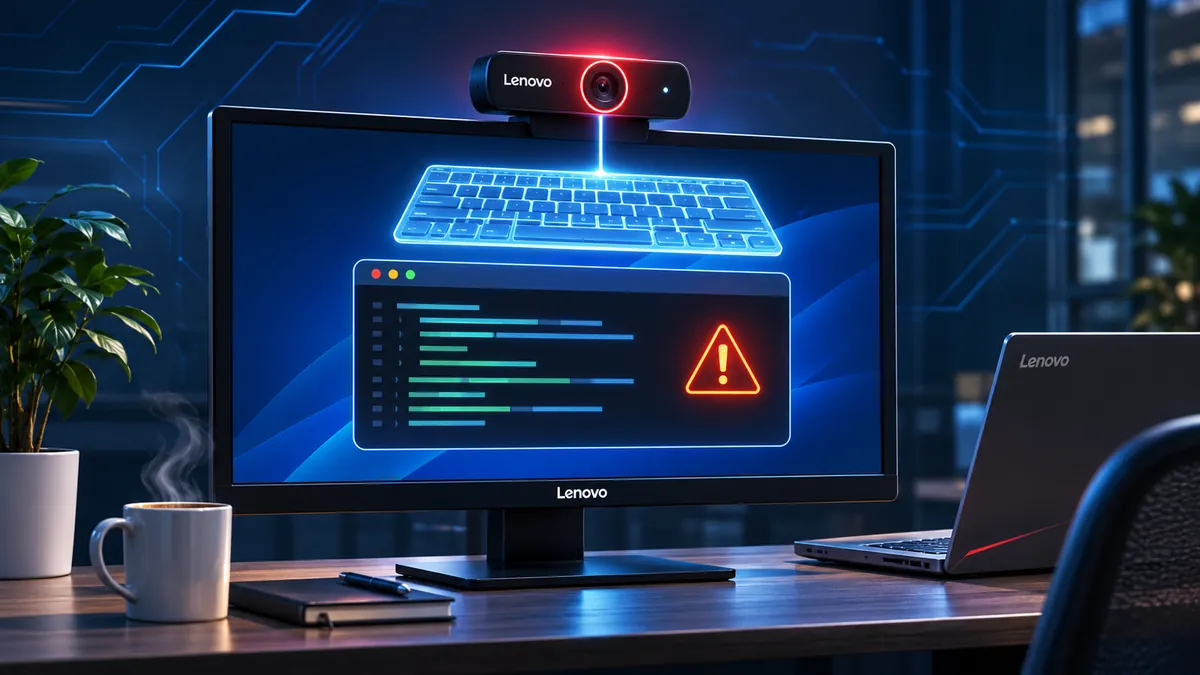
BadCam was a research demonstration, not a reported mass-exploitation campaign. The lesson for IT is narrower and more useful than the headline: any peripheral with reprogrammable, unsigned firmware can become an input device, and "we only buy approved hardware" does not remove that risk.
Why Antivirus and "Block USB Storage" Aren't Enough
Antivirus inspects files, not firmware
Endpoint antivirus scans files and watches processes. A BadUSB device has no file to scan, and its firmware sits on the peripheral where the operating system cannot read it. The first thing antivirus sees is the PowerShell or command-line process that the fake keyboard started, by which point the payload may already be running.
Blocking storage does not block keyboards
Many companies "block USB" by disabling USB mass storage. That closes the data-copying route, and a BadUSB device that identifies itself as a keyboard walks straight past it, because the policy only ever asked "is this a storage drive?"
Blocking USB storage devices is not the same as controlling all USB peripherals.
Device identity can be copied
Allowlisting by vendor ID, product ID, or serial number is a real improvement over doing nothing, but those values are reported by the device itself. The USBIPS authors point out that cheap hardware such as a Raspberry Pi Zero W can reproduce the attributes of an allowlisted device. An allowlist narrows the attack surface; it does not prove a device is genuine. That is why mature programs add behavior checks and program control on top.
AI is making more devices candidates
Turning a device into a BadUSB used to take specialist skill: dumping firmware, reverse engineering the update mechanism, finding a missing signature check, and writing a payload for that exact chip. AI tools lower each of those costs. They can help an attacker analyze a firmware image, explain unfamiliar chip code, spot weak update routines, and generate and adapt payloads far faster than before.
The result is a wider range of devices that can be reworked into BadUSB: webcams, docks, headsets, hubs, and cables with embedded firmware, not only flash drives. Every peripheral with unsigned, rewritable firmware is a candidate, and attackers can try many models instead of perfecting one. Defenses that depend on recognizing specific known-bad devices age quickly under that pressure.

How to Protect Against BadUSB
No single control stops every BadUSB variant, so the practical answer is layers: limit which devices can connect, limit what a fake keyboard can do once connected, and make sure someone can respond quickly.
| Layer | Benefit | Limitation |
|---|---|---|
| Device allowlisting | Only approved devices can connect, so random devices and visitor gadgets are refused by default | IDs can be spoofed if identity is the only check |
| Device-class control | Closes whole device types (HID, network adapter, Bluetooth, storage) where a role has no need for them, which blocks a fake keyboard at the door | Needs a per-role policy, and real keyboards still have to work |
| Device installation restrictions | Stops new, unapproved devices from installing drivers; built into Windows Group Policy at no cost | No approval workflow or central audit by itself |
| Application allowlisting | Blocks the payload a fake keyboard downloads and tries to run, even if the device got through | Does not stop commands that use built-in system tools |
| Least privilege | Shrinks the damage of injected commands, since they run with the signed-in user's rights; restricting elevated command prompt and PowerShell cuts it further | Admin accounts remain valuable targets |
| Firmware hygiene | Closes known holes such as BadCam in peripherals like webcams and docks; signed firmware prevents silent rewrites | Many peripherals have no update path |
| Physical controls | Costs almost nothing: no unknown devices from visitors or mailings, data blockers for public charging, unused ports disabled | Relies on people following the rule |
Behavior monitoring is the newest layer: a "keyboard" that types hundreds of characters in a second, or a webcam that suddenly enumerates as an input device, is not behaving like the hardware it claims to be. It is still maturing, so treat it as an addition to the controls above, not a replacement. For the broader question of controlling USB storage itself, see our guide to USB blocking software, and for the privilege side, the principle of least privilege.
What to Do If You Suspect a BadUSB Attack
Prevention fails sometimes, and most BadUSB guides stop before this point. If a computer starts behaving strangely right after a device was connected, work through this order:
- Disconnect the device and isolate the computer from the network. Unplugging stops new keystrokes, not payloads already running.
- Identify what was connected. Check the list of connected devices for anything unexpected, such as a "keyboard" that appeared when a storage drive or webcam was plugged in, or a new network adapter.
- Review what started afterwards. Look at running processes, services, startup items, and scheduled tasks created around the connection time. Persistence usually lives in one of these.
- End and remove the malicious items. Kill the process, stop and delete the service, and remove the startup entry or scheduled task.
- Treat credentials as exposed. A fake keyboard runs with the signed-in user's rights, so reset that user's passwords and review what that account touched.
- Retire the device. Do not plug it into another computer to "test" it. Firmware-level compromise cannot be reliably cleaned by deleting files.
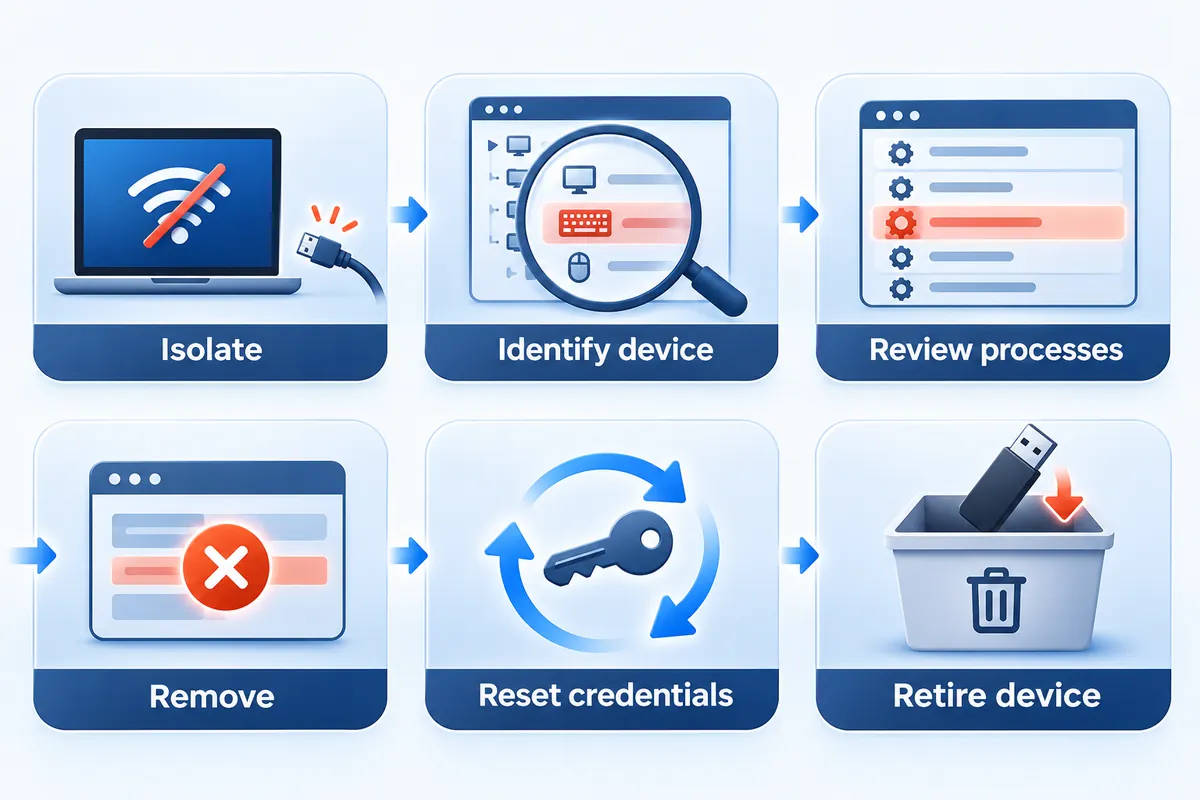
The hard part in a real company is steps 2 to 4. The affected computer may be in another building or another country, and the user is usually not the person who should be poking around in Device Manager. IT needs a way to look at the endpoint remotely and act on it directly.
How AnySecura Helps Reduce BadUSB Risk
AnySecura is an endpoint security platform, not a firmware scanner, so it does not claim to detect a reprogrammed chip. What it does is control the three points a BadUSB attack depends on: which devices may connect, which programs may run afterwards, and how fast IT can investigate.
Control which devices can connect
Device Control manages 38 device categories separately, including USB keyboards and mice, wireless and virtual network adapters, Bluetooth, and storage. It can also forbid any newly added device outright, so an unknown "keyboard" or network card is refused by default. Approved devices can be released by description, and staff can request or self-register a temporary exception when they genuinely need a new peripheral. That directly covers the gap in the "block USB storage" approach. Removable Media Control handles the storage side of the same policy.
Stop unknown programs from running
A fake keyboard usually ends by launching a downloaded program. Application Control supports application allowlisting: unauthorized programs are blocked from running by process name or application category, and unapproved software installations are blocked too. If a BadUSB payload tries to drop and start an unknown executable, it meets a policy that was not written for it. As the table above notes, this does not stop an attacker who sticks to built-in system tools, which is why it works best together with device control.
Investigate and respond remotely
When a USB-borne intrusion is suspected, IT can open the endpoint in Real-time Maintenance, part of AnySecura's Remote Maintenance module. From the console, an administrator can see the connected devices, running processes, services, startup items, and scheduled tasks on the computer, then end a malicious process or service directly, without waiting for the user or traveling to the machine. It follows steps 2 to 4 of the response list above almost one to one.
None of these replaces cryptographic device authentication or keeping peripheral firmware patched. Together they turn "an unknown device was plugged in" from an unnoticed event into one that is refused, contained, and cleaned up. For the wider picture of endpoint controls, see AnySecura's endpoint management solution.
FAQs About BadUSB
Is BadUSB still a threat in 2026?
Yes, and the risk is growing. BadCam showed in 2025 that peripherals already in use can be reflashed, and AI tools are lowering the effort needed to reverse engineer firmware and write payloads, so attackers can move faster and turn more device types, such as webcams, docks, and cables, into attack tools. It is still rarer than phishing, but targeted attacks and visitor-supplied devices are a realistic risk.
What is the difference between BadUSB and a USB Rubber Ducky?
A Rubber Ducky is a purpose-built device that acts as a keyboard from the start. BadUSB reprograms the firmware of a legitimate-looking device to make it behave differently. The visible result, injected keystrokes, is the same, which is why defenses overlap.
Can antivirus detect BadUSB?
Usually not at the device level. Antivirus scans files, and a BadUSB device carries its attack in firmware. It may catch the program that the fake keyboard downloads, but only after the attack has started. Device-class control and program allowlisting add checks that antivirus lacks.
Can a BadUSB device be cleaned once it is infected?
Do not rely on it. Deleting files does nothing to firmware, and a compromised device can re-infect any computer it is plugged into. Treat the device as untrusted and replace it, and update firmware on affected models where the vendor has released a fix, as Lenovo did for BadCam.
Can a USB cable or charger carry a BadUSB attack?
Yes. Malicious cables with a hidden implant can inject keystrokes, and chargers can abuse the USB trust model on phones, as shown by ChoiceJacking. A USB data blocker, which passes power but not data, helps for charging in public places.
Is BadUSB the same as a USB HID attack?
No. A HID attack means the device pretends to be a keyboard or mouse. BadUSB is one way to get there, by reprogramming a normal device. HID attacks can also come from devices built to do that from day one.
Are all USB devices vulnerable to BadUSB?
No. A device is exposed when its firmware can be rewritten without signature verification and an attacker has a payload for that controller. Hardware-only controllers and devices with signed firmware are much harder to abuse, but buyers rarely know which they have, so controlling device classes remains the safer default.
Can Windows block BadUSB on its own?
Partly. Group Policy can restrict installation of new devices and can disable USB storage, which helps. It offers no approval workflow, no central audit of what was connected, and no control over which programs run afterwards, so larger environments add dedicated endpoint controls.
Conclusion: Don't Trust a USB Device Just Because It Fits
USB is still the most common peripheral port in the office, and the devices on it now carry firmware, embedded operating systems, and multiple functions. BadUSB is the reminder that a device should be trusted for its identity, its authorization, and its behavior, not simply because it can be physically connected to a computer.
The practical takeaway is to control device classes rather than only storage, keep unknown programs from running, and make sure IT can see and clean an endpoint quickly when something gets through. If you want those three pieces in one place, AnySecura's Device Control is where to start.