
Forcepoint is a data security vendor with many products. Forcepoint DLP and DLP SaaS are among its most popular. But a product with so many users cannot fit everyone. It may not match your needs or budget. If so, you could consider Forcepoint DLP alternatives like Symantec, AnySecura and others.
This article reviews 8 top Forcepoint DLP alternatives for 2026. We compare their features, deployment, and pricing to help with your DLP migration project.
Key takeaways
- Match the tool to your main risk. Start with Symantec for enterprise endpoint and network DLP, Microsoft Purview for Microsoft 365, or AnySecura for self-hosted Windows DLP and device control.
- Check where each rule runs. USB and print controls run on managed devices. Email gateway inspection, SaaS sharing, and AI prompts each need their own checks.
- Compare the cost of the same coverage. Confirm which modules the quote includes, where incident evidence is stored, and who maintains the system.
- Pilot before switching. Run the same Forcepoint policies on two or three shortlisted products. Test approved transfers, blocked transfers, and the evidence each event leaves behind.
Forcepoint DLP alternatives at a glance
Here are the Forcepoint DLP alternatives at a glance. Use this table to narrow your list fast and find a product that fits your organization, deployment needs, and budget. Click any product to see its DLP features in detail.
| Product | Best fit | Deployment | Price signal |
|---|---|---|---|
| Symantec DLP | Enterprise endpoint, network, and discovery | Hybrid option with customer-hosted Enforce and Broadcom cloud detection | Quote-based (~$110/endpoint/year via reseller) |
| AnySecura | Windows endpoint DLP, device management, and activity audit | Customer-hosted, on-premises | From $18/seat/month or custom module quote Free trial up to 3 months |
| Fortra DLP | IP protection on Windows, macOS, and Linux | On-premises, SaaS, or fully managed | Quote-based (~$96/endpoint license/year via reseller) |
| Trellix DLP | Enterprises that already use Trellix ePO | ePO on-premises or ePO SaaS | Quote-based CDW $99.99/endpoint/yr · SHI $58/user/yr |
| Microsoft Purview DLP | Exchange, SharePoint, OneDrive, and Teams data | Microsoft cloud with endpoint agents | E5 ~$60/user/mo E3 ~$39 + $12/user/mo add-on |
| Cyberhaven | Tracing sensitive files across devices and SaaS apps | Cloud-managed | Quote |
| Netwrix Endpoint Protector | USB and peripheral control across operating systems | Virtual appliance, cloud-hosted, or SaaS | Quote |
| Safetica | Teams comparing cloud and self-hosted endpoint DLP | Safetica Platform or Safetica On-Prem | Cloud from $72/user/year. On-Prem by quote |
What capabilities should a Forcepoint DLP alternative have?
A Forcepoint DLP alternative should enforce the business rules you still need. For each rule, specify the data, the user's action, where enforcement happens, and how your team should respond. Use those rules to compare demos with the same scenarios.
Recognize the data you need to protect
Use a sample that reflects your business. A customer list can need exact data matching. A design document may need document fingerprinting or classification by label. Check whether the tool still recognizes the data when a user renames a file, copies a passage, or saves it in another supported format. Include a similar file that should pass to check for false positives.
Cover the channels your users actually use
- Endpoints. Check USB and external storage, printing, clipboard, and network shares. Run each required action on the operating systems you manage and test offline behavior if staff work without a connection.
- Web, email, and messaging. Separate browser uploads and desktop email or IM transfers from inspection at the proxy or mail gateway. A rule running on a laptop and a rule inspecting all outbound mail cover different devices and users.
- SaaS and generative AI. Test a managed browser upload, a file already in the tenant, and an external share link. For AI, test pasting sensitive text into a prompt, attaching a file, and retrieving a file through an approved workplace assistant. Treat each as a separate requirement.
Control the transfer and preserve evidence
Check the actions you need at each channel. These might include logging, warning, blocking, and routing an exception for approval. If employees share confidential files with suppliers, test whether an approved copy can stay encrypted or carry a traceable watermark. Ask an analyst to retrieve the event and identify who acted, what data matched, where it went, and how the policy responded.
How to compare deployment and pricing for Forcepoint DLP alternatives
Use the capabilities above to eliminate products that miss a required channel. Then compare where each shortlisted product runs and how the vendor charges for the controls you need.
Deployment and data residency. For a customer-hosted product, identify who maintains the server, database, backups, and upgrades. For a vendor-managed product, verify service region, telemetry, retention, and support access. With hybrid deployments, map the local agents, cloud detectors, and connectors separately. Ask where incident records and copies of sensitive files go under the proposed configuration.
Price transparency. Ask each vendor to quote the same number of users and endpoints, the same channels, and the same evidence retention period. Identify what is billed per seat or user and what costs extra. Forcepoint uses custom quotes for cloud and on-premises DLP, so use your itemized renewal as a baseline. A public starter price is useful once you know which plan covers the policies you intend to run.
Migration and operating cost. Include agent rollout, policy rebuilding, integration work, training, and incident review in a three-year estimate. A managed service may change who runs the system. Ask who tunes rules, owns exceptions, and investigates alerts before comparing its price with a self-managed license.
Eight Forcepoint DLP alternatives reviewed
For each product, we look at how it identifies and protects sensitive data, which channels it can control, and what it records for an investigation. We also cover deployment and pricing so you can judge how each option fits your environment and budget.
1. Symantec DLP (Broadcom)
Best for
Enterprises replacing endpoint, network, and discovery policies together.
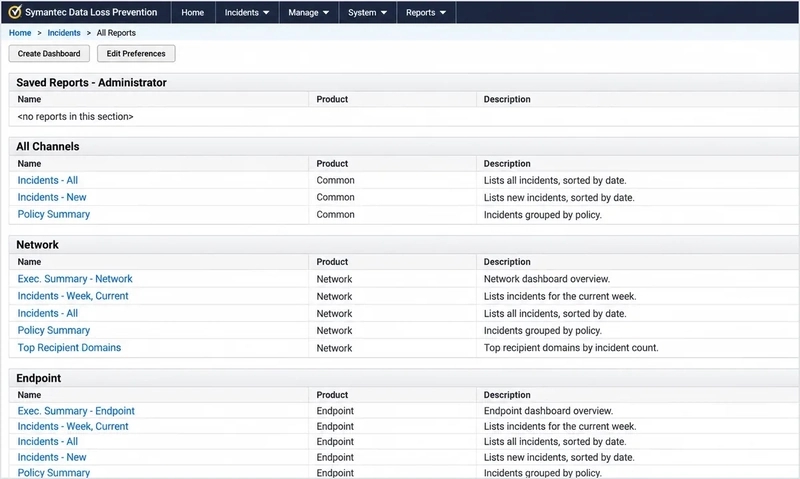
Replacing Forcepoint across endpoint, network, and storage discovery brings several policy owners into the same project. Symantec DLP gives them a central place to manage policies and incidents in Enforce.
Capability Breakdown
Data Identification and Protection
- Exact Data Matching identifies values drawn from a source such as a customer database. Indexed Document Matching detects content from registered documents.
- Discovery policies locate sensitive data in supported repositories and on managed endpoints.
Outbound Channel Controls
- Endpoint Prevent covers supported transfers such as removable-media copies and printing. Policy actions depend on the application and operating system.
- Network components extend inspection to channels such as SMTP email and web traffic. Cloud inspection depends on the components in scope.
Audit
- Enforce brings incidents from supported detectors into a single console for review and reporting.
- Analysts can use incident details to identify the matched policy and the user or destination where the detector captures that information.
Deployment
Symantec DLP supports hybrid deployment. You host the Enforce management console on your own infrastructure and use Broadcom-hosted detection for selected channels that need cloud inspection.
Pricing
Symantec DLP is quote-based. A reseller we spoke with indicated an approximate price of $110 per endpoint per year. Ask for an itemized quote for the endpoint, network, discovery, and cloud components you need.
Compare eight Symantec DLP alternatives by deployment, key strengths, and best fit. Learn more »
- Structured-record and document matching support different types of sensitive data.
- Centralized incident review across endpoint and network detectors.
- A broad rollout can involve several components with separate deployment work.
- Print protection has application and port limitations. Check endpoint policy coverage on each OS build.
2. AnySecura
Best for
Windows-heavy organizations that need local DLP, device management, and user activity auditing in one console.
AnySecura's endpoint DLP combines sensitive-file protection, device control, and user activity auditing in one console. A manufacturer can protect a supplier drawing, control how it leaves the workstation, and investigate where a copy went.
In the Sensitive Information Outbound Control Policy, scroll through the highlighted settings to see what data matches the policy and which channels it blocks. Open the Sensitive Information Log to review sample outbound activity.
Capability Breakdown
Data Identification and Protection
- Sensitive Content Inspection uses rules such as keywords and regular expressions to identify sensitive files and can work with Document Tagging to apply classification labels.
- Transparent Encryption protects designated files and allows authorized users to open them in approved applications.
Outbound Channel Controls
- AnySecura can block sensitive files from leaving through connected devices, removable media, printing, browser uploads, email, and supported instant messaging apps.
- Depending on the channel and policy, it can also warn users, log the action for audit, or route it for approval.
Audit
- Document, device, and print logs let analysts review the user, file, and action after a transfer.
- Watermarking & Document Tracing can add visible marks to supported documents and invisible marks to supported images. Analysts can search watermark and circulation records during an investigation.
Deployment
Customers deploy and host AnySecura on their own on-premises infrastructure. Your data stays within your organization and under your control, and you can tailor the deployment plan to your network and security requirements.
Pricing
AnySecura starts at $18 per seat per month for Professional. Ultimate is $28 per seat per month and adds Sensitive Content Inspection and watermarking. Enterprise is $35 per seat per month and adds Transparent Encryption. These plans are billed annually. You can also choose the modules you need and request a quote for a custom bundle. A free trial is available for up to three months.
Compare Forcepoint DLP and AnySecura side by side on data protection and endpoint controls. Learn more »
- Combines endpoint DLP, device policy, and activity logs in one console.
- Supports policy-based document encryption and traceable watermarks on eligible plans.
- The admin console has an old-school feel, with dense menus and settings panels.
3. Fortra DLP (formerly Digital Guardian)
Best for
Teams protecting source code, design files, or other IP on a mix of operating systems.
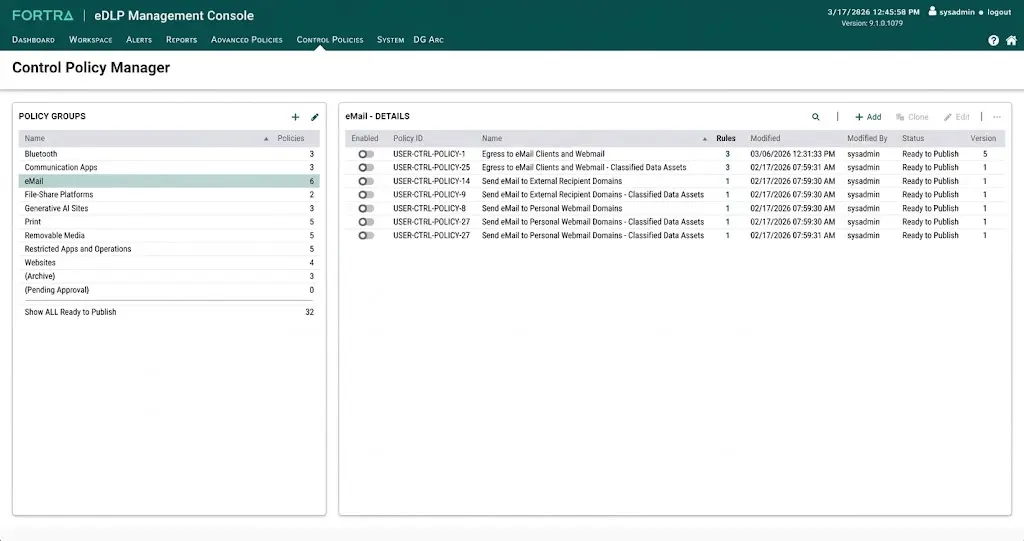
For engineering teams, a sensitive file might be source code, a CAD design, or a research document. Fortra DLP, formerly Digital Guardian, uses file content and activity context to apply policies to that kind of intellectual property.
Capability Breakdown
Data Identification and Protection
- Fortra DLP classifies data by content, context, and user input. It can also read labels from Fortra Data Classification.
Outbound Channel Controls
- The endpoint agent runs on Windows, macOS, and Linux. It covers apps, browsers, removable devices, and external destinations. Check which actions each OS supports.
- Network DLP is a separate component. It inspects traffic and can allow, block, encrypt, reroute, or quarantine data.
- Cloud DLP adds SaaS and cloud controls, with CASB, ZTNA, and SWG integrations.
Audit
- Analytics & Reporting Cloud (ARC) links system, user, and data events across endpoints and the network.
- The packages include 60 days of retention and a 1-year archive.
Deployment
On-premises, SaaS, or fully managed. With SaaS, Fortra runs the back-end systems. With the managed service, Fortra analysts host and run the program for you.
Pricing
Fortra offers Essentials, Advanced, and Elite, all priced by custom quote. A third-party reseller lists endpoint DLP at about $96 per license per year, with volume discounts.
- Classification uses content, context, and user input.
- Separate endpoint, network, and cloud controls cover different enforcement points.
- The same action can have different support across Windows, macOS, and Linux.
- Network components and reporting architecture must be scoped with the vendor.
4. Trellix DLP
Best for
Organizations already running Trellix ePolicy Orchestrator (ePO).
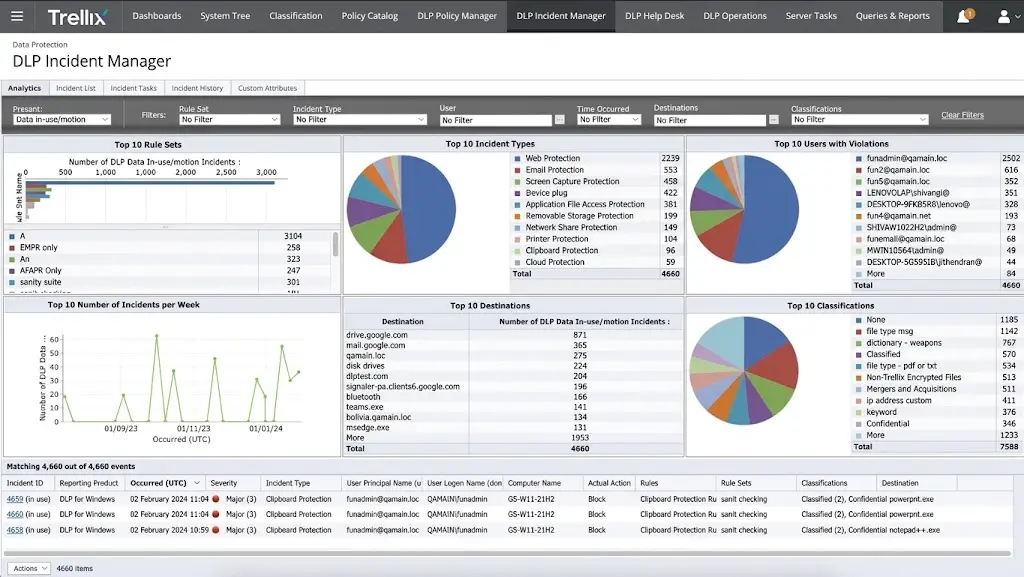
If your administrators already use ePolicy Orchestrator, Trellix DLP gives them a familiar system for rolling out policies and handling endpoint incidents. Device Control and DLP Endpoint cover different requirements, with separate products for network enforcement and discovery.
Capability Breakdown
Data Identification and Protection
- Classifies data with dictionaries, regular expressions, and registered documents.
Outbound Channel Controls
- Device Control manages removable media on Windows and macOS. It blocks unauthorized devices and applies content-based monitoring, filtering, and blocking.
- DLP Endpoint Complete includes Device Control and adds browser protection and email protection.
- Network Prevent works on email and web traffic. Network Monitor and Network Prevent both inspect data in motion.
Audit
- ePO manages policies and incidents in one place. The SaaS version uses Protection Workspace for incident management and reporting.
- Network Prevent records its incidents in ePO for case review.
- Network Prevent, Network Monitor, Discover, and Endpoint Complete can collect evidence once evidence storage is set up.
Deployment
ePO on-premises or ePO SaaS.
Pricing
Quote-based. Third-party resellers list Endpoint Complete at $99.99 per endpoint per year (CDW) and $58 per user per year for 5 to 250 users (SHI).
- Reusable ePO administration for teams already on Trellix.
- Separate endpoint and network components let teams scope enforcement to their environment.
- Coverage depends on the ePO model, component, and client operating system.
- Separate licenses can complicate a replacement spanning endpoint and gateway policies.
5. Microsoft Purview DLP
Best for
Organizations whose sensitive data lives mainly in Microsoft 365.
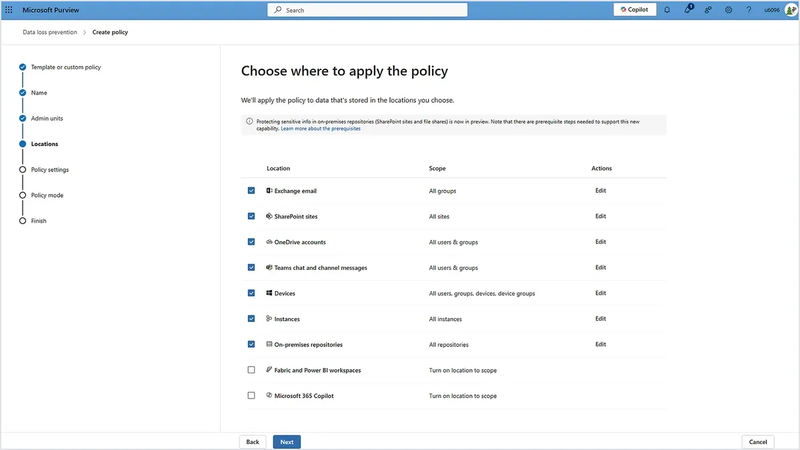
Microsoft Purview DLP is a natural starting point if employees work in Exchange, SharePoint, OneDrive, and Teams. Microsoft Purview Endpoint DLP brings supported policies to onboarded computers.
Capability Breakdown
Data Identification and Protection
- Purview DLP policy conditions can match sensitive information types, labels, or other conditions where the workload supports them.
- Sensitivity labels can apply encryption through Microsoft Information Protection. Which controls apply depends on your label and workload configuration.
Outbound Channel Controls
- Eligible Microsoft 365 workloads can enforce DLP policies on actions such as sharing or sending sensitive content.
- Supported endpoints can audit or restrict USB copying, printing, clipboard use, and uploads to restricted service domains. Available actions vary by operating system and browser.
Audit
- Activity Explorer shows covered data classification and policy activity so reviewers can see how sensitive data is being handled.
- The DLP Alerts dashboard gives analysts a place to investigate matches. Check which events and details your chosen workloads report.
Deployment
Microsoft hosts the control plane. Supported Windows and macOS devices can enforce endpoint rules after onboarding.
Pricing
Microsoft 365 E5 includes Purview DLP and costs about $60 per user per month for the full subscription. Microsoft 365 E3 costs about $39 per user per month. Eligible E3 customers can add Microsoft Purview Suite for about $12 more per user per month. For related products, see Microsoft Purview alternatives.
- DLP policies integrate with Microsoft 365 collaboration and email workloads.
- Endpoint DLP extends supported policies to Windows and macOS.
- Required licenses depend on the workload and users in scope.
- Third-party SaaS and unmanaged-device coverage need separate evaluation.
6. Cyberhaven
Best for
Teams that need to reconstruct how sensitive data traveled through devices and SaaS apps.
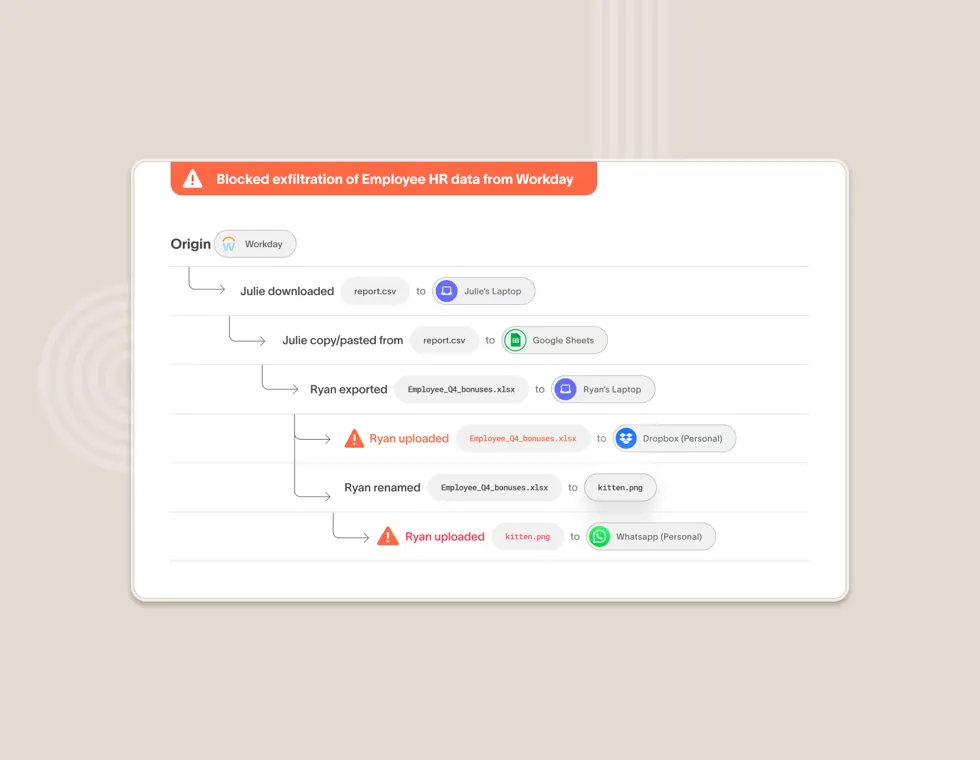
An upload alert tells you where a file turned up. Cyberhaven's data lineage also helps show where it came from and how it reached that destination.
Capability Breakdown
Data Identification and Protection
- Sensitive-data classification can draw on content and context, including where a file originated and how users handled it.
- Lineage helps carry sensitivity context through supported actions such as copying or renaming a file.
Outbound Channel Controls
- Policies can block transfers or coach users when a supported endpoint or SaaS action matches.
- For GenAI, Cyberhaven's AI controls cover supported destinations. Confirm separately which prompts and file uploads you can inspect or block.
Audit
- An incident's lineage view helps an analyst trace supported file actions back to the original source.
- Investigation detail depends on which devices, apps, and connectors captured the steps in the transfer.
Deployment
Cloud-managed. Confirm agent support for your Windows and macOS versions, SaaS connector requirements, service region, and evidence retention.
Pricing
Quote-based. Ask for the cost of the endpoints, connectors, and retention needed to capture your critical handoffs.
- Lineage gives investigators context around a transfer, including earlier file activity.
- Supported endpoint and SaaS policies can use that context to inform enforcement.
- An unmonitored application or device can leave a gap in the timeline.
- Cloud management needs review where incident data must stay in customer infrastructure.
7. Netwrix Endpoint Protector
Best for
USB and peripheral control on Windows, macOS, and Linux.
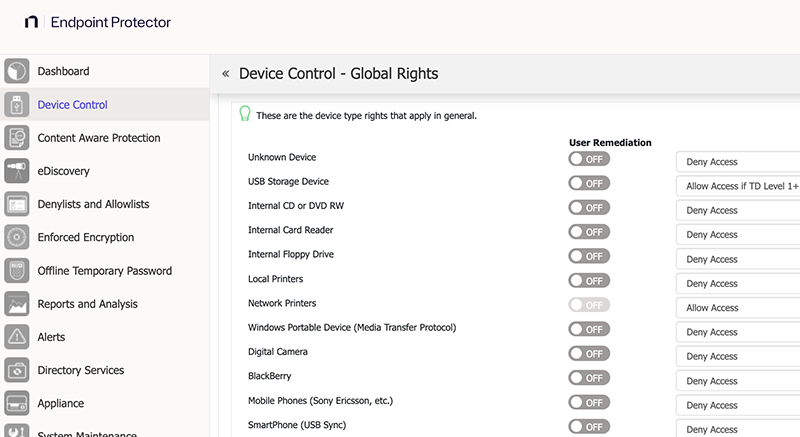
A USB policy needs to account for both the device and the file. Netwrix Endpoint Protector combines device authorization with Content Aware Protection to handle both.
Capability Breakdown
Data Identification and Protection
- Content Aware Protection inspects supported transfers against configured content and file rules.
- EasyLock enforced encryption protects files copied to supported removable media.
Outbound Channel Controls
- Device Control manages access to USB drives and other peripherals. Content-aware policies can restrict selected transfer channels on supported operating systems.
- Check browser uploads, printing, and app-level controls separately on Windows, macOS, and Linux.
Audit
- Device and policy reports record connections and transfer events. File Tracing records details about files transferred through covered channels.
- File Shadowing can retain copies for investigation where enabled. Set retention and access rules before collecting file contents.
Deployment
Netwrix offers virtual-appliance, cloud, and SaaS deployments. Select the model that meets your requirements for management and incident data storage.
Pricing
Quote-based. Ask for a breakdown by operating system, deployed endpoint count, and required modules.
- Separates peripheral permissions from content-based transfer rules.
- Offers appliance and cloud options for mixed-OS environments.
- Policy actions vary across operating systems and applications.
- Gateway email and tenant-side SaaS requirements need a separate coverage check.
8. Safetica
Best for
Teams deciding between cloud-managed and self-hosted endpoint DLP.
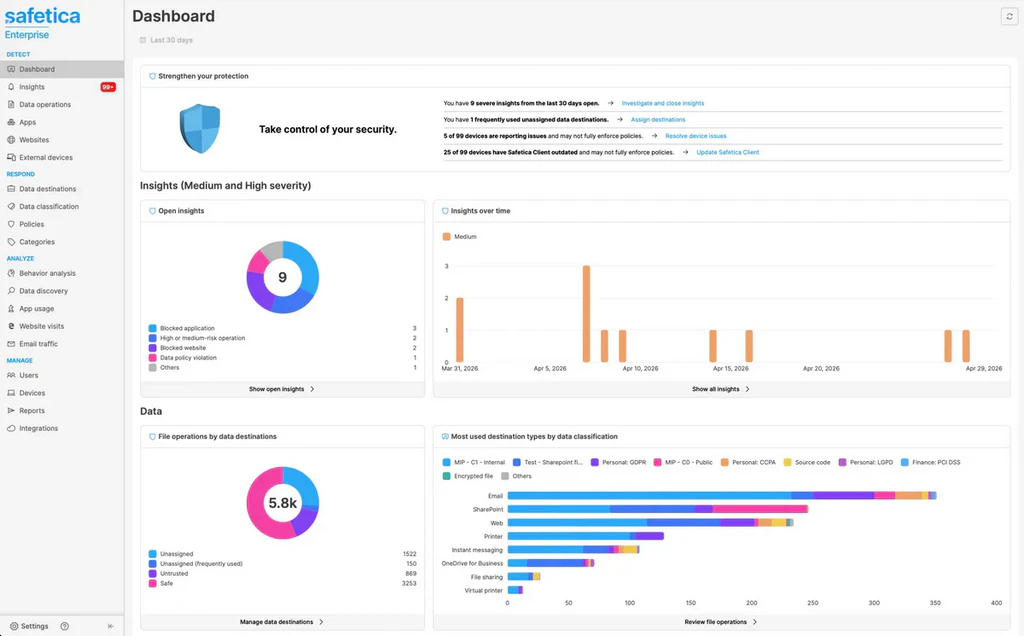
Safetica suits teams that want to apply endpoint data policies and review activity from the same product. Its cloud and self-hosted editions differ in how they analyze cloud content and retain incident evidence.
Capability Breakdown
Data Identification and Protection
- Safetica data classification lets teams apply policies to sensitive files. Content analysis and discovery features depend on the plan.
- Policy rules can use classifications to distinguish sensitive transfers from routine work.
Outbound Channel Controls
- Endpoint rules cover supported USB, print, upload, and email actions. Verify which controls are available on Windows and macOS.
- Cloud coverage depends on the plan. Review AI assistant file upload controls if employees use those services.
Audit
- Data activity reports help analysts investigate how files moved and which policies were triggered.
- Where available and enabled, Shadow Copy preserves a copy of the file that triggered an incident.
Deployment
Safetica Platform is cloud-managed. Safetica On-Prem runs on customer-managed infrastructure. Compare the plan capabilities before choosing an edition.
Pricing
Safetica's cloud plans start at $72, $96, and $144 per user per year. On-Prem requires a quote.
- Choice of cloud-managed and customer-hosted deployments.
- Public cloud pricing makes it easier to compare the entry cost of the plans.
- Cloud content analysis, evidence retention, and incident features vary by plan.
- Confirm per-channel behavior on both Windows and macOS before rollout.
How to migrate from Forcepoint DLP to your chosen alternative
Once you have a shortlist, give each vendor the same small set of Forcepoint policies. Use the pilot to decide what to move first and what you need to keep running during the cutover.
- Inventory rules and evidence. Record policy owners, classifiers, enforcement points, user groups, exceptions, and expiry dates. Export policies or incident history where supported. Verify that authorized staff can retrieve archived evidence.
- Rebuild the rules that matter first. Translate each rule into the data, action, destination, and expected response. Recreate dictionaries or document fingerprints from approved source data when needed.
- Pilot before enforcing. Start in audit mode where available. Test approved and prohibited transfers on representative OS versions and browsers. Get both vendors' guidance before putting two DLP agents on the same device. Use separate pilot devices when necessary.
- Cut over in waves. Move endpoint, gateway, and SaaS enforcement in steps, with named owners and a rollback path for each. Retire the old component after your team verifies policy outcomes and can still retrieve required evidence.
Try AnySecura as Your Forcepoint DLP Alternative
If you have yet to deploy Forcepoint and most of your risk sits on Windows endpoints, you can try AnySecura's DLP and endpoint management platform first. Use one supplier drawing to see how DLP, device policy, and user activity auditing work in the same console.
- Before a transfer. Classify the test drawing and apply Transparent Encryption. Check that authorized staff can still edit it in approved applications.
- During a transfer. Try copying the drawing to an unapproved USB drive, then send a permitted copy through the approval workflow. Verify which actions each policy allows and records.
- After a transfer. Trace the file with device and document activity logs. Use a supported watermarked copy to check which user or transfer details your auditor can recover.
Use the results to decide which modules you need and whether your IT team wants to manage the server.
FAQs about Forcepoint DLP alternatives
What is Forcepoint DLP Endpoint?
Forcepoint DLP Endpoint applies data protection policies to supported actions on managed computers, such as copying files to removable storage or printing.
Which Forcepoint DLP alternatives cover email and network traffic?
Start with Symantec DLP, Fortra DLP, and Trellix DLP. Match your current email inspection and network monitoring rules to the components included in each quote.
Which Forcepoint DLP alternatives support on-premises deployment?
AnySecura and Safetica On-Prem offer self-hosted options. Broadcom, Fortra, Trellix, and Netwrix also offer relevant customer-managed deployments or appliances. Ask each vendor where your required detectors, incident evidence, and backups will run or reside.
How much does a Forcepoint DLP replacement cost?
Some vendors publish per-user or per-seat pricing. Others quote by deployment and product bundle. Compare the price of the policies and channels you need, including migration and ongoing administration.
Can I import my Forcepoint DLP policies into another product?
Ask the receiving vendor which policy artifacts it can import. Expect to map classifiers, exceptions, rule precedence, and enforcement actions to the new product and test them in the original channels.
Conclusion
The eight Forcepoint DLP alternatives in this guide serve different needs. Symantec covers enterprise endpoint and network policies, Fortra helps protect intellectual property across operating systems, and Trellix fits teams that already use ePO. Microsoft Purview fits Microsoft 365 workflows, while Cyberhaven helps trace how data moved. Netwrix focuses on USB and peripherals, Safetica offers cloud and on-premises editions, and AnySecura combines local DLP with endpoint management.
- For enterprise DLP across endpoints and the network, we’d shortlist Symantec DLP first. Its exact data matching and document fingerprinting make it a good fit when you need to protect both customer records and confidential documents.
- For Microsoft 365 data protection, we’d start with Microsoft Purview DLP. It’s a practical choice when your sensitive data already lives in Exchange, SharePoint, OneDrive, and Teams.
- For on-premises Windows endpoint protection, we’d choose AnySecura. It brings file protection, outbound controls, and activity auditing together in one console that you host.
If your team wants to keep its DLP data on premises and manage devices from the same console, try AnySecura with one workflow that matters to your business. Test an approved transfer and a blocked one, then check what your team can reconstruct from the audit trail.
