
Exact data matching (EDM) is a data loss prevention technique that finds sensitive data by checking content against a protected copy of your own records — say, your customer or employee table — instead of hunting for a generic pattern. When it flags something, that value is really sitting in your data, whatever it happens to look like.
That's the whole point of it. A pattern rule can only tell you a string looks like an ID number; EDM can tell you it's your customer's ID number. Below, we walk through how EDM works step by step, how it stacks up against regex and keyword detection, where it falls short, and where it fits in a wider data loss prevention (DLP) setup.
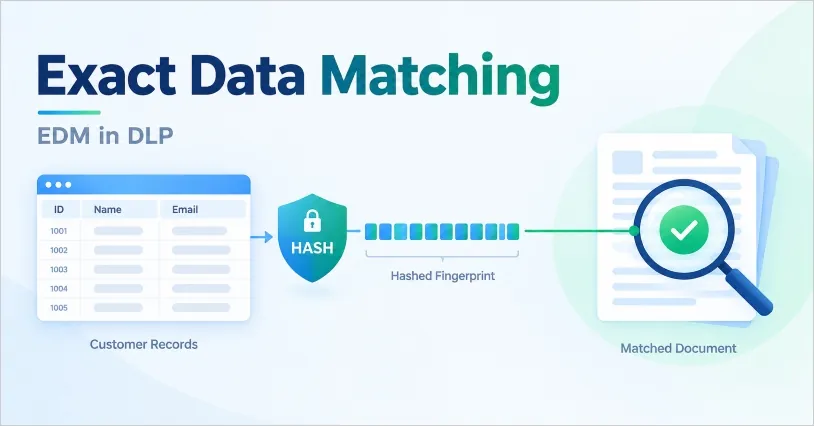
What Is Exact Data Matching, Exactly?
EDM starts from a reference dataset — a structured export of the records you actually need to protect, such as customers, patients, employees, or account holders. Selected fields from that export get converted into one-way hashes. From then on, anything employees send, copy, or upload is checked against those hashes, and only a value that exists in the dataset counts as a match.
In practice the records usually live in a CRM, an HR system, or a patient database: names paired with ID numbers, email addresses, account numbers, dates of birth. One thing worth being clear about early — EDM is a detection technique, not a full DLP solution. It tells you what is inside a file; what happens next (block, alert, encrypt, audit) is up to your DLP policies.
Why Pattern Matching Alone Isn't Enough
Regular expressions and keyword lists were the first generation of sensitive data detection, and they're still useful. The catch is that they only judge format. A rule for "any 16-digit number" will flag invoice numbers, tracking IDs, and order codes just as happily as credit cards, and a rule for the word "salary" will flag the HR newsletter. Every one of those false alarms lands on a security analyst's desk, and after enough of them the team starts ignoring alerts altogether.
EDM changes the question. Instead of "does this look sensitive?", it asks "is this one of our records?" Here's how the same three files play out under each approach.
| File being sent out | Pattern rule (16-digit number) | Exact data matching |
|---|---|---|
| Supplier invoice with 16-digit order numbers | Flagged (false positive) | No match, ignored |
| Spreadsheet of current customers and their account numbers | Flagged | Match, real records |
| List of customers added after the last dataset refresh | Flagged | Missed until the dataset is updated |
The third row is the catch: EDM only recognizes records that are already in its dataset, so anything newer than the last refresh slips through.
How Does Exact Data Matching Work?
EDM runs in two phases. You prepare the reference data once and keep it fresh, and the DLP engine then compares scanned content against it continuously.
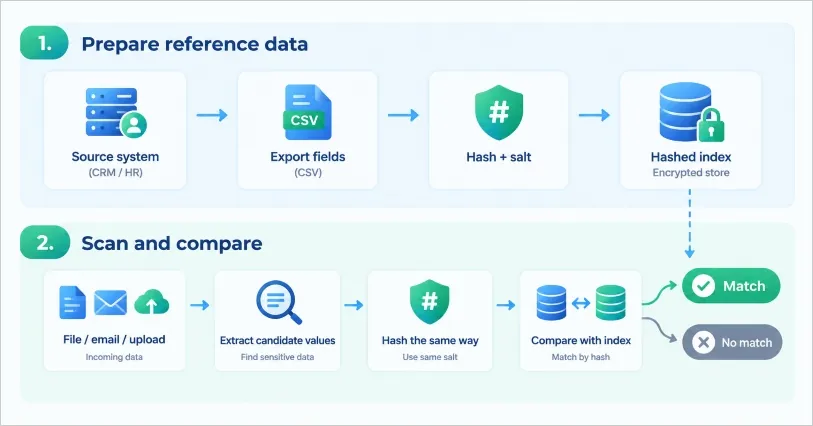
Step 1: Build the Reference Dataset
Start with your system of record — a CRM, ERP, HR platform, or patient database — and export the fields you want to protect, usually as a CSV. A scheduled export or API pull is enough; the DLP system doesn't need a live connection to the business database. Next, you map each column to a field in a schema and decide which fields are searchable and which only serve as supporting evidence.
Before anything is stored, each value gets hashed with a salt. In Microsoft Purview, for example, the hashing happens on your own machine and only the hashed values are uploaded, and the dataset can be refreshed daily with up to 100 million rows. Other platforms, such as Cato Networks, hash the file in the browser before upload. Either way, the DLP engine ends up holding hashes of your values — never a readable copy of your customer list.
Step 2: Scan and Compare
When a file, email, or upload is inspected, the engine pulls out candidate values, hashes them the same way, and checks whether those hashes exist in the index. Most implementations use a two-tier match:
- Primary element: a value with a recognizable format, like an ID number, that triggers the lookup. It has to be detectable by a normal pattern rule first, which is why EDM sits on top of regex instead of replacing it.
- Supporting elements: other fields from the same record that show up nearby — a name, date of birth, or address. The more of them appear close to the primary value, the more confident the match.
The Purview setup wizard shows how this plays out: a high-confidence match needs the primary element plus two or more supporting fields within 300 characters, and a single supporting field gives medium confidence. A document with just a valid-looking ID number scores low; one that pairs the ID with the right person's name and birth date scores high. Names and street addresses, which run to several words, are handled with multi-token matching that compares hashes of consecutive words.
| Reference record (sample data) | Found in scanned file | Result |
|---|---|---|
| ID 4417-2208 · Lena Hart · 1988-03-14 | 4417-2208 alone | Low confidence |
| ID 4417-2208 · Lena Hart · 1988-03-14 | 4417-2208 + Lena Hart | Medium confidence |
| ID 4417-2208 · Lena Hart · 1988-03-14 | 4417-2208 + Lena Hart + 1988-03-14 | High confidence |
Step 3: Let the DLP Policy Decide What Happens
EDM hands back a verdict about the content, and the policy decides what to do with it. Picture an employee attaching a customer list to an email headed for a personal mailbox:
- The DLP engine pulls candidate values out of the attachment.
- EDM compares them with the reference dataset and returns a match with a confidence level.
- The policy weighs that result against who's sending, where it's going, and which channel is being used.
- The policy allows, warns, blocks, or logs the action.
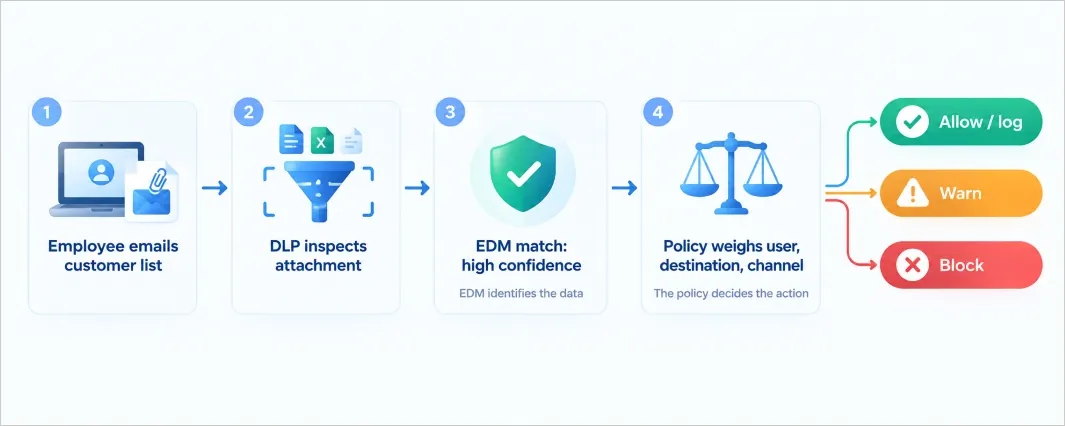
Context changes the outcome. A high-confidence customer-list match headed to an approved partner might just be logged, while the same file going to a free webmail address can be blocked outright.
EDM vs Regex, Keywords, and Document Fingerprinting
These methods answer different questions, so the strongest setups use them together instead of picking one.
| Pattern (regex) | Keyword / dictionary | Exact data matching | Document fingerprinting | |
|---|---|---|---|---|
| Matches against | A format | A word list | Your actual records | Your reference documents or forms |
| Best at | Broad discovery of ID-like data | Flagging topics and labels | Protecting known customer, patient, or employee data | Protecting unstructured documents and templates |
| False positives | High on look-alike data | High on common words | Low when the dataset is accurate | Low |
| Finds unknown data | Yes, if it fits the format | Yes, if the word appears | No, only listed records | No, only known documents |
| Upkeep | Maintain rules | Maintain lists | Refresh data, schema, and uploads | Re-index when documents change |
Pattern and keyword rules cast a wide net and catch data you didn't know to list; EDM then confirms which of those catches are really yours. That's also how most EDM engines are built — the pattern layer finds candidates and the exact match verifies them.
What Are the Limitations of EDM?
It Only Knows What's in the Dataset
Anything created after the last refresh, data from systems you never exported, and values that were truncated, masked, or reformatted can all slip past a match. Some platforms let you configure matching — ignoring case and delimiters, for instance — but the basic rule still holds: stale data means missed detections. How often you refresh should follow how often the underlying records change.
It Is Built for Structured Data
EDM works best on tabular records with clear fields. Free-form material like contracts, design files, or source code needs other methods, such as fingerprinting or content classification. File type matters too. In Cato's implementation, for example, OCR isn't supported for EDM matching, so data that only appears inside a scanned image won't be matched, and Base64-encoded files can't be inspected either.
It Takes Real Setup and Has Platform Limits
Somebody has to own the export, the schema mapping, the upload schedule, and the permissions. Platform limits vary a lot, too: Cato allows up to 15 EDM profiles per account, two columns per profile, and 8 MB per file, while Purview handles far larger datasets. Compare those numbers with your own data volume before you commit to a product.
The Reference Data Is Itself Sensitive
Hashing protects the index, but the pipeline around it still touches real records — the export file, the upload account, and any sample file used during setup. The Purview wizard, for instance, uploads its sample file in plain text, so build that sample from fake data in the same format and never from real records. Limit who can run the upload, and delete the exported CSV as soon as the index is built.
One last limit: EDM stops at detection. It won't encrypt a file, stop a transfer, or control who opens a document — that work falls to the DLP policies and enforcement tools around it.
How to Put EDM Into Practice
- Start with one dataset. Pick the highest-value record set — usually customers, patients, or employees — rather than trying everything at once.
- Keep the fields minimal. One strong identifier plus one or two supporting fields (name, date of birth, email) is usually enough for high-confidence matches.
- Clean the export. Strip out empty cells and duplicate rows so the index isn't carrying noise.
- Test with fake data first. Build the schema from a sample file in the same format as your real data.
- Run in audit mode before enforcing. Watch the matches for a week or two and tune before any rule starts blocking.
- Schedule the refresh. Match the upload cadence to how fast the source data changes, and check again after major system changes.
For a wider view of rollout planning, our guide to data loss prevention software shows how detection, policy, and enforcement fit together across channels.
How to Use EDM in Data Protection Practice
EDM on its own can't carry a data protection program. It only recognizes values that are already in its dataset, so it misses newer records and free-form files, and it doesn't rank what it finds or act on it. In practice EDM works as one step in a DLP workflow: DLP discovery and tagging first find the data EDM can't see, EDM then confirms which of the candidates are really your records, and the policies treat the two groups differently.
AnySecura covers the DLP side of that workflow at the endpoint: discovery rules, tagging, and policy enforcement. It doesn't do record-level hash matching, and there's no built-in hand-off to an EDM engine, so the EDM step stays with whichever DLP platform you already run. Here's how the four steps fit together.
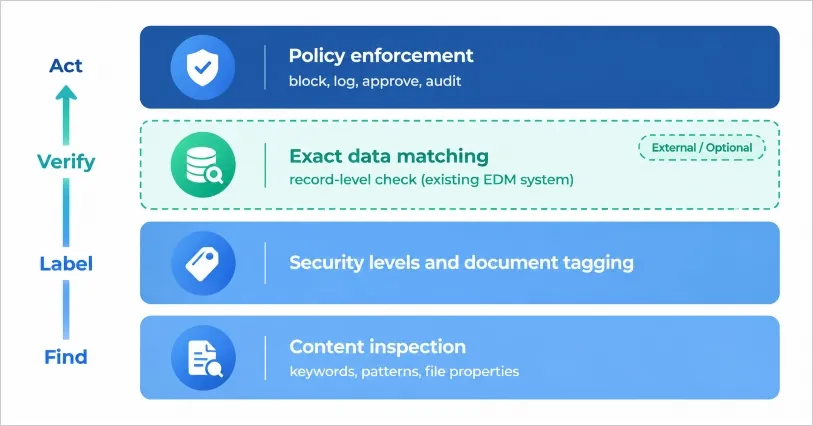
Step 1: Discover Data with Content Inspection Rules
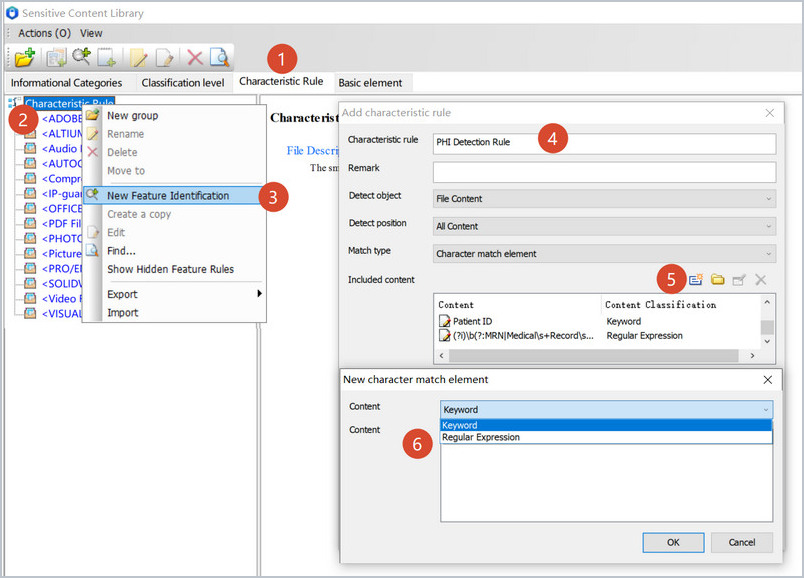
Start wide. Records created after the last EDM refresh, and free-form files like contracts or designs, are exactly what EDM misses, so the first job is finding candidates of any kind. Sensitive content inspection does this with keyword, pattern, and file property rules, across both local and remote files. A rule for patient data, for example, can pair keywords like "Patient ID" with a regular expression for medical record numbers, as in the rule below.
Step 2: Tag and Classify What You Find
A rule hit is a yes or no. It doesn't tell a policy how seriously to treat the file. Once a file is identified, document tagging automatically assigns it a type, department, and security level when it's created or modified, and users can adjust the label where needed. Policies then work from those levels, so "confidential" means the same thing to every rule downstream.
Step 3: Verify the Candidates with EDM
Now narrow down. Candidates from steps 1 and 2 are checked against the EDM dataset, and a match means the value is one of the records you hold, which is the strongest evidence of sensitivity you can get. That's the work EDM does best, and it's why the pattern layer comes first: EDM needs a candidate to look up. Anything that doesn't match isn't cleared, though. It simply stays at the confidence level the DLP rules and tags gave it.
Step 4: Apply Different Policies to Each Group
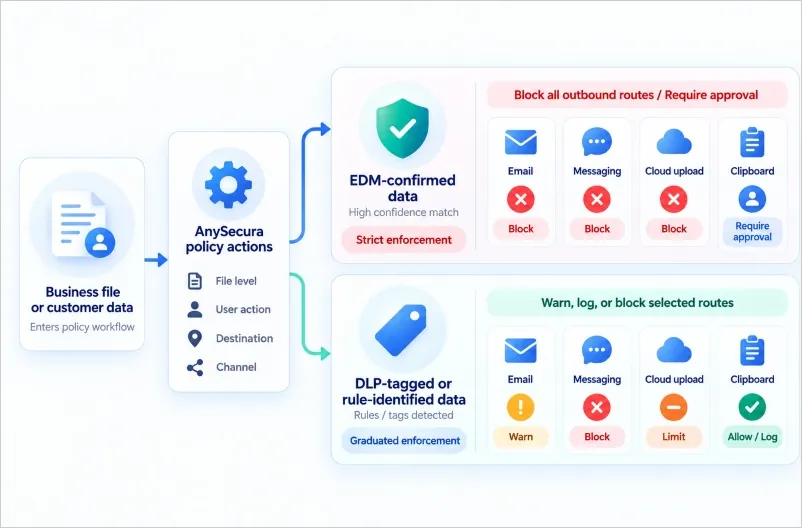
You now have two groups: data EDM confirmed, and data only the DLP rules and tags identified. They deserve different responses. EDM-confirmed records can get the strict treatment, such as blocking the transfer or requiring approval, while rule-identified data can start with a warning or a log entry until you've seen how accurate the rule is. AnySecura applies policies based on a file’s security level and the user’s actions, helping teams block unauthorized transfers, require approval, and retain audit records across supported channels.
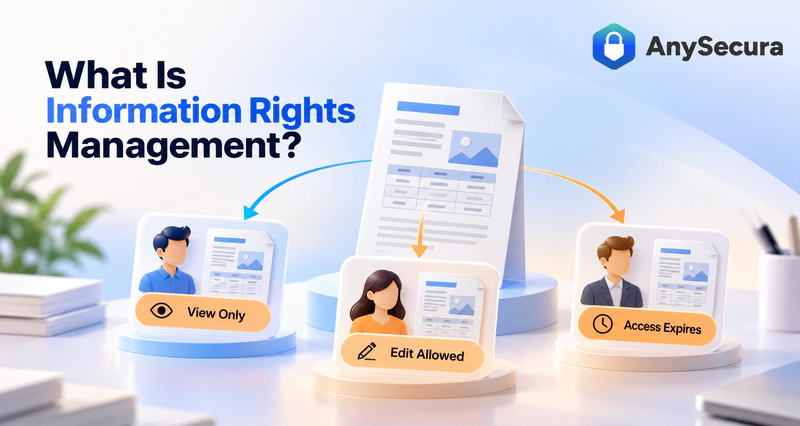
Learn how information rights management can control what recipients do with a protected document after they open it. Learn more>>
FAQs About Exact Data Matching
What is exact data matching in simple terms?
It's how DLP learns to recognize your own sensitive records. Rather than flagging anything that looks like an ID number, it checks whether the value is really on a protected list of your customers, patients, or employees — and ignores the rest.
What is the difference between EDM and regex?
Regex checks whether text fits a format, such as nine digits in a Social Security number pattern. EDM checks whether the value is one of your real records. Regex finds candidates broadly, EDM confirms which of them are genuine, and most EDM engines still use a pattern rule to trigger the lookup in the first place.
Does EDM eliminate false positives?
No, though it usually cuts them sharply when the reference dataset is accurate and current, since look-alike values such as invoice numbers aren't in your records. A product that promises zero false positives is overselling. Poor data quality, loose supporting-field settings, or short common values can still produce noise.
Is exact data matching the same as document fingerprinting?
No. EDM matches individual field values from structured records, such as names and ID numbers. Document fingerprinting matches whole or partial unstructured documents — forms or contracts, say — against known originals. They solve different problems and often get used together.
Is the reference data stored in plain text?
The index isn't: values are hashed, usually with a salt, before they reach the DLP engine. Parts of the setup can be plain text, though. Some wizards take a plain-text sample file, and your exported CSV stays readable until you delete it. Use fake data for samples and lock down the upload process.
How often should the EDM dataset be refreshed?
As often as the source data changes in ways that matter. A customer or employee table that changes daily deserves a daily or weekly upload; a record set that rarely changes can be refreshed monthly. Some platforms support daily refresh at very large scale, so the technical ceiling rarely limits you — who owns the refresh process matters more.
Can EDM detect sensitive data in images or scanned documents?
Only if the platform extracts text from the image first. Some implementations don't support OCR for EDM matching at all, so data that exists only as a screenshot or scan won't be matched. Confirm OCR support with your vendor before relying on EDM for image-heavy workflows.
Do I need EDM if I already have DLP?
Not necessarily. If pattern and keyword rules already give you a manageable number of alerts, EDM may not be worth the upkeep. It pays off when look-alike data is creating too many false alarms, or when you have to prove that specific customer, patient, or employee records didn't leave the company.
Conclusion
Exact data matching compares content with a hashed copy of your own records, so a match means a record you actually know about, not a lookalike. That improves precision and cuts false alarms, but EDM only recognizes what's in its dataset, works best on structured data, and needs ongoing maintenance. It also decides nothing on its own — the DLP policy is what allows, blocks, or audits the transfer.
The practical setup is layered: broad rules to find candidates, labels to rank them, EDM where record-level proof matters, and enforcement at the endpoint. AnySecura's sensitive content inspection and document tagging cover the first, second, and last of those layers, while EDM stays with whichever DLP platform you already run. For the bigger picture, see AnySecura's data loss prevention solution.