Data governance means knowing who owns important data, who can use it and how it may be shared. If a customer file ends up where it should not, you need clear answers. This guide shows how to implement data governance in 90 days, starting with one group of high-risk data.
This data governance plan is for IT managers and compliance leads working with a small group of business owners. In three phases of 30 days, you can name an owner, classify the key records and files, test five policies with one department, and put controls in place. The first review shows what to fix next.
📌 Quick answer: Month one is owners and classification, for the riskiest data only. By day 60, policies written and one department piloting. By day 90, controls switched on and the first KPI review done.
Short on time? Read these four lines.
- Every important data set gets an owner and a written rule, and you keep proof the rule is followed.
- Start narrow, with one risky data domain. Widen it after day 90.
- Don't stop at databases; a contract on someone's laptop is just as exposed.
- Report on only a few KPIs: owned domains, classified files, access reviews.
What Data Governance Means
In plain terms, data governance answers three questions about each important set of data. Who owns it? What are people allowed to do with it? How would you prove any of that to an auditor? Without answers, the same problems keep coming back. Two departments keep different versions of one customer list. A former employee still has access to contracts. Nobody can say who approved a file leaving the company.
Answering those questions takes three ingredients. People: owners who decide, and stewards who keep the records accurate. Policy: written rules for classifying, accessing, keeping and sharing data. Evidence: the logs and reviews that show the rules are followed. No single tool supplies all three, so this guide starts with people and rules and brings in software once the rules exist.
You'll also meet a few neighboring terms. A data governance strategy says why you're governing data and what you expect to get from it. A framework is the set of standards and structure for doing it. The program is the daily work of running the framework, and it's what this guide covers, since that's where your first 90 days go.
Common Pillars
Frameworks usually split that daily work into pillars. The table below shows one common grouping, though no list is the standard one, so use it as a checklist and cross off what doesn't fit. The eight steps later in this guide put a first version of most of these pillars in place. Data quality and metadata get only a light touch, because they need more time, and often a catalog tool, than a 90-day start allows.
| Pillar | What it covers |
|---|---|
| Ownership and accountability | Who owns each data domain and who makes the decisions |
| Policies and standards | Rules for classification, access, quality and retention |
| Data quality | Accuracy, completeness and consistency checks |
| Metadata and lineage | What data exists, where it lives and where it came from |
| Security and privacy | Protection, access control, encryption and privacy duties |
| Retention and lifecycle | How long each kind of data is kept, and how it gets destroyed |
| Compliance and audit | Proof that you're meeting legal and contractual obligations |
The 90-Day Data Governance Plan at a Glance
Seven pillars are too many to start at once, so the plan puts them in order. Think of a 90-day data governance plan as three 30-day blocks. Each block closes with exit signals, which are things you can check to see whether the work is really done or just feels done. The eight steps of data governance implementation in the next section fit inside the blocks, and each step is tagged with the one it belongs to.
| Phase | What gets done | Exit signals |
|---|---|---|
| Days 0–30 | Pick the first data domain, name owners, form a council, inventory the data and classify it (version 1) | The high-risk domain is classified; every domain has a named owner; classification results are recorded in an asset inventory |
| Days 31–60 | Write the five core policies (classification, access control, data quality, retention and disposal, acceptable use), use the handling matrix as the control baseline, and pilot one department in its own security zone | Five policies are approved; the pilot department's security zone has a named member list |
| Days 61–90 | Switch on controls for copying, printing, screenshots, decryption and outbound release; train staff; run the first KPI review | Controls are live on high-risk data, outbound requests leave approval records, and the first KPI review is written down |
Take this as a starting point, nothing more. The first version of every control will need tuning, so day 90 isn't a finish line. It's when the regular reviews kick in.
How to Implement Data Governance in 8 Steps
Steps 1 to 4 land in the first 30 days. Step 5 takes the second month, and steps 6 to 8 the third. In practice, expect overlap; follow the order, and don't treat the dates as law. Each step builds on the one before it: you can't classify data nobody owns, and you can't write rules for data you haven't classified.
Step 1: Define Scope and Business Goals (Days 0–30)
A program that tries to cover everything stalls, so pick one high-risk data domain and stay with it. A data domain is just a group of related data, such as customer personal data or engineering drawings. Both are natural first picks, since the risk is plain and an owner is easy to name. Then set a goal you can check on day 90, for instance "every customer record has a named owner and a classification within 90 days." A vague goal like "improve data governance" fails that test, because nobody could say on day 90 whether it was met.
While you're scoping, also write down which regulations cover this domain. Customer personal data, for example, usually falls under privacy laws such as GDPR. Those rules decide which policies you need, and Step 5 turns them into policies.
Step 2: Get an Executive Sponsor and Form a Small Council (Days 0–30)
A goal on paper needs someone with authority behind it. Without a sponsor, the program stalls the first time two departments disagree. Find an executive who'll back it. Then build a council of three to five people: IT, compliance, one business department head, and someone from management. Small or mid-sized company? That's enough. Fix a regular meeting slot and write down every decision.
Step 3: Assign Owners and Stewards (Days 0–30)
The council can't make every call, so each data domain gets two people of its own. The owner makes the decisions about the data. The steward looks after the records and keeps them accurate. Make business managers the owners, not IT, because they know how the data really gets used.
To keep roles straight, use a RACI table. RACI stands for Responsible, Accountable, Consulted and Informed, and the table below assigns each of those roles for the main tasks in this guide. Each row has one Accountable party: business owners make the calls about their own data, and compliance signs off on policy and audit items.
| Task | IT manager | Department head (data owner) | Compliance lead | Management | Employees |
|---|---|---|---|---|---|
| Define scope and goals | C | R | C | A | I |
| Write policies | C | C | A/R | I | I |
| Classify data | R | A | C | I | I |
| Approve access | R | A | C | I | I |
| Review audit logs | R | C | A | I | I |
| Handle incidents | R | C | A | I | I |
Step 4: Inventory and Classify Your Data (Days 0–30)
With owners in place, take stock of what they own. Start with structured data: the databases and SaaS applications you can already see, where information sits in tables and fields and usually comes with logins and logs. Then look for unstructured data, meaning the files that pile up outside those systems: contracts, quotes and drawings on employee computers, shared folders and USB sticks. Files like these don't come with an owner, a label or a log, yet they need the same rules as a database record. They need controls of their own, and the section on governing unstructured files below covers them.
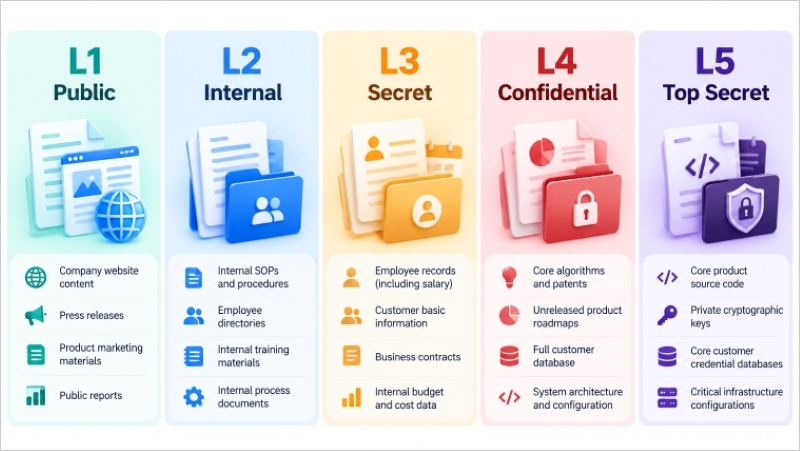
Once you know what exists, sort it by sensitivity. Fewer levels are easier for staff to apply, which is why most teams stop at three or four. Public, Internal, Confidential and Restricted is a typical set. Our data classification and handling matrix template goes to five, with definitions, an inventory sheet and a handling matrix. Use it as a base, and merge tiers if three or four suit you better. A first version by day 30 is enough.
Step 5: Write the Policies and Pilot One Department (Days 31–60)
Classification says how sensitive a file is. Policies say what people may do with it. Five policies is the floor: classification, access control, data quality, retention and disposal, and acceptable use. Keep each short. A busy manager should get through one in ten minutes. And you won't start from scratch, because the handling matrix in the template already gives every classification level a baseline rule.
Take customer personal data as the pilot. These five short sample policies show what staff must do, who makes the call and what record to keep. The labels and time periods are examples; set them against your own data, legal duties and retention schedule before approval.
| Policy | What it covers | Sample policy for customer data |
|---|---|---|
| Data classification | The levels, and who assigns them | Customer records containing names and contact details are Confidential; records containing payment details are Restricted. The customer-data owner records each dataset and its label in the inventory within five working days of creation. Until labeled, a new customer file is handled as Restricted. |
| Access control | Who may open what | Only named sales staff may open Confidential customer records for their assigned accounts. Restricted payment records require separate approval from the customer-data owner and access through the approved security zone. IT logs access, and the owner reviews the member list and access records each quarter. |
| Data quality | How accuracy gets checked | The customer-data steward checks names, contact details and account status for missing or conflicting values each month. Staff report suspected errors to the steward; the steward records each correction or escalation and closes it within ten working days where practicable. |
| Retention and disposal | How long data is kept and how it is destroyed | The customer-data owner documents a retention period for each record type and its purpose in the inventory. For this pilot, inactive contact records are reviewed 24 months after the last customer interaction and deleted when no longer needed, unless a documented legal hold or other applicable duty requires keeping them. IT records the review and deletion. |
| Acceptable use | What staff may and may not do with data | Staff use customer records only for approved customer work and must not send them to personal email, personal cloud storage or USB drives. External sharing requires a business purpose, an approved recipient and the customer-data owner's recorded approval before release. |
The customer-data examples also give the legal review something concrete to check. Under GDPR, the quality check relates to accuracy, the retention review to storage limitation, and the access and sharing rules to security. The inventory and approval records help demonstrate what the team decided and did. GDPR does not prescribe the sample's 24-month period, quarterly review or ten-day correction target. Set those to fit the processing purpose and applicable law. HIPAA enters this mapping only if your pilot also handles electronic protected health information; its audit requirements would then add to the access policy. Have your legal team confirm which clauses apply before adopting the wording.
| Regulation and clause | What it requires | Policy it feeds | Official text |
|---|---|---|---|
| GDPR Art. 5(1)(d), accuracy | Keep personal data accurate and, where necessary, up to date | Data quality: monthly field checks and correction records | EUR-Lex |
| GDPR Art. 5(1)(e), storage limitation | Keep personal data no longer than necessary | Retention and disposal: review inactive contacts and record deletion | EUR-Lex |
| GDPR Art. 5(1)(f), integrity and confidentiality | Ensure appropriate security of personal data | Access control and acceptable use: approved access and sharing | EUR-Lex |
| GDPR Art. 5(2), accountability | The controller must be able to demonstrate compliance | All five: keep the inventory, decisions, checks and review records | EUR-Lex |
| GDPR Art. 30, records of processing activities | Maintain a record of processing activities where required | Data classification: use the inventory as input to the processing record | EUR-Lex |
| GDPR Art. 32, security of processing | Apply safeguards suited to the level of risk | Access control: restrict and review access to payment records | EUR-Lex |
| HIPAA 45 CFR 164.308(a)(1)(ii)(D), if ePHI is in scope | Regularly review records of information system activity | Access control: extend the access-record review to ePHI systems | eCFR |
| HIPAA 45 CFR 164.312(b), if ePHI is in scope | Record and examine activity in systems that contain or use ePHI | Access control: add audit controls for those systems | eCFR |
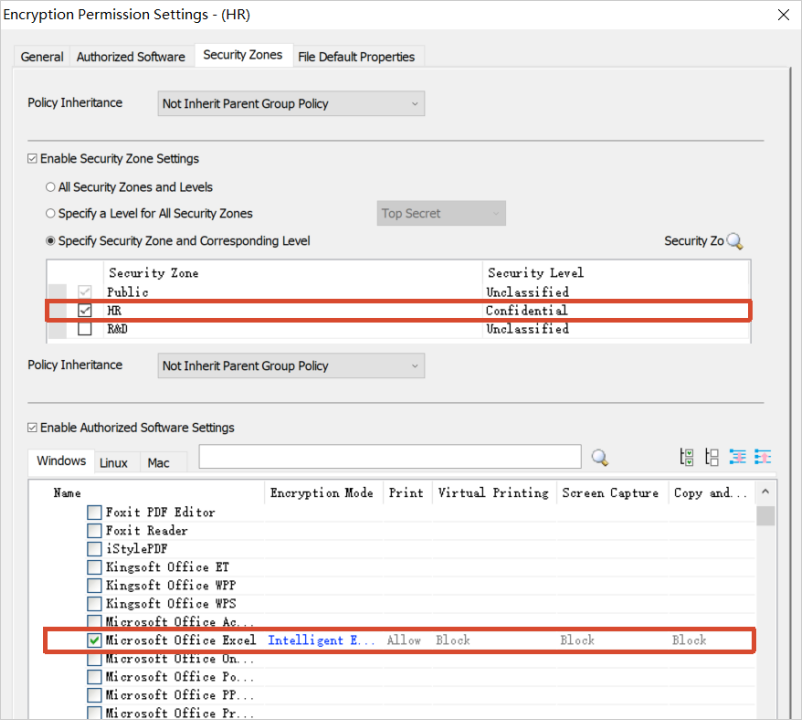
Once the policies are written, test them before rolling them out. Try them on one department. Sales and finance both make good pilots, as does a product team with well-defined data. Put that department in a security zone of its own; staff in the zone can open only what the zone allows. Zones separate departments by document classification and level, which means a finance file won't open on a marketing computer by default.
Step 6: Put Controls and Tools in Place (Days 61–90)
A policy nobody enforces is just a document. Controls make the rules real, and they should follow the classification level. For documents, expect to use these:
- Copy and print limits, so restricted documents cannot leave the approved environment. Print Control covers the printing channel.
- Screenshot and clipboard permissions, set document by document.
- Decryption requests, so staff ask for access instead of opening protected files freely.
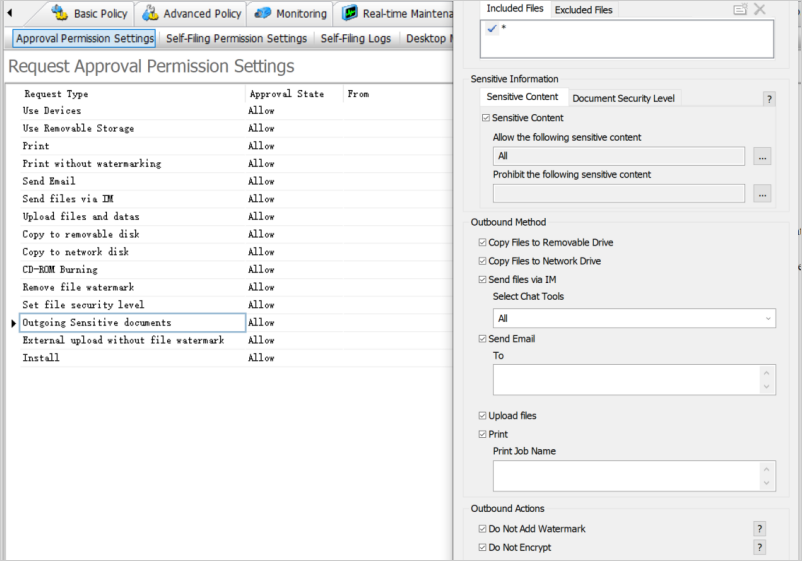
- Outbound release requests, so external sharing goes through an administrator. Email Control limits who can receive a message and what can be attached.
Software is how most of these controls get enforced. Choose tools to fit the data domain you're protecting, and ignore whoever has the longest feature list. Governance tools come in a few kinds: catalogs and metadata, data quality, master data, privacy and consent, and data security.
AnySecura belongs in the last kind, data security. It works on files on endpoints and does not provide a data catalog, lineage or data quality features. If your program needs those, pair a data security tool with a catalog product. The next section shows these controls one by one. For background on the category, see what DLP is.
Step 7: Train People by Role (Days 61–90)
Controls only work if people understand them. Run the training by role, because the groups need different things. Owners learn to approve access and read the logs. Stewards need the classification rules and the inventory process. Everyone else gets a short guide: what the labels mean, what to do when a request is blocked, how to ask for an exception. Tell staff what's being logged, and why, before any of this starts (the pitfalls section covers it).
Step 8: Measure and Iterate (Days 61–90)
Last, find out whether any of this is working. Record a baseline in week one, or you'll have nothing to compare against. The table below lists the KPIs to track; at the day-90 review, check every number against that baseline.
| KPI | How to measure it | How often |
|---|---|---|
| Data domains with a named owner | Owned domains divided by total domains in the inventory | Monthly during the 90 days, then quarterly |
| Classified files | Classified files divided by files in the scanned scope | Monthly |
| Access review completion | Reviews completed on time divided by reviews due | Quarterly |
| Policy violations | Number of violations and average days to resolve | Monthly |
| Data quality issues | Average days to close a quality issue | Quarterly |
| Audit findings | Open findings from internal or external audits | Quarterly |
Hold the first KPI review before day 90. After that, run it every quarter and revise policies wherever the numbers show a gap. The first review will almost certainly turn up weak spots. Finding them is the whole point.
Governing Unstructured Files on Employee Devices
Steps 4 to 6 apply to all of your data, but databases are the easy part, since they tend to come with logins and logs. A lot of a company's sensitive data sits in contracts, quotes, design files and spreadsheets on laptops, shared drives and USB drives, and those files need the same classification, access rules and records. This section shows how to do that with AnySecura, the endpoint data security software used for the examples in this guide. The six controls below put the earlier steps into practice on those files. For each you get what it does, an example setting in the product, and the record it leaves.
Classification Labels
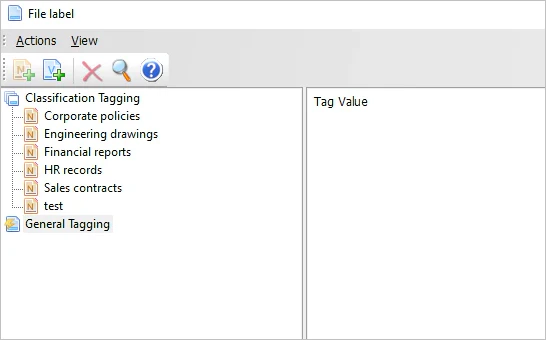
A label stamps a file with its classification level, either by rule or by hand. Give everything in the finance folder a default Confidential label, say, and anyone can see how sensitive a file is before opening it.
Record kept: label history for each file. The labeling workflow is covered in Document Tagging.
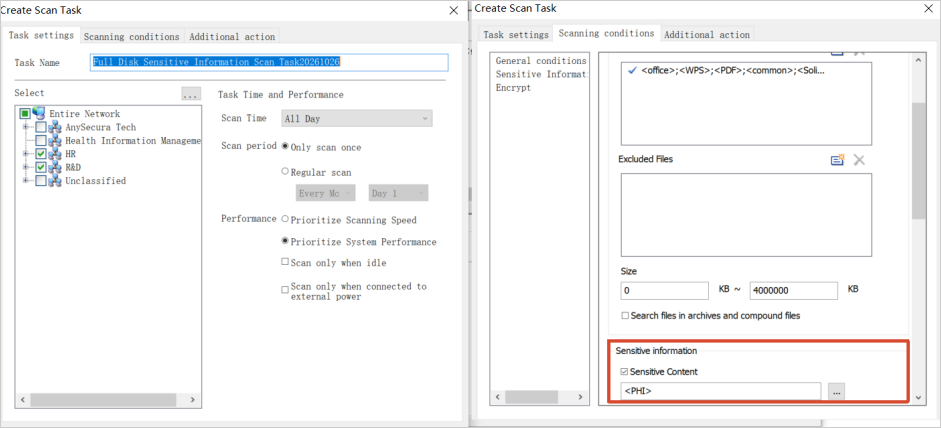
Sensitive Content Detection
Detection rules comb through your files for sensitive content and flag transfers that look risky. Say you write one that watches for customer ID patterns. It can raise an alert the moment those files leave a controlled location.
Record kept: detection events. See Sensitive Content Inspection for the rule options.
Access and Encryption
Transparent encryption does its work quietly. Files get encrypted automatically, and only authorized users and security zones can open them. What happens after a file is open depends on the permission policy: copying, printing, screenshots and clipboard use can each be allowed or blocked.
Want an unprotected copy? Send a decryption request. Nobody strips the protection off themselves, and the data owner decides each case on its merits.
Record kept: access records, plus request and approval records. Details are in Transparent Encryption.
Learn how information rights management can control what recipients do with a protected document after they open it. Learn more>>
Outbound Channels and Release Requests
Outbound rules decide what can leave through USB, email and printing, based on classification. Removable Media Control handles USB copies. Email Control sets limits on recipients, attachments and carbon copies. Print Control covers the printer. When someone really does have to send a document out of the company, the request lands with an administrator, who says yes or no.
Record kept: transfer logs and release approvals.
Audit Trail
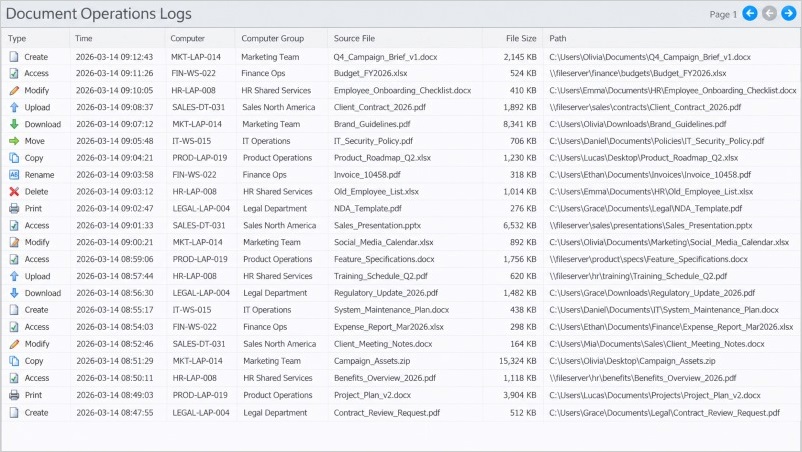
The audit trail logs file creation, changes, copies and deletions. Some actions deserve more, such as deleting a file or copying it to removable media, and for those the system can also grab a screenshot. That's the kind of evidence auditors ask for first, and the kind that clauses such as HIPAA 164.312(b) call for. Document Control describes the full feature set.
Record kept: audit log entries, with a screenshot attached for high-risk actions.
Backup and Retention
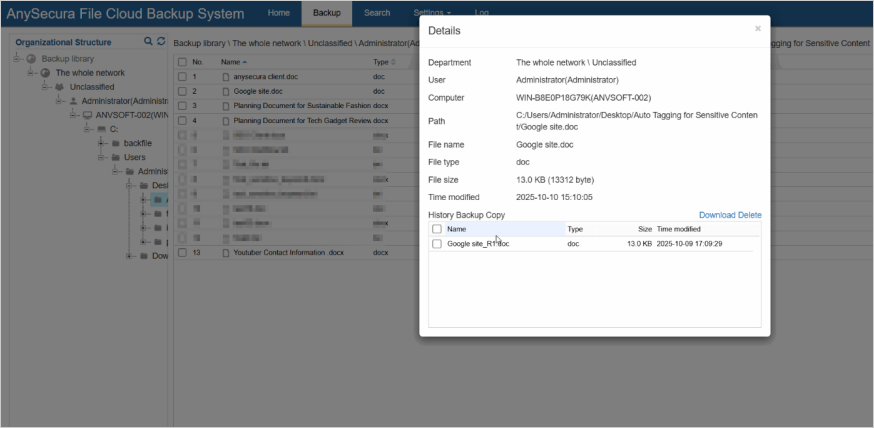
Scheduled backups protect the files you can't afford to lose. If a laptop disappears or ransomware strikes, the key documents survive, and retention rules can then be applied to the copies. Backing up Confidential folders daily is a typical setup. The service itself is covered in Cloud Document Backup.
Record kept: backup history.
Common Pitfalls and How to Avoid Them
- Starting too broadly. Begin with one high-risk domain, like step 1 says.
- Leaving the program to IT. Business owners make decisions about their data. IT provides the tools and the records.
- Writing policies nobody enforces. Connect each policy to a control and a record, as in step 6.
- Covering databases but missing files. Include employee devices and shared drives from the start, as in the unstructured files section.
- Turning on controls without telling staff. Say what classification, encryption and logging involve before they go live. Log only what the program needs, for only as long as it needs. Rules vary by region, so have your legal team look over the staff notice. None of this is legal advice.
FAQs about Data Governance
What are the 5 or 7 pillars of data governance?
There's no standard list. Frameworks count five pillars, or seven, or some other number, and the groupings overlap a lot. The pillars table above shows one common version. Choose whichever suits your organization, and make sure each area has a named owner.
Will AI replace data governance?
No. AI speeds up classification and discovery, for instance by finding sensitive content across huge file sets. A person still has to decide who owns the data, what the rules are, and which exceptions are fine.
How long does it take to implement data governance?
Within 90 days you can have a first working version, as long as you begin with one high-risk data domain. A whole organization takes longer, and the program needs regular reviews after day 90.
Who should own data governance in a small company?
You need a sponsor from management, a day-to-day lead from IT or compliance, and a business owner for each data domain. Business owners decide. The lead keeps things moving.
What is data classification and why does it come first?
Classification labels information by how sensitive it is: Public, Internal, Confidential, Restricted. It goes first because access rules, controls and retention periods all depend on the label. Skip it and every file gets treated the same.
Why do data governance programs fail?
Usually it's one of three things: too much scope at the start, decisions left to IT, or policies with no control or record behind them. Staff who weren't told what's being monitored, or why, can also stall a program.
Do small companies need data governance?
Yes, if you hold customer, employee or financial data that other people rely on. A small program is enough. A few owners will do. Keep the classification scheme short, write a handful of policies, and put controls on the files that matter most.
Can data governance work without a data catalog?
Yes. A catalog pays off once data is spread across many databases and tools. If your company mostly works with files and shared documents, start with classification, access control and outbound rules. They cover much of the core risk without a catalog.
Conclusion
To implement data governance, start with one group of important data. Give it an owner, find and classify the records and files, then write simple rules for who can use, share and keep them. Try those rules with one department before applying them more widely.
By day 90, you should be able to see whether people are following the rules and where the gaps are. Fix what the first review finds, then keep reviewing. If files leaving through email or USB are a concern, AnySecura's data loss prevention solution can help enforce the sharing rules.