
You probably think corporate espionage is something that happens in movies or only to billion-dollar tech companies. It is not. Over the past few years, we have seen small logistics firms lose their biggest clients, mid-sized manufacturers hand their pricing strategies to competitors, and fast-growing startups discover that a recently departed employee took the entire customer list. In every single case, the company had no idea until the damage was already done.
This article walks through what corporate espionage actually looks like in practice, how to detect it before it becomes a crisis, and what you can do to stop it.
1. What Is Corporate Espionage?
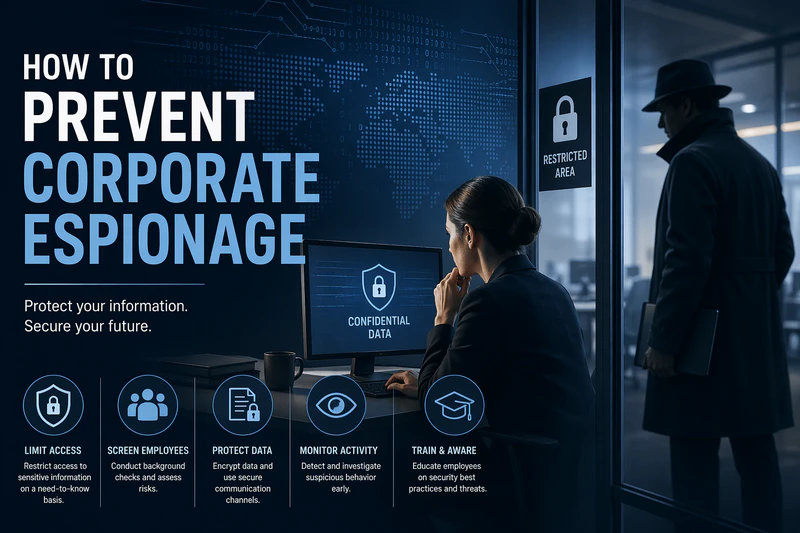
Corporate espionage is when someone steals a company's confidential information to help a competitor. That includes customer lists, product designs, pricing strategies, source code, and trade secrets.
Many business owners assume this only happens to large corporations. That assumption is wrong. If you have something a competitor wants, and stealing it costs less than building it, you are a target. Size does not matter.
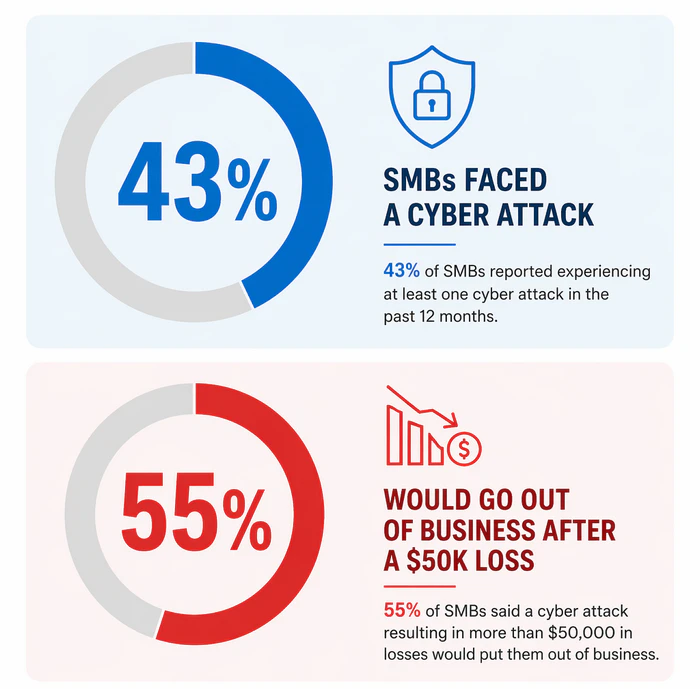
In fact, for small and medium businesses, the stakes are higher. A 2026 SMB Security Survey revealed that 43% of SMBs faced at least one cyber attack in the past year. More alarmingly, 55% of these companies stated they would likely go out of business if a single security incident cost them more than $50,000. For a smaller firm, corporate espionage isn't just a legal headache—it's an existential threat.
But what does this actually look like in practice? Let us look at some real cases.
2. Real-World Examples of Corporate Espionage
Here are four real corporate espionage cases for you to study.
Example One: Rippling vs. Deel (2025)
This case is still in court. Deel is accused of placing people inside competitor Rippling to obtain sales data, customer pipelines, and pricing information. Payments were reportedly made through cryptocurrency. The case stands out because it involved multiple people working together, not just one disgruntled employee.
Example Two: Tesla (2024)
A former engineer on the Optimus humanoid robot project was sued for downloading sensitive design files and prototype videos to personal devices right before joining a startup. He didn't use a sophisticated hack; he simply used his existing access to SharePoint and personal smartphones to bypass traditional IT blocks.
Example Three: Hitachi (2020)
A former Hitachi employee in Brazil was convicted of stealing train technology files worth tens of millions of dollars. He copied the data onto external hard drives over several months before resigning and joining a competitor. The theft went undetected for nearly a year.
Example Four: DuPont vs. Kolon Industries (2011–2015)
A former DuPont employee took thousands of documents related to Kevlar manufacturing before moving to a South Korean competitor. He did not take whole files at once. He printed small batches over time and walked them out in his briefcase. The total loss to DuPont was estimated at over $300 million.
What all these cases have in common: no sophisticated hacking occurred. The people involved already had access. They just abused it.
So if these attacks don't involve fancy hacking, how do they actually happen? Let us break down the specific methods.
3. How Corporate Espionage Happens
Looking at real incidents over the past few years, most corporate espionage attacks fall into one of five categories.
1. Phishing
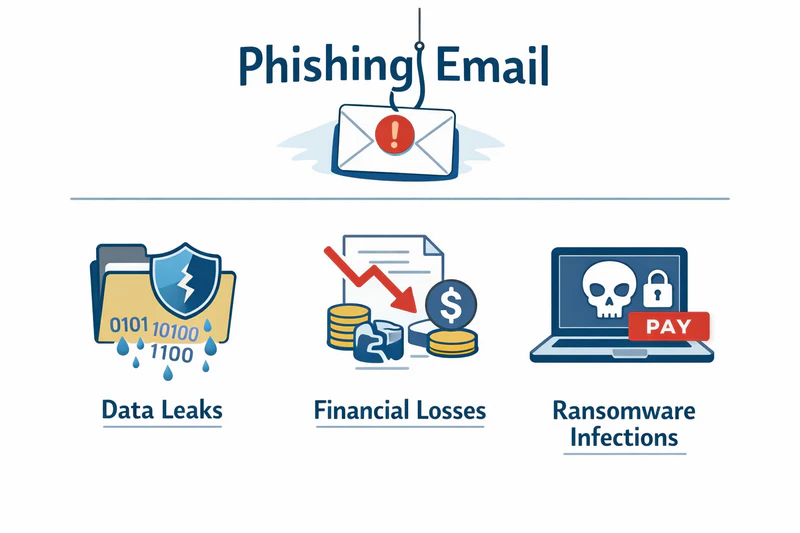
Phishing is still the most common entry point of Corporate Espionage. An employee receives an email that looks like it came from IT support, their manager, or a known vendor. The email asks them to reset a password or review a document. They click the link and enter their credentials. Now the attacker has a way in.
Phishing works because it targets human error, not technical weaknesses. No firewall stops an employee from voluntarily giving away their password.
You can learn more about how to identify phishing emails in this guide. Learn more>>
2. USB Drops
Someone leaves a malware-loaded USB drive in a parking lot, lobby, or break room. An employee finds it, plugs it in to see who it belongs to or what is on it, and the malware installs automatically.
USB drops is less common than phishing, but it still works. People are curious. That curiosity gets exploited.
3. Insider Theft
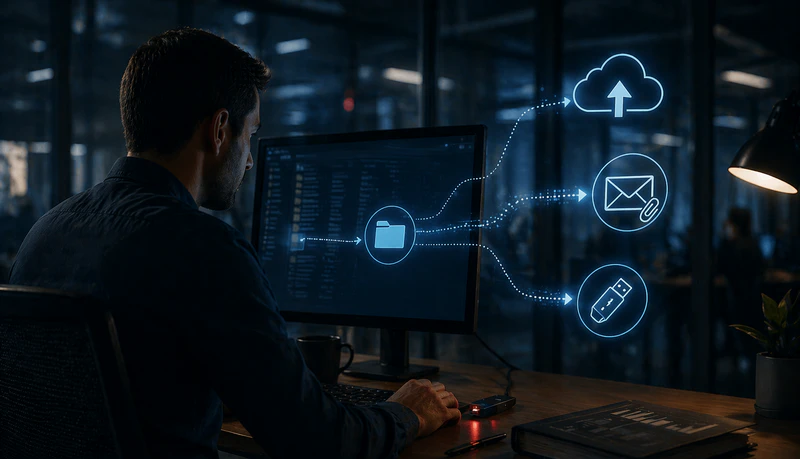
An employee copies files before quitting. Sometimes via USB. Sometimes via personal cloud accounts. Sometimes via email attachments sent to a personal address.
Insider theft happens more often than most companies admit. The person doing it may not even see themselves as a spy. They might think they are just taking "their work" to a new job. But the data belongs to the company, not the employee.
4. Physical Intrusion
Someone dresses like a delivery person, cleaning staff, or maintenance worker. They walk through the office taking photos of whiteboards, documents, and unlocked screens.
Physical intrusion is the oldest Corporate Espionage method on this list, and it still works because offices are busy and people do not question someone in a uniform.
5. Shadow AI and Prompt Leaks (New for 2026)
Shadow AI and Prompt Leaks is the newest and fastest-growing insider threat for company. Employees are using AI tools like ChatGPT, Claude, and Gemini to work faster. That is fine. But many of them are pasting confidential information into these tools without realizing the risk.
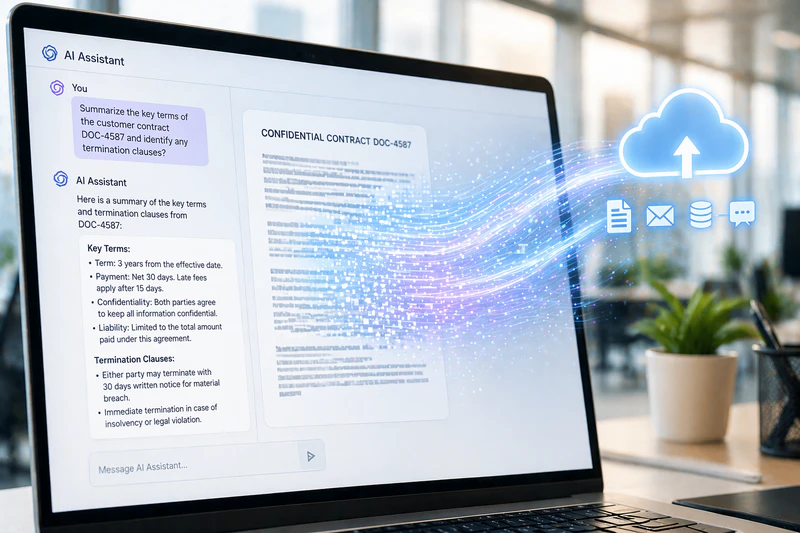
When an employee types a prompt like "summarize this customer contract" or "rewrite this product roadmap," that data gets sent to the AI provider. Some providers use customer inputs to train their models. That means your internal strategy, legal documents, or source code could become part of the model and potentially surface in responses to other users.
What makes this hard to detect is that it looks like normal work. The employee is not copying files to a USB drive or emailing documents. They are just using a browser. Traditional monitoring systems do not flag this because they are not looking for it.
💡 Best Tool to Secura AI Usage
This is where tools like AnySecura come in. (We will explain how it works in the prevention section below. For now, just know that it solves this specific problem.) Unlike basic monitoring that only watches USB drives and email attachments, AnySecura can detect when someone tries to upload a sensitive file to an AI platform. It scans the content before the upload completes. If the file contains customer data, source code, or other confidential information, the upload gets blocked automatically. It also records what happened on the screen, so you have evidence if you need it.
First, tell your employees what not to paste into AI prompts. Many of them genuinely do not know the risk. Second, use tools that monitor AI uploads. Blocking all AI tools is one option, but that often pushes employees to use them on personal devices instead. A better approach is to let them use AI safely while blocking only the uploads that contain sensitive data.
Looking at these five attack methods, you might notice something. Some come from outside the company. Others come from inside. That distinction matters more than anything else when you are building a defense.
Insider Threat vs External Attack
These two are not the same problem, and they require different solutions.
| Feature | External Attack | Insider Threat |
|---|---|---|
| Source | Hackers / Phishing | Employees / Former Employees / Contractors |
| Difficulty of Defense | Medium (firewalls can block) | Extremely High (already has legitimate access) |
| Average Loss | High | Highest (Avg. $4.9M per incident) |
| Best Tools | Firewall / Antivirus | Behavioral Auditing / AnySecura |
External attacks come from outside the organization. Hackers try to break through your firewall or trick someone with a fake email. If your security is decent, these attempts usually trigger alerts.
Insider threats come from people already inside. Current employees, former employees who still have access, contractors, vendors. They do not need to break anything. They already have keys. Insider threats are harder to detect because they do not trigger traditional security alerts.
Here is what most companies get wrong: they spend nearly all their security budget on stopping external attacks but leave themselves exposed to insiders. We have reviewed incidents where companies with million-dollar firewalls had no idea an employee had been copying customer data to a personal drive for six months. That is not a hacking problem. That is a visibility problem. The cost of this visibility gap is staggering. According to the IBM 2025 Cost of a Data Breach Report, malicious insider attacks remained the most expensive threat vector, costing organizations an average of $4.92 million per incident. While external hackers get the headlines, it's the people already inside who do the most financial damage.
The bottom line: external attackers try to get in. Insiders are already there. You need different tools for each.
That brings us to a critical question: if insiders already have legitimate access, how do you catch them before they walk out with your data? The answer is not better firewalls. It is knowing what to look for.
4. Warning Signs to Detect Employee Data Theft Before Resignation
You cannot stop what you do not see coming. The key to detect insider threat is watching for changes in employee behavior.
One sign is a sudden increase in printing. Most office workers print almost nothing these days. When someone prints hundreds of pages at night or on a weekend, that is worth investigating.
Another sign is unusual access patterns. If someone from marketing logs into the engineering server, something is wrong. The same applies to downloading large amounts of data at 2 AM or right before a long weekend.
USB usage is another red flag. Many companies have moved away from USB drives entirely. If an employee who never uses USB drives suddenly starts, pay attention.
Cloud uploads to personal accounts are a growing concern. Files moving to personal Google Drive, Dropbox, iCloud, or WeTransfer accounts are hard to track without monitoring.
The period right before someone quits is especially risky. People often copy data in the two weeks before giving notice. That is when you want to be watching access logs most closely.
Physical signs matter too. Someone you do not recognize in a restricted area. A visitor taking phone photos of computer screens. Cleaning or delivery staff in areas they do not normally service.
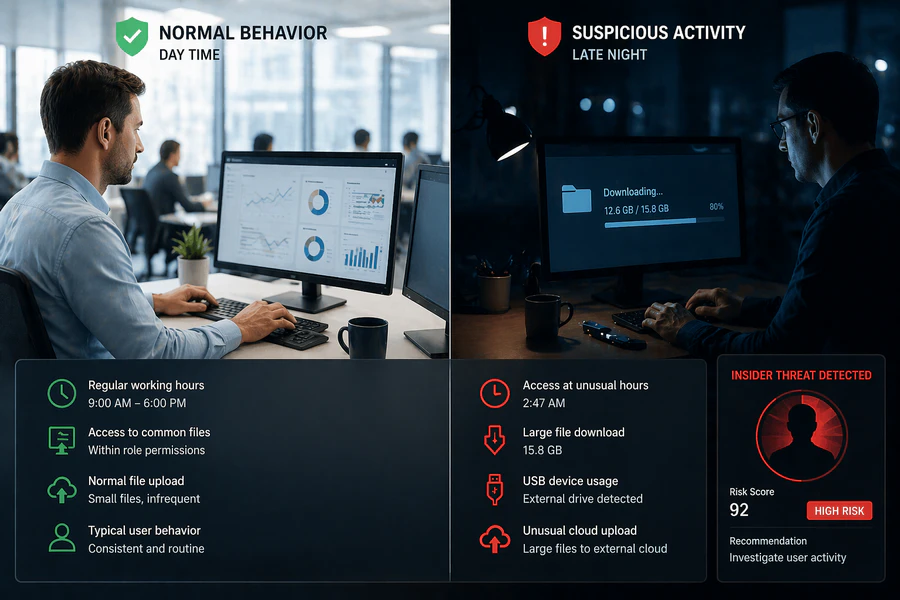
Do not rely on employees to report these things. They will not. You need automated logging and someone who actually reviews the logs.
Knowing the warning signs is only half the battle. What actually happens if you ignore them? Many companies do. They see the red flags but assume it is nothing serious. That assumption is expensive.
5. The Impact of Corporate Espionage
Losing data costs more than most people realize.
Revenue is the first thing that gets hit. When a competitor gets your pricing or product plans, they can undercut you immediately. Industry data suggests revenue declines of 30 to 40 percent in affected product lines within two years of a major leak.
Legal penalties can be severe. If stolen data includes customer information, you may face fines under GDPR in Europe, CCPA in California, or China's Personal Information Protection Law. These fines can reach millions.
R&D investment goes to waste. You spent months or years building something. Now a competitor has it for free. They did not pay for your trial and error.
Customer trust is harder to measure but often does the most damage. Clients expect you to protect their data. When you fail, they leave. And they tell others.
One example we worked on: a mid-sized logistics company lost a major client after a departing sales manager took the client contact list to a rival. The rival called those clients within a week with lower rates. The company did not lose data to a hacker. It lost data because no one checked what the departing manager did in his final weeks.
Given these severe consequences, what should you actually do to protect your company? Let us move from theory to action.
6. How to Prevent Corporate Espionage
Most companies approach prevention as a checklist. Buy a firewall. Block USB ports. Run some training. Then they call it done. That does not work.
A checklist gives you a false sense of security. What you actually need is a system where multiple layers work together, and where failure at one layer gets caught by the next. Earlier in the Shadow AI section, we mentioned AnySecura as a solution for prompt leaks. But that is just one of its capabilities. In fact, AnySeura can support all three layers of the prevention system we are about to build.
Here is how to build that system and how AnySecura helps.
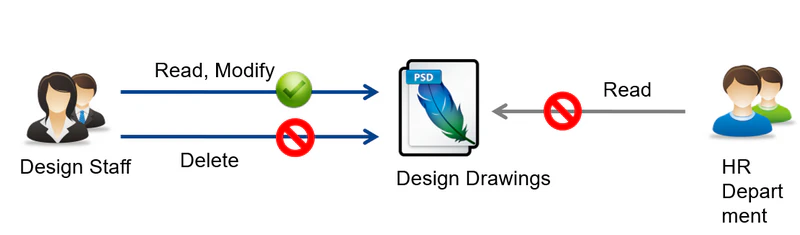
Layer 1: Access Control (The Gate)
Start with who can see what. This is the cheapest and most effective control.
Do not give everyone access to everything. Sales does not need engineering files. Marketing does not need finance data. Audit your access lists every quarter. Remove people who no longer need access to sensitive folders.
But access control alone is not enough. Someone with legitimate access can still copy everything they are allowed to see.
AnySecura controls which devices can even connect to your network—blocking unauthorized computers entirely. It checks each device for antivirus and system patches before granting access. For critical servers like ERP or PDM, it can enforce stricter authentication and automatically encrypt downloaded files. And even when a user has legitimate access, AnySecura flags abnormal patterns like someone suddenly opening dozens of confidential files.
Layer 2: Activity Monitoring (The Watch)
This is where most companies fail. You cannot stop what you do not see.
Without monitoring, here is what happens:
An employee starts copying files to a USB drive on a Tuesday. No one notices. On Thursday, they do it again. By Friday, they have a complete copy of your customer database. They quit the following week. You never know what was taken until a competitor starts calling your clients with better prices. By then, there is nothing you can do. The data is already gone.
Monitoring closes that gap. You need to know three things about every sensitive file: who accessed it, when, and where it went.
AnySecura handles this without drowning you in false alerts. Most monitoring systems flag every single file copy. That creates so much noise that security teams learn to ignore it. AnySecura looks at what is actually in the file, not just the file name. If someone renames a customer database and tries to copy it, the system still catches it. It also records what happened on the screen when something suspicious occurs. That gives you something you can actually use if the case goes to court.
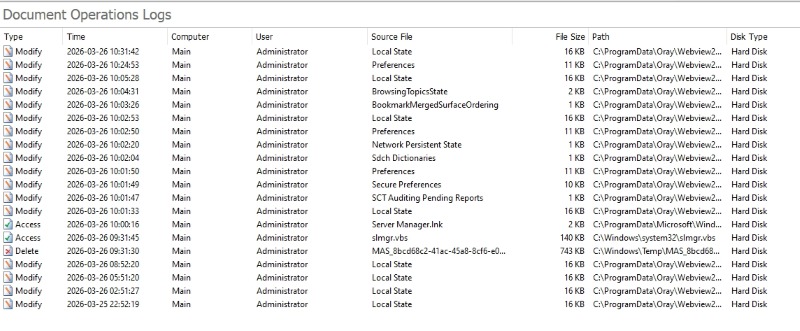
Without this layer, you are flying blind. You have gates but no cameras.
Layer 3: Data Exit Controls (The Locks)
Even if someone bypasses monitoring or has legitimate access, you can still stop the data from leaving.
- Block unapproved USB drives. Or at minimum, log every use.
- Monitor cloud uploads. Most data exfiltration today happens through a browser, not a USB drive.
- Use full disk encryption. If a laptop is stolen, the data stays unreadable.
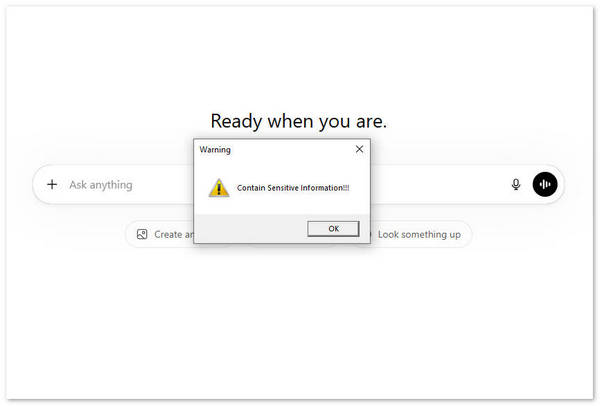
It provides granular control over USB devices—you can block all USB drives, allow only encrypted ones, or allow read-only access. It also monitors file uploads to web browsers, including AI platforms like ChatGPT, so employees cannot upload confidential data into public AI tools. These exit controls ensure that even if someone tries to bypass the first two layers, the data does not leave your network.
These controls are not about blocking everything. They are about making theft difficult enough that most people give up.
How the Layers Work Together
Here is what this system actually looks like in practice with AnySecura:
Someone tries to copy a confidential file to a USB drive.
- Layer 1 (Access Control) AnySecura confirms they have permission to see the file. That is fine.
- Layer 2 (Content Monitoring): detects the copy attempt, recognizes the content as sensitive, and blocks the transfer. It also records the screen as evidence.
- Layer 3 (USB policy) would have blocked the drive entirely if Layer 2 failed.
You do not need every layer to catch every threat. You need the layers to back each other up. AnySecura provides coverage across all three layers in a single platform.
The Risk Escalation Logic
If you take nothing else from this section, understand this sequence:
No monitoring → no visibility → data leaves unnoticed → competitor gets your information → you lose clients and revenue → you find out months later when it is too late to fix.
Monitoring is not expensive. Recovering from a data leak is.
What to do this week: If you have no monitoring in place today, start with one thing: log USB usage and cloud uploads. That alone will catch the most common exfiltration methods. From there, add a comprehensive solution like AnySecura to cover all three layers.
Even with the best prevention system in place, you still need a plan for when something goes wrong. Because something will go wrong eventually.
7. What to Do If You Suspect Corporate Espionage
If you think data is being stolen, do not confront the person first. We have seen this mistake many times. You ask someone if they are stealing files. They delete everything before you can look.
Here is what works instead.
- Preserve evidence quietly. Do not restart any computers. Do not let anyone log off. Pull logs from your email system, file servers, USB monitors, and printer logs before the person knows you are watching.
- Cut access at an off hour. If you have identified a specific person, disable their accounts at night or during lunch. Do it silently.
- Get legal involved. Improperly collected evidence cannot be used in court. Your legal team needs to advise you.
- Decide whether to involve law enforcement. For large thefts involving trade secrets, file a report. In the US, that is the FBI's Economic Espionage unit. In the UK, the National Crime Agency.
One critical note: logs get overwritten. Most systems keep logs for 30 to 90 days. If you wait more than 48 hours after discovering a potential leak to start preserving evidence, some of what you need may already be gone.
8. FAQs
Does a 30-person company need to worry about espionage?
Yes. Small companies are easier targets. An attacker may not want your technology, but client lists and vendor contracts have resale value.
Does AnySecura invade employee privacy?
AnySecura monitors document activity on company-owned devices. As long as you notify employees in writing, this is legally compliant. AnySecura does not read personal email content or browser history by default.
Can we just block all USB ports and cloud uploads?
You can, but then people cannot do their jobs. The goal is not zero transfers. The goal is knowing what was transferred, who transferred it, and whether it contained sensitive data.
How often should security training happen?
At least twice a year. Short sessions of 15 to 20 minutes work better than hour-long ones.
9. Conclusion
Corporate espionage rarely involves sophisticated hacking. It usually involves one person with legitimate access. You cannot stop every attack. But you can make it hard enough that attackers move on.
Three things to do this week: Review sensitive file access, turn on USB and cloud logging, and check departure logs during offboarding.
Most companies only build defenses after they get hit. That is expensive.
Worried about your IP? Request a free AnySecura demo.


