
Workforce analytics software has changed significantly over the past few years. What started as basic time tracking has evolved into a broader category focused on operational visibility, productivity analysis, collaboration patterns, and insider risk detection. The better platforms in 2026 are no longer just counting clicks. Some focus heavily on employee productivity monitoring software, while others position themselves as a workforce intelligence platform that combines analytics, compliance, and security.
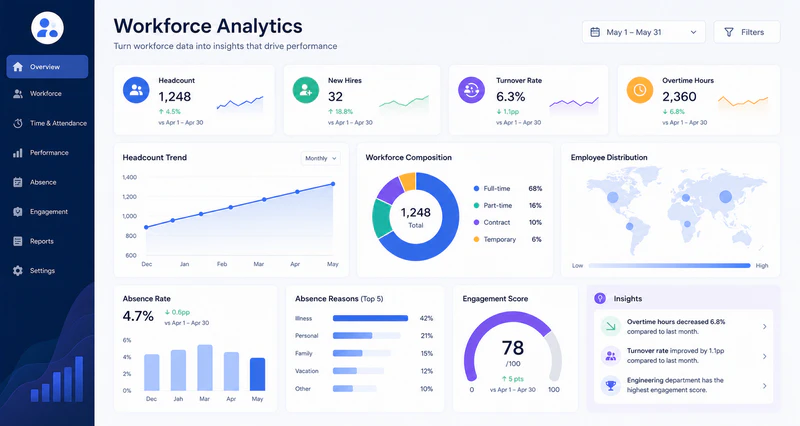
Not every product solves the same problem. Some are built for productivity analytics and workforce visibility. Others are surveillance-heavy monitoring tools with reporting added on top. A few focus on insider risk monitoring and data protection rather than performance optimization.
Below are 11 notable workforce analytics software platforms in 2026, including where each tool fits best, what limitations matter, and which teams are most likely to benefit from them.
Quick Comparison Table of 11 Workforce Analytics Software
| Platform | Core Analytical Focus | Best For | Privacy Level |
|---|---|---|---|
| ActivTrak | Team productivity & burnout risk | Hybrid team workflow optimization | High (Aggregate defaults) |
| AnySecura | Unified visibility & secure productivity | High-compliance & IP-heavy environments | Medium (Configurable) |
| Teramind | High-definition behavior tracking | Operational auditing & data integrity | Medium (Configurable) |
| Microsoft Viva | Organization-wide collaboration patterns | Microsoft 365 enterprise environments | Very High (No individual tracking) |
| Visier | Macro HR planning & retention modeling | Enterprise CHROs & headcount strategy | Very High (Structured HR data) |
| Hubstaff | Proof-of-work & contractor invoicing | Freelancer fleets & global contract workforces | Medium (Activity & screenshot based) |
| Insightful | Time tracking & project mapping | Agencies & distributed client-billing teams | High (Flexible tracking modes) |
| Prodoscore | SaaS app engagement scoring (0-100) | Revenue operations, sales, & support teams | High (API-based, no background agent) |
| DeskTime | Attendance logging & URL categorization | Small businesses & lean remote teams | High (Includes private time mode) |
| Controlio | Live session auditing & screen streaming | Customer service floors & remote BPOs | Medium (High continuous oversight) |
| WorkTime | Pure non-invasive productivity metrics | Strict GDPR-regulated & unionized regions | Very High (No logs or screenshots) |
11 Best Operational Workforce Analytics Software
1. ActivTrak
Unlike many workforce analytics softwares that lean toward either invasive surveillance or shallow reporting, ActivTrak focuses on balanced, team-level productivity intelligence. It is designed for organizations that want operational visibility without damaging employee trust, making it especially popular among mid-sized teams.
The platform analyzes application and web activity, then aggregates insights at the team level by default rather than exposing every employee action. Managers can understand how teams spend time across tools like Figma or Slack without turning analytics into constant surveillance.
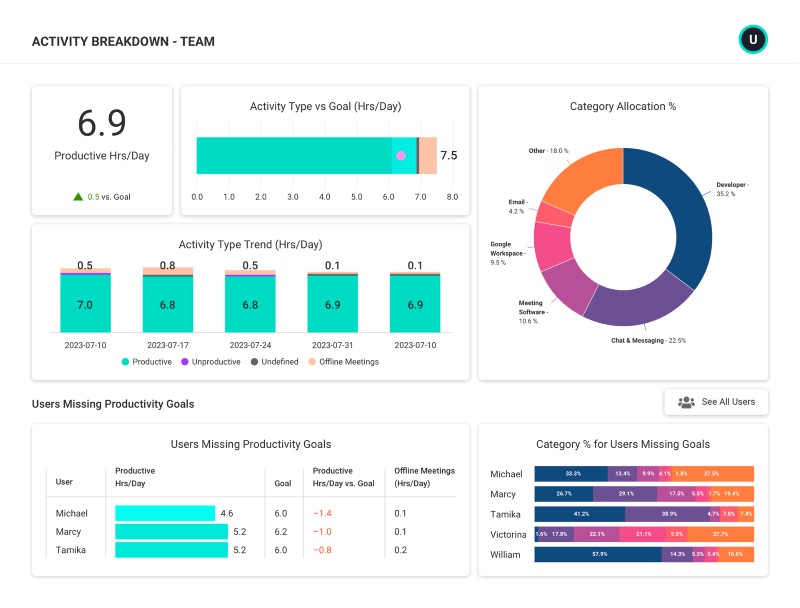
What makes ActivTrak stand out is its Operational Productivity Analytics approach and burnout-focused reporting. Instead of only identifying underperformance, its Workload Balance and Burnout Dashboard helps managers spot high-performing employees who are consistently overworked, allowing teams to rebalance workloads before burnout and turnover become problems.
Key Features:
- Team-level productivity dashboards (aggregated by default)
- Behavioral trends for burnout risk and collaboration patterns
- App and web categorization (Productive vs. Unproductive)
- Basic file movement and risk alerts
- Free tier for up to 3 users
- Strong privacy controls; excellent dashboards
- Reasonable pricing; free tier for validation
- Insider risk detection lighter than Teramind or AnySecura
- Advanced features require premium tier
Best For: Mid-sized companies, hybrid and remote teams, and organizations avoiding overly invasive monitoring.
Pricing: Free for up to 3 users. Paid plans start at $10/user/month.
Bottom Line: ActivTrak proves that software tracking doesn't need to feel like surveillance. It's a strong choice for teams that want operational visibility while maintaining workplace trust.
2. AnySecura
AnySecura approaches workforce analytics differently from traditional productivity software by combining operational visibility with endpoint security features. Rather than focusing only on logged time, it provides deep behavioral insights into application activity, website usage, file movement, USB transfers, generative AI tool usage, and employee activity timelines.
The platform is especially suited for regulated, R&D-intensive, or IP-heavy industries such as finance, cybersecurity, and software development, where traditional productivity tools often fail to address data security and intellectual property risks. By combining behavior monitoring with data loss prevention features, AnySecura connects operational productivity with insider risk awareness.
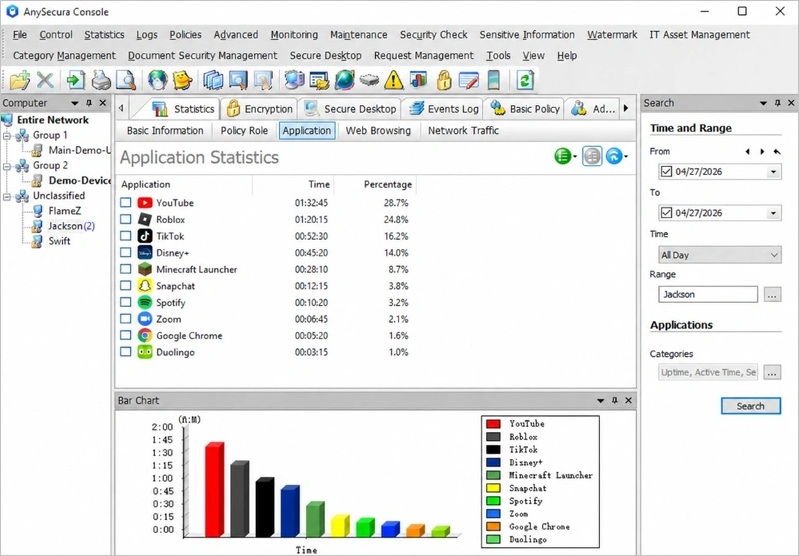
Compared with platforms like ActivTrak, AnySecura places greater emphasis on endpoint behavior and security visibility, making it better suited for security-sensitive organizations, though potentially more complex for smaller teams focused only on basic reporting metrics.
Key Features:
- Unified workforce intelligence (visibility + data protection)
- Data movement tracking (file, USB, network, and print monitoring)
- Insider risk detection utilizing behavioral baselines
- Generative AI usage tracking and prompt logging
- Transparent encryption with dynamic watermarking for sensitive data
- True insider risk prevention (not just logging)
- Granular data protection; air-gapped deployment capable
- DLP-style rules integrated into analytics platform
- More complex than pure productivity tools
- Can be over-featured for small teams focused only on reporting
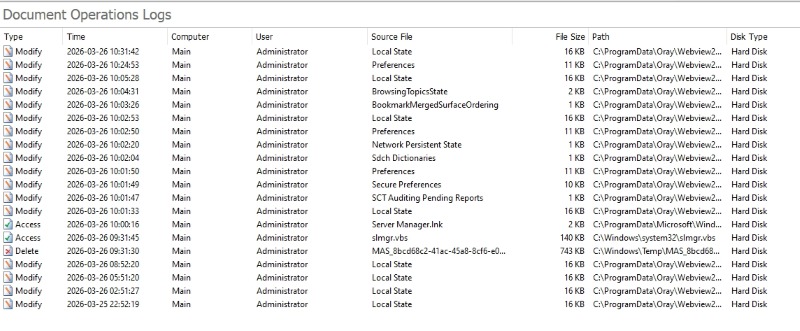
Track employee app, web, and file activity across devices. Detect data transfers, USB usage, AI tool activity, and unusual behavior patterns — not just basic productivity scores or time tracking.
Best For: Security-conscious organizations, hybrid enterprises, compliance-heavy industries, and companies needing both operational tracking and endpoint visibility.
Pricing: Three fixed plans starting at $18/user/month. Modular pricing available to select required features.
Bottom Line: AnySecura bridges the gap between productivity analytics and operational risk. It's a good fit for organizations that don't want to run separate tools for workforce visibility and endpoint intelligence.
3. Teramind
Teramind is a security-first user behavior monitoring platform. It combines employee activity logging, insider threat detection, user tracking, and productivity monitoring into a single system. In practice, it is mainly used in environments where compliance and security oversight matter more than employee experience or workflow optimization.
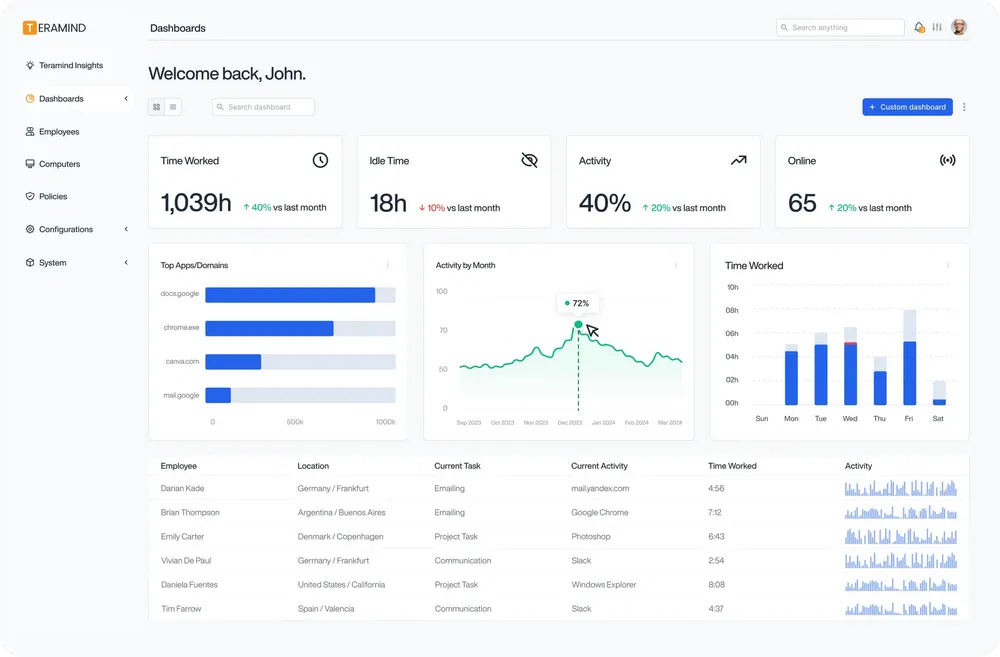
A key capability is session reconstruction. Instead of showing activity as separate logs, Teramind rebuilds a continuous video and text timeline of what a user did during a session. This is especially useful in security investigations, where teams need to understand the exact sequence of actions leading to an event rather than isolated data points.

The platform records application usage, screen activity, file operations, and optionally keystrokes, then organizes them into session-level timelines for review. These are typically used for audits, incident investigations, or compliance checks rather than day-to-day performance management.
Compared with productivity-focused tools, Teramind is much more detailed and security-driven. This makes it powerful in regulated industries, but also means it can feel too intrusive for teams focused on trust and transparency.
Key Features:
- User session recording and keystroke logging
- Website, application, and email behavior tracking
- File transfer and clipboard activity monitoring
- USB device interaction and network connection logging
- Rule-based behavioral alerts and automated risk scoring
- Comprehensive insider threat detection dashboards
- Best-in-class behavioral analytics engine
- Highly customizable rules for policy violations
- Strong for compliance and high-risk environments
- Detailed activity forensics
- Heavy surveillance reputation may create cultural resistance
- Feels excessive for standard productivity analytics needs
- More complex deployment than lightweight alternatives
- Requires transparency to avoid trust issues
Best For: Insider threat programs, highly regulated industries, security-focused enterprises, and organizations requiring detailed activity forensics.
Pricing: Starts around $15/user/month for basic features. Enterprise tier with full security features costs significantly more.
Bottom Line: Teramind is powerful but intense. Buy it if you need serious insider threat detection and compliance forensics. Skip it if you just want to understand team productivity.
4. Microsoft Viva Insights
Microsoft Viva Insights takes a fundamentally different approach from traditional workforce platforms. Rather than tracking screens or logging individual user sessions via background agents, it analyzes collaboration patterns across Microsoft 365, including email, calendar, Teams, and document activity. This makes it a high-level collaboration metrics tool rather than an endpoint monitoring software.
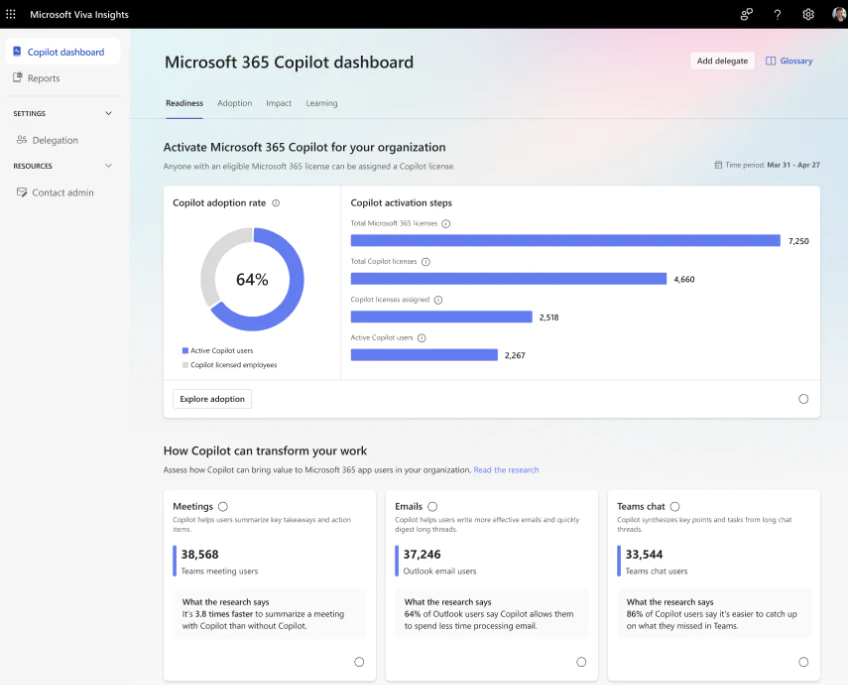
No other platform in this category comes pre-installed across Microsoft’s enterprise ecosystem at this scale. For organizations already using Microsoft 365 E3 or E5, Viva Insights typically requires no additional licensing cost and no endpoint agent deployment, which significantly changes procurement decisions.
The platform operates primarily on aggregated, anonymized data. Instead of focusing on individual tracking, it answers organizational health questions, such as whether teams have sufficient focus time or whether meeting load is balanced across the week. This approach contrasts with tools like AnySecura, Teramind, or ActivTrak, which provide more granular, per-user visibility through endpoint-level tracking.
However, this abstraction also defines its limitations. Viva Insights does not provide insider risk detection, non-Microsoft application monitoring, or off-network visibility. It is designed for productivity and collaboration health rather than security or compliance monitoring. As a result, many organizations combine it with endpoint-focused tools when broader workforce visibility is required.
Key Features:
- Aggregated, anonymized team insights (privacy by default)
- Focus time recommendations based on calendar patterns
- Collaboration metrics covering email, Teams, and meetings
- Integration with Microsoft Graph (no background agent required)
- Copilot dashboard tracking generative AI usage trends
- No surveillance methods (no screens, no keystrokes)
- Excellent for meeting culture and burnout prevention
- Privacy-preserving by design
- Free/included with many Microsoft 365 licenses
- Lacks endpoint monitoring and insider risk analytics
- No real-time activity visibility
- Requires Microsoft ecosystem adoption
- Limited operational analytics beyond collaboration data
Best For: Microsoft-centric organizations, enterprise collaboration analytics, employee wellbeing initiatives, and organizational productivity optimization.
Pricing: Included in Microsoft 365 E3/E5. Standalone starts at $4/user/month.
Bottom Line: Viva Insights is the least invasive tool on this list. It answers different questions than traditional workforce analytics software—focused on collaboration health rather than individual activity. For Microsoft shops, it's a no-brainer add-on.
5. Visier (and Workday People Analytics)
Fortune 500 CHROs are not evaluating whether a support agent opened Slack at 2:17 PM. Their focus is on workforce cost forecasting, retention risk modeling, and long-term organizational planning. Workday Workforce Analytics and Visier operate in this strategic HR analytics layer.
These platforms are built on structured HR data rather than real-time activity signals. They analyze hiring history, compensation trends, promotions, and attrition patterns to support executive-level decisions about workforce planning and organizational efficiency. As a result, they provide no visibility into day-to-day operational behavior such as application usage, device activity, or real-time productivity signals.
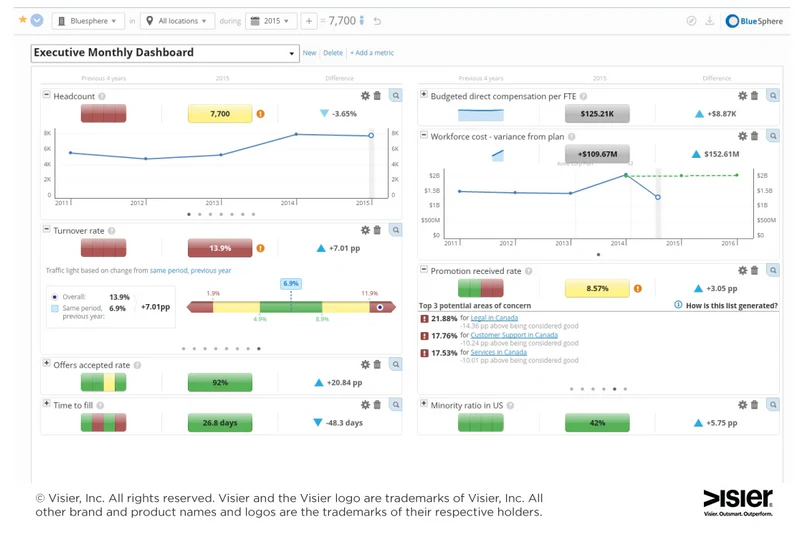
The distinction is structural, not functional. Workday and Visier answer questions about how the workforce evolves over quarters and years, while tools like ActivTrak or AnySecura focus on how work is performed minute by minute.
In most enterprise deployments, these categories are used in parallel rather than as substitutes: HR leaders rely on Workday or Visier for board-level reporting, while operations and IT teams use workforce visibility platforms for daily execution insights. They operate on different time horizons and solve different decision problems.
Key Features:
- Headcount financial modeling
- Retention risk algorithms
- Organizational health surveys
- Cross-departmental cost benchmarking
- Diversity and compliance reporting
- Best-in-class for strategic HR analytics
- Executive-level workforce intelligence
- Strong for retention analysis and headcount planning
- Trusted by large enterprises
- Not focused on operational productivity monitoring
- Limited endpoint visibility or remote workforce monitoring
- Enterprise pricing and deployment complexity
- Requires separate tools for daily productivity analytics
Best For: Enterprise HR operations, workforce planning, strategic people analytics, and large organizations with mature HR systems.
Pricing: Custom enterprise pricing. Typically six figures annually.
Bottom Line: Workday + Visier answers strategic questions about your workforce over quarters and years, not minutes. For daily productivity visibility, it's the wrong tool. For HR and finance leaders, it's essential.
6. Hubstaff
Agencies billing by the hour face a different problem than enterprise security teams. Their main challenge is turning tracked work into accurate invoices while maintaining profitability. Hubstaff is primarily positioned around this billing and time management workflow rather than broader workforce analytics or behavioral intelligence.
In practice, Hubstaff is used as a time tracking and billing system. Contractors log time against tasks, and the platform records entries with optional activity signals such as screenshots or app usage. These are then converted into timesheets for invoicing or payroll, reducing manual reconciliation in client-based work.
Productivity scoring and activity monitoring are included, but they are generally secondary signals supporting the main workflow of distributed work tracking and client billing.
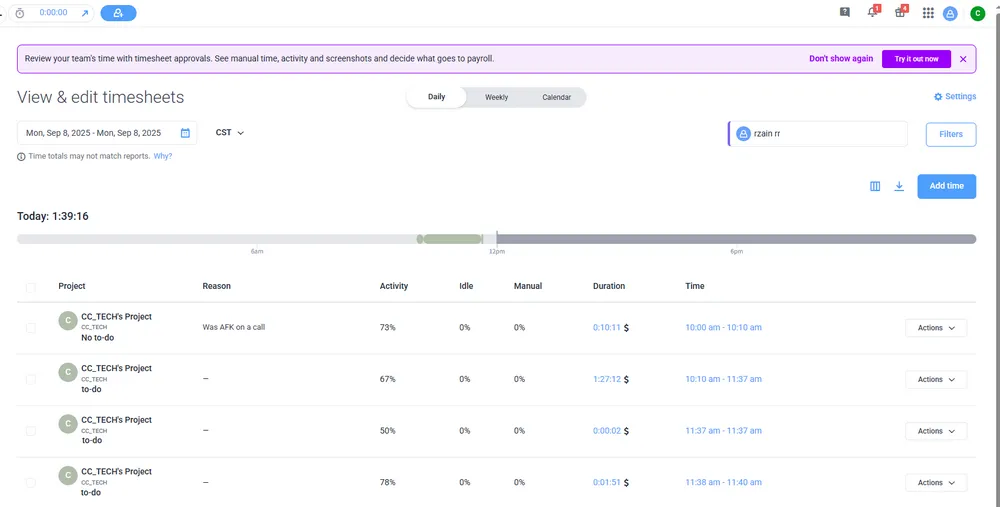
Compared with adjacent tools, ActivTrak emphasizes behavioral analytics. Hubstaff differentiates less through analytics depth and more through integrations with payroll and accounting systems such as QuickBooks and Gusto.
Key Features:
- Time tracking with manual and automatic modes
- Productivity scoring and app/website monitoring
- GPS tracking for field teams
- Screenshot capture (configurable)
- Payroll automation and project budgeting
- Team scheduling
- Simple and easy to deploy
- Strong for distributed contractors and billable client work
- Payroll integration saves administrative time
- Transparent to employees
- Limited advanced workforce analytics depth
- Not suitable for insider risk monitoring or security operations
- Less useful for complex workforce visibility analysis
Best For: Agencies, freelancers, distributed service teams, and SMBs needing time tracking and productivity reporting.
Pricing: Starts at $7/user/month. GPS and advanced features in higher tiers.
Bottom Line: Hubstaff is an operational tool, not a strategic analytics platform. For time tracking and payroll integration with remote teams, it works well. For deeper workforce insights, look elsewhere.
Compare different employee time tracking software and learn the features, pros and cons. Find the best option for your remote team or business. Learn more>>
7. Insightful
Most workforce analytics tools are designed with office-based or continuously connected employees in mind. Field technicians, retail staff, and mobile workers often operate outside that assumption. Insightful is positioned to address this gap by supporting more flexible workforce tracking across distributed environments.
The live dashboard provides a real-time view of team status, including application usage and general activity signals. This allows managers to understand whether teams are engaged in core tools without needing to inspect individual activity streams in detail. The value is primarily in aggregated visibility rather than granular monitoring.
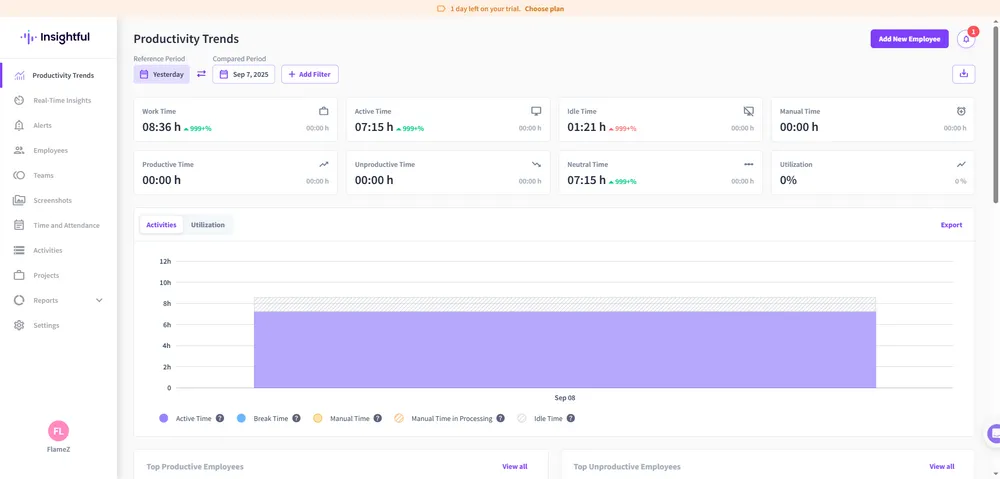
A key capability is support for offline or intermittent connectivity scenarios. Field workers can log time and activity through a mobile interface without relying on a continuously active desktop agent. This makes it more suitable for industries where mobility is part of the workflow, such as field services or on-site operations.
In enterprise deployments, usage patterns tend to vary by role. Desktop-based employees are often monitored with full activity tracking, while field teams are managed primarily through time and project reporting. This dual-mode configuration is one of the reasons Insightful is frequently adopted in mixed workforce environments.
Key Features:
- Live activity dashboard (online status, current app/URL)
- Offline time tracking via mobile app
- Automatic screenshot capture (configurable intervals)
- Productivity categorization (productive/unproductive/neutral)
- Optional on-prem deployment
- Cleaner reporting than many legacy tools
- Useful for hybrid teams and workforce optimization
- Less invasive than surveillance-heavy platforms
- Good for mid-sized remote organizations
- Limited security and compliance depth
- No insider risk monitoring or data movement analytics
- May require additional tools for endpoint security
Best For: Hybrid teams, operational analytics, workforce optimization, and mid-sized remote organizations.
Pricing: Starts at $8/user/month.
Bottom Line: Insightful is a solid mid-tier option for workforce efficiency. It won't replace a security tool, but for productivity analytics, it's more than enough for most teams.
8. Prodoscore
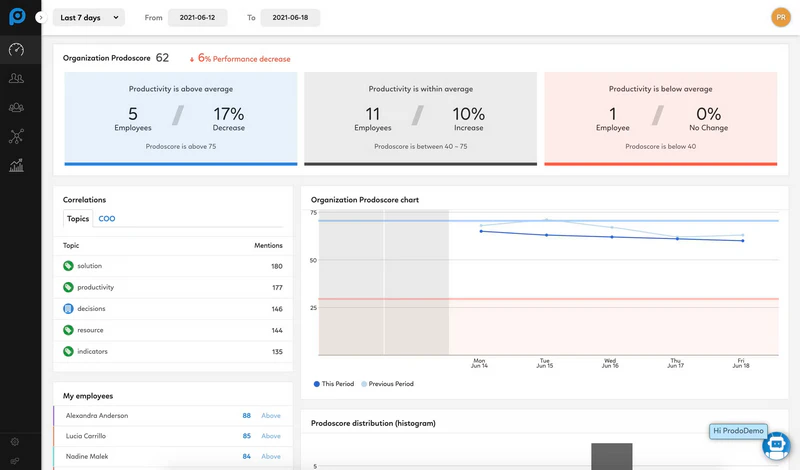
Prodoscore treats workforce analytics like a sales pipeline tool. Rather than tracking desktop time or keystrokes, it ingests telemetry via API from cloud platforms—Google Workspace, Salesforce, Slack, VoIP systems—and distills activity into a single 0–100 score.
The score acts as a non-invasive health indicator. A drop from a baseline of 85 to 55 signals potential disengagement, burnout, or need for managerial support—without requiring screenshots or session recordings.
Unlike ActivTrak or Teramind, Prodoscore offers no insider risk detection or real-time intervention. It is purpose-built for measuring engagement within SaaS workflows, not securing data or monitoring offline activity.
Key Features:
- Single Prodoscore metric (0–100) derived from API-based telemetry
- Baseline comparison and score trend analysis
- Direct integrations with Google Workspace, Salesforce, Slack, VoIP
- Non-invasive engagement indicators (no screenshots, no keystrokes)
- Eliminates noise of raw time tracking
- highly effective for sales, customer success, and recruitment teams dependent on specific SaaS tools
- privacy-preserving design
- Less useful for creative or engineering roles working offline or in localized developer environments
- no insider risk detection.
Best For: Revenue operations leaders, sales teams, and customer success organizations that need a simple, numeric measure of daily engagement with core business applications.
Pricing: Starts at $20/user/month.
Bottom Line: Excellent for revenue operations leaders who want a simple, numbers-driven system to gauge daily sales and service engagement. Avoid for engineering or creative teams—and for any use case requiring data protection or real-time monitoring.
9. DeskTime
Enterprise workforce analytics platforms often overwhelm small businesses with complex pricing structures, extensive feature sets, and configuration models designed for dedicated HR or IT teams. DeskTime takes a deliberately narrower approach by focusing on essential productivity and attendance tracking.
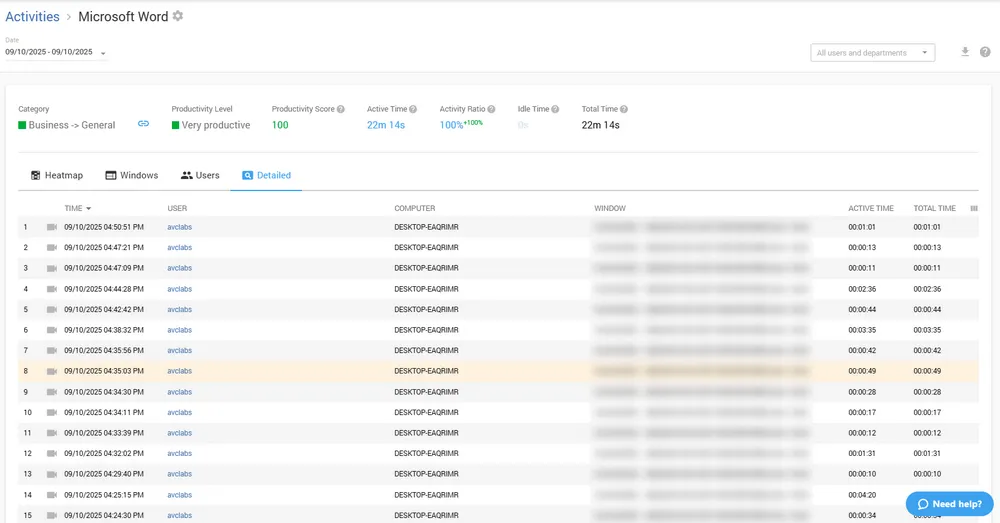
The platform covers core SMB needs such as automatic time tracking, URL and application categorization, project tagging, screenshots, and absence management. Among these, URL categorization is particularly useful for lightweight productivity classification, helping distinguish between work-related tools and general browsing activity without manual labeling.
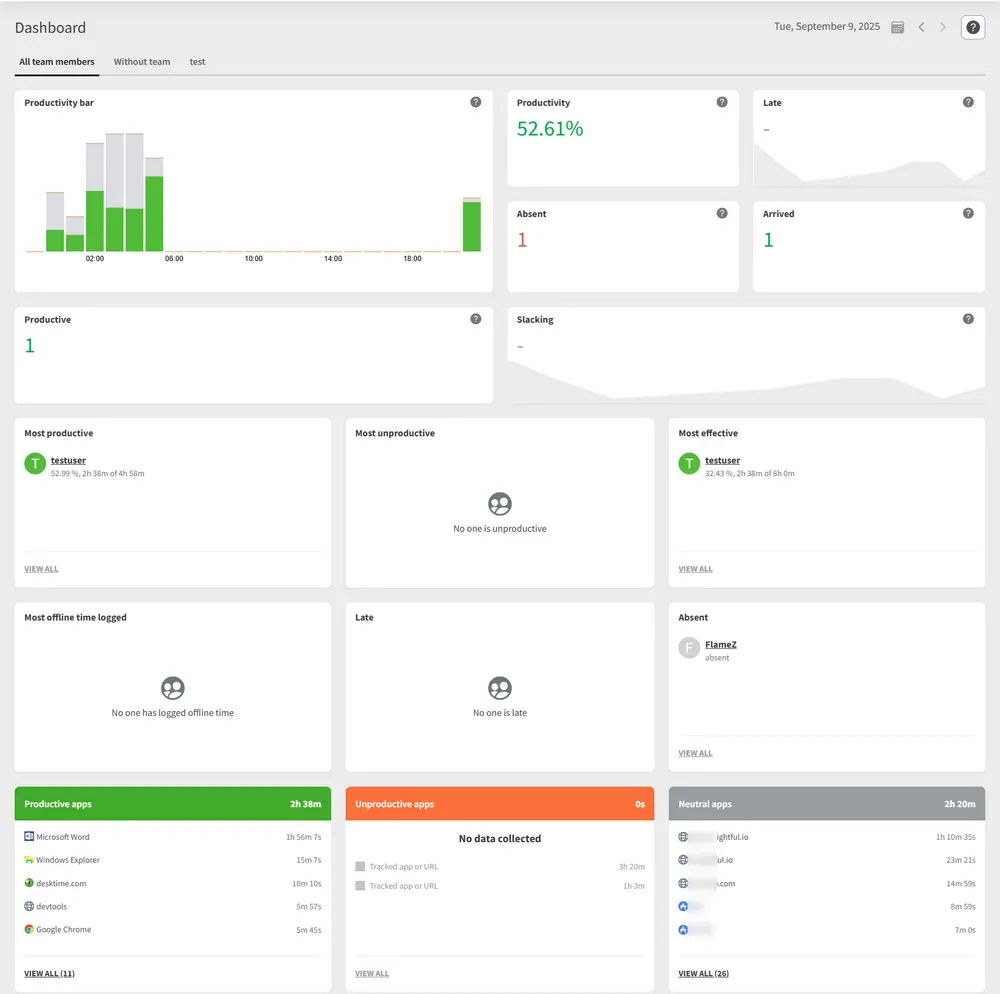
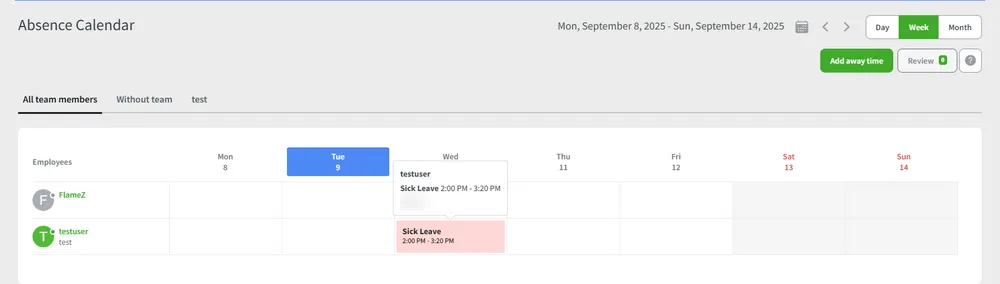
The absence calendar adds important context by placing PTO and sick leave alongside productivity data, allowing managers to understand output fluctuations without cross-referencing separate HR systems.
A common implementation issue in SMB environments is overusing screenshots across all employees, which can lead to unnecessary friction. In practice, screenshots are typically more appropriate for contract or project-based roles where billing verification is required, while salaried roles rely more on trust-based tracking.
DeskTime remains a lightweight productivity tracking solution rather than a full workforce intelligence platform. It is designed for straightforward visibility into time usage and attendance rather than deep behavioral analytics or security-focused monitoring.
Key Features:
- Automatic app and URL categorization (very accurate)
- Time tracking with optional screenshots
- Project and task management
- Absence calendar (PTO, sick days, holidays)
- Offline time tracking
- Lightweight and easy to deploy
- Good for basic productivity visibility
- Includes private time mode (less invasive)
- Affordable
- Limited advanced analytics and security features
- Not a full workforce intelligence platform
- Scales poorly beyond small teams
Best For: Small businesses, hybrid teams, and basic productivity analytics needs.
Pricing: Free for 1 user. Paid starts at $7/user/month.
Bottom Line: DeskTime doesn't pretend to be more than it is. For a small team that just wants to know where time goes without complex setup, it works perfectly.
10. Controlio
Batch reporting answers "what happened yesterday." Operations teams don’t operate on yesterday’s data—they need to know "who is idle right now?" Controlio is positioned around this real-time visibility gap that many workforce analytics tools do not prioritize.
The dashboard updates frequently enough to support live operational decisions, showing active users, current applications, and recent activity signals in near real time. In environments like call centers or support desks, this enables supervisors to react quickly—for example, redistributing workload when queues spike instead of waiting for retrospective reports.
Where it differs from tools like ActivTrak is not just feature depth, but operational design. Those platforms are built primarily for productivity analysis and reporting cycles. Controlio is closer to a live operations console, which changes how it is used inside teams.
The live screen view feature is often the most debated capability. While positioned for training and QA, in practice it is usually adopted for real-time oversight. Mature deployments typically restrict access, define strict usage policies, and separate operational monitoring from disciplinary processes to avoid trust degradation.
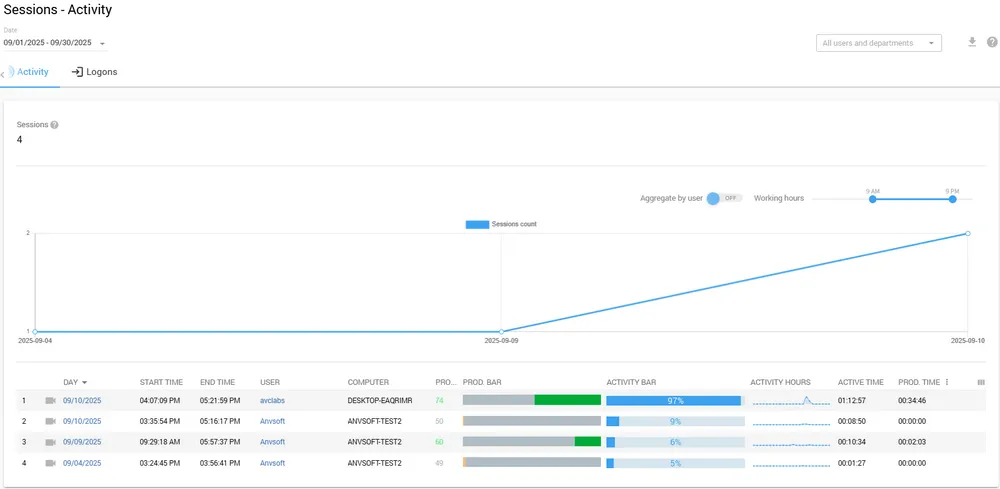
It is important to note: this level of real-time monitoring is not necessary for most organizations. Knowledge work teams rarely need second-by-second visibility. However, in call centers, IT help desks, and dispatch environments, operational responsiveness is a core requirement rather than an edge case. Controlio fits that narrow but well-defined operational category.
Key Features:
- Real-time dashboard (refreshes every few seconds)
- Live screen view (optional, access-controlled)
- Application, web, and keystroke monitoring (optional)
- Activity alerts (idle time, specific URLs, etc.)
- Cloud-based deployment
- Straightforward dashboard for quick visibility
- Less security-heavy than Teramind or Veriato
- Good for SMBs and remote teams
- Easy to deploy
- Less advanced analytics layer
- Limited enterprise-scale intelligence features
- May be outgrown by organizations needing deeper operational intelligence
Best For: SMBs, remote teams, and operational workforce visibility.
Pricing: Starts at $10/user/month.
Bottom Line: Controlio is a decent middle-ground option. It's not great at any single thing, but it's not terrible either. It works if your needs are simple and your budget is tight.
11. WorkTime
Strict European workplace privacy environments have restricted or vetoed screenshot-based employee monitoring. WorkTime is built specifically for this compliance environment.
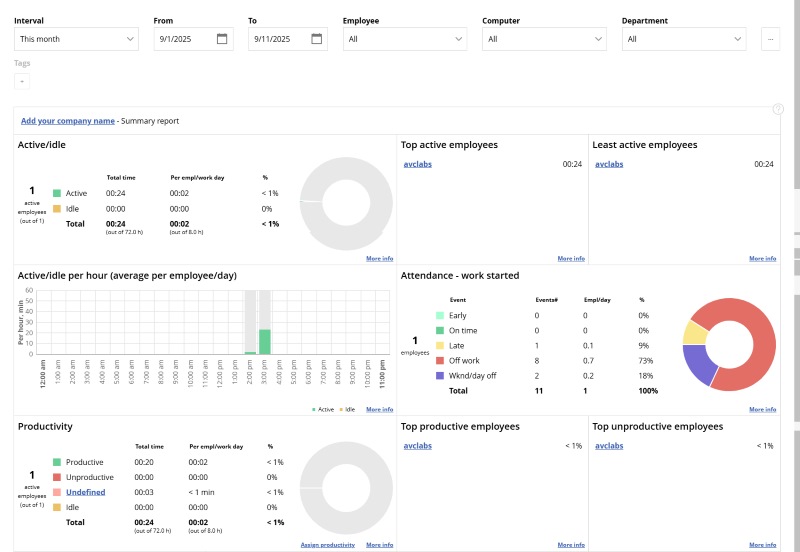
The platform avoids invasive tracking entirely—no screenshots, no keystroke logging, no session recording. It focuses on aggregated, team-level analytics, so managers see productivity patterns without individual surveillance. This makes it more restrictive than ActivTrak and far less invasive than tools like Teramind or AnySecura.
The trade-off is clear: WorkTime does not offer insider risk detection or individual investigation capabilities. It prioritizes regulatory compliance and employee trust over security visibility, which is acceptable—and sometimes required—in stricter European deployments.
Compared with Microsoft Viva Insights: both are privacy-first, but WorkTime is stack-agnostic and works outside the Microsoft ecosystem.
Overall, WorkTime is a lightweight workforce analytics tool designed for compliance-first organizations rather than security-focused monitoring use cases.
Key Features:
- No screenshots, no keystrokes, no video
- Anonymous team/role aggregation by default
- Active and idle time metrics
- Application usage tracking (without individual detail)
- On-prem or cloud deployment
- Non-invasive approach appeals to privacy-conscious teams
- Simple and straightforward
- Good for traditional office environments
- Long track record in the category
- Interface feels dated compared to newer platforms
- Limited modern analytics depth
- Fewer features than competitors
- Basic reporting only
Best For: Traditional office environments, basic productivity analytics, and small to mid-sized organizations.
Pricing: Starts at $6/user/month.
Bottom Line: WorkTime is honest about what it is: a simple, non-invasive productivity tracker. It won't win any awards for design or depth, but for basic needs, it gets the job done.
Now that we've looked at each tool in depth, it's worth stepping back to compare two fundamentally different approaches.
Workforce Analytics vs Employee Monitoring (Comparison Table)
| Category | Workforce Analytics Software | Employee Monitoring Software |
|---|---|---|
| Primary Goal | Understand productivity trends, operational efficiency, and workforce behavior | Track individual employee activity and usage |
| Focus | Organizational insights | Individual oversight |
| Typical Features | Productivity analytics, workforce intelligence, reporting, trend analysis | Screenshots, keystrokes, live monitoring |
| Management Style | Data-driven operational visibility | Direct supervision and activity tracking |
| Common Users | Operations leaders, HR, executives, workforce analysts | Managers, IT admins, compliance teams |
| Employee Experience | Usually less intrusive | Can feel invasive depending on deployment |
| Security Features | Sometimes includes insider risk analytics | Often limited unless paired with security tools |
| Best Fit | Hybrid workforce optimization | High-control monitoring environments |
The line between these categories is increasingly blurred in 2026.
Many workforce analytics software tools now include some level of employee monitoring, while traditional monitoring vendors increasingly market themselves as workforce intelligence platforms.
The difference usually comes down to intent.
If the platform primarily helps organizations understand operational patterns and improve workflows, it fits more closely into workforce analytics software.
If the system is primarily designed to observe individual employee behavior in real time, it leans more toward traditional employee monitoring software.
Key Features to Look for in Workforce Analytics Tools (2026)
Skip the long feature lists. These seven actually matter:
- Productivity Analytics — Not "percentage of active time." Real insights like "which applications drive output for each role?"
- Behavioral Insights — Trend detection. Someone who always worked 9–5 suddenly active at 3 AM? That is a signal worth investigating.
- Insider Risk Detection — File movements, USB use, print jobs, unusual data access. Most productivity tools lack this entirely.
- AI Tool Monitoring — Can it see usage of ChatGPT, Copilot, Gemini? Track prompts? Block paste of sensitive data? Table stakes for 2026.
- Real-Time Activity Visibility — Live dashboards for operations roles. Not needed for everyone.
- Privacy Controls — Aggregation, anonymization, role-based access, data retention policies. Non-negotiable for legal compliance.
- Reporting & Dashboards — Can you answer "what happened last week?" in under 60 seconds without exporting to Excel?
Buyer's Guide: How to Choose the Right Workforce Analytics Platform
Don't start with features. Start with your actual problem.
For Remote Teams: Hubstaff. You need time verification for distributed work, not insider risk detection. Screenshots optional. Privacy matters more because employees are in their homes.
For Enterprise Security: Teramind or AnySecura. You need behavioral analytics, data movement monitoring, and real-time intervention. Expect weeks of policy configuration. This is not a quick win.
For Compliance: WorkTime depending on jurisdiction. WorkTime for GDPR-heavy regions.
For Productivity Optimization: ActivTrak or Insightful. You want team-level insights without destroying trust. Free tiers help validate before buying.
For Hybrid Workforces: Microsoft Viva Insights plus one other tool. Viva covers M365 activity with privacy defaults. Add a lightweight tracker for non-Microsoft applications.
For Macro People Strategy: Workday or Visier. You need twelve-month workforce forecasts and retention modeling. You do not need real-time visibility. Different procurement category entirely.
The real selection logic most people ignore: Get legal and HR sign-off before running a pilot, not after. Tool failures are rarely technical. They are trust failures.
Trends in Workforce Analytics You Should Know
AI usage monitoring is becoming the new default layer.
Two years ago, tracking ChatGPT was niche. Today, it is a checkbox in every enterprise RFP. Vendors without native Copilot or ChatGPT visibility are already behind. By end of 2026, AI tool governance will be as standard as web filtering.
Workforce analytics is merging with endpoint security.
The old model meant separate tools: productivity purchased by HR, security purchased by IT. That is collapsing. The same agent must now serve both functions. AnySecura and Teramind are already there. Pure productivity players are not. The market is splitting into unified platforms and legacy point solutions.
Insider risk analytics is pulling away from productivity tracking.
"How productive is my team?" and "is someone stealing data?" are distinct questions requiring different data models. The best platforms offer separate modes or modules. The worst still pretend one dashboard serves both purposes.
Privacy-first monitoring is no longer optional.
GDPR fines. Works Council vetoes. Employee pushback. Organizations that ignored privacy in 2024 are scrambling to retrofit aggregation. Tools with privacy defaults are winning enterprise deals. Tools that default to surveillance are being blocked.
Unified endpoint plus workforce visibility is the new enterprise standard.
IT already deploys endpoint agents for security. HR now wants analytics from the same agent. One deployment, one update cycle, one vendor relationship. AnySecura's unified architecture is built for this. Standalone productivity tools face replacement risk.
Real-time visibility is becoming table stakes for operations roles.
Not every organization needs it. But call centers, IT help desks, and dispatch teams have realized that batch reporting cannot rebalance today's workloads. Controlio and Insightful lead here. Most enterprise platforms are still catching up.
FAQ about Workforce Analytics Software
Is workforce analytics legal?
Yes, with disclosure. Most regions require notification. Some jurisdictions require consent or legitimate business justification. Never deploy without legal review.
Does it invade privacy?
It can, depending on configuration. Tools that default to individual screenshots invade privacy. Tools that default to aggregated team data do not. Configuration choices matter more than software selection.
What is the difference between workforce analytics and employee monitoring?
Analytics delivers patterns and trends at the team level. Monitoring delivers individual activity records for investigation purposes. See the comparison table above.
Can these tools detect insider threats?
Some can. Most productivity tools cannot. Look specifically for file movement monitoring, USB controls, and behavioral anomaly detection. AnySecura and Teramind lead here.
Which is best for remote teams?
Hubstaff for time verification. ActivTrak for behavioral insights without full surveillance. The correct answer depends on whether the organization bills hours or seeks productivity patterns.
Is screenshot monitoring ever acceptable?
Yes, with context. Screenshots for project-based contract work (with contractual agreement) is appropriate. Screenshots for salaried employees without documented cause is toxic. Policies must be specific and disclosed.
How much should workforce analytics cost?
$5–15 per user per month for cloud tools. Enterprise on-prem platforms cost more but include DLP features. Free tiers work for teams under ten users.
What is the most underrated feature?
The absence calendar. When productivity drops, the first question should be "who was out?" Most tools require checking a separate HR system. Well-designed platforms display PTO adjacent to activity data.
Do I need separate tools for productivity and security?
Increasingly, no. Unified platforms like AnySecura and Teramind handle both. However, most pure productivity tools lack security features entirely. If both requirements exist, either purchase a unified platform or accept two tools.
Final Thoughts
The workforce analytics software market in 2026 is broader than many companies realize.
Some platforms focus on productivity analytics and operational visibility. Others prioritize insider risk monitoring, endpoint oversight, or compliance controls. A few are essentially HR intelligence systems rather than workforce monitoring platforms.
The right choice depends less on feature lists and more on organizational priorities.
Start with a single problem. Run a small pilot. Secure legal and HR approval before procurement, not after. Configuration decisions matter more than feature checklists. The same platform that builds trust with aggregated dashboards can destroy it with screenshots. Organizational policies determine which outcome prevails.
AnySecura provides workforce analytics that reveals how work actually happens—application usage, web activity, file movement, and behavioral patterns—so teams can understand productivity, collaboration, and risk in one view, not just surface-level activity logs.


