
A document ruled by the Court of Justice of the European Union in 2019 requires that "the Member States must require employers to set up an objective, reliable and accessible system enabling the duration of time worked each day by each worker to be measured". The U.S. Labor Law (FLSA) also sets relevant regulations on the employees' hours worked and record-keeping, requiring employers to keep records of working hours, earned wages and more for each worker. Although the method of timekeeping is not fixed, it is clear that this should be "complete and accurate".
Certain small businesses still use paper timesheets and punch cards for the payroll system. Even if not all companies use employee time tracking software, the modern digital automatic timesheet is getting popular and more common, and you will like it when it saves your time and money.
When employers fail to recognize work hours, or your employee just forgets to punch, the calculation becomes complicated and unreliable. In this case, employee time tracking software helps simplify payroll and improve efficiency. This article evaluates, compares, and shortlists the 12 best employee time tracking software options available now, with pricing, persona-based picks, and compliance notes to help you choose faster. Whether for small business or remote team, it will be more transparent and visible for the billable hours or payroll costs.
Part 1: What Is Employee Time Tracking Software
Employee time tracking software is a digital platform designed to replace manual punch cards and paper timesheets. It automates the capture of clock-in and clock-out times, calculates total worked hours, and links time entries to specific tasks, projects or clients.
Beyond basic logging, it streamlines payroll workflows, supports accurate client invoicing, and helps businesses stay compliant with labor regulations like FLSA. Unlike manual methods, these tools centralize data in real time, reducing human error and giving managers clear visibility into how teams spend their working hours.
- Time Logging: Captures start or stop times, breaks, and attendance automatically across devices.
- Project Mapping: Associates every hour with a project, client, or task for precise cost tracking.
- Overtime Calculation: Computes overtime based on federal or state rules and generates audit-ready reports.
- Timesheet Approval: Enables managers to review, edit, and approve employee time entries before payroll.
- Payroll Integration: Syncs verified hours directly to payroll systems, eliminating manual data entry.
- Productivity Insights: Shows how time is distributed across work and non-work activities without invasive surveillance.
- Mobile Tracking: Supports clock-in via smartphones, GPS verification, and offline logging for on-site teams.
👉 You May Also Need: Small Business Management Software in 2026: CRM, Payroll & More
Part 2: Why Businesses Use Employee Time Tracking Software
In current real life, companies adopt employee time tracking software not just to "monitor hours", but to solve real operational and financial challenges across diverse work models. The most common use cases span remote, hybrid, field, and agency environments, each with unique demands that manual tracking cannot meet.
| Metric | Manual Methods | Automated Software |
|---|---|---|
| Suitable For | businesses without special billing requirements | remote/hybrid/field/agency teams |
| Accuracy | Low: Prone to forgetfulness, rounding errors, and intentional misreporting | High: Auto-capture eliminates missed punches, miscalculations, and manual fraud |
| Cost | Low direct cost | Subscription-based |
| Compliance Risk | High: Incomplete records trigger FLSA audits, fines, and lawsuits | Low: System logs are timestamped, immutable, and audit-ready |
| Scalability | Low: Paper/spreadsheets become unmanageable as teams grow | High: Add/remove users in clicks; works for 5 to 500+ employees |
| Employee Acceptance | Mixed: Older staff may prefer simplicity; younger teams find it inefficient and outdated | Medium: Requires onboarding, but modern tools prioritize user experience and privacy |
- Remote Teams: Distributed teams need a reliable way to log hours regardless of location. Employee time tracking software ensures transparency, prevents time theft, and keeps remote workers accountable without micromanagement.
- Hybrid Teams: Organizations with both in-office and remote staff need a unified system to standardize time logging, simplify payroll, and create consistent attendance policies.
- Field Teams: On-site staff require GPS-enabled clock-in to verify job site attendance. This prevents buddy punching and ensures compliance with labor laws for hourly workers.
- Agencies: These businesses rely on billable hours as their primary revenue stream. Accurate tracking ensures every minute of client work is invoiced, reducing revenue leakage and improving project profitability.
- Freelancers: Solo professionals use time trackers to document work for clients, justify billing, and analyze their own productivity patterns.
- Professional Services (Legal, Accounting, Consulting): Firms in these industries operate on hourly billing and strict compliance rules. Time tracking is non-negotiable, it ensures accurate client billing and protects against legal disputes over hours worked.
Part 3: Best Employee Time Tracking Software for Business
Choosing employee time tracking software starts with your team's work model and compliance needs. Below we compare 12 leading options on features, pricing, and fit—whether you run a mid-size company or a small business.
How to Choose Employee Time Tracking Software
Buyers, attention! When evaluating employee time tracking tools, team type, payroll integration, employee privacy, and GPS capability should be taken into consideration.
Team Type
The first decision point is your primary work model, as tools are built with specific use cases in mind.
- Office Teams: A software with simple desktop-based logging, timesheet approvals, and reporting is enough. No GPS required.
- Remote Teams: Require advanced monitoring and activity insights that balance accountability with privacy.
- Field Teams: Must have GPS tracking and mobile clock-in to verify job site attendance and prevent time theft.
Payroll Integration
This may be the top technical requirement for your business. Tools that integrate natively with QuickBooks, ADP, or Gusto eliminate manual data entry, reduce payroll errors, and ensure FLSA compliance. Tools requiring CSV exports may be less competitive.
Employee Privacy
Privacy is always what most employees worry about. Choose the tools that clearly disclose what data will be collected such as app usage, screenshots, location and more. If a tool does not prioritize trust over surveillance and contains hidden monitoring, it may damage morale and violate state privacy laws like CCPA.
GPS Tracking
For field teams like construction, retail, hospitality, or healthcare, mobile accessibility and GPS verification are necessary. Choose the tools with related features: iOS/Android apps support, GPS location tagging to confirm job site attendance, geofencing to auto-clock employees in when they arrive at a work site, etc.
Comparison Table of Employee Time Tracking Software
| Tool Name | Best For | Payroll Integrations | Privacy Level |
|---|---|---|---|
| Hubstaff | Remote/field/agency teams | Bitwage, FreshBooks, Payoneer, PayPal, QuickBooks, Wise, Gusto, Deel (Native integration) | Moderate (transparent monitoring) |
| AnySecura | Activity-based time insights + DLP (not a traditional time clock) | Manual export; no native payroll sync | Moderate (consent-based monitoring; end-to-end encryption) |
| Toggl Track | Freelancers, small teams | QuickBooks, Xero (Mostly non-native) | High (no invasive monitoring) |
| Clockify | Small businesses, budget teams | CSV exports | Basic (transparent data use) |
| Harvest | Professional service focused on billable hours | QuickBooks, Stripe, Deel, and more | Moderate (clear data policies) |
| Time Doctor | Remote/hybrid teams, productivity-focused firms | ADP, Deel, Wise, PayPal (Partial native), CSV exports | Moderate (ethical monitoring) |
| Connecteam | Field teams (construction, retail, healthcare, etc.) | Quickbooks, Gusto, Xero, ADP | Moderate (location consent) |
| Jibble | Small businesses, field teams | Deel, QuickBooks, Xero (Sync and export) | High (minimal data collection) |
| Insightful | Enterprise teams, compliance-focused businesses | ADP, Gusto (data syncing) | High (privacy-by-design) |
| QuickBooks Time | QuickBooks users, small/hourly business payroll | QuickBooks (deep), ADP | Basic business privacy |
| Everhour | Project management users | Deel (Export) | High (non-invasive) |
| Timely | Businesses needing AI-powered automated tracking | QuickBooks (Sync invoices) | High (employee-controlled data) |
Pricing & Plans Comparison
Cost is often the first filter. The table below summarizes free tiers, starting paid prices, and billing models for each tool. Figures reflect vendor-published rates as of May 2026; confirm on each vendor's site before buying.
| Tool Name | Free Tier | Starting Paid Price | Billing Model |
|---|---|---|---|
| Hubstaff | 14-day free trial | From $4.99/seat/mo (Starter, annual; 2-seat min.) | Per seat (2-seat minimum) |
| AnySecura | Free trial available | From $18/seat/mo ($216/seat/yr, Enterprise) | Per seat, billed annually |
| Toggl Track | Free for up to 5 users | From $9/user/mo (Starter, annual) | Per user |
| Clockify | Free for up to 5 users | From $3.99/seat/mo (Basic, annual) | Per seat |
| Harvest | Free for 1 user, 2 projects | From $9/seat/mo (Teams, annual) | Per seat |
| Time Doctor | 14-day free trial | From $6.67/user/mo (Basic, annual) | Per user |
| Connecteam | Free for up to 10 users | From $29/mo flat (Basic; first 30 users) | Flat fee + per-user overage |
| Jibble | Free for unlimited users | From $4.49/user/mo (Premium, annual) | Per user |
| Insightful | 7-day free trial | From $8/seat/mo (Workforce Analytics, annual) | Per seat (module-based) |
| QuickBooks Time | 30-day free trial | $20/mo base + $8/user (Premium) | Base fee + per user |
| Everhour | Free for up to 5 users | From $8.50/seat/mo (Teams, annual; 5-seat min.) | Per seat (5-seat minimum on paid) |
| Timely | 14-day free trial | From $9/user/mo (Starter, annual) | Per user |
Tip: Teams with 10 or fewer employees can use Connecteam's Small Business plan free. Jibble remains the only option here with unlimited free users. For QuickBooks households, factor in both the base fee and per-user charge when comparing QuickBooks Time against flat-rate alternatives.
Best Employee Time Tracking Software (Quick Picks)
Not sure where to start? Match your situation to one of these four common buyer profiles:
- QuickBooks user running hourly payroll → QuickBooks Time. Native two-way sync with QuickBooks Online, Desktop, and Payroll eliminates manual exports. Choose Premium for GPS and scheduling; Elite if you need geofencing and mileage tracking.
- Construction, retail, or field crew (under 30 workers) → Connecteam or Jibble. Connecteam's free Small Business plan covers up to 10 employees with GPS clock-in, scheduling, and chat. Jibble suits larger budget-conscious teams: unlimited users on the free plan, with GPS and facial recognition included; Premium ($4.49/user/mo annual) adds unlimited geofences and advanced leave rules.
- Agency or consultancy billing by the hour → Harvest or Everhour. Harvest ties time entries to invoicing and budget alerts. Everhour embeds timers inside Asana, Trello, or Jira so teams never leave their project workflow.
- Office or hybrid team needing activity visibility plus data security → AnySecura. Best when you want monitoring-derived work-time insights and enterprise DLP in one platform—not when you need a punch clock or direct payroll sync. Pair it with a dedicated time clock if FLSA-grade timesheet approval is required.
For zero-budget teams, Jibble supports unlimited free users; Clockify and Toggl Track each cover up to five users free. For privacy-first knowledge workers who dislike timers, consider Timely.
1. Hubstaff
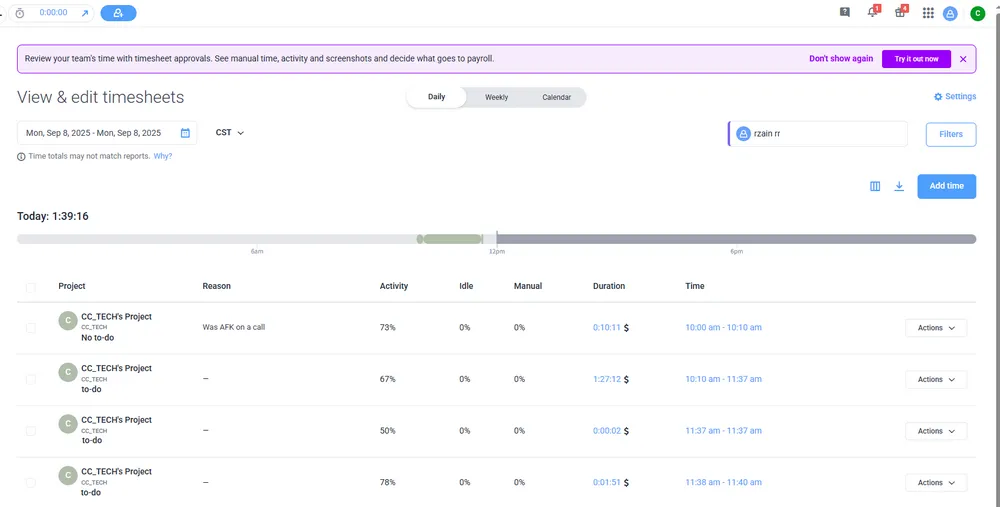
Hubstaff is a robust employee time tracking platform built for distributed workforces, combining precise time logging, GPS job site verification, automated payroll, and AI-driven productivity analytics. It is designed to balance accountability with flexibility, making it ideal for remote teams, construction crews, and creative agencies that bill by the hour.
Furthermore, Hubstaff simplifies time tracking across devices, so employees can clock in/out via desktop, mobile app, or web browser, with real-time sync ensuring data is always up-to-date. On the Team plan and above, its GPS and geofencing features verify employee locations at clock-in, track routes during shifts, and auto-clock users in when they enter a predefined job site.
Features:
- Real-time time logging across web, desktop, and mobile.
- GPS location tracking and geofencing for field teams.
- AI productivity insights for app/URL usage, focus time, burnout alerts.
- Automated payroll processing and global payments.
- Timesheet approval workflows and attendance tracking.
- Strong GPS and geofencing on Team plan and above.
- Deep payroll integrations with top US platforms such as QuickBooks, Gusto, ADP, etc.
- AI insights balance productivity tracking with employee privacy.
- Transparent monitoring settings since employees can view their own activity data.
- Paid plans require a 2-seat minimum; GPS is not included on Starter.
- Full feature set may feel overwhelming for very small teams.
- GPS sync may lag in areas with poor cellular coverage.
- Activity tracking like app or URL usage may feel intrusive to some employees.
2. AnySecura
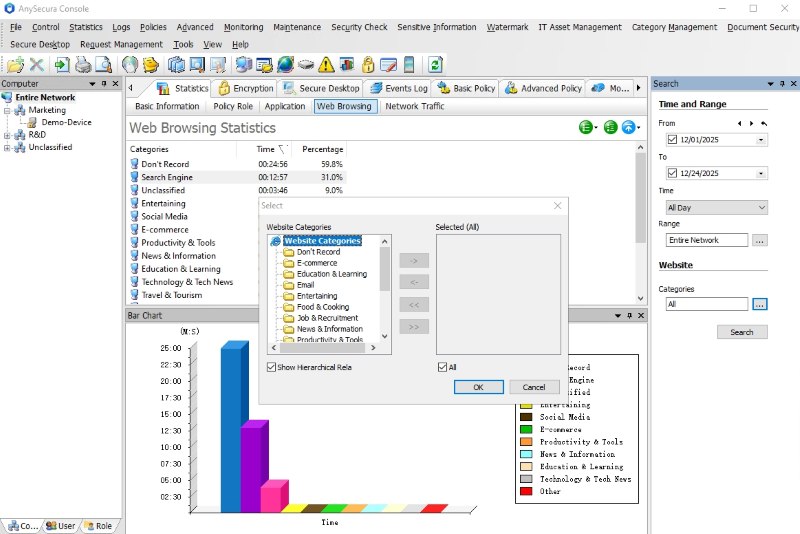
AnySecura fits office, remote, and hybrid teams that need visibility into real work activity—not just clock-in times. Instead of relying on manual punches or timers, it automatically tracks app and website usage in the background, giving managers a clear view of how work hours are spent. Daily and weekly dashboards break down time by person, app, and URL—useful when employees forget to log hours or when a simple in/out stamp cannot explain productivity gaps. Permission-based monitoring with explicit consent ensures transparent deployment and GDPR alignment.
Beyond time tracking, AnySecura shows when apps open and close, tags usage by category (work, communication, entertainment, and more), and totals time spent across browsers—helping managers understand productivity patterns instead of just total hours. Optional screenshot capture supports coaching or dispute resolution where policy allows. It also includes enterprise DLP on the same endpoint: USB/Bluetooth access control, file-transfer blocking, document sharing via email or IM, and invisible watermarks to trace leaks. Real-time alerts flag risky operations before data leaves the device. If you need payroll-ready timesheets, pair it with Clockify or QuickBooks Time; AnySecura handles the activity layer those tools do not cover.
Key Features:
- Apps/Websites Usage Calculation: For time tracking, AnySecura offers simple and secure task mapping and management. It sums up all the apps and websites your employee computer used and calculates the time spent, so you will know who is really working and which task they are working on.

- Protect Core Data: Business data matters. AnySecura detects device access including USB or Bluetooth, blocks unauthorized file transfers, and tracks document sharing via email or instant messaging. It also adds invisible watermarks to internal documents and screenshots, enabling full traceability if your data is leaked.

- Online activity monitoring and screenshot capture help analyze and improve productivity.
- Real-time alert for any risky operations.
- Combines time tracking with enterprise data loss prevention (DLP).
- Document watermarking (visible/invisible) and leak traceability.
- Limited payroll integrations—no native sync with QuickBooks, ADP, or Gusto.
- No GPS clock-in or geofencing for field teams.
3. Toggl Track
Toggl Track has one core philosophy: time tracking should be simple, not stressful. Designed for freelancers, small teams, and creative professionals, it prioritizes ease of use, privacy, and profitability analytics, making it a top employee time tracking software for anyone who hates complicated software or invasive monitoring.
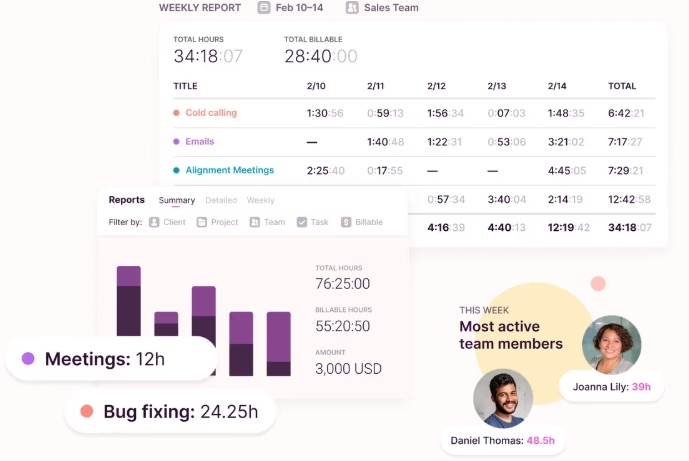
What sets Toggl Track apart from basic tools is its profitability and analytics engine. While other software focus on hours logged, it turns time data into actionable business insights, calculating project profitability, employee profitability, and comparative performance trends. Managers can see which projects are most profitable, which team members are most efficient, and how time is allocated across tasks, all without micromanaging.
Features:
- One-click manual timers and passive AI time capture.
- Calendar integration for auto time entries.
- Profitability analytics for project, employee, comparative trends.
- A wide range of integrations like project management and accounting.
- Idle time detection and smart reminders.
- Easy to use so there is no training required for teams.
- Best profitability analytics for agencies and freelancers.
- Seamless cross-device sync and integrations.
- No GPS or geofencing for field teams.
- No native timesheet approval workflows, requiring workarounds, instead.
- Reporting features only available in paid plans.
4. Clockify
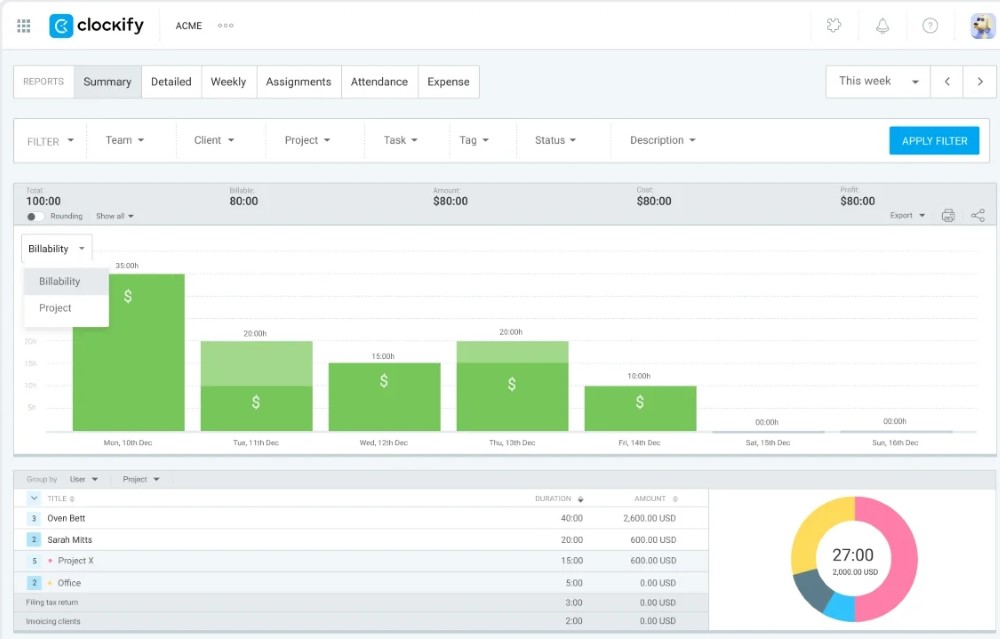
If you are looking for a free employee time tracking software, then Clockify is a popular option for very small teams. Its free plan supports up to 5 users with core time tracking, project management, basic reporting, cross-device sync, and a kiosk mode on paid tiers. Paid upgrades unlock approvals, invoicing, GPS (Pro plan), and more. Employees can log time via manual timers, weekly timesheets, calendar view, or auto-tracker.
Besides, paid plans add advanced features like timesheet approvals, audit logs, bulk editing, custom reporting, and invoicing. You should know that the invoicing feature is particularly useful for agencies. It lets you convert tracked billable hours into professional invoices, add taxes or discounts, and send reminders for overdue payments.
Features:
- Free for up to 5 users with core time tracking features.
- Offer multiple logging methods such as timer, timesheet, calendar, auto-tracker.
- Project management with budget tracking and alerts.
- Basic reporting dashboard with time breakdowns and charts.
- Convert hours to invoices and track payments.
- Affordable paid tiers from $3.99/seat/mo (annual), ideal for growing teams.
- Simple and clean interface that is easy for all employees to use.
- Multiple logging methods to fit different work styles.
- Invoicing feature streamlines client billing for agencies.
- Free plan capped at 5 users; larger teams need paid seats.
- Advanced features like approvals and audit logs require paid upgrades.
- GPS tracking requires the Pro plan ($7.99/seat/mo annual).
- Customer support is limited for free-tier users.
5. Harvest
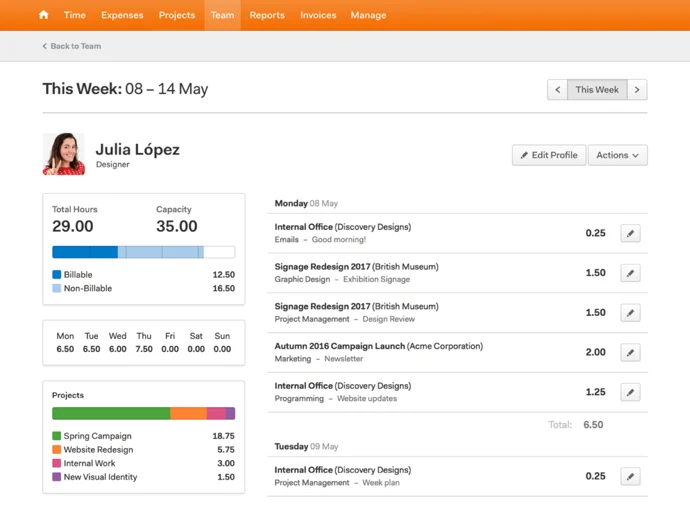
Unlike generic employee time tracking software, Harvest ties time entries directly to invoicing, budgeting, and expense tracking, creating a seamless workflow from task completion to client payment. Moreover, it excels at billable vs. non-billable hour tracking, allowing teams to tag entries by project, client, or task and apply custom billing rates (by role, team member, or project). For creative teams, this ensures every minute of client work is accounted for, reducing revenue leakage.
It includes project budgeting with real-time alerts which notifies teams when they hit 80% or 100% of a project's hourly budget, expense tracking with receipt scanning, and native invoicing that converts tracked hours into professional, customizable invoices.
Features:
- Billable and non-billable tagging with role-based or custom billing rates.
- Project budgeting with threshold alerts, e.g., 50%, 80%, 100% of budget.
- Mobile expense tracking with receipt photo capture and offline sync.
- Detailed profitability reports.
- Native invoicing with taxes, discounts, and recurring retainer support.
- It offers invoicing and budgeting for billable-hour agencies.
- Robust mobile app with offline tracking for on-the-go work.
- Scales from small freelance teams to mid-sized agencies.
- No GPS or geofencing for field-based teams.
- Limited employee productivity analytics, as it only focuses on financials, not activity).
- No native shift scheduling or HR features.
6. Time Doctor
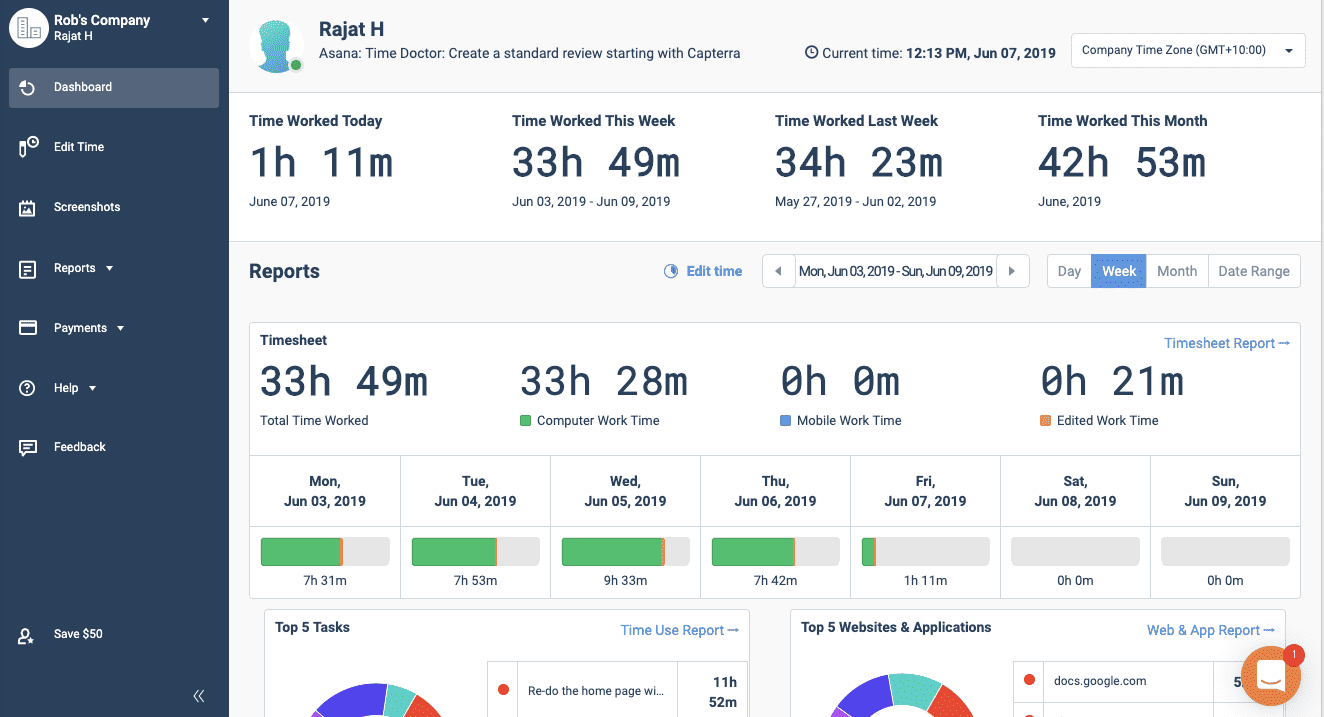
Time Doctor combines automated time logging with detailed activity monitoring, perfect for managers who need visibility into how remote employees spend their work hours without resorting to overly intrusive surveillance. What's more, it allows you to link time data directly to productivity analysis, payroll, and project management.
This employee time tracking software offers flexible tracking modes to suit different team cultures, including Automatic (silent background tracking for dedicated work environments), Interactive (manual start/stop timers for remote teams with mixed personal/work device use), and Mixed (combines both modes for role-specific policies). For remote teams, you can use the tool to track total meeting time, average duration, idle time during meetings, and top apps used, helping managers identify meeting bloat or low-engagement sessions.
Features:
- Flexible tracking modes: Automatic, Interactive, and Mixed.
- App usage tracking with productivity categorization.
- Optional customizable screenshots.
- Idle time detection and alerts for inactive work periods.
- Meeting analytics including duration, idle time and more.
- Detailed productivity insights for remote team accountability.
- Highly customizable monitoring settings.
- Robust idle time and activity tracking to reduce time theft.
- Seamless payroll integration for hourly remote workers.
- Screenshot feature can feel intrusive to some employees.
- Steeper learning curve due to extensive customization options.
- Lacks the GPS features for on-site teams.
7. Connecteam
For those companies that have frontline workers who rely on mobile devices for daily operations, Connecteam can help you. It combines time tracking, scheduling, task management, communication, and HR tools into a single app. We found that it's entirely optimized for field and remote teams with a focus on simplicity and offline functionality.
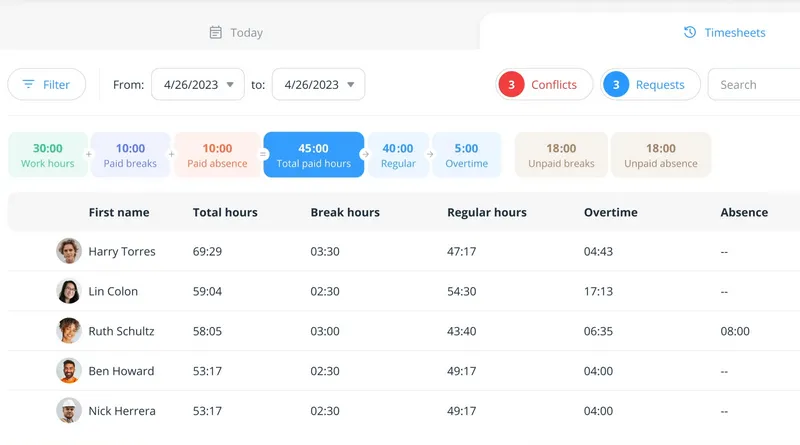
Connecteam's time clock is GPS-enabled and geofenced, ensuring field employees can only clock in and clock out from predefined job sites. Shift switching and offline tracking are also available on this app. Besides, managers can view real-time attendance, track employee locations, and approve timesheets for managing dispersed field teams.
Features:
- GPS-enabled time clock with geofencing for job site verification.
- Offline mobile tracking with automatic sync when online.
- AI-powered shift scheduling with swap/request functionality.
- Integrated task management with checklists and file attachments.
- Real-time team chat and updates for frontline communication.
- All-in-one platform for deskless teams.
- Practical GPS and geofencing for field team accountability.
- Robust offline functionality for remote job sites with poor connectivity.
- Less focus on office team productivity analytics.
- Limited integrations with project management tools.
- No native invoicing or profitability tracking for client billing.
8. Jibble
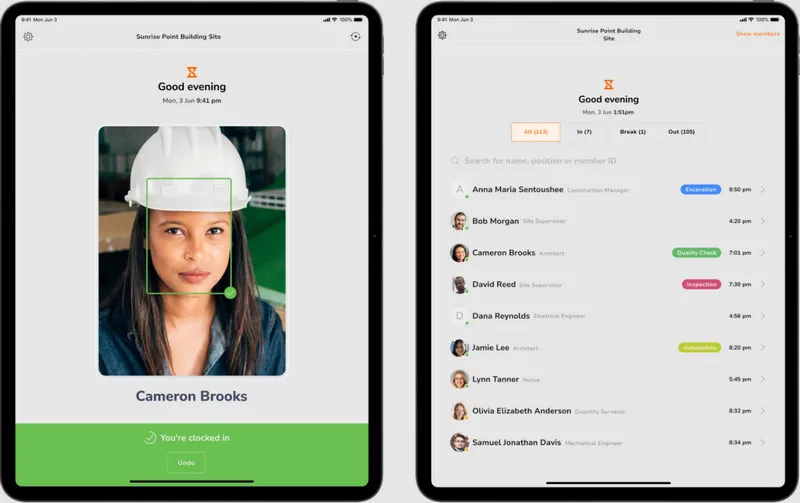
Apart from Clockify, Jibble is another strong free employee time tracking option. It caters to small businesses, startups, and field teams that need reliable attendance tracking without enterprise complexity. Jibble's free forever plan supports unlimited users with GPS, facial recognition, and limited geofencing; Premium starts at $4.49/user/mo (annual) for unlimited geofences, leave accruals, and multi-level approvals.
Using Jibble, employees can log hours via mobile app, web, or shared kiosk, with verification methods to prevent buddy punching, including facial recognition, GPS location tagging, NFC/RFID card scanning, and PIN entry. Field teams can restrict clock-in to predefined locations via geofencing, with offline tracking for remote sites.
Features:
- Forever-free plan with unlimited users, GPS, and facial recognition.
- Multi-verification clock-in, including facial recognition, GPS, NFC and PIN.
- Geofencing on free plan (limited sites); unlimited geofences on Premium.
- Basic timesheet reporting and payroll export functionality.
- Advanced leave management and approvals on Premium and Ultimate.
- Unlimited users on the free plan—unique in this category.
- Secure verification methods eliminate buddy punching and time theft.
- GPS and geofencing for small field teams.
- Limited productivity analytics.
- No project mapping or billable hour tracking.
- Basic reporting with limited customization options.
- Premium ($4.49/user/mo annual) required for unlimited geofences and advanced leave rules.
- Limited integrations with project management or advanced payroll tools on the free plan.
9. Insightful
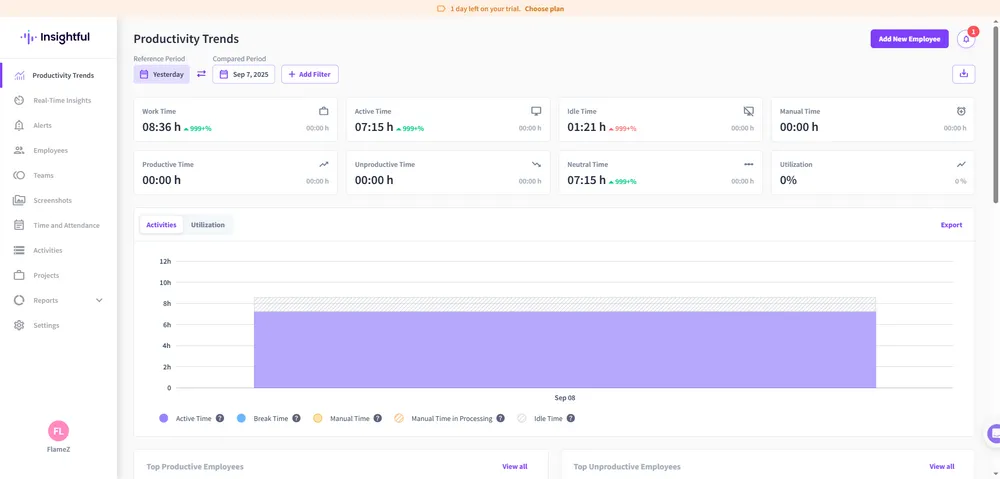
Insightful (formerly Workpuls) prioritizes transparency and employee consent while delivering actionable operational insights. It features automated time logging and deep productivity analytics, designed around privacy-by-design principles.
This tool can detect when employees start/stop working and maps time to projects via Automatic Time Mapping (ATM), which is an AI-powered feature that recognizes activities like calls, tickets, tasks, etc. across integrated tools and allocates time accordingly. This eliminates manual timesheet entry and reduces human error, while still allowing employees to edit entries for accuracy. It also generates audit-ready compliance reports for labor laws and data regulations, with role-based access control to protect sensitive data.
Features:
- Passive automatic time tracking with no manual timers required.
- AI-powered Automatic Time Mapping (ATM) for project allocation.
- Website usage tracking with productivity categorization.
- Customizable dashboards and enterprise-grade productivity reporting.
- Audit-ready compliance logs and role-based access control.
- Privacy-first design with no invasive surveillance.
- Deep workforce analytics for enterprise operational visibility.
- Automated time tracking eliminates manual timesheet work.
- Powerful compliance tools for regulated industries.
- Not ideal for small businesses for the high cost and complicated steps.
- Not friendly to field teams for the lack of GPS tracking.
- It only focuses on analytics, not financials, so has limited invoicing and billing features.
10. QuickBooks Time
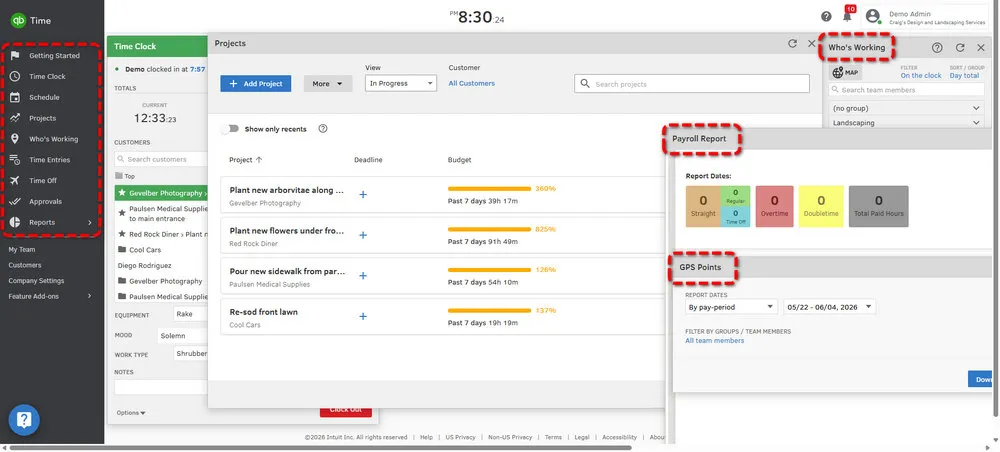
No doubt that QuickBooks Time (formerly TSheets) should be on the top list of best employee time tracking software. It excels at deep integration with QuickBooks accounting and payroll, widely welcomed by small businesses that rely on QuickBooks for financial management. Unlike most tools, QuickBooks Time syncs time data directly into QuickBooks with no manual exports or workarounds.
We will say that this tool is designed for hourly teams, such as retail, construction, healthcare, small manufacturing, and small office staff. For the mobile version, it offers clock-in/out with GPS tagging for field employees, geofencing to restrict clock-in to job sites, and offline tracking for remote locations. While the office teams can use web-based time clocks or desktop widgets for quick logging. All time entries are automatically linked to jobs, customers, or projects, enabling accurate job costing and project profitability analysis.
Features:
- Native, deep integration with QuickBooks Online/Desktop and Payroll.
- Mobile GPS clock-in/out with geofencing for job site verification.
- Automated overtime calculation.
- Job costing and project profitability tracking.
- PTO tracking, shift scheduling, and timesheet approval workflows.
- Unmatched QuickBooks integration, seamless payroll and accounting sync.
- Simple operation for small business owners and non-technical staff.
- Compliance tools for FLSA and labor law adherence.
- Limited functionality for non-QuickBooks users, for example, no standalone accounting.
- Basic productivity analytics like hours and job costing, no advanced project management or invoicing features.
11. Everhour
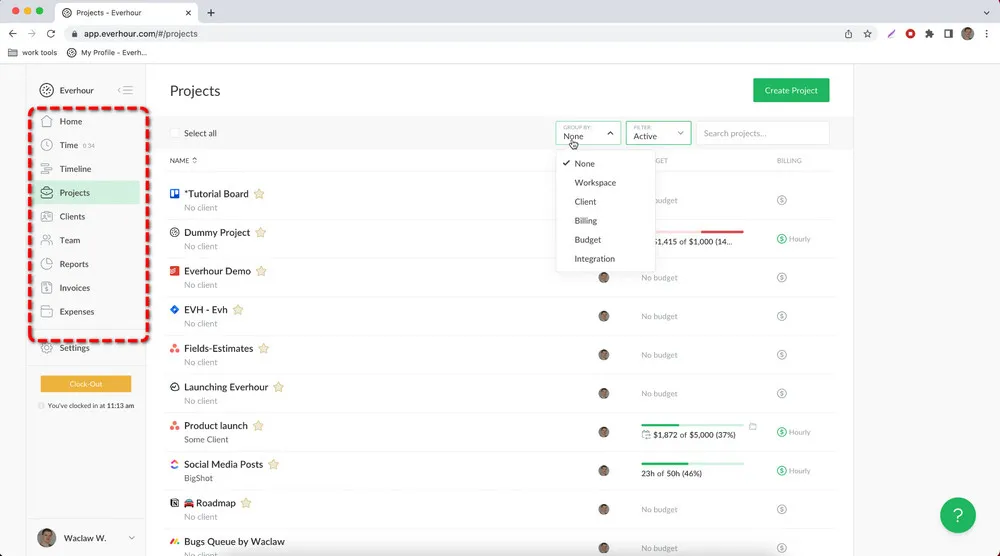
Everhour caters to agencies, freelance teams, and client-facing businesses. You will see that one of its standout features is the native in-app timers. You can start/stop timers or log time manually directly next to tasks in Asana, Trello, Monday, or Jira, no separate app or tab required. This deep integration ensures time tracking becomes a natural part of the project workflow.
Everhour also supports weekly timesheets for manual entry, with manager approval workflows to ensure accuracy. Another feature we want to mention here is the real-time project budget monitoring. Teams can set budgets in hours or dollars, assign custom billing rates per user, and receive automatic alerts when approaching budget thresholds (75%, 90%, 100%). Furthermore, timers can even auto-stop when budgets are exceeded to prevent overspending.
Features:
- Native in-app timers for Asana, Trello, Monday, Jira, and GitHub.
- Weekly timesheets with manager approval and locking workflows.
- Project budgeting with real-time alerts and auto-stop timers.
- Custom billing rates and reports.
- Invoicing with QuickBooks/Xero integration.
- Seamless integration with top project management tools.
- Lightweight, non-intrusive design with zero workflow disruption.
- Powerful budget tracking to prevent project overspending.
- Privacy-focused with no invasive employee monitoring .
- Team plan bills for a 5-seat minimum ($8.50/seat/mo annual).
- No GPS or geofencing for field-based teams.
- Limited standalone features and relies on project management integrations.
- Only emphasize on desktop project management workflows.
12. Timely
Timely as an AI-powered employee time tracking software is built for knowledge workers, remote teams, and businesses that want accurate time logs without manual data entry or invasive surveillance. It stands out for its passive AI-driven time capture and strict privacy design, all time data is controlled by employees, with no hidden monitoring or screenshots.
Timely uses Memory Capture, a silent background feature that records digital activities including apps, websites, documents and more without capturing sensitive content. Its AI Timesheet Assistant then automatically organizes these memories into accurate time entries, suggesting project tags and notes based on the user's habits. The most important thing is that employees retain full control during the process. They can edit, delete, or approve entries, and all data is encrypted and accessible only to the user by default.
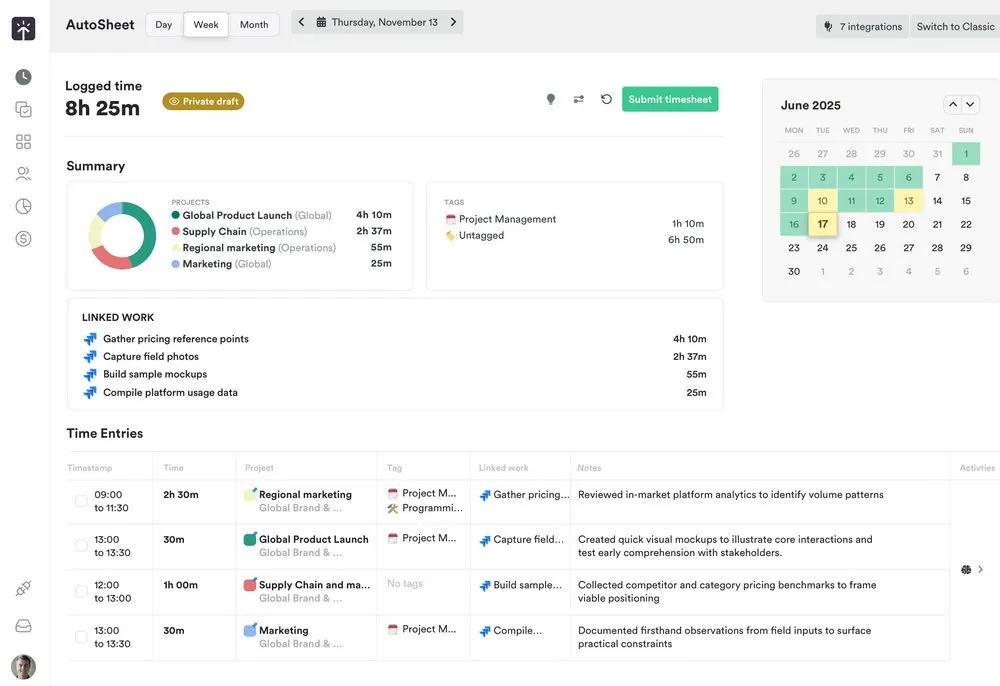
Features:
- AI-powered Memory Capture without manual timers, and no screenshots.
- AI Timesheet Assistant for automatic time entry generation.
- People Dashboard provides real-time visibility into team capacity, overtime, and workload distribution.
- Project budgeting and billable hour tracking.
- Shareable client snapshot report.
- Effortless AI-driven tracking eliminates manual timesheet work.
- No surveillance and employee can control data.
- Powerful workload analytics for knowledge worker teams.
- Higher pricing than basic time trackers.
- Not enough productivity analytics.
- Lack native shift scheduling or HR features.
FAQs About Best Employee Time Tracking Software
1. What is the #1 employee time tracking tool for daily office use?
It depends on what "office use" means for your team. For payroll-ready timesheets and manager approvals, QuickBooks Time (if you use QuickBooks) or Clockify (if you want a low-cost standalone clock) are the most practical daily drivers. For activity-based visibility—seeing how desktop time is spent without manual timers—Time Doctor, Insightful, or AnySecura are better fits. AnySecura is especially relevant when you also need DLP and endpoint security alongside work-time reporting. See our persona picks for a faster shortlist.
2. How do I track my employee hours working from home?
Use software matched to your compliance and trust requirements. Hubstaff and Toggl Track offer cross-device timers with transparent policies. AnySecura suits teams that need centralized app/website usage reports and optional screenshot review—but deploy it with a written monitoring policy and employee notice. For a step-by-step remote rollout, see our guide below.

Learn to monitor employees working from home. Balance operational visibility with employee trust using 7 practical, compliant remote management strategies. Learn more>>
3. What is the best way to keep track of timesheets?
The best approach is automated time tracking with manager approval workflows. Digital systems reduce rounding errors, create timestamped audit trails, and export to payroll platforms—replacing paper or spreadsheet timesheets. Compare tools in our feature table and pricing table.
4. How do I track my employees daily work?
Choose based on the data you actually need. Task-level billing → timer-based tools like Toggl or Everhour. Attendance and shift hours → Hubstaff, Connecteam, or Jibble. Desktop activity patterns → AnySecura, Time Doctor, or Insightful. Whichever you pick, publish a clear policy explaining what is collected, who can access it, and how long data is retained.
5. Does time tracking improve productivity?
Yes, when implemented ethically. Tracking helps teams spot bottlenecks, protect billable hours, and set realistic project boundaries. Tools that give employees visibility into their own data—such as Toggl, Timely, or Hubstaff's self-view dashboard—tend to earn more buy-in than covert monitoring. Pair any software with manager coaching, not just surveillance.
6. How do EU working-time rules differ from U.S. FLSA requirements?
They overlap in goal but differ in rigor. The EU Court of Justice (2019) requires employers in Member States to maintain an objective, reliable, and accessible system recording daily working time for each worker—including overtime and rest breaks. The EU Working Time Directive also caps average weekly hours and mandates minimum rest periods.
U.S. FLSA does not mandate a specific tracking method, but employers must keep accurate records of hours worked, wages, and overtime for non-exempt employees. FLSA focuses on pay correctness rather than prescribing daily digital logs. In practice: EU employers often need provable daily records; U.S. employers need defensible records that survive a DOL audit. A time tracking tool with immutable timestamps and exportable reports serves both, but EU deployments may require stricter employee consultation under local labor law.
7. Is screenshot monitoring legal?
Often yes on employer-owned devices, but not unconditionally. In the U.S., federal law generally permits monitoring of company equipment during work hours, yet state laws add constraints. California's CCPA/CPRA may require notice and opt-out rights for certain employee data; Connecticut and Delaware require written notice before electronic monitoring; New York mandates annual written notice. In the EU, screenshot capture is high-risk under GDPR because it may capture personal communications and special-category data—employers need a lawful basis, a data protection impact assessment (DPIA), and proportionality testing. Best practice everywhere: disclose monitoring in writing, limit capture to work devices and work hours, restrict access to authorized managers, and avoid collecting personal passwords or private messaging content.
8. What employee notification obligations should employers meet before deploying time tracking?
At minimum, provide advance written notice that explains:
- What data is collected (clock times, GPS, screenshots, app usage, etc.)
- Why it is collected (payroll, billing, security, productivity)
- Who can view the data and how long it is stored
- Whether monitoring applies on personal devices or outside work hours
In the EU, consult works councils or employee representatives where required, and document your lawful basis under GDPR. In the U.S., distribute policies before activation and obtain acknowledgment. Tools like AnySecura support consent-based deployment; traditional time clocks like QuickBooks Time still require a clear attendance policy even without screenshots. When in doubt, have employment counsel review your jurisdiction's rules before rollout.
Discover 13 daily work habits, focus strategies, and lightweight tools to improve efficiency at work without burning out. Learn more>>
Conclusion
Employee time tracking software has become essential for modern businesses—whether you need payroll-grade timesheets, field GPS clock-ins, or activity-based work insights. Match the tool to the job: use dedicated time clocks for pay and compliance, and consider monitoring platforms like AnySecura when endpoint visibility and data protection matter as much as hours logged. Review our pricing table and persona picks before committing.
If your team needs activity-based time insights alongside enterprise DLP, explore AnySecura with a free trial or custom demo.


