
I'm looking for "all-in-one" software for a small business management that covers multiple fields like CRM, Invoicing, Contracts, Project management, Time tracking. - from Reddit
Now small businesses are relying on digital tools more than ever to manage operations, time tracking, customer relationships, payroll, accounting, and remote collaboration.
According to the latest Small Business Insights report from QuickBooks, businesses across the US, Canada, the UK, and Australia consistently rank greater efficiency as the biggest benefit of digital tools, with around 66% of respondents saying software helps improve operational efficiency. Time savings and fewer errors were also among the top reported advantages.
However meanwhile, the report highlights that nearly 2/5 small businesses say the biggest challenge with their current digital tools is the lack of integration between platforms. That makes all-in-one small business management software essential. Instead of juggling multiple disconnected apps, many SMBs are now prioritizing consolidated systems that reduce manual work and improve efficiency. Keep reading to find the best all-in-one business management software for your teams.
Part 1: What Is Small Business Management Software
Small business management software consists of a suite of integrated digital tools designed to streamline and automate various aspects of company operations.
Typically comprising modules such as accounting, customer relationship management (CRM), time tracking, payroll and HR, project management, and business analytics, these systems provide a centralized platform for collaboration and decision-making. Unlike traditional fragmented software solutions, these platforms unify data sources and eliminate information silos, so you can make wise decisions for your team.
- Accounting: Automate the processing of bills, payments, invoices and reports, while supporting tax compliance.
- CRM: Centralize customer data and interaction records to boost the efficiency of sales and marketing teams.
- Payroll: Track inventory levels, procurement and project progress to optimize the supply chain.
- Time Tracking: Enable managers to review, edit and approve employee time entries before payroll.
- Project Management: Help monitor employee productivity, manage workloads, and improve payroll accuracy.
- Analytics and Reporting: Provide reports to monitor key performance indicators in real time, helping enterprises stay informed about their development status.
Compare different employee time tracking software and learn the features, pros and cons. Find the best option for your remote team or business. Learn more>>
Part 2: How to Choose the Best Business Management Software for SMBs
Actually, it's not easy for you to choose the best and most suitable business management software for your team. But don't worry, check the following points we collected and you may be clear what your real demand is.
Step 1: You should comfirm which software type you need, the all-in-one software or the specilized software*.
| Your Biggest Problem | Software Type | Recommended Software |
|---|---|---|
| You switch between too many spreadsheets, emails and disconnected apps. | All-in-one management | |
| Payroll, invoicing and bookkeeping take too much manual work every month. | Bookkeeping | |
| You manage remote employees, contractors or shift workers. | Time Tracking | |
| Your team struggles to track leads, follow-ups, and customer conversations. | CRM | |
| Projects often miss deadlines or team communication feels scattered. | Project Management |
*Note: Compared to all-in-one software, specialized tools tend to offer deeper functionality and customization within a specific operational area.
Step 2: After you confirm the software type, you can consider which software is suitable under that category, based on ease of use, pricing, scalability, AI automation, security and more.
- Ease of Use: (Will your team actually use it?)
- Pricing and scalability: (Can the software grow with your business?)
- AI and Automation: (Can it reduce manual reporting?)
- Security and Compliance: (Will it cause data leak?)
A platform may offer powerful features, but if your employees are reluctant to use it because of the complicated interface or setup, it's not the right solution. So for smaller businesses without dedicated IT teams, simple dashboard and easy integration are often more valuable than advanced functionality.
Software that works for a 5 person startup may not work for a 50 person company. If your team expands, you may need multi-user permissions and more integration. So you need to choose scalable tool early to avoid costly migrations later.
AI features are becoming increasingly common in SMB software, you should only use AI and automation tools that save time without adding unnecessary tasks. Focus on what your team can actually use, instead of all the flourishing features.
Data security and compliance are important. Trust platforms that have data loss prevention and compliance support.
Part 3: Comparison Table of Small Business Management Software
Lack technical skills? Are your startups budget-sensitive? Rely on customer service? How to know if a small business management software is suitable for specific industries? To reduce your troubles, our comparison table has already considered your concerns.
| Software | Ease of Use | Pricing* | Main Integrations | Customer Support | Focus |
|---|---|---|---|---|---|
| Zoho | ⭐⭐⭐ | $67/M | QuickBooks, Shopify, Stripe | 24/5 support | All-in-one |
| Odoo | ⭐⭐ | $31.9/M | PayPal, Stripe, Shopify | 24/7 support | All-in-one |
| AnySecura | ⭐⭐⭐⭐⭐ | $79.99/Y | Basic integrations | 24/7 support | All-in-one |
| Monday | ⭐⭐⭐⭐ | $190/M | Slack, Zoom, Outlook | 24/7 support | All-in-one |
| Bitrix24 | ⭐⭐ | $199/M | QuickBooks, Xero, Stripe | 24/7 support | All-in-one |
| QuickBooks | ⭐⭐⭐⭐ | $137.50/M | PayPal, Shopify, Square | 24/7 support | Accounting |
| Xero | ⭐⭐⭐⭐ | $18/M | Shopify, Stripe, PayPal | 24/7 support | Accounting |
| Hubstaff | ⭐⭐⭐ | $10/M | Trello, Asana, ClickUp | 24/7 support | Time Tracking |
| Clockify | ⭐⭐⭐⭐ | $12.99/M | Trello, Asana, Jira | 24/7 support | Time Tracking |
| HubSpot | ⭐⭐⭐⭐ | $90/M | Shopify, Slack, QuickBooks | 24/7 support | CRM |
| Salesforce | ⭐⭐ | $100/M | Slack, Mailchimp, QuickBooks | 24/5 support | CRM |
| ClickUp | ⭐⭐⭐ | $12/M | Slack, GitHub | 24/7 support | Project Management |
| Asana | ⭐⭐⭐⭐ | $24.99/M | Slack, Google Workspace | 24/7 support | Project Management |
*Note: Prices are for reference only. Actual prices may vary depending on team size or plan. Please refer to the software's official website for the most accurate information.
Part 4: Best All-in-One Small Business Management Software
We believe that most bosses want all-in-one small business management software due to the consolidation trend. It should be easy to use, save time and automated. If not, why would you choose it? We have you covered. Check the following top 5 management software for SMBs.
1. Zoho
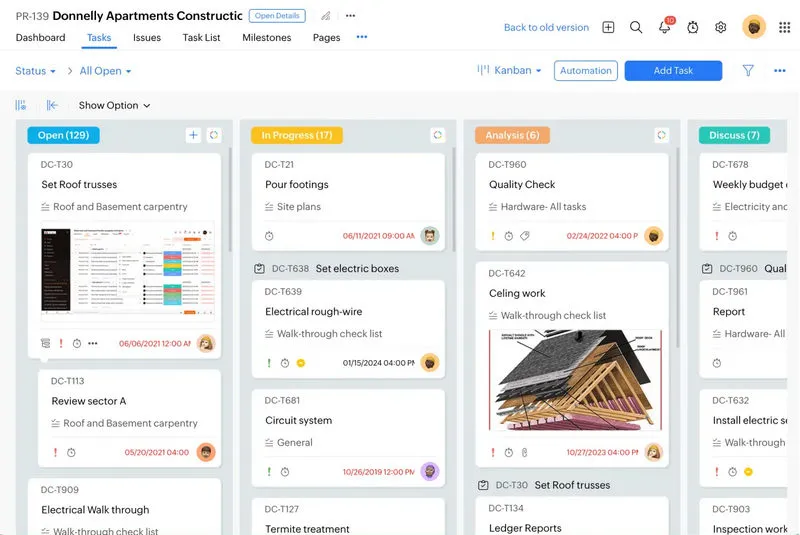
Zoho One is a good option for small businesses that want to manage multiple operations from a single platform. Instead of relying on separate tools for CRM, accounting, HR, inventory and internal collaboration, you can manage your work within the same ecosystem. So you don't need to constantly switch between disconnected apps or manually transfer data across systems.
For example, sales activity inside the CRM can connect directly with invoicing and customer records, while inventory and order data remain accessible across teams. For SMBs trying to simplify daily operations, this type of integration can save significant administrative time.
Another reason Zoho appeals to growing small businesses is that also supports multi-currency transactions and multiple languages, which can be useful for businesses working with international customers or distributed teams.
Features:
- All-in-one business management software covering CRM, accounting, inventory HR, payroll and more.
- Shared workflows between apps.
- It support international operations with multi-currency and multilingual capabilities.
- Built-in automation for repetitive tasks like invoice reminders
- Integrates with platforms like Shopify, Stripe, PayPal, Google Workspace, and Microsoft 365.
- More affordable than many enterprise-style platforms.
- Replace multiple disconnected tools with a single ecosystem.
- Flexible enough for businesses to start small and expand into additional apps later.
- Automation tools can reduce repetitive admin work for smaller teams.
- The large number of apps can feel overwhelming during initial setup.
- Some advanced functionality may require higher plans.
- Full customization and automation setup can take time for teams lacking technical skills.
2. Odoo
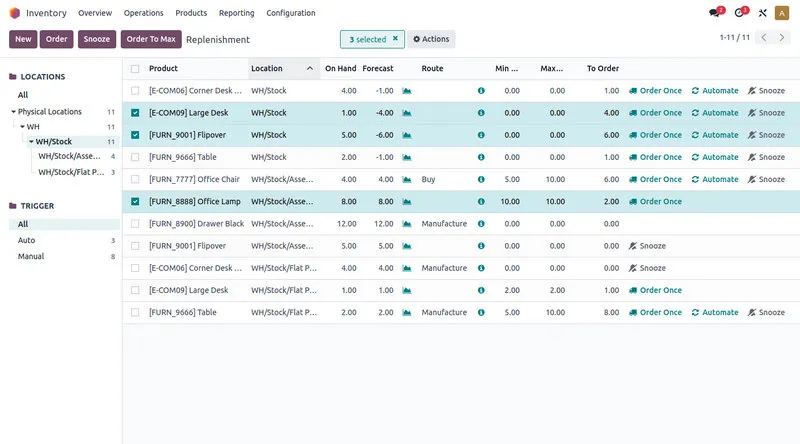
Instead of forcing companies into a fixed setup, Odoo uses a modular structure. You can choose only the apps you actually need right now, such as CRM, accounting, inventory, etc., and expand gradually over time.
That flexibility makes Odoo appealing for businesses with more customized workflows. A retail company may focus heavily on inventory and POS management, while a service business may rely more on CRM, invoicing, and project tracking. So many SMBs will notice how configurable the platform is compared to Zoho One.
Odoo also offers a free Community edition, which makes it attractive for startups or smaller businesses trying to avoid higher costs.
Features:
- Modular business apps including CRM, accounting, inventory and many more.
- Offer both open-source Community edition and optional paid Enterprise plans.
- Custom workflows, dashboards, and field configuration.
- Have ecommerce integrations and marketplace connectors.
- Provide reporting and operational analytics across business functions.
- Strong inventory, operations, and ecommerce capabilities.
- More customizable than many traditional SMB all-in-one software.
- Free Community edition lowers the barrier for startups.
- You can expand into additional modules gradually over time.
- Setup and customization can take longer.
- Advanced configurations may still require technical knowledge.
- The interface can feel crowded when multiple modules are active.
- Smaller teams may not need the full features.
3. AnySecura
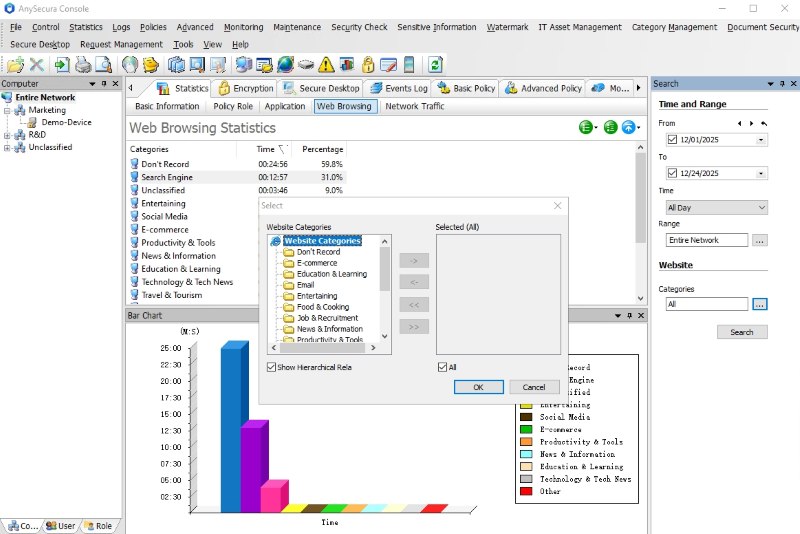
Most managers like AnySecura when they can be informed of everything with one single dashboard. If you want more visibility into how work is actually happening inside your company, especially when you cannot control the process easily, this all-in-one tool is for you.
Time Tracking:
AnySecura helps managers understand how employees spend their working hours, including which apps and websites are being used during the day. This makes it easier to identify workflow bottlenecks or unproductive time without manually tracking every task.
Data Prevention:
For companies handling sensitive files or client data, AnySecura provides controls to reduce the risk of information being copied or moved outside the company. This includes restrictions on external devices like USB drives and visibility into how files are accessed. If your employee leak your data, you can even trace the source by its watermark.

Automated Reporting:
You don't need to collect updates manually from employees. AnySecura will give you the detailed reports and analytics, helping you save time on supervision and focus more on future planning.
- All-in-one tool lets you handle everything on one page, no need to switch between different software for monitoring, reporting, and security control, etc.
- Monitor real-time online activity and log all operations on the device. Shows how work time is being used across your team.
- Professional data loss prevention allows you to control external devices or trace document interactions.
- Work data is turned into clear reports so you can quickly understand productivity trends without digging through raw logs.
- Not friendly if you need more integrations.
4. Monday
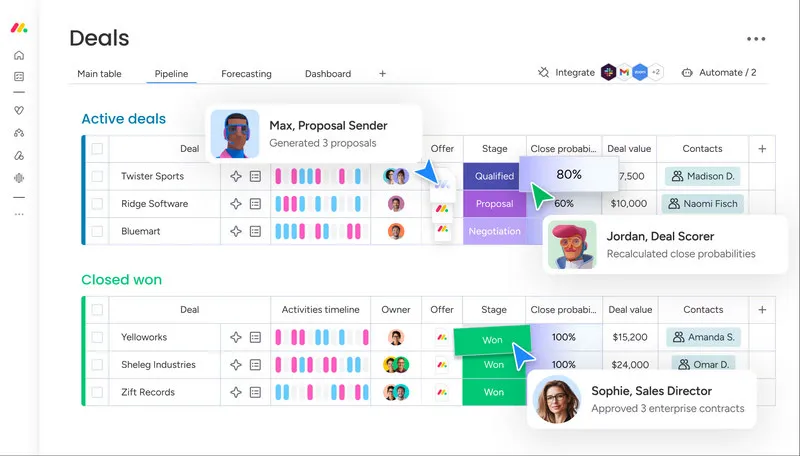
Compared to complex tools, monday.com feels lighter, more visual and easier to adopt for smaller teams. It is designed around visual workspaces and customizable boards that help you organize projects, internal operations and ongoing tasks in one place.
The automation system is also relatively approachable for SMB teams as you can create simple rule-based automations. For example, assigning tasks automatically, updating statuses, sending reminders or triggering notifications when project stages change.
That's the reason why it commonly used by marketing teams, agencies, creative businesses, startups, etc. where project communication are central to daily work.
Features:
- Visual boards for project tracking, workflows, CRM pipelines, and operations.
- Multiple project views including timeline, Kanban, calendar, and Gantt.
- Offer team collaboration tools with comments, updates, file sharing, and notifications.
- You can have templates for marketing, operations, HR, project management and sales workflows.
- Integrations with Slack, Zoom, Google Workspace, Microsoft Teams and Salesforce.
- Very simple interface for small teams.
- Strong collaboration and workflow visibility.
- Flexible enough for many different business processes.
- Automation features help you reduce repetitive coordination work.
- Pricing can increase quickly as teams scale.
- It's not designed as a full accounting or payroll platform.
- Some smaller businesses may find the platform more project-focused than operationally focused.
5. Bitrix24
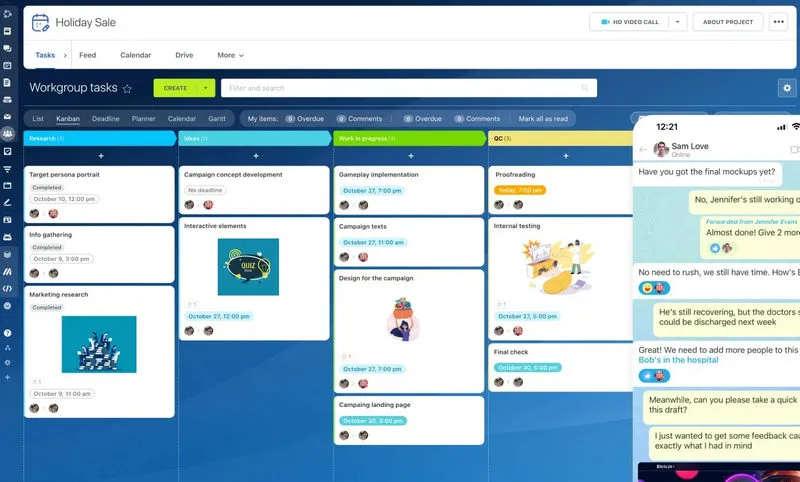
Bitrix24 is often a good choice if you are looking to consolidate multiple tools without taking on the cost of a full enterprise software. It combines CRM, project management, internal communication, time tracking, document sharing and collaboration tools within a single workspace. Best for smaller teams trying to reduce the number of separate subscriptions.
One important thing is that Bitrix24 emphasizes communication. Team chat, video meetings, activity feeds, notifications and collaborative workspaces are built directly into the platform rather than added as secondary integrations.
The CRM is also comprehensive for small sales teams. You can track leads, manage pipelines, automate follow-ups, and monitor ongoing customer activity from the same system used for internal collaboration. Besides, this software offers both cloud-based and self-hosted deployment options, which may appeal to businesses wanting more control over data or infrastructure.
Features:
- CRM, task management, communication, and collaboration tools in one platform.
- Offer team chat, video calls, activity feeds, and shared workspaces.
- Cloud and self-hosted deployment options.
- Suppot workflow automation and sales management.
- Integrations with email, telephony, payment tools and productivity apps.
- Broad feature coverage without requiring multiple separate tools.
- Strong built-in communication and collaboration features.
- Useful combination of CRM and operational workflows.
- Flexible deployment options for different business needs.
- Interface can feel overwhelming at first.
- Some advanced automation and analytics features require paid plans.
- Not very suitable for those who want simpler workflows. You may prefer lighter tools.
Part 5: Best Bookkeeping Software
Messy finances lead to tax headaches and missed growth opportunities. If you only seek a specialized tool in accounting, here we have two options for you. The digital tool can help you automate data entry, sync with bank accounts and generate tax-ready reports.
1. QuickBooks
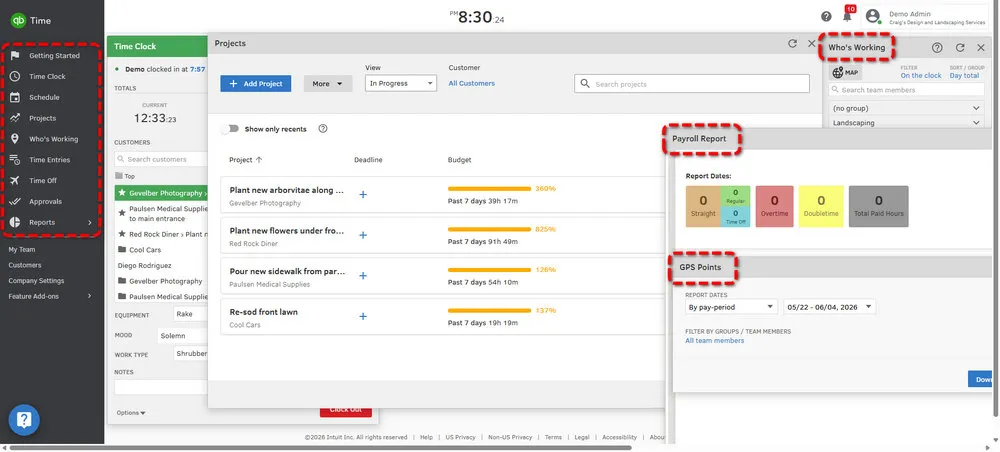
QuickBooks can be your first choice because it is widely used among small businesses, especially in the U.S. Whether for accountants, bookkeepers, and tax professionals, you can use it to simplify reporting, tax preparation, payroll management, and year-end accounting processes.
It covers most core bookkeeping needs in a single system, including invoicing, expense tracking, bank reconciliation, payroll, tax reporting, and financial dashboards. You can connect bank accounts and payment platforms to automatically import transactions, helping reduce manual data entry throughout the month.
Features:
- Bank and credit card transaction syncing.
- Invoicing, recurring billing, and payment reminders.
- Payroll processing and tax support.
- Expense categorization and receipt tracking.
- Integrations with ecommerce, payment, payroll and CRM platforms.
- It is widely recognized by accountants and tax professionals.
- Robust bookkeeping and payroll feature coverage.
- Large integration ecosystem.
- Subscription costs can increase as additional features are added.
- Payroll and advanced financial tools may require higher-tier plans.
- Focus on accounting, instead of comprehensive features.
2. Xero
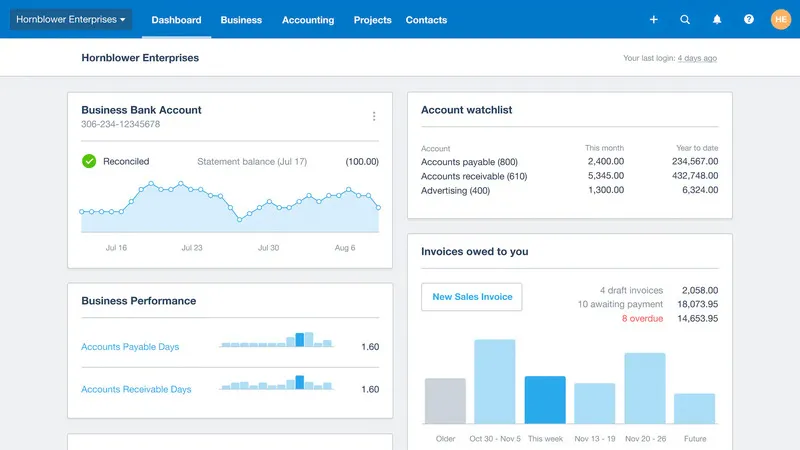
Xero is another popular bookkeeping software that prefers a cloud-first accounting experience with a simpler and more modern interface. Because the platform was originally built for cloud-based accounting, business owners, accountants, and finance teams can access financial data from different devices without relying on desktop software or manual file transfers.
Xero also supports international transactions, online payments and multi-currency accounting features, making it a practical option for ecommerce businesses, agencies and service companies with global clients.
Features:
- Cloud-based bookkeeping and financial management.
- Multi-currency accounting support.
- Bank transaction imports and expense categorization.
- It has financial reporting and cash flow visibility.
- Integrations with ecommerce, payroll, CRM and payment platforms.
- Easier to navigate for many non-accounting users.
- Strong cloud-based accessibility and collaboration.
- Good international and multi-currency support.
- Certain payroll and regional tax features vary by country.
- Larger businesses may eventually require more ERP-style financial systems.
- Advanced reporting may be limited.
Part 6: Best Employee Time Tracking Software
We know that time tracking is crucial for small businesses with hourly employees or projects. It prevents time theft, ensures accurate billing, and helps you understand team productivity. See if the software below is suitable for you.
1. Hubstaff
Hubstaff is one of the best specialized small business management software, best for teams managing remote employees, contractors, freelancers, or distributed workforces.
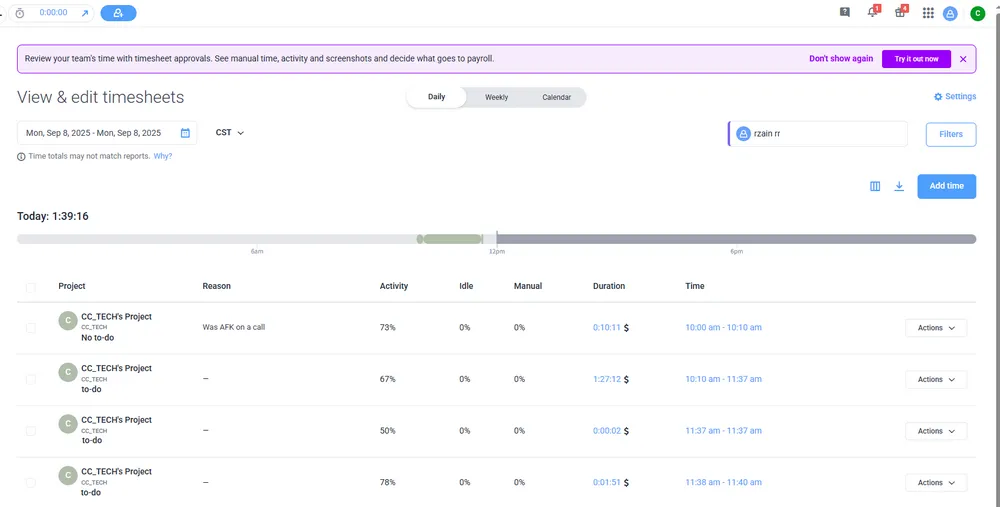
Instead of simply logging hours, it combines time tracking with workforce visibility, activity monitoring, payroll workflows and project reporting. Employees can track time through desktop or mobile apps, while managers can monitor work hours, attendance, project progress, and productivity reports from a centralized dashboard. GPS tracking is also available for businesses with mobile or field-based teams.
Features:
- It offers time tracking across desktop, web and mobile apps.
- Let you have productivity monitoring and workforce reporting.
- Support GPS location tracking for mobile teams.
- Payroll, invoicing and client billing integrations.
- Provide project reporting and operational analytics.
- Strong combination of time tracking and workforce visibility.
- Useful for remote teams and distributed businesses.
- GPS and activity tracking support field and mobile employees.
- Some teams may find employee tracking features too detailed.
- Not perfect for businesses looking for lightweight time logging without employee monitoring.
2. Clockify
Actually, Clockify is commonly used by freelancers, startups and small businesses that need straightforward time tracking. No doubt that one reason it has become popular among SMBs is the generous free plan, which supports unlimited users and projects for basic time tracking.
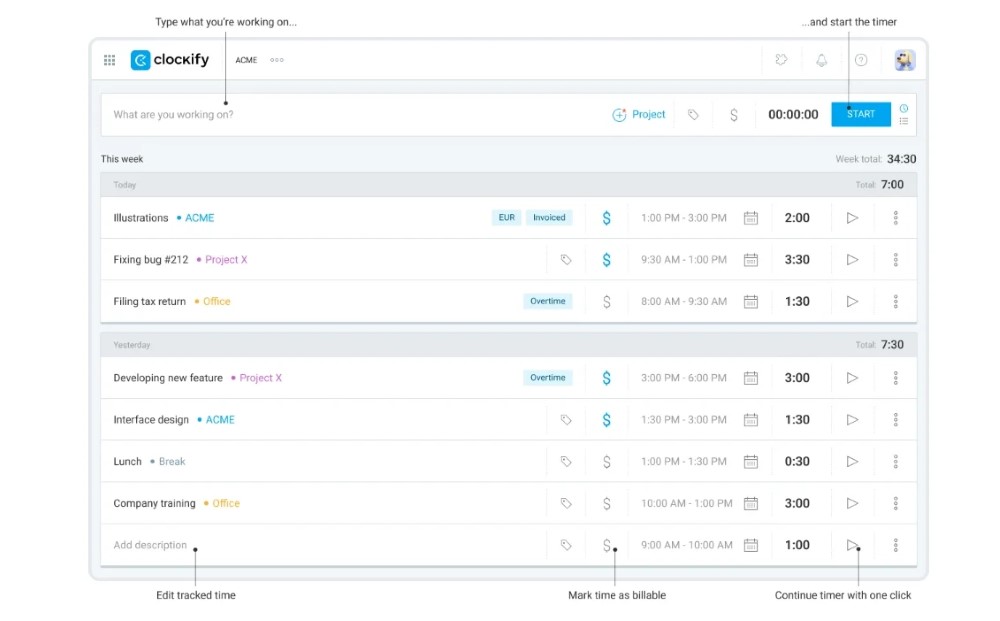
Compared to Hubstaff, it focuses primarily on time logging and reporting rather than employee monitoring. Your employees can track hours through web, desktop or mobile apps, organize time by project or client, and generate reports for invoicing, budgeting, or productivity analysis. Best for teams that only need accurate time records and basic reporting without GPS tracking, productivity screenshots, or detailed employee activity monitoring.
Features:
- Time tracking across web, desktop, and mobile apps.
- Unlimited users and projects on the free plan.
- Offer manual time entry and live timer tracking.
- Reporting for billing, budgeting, and workload visibility.
- Various integrations.
- Accessible free plan for startups and small teams.
- Easy to implement without major onboarding complexity.
- Works well for freelancers, agencies, and service businesses.
- Limited workforce management and scheduling features.
- Advanced permissions require paid plans.
- Less suitable for businesses needing employee monitoring features.
👉 You May Also Need: 12 Best Employee Time Tracking Software in 2026
Part 7: Best CRM Software
CRM (customer relationship management) software turns leads into customers and keeps existing clients happy. For small businesses, a good CRM eliminates messy spreadsheets, missed follow-ups and lost leads.
1. HubSpot
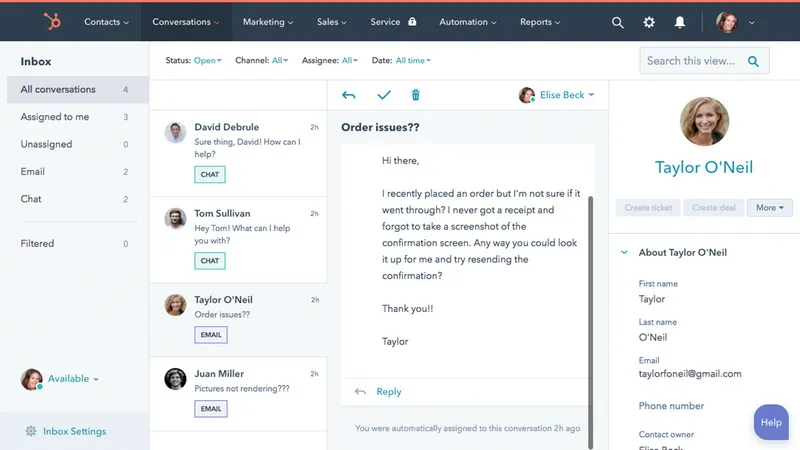
One reason many SMBs start with HubSpot is the free CRM offering. You can organize contacts, track deals, monitor sales pipelines, and manage customer interactions without immediately committing to a large CRM investment.
Beyond basic contact management, HubSpot combines CRM features with marketing tools, email automation, lead capture forms, customer support workflows, and reporting dashboards. Suitable for businesses trying to centralize customer-related operations instead of relying on separate sales and marketing tools.
Features:
- It offers contact management, deal tracking, and CRM pipelines.
- Reporting dashboards and sales activity visibility.
- Support marketing automation and customer service integrations.
- Provide lead capture forms and customer communication tools.
- Email tracking, templates, and sales workflows.
- Combines sales, marketing, and customer communication tools.
- Easier to use compared to many enterprise CRM systems.
- Large integration and scalable platform structure.
- Automation and analytics require paid plans.
- Some businesses may only use a small portion of the broader ecosystem.
- Deep customization is limited.
2. Salesforce
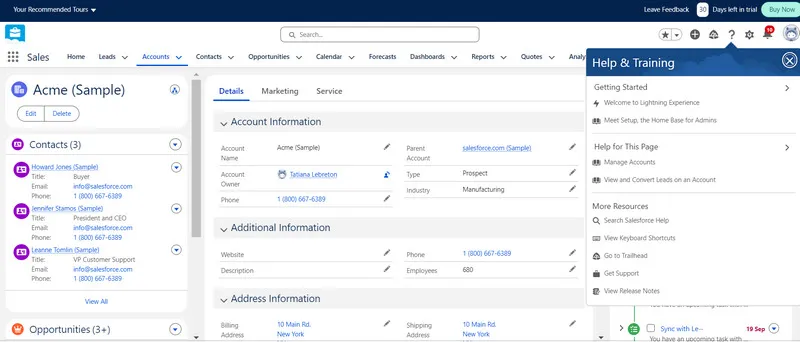
Salesforce works well for businesses that already have a sales process in place and need something more structured than spreadsheets or lightweight CRMs. You can track leads, manage deals, organize customer conversations, and build custom sales pipelines that match how your team actually works.
A lot of simpler CRMs are easy at first but become limiting once the team gets bigger. Salesforce is different. You can start relatively small, then add more tools and automation later without switching systems completely. There are more settings, more setup, and more customization options. Some teams love that flexibility. Others may find it takes longer to learn.
Features:
- Track leads, customer conversations, and sales deals in one place.
- Build custom sales pipelines that match your team's workflow.
- Automate follow-ups, reminders, and repetitive sales tasks.
- View sales reports and team performance from customizable dashboards.
- Expand into more advanced Salesforce tools as the business grows.
- Flexible enough for businesses with more complex sales processes.
- Good option for teams planning to scale over time.
- Strong reporting and customization compared to simpler CRMs.
- Can feel overwhelming for very small teams.
- Pricing increases as more users and advanced features are added.
- Setup takes more time if you are new.
Part 8: Best Project Management Software
A good project management software keeps your businesses on track, preventing missed deadlines, miscommunication, and scattered tasks. Below are the top two options.
1. ClickUp
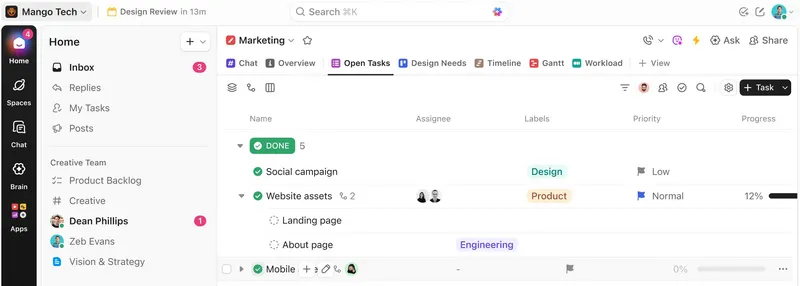
ClickUp tries to combine several work tools into one platform instead of making teams jump between different apps all day. Beyond project management, it also includes task tracking, docs, team collaboration, time tracking, and basic workflow automation.
Some teams use it as a simple task list, while others build more detailed workflows for projects, marketing campaigns, client work, or internal operations. You can switch between list view, Kanban boards, calendars, timelines, and Gantt charts depending on how they prefer to organize work. Meanwhile, ClickUp can feel a little complicated at first. There are a lot of menus, settings, and customization options, so new users sometimes spend time figuring out how they actually want to structure their workspace.
Features:
- Task management with list, board, calendar, timeline, and Gantt views.
- Built-in docs, comments, file sharing, and team collaboration tools.
- Custom workflows, statuses, and task organization options.
- Automation for recurring tasks and project updates.
- Integrations with Google Workspace, Slack, GitHub, Zoom and other business tools.
- Flexible enough for many different types of teams and workflows.
- Generous free plan for startups and smaller businesses.
- Combines project management, collaboration, and tracking tools in one platform.
- Can feel complicated or confusing for first-time users.
- Reporting and automation features require paid plans.
- Setup takes longer if you want highly customized workflows.
2. Asana
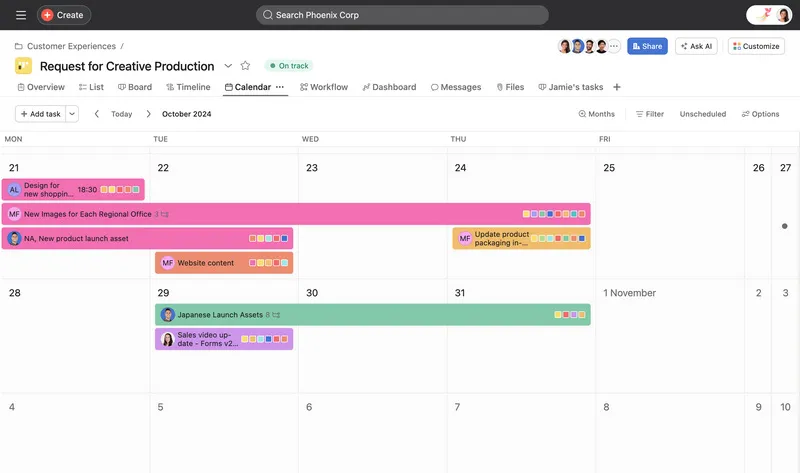
Asana is another great project management tool focused on keeping teams organized without making project tracking feel overly technical. A lot of small businesses choose it because it's easy to understand from day one, especially for teams moving away from spreadsheets, email chains, or scattered task lists.
It is built around task management and team coordination. You can assign work, set deadlines, leave comments, attach files, and track project progress from one shared workspace. The layout is generally cleaner and more structured than ClickUp, which makes onboarding easier for less technical teams.
Features:
- Offer task management with list, board, calendar, and timeline views.
- Task assignments, deadlines, comments, and file attachments.
- Shared project workspaces for team collaboration.
- Goal and progress tracking for ongoing projects.
- Large integrations.
- Easy for small teams to learn and adopt quickly.
- Clean interface that keeps projects easy to follow.
- Good balance between project tracking and team collaboration.
- Less customizable.
- No native built-in time tracking for employee hours.
- Complex operational workflows may outgrow the platform over time.
FAQs About Small Business Management Software
1. Which is the best small business software?
There is no absolute answer. The best small business management software depends on your business type, budget and core needs. Some may say this one is perfect, but it may not suit your teams.
Here we have a recommendation for your reference. For all-in-one management, AnySecura is best for most teams. Combined time tracking, workforce analytics, employee productivity reports, data loss prevention and more, it allows you to build a better team by saving time and budget.
For bookkeeping, QuickBooks is the industry standard, while Xero is better for global businesses. For time tracking, the free Clockify is best for a budget-sensitive company. For CRM, HubSpot is free and scalable, while Salesforce offers enterprise reliability. For project management, ClickUp is versatile, and Asana is user-friendly.
Anyway, if you want to know whether a software is suitable for you fimrs, try it in person.
2. Can small businesses use free management software?
Yes, especially in the beginning. In effect, a lot of small businesses don't need expensive software right away. Free tools are usually enough to handle basic daily work like tracking tasks, managing customers, logging employee hours, or organizing projects.
As we mentioned earlier, some software is free to use at first. Clockify lets teams track time for free. HubSpot has a free CRM for managing contacts and sales leads. Asana and ClickUp both offer free project management plans for smaller teams, while Bitrix24 includes collaboration and CRM features in its free version too.
Of course these free versions have limits. For example, the automation, deeper reporting, admin controls, or larger team features are locked behind paid plans. But we know that most companies just want something simple that helps the team stay organized without spending hundreds of dollars a month too early. So free plans are useful for that and there is no shame.
The most important thing is to understand what your team actually need and what can really help you.
3. What are people replacing QuickBooks with?
Some teams switch to Xero because it feels a bit simpler and works better for those who don't want a heavy accounting system. It's also easier for teams that work online or with clients in different countries. Others go with Zoho Books mainly because they already use other Zoho tools, so everything stays in one place instead of juggling multiple systems.
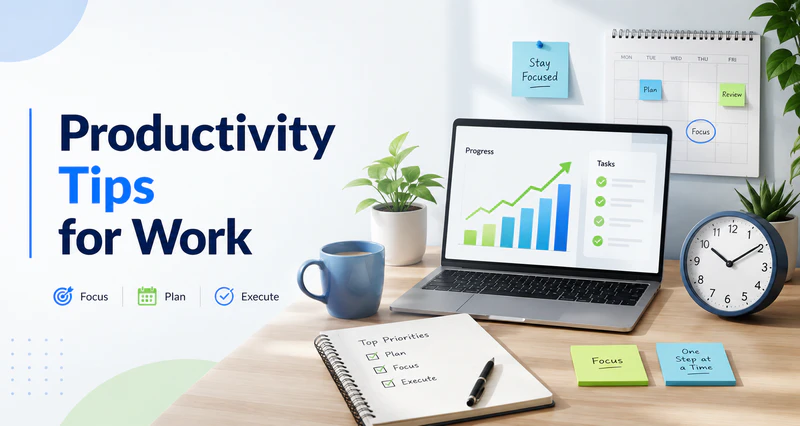
Discover 13 daily work habits, focus strategies, and lightweight tools to improve efficiency at work without burning out. Learn more>>
Conclusion
This guide introduces 13 small business management software options and offers a simple way to determine which is best for your current team. Whether you need an all-in-one platform, bookkeeping software, time tracking, CRM, or a project management tool, there is a solution tailored to your team size, budget, and industry.
There is no perfect software, the one that suits you is the best. By choosing the right software, you can simplify operations, reduce errors, save time, and develop your business in the future.
Some businesses prefer combining multiple specialized tools, while others want everything in one place to reduce switching between apps. For teams that need both productivity tracking and employee activity visibility in one system, try AnySecura now.


