
Some workdays feel full from the moment you sit down — emails, pings, meetings, small fires — and yet the things that actually matter barely move. That gap between busy and productive is where most of us get stuck.
The good news: you do not need a complete life overhaul to fix it. Small shifts in how you plan your day, protect your focus, and use your tools can add up fast — 13 practical productivity tips for work you can start this week, one or two at a time.
Whether you are in an open office, working remotely, or juggling both, the goal is the same: improve productivity at work without burning out or working longer hours for the sake of it.
Why Productivity at Work Matters
Productivity at work is not about squeezing more tasks into every hour. It is about making sure your time goes toward work that actually moves projects, relationships, and results forward — the foundation of lasting workplace productivity.
When efficiency slips, the signs show up quickly:
- Important tasks keep getting pushed to "tomorrow"
- Small interruptions eat large chunks of the day
- Stress builds because everything feels urgent, nothing feels finished
The opposite is just as real. When your daily work habits support focus and clarity, you finish meaningful work earlier, communicate with more intention, and carry less mental clutter into your personal time.
These tips are not about perfection. They are about building a work rhythm that fits real jobs, real teams, and real distractions — not an ideal schedule that falls apart by Tuesday.
Busy vs Productive Work Habits
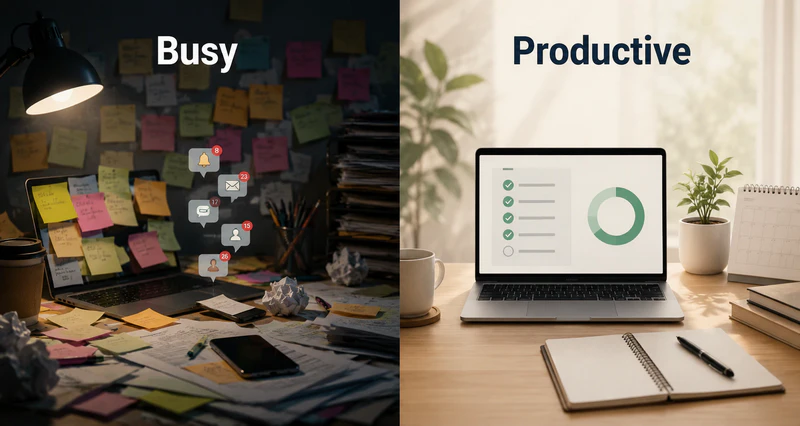
Busy and productive can look similar from the outside — both involve long hours and a full calendar. The difference shows up in what actually gets finished and how you feel at the end of the day.
| Aspect | Busy Work Habits | Productive Work Habits |
|---|---|---|
| Daily focus | React to whatever lands first — inbox, pings, last-minute requests | Start with one to three clear priorities before opening email |
| Communication | Check messages constantly throughout the day | Batch email and chat at set times between focus blocks |
| Task approach | Switch between many open threads at once | Single-task in protected 25–90 minute focus windows |
| Meetings | Fill every open calendar slot; back-to-back calls | Decline or shorten unless there is a clear agenda or decision |
| Breaks | Skip breaks or push through fatigue | Step away regularly before attention and quality drop |
| End of day | Tired but unsure what was actually accomplished | Key tasks finished with a clear sense of progress |
| Measure of success | Hours logged, messages answered, calendar fullness | Outcomes moved forward — projects, decisions, deliverables |
If most of your week sits in the left column, you are not alone — modern work defaults to busy. The tips below are designed to shift you toward the right column, one habit at a time.
McKinsey Global Institute research (2012) found that interaction workers — managers, professionals, and others whose jobs depend on communication — spend roughly 28% of the workweek reading and answering email. That figure is dated but still widely cited; it does not include chat or meetings, so if your audit later shows communication eating half your week, the gap between busy and productive is measurable, not vague.
A Simple Productivity Framework for Work
Before diving into the habits, it helps to see how they fit together. Most sustainable gains in productivity at work fall into four pillars:
- Prioritize: Decide what matters before the day decides for you — clear daily goals beat a long reactive to-do list.
- Focus: Protect blocks of uninterrupted time and single-task through them; this is where real focus at work happens.
- Eliminate distractions: Reduce notifications, meeting clutter, and digital pulls that break momentum.
- Optimize tools: Use a small, simple stack that supports habits instead of adding friction.
The tips below map to these pillars. Start with one pillar that matches your biggest gap — unclear priorities, scattered focus, constant interruptions, or tool overload — and build from there.
13 Productivity Tips for Work (Daily Work Habits)
1. Set Clear Daily Priorities
Most people start the day by opening their inbox or chat app — and instantly start working on other people's priorities. By evening, they have responded to dozens of messages but made little progress on what actually matters.
Before you touch email, ask yourself: What one to three things would make today a success?
Write them down somewhere visible — a notebook, a sticky note, or the top of your task list. Keep the list short. If everything is a priority, nothing is.
Good daily priorities are specific: "Draft the Q2 report introduction" beats "Work on the report." Everything else is secondary until those core items are done.
Three priorities for three different roles, same rule:
- Marketing coordinator: finalize the campaign brief, send the vendor quote request, review last week's ad metrics — not "catch up on email."
- Software developer: merge the pull request blocking QA, write the API error-handling tests, document the deployment steps — not "check Slack."
- Operations manager: approve the vendor contract, resolve the inventory discrepancy ticket, prep the Friday team update — not "attend whatever is on the calendar."
Notice the pattern: each list names a deliverable or decision, not a channel. If your three items could be finished by reading and replying all day, they are probably someone else's priorities wearing your to-do list.
This single habit is one of the highest-return productivity tips for work because it pulls you out of reactive mode and back into intentional work.
2. Use Time Blocking
Your calendar should not only hold meetings. It should protect time for deep work, admin tasks, communication, and breaks — the same way it protects a call with a client.
Try structuring your day in blocks:
| Time | Focus |
|---|---|
| 9:00–11:00 | Deep work — no messages |
| 11:00–11:30 | Email and Slack |
| 2:00–3:30 | Project execution |
| 4:00–4:30 | Meetings / syncs |
Time blocking gives your tasks a container. Without one, work spreads across the day like water — touching everything, finishing little.
Place your hardest block where your brain is actually sharp, not where your calendar has a gap. Most people hit peak focus in the first two to three hours after waking, when alertness and working memory are highest; a second, smaller window often appears mid-afternoon. Schedule deep work in the first window when you can — admin, email, and low-stakes calls fit better in the dip between them. If mornings are already meeting-heavy, protect one 90-minute block the night before by declining or moving a lower-stakes call. One defended block beats a perfect theoretical schedule that never survives Monday.
Start with just one 90-minute focus block per day. After two weeks, you will likely notice a clear difference in how much real output you produce.
3. Apply the 80/20 Rule
Roughly 20% of what you do drives 80% of your results. The trick is identifying that 20% — and doing more of it.
Look back at the last week or month and ask:
- Which outputs did people actually use, reference, or act on?
- Which tasks took a long time but changed almost nothing?
- If you could only finish one thing today, what would it be?
Once you spot the pattern, protect the high-leverage work. Delegate, simplify, or drop the rest where you can. Many people feel inefficient not because they work slowly, but because they spend most of their energy on low-impact tasks that feel necessary.
A typical pattern: list everything you did last week with rough hours attached. You might find 11 hours on internal status updates and CRM cleanup, but only 3 hours on client calls — while every closed deal that month traced back to those calls. Moving status updates to a single Friday block and freeing two call slots per week is how the 80/20 rule shows up in a calendar, not in theory.
4. Avoid Multitasking
Writing a proposal while answering messages and glancing at a spreadsheet feels like multitasking. In practice, it is rapid task switching — and it comes with a cost.
Every switch forces your brain to reload context. Errors go up, completion time stretches out, and mental fatigue sets in faster. Gloria Mark and colleagues at UC Irvine found that after a workplace interruption, people needed an average of 23 minutes and 15 seconds to return fully to the original task. Her follow-up work on attention fragmentation found knowledge workers switch tasks or are interrupted roughly every three to five minutes during a typical session — so a "quick reply" in the middle of writing can cost you the better part of half an hour, not thirty seconds.
A better approach:
- Pick one task
- Set a 25–45 minute focus window
- Work on only that task during the window
- Handle messages in a separate batch afterward
Single-tasking looks slower on the surface. Over a full day, it consistently helps you improve work efficiency.
5. Limit Meetings
Meetings are where work gets discussed — not where work gets done. Too many of them, and your output shrinks even while your calendar looks "full."
Run the math on your own calendar before cutting anything. Add up scheduled meeting hours this week, then subtract them from your nominal work week — say, 40 hours. If meetings take 15 hours, you have 25 left; subtract a realistic hour each day for email, chat, and admin, and you are down to roughly 20 hours for actual project work. That is normal for many office jobs, but it explains why a day of back-to-back calls leaves zero room for the report you planned to finish. Microsoft's Work Trend Index reports that employees are interrupted by meetings about every two minutes during the workday, with a large share of those calls scheduled ad hoc — which makes protected focus blocks even harder to keep.
Practical ways to cut back:
- Decline meetings without a clear agenda or decision to make
- Default to 25- or 45-minute slots instead of always booking an hour
- Ask whether an async update — a Loom video, a Notion doc, a Slack thread — would work instead
- Protect at least half a day each week as meeting-free focus time
Your calendar is a resource. Guarding it is one of the fastest ways to reclaim productive hours.
6. Reduce Email Overload
Email is, by default, a to-do list that other people write for you — unless you take control of it.
Try this rhythm:
- Check email two or three times a day at set times, not every few minutes
- Sort messages into simple buckets: Action, Waiting, Reference
- Keep replies short when a short reply is enough
- Batch email processing like any other task — do not let it bleed across the entire morning
Separating "communication time" from "execution time" alone can recover an hour or more on many workdays.
Try fixed windows instead of vague "check less often" — for example, 8:30, 12:00, and 4:30 for 20 minutes each. Outside those slots, inbox closed. When a message needs follow-up later, move it to a task list rather than leaving the tab open as a reminder; an open inbox is an open invitation to context-switch. For threads that will take more than two minutes, reply with a one-line acknowledgment and schedule the real response in your next email block.
7. Turn Off Notifications
That small popup is designed to interrupt you. And it works.
Turn off non-essential notifications on your phone and computer — especially for email, chat apps, social media, and news. Then check messages on your schedule, not theirs.
The first day may feel uncomfortable. You might worry about missing something urgent. In most cases, you will not — truly urgent issues find other paths. The vast majority of notifications can wait 30 minutes without consequence.
Analysis from RescueTime's 2018 study of 50,000+ knowledge workers found the median worker checks email or IM about every six minutes — often without noticing. Each glance feels harmless; stacked across eight hours, it is the mechanical version of the task-switching cost in tip 4. Disable badges on phone and desktop, not just sound — visual cues pull attention even when you do not act on them.
8. Batch Similar Tasks
Your brain pays a cost every time it switches modes. Grouping similar work together reduces that tax.
Examples:
- Stack phone calls into one block instead of scattering them through the day
- Handle admin work — expenses, forms, file updates — in a single afternoon slot
- Do creative work (writing, planning, designing) during your highest-energy hours
Pair this with time blocking and you get a compounding effect: fewer transitions, longer stretches of momentum, faster completion.
9. Take Breaks Strategically
Working straight through feels productive until it is not. After a certain point, attention drops, mistakes creep in, and everything takes longer.
Useful break patterns:
- Pomodoro: 25 minutes of focus, 5 minutes off; repeat four times, then take a longer break
- 90-minute rhythm: step away roughly every 90 minutes — walk, stretch, get water
- Micro-breaks: even 30 seconds away from the screen helps reset attention
Breaks are not a reward for finishing everything. They are part of doing good work sustainably.
There is evidence behind the rhythm, not just comfort. A University of Illinois study (Ariga & Lleras, 2011) found that brief, structured task switches during a sustained vigilance task prevented the usual decline in performance over time — supporting the idea that short mental resets help maintain focus on repetitive work. The 90-minute block in tip 2 aligns with natural alertness cycles; pairing a 5–10 minute walk or stretch at the end of each block beats scrolling your phone, which often reintroduces the interruptions you just left.
10. Automate Repetitive Tasks
If you do something the same way more than twice a week, ask whether a tool can handle part of it.
Common wins:
- Email rules that auto-sort or label messages
- Template replies for frequent questions
- Scheduled reports instead of manual exports
- Simple automations (Zapier, Make) that connect one step to the next
Automation does not need to be complex. Saving 30 minutes a week adds up to more than two extra hours a month — time you can put back into focused work.
Start with one friction point you hit every week — for example, auto-routing vendor invoices to an "AP" folder and applying a template reply for missing PO numbers (often 20–30 minutes to set up, then saves repeated sorting). Or schedule a Monday Slack digest from Jira instead of pinging each other for status. One small automation per month beats a grand workflow overhaul that never ships.
11. Create a Focused Work Environment
Habits and environment work together. Strong habits in a distracting space still fight uphill — whether the pull is a cluttered desk, an open-plan office, or a laptop full of tabs.
Physical space:
- Adequate lighting and a chair that supports long sessions
- A dedicated work zone — even a corner of a table — so your brain associates "sitting here" with work mode
- Less visual clutter: foot traffic you cannot control, cables, paper piles, random objects that catch your eye
Digital space:
- Close tabs not needed for the current task; keep one primary project open when possible
- Organized folders and a clean desktop — not dozens of unsorted files mixed with entertainment apps
- Tools chosen for speed and simplicity, not feature overload
You do not need a magazine-worthy desk. Change one thing per week — tidy cables, rename files, adjust monitor height — and within a month your environment will support focus noticeably better.
In open-plan offices, noise is often the hidden cost. University of Sydney research (Kim & de Dear, 2013, Journal of Environmental Psychology) analyzed 42,000+ office workers and found open-plan layouts scored worse on acoustics and privacy — with noise distraction cited as a main reason. Prior lab work also shows intelligible speech interrupts cognitive tasks even when you try to ignore it. If you cannot move desks, noise-cancelling headphones or a white-noise app are not perks; they compensate for a layout that was never designed for deep work.
Most productivity advice fails in practice for predictable reasons, not because the tips are wrong. People set three priorities but leave email open while writing them. They time-block deep work but accept every meeting invite that conflicts with it. They turn off notifications on their laptop but leave their phone on the desk. They run a time audit for three days, see uncomfortable numbers, and stop logging. If a habit did not stick last month, fix the leak before adding a new technique on top.
12. Reduce Digital Distractions and Set Device Boundaries
Your laptop and phone are work tools — but they are also entertainment hubs, social feeds, and infinite-scroll machines. When work and personal use blur on the same device, focus gets harder still.
On your own:
- Log out of personal social accounts on your work browser, or use a separate work-only browser profile
- Remove distracting apps from your dock or home screen; do not stay logged into entertainment accounts all day
- Put your phone face-down or in another room during focus blocks
- Use headphones and ambient sound to signal "I am heads-down" in an open office or at home
- Tell teammates: "I am writing until 11 — ping me if it is urgent"
- Use a lightweight site blocker during focus hours — enough to stop the autopilot click toward Reddit, YouTube, or Instagram
With your team:
- Work laptop primarily for work; personal browsing on personal time and devices where possible
- Shared focus-hour norms — fewer @everyone pings, a shared definition of "urgent"
- For small teams, agreed focus habits can become consistent device settings — for example, limiting social apps during focus blocks via application control or web access control
On shared or managed work devices, systems beat willpower — especially when remote work blurs the line between "work" and "personal." Clear boundaries create more freedom: you know when to focus and when to switch off.
A Udemy survey (2018, 1,000+ U.S. full-time workers) found that 54% of employees attributed underperformance to workplace distractions, and 69% reported being distracted at work — while 70% said training could help them block distractions better. That gap is why personal habits (logout, site blockers, phone in another room) matter first, and why teams sometimes add device-level rules when the same three sites keep winning the attention battle across the group.

13. Improve Visibility of How You Spend Work Time
You cannot fix what you cannot see. Many people feel they "worked all day" but cannot say where the hours went.
Run a one-week personal time audit — for yourself, not for a manager:
- How much time went to meetings?
- How much to email and messages?
- How much to real project work?
- How much was lost to interruptions?
Toggl, Clockify, or even a simple spreadsheet with four columns (time, category, task, notes) is enough.
Log in 15-minute chunks for five workdays — long enough to see patterns, short enough to sustain. A sample Tuesday might look like this:
| Time | Category | What happened |
|---|---|---|
| 9:00–9:45 | Deep work | Drafted proposal section 2 |
| 9:45–10:15 | Meeting | Weekly sync, no decision made |
| 10:15–10:40 | Lost / switch | Slack thread → email → back to doc |
| 10:40–12:00 | Email + admin | 18 replies, expense form |
| 2:00–3:30 | Deep work | Finished proposal section 2 |
That "lost / switch" row is the one most people skip — and the most useful. It usually points to notification or meeting leaks, not a lack of effort.
After a week, patterns emerge. Compare your numbers to rough benchmarks from large-scale workplace studies — not as a scorecard, but as a sanity check:
| Activity | Typical share of workweek | If yours is much higher… |
|---|---|---|
| Meetings | 30–50% for many office roles | Start with tip 5 — decline, shorten, or async alternatives |
| Email and messaging | ~2–2.5 hours per day | Batch communication (tips 6 and 7) usually return time fastest |
| Deep / project work | Often under 40% without protection | Defend one daily focus block (tip 2) before optimizing anything else |
| Interruption recovery | Hard to log directly; shows up as "lost" time between tasks | Reduce switches (tips 4 and 8) and notification pulls (tip 7) |
Asana's Anatomy of Work survey found that knowledge workers spend nearly 60% of their time on "work about work" — coordinating, searching for information, and switching tools — rather than on skilled work itself. If your audit shows the same shape, the fix is usually fewer handoffs and clearer priorities, not working faster within the same fragmented structure. For teams tracking broader trends, workforce analytics tools can surface similar patterns at scale.
Best 4 Apps for Productivity Tips That Help You Work Better
You do not need an enterprise stack to improve work efficiency. These lightweight tools are enough for most individuals and small teams:
Notion
A flexible workspace for notes, project docs, and simple wikis. Good if you want one place to capture ideas, meeting notes, and lightweight project hubs — best when your work spans writing, planning, and reference material in one project.
Todoist
Clean task management with priorities, due dates, and quick capture. Ideal when your day is driven by discrete tasks with deadlines rather than long documents — pair it with tip 1 for daily priority capture.
Trello
Visual boards for tracking projects and workflows. Drag-and-drop simplicity makes it easy to see status at a glance — strongest when several people hand work off across stages (backlog → in progress → review).
Pomodoro tools (Focus To-Do, Pomofocus, Forest)
Timed focus sessions with built-in breaks. Pairs well with time blocking and helps reduce "just five more minutes" procrastination — most useful if you struggle to start tasks or tend to work past the point where quality drops.
Keep the stack simple: one task manager, one note space, one timer. More tools often mean more switching — which works against the very productivity at work you are trying to build.
How AnySecura Supports a Focus Environment at Work
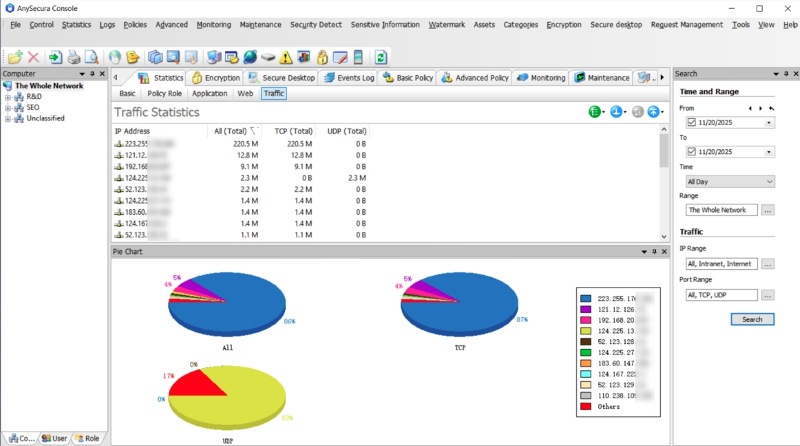
AnySecura is software installed on work computers. It lets you set simple rules on those devices — for example, block YouTube, games, and social apps during 9:00–17:00, allow them after hours, and stop work browsers from opening entertainment sites in the middle of a focus block.
It handles the device side of productivity: which apps and websites can run on work machines, and when. It is not a task manager or timer — pair it with the planning tools above for scheduling. AnySecura keeps the machine itself from pulling you back into distractions you already decided to avoid.
It can help when:
- People keep reopening Reddit, YouTube, or games on company laptops during work hours
- A small team wants the same focus rules on every work device — without relying on a browser extension or honour system
- Remote teams need one place to apply “work device = work apps only” settings across Windows and Mac machines
AnySecura is not a full employee monitoring platform. It is not built for keystroke logging, screen recording, or ranking who worked the hardest. Its focus is limiting distracting apps and sites on work devices during agreed hours.
If a personal browser blocker already works for you alone, you may not need anything else. If a small remote team shares work laptops and keeps drifting to the same distractions, AnySecura applies those focus rules at the device level — so good habits are not fighting an open YouTube tab all day. For a documented baseline you can roll out across the whole remote team, see AnySecura's Remote Work & BYOD Data Security Policy Template.
Set work-hour rules on company laptops: limit games, social media, and streaming sites during focus time, allow them after hours, and keep the same settings across your team's machines.
FAQs About Productivity Tips for Work
What are the best productivity tips for work?
Start with three: set one to three daily priorities, use time blocking to protect deep work, and turn off non-essential notifications. For most people, these three changes produce the fastest visible improvement.
How can I improve efficiency at work without working longer hours?
Focus on the 80/20 rule, batch similar tasks, and reduce meeting and email fragmentation. Structure beats overtime — the same eight hours produce more when they are organized intentionally.
What tools help with workplace productivity?
Notion for notes and docs, Todoist for tasks, Trello for visual project tracking, and a Pomodoro app for timed focus. Keep the stack small — fewer tools, less switching.
Can setting boundaries on work devices help personal productivity?
Yes, when those boundaries stay light and focus-oriented — for example, limiting entertainment apps during focus hours. The goal is supporting your habits and reducing digital distractions, not tracking every keystroke.
How long before new daily work habits show results?
Most people notice a difference within one to two weeks — fewer interruptions, more completed focus blocks. Around four weeks, the rhythm tends to feel natural. Steady adjustment beats a one-day overhaul.
Final Thoughts: Building Productivity That Lasts
Productivity at work is not a single hack or a perfect tool stack. It is a collection of small decisions repeated daily: what you prioritize, how you protect your time, what you remove from your environment, and which tools actually help instead of adding noise.
You do not need all 13 tips at once. Pick two that address your biggest gap right now and run them for two weeks. Then add one more. The people who improve productivity at work sustainably are rarely the ones who work the longest hours — they work with clearer boundaries, fewer unnecessary switches, and habits that match how focus actually works in a real job.
AnySecura helps reduce digital distractions on work devices — limiting entertainment apps and keeping work machines oriented toward work, not infinite scroll. Quiet support for the habits in this guide, not a replacement for them.


