
Every day, call center agents talk to customers, solve problems, and represent the company, often without anyone else listening in. These conversations shape how people feel about your brand. That’s why it’s so important to have a clear way to check call center quality during those conversations.
This guide explains what call center monitoring really is, what to monitor and how to do it the right way, so your company can present a professional brand image during real customer interactions, while improving satisfaction and strengthening long-term loyalty.
What Is Call Center Monitoring
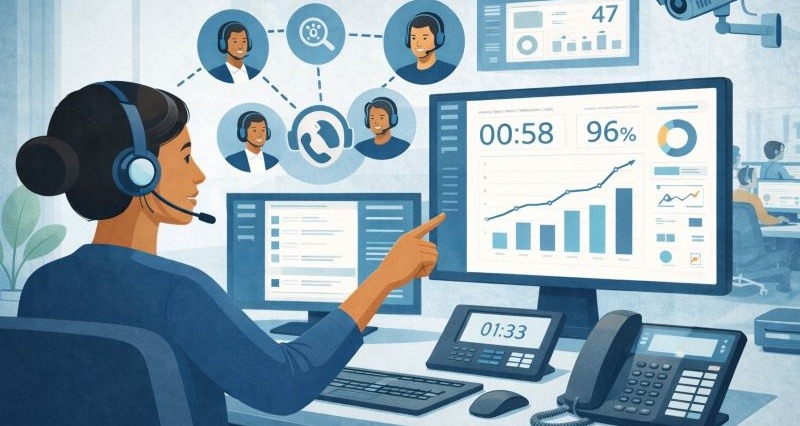
Call center monitoring is the practice of systematically observing and evaluating how customer interactions are handled. For most frontline teams, monitoring helps answer three practical questions:
- Are our agents following the right procedures?
- Are we consistently delivering quality and compliant service?
- When things go wrong, do we know what happened and why?
A customer requests a password reset, but later reports it didn’t work. After reviewing the call, you find the agent skipped the account verification step. Without that, the process couldn’t complete. Monitoring helps you catch the error and guide the agent to follow the correct steps next time.
Agents are required to read a risk disclaimer during product pitches. A review of recent calls shows a few are skipping it. It’s not deliberate, just easy to forget under pressure. Monitoring helps you spot the pattern early, update reminders in training, and stay compliant.
You notice that one agent consistently has longer call times than the rest of the team. It's unclear why until you review a screen recording, and it shows the agent spending extra time clicking between systems, searching for customer history, and hesitating while looking up answers. So you simplify the workflow or provide a better tool, improving efficiency without putting unfair pressure on the agent.
Types of Call Center Monitoring
1. Call Recording
This is the process of capturing and storing call audio for later playback and analysis. Every phone conversation can be recorded and saved in a secure archive. Recordings create an objective record of what was said. They are invaluable for quality assurance reviews, compliance audits, and dispute resolution, since managers can rewind and listen to exactly how an interaction went. For example, if a customer claims an agent provided incorrect information, a supervisor can pull up the recording to verify the facts. Recording all calls (or a well-chosen sample) ensures you don’t miss critical details, and it allows for consistent evaluation against your quality standards after the call has ended.
2. Live Call Listening
Call monitoring means actively observing calls in real time or reviewing agent activity, beyond just storing audio. This can include a supervisor silently listening to live calls or using software to watch the agent’s on-screen actions as they handle a contact. In other words, monitoring focuses on agent behavior during interactions: Are they following the script? Navigating the software efficiently? Sticking to the required process? Live monitoring lets supervisors listen in on calls as they happen and even coach the agent on the spot (for instance, using a “whisper” feature to give the agent tips without the customer hearing).
3. Screen Monitoring
This often involves recording the agent’s screen or tracking their software usage during the call. This provides a visual record of how the agent is handling the workflow, not just what they are saying. For example, screen recordings show where an agent might get stuck in a CRM system or take extra steps, revealing process bottlenecks that aren’t obvious from audio alone.
4. Automated Analytics
Some monitoring tools now include AI-powered analysis that flags issues like tone changes, compliance gaps, or trending issues across hundreds of conversations. These systems help scale up QA without manually reviewing every call.
What to Monitor in Call Center Quality Monitoring
In call center quality monitoring, what exactly should your quality assurance specialist pay attention to when evaluating an agent's performance during a phone interaction? This section breaks down the key behaviors and standards agents are expected to meet.
- Greeting and Introduction: Verify the first few seconds of each call recording, check if the agent opened the call politely and used the correct greeting as per your script (e.g. saying the company name, their name, and offering help). A warm, professional greeting sets the right tone for the whole call.
- Authentication / Data Verification: If the call involves checking ID or looking up accounts, make sure the agent followed the correct steps to protect the customer’s personal information.
- Issue Understanding and Response: During call review, note if the agent accurately paraphrased the issue and if their response solved the customer’s need. Ensure the agent fully understood the customer’s question or problem and provided accurate, relevant information.
- Compliance and Script Adherence: Monitor whether the agent adhered to mandatory scripts and policies. This includes any required disclosures (legal or regulatory statements) and avoiding prohibited language. For example, in sales calls, did the agent stick to approved claims? In support calls, did they refrain from unauthorized promises or apologies that violate policy?
- Problem-Solving & Resolution: Evaluate the agent’s troubleshooting or sales skills, did they efficiently address the customer’s issue or need? This involves checking if the agent followed the correct process, consulted the knowledge base or resources as needed, and took appropriate actions (like creating a ticket, offering a relevant product, or escalating when necessary).
- Professionalism and Empathy: The agent’s tone and demeanor are crucial. Monitor whether they were courteous, patient, and empathetic to the customer. Even under stress, agents should remain professional and not blame or argue with the customer. While listening to the call, judge the tone of voice and choice of words. Note positive behaviors like using the customer’s name, apologizing sincerely for inconveniences, or showing understanding (“I can imagine how frustrating this is…”). Also note any negative behaviors (sounding impatient, raising voice, or being dismissive).
- Closing and Next Steps: Check that the agent closed the call properly by confirming the customer’s issue was resolved, summarizing any next steps, and ending on a polite note (thanking the customer for calling, etc.).
Using these focus areas as a guide, you can create a detailed call monitoring scorecard. Many centers include each of the above categories as line items to be scored (often on a numeric scale or yes/no).
Here is an example:
| Evaluation Criteria | Score Options | Comments |
|---|---|---|
| Greeting and Introduction | ☐ Yes ☐ No ☐ Partial | Did the agent use a proper opening (company name + agent name + offer to help)? |
| Identity Verification | ☐ Yes ☐ No | Did the agent follow the correct customer verification steps? |
| Issue Understanding | 1 ☐ 2 ☐ 3 ☐ 4 ☐ 5 ☐ | Did the agent accurately grasp and restate the customer’s concern? |
| Resolution | ☐ Resolved ☐ Escalated ☐ Incomplete | Was the issue fully resolved during the call? |
| Script and Compliance | ☐ Yes ☐ No | Did the agent follow all required scripts and disclosures? |
| Professionalism & Empathy | 1 ☐ 2 ☐ 3 ☐ 4 ☐ 5 ☐ | Was the agent polite, patient, and empathetic throughout the interaction? |
| Call Closing | ☐ Yes ☐ No | Did the agent confirm resolution, summarize next steps, and thank the customer? |
How to Choose the Right Call Center Monitoring Software
Effective call center monitoring relies on the right tools to assess quality. Nowadays there are many solutions available. Below are some common tools used to monitor call center interactions and performance:
Call Recording Tool
To make quality checks more effective, your call recording software should do more than just save audio. Good tools can record calls automatically or when needed, store them safely online, and make it easy to find a call by agent name, date, or keyword. They should also follow data privacy rules like GDPR or PCI-DSS.
- Automatic and on-demand recording
- Encrypted storage
- Advanced search filters by agent or keyword
- Compliance support for PCI and GDPR
- Aircall
- RingCentral
- NICE CXone
- Talkdesk
Screen Monitoring / Agent Desktop Capture Tool
Screen monitoring software lets supervisors see or record what’s happening on an agent’s computer during and after customer calls. This gives helpful insight into how the agent uses systems, enters information, and follows company processes while talking to the customer. It works alongside audio recordings to show what was happening on screen at the same time, making it easier to check accuracy, CRM use, and task completion.
In real-time scenarios, screen viewing can help managers step in if an agent is stuck or not following the right steps. After the call, recorded screen videos help with training and quality reviews. Many tools today offer features like synced audio and video playback, support for multiple screens, and automatic blurring or pausing when sensitive information shows, making sure everything stays private and meets data rules.
- Real-time or post-call screen capture
- Selective application recording
- Auto-blurring of sensitive data
- Customizable role-based access
How AnySecura Enables Screen Monitoring for Your Call Center
AnySecura stands out as a smart and privacy-conscious screen monitoring solution, especially suited for call centers that want visibility without overstepping boundaries.
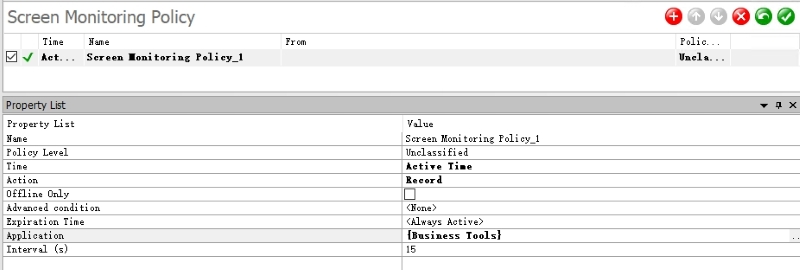
- App-Based Screen Recording for Better Privacy:
AnySecura allows you only records the screen when specific, approved applications are in use. This means no recording happens during personal tasks or non-work activities, giving agents peace of mind while ensuring the company captures only what matters. It’s a balanced approach that protects privacy without sacrificing oversight.
- Event-Based Search to Save Time:
Instead of watching hours of screen recordings, supervisors can jump straight to key moments, like when a specific customer action occurred or a compliance policy was triggered. AnySecura tags these events automatically, making it easy to locate and review just the relevant footage, speeding up audits and coaching.

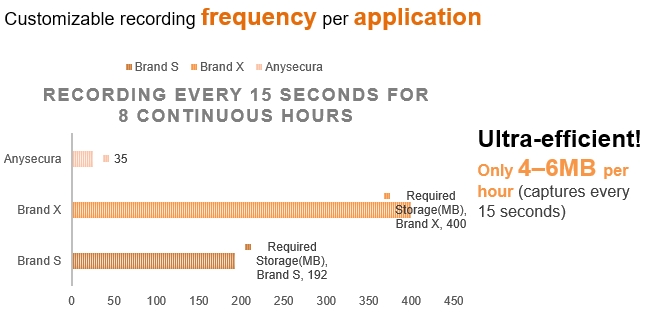
- Smart Recording and Storage Efficiency:
AnySecura uses intelligent recording logic and smart compression to keep file sizes small without lowering video quality. It captures only necessary actions in high clarity, which helps teams monitor more without overwhelming storage space or increasing system load.
Live Call Listening and Whisper Coaching Tool
If you want to coach agents during live calls, you’ll need call center software that lets supervisors listen quietly, talk to agents without the customer hearing (whisper mode), and join the call if needed. Good tools also include access controls, cloud support, and tags to mark important moments, making real-time coaching smooth and secure.
- Silent live listening
- Whisper coaching
- Supervisor alerting
- Remote access through cloud-based systems
- Five9
- CloudTalk
- JustCall
- Zendesk Talk
Speech Analytics and AI Monitoring Tool
Speech analytics tools help QA teams automatically review 100% of calls, far more than what manual listening can cover. These platforms use AI to transcribe conversations and analyze what was said, how it was said, and whether agents followed required scripts or missed key steps.
A good speech analytics system can detect key phrases in real time (like “cancel” or “manager”), flag when mandatory disclosures are skipped, and assess customer sentiment based on tone and word choice. It can automatically tag calls, score agent performance, and generate reports by agent, issue type, or emotional cues. Some platforms also send real-time alerts to supervisors if a call becomes risky, and many support multilingual analysis. Integration with QA platforms, CRMs, or helpdesk tools makes it easier to turn insights into action.
- Auto-transcription of calls
- Keyword flagging
- Sentiment and emotion detection
- Real-time compliance alerts
- Observe.AI
- CallMiner
- Avaya OneCloud
- Verint Speech Analytics
Customer Feedback and Surveys Tool
Customer feedback tools let you hear directly from the people who matter most, your customers. These tools automatically send short surveys after a call(via text, email, or IVR),asking questions like “How satisfied were you?” or “Would you recommend us?” Responses turn into measurable scores like CSAT or NPS.
Beyond basic ratings, good tools let you collect open-text feedback, detect emotion in customer comments, and even flag low ratings for quick follow-up. Some can match survey responses to the specific agent or ticket, so you can see how customer opinions line up with your internal QA scores.
- Multi-channel feedback collection
- CSAT/NPS integration
- Agent-linked reporting
- Flexible survey logic
- Delighted
- Qualtrics
- Survicate
- Zoho Survey
To learn more about each call center monitoring software, read our detailed review article covering most of the tools mentioned here.
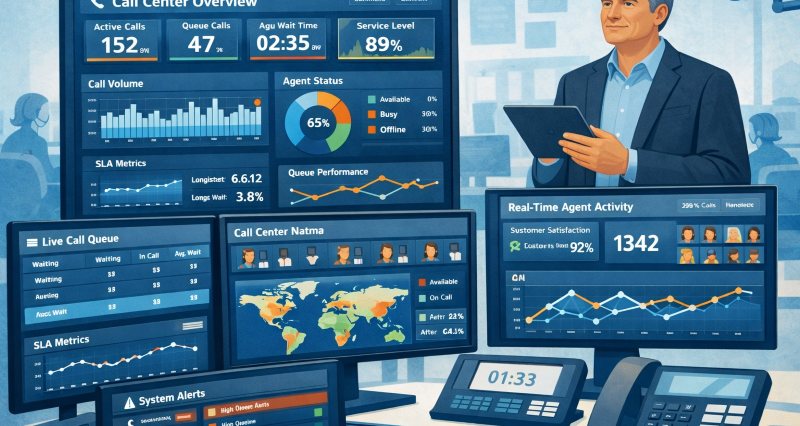
Compare call center monitoring software and learn how to choose the right tools for quality, compliance, and performance. Learn more>>
FAQs about What is Collate Printing
What is the 80/20 rule in call centers?
It means 80% of incoming calls should be answered within 20 seconds. This is a common goal to make sure customers don’t wait too long and stay satisfied.
How do you monitor call center performance?
You can monitor performance by checking call recordings, using quality scorecards, tracking key numbers like wait time and customer satisfaction, and listening to live calls. Tools like screen monitoring or speech analytics can help managers see how agents are doing and where to improve.
Why is call monitoring important?
It helps make sure agents give correct, polite, and helpful service. Managers can spot problems early, coach agents better, and make sure the team follows rules. Good monitoring leads to happier customers and better results.
Conclusion
By carefully monitoring calls, you can provide targeted coaching, recognize top performers, and fix process issues, all of which lead to better customer experiences. Remember that the aim is not to micromanage or punish agents, but to empower them with insights and support. When your team understands that monitoring is there to help them shine and make customers happy (not just to find faults), you’ll foster a positive culture of growth and accountability.
Ready to get started? Try AnySecura for free and see how smarter monitoring can improve agent performance and customer satisfaction, without compromising privacy or trust.


