Many tools described as "free employee monitoring software" are free only for a few users or for a limited trial. Before choosing one, check the user limit, data-retention period, screenshot access, and whether the plan expires — these details often matter more than the feature list itself.
This guide compares 10 employee monitoring tools worth considering in 2026, separating ongoing free plans from time-limited trials so you can see exactly what "free" gets you with each one, along with their key strengths and ideal use cases.
What Is Employee Monitoring Software?
Employee monitoring software is designed to help businesses understand employee work activity. It is typically installed on computers or other company devices and collects work activity data, allowing managers to see how employees spend their working time, which applications they use, which websites they visit, and how productive they are overall.
It is important to note that employee monitoring software is not the same as simple attendance software.
Traditional attendance tools mainly focus on:
- When employees start and finish work
- How many hours they work
- Whether they are late or absent
Employee monitoring software, on the other hand, can also look at what employees do during working hours, such as:
- Application and website tracking: See which applications and websites employees use during working hours
- Productivity analysis: Use activity data to generate productivity scores, work pattern insights, and team reports
- Screenshots and screen recording: Capture periodic screenshots or continuous screen recordings as visual evidence of activity
- Detailed computer monitoring: Some tools also track activities such as keystrokes, file operations, emails, printing, and removable storage devices
- Reports and alerts: Generate regular reports and notify managers when specific rules or conditions are triggered
As a result, the scope of employee monitoring software is generally broader than that of basic time tracking software. More intrusive features, such as screenshots and keystroke tracking, are also less likely to be included in permanently free plans. This is an important factor to consider when comparing free employee monitoring tools.
Best Free Employee Monitoring Software at a Glance
The table below compares 10 free employee monitoring software options by their main use cases, key monitoring features, and available free plans or trials. It gives you a quick way to see which tools are free to use on an ongoing basis and which are mainly available for a limited trial.
| Software | Best For | Free Plan / Trial | Starting Price |
|---|---|---|---|
| Jibble | Time tracking and employee monitoring | Free forever | Free; Enterprise pricing available on request |
| ActivTrak | Productivity analytics | Free plan for up to 3 employees | From about $10/user/month |
| WorkTime | Non-invasive monitoring | Free plan for up to 3 employees | From about $6.99/user/month |
| EmpTrakr | Free employee monitoring | Free option available | Free |
| AnySecura | Employee monitoring and data security | 30-day free trial | From about $216/user/year |
| Insightful | Employee activity analysis | 7-day free trial | From about $8/user/month |
| Monitask | Screenshot monitoring | 10-day free trial | From about $7.99/user/month |
| Time Doctor | Remote team monitoring | 14-day free trial | From about $6.67/user/month |
| DeskTime | Automated activity tracking | 14-day free trial | From about $7/user/month |
| EmpMonitor | Detailed employee monitoring | 15-day free trial | From about $6/user/month |
10 Best Free Employee Monitoring Software
We selected employee monitoring software that offers either an ongoing free plan or a publicly available free trial. Each tool was compared based on free plan availability, user limits, trial duration, monitoring features, and data retention, making it easier to understand what you can actually get for free.
1. Jibble
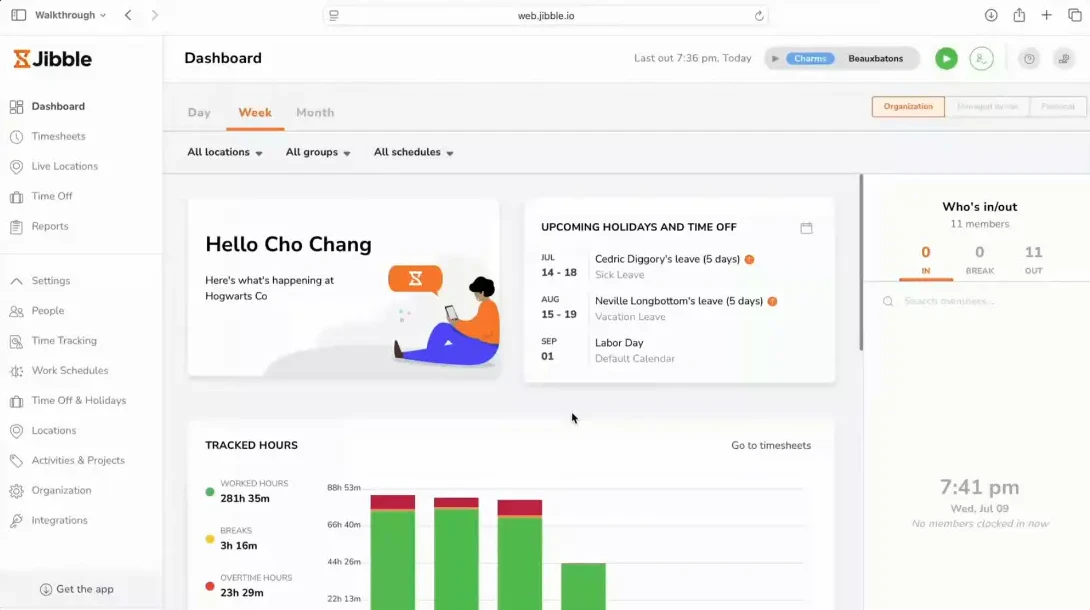
Source: Jibble
Most tools on this list started as time trackers and added monitoring features later. Jibble does the opposite: attendance and location verification are the core product, and screenshots are the add-on. If what you actually need to know is whether people are where they're supposed to be and working when they say they are, rather than what's happening on their screen, Jibble is the only tool here that's free with no user cap and no trial clock ticking down.
Free Option: Jibble's free plan has no user limit or time limit. It includes time tracking, attendance management, GPS tracking, facial recognition, timesheets, and reporting.
Key Features
- Employee time and attendance tracking
- Project and task time tracking
- GPS tracking and geofencing
- Facial recognition and selfie verification
- Automatic timesheets
- Screenshot monitoring
- Employee activity and productivity analysis
- Reports and data export
- Support for Windows, Mac, Android, and iOS
Jibble also supports scheduled screenshots, allowing managers to review employee screen activity during working hours. Screenshots can automatically blur sensitive information.
 Pros:
Pros:- Free forever with no user cap
- GPS and geofencing verify location, not just hours
- Facial recognition prevents buddy punching
- Screenshots included even on the free plan
Cons:- Screenshots capped at 10-minute intervals with 3-day retention
- Not built for deeper behavioural or data-risk analysis
- Mobile-first design is less suited to desktop-heavy office monitoring
👍 Best for
Businesses looking for free time tracking, attendance management, and basic employee monitoring.
2. ActivTrak
Source: ActivTrak
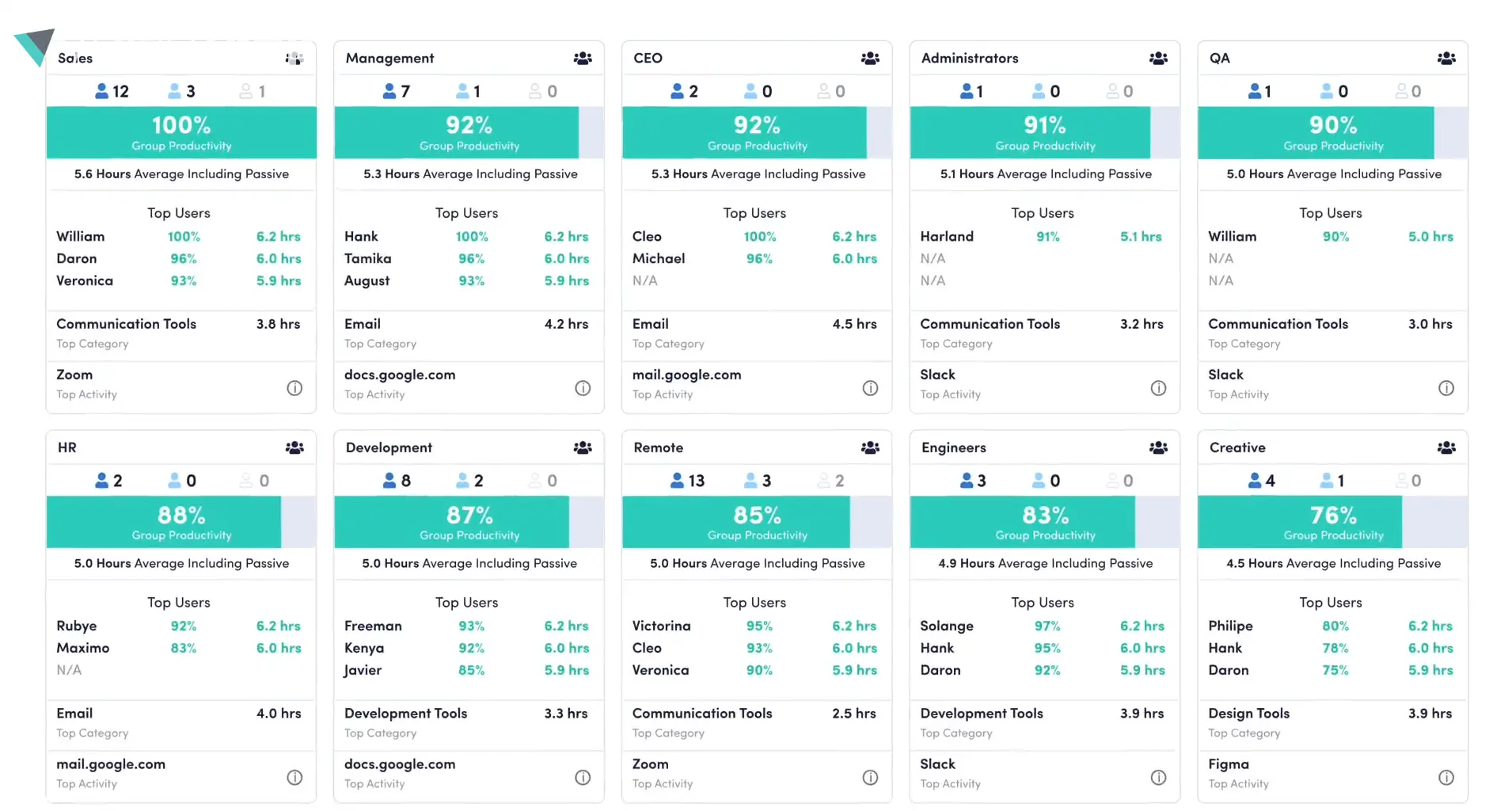
ActivTrak is answering a different question than most of the tools here. It's not “what did this employee do,” it's “how is the team spending its time overall, and where are the bottlenecks”. It doesn't treat screenshots as the primary signal, it turns app and website usage into pattern-level insight. That makes it a better fit for managers trying to spot workload or process issues than for anyone who wants to review individual activity line by line.
Free Option: ActivTrak offers a free plan for up to 3 employees. The free version provides activity data, work-pattern analysis, application and website insights, and productivity visibility. New users can also access the full version of the product for a limited trial period before being downgraded to the free plan.
Key Features
- Employee activity tracking
- Automatic time tracking
- Application and website usage
- Work pattern analysis
- Productivity trend analysis
- Employee activity summaries
- Productivity reports
- Workforce analytics
Pros:- Automatically categorises app/site usage as productive or unproductive
- 30 days of data history on the free plan
- Dashboards are readable by non-technical managers without training
Cons:- 3-user cap makes it impractical beyond a small pilot
- Screenshots and endpoint controls are locked behind paid tiers
- Less useful when you need to verify a specific incident rather than a trend
👍 Best for
Small teams that need productivity analytics and workforce insights.
3. WorkTime
Source: WorkTime
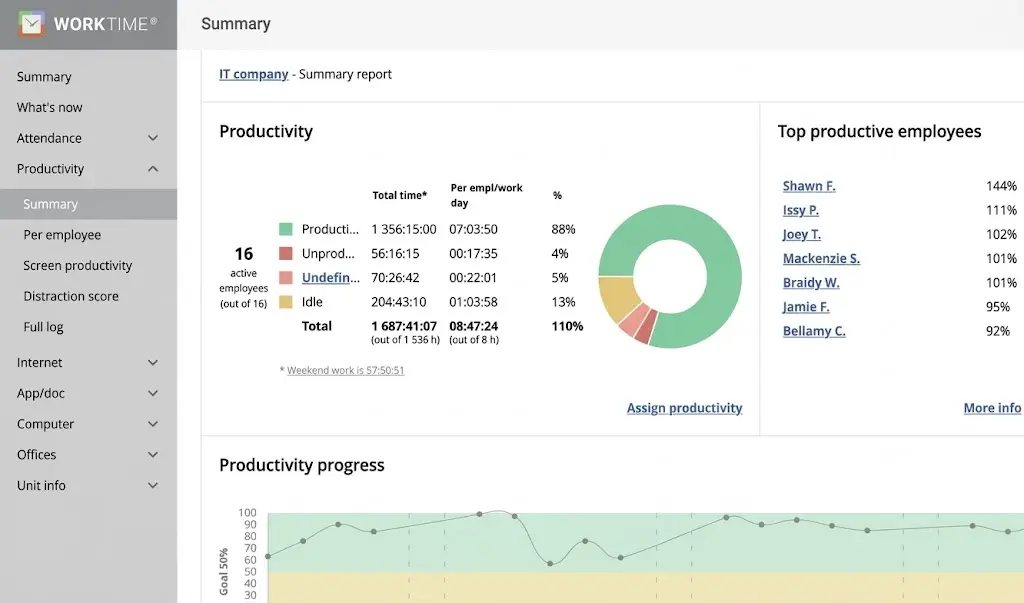
WorkTime is the most restrained tool on this list. It's built for teams that need visibility but where monitoring itself risks creating friction. No screenshots, no screen recording, just activity and attendance signals. That's a real limitation if you actually need to see what's on someone's screen, but it's the point if employee trust is a practical constraint on how you roll out monitoring in the first place.
Free Option: The free plan supports up to 3 employees and provides access to basic monitoring features. WorkTime also offers a 14-day free trial of its full feature set.
Key Features
- Active and idle time monitoring
- Application usage tracking
- Website usage tracking
- Attendance monitoring
- Login and logout tracking
- Activity and productivity reports
- Overtime tracking
- Remote and hybrid workforce monitoring
Pros:- No keylogging or screen capture, lower privacy/legal exposure in stricter jurisdictions
- Login/logout audit trail useful for hourly-wage compliance
- Free plan works long-term, not just as a trial
Cons:- No screenshots means no visual evidence if a dispute arises
- Free tier capped at 3 employees
- Reporting is thinner than tools built around analytics
👍 Best for
Businesses that prefer non-invasive employee monitoring with a stronger focus on privacy.
4. EmpTrakr
Source: EmpTrakr
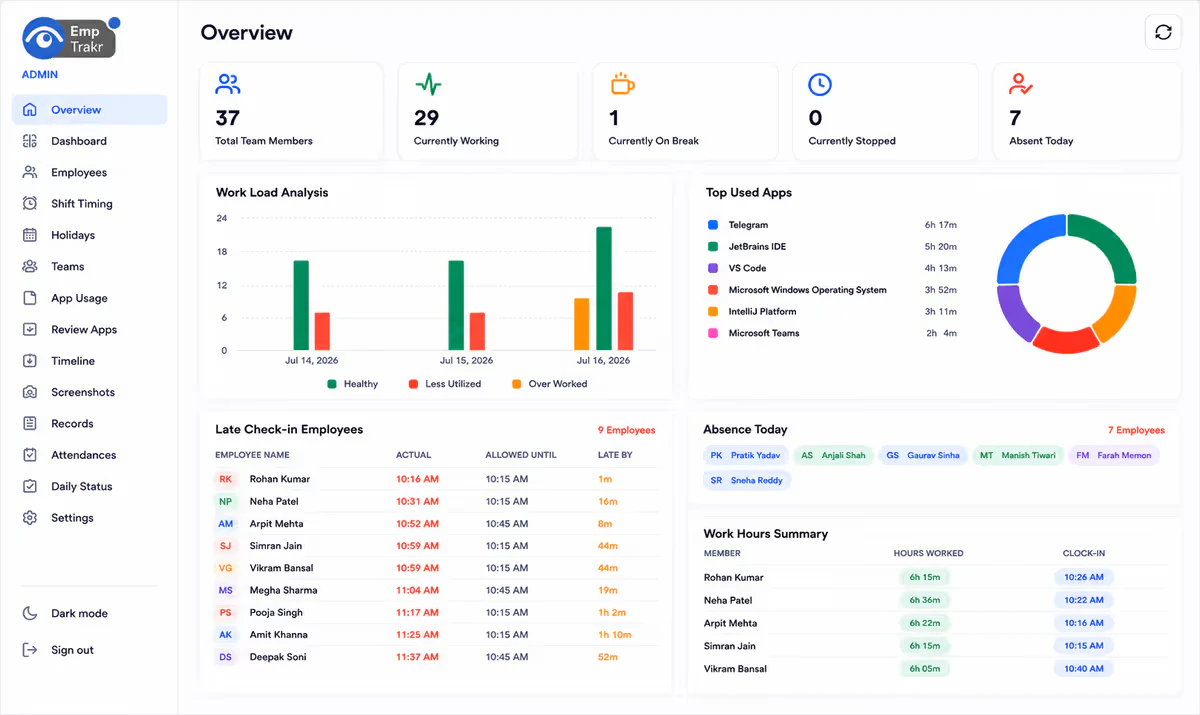
EmpTrakr is one of the more budget-friendly options in this list because its Free Forever plan supports unlimited employees while covering a relatively broad range of monitoring functions. It is particularly appealing to small businesses that want screenshots, app and website tracking, attendance, and productivity visibility without paying per user. The main consideration is whether its feature depth and overall platform maturity are sufficient for organisations with more demanding enterprise requirements.
Free Option: EmpTrakr currently offers a Free Forever plan with unlimited employees. The free plan includes employee monitoring, time tracking, attendance tracking, screenshots, application and website tracking, productivity reports, idle-time detection, and a team dashboard.
Key Features
- Employee activity tracking
- Application and website monitoring
- Automatic screenshots
- Idle time detection
- Attendance management
- Productivity reports
- Team management dashboard
- Time tracking
Pros:- Full feature set free, no user limit
- Includes screenshots and idle detection that competitors gate behind paid plans
- Low barrier for a first monitoring deployment
Cons:- Limited independent reviews or case studies to verify long-term reliability
- Smaller support and integration ecosystem
- Worth confirming data-handling practices given the lack of an established track record
👍 Best for
Small businesses and growing teams looking for broad employee monitoring features at no cost.
5. AnySecura
Source: AnySecura
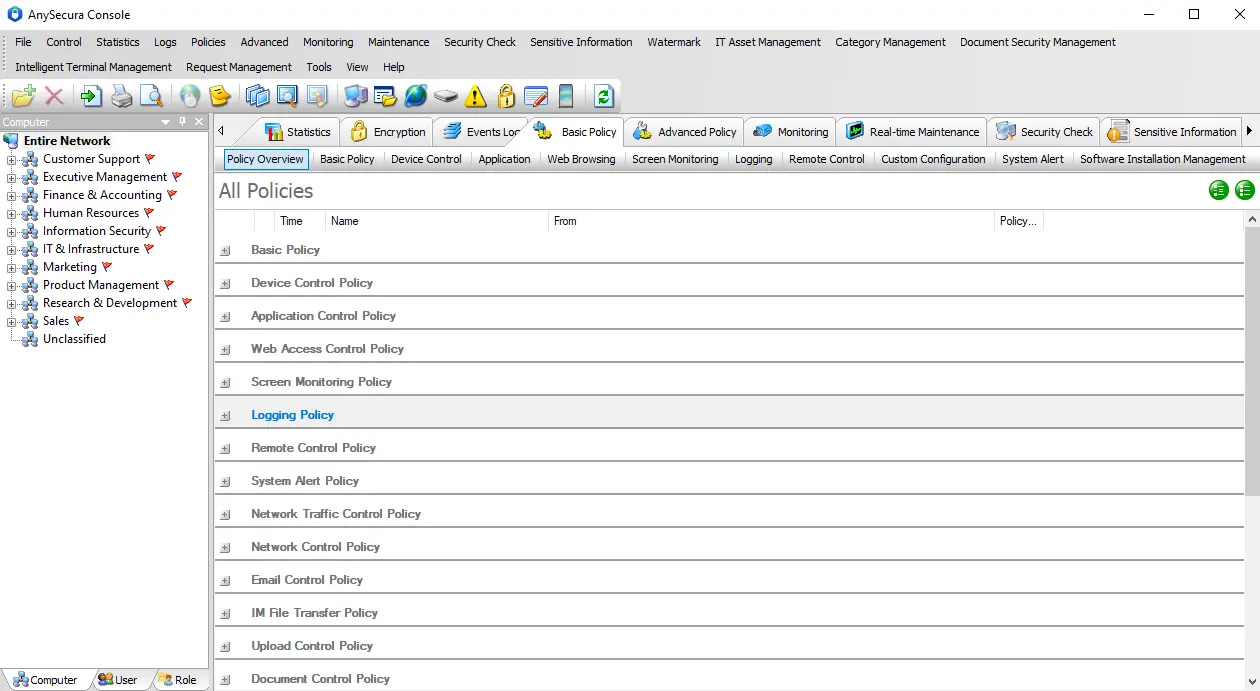
AnySecura takes a broader approach than most tools on this list. It's built around data loss prevention (DLP) first, with employee activity monitoring as one layer rather than the whole product. That distinction matters: if what you're actually worried about isn't where employees' time is going but whether sensitive data is leaving the company through a USB drive, a personal cloud account, or email, none of the productivity-focused tools above were built to answer that. It's not the right fit for a team that just wants lightweight time tracking, it's built for organisations that need tight control over where their data goes.
Free Option: AnySecura offers a 30-day free trial with access to its full range of employee monitoring and data security features. This allows businesses to fully evaluate the platform and its capabilities in a real-world environment before deciding whether to continue with a paid plan.
Key Features
- Employee activity monitoring
- Application and website tracking
- Screenshots and screen recording
- Document and print control
- Removable media and USB control
- Sensitive content identification
- File access auditing
- Transparent encryption
Pros:- Tracks file-level actions (copy, print, transfer) that activity monitors don't see at all
- Classification and tagging let you treat sensitive files differently from routine ones
- Audit trail built for compliance and incident investigation, not just productivity review
Cons:- Trial-only, no ongoing free tier
- More setup than a lightweight tracker since policies need to be configured
- Overkill if your only goal is measuring hours worked
👍 Best for
Businesses that want employee monitoring combined with data loss prevention and sensitive data protection, not just productivity tracking.
6. Insightful
Source: Insightful
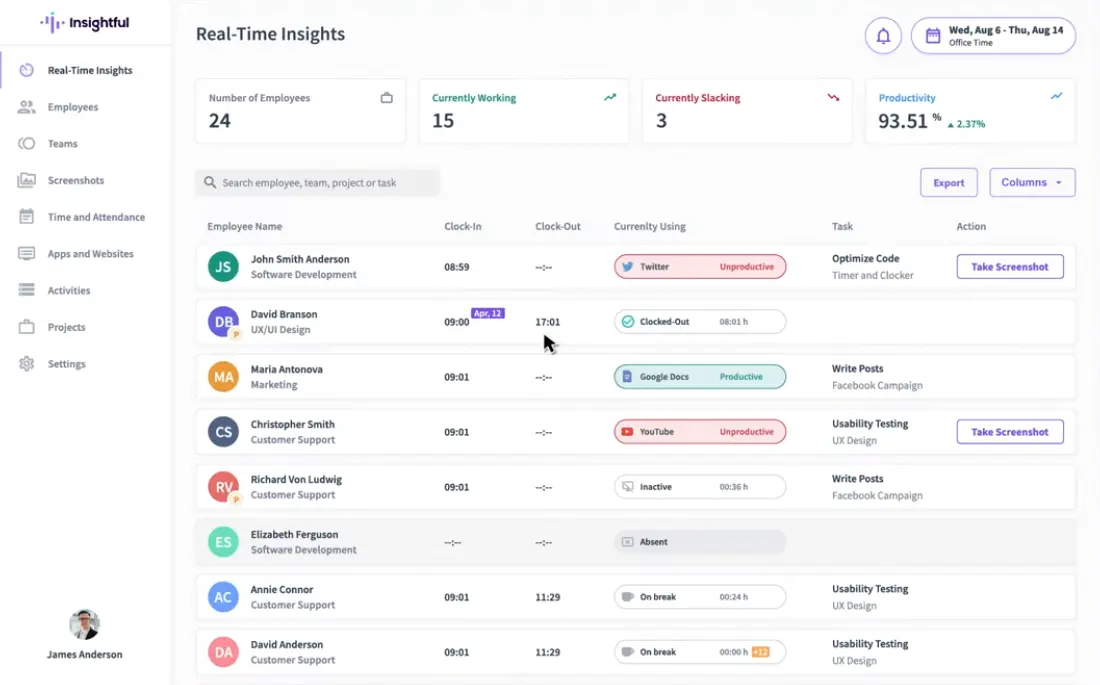
Insightful's main differentiator is its deployment flexibility. In addition to its cloud offering, it supports on-premise deployment, while Linux support is currently available in beta. This can be important for organisations that have specific infrastructure or data-handling requirements. For smaller teams using standard Windows or Mac devices, however, deployment flexibility may be less important than features, ease of use, or pricing. Its 7-day free trial is also relatively short for businesses that need more time to evaluate the platform.
Free Option: Insightful offers a 7-day free trial with access to its full feature set. There is no permanent free plan, so continued use requires a paid subscription.
Key Features
- Employee activity monitoring
- Application and website tracking
- Automatic time tracking
- Screenshots
- Productivity analysis
- Attendance monitoring
- Productivity reports
- Workforce analytics
- Cloud and on-premise deployment
Pros:- On-premise deployment for teams that can't send activity data to third-party servers
- Linux support, rare among tools on this list
- Choice of cloud or on-prem depending on IT policy
Cons:- 7-day trial is short for evaluating deployment logistics
- Most monitoring features overlap with cheaper tools once deployment flexibility is set aside
- No permanent free plan
👍 Best for
Businesses that want comprehensive employee monitoring with flexible deployment options.
7. Monitask
Source: Monitask
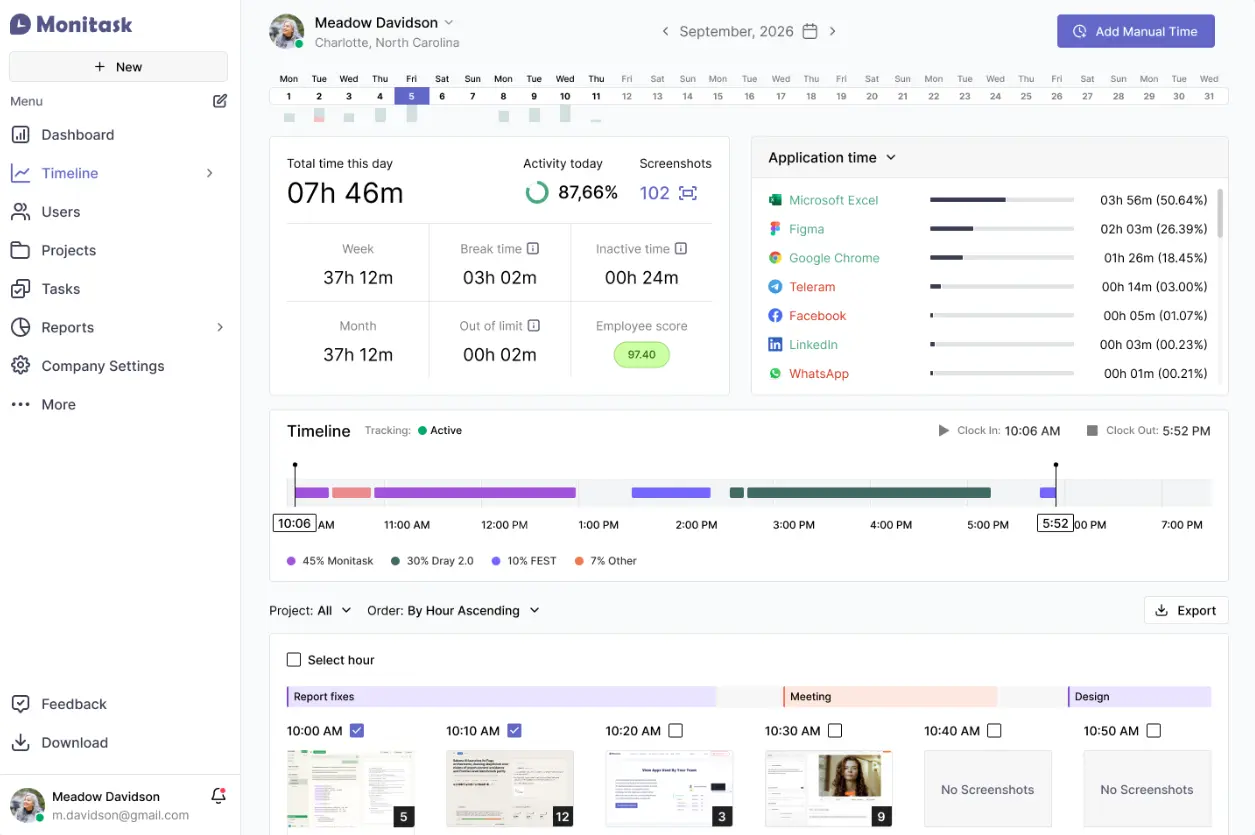
Monitask only takes screenshots while an employee is actually clocked in, which makes its monitoring scope narrower, and easier to justify, than tools that track continuously. If what you need is visual proof of work during billed hours, a common requirement with freelancers and outsourced teams, that's a better match than the broader tracking DeskTime or Time Doctor do. If you need visibility outside of clocked-in hours, though, it's not the right tool.
Free Option: Monitask currently offers a 10-day free trial, with no credit card required. The exact features available during and after the trial depend on the selected plan.
Key Features
- Automatic screenshots
- Work time tracking
- Application and website monitoring
- Employee activity levels
- Timesheets
- Productivity reports
- Remote employee monitoring
- Task and project tracking
Pros:- Screenshots only fire while clocked in, narrowing capture to billable time
- Well suited to verifying contractor or freelancer hours specifically
- No credit card required to start the trial
Cons:- No visibility outside clocked-in sessions
- 10-day trial is short
- Screenshot frequency and retention depend on plan tier
👍 Best for
Remote teams that need screenshot-based visibility into employee activity.
8. Time Doctor
Source: Time Doctor
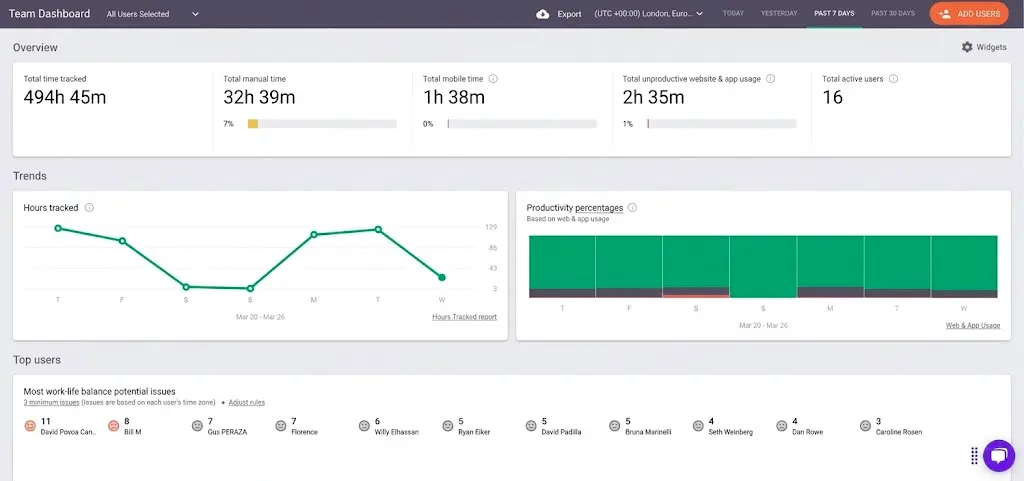
Time Doctor's real focus isn't monitoring, it's managing distributed teams across time zones, and the task management layer is what actually separates it from after-the-fact trackers like Monitask or DeskTime. If your remote team's real pain point is coordinating who's working on what in real time, not just reviewing what got done afterward, that's the reason to pick this over a pure screenshot tool.
Free Option: Time Doctor offers a 14-day free trial with access to its advanced feature set. After the trial ends, continued access to the full platform requires a paid plan.
Key Features
- Employee activity monitoring
- Automatic time tracking
- Application and website monitoring
- Idle time monitoring
- Screenshots
- Screen recording
- Attendance management
- Productivity reports
- Task and project management
Pros:- Task management ties activity data to specific projects, not just apps or websites
- Built for coordinating teams across time zones, not just recording what happened
- Screen recording available alongside screenshots for closer review
Cons:- Functionality drops sharply once the 14-day trial ends
- More setup overhead than needed if task tracking isn't a requirement
- No free tier once the trial expires
👍 Best for
Remote teams that need detailed time tracking and workforce productivity monitoring.
9. DeskTime
Source: DeskTime
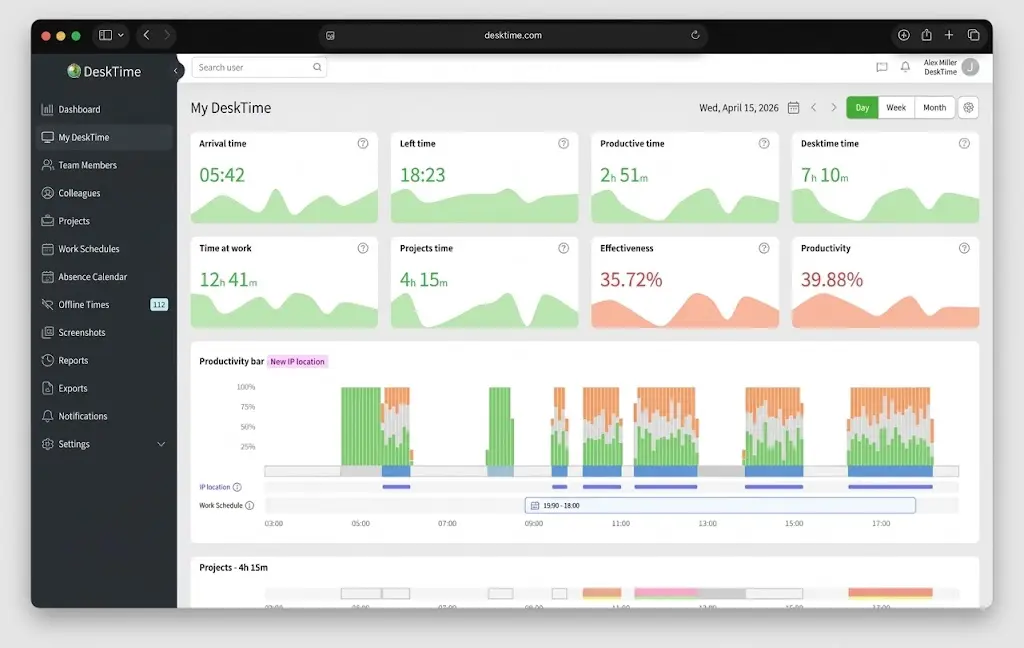
DeskTime's edge over Time Doctor and Monitask is that employees don't have to do anything, no manual clock-ins, no starting a timer, it all runs automatically in the background. That's a genuine advantage for teams where getting employees to actually use a monitoring tool is the hard part. But it also means employees have less sense of when they're being tracked, which is worth weighing against WorkTime's more privacy-forward positioning.
Free Option: DeskTime currently offers a 14-day free trial rather than a full long-term free plan. Users can test its employee monitoring and productivity management features during the trial period.
Key Features
- Automatic time tracking
- Application and website monitoring
- Productivity analysis
- Screenshots
- Project time tracking
- Attendance management
- Idle time tracking
- Productivity reports
Pros:- Fully automatic tracking, no manual clock-ins required
- Project-level time tracking useful for client billing
- Screenshots available as an optional layer rather than mandatory
Cons:- Lower employee awareness of being tracked can create trust issues if not disclosed clearly
- 14-day trial only, no long-term free option
- Less suited to teams that want privacy-forward monitoring
👍 Best for
Businesses that want automated employee activity and time tracking.
10. EmpMonitor
Source: EmpMonitor
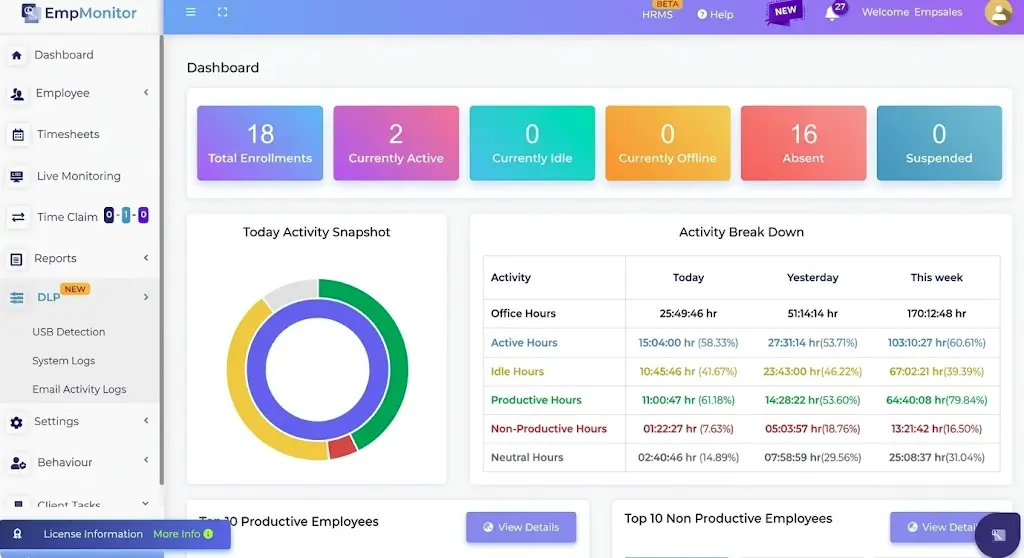
EmpMonitor goes further than basic productivity monitoring, insider risk alerts and USB/device controls go beyond basic productivity tracking, but it approaches the problem from a monitoring angle rather than a data-protection one. It flags suspicious behaviour rather than actually classifying sensitive content or blocking it from leaving the company. If a full DLP platform feels like overkill but basic activity monitoring feels thin, it's a reasonable middle ground.
Free Option: EmpMonitor currently offers a 15-day free trial, allowing businesses to test its employee monitoring and productivity features before purchasing. It does not offer a full long-term free plan.
Key Features
- Employee activity monitoring
- Working-time tracking
- Screen monitoring
- Application and website monitoring
- Productivity analysis
- Real-time monitoring
- Insider risk monitoring
- Device and USB controls
- Activity reports
Pros:- Insider risk alerts flag unusual behaviour patterns automatically
- USB and device controls go beyond what pure productivity trackers offer
- Real-time live screen view supports immediate incident response
Cons:- Flags risk rather than actually blocking or classifying sensitive content
- 15-day trial only, no permanent free plan
- Broader monitoring scope means more privacy/compliance considerations to work through before deployment
👍 Best for
Businesses that need detailed employee activity monitoring and broader monitoring controls.
How to Choose the Right Employee Monitoring Software
If You Mainly Need Productivity Analytics
If your main concern is overall team productivity and how employees allocate their working time, rather than reviewing individual activity records, tools such as ActivTrak and Insightful may be a better fit. They focus on turning large amounts of activity data into easy-to-understand productivity charts and trends.
If You Need Screenshots
If screenshots are a key requirement, Monitask, Time Doctor, DeskTime, EmpMonitor, Jibble and EmpTrakr are worth comparing. Screenshot frequency, whether screenshots are triggered automatically or manually, and whether the feature is included in a free or trial plan vary between products. Check the specific screenshot capabilities and restrictions before choosing a tool.
If You Manage Remote Teams
For remote or distributed teams, Time Doctor, DeskTime, and Jibble are worth considering. Time Doctor combines time tracking, screenshots, and productivity monitoring for distributed teams, while DeskTime focuses on automated activity and time tracking. Jibble is particularly useful for teams that need time and attendance management alongside GPS tracking and basic employee monitoring.
If You Prefer Non-Invasive Monitoring
Not every business needs to record employee screens or detailed computer activity. If you prefer to understand work patterns without monitoring every detail, tools such as WorkTime and ActivTrak, which do not rely on invasive tracking such as keystroke logging or screen recording, can be a better starting point.
If You Need More Detailed Computer Monitoring
If your requirements go beyond time tracking and productivity analysis and you need greater visibility into employee computer activity, EmpMonitor may be worth considering. If the concern also includes controlling sensitive data transfers, a broader endpoint security or DLP solution may be more appropriate.
However, the broader the monitoring scope, the more carefully businesses need to consider employee privacy, internal policies, and compliance requirements.
If You Mainly Want a Free Option
If budget is the main consideration, you can start with Jibble, ActivTrak, WorkTime, and EmpTrakr. Jibble and EmpTrakr offer free plans with no time limit, while ActivTrak and WorkTime also provide free options with certain limits on users, data retention, or features.
- The maximum number of users supported by the free plan
- Data retention period
- Which monitoring features are actually included
- Whether reports can be exported
- Whether screenshots or screen recording are available
- Whether storage or data volume is limited
- Whether the free plan has a time limit
Are Free Employee Monitoring Tools Enough for Your Business?
For individuals, freelancers, and small teams, these tools can cover many everyday needs, including time tracking, attendance management, application and website usage analysis, productivity analysis, and basic employee activity monitoring. For businesses just starting to explore employee monitoring, a free plan or free trial can also be a low-cost way to determine whether this type of software fits their management needs.
However, as teams grow or employees begin handling more customer data, financial information, source code, and other sensitive information, free or trial-based employee monitoring software may start to show its limitations.
The key issue is that employee monitoring mainly answers:
What Are Employees Doing?
For example, how much time employees spend working, which applications they use, which websites they visit, or what appears on their screens at a particular time.
But data security raises another important question:
Where Is Company Data Going?
Even if you know that an employee is using a particular application, you may not know whether they have copied sensitive files to a USB drive, uploaded them to a personal cloud account, or sent them to an external party through email or instant messaging. This is something that employee activity monitoring alone is not designed to solve.
When You May Need a More Comprehensive Employee Monitoring Solution
If your team handles customer data, financial information, source code, or other confidential business information, simply recording working hours, application usage, or screen activity may not be enough.
When businesses start asking whether data is being copied, transferred, or taken outside the company, they may need additional data security capabilities, such as:
- Identifying sensitive files and tracking how they are accessed, copied, printed, and transferred
- Classifying and tagging sensitive content such as customer information, financial data, and source code
- Controlling the use of USB drives and removable storage devices to reduce the risk of data being copied
- Auditing and controlling high-risk actions such as file transfers and printing
- Strengthening data access and activity auditing when employees leave the company or change roles
- Using transparent encryption to protect important files without disrupting normal workflows
This is where AnySecura differs from traditional employee monitoring software.
Employee monitoring mainly focuses on “what employees are doing on their computers,” while AnySecura goes a step further by focusing on “how company data is being used and whether it is leaving a controlled environment.” In addition to employee activity monitoring, it provides data security capabilities such as sensitive content identification, file access auditing, transparent encryption, application and device controls, print control, and document labelling. This helps businesses address data loss risks beyond productivity management.
If your business is becoming concerned not only with employee productivity but also with how sensitive data is accessed, used, and transferred, you can learn more about AnySecura’s data security capabilities. You can also request a product demo to discuss a solution based on your specific business requirements.
FAQs about Free Employee Monitoring Software
Is There Completely Free Employee Monitoring Software?
Strictly speaking, completely free employee monitoring software with no limits is uncommon. Most products offer either a free plan with restrictions or a limited free trial. ActivTrak and WorkTime offer limited free plans, while Jibble and EmpTrakr provide free plans without a time limit. Insightful, Monitask, Time Doctor, DeskTime, AnySecura, and EmpMonitor mainly offer free trials.
What Is the Best Free Employee Monitoring Software for Small Businesses?
If productivity analytics are the priority, ActivTrak is a good option. If you need time and attendance management, Jibble is worth considering. For a more non-invasive monitoring approach, WorkTime may be a better fit.
Can Employee Monitoring Software Take Screenshots?
Yes, but not every tool supports screenshots. Monitask, Time Doctor, DeskTime, EmpMonitor, Jibble, and EmpTrakr offer screenshot features, while WorkTime does not use this type of more intrusive monitoring. Check whether screenshots are included in the specific free or trial plan before choosing a tool.
Is Employee Monitoring Software Legal?
Generally, employee monitoring software can be used legally, but businesses need to comply with applicable employment and data privacy laws and inform employees about the scope of monitoring where required. Extra care is needed when monitoring involves screenshots, keystrokes, private communications, or personal devices.
Conclusion
None of these 10 tools is objectively "the best," only the best fit for a given need: Jibble or WorkTime works if you just need low-cost attendance verification, ActivTrak is a better fit if you care about overall team productivity, and Insightful, Time Doctor, DeskTime, and EmpMonitor each bring their own strengths if you need deeper behavioural visibility.
But whether free or paid, all of these tools answer the same question: where employees' time is going. What most of them don't touch is an equally important one: where the company's sensitive data actually ends up. Once a team starts handling customer records, financial information, or source code, knowing what employees are doing and knowing whether data is leaving the company are two different things. If your team is facing the latter, it's worth seeing what AnySecura can offer.