
Everyone on your team seems busy, yet project efficiency barely moves forward. At this point, you may start to wonder whether your employees are truly focused on their tasks or simply jumping between unrelated apps.
Traditional productivity tools and manual supervision often miss the full picture of employee activity. That’s why more companies are turning to employee monitoring software — they offer real-time visibility into employee computer activity, helping managers identify productivity gaps, improve workflows, and support their teams more effectively.
With so many employee monitoring solutions available, it can be hard to know where to start. Here is a practical path to monitor employee computer activity effectively—from scope and setup to rollout and review.
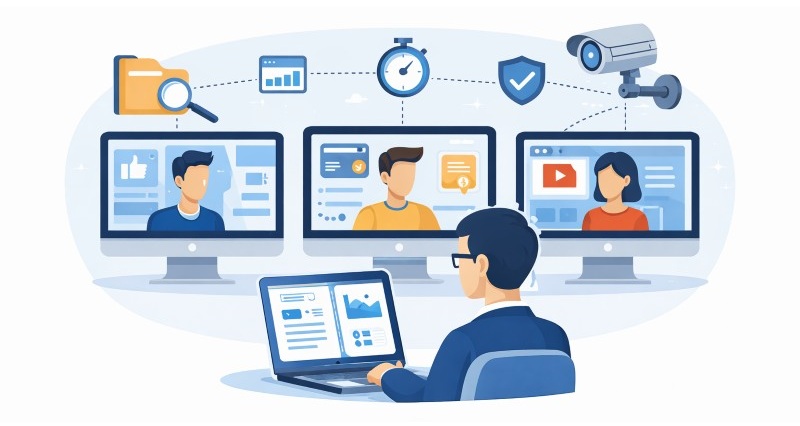
What Type of Employee Computer Activity Can Be Monitored?
Most employee monitoring tools collect a wide range of data, but not all metrics are truly useful. If you don’t understand what these metrics mean, you may struggle to choose the right tool. Below are four key metrics you should pay close attention to.
- App / Web Usage: Tracking application and website activity is essential for understanding productivity. You can find activity logs or aggregated statistics from most of the monitoring software, showing which applications are used, which websites are visited, how long they are used, and the percentage of time spent on each. Some tools also allow you to label applications or websites as work-related or non-work-related, making it easier to see whether employees are getting distracted for extended periods.
- Work Hours and Endpoint Presence: Most monitoring tools record when employees log in and when activity last occurred on the endpoint. Some platforms also track keyboard or mouse input to distinguish active from idle stretches — but capabilities vary. Pair login and usage records with app statistics to understand how time was spent during scheduled work hours.
- File Activity, Downloads, and Transfers: For teams focused on compliance and security, keeping track of file activity is critical. You get to see when files are created, changed, or downloaded from the internet. These records help you track data movement and better protect company information.
- Keystrokes and Session Logs: For organizations subject to stricter regulations, such as finance or government sectors, some monitoring tools offer optional extras: snapshots of the screen taken at set intervals, a log of every key pressed, and a video-style replay of the full work session.
Choose Your Monitoring Layer
| Primary goal | Monitor on the endpoint | Usually skip | Tool type / further reading |
|---|---|---|---|
| Productivity insight | Work hours, login/last-active timestamps, app and web usage | Keystroke logging, continuous screenshots | Productivity analytics or time tracking software (e.g., ActivTrak, Hubstaff) |
| Data security & compliance | File access, transfers, USB/removable media, print/copy, email attachments | Productivity scoring, minute-by-minute idle alerts | DLP or endpoint security platform (e.g., AnySecura DLP, Teramind) |
| Web policy enforcement | Website categories, blocked domains, download events | Full desktop session replay | Web access control or internet usage monitoring tools |
| Full endpoint visibility | Combine productivity + file + app metrics with role-based scope | One-size-fits-all settings across all departments | Unified UAM/DLP platform with modular controls (e.g., AnySecura) |
Most mid-size companies run two layers: light productivity tracking for general teams and stricter file or device controls for roles that handle sensitive data. For web-only scope, see how to monitor employee internet usage.
How to Read Activity Data Without Overreacting
To read employee computer activity data without overreacting, focus on patterns and context—not single idle gaps, app category labels, or one-off file events.
- Presence gaps: Short periods away from the endpoint are normal—meetings, thinking, or reading off-screen. Flag patterns (e.g., no login during entire scheduled shifts), not single gaps. On input-tracking tools, set idle alerts to 15–20 minutes; on presence-based tools, focus on login and last-activity timestamps instead.
- App and web ratios: A high percentage on one "unproductive" site may mean a quick lookup, not an hour of distraction. Review session duration and frequency, not category labels alone.
- File activity: One large transfer to external storage is worth investigating; routine saves to a shared drive are not. Prioritize alerts on sensitive folders, after-hours access, and unusual destinations.
- Cross-check with output: Activity data explains how time was spent; deliverables and project milestones still define whether work was effective.
When You Should NOT Monitor
Defaulting to full-screen surveillance often backfires—lower trust, higher turnover, and logs nobody reviews. Skip or sharply limit endpoint tracking when:
- Personal devices and accounts: Do not install agents on BYOD laptops or phones, and do not track personal email, banking, or messaging unless law and explicit consent allow it—and even then, scope narrowly.
- Off hours and unpaid time: Activity outside scheduled work should not feed productivity scores or disciplinary reports unless security policy requires after-hours retention for incident response.
- Output-driven roles: Developers, designers, researchers, and senior specialists often deliver through thinking time, collaboration, or work away from the keyboard. If milestones and reviews already tell you enough, minute-by-minute idle alerts add noise.
- No clear business purpose: "We want visibility" is not a goal. If you cannot name the risk (data leak, compliance gap, attendance fraud) or the metric you will act on, postpone rollout until scope is defined.
- Local law or works-council rules block it: Some EU works councils, Canadian provinces, and U.S. state rules require notice, consultation, or prohibit certain data types. If counsel says wait—wait.
- You lack policy and ownership: Without a written policy, retention limits, and someone accountable for alerts, monitoring creates liability instead of protection.
When in doubt, start narrow—often file and access controls for sensitive roles only—and expand only after a pilot proves the data is useful.
Compare 10 free employee monitoring tools by user limits, trial length, and features to find the right fit for your team. Learn more>>
How to Monitor Employee Computer Activity in 5 Steps
To monitor employee computer activity effectively, work through five steps: define scope, choose and configure tools, pilot with a small group, roll out with a written policy, then review and refine.
Step 1. Define What You Actually Need to Monitor
The first step is to decide which metrics you will actually review and act on—not everything the software can record.
1. Productivity Tracking
- Work hours / login and logout times
- Login and last-activity timestamps
- Application usage
- Website usage
- Task completion / project progress
2. Data Security & Compliance
- File transfers
- Access to sensitive folders or databases
- Use of external storage devices
- Sharing files via email or cloud services
- Attempted access to restricted systems
3. Risk & Policy Enforcement
- Unauthorized software installation
- Suspicious browsing
- Email or messaging activity
- Printing or copying of sensitive documents
- Failed login attempts or security alerts
4. Optional / Supportive Insights
- Screenshot capture
- System performance issues
- Collaboration tool activity
Configure Monitoring by Team Role
One policy rarely fits every department—finance, engineering, and support teams need different starting points.
| Role | Do monitor | Skip or limit | Recommended alerts |
|---|---|---|---|
| Finance & accounting | Payroll, tax, and client financial folders; USB and cloud uploads; print/copy of sensitive spreadsheets; after-hours logins | Keystroke logging and constant screenshots unless an auditor explicitly requires them | Bulk download of client records; file copy to personal email or USB; after-hours access to restricted directories |
| Software development | Approved IDEs and repos; unauthorized software installs; code or config copies to personal cloud storage | Marking Stack Overflow, docs, or local builds as "unproductive"; screenshots during coding sessions | Large archive download from source control; clone to unapproved storage; unvetted packages or remote-access tools |
| Customer support / call center | Login/logout vs. scheduled shifts; CRM and ticket usage during queue hours; active time during paid blocks | Deep file-level DLP unless PCI or customer-data rules apply; invasive session replay on agent desktops | Extended idle during queue time; sustained non-work web use during paid shifts; CRM logout while still clocked in |
Remote or hybrid teams should follow the same scope rules on company devices. Remote monitoring setup covers communication-heavy home-office environments.
Step 2. Choose and Configure Employee Monitoring Tools
Once you have your goals in mind, research and choose the tool to monitor employee computer activity or combination of tools that best fits your needs. You can try out a few options using free trials or demos.
When you judge software, look at how simple the setup is, the kind of data it records, the reports it gives and whether it matches your aims. If you want to track productivity, choose software that captures work hours and application usage in plain reports. If security is the key worry, choose an employee monitoring solution that records file activity and issues alerts.
Match the tool to your primary goal. Full comparisons: employee monitoring software roundup.
- 🎯 Full endpoint (productivity + security): AnySecura — modular activity tracking, file transfer control, and DLP on one platform.
- Productivity and time tracking: ActivTrak, Hubstaff, Time Doctor — lighter analytics for remote and hybrid teams.
- Enterprise insider risk: Teramind — deep session and behavior analytics for regulated environments.
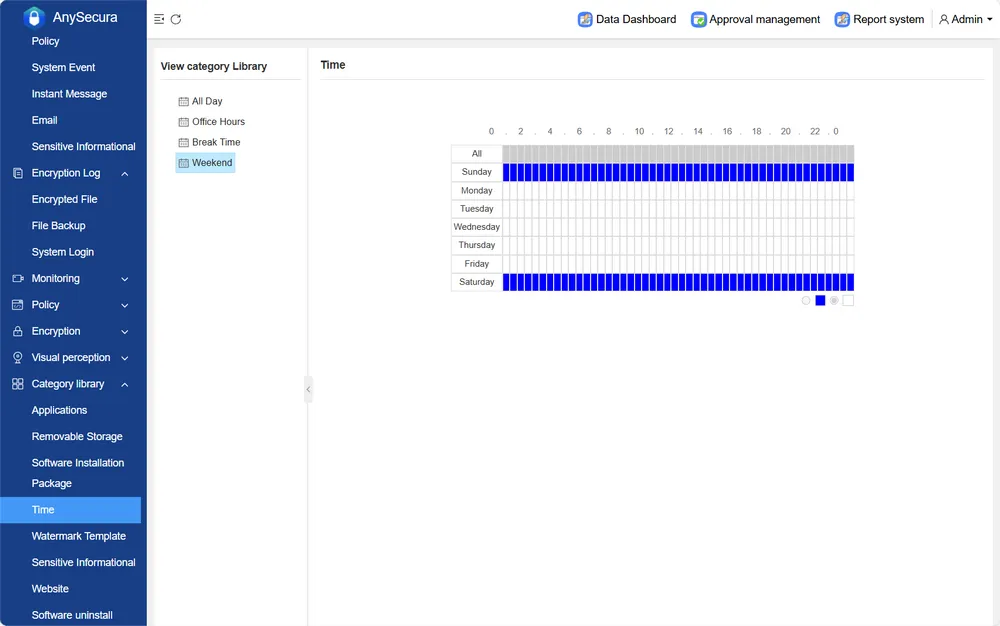
After you pick the employee monitoring tools that match your aims, install them and enter official work hours in the program. Choose the teams, job titles, or devices you will monitor so recorded data reflects scheduled work time and excludes private activity outside those hours.
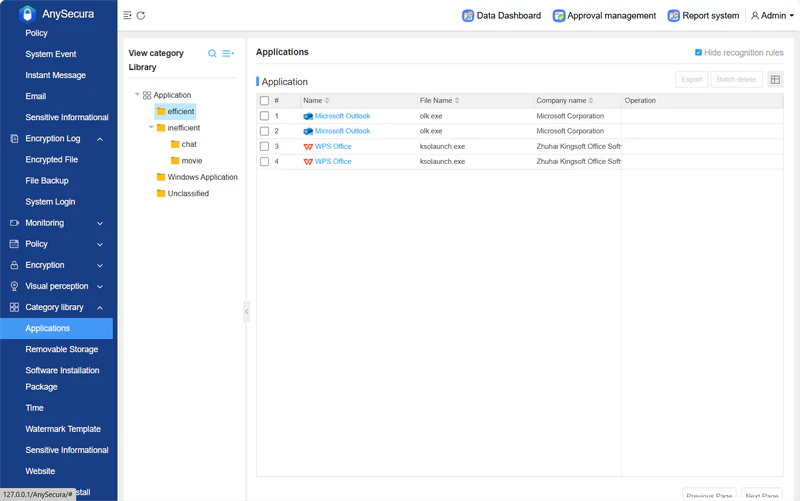
Next, customize activity categories. Mark which websites, apps, and software count as “productive” and which are “distracting” based on your company’s workflow. This helps the tool generate clearer, more meaningful productivity reports.
Then, set alerts and thresholds. Configure notifications for important events, such as endpoint offline during scheduled hours, access to sensitive files, or large data transfers. These alerts help you respond quickly without needing to watch dashboards all day.
- Offline during scheduled work: Alert when an endpoint shows no login or activity during expected shift hours.
- Sensitive file access: Alert on after-hours access or copy to USB/cloud.
- Large transfers: Alert when a single outbound transfer exceeds your policy limit (e.g., 50 MB).
- Policy violations: Alert on blocked-site access or unauthorized software install—skip low-priority browsing unless security is the primary goal.
Step 3. Pilot with a Small Group
Before a company-wide rollout, run a pilot with one department or a mixed volunteer group for a few weeks. Tell participants what is tracked and why—transparency reduces pushback and surfaces bad settings early.
Use the trial to confirm reports are accurate, test invasive features (such as screenshots) before enabling them broadly, and collect feedback on confusing metrics. Turn off anything outside your defined scope before you expand.
Step 4. Roll Out Company-Wide
After a successful pilot, move forward with the full rollout. Announce the monitoring program to all employees. It often helps to prepare an official monitoring policy document that employees can reference, which includes details on data handling, privacy safeguards, and whom to contact with questions.
- Purpose and scope: Which devices, teams, and work hours are covered—and what is explicitly out of scope (personal email, BYOD, off-shift activity).
- Data collected: List the metrics enabled (apps, files, login/presence records, etc.) and any invasive features turned off by default.
- Retention and access: How long logs are kept, who can view them, and whether employees can request their own data.
- Employee rights: How to raise concerns, opt out where legally allowed, and whom to contact (HR, IT, or a privacy officer).
- Consequences: How monitoring data may be used in performance reviews or disciplinary action—and that it is supporting evidence, not the sole basis.
Provide training or demos on how to use the tool. This is especially important if employees will have access to their own data or need to interact with the software (for example, some tools allow employees to categorize their own time).
Explain how the system works and why it is being introduced. Use training sessions to walk through the purpose of the monitoring and how it is intended to support both company goals and employee workflows.
Step 5. Review, Refine, and Iterate
Review alerts, reports, and data quality during the first few weeks of full rollout. Compare results against your productivity, security, or compliance goals and adjust thresholds that fire too often or too rarely.
Gather feedback from managers and employees and update policies or settings when concerns are valid—for example, when offline time is misread as low engagement. Monitoring works best as a living program, not a one-time install.
Why AnySecura Is the Top Employee Monitoring Solution
Most monitoring tools on the market either offer too little or too much. They bundle features you don't need or force you to hunt through multiple products and pricing plans to find what you actually want.
AnySecura stands out as the top employee monitoring solution thanks to its unified solution and fully customizable modules. Just share your goals, and it will provide a monitoring solution tailored to your team's needs. No forced bundles, no wasted features. Save money while focusing only on the data that matters most to you.
Why Choose AnySecura?
- Real-Time Activity Dashboard: Shows endpoint online status and last-activity timestamps in the management console — so supervisors can see who is at their workstation without waiting for end-of-day reports.
- App and Website Tracking: Records every program or page visited and how long it was used, helping managers reduce distractions and confirm teams rely on approved software.
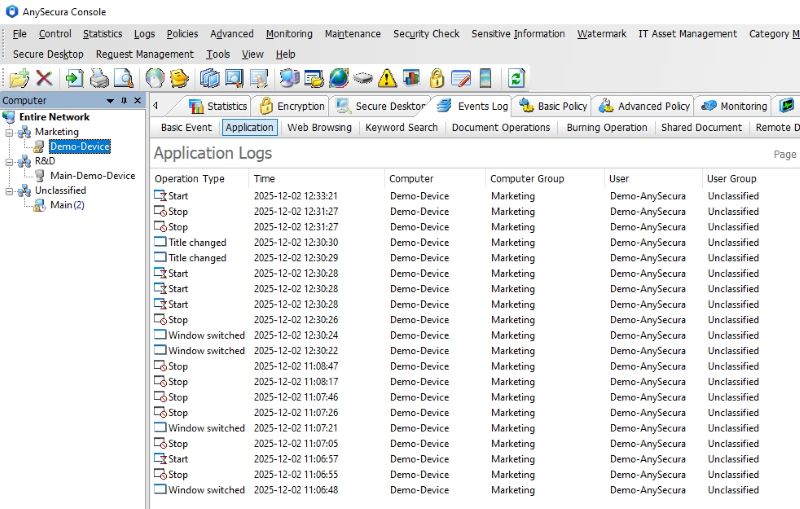
- File Activity & Transfer Monitoring: Logs file creation, edits, moves, and copies across local disks, cloud storage, and removable media—creating an audit trail that helps prevent data leaks.
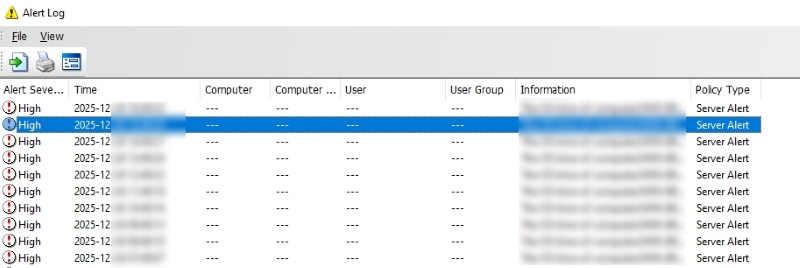
- Alerts and Behavior Flags: Sends notifications when users visit blocked sites, trigger unusual downloads, or start large file transfers, giving security teams time to respond.
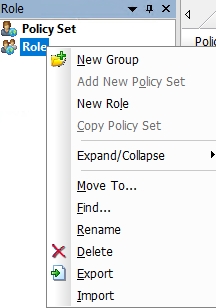
- Privacy and Compliance Controls: Includes role-based access and activity logs to protect sensitive data and comply with laws, building trust with employees.
Firms that grow fast but want oversight without surveillance culture gain a workable balance through AnySecura. The platform feeds live visibility, lets you set privacy limits and delivers reports that auditors, executives or clients accept without extra work.
When you decide to convert streams of monitoring data into real productivity gains as well as tighter data security, AnySecura stands ready to take you there.
FAQs about Monitoring Employee Computer Activity
Is monitoring employee computers legal?
In most jurisdictions, yes—when monitoring is limited to company-owned devices, serves a legitimate business purpose, and follows local labor and privacy laws. The EU's GDPR requires a lawful basis and proportionate collection; U.S. rules vary by state. Publish a written policy, inform employees before monitoring begins, and consult legal counsel for cross-border teams. More on legal internet usage monitoring.
Do employees need to know they are being monitored?
In nearly all cases, yes. Transparent disclosure is both a legal requirement in many regions and a practical way to maintain trust. Include what is tracked, why, how long data is retained, and who can access it in your employee monitoring policy. Get written acknowledgment before rollout.
How can I avoid collecting sensitive personal data?
Limit monitoring to work hours and company devices where possible. Avoid keystroke logging, screenshots, and full session recording unless compliance explicitly requires them. Exclude personal email, banking sites, and messaging apps from tracking. AnySecura offers fine-grained controls over what is recorded, making it easier to respect privacy while still capturing work-critical activity.
What is the difference between monitoring computer activity and monitoring internet usage?
Computer activity monitoring covers the full endpoint—applications, files, login presence, and device events. Internet usage monitoring focuses on websites and web traffic. Match scope to your goal; for web-only tracking, read how to monitor employee internet usage.
Can break time be counted as idle time?
On tools that track keyboard or mouse input, yes — and that is a common source of employee pushback. AnySecura records login and last-activity timestamps rather than input-based idle detection, so break periods are less likely to trigger false flags. Regardless of platform, clarify expected break policies in your monitoring policy and review usage patterns in context, not minute by minute.
Can monitoring data be used for termination?
It can serve as supporting evidence, but should rarely be the sole basis for dismissal. DLP logs carry more weight for serious violations like data theft. For productivity concerns, combine monitoring data with documented performance issues, missed goals, and prior warnings for a defensible process.
Conclusion
How to monitor employee computer activity? The answer is to approach it as an ongoing process, not a one-time setup. Start with well-defined goals, test your approach through a pilot, roll it out with clear policies and training, and continuously review both the data and employee feedback. This ensures the system remains useful, fair, and aligned with both business objectives and workplace trust.
And with the right help, like AnySecura, companies can turn monitoring into a practical management tool, one that helps teams work smarter, stay secure, and grow together over time.


