
Monitor employee internet usage on company-owned devices by documenting your purpose, notifying employees, and collecting only the web activity data that purpose requires — then align retention and access rules with your jurisdiction.
Personal browsing, unauthorized apps, and risky sites can slow networks and create compliance gaps even when teams are otherwise productive. This guide walks through eight steps — starting with regional legal requirements — to help IT and security teams set up a program that supports network protection, policy enforcement, and audit readiness.

Learn how to monitor employee use of AI applications like ChatGPT and Copilot, reduce shadow AI risk, and build an effective usage policy. Learn more>>
What Is Employee Internet Usage Monitoring?
Employee internet usage monitoring means recording and reviewing how staff use the internet on company-owned devices — websites visited, bandwidth used, files transferred, web apps accessed, and events that may indicate a policy or security issue.
| Category | What Is Typically Monitored |
|---|---|
| Web Access |
◦ Websites and domains accessed
◦ Website categories (e.g., social media, entertainment, malicious sites) ◦ Time, frequency, and duration of access ◦ Records of blocked or policy-triggered website access attempts |
| Network Traffic |
◦ Upstream and downstream bandwidth usage
◦ Types of network traffic and protocols (e.g., HTTP/HTTPS, FTP) ◦ High-volume or anomalous traffic patterns ◦ Traffic spikes that may affect business system performance |
| Downloads / Uploads |
◦ Download and upload event logs
◦ File types (e.g., ZIP, EXE, PDF, CAD files) ◦ File size and transfer direction ◦ Use of external cloud services, file-sharing platforms |
| Web Apps / Cloud Services |
◦ Access to SaaS and web-based applications
◦ Use of unauthorized or high-risk cloud services (Shadow IT) ◦ Frequency of use and active time periods ◦ Data synchronization or external sharing activities |
| Online Collaboration |
◦ Access to web-based instant messaging tools
◦ Use of online meeting and collaboration platforms ◦ Network connection records generated by communication tools |
| Security / Compliance Signals |
◦ Attempts to access known malicious or phishing websites
◦ Indicators of communication with malware or command-and-control (C2) infrastructure ◦ Access attempts that violate corporate network or security policies ◦ Anomalous or high-risk behavioral patterns |
| Behavioral Patterns |
◦ Differences between work-hour and non-work-hour internet usage
◦ Access patterns inconsistent with job roles or responsibilities ◦ Long-term trend analysis rather than single-event judgment |
| Audit-Ready Logs |
◦ Access logs (time, source, destination)
◦ Security or policy-triggered event records ◦ Policy enforcement and response outcomes ◦ Administrative access and operation audit trails |
Most web traffic today runs over HTTPS. Without SSL inspection, a network firewall or DNS filter typically sees domain names and traffic volume, but not the full URL path or page content inside the encrypted session. An endpoint agent on a company device can log URLs, categories, and session metadata from the browser or OS — which is why most compliance and incident-response programs use endpoint tools rather than network taps alone. Deployments that use SSL inspection can capture more detail, but that requires explicit configuration and should be reflected in employee notice. Neither approach covers personal devices or home networks unless the employee uses a managed VPN or work profile; if BYOD is in play, keep the program scoped to company hardware and approved access paths.
Collection scope should follow from the reason monitoring exists — not from whatever the software makes available by default. Security teams investigating malware need different logs than teams reviewing acceptable use:
| Primary goal | Collect | Limit or skip | Typical retention |
|---|---|---|---|
| Security / threat blocking | Site categories, blocked attempts, malware alerts | Full URL archives unless actively investigating | 30–90 days |
| Compliance audit | URLs, timestamps, user ID, policy enforcement actions | Screen capture, keystroke logging | Per regulation; periods vary by sector |
| Bandwidth / network performance | Domain, category, bandwidth per user or team | Session replay, individual URL review | 30–60 days |
| Acceptable use enforcement | Categories, duration, repeat policy triggers | Message or page content | 60–90 days |
| Incident investigation | Full URL and timestamp for the affected window | Ongoing blanket capture after the case closes | Delete when investigation ends |
Is Monitoring Employee Internet Usage Legal?
In many jurisdictions, employers may monitor internet usage on company devices when the practice is transparent, proportionate, and tied to a legitimate business purpose — such as network security, data protection, or policy enforcement. Advance notice and purpose documentation are expected in most privacy frameworks; legal risk increases when monitoring goes beyond what the purpose requires, happens without notice, or lacks documentation.
Regional requirements differ in detail. Select your jurisdiction to see how common frameworks treat notice, proportionality, and data retention.
European Union
| Employee Monitoring Policy Requirement | Compliance Expectation |
|---|---|
| Governing law / regulatory framework | General Data Protection Regulation (GDPR) |
| Employee notice obligation | Mandatory (GDPR Art. 13/14) |
| Lawful basis for processing | Must be explicit (legitimate interests / legal obligation) |
| Whether employee consent is valid | Usually invalid (power imbalance) |
| Purpose limitation | Strict |
| Proportionality principle | Core requirement |
| Whether blanket/continuous monitoring is allowed | Generally not allowed |
| Whether covert monitoring is allowed | Rare exceptions (DPIA required) |
| Content-level monitoring (viewing specific webpages/content) | High risk; requires strong justification |
| Data minimization requirement | Mandatory |
| Data retention time limits | Must be limited |
| Access control | Mandatory |
| Additional procedural requirements | DPIA / union or works council |
Regulators enforce rules differently by region, but the underlying expectations are similar:
- Document the purpose: Tie monitoring to a written business reason.
- Minimize scope: Collect only what that purpose requires.
- Give notice: Inform employees before monitoring begins.
- Limit access: Restrict log access to authorized roles.
- Set retention limits: Delete data after a defined period.
This article provides general guidance only and does not constitute legal advice. Consult qualified counsel for requirements specific to your jurisdiction.
Compare 10 free employee monitoring tools by user limits, trial length, and features to find the right fit for your team. Learn more>>
8 Steps to Set Up Compliant Internet Usage Monitoring
Scope logging by department and purpose, publish policy before collection starts, run a short pilot, then set retention and role-based access — not a single default profile for the whole organization.
1. Define Monitoring Scope and Purpose
Name the business reason first — network security, compliance, incident investigation, or policy enforcement — then identify the lawful basis for collection in your jurisdiction (often "legitimate interest" or a statutory requirement). Limit monitoring to company-owned devices and to the data types that serve that reason. Write the scope and rationale down so teams can reference it during audits or policy reviews.
Different teams legitimately use different parts of the web. A single block list often breaks workflows in one department while leaving gaps in another:
| Role | Log or allow | Restrict or skip |
|---|---|---|
| Marketing & sales | Social platforms, ad tools, CRM web apps | Blocking competitor research or industry news sites |
| Software development | Git repos, documentation, package registries | Marking Stack Overflow or docs as "non-work"; full URL review of routine coding activity |
| Customer support / call center | CRM, ticket systems, knowledge bases during shifts | Video streaming during paid queue hours; deep content logging on agent desktops |
| Finance & accounting | Banking portals, tax sites, approved client portals | Keystroke or screen capture unless an auditor requires it |
Remote and hybrid staff follow the same scope rules on company devices. For home-office specifics — VPN paths, BYOD boundaries, communication-heavy roles — see our guide on monitoring remote employees.
2. Establish a Clear Monitoring Policy
Publish an Internet Use and Monitoring Policy that states what is logged, why it is logged, who can access records, and how long data is kept. Add it to your employee handbook or onboarding materials so staff see it before monitoring starts. Use plain language for acceptable use rules — for example, personal streaming during work hours — and describe how the organization handles policy questions or violations.
3. Select and Configure Monitoring Tools
Match the tool to the scope from Step 1. Enable the modules your policy requires — web logging, category rules, threat alerts, retention — and leave the rest off. Endpoint tools like AnySecura support this modular setup: IT can configure rules by department or role and adjust retention without running a single blanket profile across the organization.
Before a company-wide rollout, run a two- to four-week pilot with one department. Check that reports reflect actual browsing, work-related sites are not blocked, and retention deletes on schedule. Turn off anything outside your defined scope before expanding.
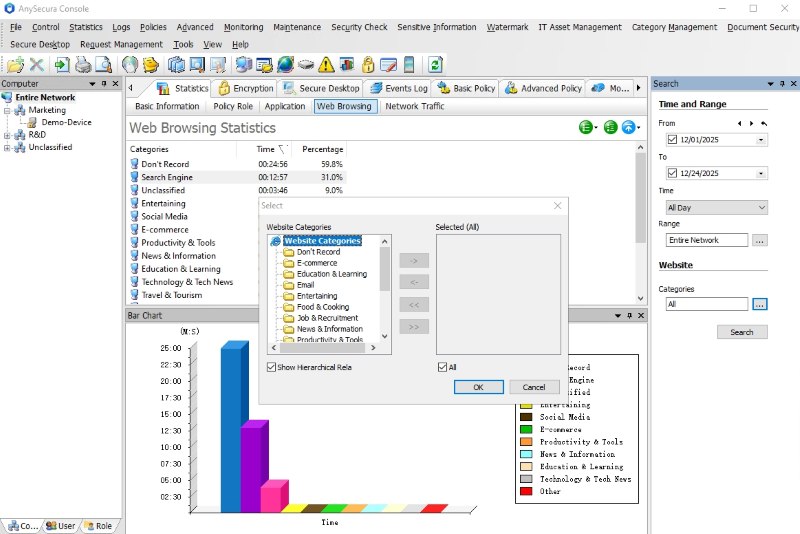
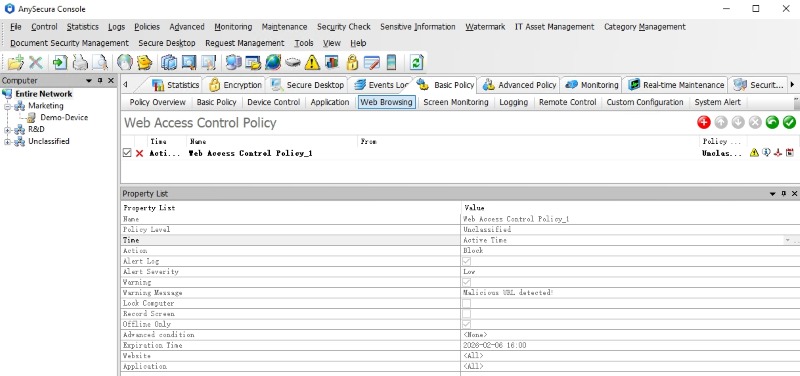

Enable web logging, category-based access rules, and alerting by module. Set retention periods, assign log access by role, and keep collection within the scope you documented — from one console.
4. Implement Role-Based Access Controls
Assign log access to specific roles — typically IT administrators, security analysts, or compliance officers. Use role-based permissions to separate duties: HR may not need raw browsing data, and not every IT admin needs to change blocking rules. Record each access to the monitoring console, including views and exports. These controls keep log access aligned with your documented policy.
5. Communicate with Employees
Notify employees before logging begins. Many regulations require advance notice; even where they don't, transparency reduces friction. Share the policy through onboarding, email, or an internal portal. Explain what is logged (e.g., URLs and timestamps), what is not (e.g., personal messages on non-company accounts), and who employees can contact with questions. Frame monitoring as a way to keep systems safe and apply policy consistently — not as individual surveillance.
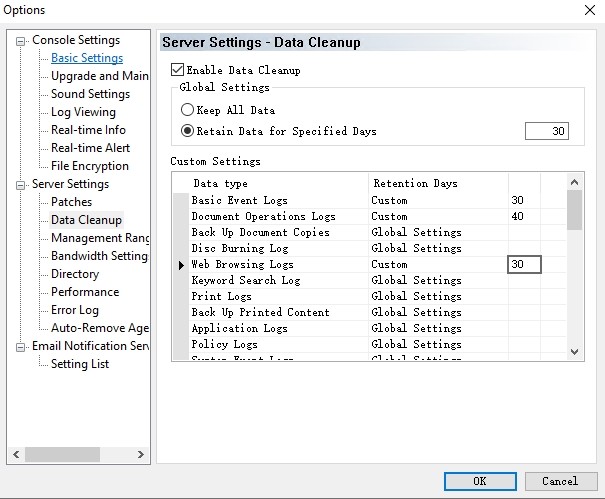
6. Set Data Retention and Minimization Rules
Match storage to your policy. Set a retention period for each log type and configure automatic deletion. Collect URLs, categories, and timestamps rather than message content unless your policy and legal review specifically require it. Store logs on encrypted or access-controlled systems and run periodic cleanup of expired records.
- Web access logs (routine): 60–90 days, then auto-delete.
- Security / threat alerts: 90 days unless tied to an open investigation.
- Compliance audit trails: Follow your regulator's minimum — regulated industries often retain access records longer than routine web logs.
- Incident investigation exports: Delete when the case closes; do not keep indefinitely "just in case."
7. Review and Adjust Regularly
Review your setup at least once or twice a year. Check whether each data type is still needed and whether rules are working as intended. If legitimate sites are blocked too often, adjust categories; if threat patterns change, update alert rules. Run a privacy impact assessment (DPIA) before adding new capabilities such as screenshot capture. Expand scope only when you document a new purpose and update the employee notice.
8. Document and Audit Compliance
Keep an internal record of what you monitor, why, and who has access — often called a Record of Processing Activities under GDPR. Log policy changes, tool configuration updates, and any access to monitoring data. Train administrators on handling procedures. These records help during audits and show that the program follows stated limits on purpose, transparency, and data retention.

A guide to supporting remote teams with clear policies, appropriate logging, and privacy boundaries. Learn more>>
FAQs about How to Monitor Employee Internet Usage
Do we need to inform employees before monitoring their internet usage?
In most jurisdictions, yes — advance notice is expected under privacy and employment law. Share the policy during onboarding or through a written notice that explains what is logged, why, and how the data is used.
Can we see what employees browse on HTTPS sites?
On company devices with an endpoint agent, yes — the tool records the URL and category from the browser or OS, regardless of HTTPS encryption. A network firewall without SSL inspection typically sees only the domain name, not the full path or page content; firewalls with SSL inspection can capture more, but that should be disclosed in your policy. Neither method captures activity on personal phones or home Wi-Fi unless the device is managed or traffic routes through your VPN.
Can we monitor all internet activity, including private emails or messages?
In most cases, no — monitoring should match your stated purpose. Content-level logging (such as reading message bodies) typically requires a specific justification and may not be appropriate for personal accounts. Check your policy and local requirements before enabling it.
Does monitoring work on personal devices (BYOD)?
Full monitoring on personal hardware generally requires a separate work profile, MDM enrollment, or a written BYOD agreement that limits collection to business apps and work hours. Without that, restrict the program to company-issued devices and approved VPN access paths. Personal browsing on an employee's own phone or laptop outside those boundaries should stay out of scope.
How is internet usage monitoring different from computer activity monitoring?
Internet usage monitoring focuses on web traffic — URLs, categories, downloads, cloud app access, and bandwidth. Computer activity monitoring covers a wider surface: desktop apps, idle time, file transfers, print jobs, and optionally keystrokes or screenshots. Many organizations need both, but they serve different purposes and carry different privacy implications. Keep the scopes separate in your policy rather than enabling everything at once.
What kind of data should we collect and what should we avoid?
Start with what your purpose requires: URLs, timestamps, user or device IDs, and site categories cover most security and compliance use cases. Avoid collecting passwords, personal account credentials, or message content unless a legal review confirms it is necessary.
Conclusion
Internet usage monitoring works best when it is purpose-built, documented, and communicated upfront. Teams that match collection to a defined goal, publish policy before logging starts, and review settings after a pilot can meet security and compliance needs without expanding scope beyond what the situation requires.
AnySecura lets you enable monitoring modules individually, set retention and access rules, and align logging with your written policy.


