A security team can spend months building detection rules and still miss the resignation email that preceded a bulk download by six days. Both events were in the logs. Nobody linked the resignation to the download until after the data was gone. Insider threat detection software is built to make that connection before the data moves.
Not all products make that connection in time to act. Some reconstruct the sequence of events after an insider threat incident completes; others can block it while it is still in progress. Most security teams eventually face that choice. This article covers seven products and helps you work out which one fits your operation.
Best Insider Threat Detection Software at A Glance
| Product | Deployment | Starting price | Active blocking | Document encryption | Session recording | Best for |
|---|---|---|---|---|---|---|
| Teramind | Cloud / On-prem | $168/user/yr | Partial (configurable) | No | ✓ | SMB–Enterprise |
| AnySecura | On-premises only | $216/user/yr | ✓ (all channels) | ✓ (transparent) | ✓ | Mid-market–Enterprise |
| Proofpoint ITM | Cloud / On-prem | Quote only | No (detect + alert) | No | ✓ | Enterprise |
| Microsoft Purview | Cloud only (M365) | $5/user/mo or via E5 | Limited | No | No | Mid-market–Enterprise |
| Cyberhaven | Cloud only | ~$30–48k/yr | ✓ (multi-channel) | No | No | Mid-market–Enterprise |
| Varonis | Cloud / On-prem | Quote only | Limited (auto-remediation) | No | No | Enterprise |
| ManageEngine DSP | Primarily on-prem | From $745/yr | Partial (file transfer) | No | No | SMB–Mid-market |
Licensed modules, operating systems, policy settings, and quoted prices affect actual coverage and cost.
What Is Insider Threat Detection Software?
Insider threat detection software looks for risky activity performed through trusted access. Depending on the product, it may connect endpoint events with file sensitivity, permissions, identity, employment context, and a user's normal behavior.
The goal is to show analysts what deserves review and why. A high-risk alert is still only a pattern or policy match. It is not proof that an employee acted maliciously. Products with DLP or access enforcement can also intervene, but only on the channels and policies they actually support.
The category names are less tidy than vendors sometimes suggest. Insider threat management software usually adds case handling, governance, and coordinated response. Insider threat prevention software puts more weight on warnings, approvals, blocking, access changes, or encryption. Many platforms do some of each, so judge the workflow rather than the label.
Detection vs. Prevention: What's the Difference?
Detection records and connects activity so analysts can triage alerts and reconstruct an event. Prevention acts before or during the event with a warning, approval request, transfer block, access change, or file encryption.
Most products (like Proofpoint, Varonis, Microsoft Purview) are built around post-incident detection and forensic investigation. Only a handful can proactively block data before it leaves the organization. In this article, we will also expand on this point.
Detection-first products often suit administrators, developers, and other privileged users whose legitimate work makes broad blocking disruptive. The balance changes when one unauthorized email, USB copy, or browser upload would create unacceptable exposure. In both cases, the control has to work on an ordinary Tuesday. Policy precision, exception handling, offline behavior, and preserved evidence determine whether it will.
The 7 Best Insider Threat Detection Software in 2026
How We Make These Recommendations
We evaluated each tool across four areas: ability to actively block data exfiltration (not just detect it), deployment flexibility, pricing transparency, and our hands-on impressions. No vendor paid to influence these rankings. AnySecura publishes this article, and where its capabilities differ from competitors, we say so directly.
We also built a quick quiz based on this comparison. Answer a few questions, find the tool that fits your needs, and jump straight to that section of the article.
Product to Evaluate First: AnySecura
This recommendation reflects how the product fits your priorities. The closest alternative appears in the comparison below.
Why It Fits
The product description will be displayed here.
1. Teramind — Best for Granular Endpoint Visibility
If your analysts need to see exactly what happened on an endpoint, Teramind is a sensible place to start. It connects behavioral alerts with session replay. An analyst can move from an isolated log entry to visual evidence of what the user did before, during, and after the event. Its policy controls cover files, email, web uploads, USB, and printing, so the same workflow can investigate an event or intervene while it is happening.

How It Supports the Investigation Workflow
- Screen Recording & Session Replay: Replay lets an analyst review what happened around a transfer instead of relying on filenames and timestamps alone.
- Keystroke Logging: Recorded input adds evidence to investigations involving email or documents, though access and retention require governance.
- UEBA Behavioral Baseline: Ranks each event against the user's own established pattern rather than a generic threshold.
- Content-Aware DLP: Classifiers, keywords, and regular expressions distinguish a sensitive export from an ordinary file transfer.
- Configurable Blocking: Policy can warn, redirect, or block a transfer based on file sensitivity and user role.
- Air-Gapped Deployment: The management workflow can stay on premises without a connection to a vendor cloud.
Pricing & Deployment
Teramind publishes its pricing: $15/user/month for Starter, $30 for UAM, $35 for DLP, with Enterprise on a quote. A five-seat minimum applies, which rules out very small teams. It runs on cloud, on-premises, or hybrid across Windows, macOS, and Linux, though feature coverage varies by platform.
What to Expect in Practice
On-premises setup is not plug-and-play—expect to follow a setup guide, and budget time for it. Cloud deployment is a different experience: you can expect to be up and running within a few hours. The interface is data-heavy throughout; every view is packed with tables, which makes it capable but slower to navigate than the price might suggest. During testing, the recording agent created noticeable lag on the monitored machine.
- Session replay significantly accelerates investigations
- Behavioral analytics are mature and well-regarded
- Pricing is published
- Supports on-premises deployment
- Setup is complex
- Privacy compliance requires careful attention
- No Linux or mobile endpoint monitoring
- Five-seat minimum applies
2. AnySecura — Best for On-Premises Deployment with Built-In Document Encryption
Compared to the other software in this list, AnySecura is the best choice for manufacturing, government, financial, and healthcare organizations that need to ensure data physically cannot leave the company—even if someone tries to exfiltrate it, the file remains unusable. This is because it is the only one of the seven products with built-in transparent document encryption. That means even if data is leaked, the file cannot be used—covering the "post-leak" gap that other products miss.
For these organizations, it also delivers full channel coverage: USB, email, IM, browser uploads, network shares, and more. And it is purely on-premises deployment, so data never leaves the organization or gets uploaded to a vendor—meeting these organizations' data residency and confidentiality requirements.
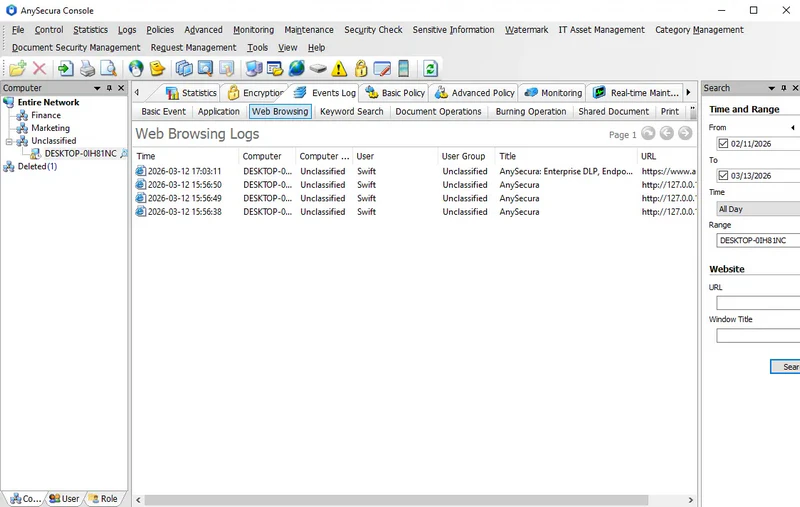
If you are evaluating Teramind but feel "it monitors but still can't prevent exfiltration"—or you are interested in Cyberhaven but cannot accept cloud deployment—this product is worth a look.
Cloud deployment and SaaS are not options here. And while it includes behavioral analytics, it does not match Teramind's UEBA depth or AI-driven behavioral baseline modeling.
How It Supports Controlled Data Workflows
- Transparent document encryption: Files stay restricted to authorized users and devices even after being copied to a field laptop or external drive.
- Multi-channel policy control: Policies apply across USB, email, IM, browser uploads, and print—so a file blocked through email can't slip out through a browser upload the next morning.
- Document classification & tagging: Five sensitivity levels let teams apply different restrictions to internal templates, customer records, and confidential designs.
- Screen monitoring: Authorized reviewers can examine screen activity around a transfer to confirm whether it followed normal workflow or involved unusual steps.
- Visual perception (anti-photography): Alerts or locks the endpoint when it detects an attempted screen photo in controlled rooms.
- Watermark & traceability: Screen, print, and document watermarks identify the user or source when files move between employees, suppliers, or reviewers.
- Multi-level approval workflow: Employees can request temporary approval for an exceptional transfer instead of asking IT to disable the policy.
- Removable media encryption: USB storage used for field work stays encrypted, so a lost device doesn't become a breach.
- Network access control: Unmanaged devices connecting to the office network are identified and blocked before they reach internal resources.
Pricing & Deployment
AnySecura uses an on-premises architecture, giving you direct control over policies and data while making your team responsible for infrastructure, maintenance, backups, and administrator access. Annual pricing starts at $216 per user for Professional, $336 for Ultimate, and $420 for Enterprise. A 30-day free trial and module-based licensing are also available. AnySecura supports Windows, macOS, and Linux, but Windows offers the broadest feature coverage. If you use multiple operating systems, test your required policies on each one before deployment.
- Pricing is transparent
- Active blocking is genuinely effective
- Transparent document encryption is unique—no competitor offers it
- Data stays entirely on-premises
- Anti-photography detection is rare in this category
- Supports Windows, Mac, and Linux
- No cloud deployment option
- Requires on-premises server infrastructure (SQL Server or MySQL)
- Some advanced features on Mac and Linux are not equivalent to Windows
- Brand recognition is low in Western markets
3. Proofpoint Insider Threat Management — Best for Enterprise Investigation Workflows
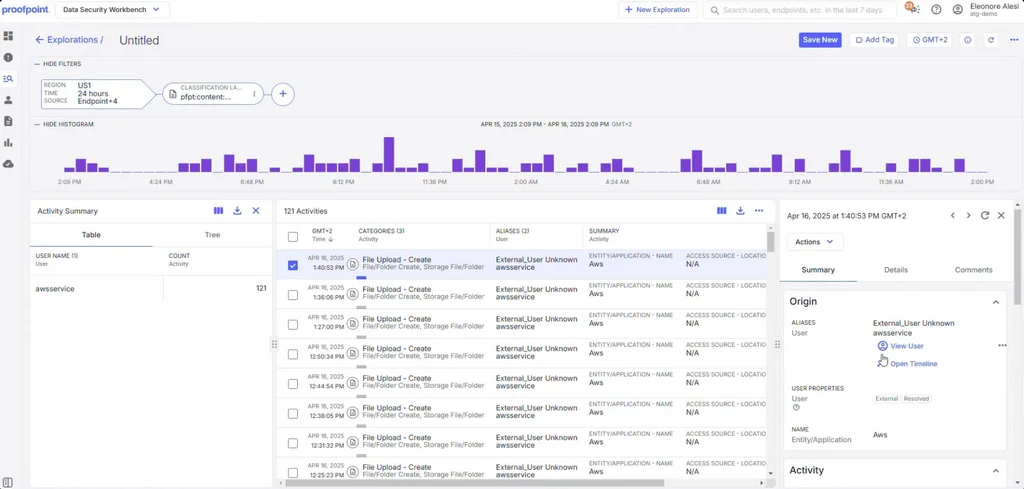
An insider-risk alert may require review by security, HR, or legal teams. Proofpoint Insider Threat Management (ITM) organizes user activity, data movement, screenshots, and related context into a clear timeline so investigators know what happened. Based on the investigation, security teams can then use it to allow, restrict, or block data transfers through USB devices, web uploads, cloud synchronization, printing, and network shares.
How It Supports Formal Investigations
- User Activity Timeline Recording: When HR or legal asks what happened before a sensitive file reached a personal account, the timeline connects file access, application use, web activity, and data movement in chronological order.
- Data Movement Monitoring: Investigators can follow sensitive data from an endpoint into email or a connected cloud service instead of asking separate teams to assemble each part of the event.
- Behavioral Analysis & Risk Scoring: Changes such as unusual access volume or a new transfer destination help prioritize cases, but the score remains a lead for review rather than a judgment about intent.
- Case Management: Security can document findings, approvals, and escalation in one case before handing evidence to HR or legal, reducing informal decisions made through email and spreadsheets.
- Privacy Controls (Data Masking): Analysts can begin triage without seeing the employee's identity. Authorized disclosure can occur later if the evidence meets the organization's investigation threshold.
- SIEM Integration: Exported events let a security operations team compare user activity with identity, network, and endpoint alerts already handled in its security information and event management (SIEM) workflow.
- Adaptive Endpoint Controls: When a user's risk score rises, the policy can apply stricter controls to USB, web upload, cloud sync, printing, copy and paste, or network shares—without adding friction to the rest of the workforce.
- Silent Agent (Zen): The endpoint agent is designed to run without user-visible processes. Buyers should still validate resource use under their own capture settings and representative workloads.
Pricing & Deployment
Proofpoint does not publish a standard ITM price. Cost varies with the endpoint agent, data controls, storage, services, and integrations. Endpoint coverage and available data regions narrow the viable deployment options.
What to Expect in Practice
Deployment is fast. We were up and running within a few hours. The investigation workflow is the strongest part: pivoting between activity records is smooth, screen capture makes evidence collection easy, and reporting is presentation-ready. Default policies run noisy but tune well. We found on-premises version noticeably more burdensome than the SaaS experience, with SQL upgrades requiring specialist help. No remote desktop control, which is a real gap when responding to an active incident.
- Investigation workflow is thorough
- Email and endpoint activity correlation is unique in this category
- Silent agent (Zen) does not impact endpoint performance
- No published pricing
- Integration with non-Proofpoint tools requires customization
- Primarily aimed at large enterprises; cost is high
4. Microsoft Purview Insider Risk Management — Best for Microsoft 365 Environments
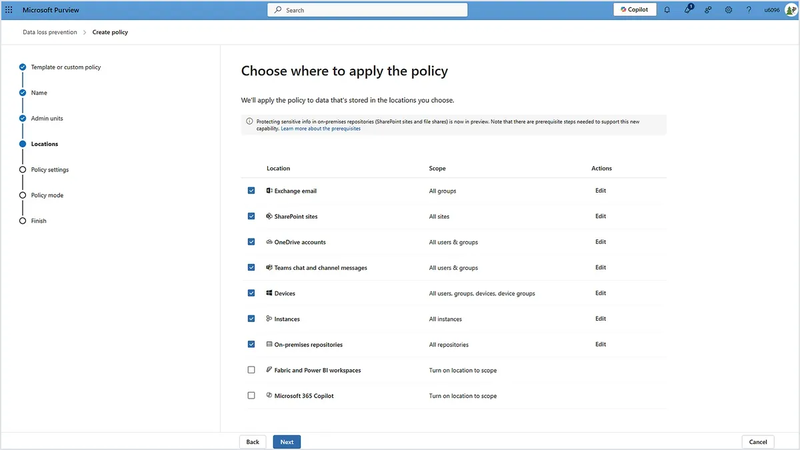
If most of your user activity is already recorded in Microsoft services such as SharePoint, OneDrive, Exchange, Teams, and Microsoft identity, you can use Microsoft Purview Insider Risk Management with less integration work.
Policy templates and triggering events turn those signals into risk indicators, alerts, and cases, so analysts do not have to rebuild the context in another platform. The workflow depends on configured indicators, triggering events, user roles, and eligible licenses.
How It Fits Microsoft 365 Operations
- Built-in and Custom Indicators: A team can begin with activity already recorded in Microsoft workloads, then add selected non-Microsoft signals where a connector, configuration, and billing model support the required workflow.
- Machine Learning Risk Models: A single large OneDrive download may be legitimate. Correlating it with resignation indicators, unusual access, or later external sharing gives an analyst a stronger reason to review the event.
- Cross-M365 Behavioral Monitoring: When a case moves from a Teams conversation to SharePoint, Exchange, or OneDrive, the investigation can stay within Microsoft 365 rather than depend on a separate endpoint agent for every signal.
- Privacy-by-Default Anonymization: Pseudonymized user names let analysts triage activity before learning who the employee is, helping the organization separate initial risk review from a formal identity-based investigation.
- Automated Investigation Workflows: Integration with Microsoft Purview eDiscovery and Communication Compliance helps legal, compliance, and security teams carry an approved case into their existing review process.
Pricing & Deployment
Purview is available as a $5/user/month add-on or included in Microsoft 365 E5 at $60/user/month. Installing the endpoint agent is a recurring complaint among buyers—plan for it, especially across a mixed Windows and macOS fleet. In hybrid environments, getting full coverage typically takes weeks to months.
What to Expect in Practice
Installing the endpoint agent is a recurring complaint among buyers—plan for it, especially across a mixed Windows and macOS fleet. In hybrid environments, getting full coverage typically takes weeks to months rather than days. Pure Microsoft 365 deployments are faster, but the moment you need signals from outside the Microsoft stack, the integration work adds up quickly.
- M365 users need no extra endpoint agent
- Privacy-first design is built in
- AI-powered risk detection
- Limited coverage outside Microsoft applications
- Alert noise is high
- Configuration is complex
- Not suitable for multi-cloud or non-Microsoft environments
5. Cyberhaven — Best for AI-Powered Active Prevention and Data Lineage Tracking
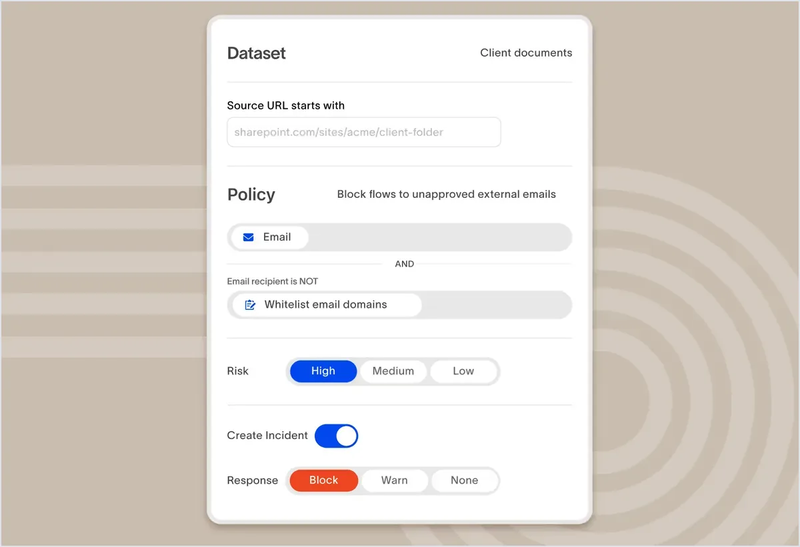
Microsoft-native context loses its advantage when sensitive information moves through development tools and third-party cloud services. Cyberhaven is worth a closer look when prevention depends on following that information through copies, transformations, endpoints, and destinations. Its organizing idea is data lineage—a record of where information started and how it was copied, transformed, or moved, even when the resulting file has a different name.
Combined with DLP and insider risk controls, that lineage context can catch risky movement that simple filename or file-hash matching may miss. Across endpoint and cloud services, the investigation preserves the relationship between the original information, the user's actions, and the destination.
How It Follows Data Through Modern Work
- Multi-Platform Behavioral Collection: A company with Windows and macOS endpoints can review how users interact with sensitive data across both platforms instead of leaving one workforce outside the investigation.
- Data-Aware Detection: The platform combines the user's action with the sensitivity and history of the information, helping analysts spend time on movement that could expose source code, research, or customer data.
- Real-Time Active Blocking: If a developer tries to upload a protected derivative file to a personal cloud account, policy can intervene through cloud upload, email, USB, or AirDrop at the point of movement.
- Temporal Threat Detection: A series of small downloads may look harmless in isolation. Correlating events across weeks can reveal a gradual pattern without treating every individual transfer as an incident.
- User Risk Scoring: Updated scores help a security team prioritize users and events for review as their interaction with sensitive data changes. Analysts still need business context before deciding whether the activity was approved.
Pricing & Deployment
Cyberhaven is cloud managed, making strictly self-hosted or disconnected environments a poor fit. Pricing requires a custom quote, with operating systems, regions, endpoint coverage, and licensed modules shaping the final proposal. For a detailed breakdown of features, pricing tiers, and alternatives, see our Cyberhaven review.
What to Expect in Practice
On false positives, it genuinely delivers lower noise than traditional DLP tools, with data lineage providing the context that makes alerts actionable. Investigation response time is a real improvement. In some scenarios, remediation occurs after the data has already been accessed or shared rather than at the moment of movement. The one consistent frustration is data export. Getting event data out of the platform for external analysis or BI tools is harder than it should be.
- Genuine active prevention, not just detection
- AI-driven detection reduces false positives
- Unified platform covering DSPM, DLP, and IRM
- No published pricing
- No on-premises option
- Contract threshold is high
- Brand history is relatively short
6. Varonis — Best for Data Access Governance and Anomalous Access Detection
Data lineage explains how information traveled. It does not answer why the user could reach that information in the first place. Varonis starts with that earlier control gap.
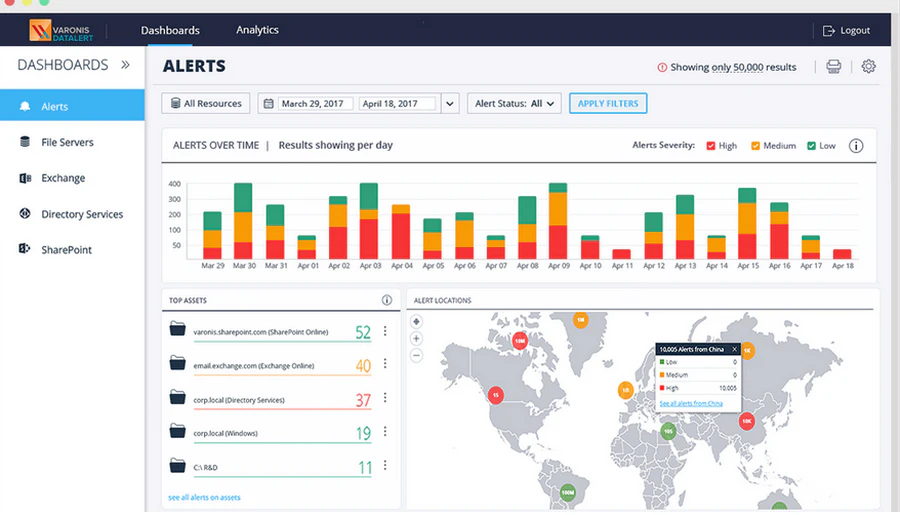
It combines data classification and effective-permissions analysis to show how access was granted and whether the resulting activity is unusual. Searchable forensics help analysts investigate what happened, while automated remediation can remove unnecessary permissions.
How It Reduces Access Exposure
Reducing access exposure requires three connected steps: find the sensitive data, calculate who can actually reach it, and compare those permissions with real activity. Remediation then changes the access path that created the risk.
- Data Discovery & Classification: After a merger, file shares and cloud storage often contain sensitive data that no current owner can fully account for. Scanning and classification show where that data sits before the team tries to reduce access.
- UEBA (User and Entity Behavior Analytics): Unusual volume, off-hours downloads, or access outside a user's normal scope can move an event higher in the review queue, especially when the affected repository contains sensitive data.
- Access Permission Governance: Mapping effective access shows which employees can reach payroll, legal, or customer repositories because of nested groups and inherited permissions, not merely which users were intentionally assigned.
- Automated Remediation: Organizations can revoke or restrict access when defined conditions are met, reducing the number of accounts that remain exposed while a team works through a large permissions backlog.
- File Activity Monitoring: Read, write, move, copy, and delete records help an investigator determine whether excessive access became actual use and what information the user touched.
- Multi-Cloud Coverage: M365, AWS, Azure, Google Cloud, and on-premises file-server coverage can support organizations whose sensitive data no longer lives in one repository.
Pricing & Deployment
Varonis does not publish pricing. Costs are calculated from user count, data-store volume, and workload size, with UEBA as an additional module. Deployment supports both cloud and on-premises, but the wider classification and permissions-remediation program requires sustained ownership beyond initial setup.
What to Expect in Practice
Detection quality is solid once tuned, but tuning is ongoing work — without a dedicated admin, false positives pile up. Setup takes significantly longer than advertised, so go in prepared. The interface divides opinion; some teams adapt, others never do. Blocking covers user-level actions like account lockout and workstation isolation, but can't stop DLP-level activity like printing or cloud uploads. Compliance reporting is genuinely strong, though exports are Excel-only and there's no native SIEM or SOAR integration, which adds manual work for most security teams.
- Permission-aware alerts are unique in this category
- Audit trail is thorough
- Recognized by Gartner and G2
- No published pricing
- Setup is complex
- Cost is high
- Better suited for data governance than real-time blocking
7. ManageEngine DataSecurity Plus — Best for SMBs and File Server Auditing
ManageEngine DataSecurity Plus is built for organizations that need straightforward file server monitoring without the complexity — or the price tag — of enterprise-grade platforms. At $745/year as a starting point, it's one of the few tools on this list with transparent, accessible pricing, making it a practical choice for security teams working within a defined budget.
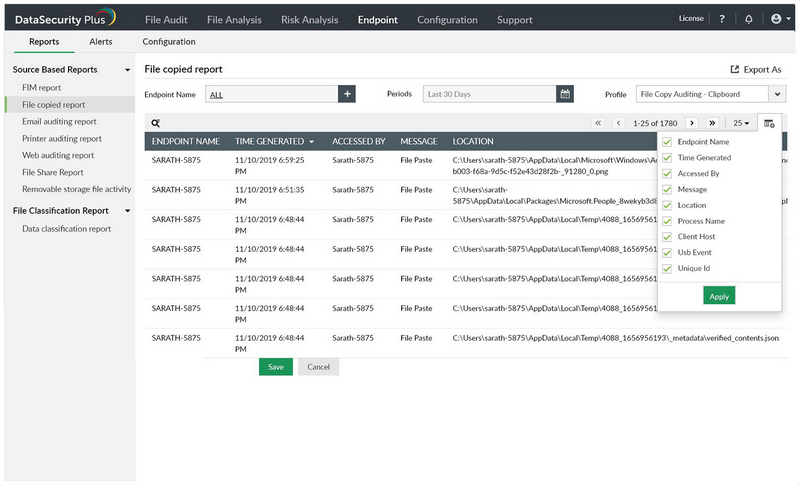
Where it excels is in visibility over file activity: who accessed what, when, and whether anything was copied or transferred. For SMBs and mid-sized organizations whose primary risk is data leaving through file servers rather than complex multi-channel exfiltration, that coverage is often enough. It also benefits from sitting inside the broader ManageEngine ecosystem — if your team already uses ManageEngine products, the learning curve is significantly lower.
ManageEngine DataSecurity Plus is not built for active blocking across all channels, nor does it offer session recording or document-level encryption. If your threat model includes cloud uploads, USB transfers, or insider attacks that bypass file servers entirely, you'll likely need a more capable platform.
How It Supports a Scoped Windows Project
- File Activity Monitoring: Tracks who accessed, changed, copied, or deleted files on your Windows servers — and when. The starting point for any insider threat investigation.
- Permission Analysis: Surfaces accounts with excessive or outdated access rights, useful after role changes or team restructuring when access rarely gets cleaned up.
- Data Loss Prevention: Flags regulated or sensitive content before it moves through a controlled endpoint channel, tying policy events to the actual data.
- Ransomware Detection: Identifies workstations showing mass encryption behavior and isolates them from shared folders before the damage spreads.
- Anomaly Detection: Flags high-volume or off-hours file access, giving your team an early signal when an account starts behaving out of character.
Pricing & Deployment
ManageEngine publishes module starting prices. The September 2026 listings start file-server auditing at $745 per year for two Windows servers and Data Leak Prevention at $345 per year for 100 workstations. These separate licenses do not represent a single suite price. Buyers with mixed operating systems or advanced UEBA requirements should confirm that the modular, Windows-centered design covers the full project before committing to the file-auditing entry price.
What to Expect in Practice
Setup takes longer than expected, and the dated interface doesn't help. New users will need time to find their footing. That said, once policies are tuned, detection accuracy improves noticeably and alerts fire quickly. Reports load slowly, and the inability to scan password-protected files is a recurring frustration. For the price, though, it delivers solid value where it counts.
- Pricing is published; a free trial is available
- Compliance reporting is thorough
- File server monitoring is mature
- Interface is dated
- UEBA depth is limited
- Coverage is mainly limited to Windows and file servers

Understand the different types of insider threats and the behavioral signals that indicate risk before data leaves your organization. Learn more>>
Which Insider Threat Detection Tool Should You Choose?
When the SOC Must Reconstruct an Endpoint Event
Suppose the security operations center receives an alert after an employee compresses project files and uploads the archive through a browser. If the immediate question is “What did this user do on the endpoint before and after the upload?”, Teramind is the stronger starting point because behavioral signals, session replay, and configurable blocking sit close to the endpoint activity.
Proofpoint ITM becomes more relevant when HR, legal, or security also needs the related email, cloud activity, and formal case record, particularly in an existing Proofpoint environment. The final choice turns on who investigates, which evidence they need, how recordings are governed, and whether each operating system receives the same controls. If access must remain restricted after the file leaves, neither investigation workflow answers the whole requirement.
When a Design or Research File Must Remain Controlled After Copying
A manufacturer may allow engineers to move CAD files between an office workstation, a field laptop, and an approved supplier. Blocking every copy would stop the work. Logging every copy would not control what happens to the file afterward.
AnySecura fits this middle ground when the company also requires on-premises administration. Channel policies govern how the file leaves, while transparent document encryption can restrict who opens it later. The fit is narrower for cloud-first businesses or security teams that primarily need UEBA to discover unusual behavior they have not already defined in policy.
When the Risk Begins in SharePoint, OneDrive, Exchange, or Teams
An employee preparing to change roles may download an unusual volume of SharePoint files and later share selected documents outside the company. In a Microsoft 365-centered business, Microsoft Purview can connect identity, audit, file, email, and collaboration signals without asking the analyst to recreate the sequence in another console.
That head start disappears as the workflow moves into unsupported on-premises repositories, specialist applications, or third-party cloud services. Buyers then need to price connectors and external indicators, verify what context crosses the boundary, and decide whether a data-centered platform would reduce the integration work.
When the Question Is “Where Did the Data Go?” or “Why Could They Access It?”
A developer may copy source code into a new document before uploading it to a cloud service. Cyberhaven is organized around following that information through the transformation and transfer. It helps answer where the data went, even when the new file no longer resembles the original by name.
A different problem appears when a former project member can still open an engineering repository months after changing teams. Varonis is organized around that access path: why the user can reach the data, what the repository contains, whether the access is unusual, and how to remove unnecessary permissions. Feature counts hide this difference. The business problem makes it obvious.
When a Small IT Team Needs to Start with Two Windows File Servers
A regional business may need to answer a limited question before its next audit: who accessed the finance and HR shares, and can IT investigate an unusual download? ManageEngine DataSecurity Plus gives that team a contained starting point without requiring a broader insider-risk program on day one.
Separate modules let the business add data discovery or endpoint DLP when USB, Outlook, browser, and printing risks enter scope. They also make the bill of materials easy to misunderstand. Price the complete workflow, including workstation prevention and reporting, rather than treating the lowest file-auditing license as the cost of the finished program.
Use Three Scenarios to Make the Final Decision
Once two products remain, run the same three scenarios against both: an approved bulk transfer, an accidental share to the wrong destination, and a prohibited transfer involving sensitive data.
Follow each event from observation through response, evidence preservation, the user's exception path, and the administrative work afterward. A small difference in a feature table can become a daily headache in this sequence. That is exactly what a pilot should uncover.
Frequently Asked Questions About Insider Threat Detection Software
Q1: Is Insider Threat Software the Same as Employee Monitoring Software?
The categories overlap, but their primary purposes lead to different forms of monitoring. Employee monitoring software usually centers on productivity and work patterns, whereas insider threat software connects user activity with sensitive data, access, policy violations, investigation, and response. A platform may support both, so a documented and proportionate purpose—not the feature name—should define what information is collected and who can review it.
Q2: Can Insider Threat Software Prevent Data Theft, or Only Detect It?
Some products only detect suspicious activity, while others can warn the user, request approval, block a transfer, revoke access, isolate an endpoint, or keep the file encrypted after it moves. Whether that amounts to prevention depends on the licensed module, channel, operating system, and policy behavior. The claim is meaningful only when the specified response covers the workflow in which the data could actually leave.
Q3: What's the Difference Between DLP and Insider Threat Detection Software?
Traditional DLP (Data Loss Prevention) focuses on content inspection—scanning data in motion or at rest for sensitive patterns (PII, PCI data, keywords) and blocking transfers that violate policy. Insider threat detection software adds a behavioral layer: it monitors who is doing what, not just what data is moving. A DLP tool may block an email containing a credit card number; an insider threat platform can also flag an employee who accessed ten times their normal file volume before the transfer. Many platforms now combine content-aware DLP with behavioral context, but buyers should verify whether both capabilities cover the same channels, operating systems, and licenses.
Q4: Does Insider Threat Software Work on Mac and Linux?
Some products support Windows, macOS, and Linux, although the same agent may not deliver identical monitoring and prevention on every system. Other platforms concentrate on Windows endpoints or collect signals through connected cloud services instead of a general-purpose agent. A version-specific coverage matrix is therefore more useful than a simple support claim because it exposes differences in policy enforcement, offline behavior, upgrades, and endpoint performance.
Conclusion
If your environment is cloud-first and your primary need is visibility, Teramind, Proofpoint, or Cyberhaven are all credible options depending on your investigation workflow and budget. But if your data has to stay on-site, if files need to remain controlled after they move, or if you need blocking that works across every channel — not just the ones the vendor supports by default — AnySecura is the only product on this list built to answer all three at once.
Start with the free trial. Map your highest-risk transfer scenarios against the policy controls, and see whether the blocking behavior holds up before you commit.