
Data breaches in 2026 have entered a new era of complexity. With the global average cost of a breach now exceeding $4.4 million (according to 2025 IBM Cost of a Data Breach Report), the risk has shifted from nation-state attacks to internal AI-driven data sprawl. Misconfigured cloud buckets, employees leaking data into GenAI prompts, or unrevoked contractor access are the primary triggers.
After reviewing dozens of tools and speaking with SecOps practitioners across manufacturing, finance, and tech, we’ve identified a critical shift: the most expensive platform is often not the right one. This guide analyzes the 12 best data security software solutions in 2026, focusing on their ability to protect IP, manage DSPM (Data Security Posture Management), and enforce DLP without slowing down your business operations.
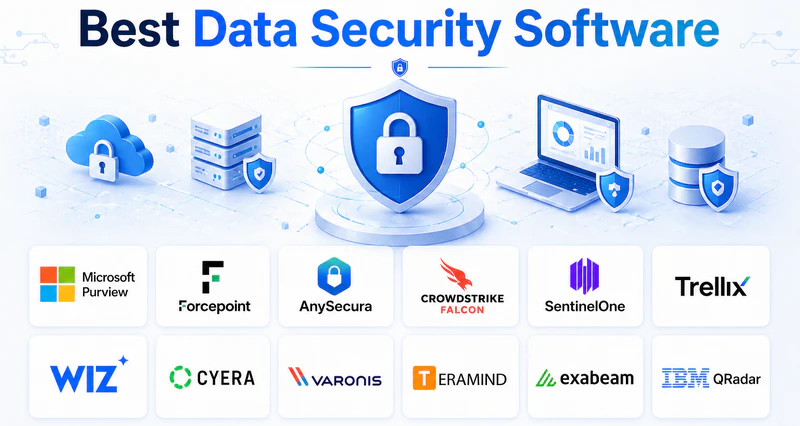
🚀 Quick Selection Guide: Which tool fits your business?
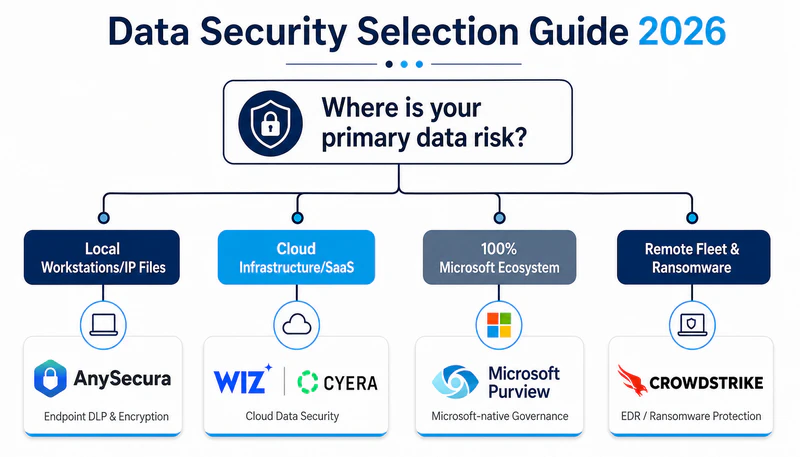
If you don’t have time to read the full analysis, use this logic to find your starting point:
- IP-Heavy Industries (Manufacturing, R&D, Game Dev, Fintech): If your core value is in proprietary files like CAD, source code, or financial models and you need to protect your sensitive data, start with AnySecura (#3).
- Cloud-Native Tech / SaaS: If your data lives in AWS/Azure or Snowflake and you don't care about laptops, start with Wiz (#7) or Cyera (#8).
- Microsoft-Centric Office: If you are 100% on M365 and need compliance fast, start with Microsoft Purview (#1).
- High-Security / Remote Fleet: If you need to stop ransomware on remote laptops across the globe, look at CrowdStrike (#4) or SentinelOne (#5).
- Regulated Finance / Healthcare: If you need deep audit logs and SIEM integration for compliance, start with Forcepoint (#2) or IBM QRadar (#12).
1. What Is Data Security Software?
Data security software is not antivirus. Antivirus keeps unauthorized users out. Data security software controls what happens after someone gets in, including what authorized users can do with the data they can already access. See more in our blogs.
These tools answer three practical questions that directly affect business risk. Where does sensitive data live across your laptops, cloud storage, and file servers. Who is accessing that data and from which locations. And what automated actions should trigger when data moves outside approved channels.
4 Types of Data Security Software
The market divides into four functional categories. Each addresses a distinct risk profile.
Data Loss Prevention (DLP) monitors data leaving the organization. It blocks emails containing credit card numbers, prevents uploads to personal cloud drives, and restricts USB file transfers. DLP is the first line of defense against accidental or intentional data exfiltration.
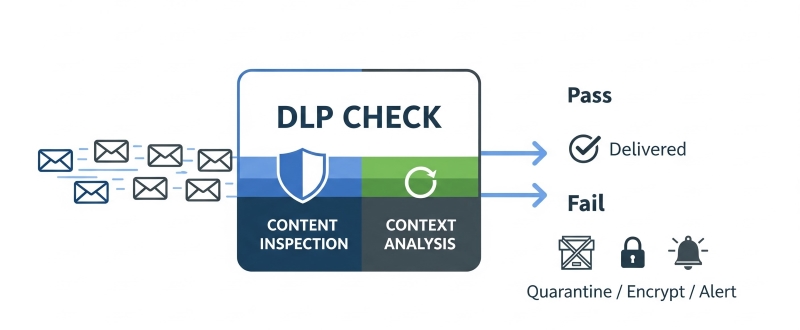
Learn what is DLP and how Data Loss Prevention (DLP) protects enterprise data from leaks and insider threats. Learn more>>
Endpoint Security installs directly on laptops and servers. It stops ransomware execution, catches malware that signature-based tools miss, and provides visibility into process-level behaviors across every endpoint.
Cloud Security / DSPM (Data Security Posture Management) scans AWS, Azure, and Google Cloud environments. It identifies misconfigured storage buckets, over-privileged identities, and databases that should not be publicly accessible.
Insider Threat / User Behavior Analytics (UEBA) establishes behavioral baselines for each user. When an employee accesses files outside normal working hours or downloads historical data they have never touched before, these tools generate alerts for investigation.
2. Which Type of Data Security Do You Actually Need?
Selecting a data security product begins with identifying where your sensitive data lives. The wrong category, no matter how well executed, will not solve your actual problem.
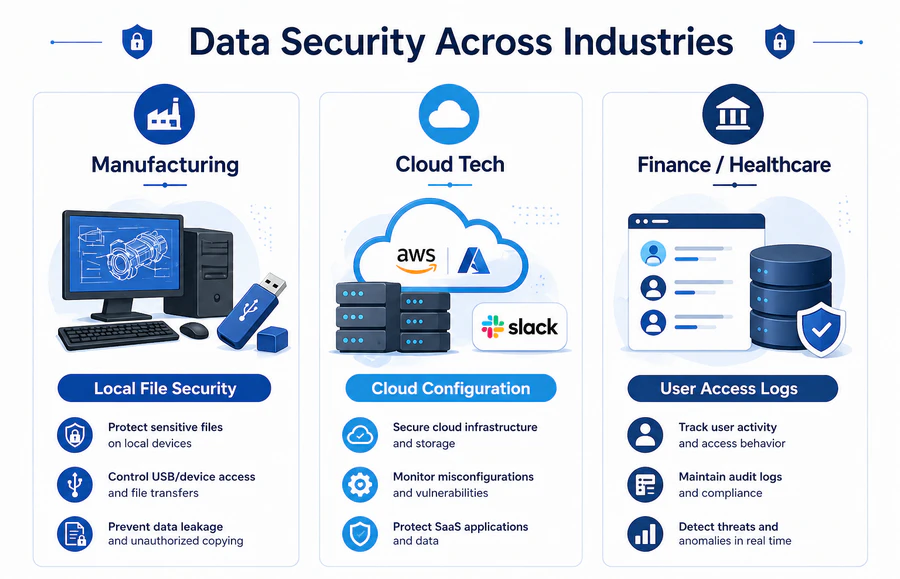
If you operate in manufacturing, engineering, or design, your intellectual property resides in files stored on local workstations and file servers. Engineers frequently transfer these files through USB drives, messaging applications, or personal email. Your primary risk is data leaving through uncontrolled physical and application channels. The appropriate solution combines endpoint DLP, device control, and file-level encryption. Cloud-native tools alone are unlikely to address this risk.
If you run a software or technology company, your data lives in cloud storage buckets, GitHub repositories, and SaaS applications like Slack or Teams. Your laptops are replaceable. Your exposed cloud resources are not. The greatest risk is a misconfigured S3 bucket or a former employee whose access was never revoked. Cloud-native DSPM tools and identity-focused controls should be your priority. Heavy desktop DLP agents will generate friction without addressing the core problem.
If you work in financial services or healthcare, you face regulatory retention requirements and insider threats from employees with legitimate access to sensitive records. The risk is not always malicious. A nurse looking up a neighbor's medical record or a teller checking a celebrity's bank balance creates compliance violations. You need user behavior analytics combined with long-term log retention and audit-ready reporting.
Match the tool category to your data location. That is the only selection framework that consistently works.
3. Best 12 Data Security Software in 2026
Here are the 12 best data security tools in 2026, categorized by use case and deployment environment. You can also compare practical deployment scenarios in our blogs.
Category 1: Data Protection & DLP
These tools control how data leaves the organization. They apply policies to email, web uploads, USB devices, and printing. For companies whose competitive advantage lives in documents and drawings, this category is non-negotiable.
#1 Microsoft Purview
Core Strength: Native M365 Governance & Automated Sensitivity Labeling
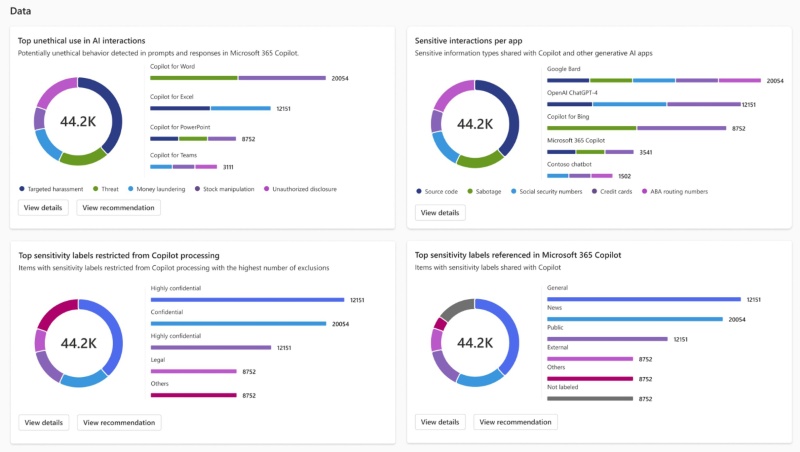
For organizations deeply embedded in the Microsoft ecosystem, Microsoft Purview serves as the compliance and data protection suite. It applies sensitivity labels to documents and emails based on content inspection. When a salesperson attaches a proposal marked "Confidential" to an email addressed to a personal Gmail account, Purview evaluates the destination and blocks the send if policy prohibits external forwarding. The 2026 release includes adaptive protection that learns normal sharing patterns for each department and only intervenes when behavior deviates from baseline.
Key Features:
- Automatic sensitivity labeling based on content inspection
- Unified policy management across Exchange, SharePoint, Teams, and Windows endpoints
- Adaptive protection that adjusts rules based on user behavior patterns
- Insider risk management with activity explorer dashboards
- Native integration with Entra ID eliminates need for separate agents
- Single compliance portal for classification, DLP, and insider risk
- No additional endpoint software for Intune-managed Windows devices
- Effectiveness drops sharply outside Microsoft services
- Linux endpoints receive limited protection
- Licensing requires careful cost analysis across multiple SKUs
Verdict: Choose Purview when Microsoft comprises at least 80 percent of your productivity stack. Otherwise, select a vendor-agnostic DLP platform.
#2 Forcepoint
Core Strength: Risk-Adaptive Protection & Unified Hybrid DLP
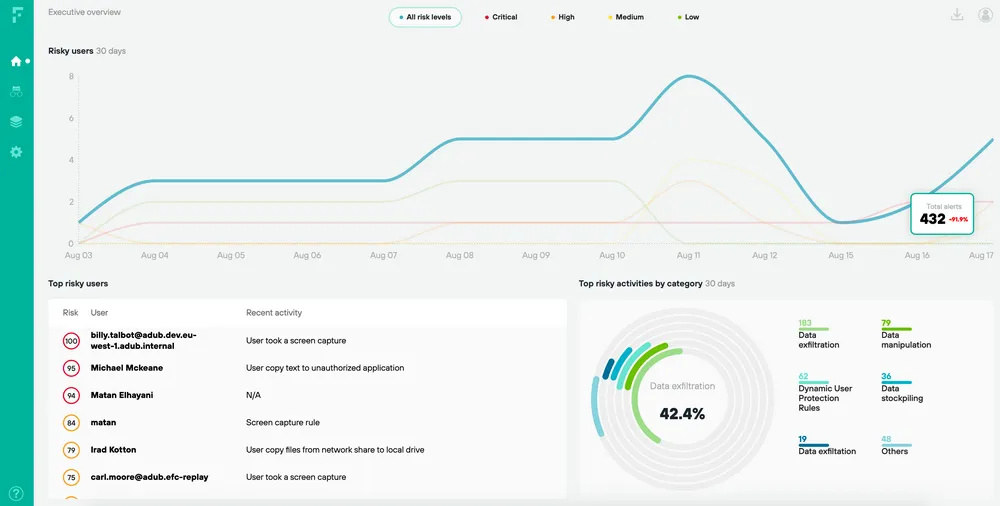
Forcepoint is the enterprise DLP choice for organizations that need consistent policy enforcement across hybrid environments. Large financial institutions and healthcare systems have deployed Forcepoint for over a decade. The platform operates a single policy engine that applies rules uniformly to web traffic, email, cloud applications, and endpoint activities. An employee working from a home office receives the same data protection controls as someone inside headquarters. If a user interacts with a known phishing domain, Forcepoint automatically elevates DLP restrictions for that session.
Key Features:
- Single policy engine covering web, email, cloud, and endpoints
- Risk-adaptive responses that escalate restrictions based on session context
- Pre-built compliance templates for GDPR, HIPAA, PCI, and SOX
- Cloud management console with on-premises policy cache
- Enterprise-grade stability with low false positive rates after tuning
- Extensive compliance reporting templates
- Works across Windows, Mac, Linux, and major cloud platforms
- Initial configuration requires dedicated security operations staff
- Small IT teams typically cannot implement effectively
- Annual licensing costs run higher than mid-market competitors
Verdict: Suitable for regulated enterprises with established security teams. Not recommended for organizations without dedicated DLP administration resources. For a direct comparison, see Forcepoint vs AnySecura.
#3 AnySecura
Core Strength: Granular Endpoint Control & Cross-App IP Exfiltration Blocking
AnySecura is a modular data protection software built for organizations where intellectual property is the core business asset. It provides comprehensive security to prevent unauthorized access, transfer, or leakage of corporate data. Through transparent encryption, users can edit files normally, but any copy moved outside the encrypted environment becomes immediately unreadable.
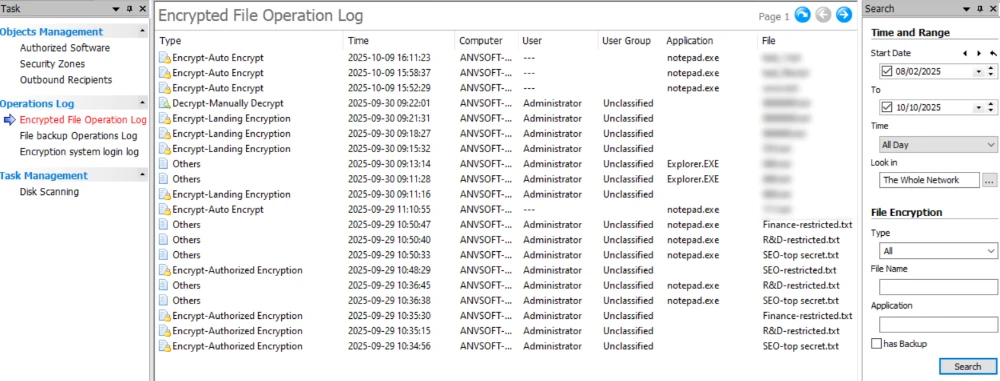
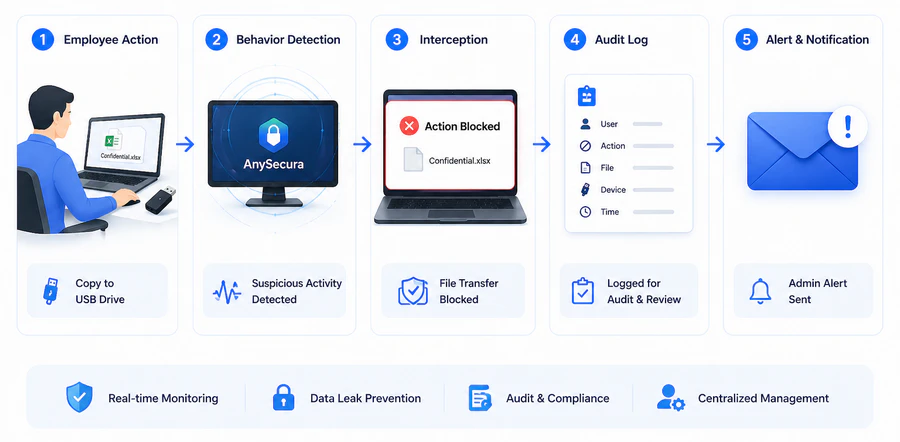
Beyond file encryption, AnySecura offers a comprehensive set of controls. Print control adds watermarks to every job and records all printing activities. Device control and Removable Media Control manage each endpoint, USB, Bluetooth, and other peripherals through allowlisting, blocking unauthorized devices from connecting. Application control blocks screen capture tools and instant messaging apps to prevent data leakage. Audit and monitoring features generate real-time logs and reports, enabling organizations to quickly identify breach sources and conduct investigations. Its flexible pricing model supports annual licensing, with the option to purchase only the modules needed.
The Efficiency Edge (TCO): AnySecura’s modular architecture allows businesses to go live in under 2 weeks, compared to the 6-month cycles typical of Forcepoint or Symantec. For mid-sized firms, this results in a 40% lower Total Cost of Ownership by eliminating the need for extensive consulting and dedicated admin teams.
Key Features:
- Transparent file encryption that requires no user training
- USB, Bluetooth, and wireless device control with per-device allowlisting
- Application blocking for messaging apps, cloud drives, and screen capture
- Print management with watermarks and print job logging
- Clipboard monitoring and screenshot prevention
- Offline policy enforcement for disconnected laptops
- Fine-grained control over physical ports, wireless connections, and local apps
- Strong support for legacy operating systems
- Predictable pricing based on module selection
- No per-event cloud processing fees
- Endpoint agent can impact performance on older hardware
- Reporting interface is less polished than enterprise competitors
Verdict: Built for organizations that need granular control over file movement, device access, and application usage. Its transparent encryption and multi-layer controls prevent unauthorized access and data exfiltration. Related product capabilities are listed on the products page.
DLP tools focus on preventing data from leaving through email, web, or USB. But if ransomware executes directly on a laptop and encrypts files before any data transfer happens, DLP will not stop it. That is where endpoint security comes in.
Category 2: Endpoint Security
Endpoint security tools protect the devices where employees do their work. They prevent ransomware execution, block malware, and provide visibility into process-level behaviors.
#4 CrowdStrike Falcon
Core Strength: Cloud-Native Threat Hunting & Real-Time Behavior Telemetry
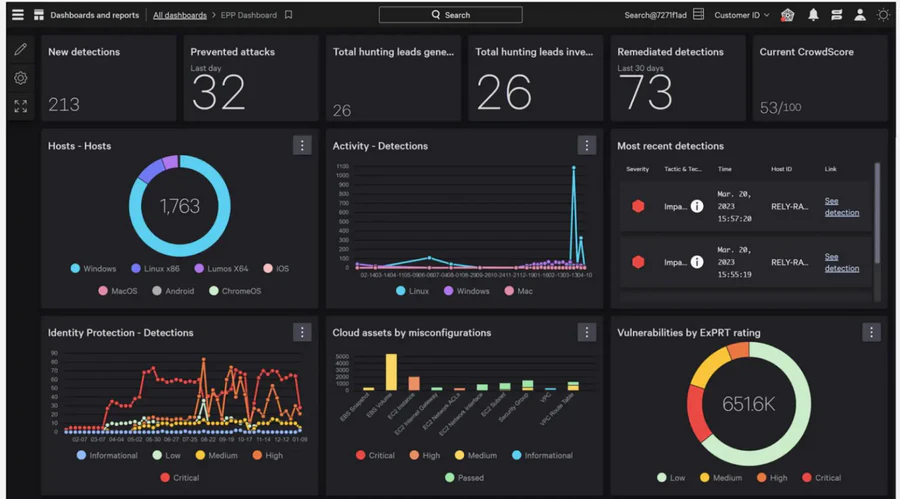
CrowdStrike Falcon became the endpoint security standard for technology companies by moving detection logic to the cloud. The local agent transmits behavioral data rather than storing signature databases locally. Falcon observes process behavior in real time. When a user opens a PDF that spawns a PowerShell process attempting to reach a domain registered six hours ago, Falcon terminates the process and quarantines the machine. The cloud console aggregates telemetry across all endpoints, enabling threat hunting across the entire fleet.
Key Features:
- Real-time process behavior analysis without signature updates
- Cloud console with cross-endpoint threat hunting
- Managed threat hunting add-on available
- Integrated firewall and USB device control
- Minimal endpoint performance impact
- Cloud console provides search capabilities on-prem solutions cannot match
- No reboot cycles for updates
- The 2024 update incident demonstrated risks of cloud-pushed updates
- Offline protection relies on cached behavioral rules
- Pricing becomes expensive beyond core modules
Verdict: Ideal for organizations where laptops rarely connect to traditional VPN infrastructure.
#5 SentinelOne
Core Strength: Autonomous AI Rollback & Offline Ransomware Protection
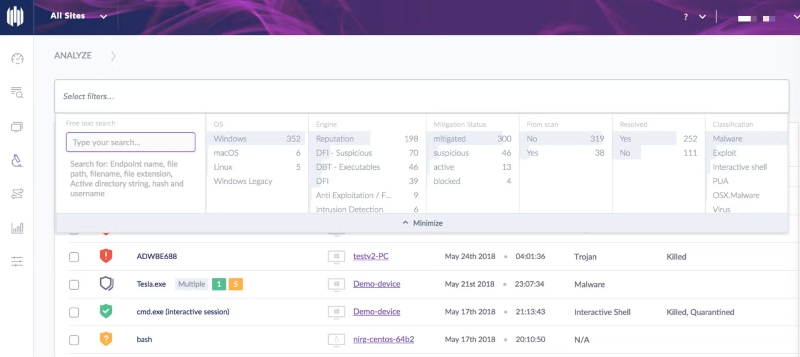
SentinelOne distinguishes itself through local AI processing, making it a strong choice for environments where devices operate offline for extended periods. The detection engine runs on the endpoint rather than relying solely on cloud analysis. SentinelOne maintains a local behavioral model that continues functioning without internet connectivity. The autonomous response capability includes rollback. If ransomware begins encrypting files, SentinelOne reverts every changed file from its local vault. The Storyline feature groups related alerts into attack narratives.
Key Features:
- Local AI model operating without cloud connectivity
- Autonomous rollback of ransomware-encrypted files
- Storyline attack narratives that correlate related alerts
- One-click remediation from the management console
- Superior offline protection compared to cloud-dependent alternatives
- Rollback feature effectively undoes ransomware damage
- Works across Windows, Mac, Linux, and Kubernetes
- Higher license costs than CrowdStrike for smaller deployments
- Management console has a steeper learning curve
- Initial deployment requires more manual configuration
Verdict: Select SentinelOne when users work offline for extended periods. Select CrowdStrike for primarily connected environments.
#6 Trellix
Core Strength: Legacy System Support & Compliance-Driven Policy Management
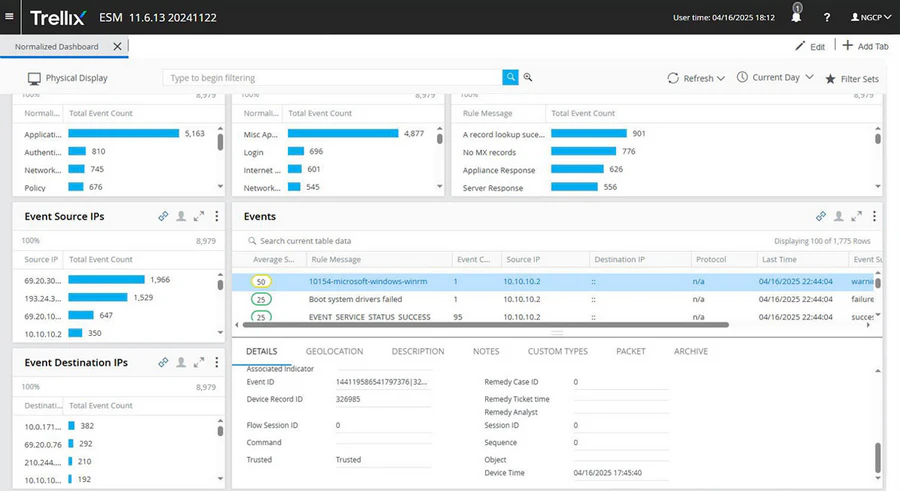
Trellix, formed from the merger of McAfee Enterprise and FireEye, continues to serve organizations with strict compliance requirements and legacy systems. The product carries forward McAfee's ePolicy Orchestrator infrastructure. The console pushes antivirus, firewall, and device control settings to thousands of endpoints. The FireEye acquisition added behavioral analysis that detects threats executing in memory without writing files to disk. Trellix maintains compatibility with older operating systems that competitors have ended support for.
Key Features:
- ePolicy Orchestrator console for centralized policy management
- Memory-level threat detection from FireEye technology
- Support for Windows 7, Windows Server 2008, and legacy Linux
- Built-in compliance reporting for DISA STIG and government frameworks
- Comprehensive compliance reporting for government audits
- Agent stability on legacy platforms
- Mature policy management for 10,000+ endpoint deployments
- Interface reflects merged product history
- Small teams find ePolicy Orchestrator unnecessarily complex
- Slower feature release cadence than cloud-native competitors
Verdict: Trellix continues serving government, financial, and healthcare organizations with audit requirements and legacy infrastructure.
Endpoint tools protect individual devices, but they cannot see what data is sitting exposed in an S3 bucket or a Snowflake database. Once companies move workloads to the cloud, a different set of blind spots appears.
Category 3: Cloud Security / DSPM
Cloud security tools find data that organizations have forgotten exists in cloud storage. For companies running on AWS, Azure, or Google Cloud, this category addresses exposure risks that endpoint tools cannot see.
#7 Wiz
Core Strength: Agentless Cloud Infrastructure Visibility & Attack Path Analysis
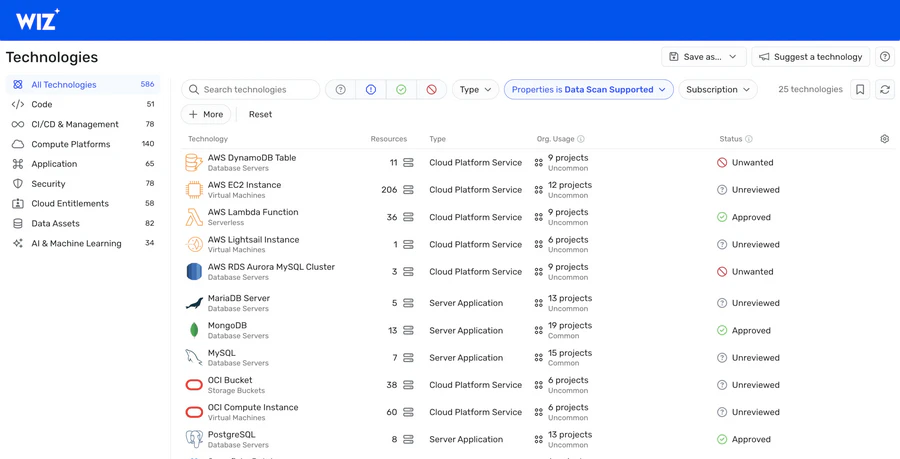
Wiz built its reputation on solving cloud visibility problems that other tools miss by constructing complete resource graphs that reveal attack paths. The platform connects to cloud environments through API and scans all cloud resources without requiring agents on virtual machines. The attack path visualization shows how discrete low-severity issues combine into critical risks. A development server with a low-severity vulnerability becomes a critical finding when Wiz shows that same server has an open internet port, a weak administrator password, and access to a production database with customer data. No other cloud security tool connects those dots as directly.
As the current gold standard for DSPM, Wiz provides the most intuitive attack path visualization for cloud-native teams.
Key Features:
- Agentless scanning across AWS, Azure, and GCP
- Attack path visualization showing how multiple low-risk issues combine
- Toxic combination detection (public exposure + weak credentials + sensitive data)
- Continuous graph update as cloud resources change
- Agentless deployment produces results within hours
- Attack path visualization clearly influences remediation priorities
- Works across all major cloud providers from a single console
- Wiz addresses only cloud infrastructure risks
- No protection for on-premises servers or endpoint devices
- Annual licensing scales with cloud spend
Verdict: Wiz serves organizations running production workloads across multiple cloud providers.
#8 Cyera
Core Strength: Automated Cloud Data Classification & Lineage Mapping
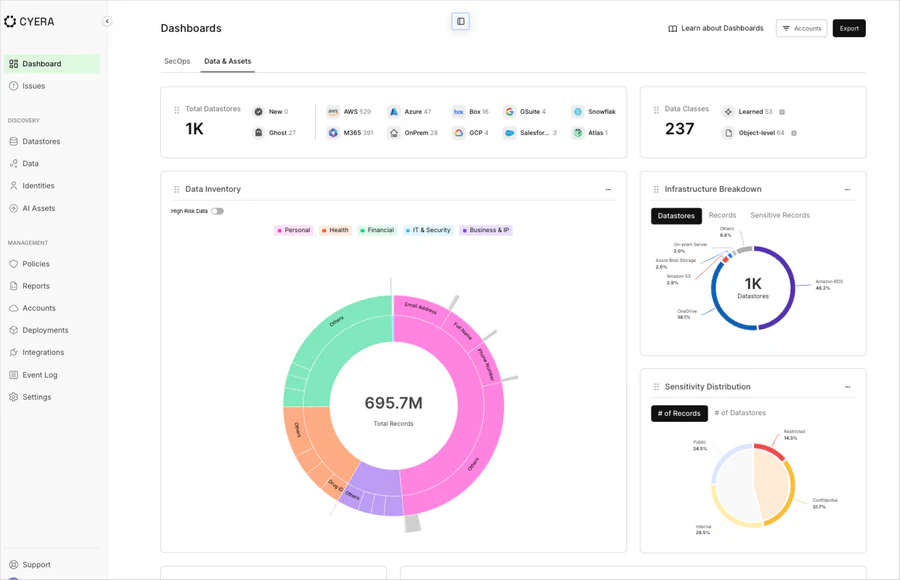
While Wiz takes a broad infrastructure view, Cyera focuses specifically on data security posture management for cloud data stores. The platform connects to cloud data services like AWS S3, Snowflake, Databricks, and Microsoft SharePoint Online. It classifies every piece of data it finds, identifying where sensitive information like PII, financial records, or intellectual property actually resides. A security engineer at a mid-sized fintech company posted that Cyera discovered a Snowflake database containing customer addresses that had been accidentally left open to all internal employees for three years. The team had no idea the data was there until Cyera classified it.
Key Features:
- Deep data classification across cloud data stores (S3, Snowflake, Databricks, BigQuery)
- Sensitive data discovery with automated tagging
- Identity and entitlement mapping showing who can access what
- Remediation workflows for overly permissive access policies
- Continuous monitoring for data stores added outside official channels
- Focused exclusively on data, not just infrastructure misconfigurations
- Faster classification engine than general-purpose DSPM tools
- Clear reporting on exactly which sensitive data sets are over-exposed
- Works well with Snowflake and Databricks environments
- Narrower scope than Wiz; does not scan compute resources or Kubernetes
- Requires read access to cloud data stores, which some compliance teams restrict
- Less valuable for organizations with minimal cloud data warehouse usage
Verdict: Cyera is the better choice when your concern is who can see what inside your Snowflake, S3, or Databricks environment. Wiz is better for broad infrastructure attack path analysis.
Finding exposed cloud data is one thing. But knowing whether a legitimate employee is quietly downloading thousands of records they should not touch is another. That requires watching user behavior, not just scanning storage.
Category 4: Insider Threat / Behavior Analytics
Insider threat tools watch what authorized users do with legitimate access. They detect compromised accounts, malicious insiders, and accidental data exposure.
#9 Varonis
Core Strength: Permission Hygiene & Automated Access Remediation
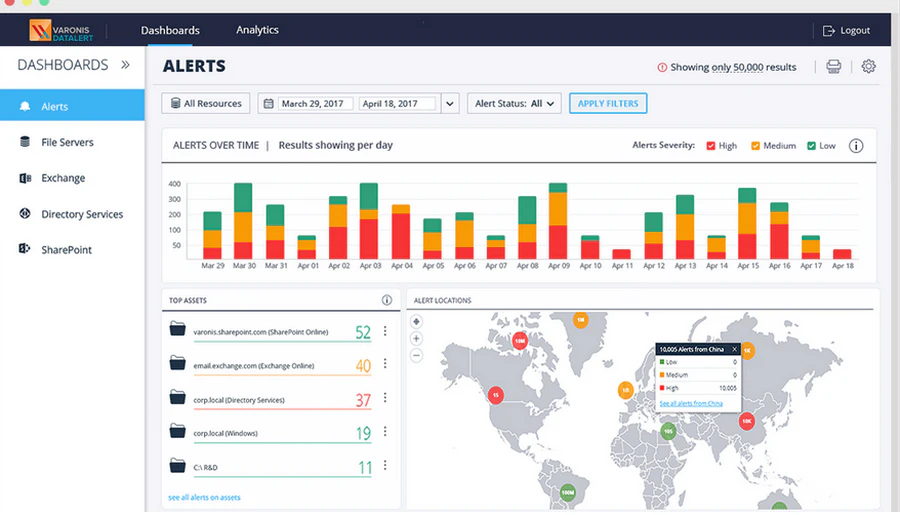
Varonis specializes in permission hygiene for file servers and SharePoint environments where access controls have degraded over years. Many organizations accumulate excessive permissions, leaving sensitive data accessible to employees who should not see it. Varonis scans every file and folder across Windows file servers and SharePoint sites. The analysis identifies which users access which data and recommends specific permission revocations. A typical deployment discovers that seventy percent of stored data is stale and that thirty percent of active data remains accessible to users who should not have access.
Key Features:
- Automated discovery of stale and orphaned data
- Permission recommendation engine based on actual usage
- Automated remediation workflow for access revocation
- Integration with ServiceNow for change approval
- Direct reduction of breach surface area without behavioral change
- Clear ROI based on reduced access
- Works with on-premises and SharePoint Online
- High license costs relative to other solutions
- Initial scans consume weeks for large environments
- Limited value in modern cloud-only environments
Verdict: Varonis works for organizations with decades-old file server infrastructure.
#10 Teramind
Core Strength: Real-Time User Activity Monitoring & Foreground Action Blocking
Teramind provides user activity monitoring with real-time recording of screen activity, keystrokes, and application usage, plus live blocking capabilities. The real-time blocking capability distinguishes it from audit-only products. When a call center agent pastes a customer credit card number into a personal messaging window, Teramind detects the pattern and closes the browser tab before the message transmits. Business process outsourcers and trading desks use this for compliance.

Key Features:
- Continuous screen capture with searchable playback
- Real-time keystroke logging and pattern detection
- Live blocking of policy-violating actions before completion
- Productivity and time-tracking dashboards
- Unmatched visibility into remote user activity
- Real-time blocking prevents violations before data leaves
- Works with any application, including VDI
- Legal and privacy restrictions in many jurisdictions
- Written user consent typically required
- Can create adversarial employee relations if deployed poorly
Verdict: Teramind fits call centers, trading floors, and outsourced service desks.
#11 Exabeam
Core Strength: Behavioral Baselines & UEBA-Driven Alert Noise Reduction
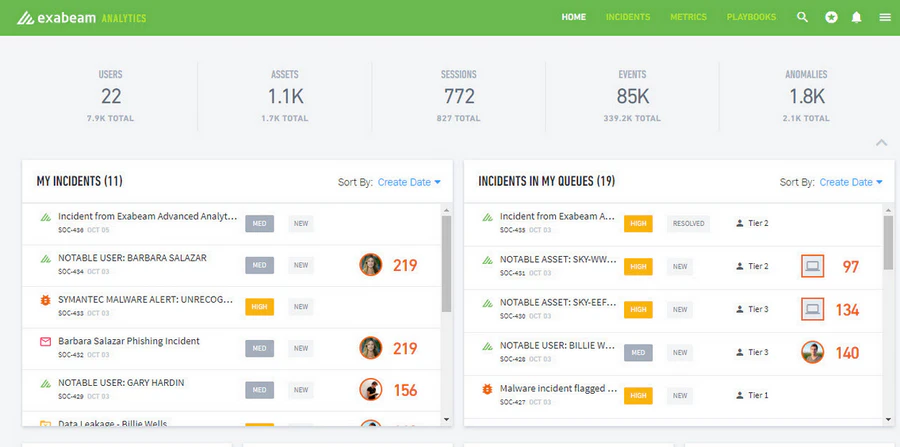
Exabeam functions as a behavioral analytics overlay on existing log infrastructure, reducing false positives by establishing baselines for each user and device. It does not store logs itself. Instead, it analyzes log data from SIEM platforms and cloud services to detect anomaly patterns. When a finance manager who never works weekends logs in on a Saturday from a new IP address and downloads a vendor payment list, Exabeam flags the sequence as high risk even though each individual action complied with access policies.
Key Features:
- User and entity behavior baselining without manual rules
- Timeline-based attack story visualization
- Pre-built behavioral models for insider threat scenarios
- Integration with Splunk, QRadar, and other SIEMs
- Reduction of false positives compared to rule-based alerting
- Direct integration with existing SIEM investments
- No log storage requirements
- Requires an underlying log storage solution
- Enhancement to existing infrastructure, not a replacement
- Value depends on quality of upstream log data
Verdict: Exabeam serves SOC teams overwhelmed by alert volume from traditional SIEM platforms.
Insider threat tools generate alerts, but they are not designed to store years of historical data for compliance audits. Organizations subject to regulations like PCI or HIPAA need a different type of infrastructure.
Category 5: SIEM / Enterprise Security
SIEM platforms aggregate and store log data from across the organization. For enterprises subject to regulatory audits or those needing forensic investigation capabilities spanning months or years, this category provides the centralized logging and correlation that standalone tools cannot offer.
#12 IBM QRadar
Core Strength: Multi-Year Log Retention & Regulatory Compliance Reporting
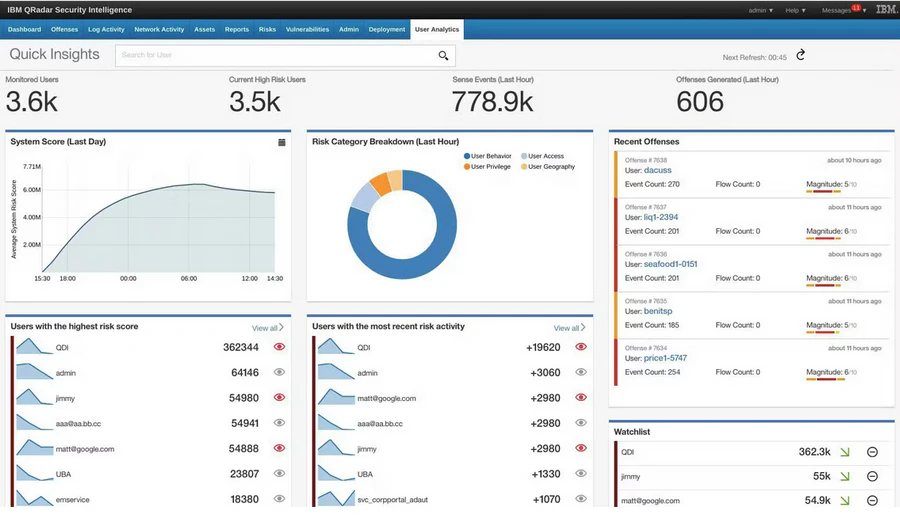
IBM QRadar is the enterprise SIEM choice for organizations that need multi-year log retention and regulatory audit support. Large financial institutions and government agencies maintain QRadar deployments for compliance. QRadar ingests log data from any source capable of generating audit records, normalizes the data, and stores it according to retention policies. The correlation engine evaluates events across these logs. QRadar scales to billions of events with query performance smaller SIEM products cannot match.
Key Features:
- Ingest and normalization from 500+ log source types
- Custom correlation rule engine
- Built-in compliance reporting for PCI, HIPAA, SOX
- Multi-year log retention with indexed search
- Unmatched flexibility for custom rules and reports
- Proven scalability for the largest environments
- On-premises and cloud deployment options
- Dedicated team required for deployment and management
- Licensing involves multiple cost dimensions
- Smaller organizations rarely staff the required expertise
Verdict: QRadar fits enterprises with compliance mandates and dedicated SIEM team budgets.
With all twelve tools reviewed, the next section provides a side-by-side comparison to help narrow down choices based on star ratings, target audience, and deal-breakers.
4. Comparison Table of 12 Data Security Software
| Category | Tool | Star Rating | Primary Strength | Skip If | Deployment Time |
|---|---|---|---|---|---|
| DLP | Microsoft Purview | ⭐⭐⭐⭐ | Native M365 integration | Non-Microsoft infrastructure | 1-2 months |
| DLP | Forcepoint | ⭐⭐⭐⭐ | Hybrid environment consistency | No dedicated DLP admin | 2-3 months |
| DLP | AnySecura | ⭐⭐⭐⭐⭐ | Granular endpoint control & transparent encryption | Cloud-only security needs | 2 weeks |
| Endpoint | CrowdStrike | ⭐⭐⭐⭐⭐ | Lightweight cloud management | Extended offline operation | 1-2 months |
| Endpoint | SentinelOne | ⭐⭐⭐⭐ | Offline autonomous response | Budget constraints | 1 month |
| Endpoint | Trellix | ⭐⭐⭐ | Legacy platform support | Modern infrastructure | 2-3 months |
| Cloud (Broad) | Wiz | ⭐⭐⭐⭐⭐ | Attack path visualization | No cloud infrastructure | 1 month |
| Cloud (Data) | Cyera | ⭐⭐⭐⭐ | Deep data classification | Minimal cloud data warehouse usage | 2-3 months |
| Insider | Varonis | ⭐⭐⭐⭐ | Permission hygiene | Modern cloud-only | 3-6 months |
| Insider | Teramind | ⭐⭐⭐ | Real-time blocking | Privacy restrictions | 1-2 months |
| Insider | Exabeam | ⭐⭐⭐⭐ | False positive reduction | No existing SIEM | 2-3 months |
| SIEM | IBM QRadar | ⭐⭐⭐⭐ | Audit-ready reporting | Under 1,000 employees | 3-6 months |
5. How to Choose the Right Data Security Software
Step 1: Map sensitive data locations for one department.
Walk through the finance team's daily workflow. This two-hour exercise reveals whether your data lives primarily on endpoints, in the cloud, or on file servers. Then map controls to the right solution.
Step 2: Name your highest-probability threat scenario.
Is ransomware the most likely event. Is an employee walking out with design files (see AnySecura). Is a misconfigured cloud database exposing customer records. Pick one scenario.
Step 3: Select two vendors from the matching category.
Run a two-week proof of concept on ten users. For manufacturing or design environments, include AnySecura in this comparison because its messaging app blocking specifically addresses file exfiltration risks that general DLP tools handle poorly. For cloud data-heavy orgs, compare Wiz and Cyera side by side.
Step 4: Reference call another organization of similar size.
Ask one question. What limitation would you change about this product.
6. FAQs about Data Security Software
Does data security software slow down employee computers?
Yes, for some products. DLP agents that inspect every file read/write add measurable latency on older hardware. Forcepoint users specifically report the agent is "very heavy and takes too much time and bandwidth." Modern cloud-native endpoint products like CrowdStrike and SentinelOne have minimal impact. Testing on representative hardware before full deployment is recommended.
Can small organizations rely on built-in controls instead of dedicated software?
For teams under 50 employees, platform-native controls often suffice — SharePoint permissions, Google Drive sharing settings, and mandatory two-factor authentication cover basic needs. Beyond 50 employees or when handling regulated data (health records, payment card info), dedicated tools become necessary for auditability and incident response.
What distinguishes DLP from insider threat tools?
DLP blocks policy violations before data leaves. Insider threat tools alert for investigation after behavior occurs. For design and manufacturing firms, AnySecura effectively bridges both because its messaging app blocking prevents exfiltration (DLP) while its audit logs support investigations (behavior analytics).
7. Conclusion
Most breaches are caused by misconfiguration, not advanced attacks. The correct software solves your specific data movement problem without creating friction.
Manufacturing and design firms should mandate AnySecura in their evaluation to test its messaging app blocking. Get a free trial or live demo below to test its messaging app blocking and transparent encryption on your actual CAD or source code files.
Cloud-native companies should compare Wiz (infrastructure) and Cyera (data classification). Regulated enterprises need Forcepoint or IBM QRadar but must budget for dedicated staff.
Pick two products from the category that matches your threat. Run a two-week proof of concept on ten users. The product that protects without blocking legitimate work is the correct choice.
Disclaimer: Our reviews are based on technical analysis and feedback from current security operations (SecOps) teams.


