It's completely normal these days for a single office computer to run a dozen or more applications at once. Without proper application control, this kind of unmanaged endpoint software environment quickly becomes a serious risk to enterprise software compliance.
Business systems, everyday collaboration tools, and various apps employees download on their own combine to keep daily operations running. But that convenience comes at a cost: disorganized, unmanaged applications quietly expose companies to a range of hidden risks.
What Risks Come with Unmanaged Endpoint Software?
Security Defenses Become Meaningless
Cracked or "portable" software downloaded from the internet rarely comes with any security certification. These programs are often bundled with trojans, backdoors, or ransomware, and once executed, they can expose an entire internal network's data in one go. This is exactly the kind of unauthorized software risk that application whitelisting is designed to prevent.
Copyright Risk Can Strike Without Warning
Installing commercial software without a proper license is a fast way to attract a vendor's attention. Software copyright audits have become routine, and if a vendor captures evidence of unlicensed software use on your endpoints, your company could face real infringement liability.
No Visibility Into What's Actually Installed
Without centralized software asset management, IT has no reliable way to know what software exists across the organization, which programs pose a risk, or who's running unauthorized applications. When something goes wrong, there's no way to respond quickly, and when a compliance audit comes around, there are no logs to show for it.
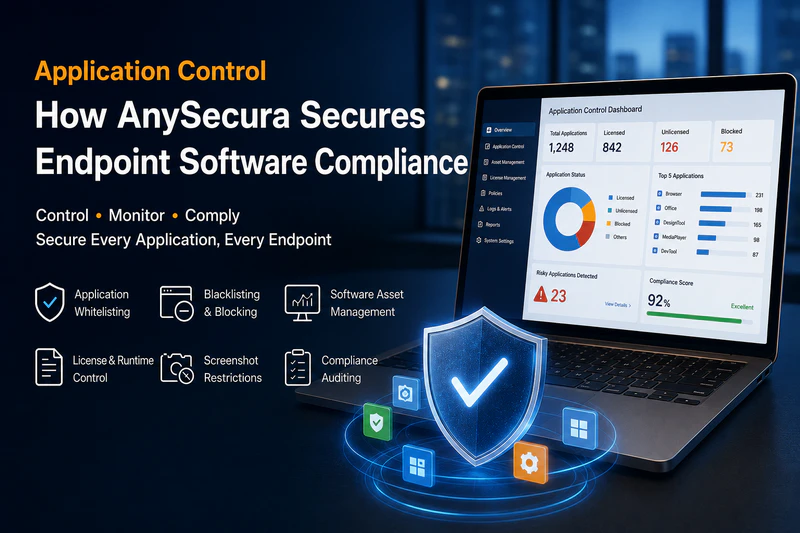
AnySecura's Application Control Solution for Software Compliance
The real fix for uncontrolled endpoint software is building an application control system that is controllable, flexible, and fully auditable.
To address these pain points, AnySecura offers a complete software compliance management solution that covers the entire lifecycle, from installation through execution, usage, and removal, helping organizations lock down endpoint software management and compliance without disrupting day-to-day productivity.
Application Whitelisting and Blacklisting for Installation Control
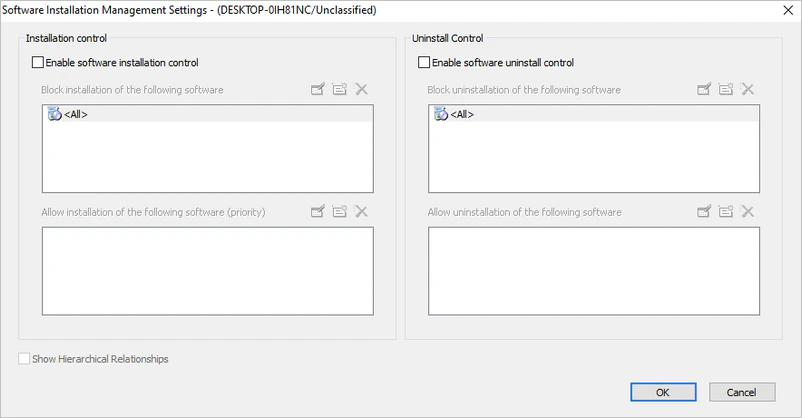
Manage software installation and removal through customizable application whitelisting and blacklisting policies.
- Full lockdown: Block unauthorized installations entirely, allowing only pre-approved, compliant software.
- Targeted blocking: Give employees more flexibility while still blocking specific unauthorized software via a blocklist.
- Removal control: Restrict uninstall actions so only designated programs can be removed, keeping the endpoint environment stable and predictable.
Custom Software Recognition Rules
Administrators can define their own software recognition rules, and endpoints will automatically allow or block installations based on these presets.
Control strictness can also be adjusted on the fly. With a more relaxed rule set, multiple versions of the same software can coexist without conflict, significantly cutting down on repetitive maintenance work for IT teams.
Multi-Condition Runtime Control
Set software execution rules based on multiple conditions, including IP subnet, internal versus external network environment, device type, and OS version.
For example, sensitive business systems can run freely on the internal network but be automatically disabled the moment a device connects externally, closing off a major data leak risk for remote and hybrid work.
Concurrent License Management
For commercial software with limited license seats, precisely control how many instances can run simultaneously.
Once usage hits the purchased license cap, the system automatically blocks any additional endpoints from launching the software, eliminating over-licensed use at the source and reducing exposure to copyright audits and infringement claims tied to unlicensed software.
Blocking Rogue Software Downloaders
AnySecura's application control includes a built-in database of known rogue software downloader signatures, automatically detecting and blocking risky installation attempts.
Administrators can also add custom entries to this list, tailoring risk-blocking rules to their organization's specific needs.
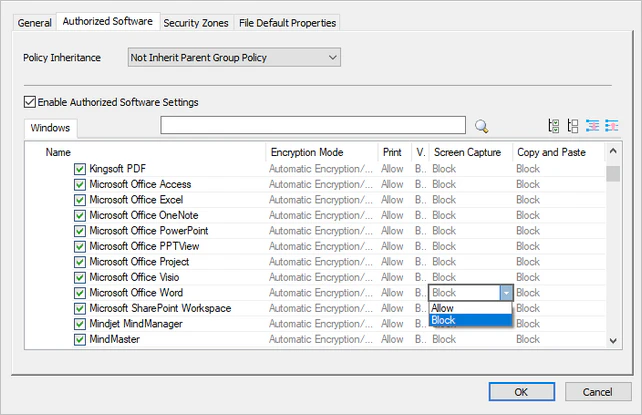
Context-Aware Screenshot Restrictions
For sensitive business scenarios, screenshot permissions can be tied directly to specific programs. When a sensitive application or core business system is running, screenshot capability is automatically locked, and permissions are restored once the program closes. This strikes the right balance between usability and data security, eliminating the risk of leaks through screenshots.
Software Asset Management and Compliance Auditing
AnySecura automatically logs every application that has run across all endpoints, giving administrators categorized statistics and control at a glance.
In today's complex cybersecurity landscape, application control is no longer just a tool for blocking installs. It's a critical checkpoint connecting endpoints, business operations, and data assets. AnySecura tackles the problem at the source, using granular, adaptable rules to fit diverse business scenarios, giving organizations a practical path to endpoint software management, software asset management, and full software compliance, all at low cost.