
An AI governance framework is a simple set of rules, owners, and checks. It answers four questions: which AI tools do we use, what data can go into them, who approved them, and how do we find out what happened when something goes wrong. Think of it as an expense policy for AI. It says what you can claim, who signs off, and where the receipts are kept.
This AI governance framework is written for two groups. Framework owners in IT, security, legal, or HR need to decide the rules. Employees who use ChatGPT or similar tools every day need to know what they can and cannot do. Each step below says what both groups do. The checklist right after this introduction gives you the short version.

One-Page Checklist of AI Governance Framework
If you only have a few minutes, start here. The first table lists the core tasks for framework owners and for every employee. The second table maps each of the six steps to what it means and who does what. Print it, share it with your team, and use it to check your progress as you work through the full guide below.
| Who | What to do |
|---|---|
| Framework owner | Name one person who is responsible for the framework, and a small group that meets every quarter. |
| Build the list of AI tools in use, and name an owner for each tool. | |
| Set three data levels, public, internal, and confidential, with clear examples. | |
| Write the approval path for new tools, and an impact assessment for high-risk personal data use. | |
| Provide a short briefing for every employee before they start using AI. | |
| Decide what is recorded, how long it is kept, and who can view it. Tell employees first. | |
| Write the five-step incident process, and a rule that protects people who report problems. | |
| Set the review schedule and the three numbers you will track. | |
| Every employee | Use only the AI tools on the approved list. |
| Before you paste anything, ask: would a competitor seeing this cause a problem? If unsure, ask first. | |
| Ask for approval before using a new tool. | |
| If something goes wrong, stop, keep the records, and tell your contact right away. |
| Step | What it means | Framework owner does | Employee does |
|---|---|---|---|
| 1. List the AI tools | Know what is in use | Build and maintain the list | Tell the team which AI tools you use |
| 2. Set data rules | Decide what data may go into AI | Define public, internal, and confidential levels | Check the level before you paste |
| 3. Approve first | New tools are approved before use | Run the approval path | Ask before you start with a new tool |
| 4. Keep records | Be able to show what happened | Set what is recorded and for how long | Know which windows are recorded |
| 5. Handle problems | Respond the same way every time | Grade the incident and run the steps | Stop, and report it right away |
| 6. Review | Keep the framework current | Check the list and rules on a schedule | Tell the owner when your work changes |
What an AI Governance Framework Is
An AI usage policy is a document. An AI governance framework is what makes the policy work. It has four parts:
- Rules that say what is allowed and what is not.
- Owners who are responsible for each rule and each tool.
- Checks that show the rules are followed, such as reviews and spot checks.
- Records that let you prove what happened, months later if needed.
Many companies already have some of this for other systems, such as email or expenses. An AI framework uses the same habits. You do not need legal training to start, and you do not need to finish everything before you begin.
Step 1: List the AI Tools You Use
You cannot protect what you do not know about. The first step is a list of every AI tool in use, including the ones nobody officially approved.
What the framework owner does: Build the list from several places, not just from what people report. Check browser extensions, expense and subscription records, and sign-in logs. Ask teams directly, and make it clear that the goal is to count tools, not to blame anyone.
What the employee does: Tell your team which AI tools you use and what you use them for. Listing a tool is not a mistake. Hiding it is the real problem.
Each line in the list should record five things: the tool name, the person responsible for it, what it is used for, what data it touches, and whether it has been approved. The table below shows what a real list looks like. It is messy at first, and that is normal. Most companies find tools that nobody expected, and finding them is the point of this step.
| Tool | Owner | Used for | Data it may touch | Status |
|---|---|---|---|---|
| ChatGPT (team account) | Operations manager | Drafting internal emails and summaries | Internal and public data | Approved for public and internal data |
| Microsoft Copilot in Office | IT team | Summarising documents, drafting in Word and Outlook | Any file the user can open | Approved; confidential files excluded by label |
| GitHub Copilot | Engineering lead | Writing and reviewing code | Source code (no secrets or keys) | Approved; secrets excluded |
| AI meeting-notes app (personal sign-up) | Sales lead | Recording and summarising client calls | Client names, pricing, contract talk | Under review; not yet approved |
| Translation tool (personal account) | Sales representative | Translating client emails | Client emails | Not approved; switch to company account |
| Free online PDF summariser | Unknown, found in browser logs | Summarising contracts | Customer contracts | Blocked; owner to be assigned |
Notice the last three rows. The personal accounts and the free website are where most of the risk sits, and they are usually the lines that take the most work to fix. A list like this is a working document. Update it as tools are approved, replaced, or blocked.
Step 2: Decide What Data Can Go Into AI
The same AI tool can be safe for one kind of data and risky for another. A public product description and a customer contract should not follow the same rule. So write the rules by data, not by tool.
Use three levels:
- Public: content that is already public, such as website copy. It can go into any approved AI tool.
- Internal: content that stays inside the company, such as meeting notes. It can go only into approved company tools, and the vendor must confirm it does not use your inputs for training.
- Confidential: customer lists, contracts, personal data, passwords, and source code. It cannot go into any AI tool unless the security team has approved that specific use.
You can use a simple test. Ask: if a competitor saw this text, would it cause a problem? If yes, do not paste it. If you are not sure, treat it as internal or confidential and ask first.
Keep the rules to these three levels. If your company already has a classification scheme, map it to these three rather than creating a new one.
How to apply the levels to thousands of files: Writing the rules is the easy part. Applying them by hand to every file is not realistic. AnySecura helps turn the levels into system actions:
- Document security levels let you set a level on each file that matches public, internal, and confidential. The level decides whether an AI tool may read that file.
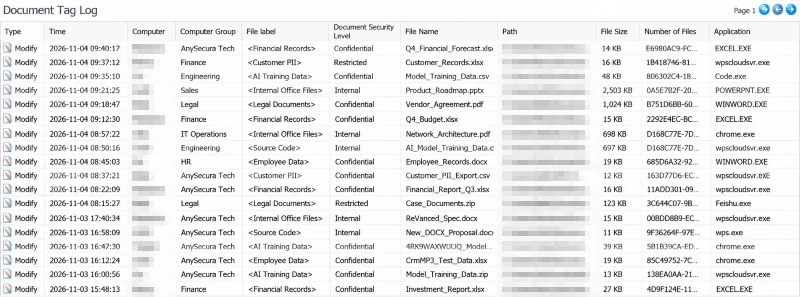
- Document Tagging attaches labels to files, and the labels stay with the file when it is renamed or copied.
- Sensitive Content Inspection scans what is inside a file, such as customer lists and personal details, so files can be sorted quickly without opening each one.
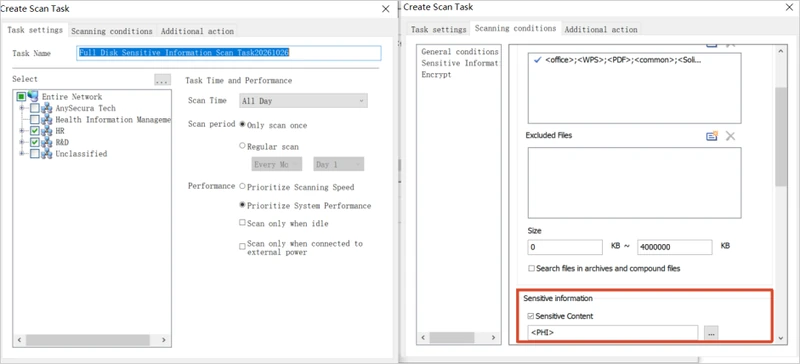
Once the levels are set, the system can block by level. Confidential content does not reach any AI tool. Internal content reaches only the approved ones.
The owner should set up the three levels first, scan existing files, and then make sure new files get a level when they are created. Employees then only need to read the label. If a file has no label, ask before using it.
Step 3: Approve New AI Tools Before Use
Approval should match the risk. Most AI tools fall into one of three paths.
- An approved tool, used within the data rules: no new approval needed.
- A new tool used only with public or internal data: IT or security reviews the vendor terms and settings. This usually takes a few days.
- A new tool that touches confidential data, makes decisions about people, or acts on its own, such as sending emails: the framework owner and the security team decide together and write down the reason. For high-risk use of personal data, do an impact assessment before the first use.
What the employee does: Fill in a short form with five questions. What tool is it? What do you want to use it for? What level of data will you put in? Who else will use it? Can you turn off the setting that lets the vendor train on your inputs?
Before the first use, every employee should spend about ten minutes on a short briefing. It covers what AI gets wrong, which data levels are off limits, and who to call when something looks wrong. The owner should write this briefing and keep it short enough that people will read it.
What the owner checks for every new tool: training terms, data location, how long data is kept, whether logs are available, single sign-on, and what permissions an agent would have.
Approval is not a one-time event. A new model version, a new connector or permission, a change in vendor terms, or a new type of data a tool can reach may require a new approval.
Step 4: Keep AI Usage Records You Can Check
The goal is not to watch people all day. It is to keep enough records that, when something goes wrong, you can work out what happened. Each record should show who used which tool, what data level was involved, what action was taken, and which approval it falls under.
What the owner decides: how long records are kept, who can view them, and whether each viewing is logged. A common benchmark is at least six months, which matches the minimum the EU AI Act sets for high-risk use. Check your own legal requirements as well.
What the employee should know: the company must tell people what is recorded before it starts recording. Recording without notice damages trust, and in many places it is not allowed. Before any monitoring starts, ask HR or legal to review it.
Recording and tracking tools can do much of the work. AnySecura helps in three places:
- AI tool screen monitoring: the screen recording starts when an AI agent or an AI web window opens, so a session can be replayed later.chatgpt.comNew chatSearch chatsTodayContract summaryMeeting notes draftEmail reply to client
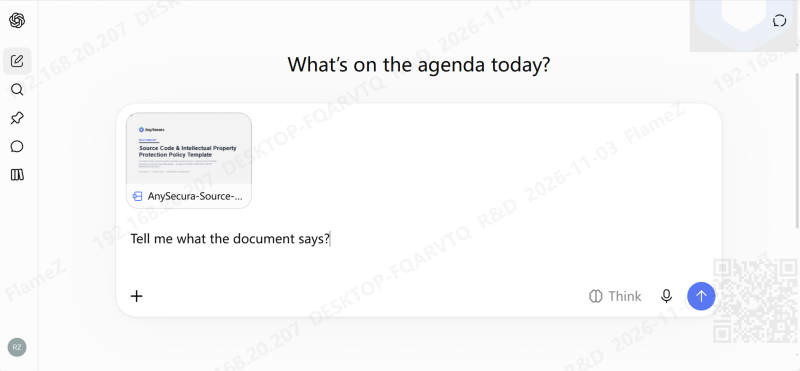
- Screen watermark: a watermark on the AI tool window can show the department, user, time, and IP address. You can also add custom content, including images and QR codes. If a photo or screenshot leaves the company, its source can be traced.
- Document access log: provided by the Document Control module, it records which documents an AI tool accessed, when, and who started the session.
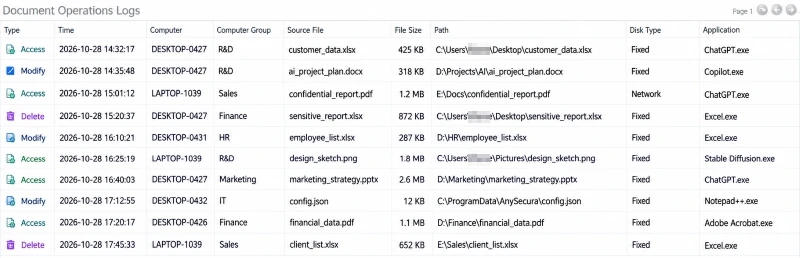
Use these controls for confidential data and for AI tool windows. Set the retention period, and make sure employees know which windows are recorded. The tools enforce the rules, but people still have to decide the rules.
Step 5: Handle Problems Quickly
Some AI problems are small. Others are serious. These are common examples:
- Someone pastes a customer list into a free AI website that was never approved.
- An AI assistant sends an email that should never have gone out.
- Finance finds an AI tool that nobody approved, and it has been used for months.
What the employee does first: stop. Do not delete anything, because the records are needed. Tell IT or the security contact as soon as possible, and on the same working day if you can. A person who reports a problem should not be punished for it. Write that rule into the policy so people believe it.
What the owner does: Grade each problem as minor, medium, or serious, based on the data level and how many people or systems were affected. Then follow the same five actions every time:
- Stop: switch off the tool, revoke the key, or remove the agent's access.
- Check: what data was involved, and which people or customers are affected.
- Tell: the people who need to know, including anyone a contract says must be told.
- Fix: update the rules or close the gap that allowed it.
- Review: ask what went wrong and what would have caught it earlier.
Here is a typical case. An employee pastes a customer contract, marked confidential, into an unapproved AI assistant to prepare for a renewal call. That is a medium-level problem. The response starts by blocking the tool. Next, the team checks whether the contract's confidentiality terms require telling the customer. The review then asks why the tool was not on the approved list, and whether the list or the rules need to change.
The insider data breach response plan template gives a full structure you can adapt for AI incidents.
Step 6: Review on a Schedule
An AI governance framework that is never reviewed becomes outdated within a year. Set a routine:
- Check the tool list every quarter.
- Check the framework and the acceptable use policy every six months.
- Check right away after a big change, such as a new tool, a serious incident, or a change in vendor terms.
You do not need a large report. Track three numbers: how many unlisted tools were found, how long approval requests took on average, and how many incidents happened and how long each one took to close. If these numbers get worse over several reviews, the framework needs changes.
Decisions That Stay With People
Tools can enforce a rule once someone has written it, but the decisions behind the rule still belong to people. Each of the four below needs a named person and a written owner:
- Who owns the framework, and who signs off on exceptions to it.
- Which uses of AI are off limits, and who decides that.
- Whether an AI tool's answers are accurate and fair enough for the decisions they inform.
- Whether a vendor can be trusted, and what its contract actually commits it to.
For the technical side of AI security, such as attacks on AI tools, see 10 AI Security Best Practices to Protect Generative AI Systems. This guide is about how the organization uses AI.
The Laws Behind These Steps
Most laws do not give a fixed list of tasks. They ask you to show that you control AI and personal data in a reasonable way. The six steps are the simplest way to show that. The table below links the main rules to the steps in this guide.
| Law or standard | What it asks, in plain words | Where it shows up in this guide |
|---|---|---|
| EU AI Act, Article 4 (in force since February 2025) | People who use AI need a basic level of AI literacy | The briefing in Step 3 |
| EU AI Act, Article 5 (in force since February 2025) | Certain uses of AI are banned outright | The confidential level and the approval path in Steps 2 and 3 |
| EU AI Act, Article 26 (high-risk uses, Annex III from 2 December 2027) | Human oversight, logs kept for at least six months, workers informed before use, serious incidents reported | Steps 3, 4, and 5 |
| EU GDPR, Articles 5, 32, and 35 | Personal data is used for a clear purpose, kept secure, and high-risk processing is assessed first | Steps 2 and 3 |
| Singapore Personal Data Protection Act (PDPA) | Personal data is collected and used for a stated purpose, with notice or consent, and protected reasonably | Steps 2 and 4 |
| PDPC guidance on personal data in generative AI (2026) | Explains how the PDPA applies when personal data is used with generative AI | Steps 2 and 3 |
| IMDA Model AI Governance Framework for Agentic AI (January 2026, guidance) | Limit an agent's autonomy and access, require human checkpoints, apply technical controls, and train end users | Steps 3, 4, and 5 |
| NIST AI Risk Management Framework and ISO/IEC 42001 (voluntary) | Keep an inventory, review regularly, manage incidents, and keep records of the management system | The whole framework |
Some of these rules are mandatory, such as the PDPA and the GDPR, and some apply only to specific high-risk uses. The steps in this guide are not a substitute for legal advice. Your legal team should confirm which rules apply to your business and your location.
FAQs About AI Governance for Teams Using AI
What is an AI governance framework, in simple terms?
It is a set of rules, owners, and checks that decide how your organization uses AI. It also defines how you show afterward that the rules were followed.
Is an AI governance framework the same as an AI usage policy?
No. A usage policy is a document that tells employees what they may do. An AI governance framework is the policy plus the approved tool list, named owners, approval steps, records, incident handling, and regular review.
Do we need an AI governance framework if only a few employees use AI?
Yes, but keep it small. A one-page list of tools, three data levels, and a simple approval form covers most small teams. Add the other parts as the use of AI grows.
Which AI tools should we approve first?
Start with the tools people already use every day. Check their terms for training on your data, data location, and log access. Approve the ones that pass for public and internal data, and block the rest until they are reviewed.
Can employees use their own AI accounts for work?
Not for company data. Personal accounts fall outside the company's controls, so the company cannot check how data was used. If someone needs a tool, they should request an approved company account.
What should an employee do if they already pasted sensitive data into an AI tool?
Stop, do not delete anything, and tell the IT or security contact as soon as possible. Reporting quickly makes the problem easier to fix, and the company should make clear that people who report are not punished.
How often should we review the framework?
Review the tool list every quarter and the framework every six months. Review sooner after a big change, such as a new tool, a serious incident, or new vendor terms.
Do we need a lawyer to set this up?
You should involve your legal team, especially for monitoring employees and for personal data. You can build the basic framework yourself using the steps in this guide, and then ask legal to check the rules that apply to your location.
Conclusion: Start Small and Keep It Running
An AI governance framework works when everyone can see their own part in it. The framework owner keeps the tool list, sets the data rules for each level of sensitivity, approves new tools, decides what is recorded, runs the five-step response to problems, and reviews it all on a schedule. Employees check the data level before they paste, ask before using a new tool, and report problems right away. These habits also match what the EU AI Act, the GDPR, and Singapore's PDPA and PDPC guidance expect in practice: staff who understand AI, personal data that is protected, and records that show what happened.
You do not need to do everything at once. Start this week with the list of AI tools and the data levels. Add approval and the short briefing next, then records and incident handling, and put the review dates in the calendar. When you want the rules enforced on company devices, such as finding and labeling sensitive files automatically, keeping sensitive data out of AI tools, and logging which documents AI tools open, AnySecura's Sensitive Content Inspection and Document Control modules are built for that. Start a free trial or ask for a demo to see how it fits your setup.