
A sales rep pastes a client contract into ChatGPT to draft a follow-up email. A developer drops a chunk of proprietary code into Copilot to debug an error. Neither one thinks twice about it, but both actions just sent sensitive company data to a service IT never approved and can't see. That's shadow AI, and it's happening on company devices right now, policy or no policy.
This article covers how to monitor employee use of AI applications: what to track, how to build an approved application list, and how to catch sensitive data before it leaves your organization, without slowing everyone down.
Why Businesses Need to Monitor Employee AI Usage
Data Leakage Risk
Employees copy customer records, financial data, internal files, or source code into public AI tools all the time, usually just trying to get a task done faster. It's a bigger problem than it looks: IBM's 2026 Cost of a Data Breach Report found that breaches linked to unsanctioned "shadow AI" use jumped from 20% to 43% of organizations in a single year, pushing the average cost of those breaches from $4.63 million to $5.39 million. Once that data leaves the organization through an unapproved app, there's no telling how it gets handled, processed, or stored afterward. The real first step to cutting that risk is knowing which AI tools employees are actually using, and what they're sending them.
Compliance Risk
AI usage also brings its own data protection and compliance questions. A business that handles personal data, healthcare information, or other regulated data has to ask whether that data should reach an external AI service at all. Clear AI usage rules and controls around sensitive data are how you answer that question.
No Visibility Means No Governance
If IT and security teams don't know which AI applications employees are actually using, there's no way to decide what to allow, restrict, or block. That's not a hypothetical problem: the same IBM report found 68% of breached organizations had no AI governance policy in place at all. Blocking every AI tool outright isn't realistic either; it just gets in the way of normal work. A more practical approach is to start with visibility, then build policies around the application, the user, and the data at risk.
What Should You Monitor When Employees Use AI Applications?
Monitoring AI usage shouldn't stop at "is this employee using ChatGPT or not." What matters more is how they're using it, and whether that creates data security risk. Here's what to track:
| What to Monitor | Why It Matters |
|---|---|
| Application and website access | Which AI applications or websites employees visit, and how often |
| Data being transmitted | Whether sensitive information (customer data, source code, financial data) is entered or uploaded |
| Account type | Whether employees use company-approved accounts or personal AI accounts |
| Files and removable media | Whether files are uploaded to AI platforms, or moved via USB or other media beforehand |
| Logs and alerts | Whether a predefined policy rule was triggered, and whether the activity was recorded for review |
Track these five things and you go beyond just detecting AI use, to actually understanding how it's used and whether that's putting you at risk.
How to Monitor Employee Use of AI Applications
Create an Approved AI Application List
The first step isn't deploying a monitoring tool. It's building an approved AI application list. AI tools can usually be sorted into three tiers, depending on the business:
- Approved: applications employees are allowed to use
- Restricted: applications limited to specific departments or users
- Prohibited: applications employees are not permitted to access
This gives IT teams a clear boundary to work from, instead of an all-or-nothing ban. New AI applications keep appearing, so the list needs regular review.
Control Access to High-Risk AI Applications
For applications that carry higher data security risk, businesses can restrict or block access based on their security policy. Access rules can apply at multiple levels: AI applications, AI websites, specific users or departments, and specific devices. That way, a business can keep supporting legitimate AI use while restricting unapproved or higher-risk tools.
Monitor AI Application and Website Activity
Many AI services run directly in the browser, so monitoring only the applications installed on a device isn't enough. Businesses should also track application activity, website access, access time, user activity, and usage patterns. That gives IT and security teams a clearer picture of which services employees actually use, how often, and for how long, and it's the basis for reviewing whether current policies still make sense.
Monitor Data Sent to AI Applications
Knowing which AI tools employees use is only the first layer. What matters more is what data is actually being sent to those services: copy-and-paste content, uploaded files, customer information, internal documents, financial information, source code. When an employee tries to send sensitive content to an unapproved AI service, the business can respond according to policy, with a warning, a restriction, or a block. This is where AI usage monitoring differs from regular application monitoring: it's not enough to know what was used. Businesses also need to know what was sent.
Monitor File Transfers and Removable Media
Employees don't always upload files directly to an AI application. Sometimes the data moves through a USB drive, a personal cloud account, or an instant messaging app first. That's why AI data security can't rely only on monitoring AI websites or applications themselves; businesses also need to track file transfers and removable media usage to close off these alternate paths.

Control which AI applications and websites employees can access, inspect sensitive content before it's sent to external AI services, and keep an audit-ready record of every action, all from one central console.
Review AI Usage Logs and Alerts
Finally, businesses need to regularly review AI usage logs and security alerts. Logs help administrators see who accessed an AI application, which application or website it was, when it happened, whether a security policy was triggered, and what action followed. When activity violates policy, alerts let administrators respond quickly and dig deeper.
Best Practices for Building an AI Usage Policy
Technical monitoring is only part of AI governance. Businesses also need a clear AI usage policy that tells employees which tools they can use, and which data should never be submitted to an AI service.
Define Approved and Prohibited AI Applications
Spell out which applications are allowed, which are restricted, and which are off-limits, and revisit the list regularly as business needs evolve.
Classify Sensitive Data and Define Input Restrictions
Identify what counts as sensitive data and specify which categories employees may not enter into public AI services. Customer information, financial data, confidential internal files, and source code are common examples.
Set Rules for Personal AI Accounts
Clarify whether employees can use personal ChatGPT, Gemini, or other AI accounts for work. If company data shouldn't be processed through a personal account, the policy should say so explicitly.
Define How AI Usage Is Monitored and Enforced
Employees should understand what AI activity the company monitors and what happens when policy is violated. Clear rules reduce misunderstandings and keep technical controls aligned with the stated policy.
Provide Employee Training and Communicate Policies Transparently
Training matters as much as the policy itself. Explain to employees why AI usage needs to be managed, what data can't be submitted, and how to use approved tools safely. Transparent communication also helps employees see monitoring as a way to protect company data, not a sign of distrust.
Get a ready-to-use generative AI acceptable use policy template for IT, Security, and Legal teams. Download the template>>
How AnySecura Can Help Monitor Employee AI Usage
AnySecura helps businesses gain visibility into employee AI usage and control the risks that come with it, through endpoint monitoring, application control, and data protection capabilities.
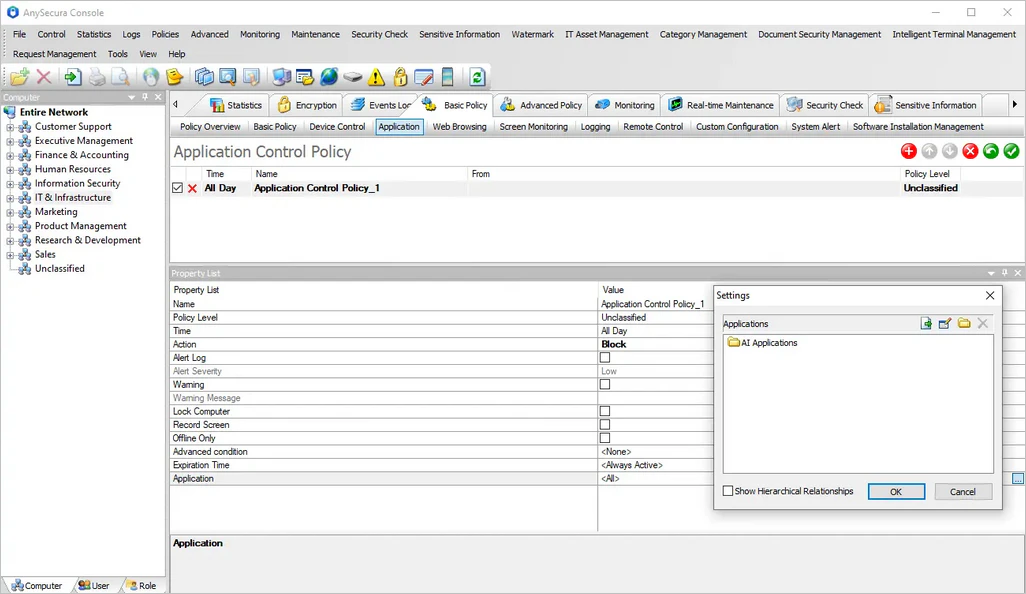
Application Control
Identifies and manages application access at the endpoint level, giving administrators full visibility into which applications are installed and running across the organization. Based on an approved/prohibited application list, administrators can set granular policies to allow, block, or restrict specific AI applications by user, group, or device. This keeps AI tool usage aligned with company policy without admins having to check every endpoint by hand.
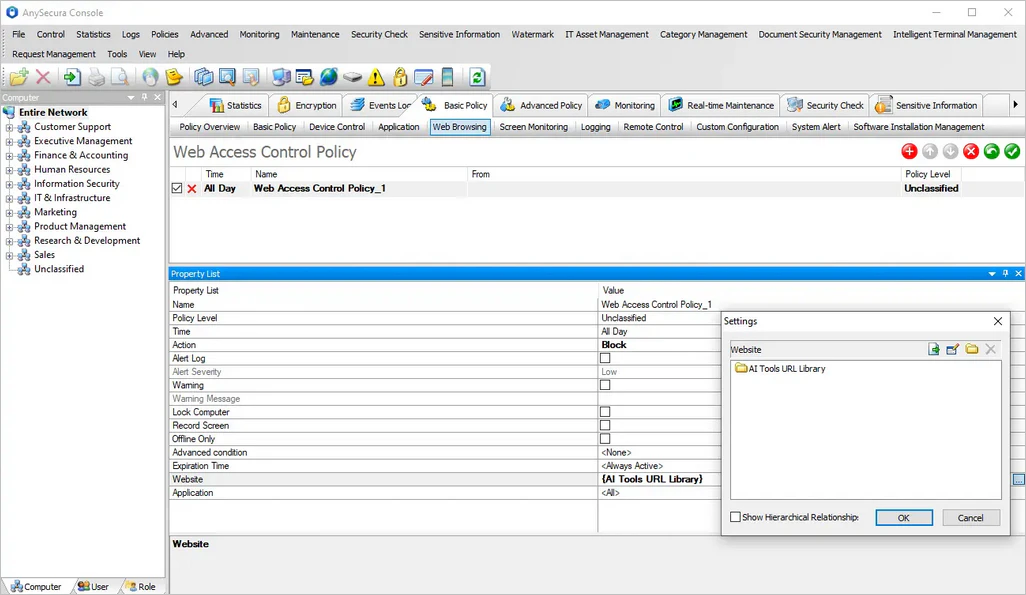
Web Access Control
For browser-based AI services like ChatGPT, Gemini, and Claude, applies policy-based rules by domain or URL to manage access to AI websites. Administrators can allow, block, or restrict access at the domain level, covering AI tools accessed directly through the browser rather than installed as standalone applications. This closes the gap that application-level controls alone leave open, since many employees turn to browser-based AI tools even when installed applications are tightly managed.
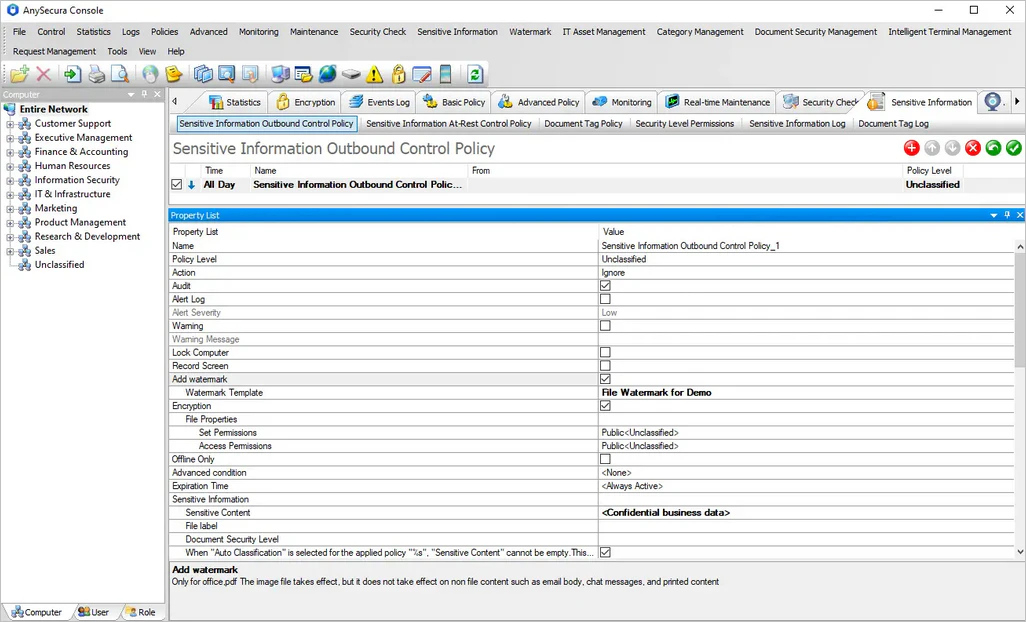
Sensitive Content Inspection
Checks relevant data against rules defined by the administrator, covering content such as customer information and financial data. When an employee attempts to send sensitive content to an external AI service, whether through copy-paste, file upload, or another channel, the business can apply restrictions based on policy, from a warning to an outright block. That way, businesses can see what data is actually leaving the organization, not just which applications employees are using.
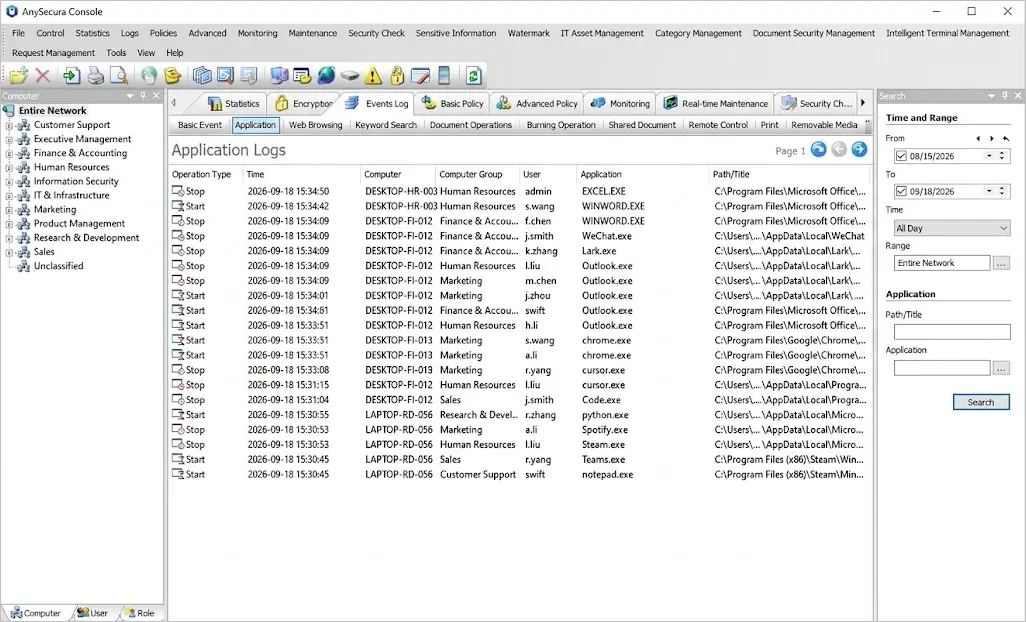
Activity Monitoring
Records user activity at the endpoint, giving administrators visibility into relevant actions and security events, including how AI applications and other work activity are being used. It gives businesses the ongoing record they need to review whether current AI usage policies are still working, and to dig into specific incidents when a security alert fires.
Together, these capabilities take a business beyond simply knowing whether employees use AI, to actually managing application access, employee activity, and sensitive data transmission in one place.
FAQ
Can employers monitor employee use of AI applications?
In most cases, yes. Within the bounds of applicable law and internal policy, employers can monitor AI application usage on company devices. Businesses should clearly explain what's being monitored, why, and how the data will be used, and build their policy around applicable privacy and labor regulations.
What is shadow AI?
Shadow AI refers to employees using AI applications like ChatGPT, Copilot, or Gemini on their own initiative, without approval or oversight from IT or security teams. Because this usage happens outside sanctioned channels, businesses often have no visibility into what data employees are sending to these tools, which creates a direct path for data leakage and compliance violations.
How can I monitor ChatGPT usage in the workplace?
Application monitoring, web access monitoring, and endpoint activity logging can all help track ChatGPT usage. If preventing data leakage is the priority, businesses also need to inspect the content being sent to ChatGPT and similar external AI services.
How can businesses prevent employees from uploading sensitive data to AI?
A combination of AI usage policy, web and application access controls, and sensitive content inspection lets businesses manage what data employees send to external AI services. The policy should also clearly define which categories of data are never allowed to be submitted to public AI tools.
Should companies block ChatGPT and other AI applications?
Not necessarily. AI tools have become a genuine productivity aid for many employees. Rather than applying a single blanket policy, businesses can allow, restrict, or block different applications based on business need and data security risk.
Conclusion
Monitoring employee AI usage isn't just about knowing whether someone used ChatGPT or another AI tool. Businesses need to understand which applications employees are using, how they're accessing them, and whether sensitive data is being sent to external AI services.
A complete AI usage management process covers discovering AI applications, monitoring usage activity, inspecting sensitive data, and controlling high-risk behavior. It lets businesses support AI adoption while keeping data leakage risk in check.
Businesses that want AI application usage, employee activity, and sensitive data security under one roof can turn to AnySecura's endpoint monitoring, application control, and data protection capabilities to make that happen.
Book a demo to see how AnySecura helps monitor AI usage across your organization.