
Managing a hybrid team is hard when people work from different locations. You can't see how time is spent, which distractions pull people off task, or who actually needs help — you just notice deadlines slipping.
Microsoft's Work Trend Index found that 85% of leaders feel less confident about employee productivity since hybrid work took hold. Employees, meanwhile, report working more hours. The mismatch usually means managers are tracking the wrong signals.
Below is a review method you can run with a spreadsheet — and how AnySecura collects the same data automatically when manual tracking stops scaling.
Part 1: Why Hybrid Teams Are Harder to Manage
Hybrid teams don't fail because people work from home. They fail when managers lose the informal read they used to get in an office — who looks stuck, who's coasting, who needs a nudge. Three situations come up again and again:
Scenario 1: Two Employees, Same Role, Different Results
Both finish their weekly tasks on time. One spends 6 hours in design tools and delivers two client-ready drafts. The other is "always online" but bounces between chat, browser tabs, and half-finished files. Traditional check-ins miss this gap because both look busy.
Scenario 2: Remote Staff Held to Office Rules
A manager expects instant replies because that's how the in-office team operates. Remote employees on different schedules get labeled "unresponsive," even when their output is strong. Morale drops, and good people leave — not because of performance, but because the rules were never adapted for hybrid work.
Scenario 3: Problems Surface Too Late
A project slips two weeks before anyone notices. By then, the issue isn't one distracted afternoon — it's a pattern: rising time on non-work apps, fewer document updates, and growing gaps between task assignments and deliverables. Without early signals, coaching happens after damage is done.
The fix isn't more surveillance. What helps is a structured review — starting with what got done, not who was online.
Part 2: How to Manage Hybrid Workforce Productivity
Most managers check the wrong thing first — whether someone is online, not whether the work landed. The OBC Framework (Outcome–Behavior–Context) is a three-step review order we use for hybrid teams: check delivery, then work habits, then circumstances.
The OBC Framework follows one simple rule:
Judge results first, understand behaviors second, and interpret them within context last.
Don't start with "were they online?" — that jumps to context and leads to unfair calls.
| Step | Layer | What You Do | Example Signals |
|---|---|---|---|
| 1 | Outcome — Judge results | Did the work get delivered on time and to standard? | Tasks closed, files created or updated, milestones hit, quality pass rate |
| 2 | Behavior — Understand patterns | What work habits support or block those results? | Time in approved work apps, focus blocks vs. app-switching, response time within agreed SLA |
| 3 | Context — Interpret circumstances | What situation shaped those patterns? | Remote vs. in-office days, role-specific tools, collaboration load, schedule rules |
If output looks fine, leave it there — working from a café on Tuesday isn't a problem by itself. If output is off, look at behavior next to see what's going on. Context comes in when you need to decide whether bad numbers point to a rule problem or an individual one.
Start with output — by role, not one generic score
Ask what got delivered before asking how the day looked. A sales rep and a developer shouldn't share the same scorecard — sales leads with pipeline and closed deals, knowledge workers with deliverables and file output, support with response times and ticket closure. Pick metrics that fit the job, not one template for everyone.
Look at what shipped, not how long someone sat at the desk. Move to the next step only when results miss target. AnySecura's output reports show where to pull delivery data.
Run a 15-minute weekly review
Once a week, block 15 minutes and walk through the team. You don't need software for this — a task board and honest notes work fine:
- Did each person hit their weekly deliverable? Note anyone below 80%.
- Is time in work apps up or down vs. last week?
- Any spike in off-task browsing or app-hopping? Ask before assuming.
- Were the expected files created or updated on time?
- If output is fine but distraction is up, check for burnout. If output is down and tool use is low, book a 1:1. If output is down and distraction is high, tighten app and site rules.
Keep it weekly. Monthly is too late to catch a slide. When the team grows beyond a handful of people, AnySecura fills in the usage numbers so you're not chasing data by hand.
Write down the rules before you review anyone
Context matters, but it shouldn't replace a delivery check. A lot of wasted time in hybrid teams traces back to rules nobody wrote down. For each role, agree on four things upfront:
- Core deliverables: What "done" looks like each week (e.g., 3 support tickets resolved, 1 design draft delivered).
- Response windows: How fast replies are expected — not instant, but agreed (e.g., within 2 hours during core hours).
- Approved tools: Which apps and sites are work-related vs. off-limits during focus time.
- Hybrid schedule rules: Which days are in-office, which are remote, and whether hours are fixed or flexible.
Put it on one page and share it with the team. When the rules are written, remote workers stop getting judged by office habits that don't apply to them.
Part 3: Build a More Productive Hybrid Workforce
The OBC review above works with a spreadsheet and a weekly calendar block. In practice, though, most managers lose time chasing numbers — pulling app usage from one place, file activity from another, and policy violations from a third.
AnySecura puts those signals in one console. You can see which applications and sites each person uses, whether expected files were created or updated, and whether anyone installed unapproved software — the same inputs you'd need for the Outcome and Behavior layers. Policy rules in AnySecura also cover the Context layer: approved tools, blocked distractions, and install restrictions you agreed on with the team.
You don't have to use software to run a fair review. But once the team grows past a handful of people, manual tracking breaks down — and setting up AnySecura takes just a few clicks per step.

Block distractions, review usage weekly, and coach from reports instead of gut feel.
Part 4: How to Manage Hybrid Workforce Productivity Step by Step
These four steps follow the same logic as the OBC framework: understand how work actually happens, spot what slows people down, set rules that match your team charter, then confirm output through reports — not by watching screens all day.
- Step 1 — Baseline app and web usage across the team
- Step 2 — Flag focus or communication issues before they pile up
- Step 3 — Enforce the rules you wrote down with the team
- Step 4 — Confirm deliverables and adjust from there
Even if you're new to endpoint management, each step is a few clicks in the AnySecura Console. Run through them in order the first time; after that, most teams only revisit policy rules and output checks during the weekly review.
1.0 Install Console and deploy Agent.
Install AnySecura Console on your Admin computer and deploy AnySecura Agent on each hybrid team device before pulling usage reports. See the AnySecura Installation Guide for full setup steps.
Step 1: Understand Current Work Patterns
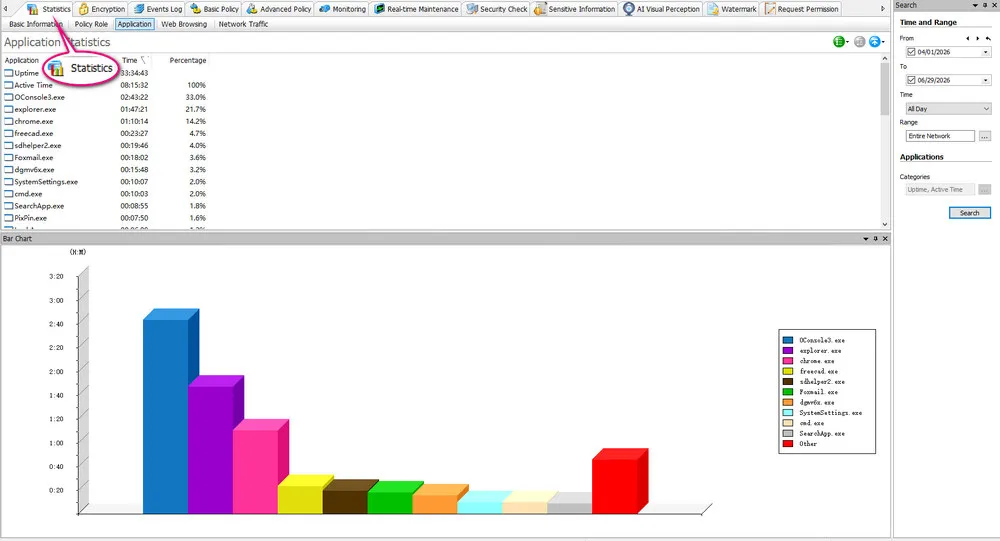
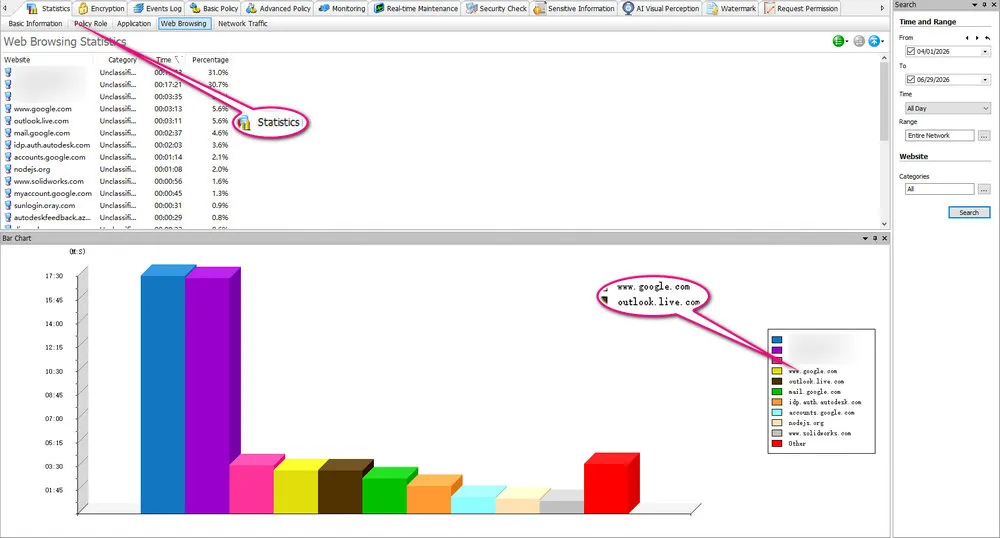
Start by generating activity reports for your team. AnySecura breaks down which applications and websites each person uses and how much time goes to each — so you can compare "busy" days against actual output instead of guessing. Look for mismatches: someone in design tools all week but no files updated, or a support rep spending half the day on non-work sites.
This baseline feeds the weekly review above. Run it for at least one full week before changing policies, so you're reacting to a pattern, not a single bad afternoon.
1.1 Check app usage.
Launch AnySecura Console > "Statistics" > "Application".
1.2 Check website usage.
Launch AnySecura Console > "Statistics" > "Web Browsing".
Step 2: Identify Productivity Issues
Usage stats show where time goes; chat logs often show why work stalls. In AnySecura, review IM and communication records to catch off-topic threads, long personal conversations during core hours, or risky language you want flagged early.
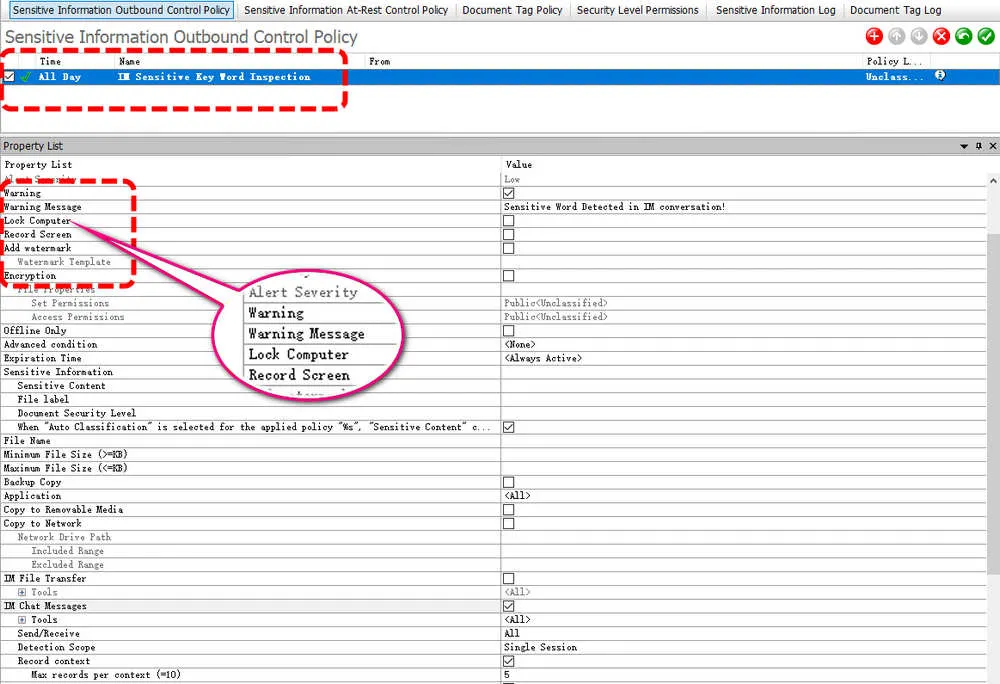
Set custom keywords under the Sensitive Information policy and get notified when they appear in chat — useful for compliance, but also for spotting distractions before they become a habit. When a deadline slips and the app report looks fine, the chat log is usually where you'll find the reason.
2.1 Control IM chat.
On the AnySecura dashboard, click "Sensitive Information" > "Sensitive Information Outbound Control Policy". Set keywords that may be inappropriate to appear in online chat.
Step 3: Create Better Work Rules
After Steps 1 and 2 show where time leaks or conversations drift, translate your team charter into enforced rules. Build whitelists and blacklists for websites and applications, and block installs that aren't on your approved list — so people can't add games, unvetted remote tools, or file-sharing apps without you knowing.
Start narrow: block the few sites or apps that showed up repeatedly in Step 1, rather than locking down everything on day one. You can always tighten policy in the next weekly review if numbers don't improve.
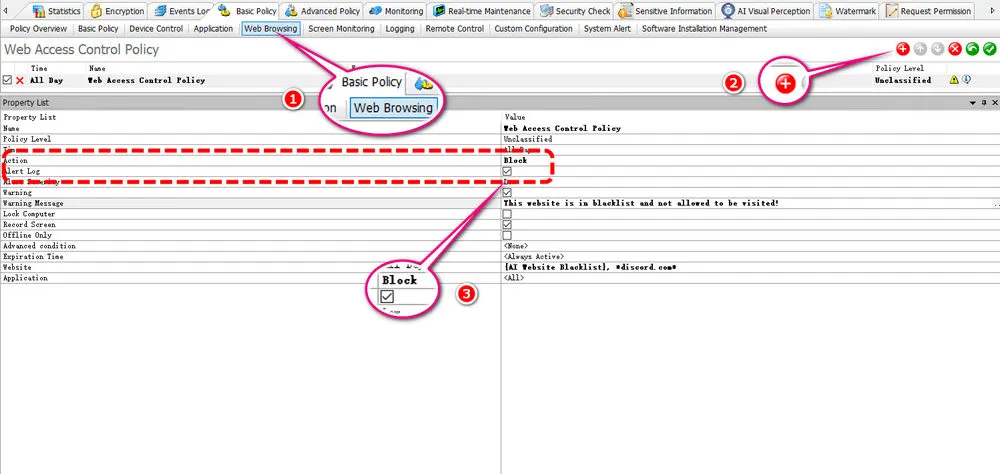
3.1 Block using certain apps or websites.
AnySecura Console > "Basic Policy" > "Web Browsing" or "Application" > "Block".
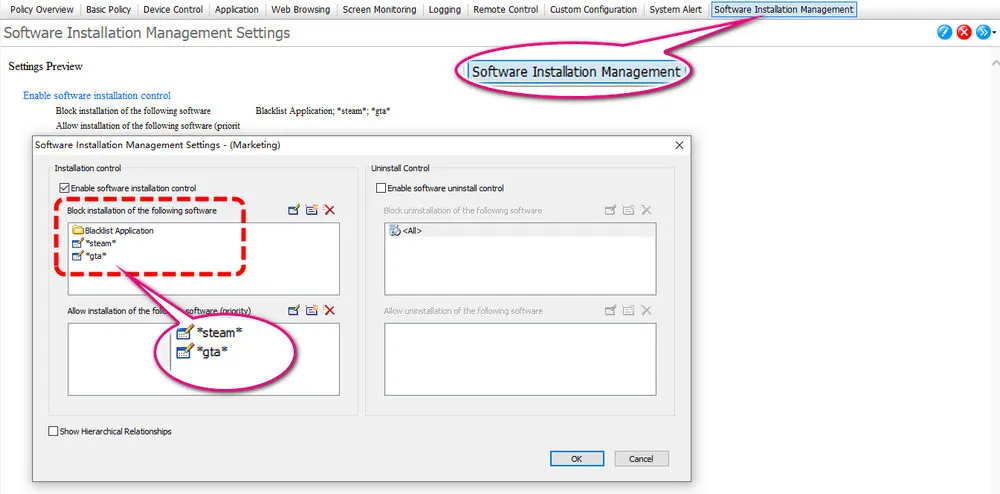
3.2 Block unrelated app installation.
AnySecura Console > "Basic Policy" > "Software Installation Management" > "Block".
Step 4: Measure Output and Improve
Circle back to deliverables here — the same place a productivity review should start. Open daily or weekly output reports in AnySecura and check whether tasks stayed on track, quality held, and time went to work tools rather than random browsing. Adjust policies or talk to the person based on what shipped, not how long they looked busy.
Screen captures and recordings are a secondary tool. Use them only when reports or alerts flag anomalies, policy violations, or data leak risks that need a closer look.
4.1 Review daily and weekly output reports.
Open AnySecura Console > "Statistics" to generate usage reports for your team. Compare application time and web browsing patterns across days or weeks to spot efficiency trends — rising focus on work tools, slipping task progress, or repeated off-task behavior.
Pair application and website statistics with "Event Log" > "Document Operation" to confirm whether files are being created, updated, and delivered on schedule — the clearest signal of actual work output.
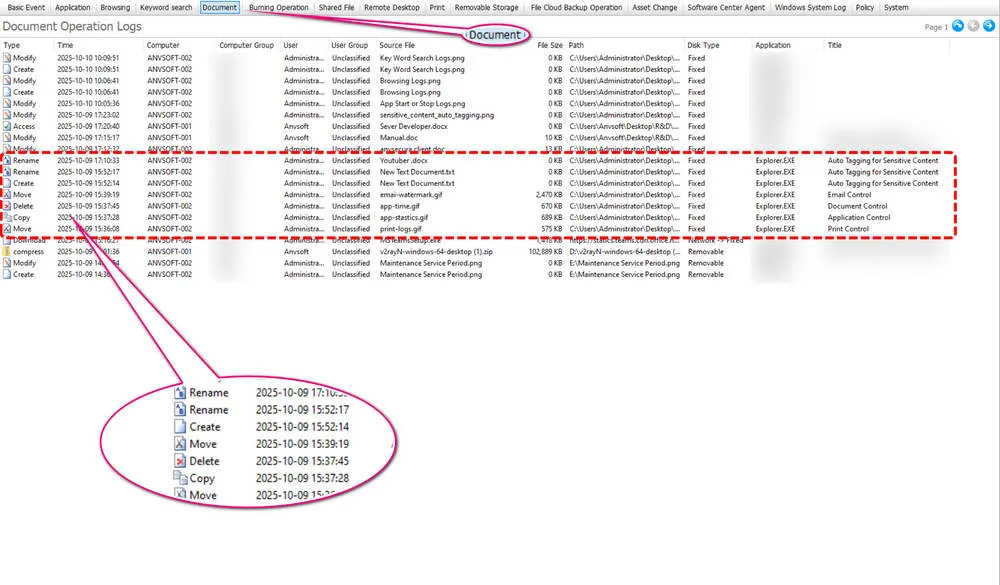
4.2 Act on trends and refine team workflows.
When reports show dropping time in work-related apps, rising distraction patterns, or one person lagging the rest on document output, decide whether it's a rules problem or a coaching conversation. Rules issues go back to policy setup; people issues are a 1:1 with the weekly checklist in hand. Either way, base the talk on what the reports show — not on how long someone appeared online.
4.3 Trace flagged issues with screen evidence (supplementary).
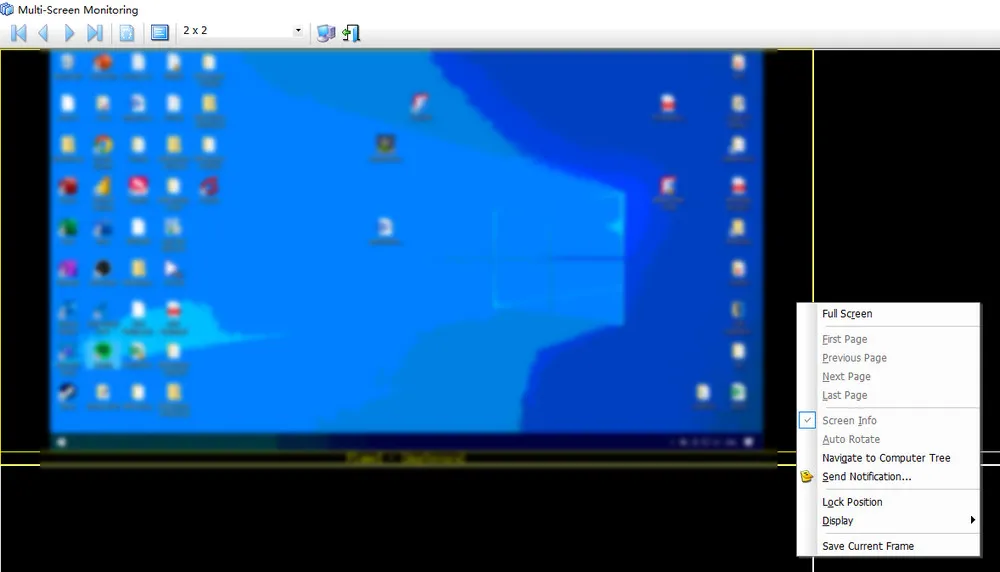
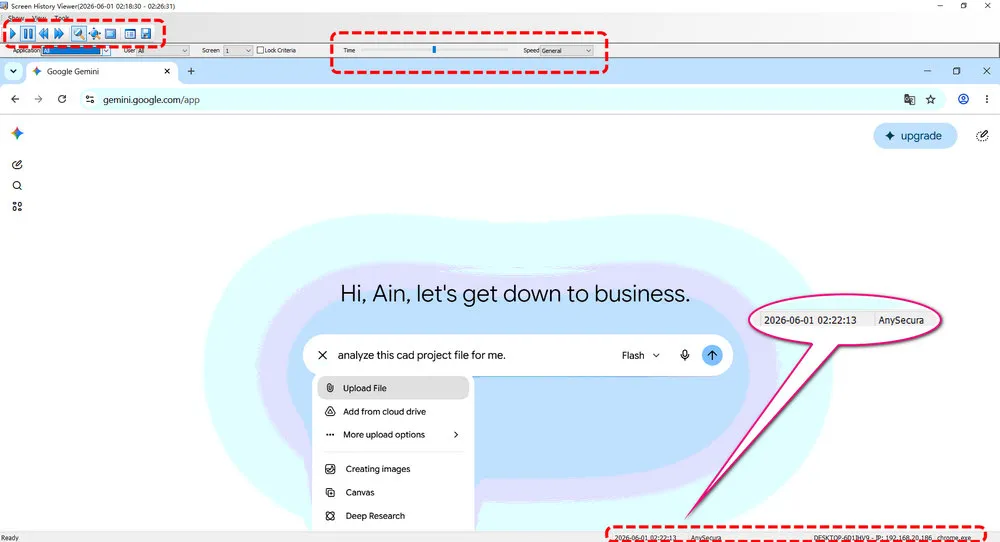
Only when daily or weekly reports, keyword alerts, or document logs surface anomalies should you drill down with visual records.
Review screenshots: AnySecura dashboard > "Monitoring" > "Multi-Screen Monitoring".
Playback screen recordings: AnySecura dashboard > "Monitoring" > "Search Screen History".
FAQs About Managing Hybrid Workforce Productivity
1. What is hybrid workforce management?
Hybrid workforce management means running a team that splits time between office and remote work — with clear expectations, output tracked by role, and a short weekly review that doesn't rely on watching screens all day.
2. How can I measure productivity for remote hybrid workers?
Check deliverables first: tasks closed, files out the door, milestones met. If something's off, look at how time was spent — work apps vs. everything else, file update frequency. Schedule and location only matter when you're explaining a pattern, not scoring someone on Monday morning. Outcome first, then behavior, then context — that's the order throughout this guide. AnySecura pulls behavior and output numbers through Statistics and Document Operation logs; use screen capture only when a report looks wrong and you need proof.
3. Can I control website and app use without disrupting work?
Yes — start with a whitelist of approved work tools rather than blocking everything. Use blacklists only for known distractions (social media, gaming sites). Set rules during focus hours, not 24/7. AnySecura supports both approaches via Basic Policy rules, and you can adjust them in policy setup based on weekly review data.
4. How often should I review hybrid team productivity?
Most teams only need 15 minutes once a week. Monthly works for spotting longer trends. Daily only makes sense when a deadline is at risk or someone is on a formal improvement plan. The weekly checklist above covers what to walk through.
Final Words
Are you losing control or not knowing what your team is actually doing? Still confused about how to manage hybrid workforce productivity? Don't hesitate anymore. Download business management software AnySecura and follow our steps to try.
Most of the time, the problem isn't the employee's effort, it's a clear view of how time is being spent that is essential for your team. Once you can see how work is actually getting done, you can understand your team's work patterns, manage hybrid employees with more confidence and less guesswork, and then improve productivity.
