
Who actually delivered last week? Which projects are falling behind? When deadlines slip, is it workload, collaboration breakdown, or unclear process? Every manager needs answers to these questions — yet many still rely on status meetings, spreadsheets, or self-reported updates that capture only part of the picture.
Effective performance monitoring combines deliverables, KPIs, process metrics, and relevant productivity signals — so you can coach based on facts, not assumptions. This guide covers how to monitor employee performance in 2026: the methods and tools that fit each purpose, and how to turn the data into better decisions for your team.

4 Effective Methods to Monitor Employee Performance
Monitoring employee performance means understanding outcomes — goals met, deadlines hit, quality maintained — in a way that helps the whole team improve. It is not about surveillance or finding fault; it is about having enough shared visibility to coach well, allocate work fairly, and celebrate progress. Activity data can add context during a review, but deliverables and KPIs remain the primary scorecard.
Most organizations combine two or more of these approaches. Here are four proven methods to adopt in 2026:
| Method | Measures | Best For | When to Use |
|---|---|---|---|
| Task Management | Task completion, deadlines, backlog | Individual daily work | Tracking who delivers what, and when |
| Project Management | Milestones, team contribution, schedule | Cross-team projects | Monitoring project delivery and workload |
| Time Tracking | Hours per task, effort vs. output | Workload and efficiency reviews | Checking if time spent matches results |
| Employee Activity Monitoring | Endpoint activity, app/web usage, file activity | Understanding why performance changes | Output drops but the cause is unclear |
No single tool provides a complete picture. High-performing organizations combine output metrics from task and project management platforms with time allocation and employee activity data to understand both what happened and why it happened.
Method 1: Using Task Management Tools
Task management tools are the most direct way to monitor individual performance at the work-item level. They show whether employees complete assigned tasks on time, how backlogs grow or shrink, and where quality issues recur. Core features include task assignment, progress tracking, deadline management, and collaboration — giving you measurable output data rather than raw activity logs.
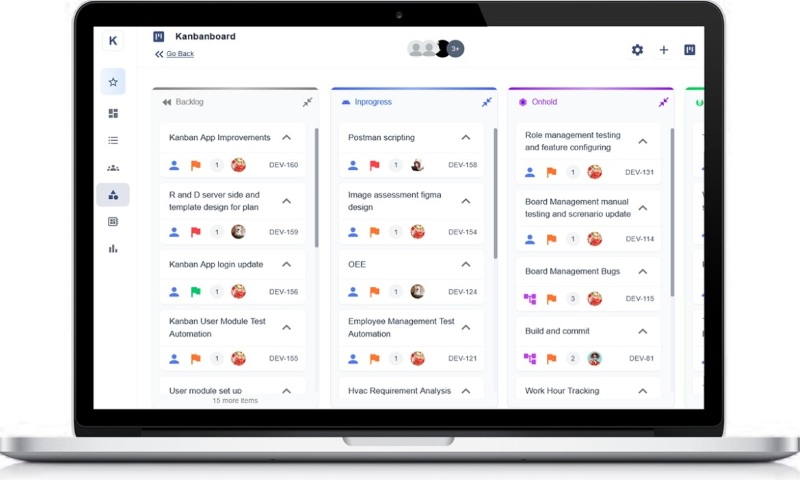
How to Monitor Performance with Task Management Tools
- Create tasks with clear owners, deadlines, and expected outcomes so completion can be scored objectively.
- Track on-time delivery rate, backlog size, and rework frequency through task boards or status reports.
- Compare planned vs. actual completion dates to identify bottlenecks and coaching opportunities.
- Run weekly or monthly reports on completion count, error rate, and cycle time to assess efficiency trends.
Method 2: Using Project Management Tools
Project management tools extend task tracking to team and project level. They measure milestone achievement, resource utilization, and each member's contribution to delivery schedules. Gantt charts, milestone tracking, and budget vs. actual reporting help you evaluate performance in context — not in isolation.
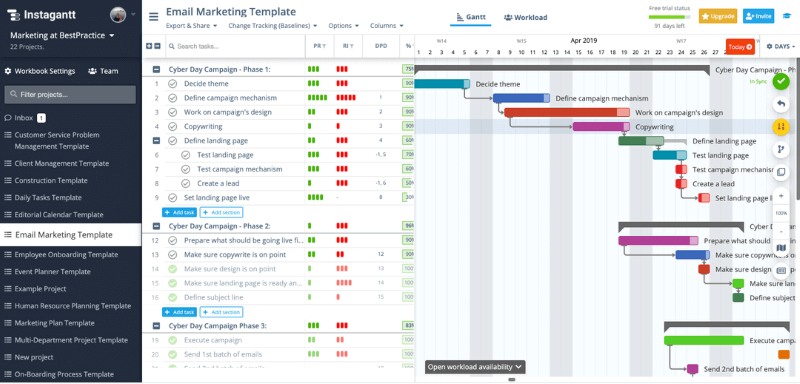
How to Monitor Performance with Project Management Tools
- Break projects into tasks with owners, goals, and deadlines so individual contribution is visible.
- Use boards and Gantt charts to track milestone progress and flag schedule slippage early.
- Review completed deliverables against quality standards and verify milestone achievements on schedule.
- Analyze project reports for each employee's task load, completion rate, and on-time performance — then adjust workloads or provide targeted feedback.
Method 3: Using Time Tracking Tools
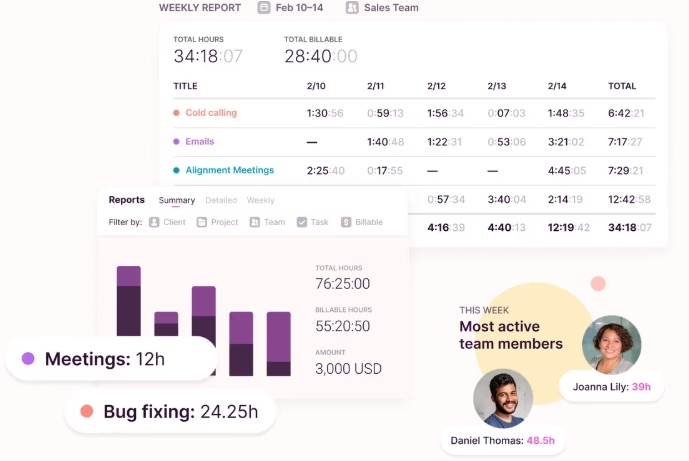
Time tracking tools measure how effort is allocated across tasks and projects. Used for performance — not just attendance — they reveal whether time spent aligns with output: long hours with few deliverables signal a problem; consistent task completion within estimated hours signals efficiency. Many tools also support idle detection and calendar integration to distinguish focused work from gaps.
How to Use Time Tracking for Performance Review
Tools such as Toggl Track illustrate a typical workflow:
- Step 1: Deployment and Binding: Download and deploy the tool, create a team, and invite employees to bind their accounts. Set reporting periods aligned with your review cycle.
- Step 2: Employee Daily Time Logging: Employees log time against specific tasks or projects. Accurate categorization lets you compare effort invested vs. deliverables produced.
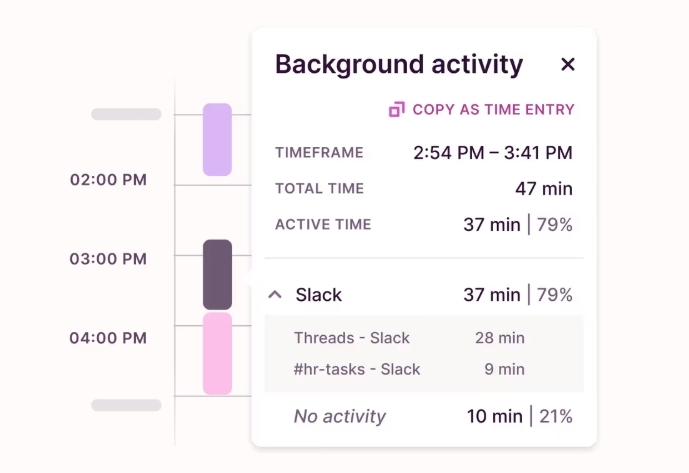
- Step 3: Compare Effort to Output: Review time data alongside task completion records. Look for mismatches — high hours with low output, or missed deadlines despite adequate logged time.
- Step 4: Performance Review and Adjustment: Export reports at regular intervals and use them in one-on-one reviews to discuss workload balance, estimation accuracy, and productivity trends.
Method 4: Using Employee Activity Monitoring Tools
When deliverables slip but the reason is unclear, managers often need a second layer of visibility — what employees actually did on company devices during the workday. Employee activity monitoring tools fills that gap: it logs endpoint activity so you can cross-check output data from task and project tools, not replace it.
AnySecura is an employee monitoring platform designed for this supporting role. Beyond application and web usage, it also logs file operations and print activity on endpoints — and can block policy violations as they happen, such as unauthorized file transfers or printing of sensitive documents. Managers get factual context to bring into performance conversations; security teams get an audit trail when risk is part of the picture. For setup and scope configuration, see our guide on monitoring employee computer activity.
What Activity Data Can AnySecura Provide?
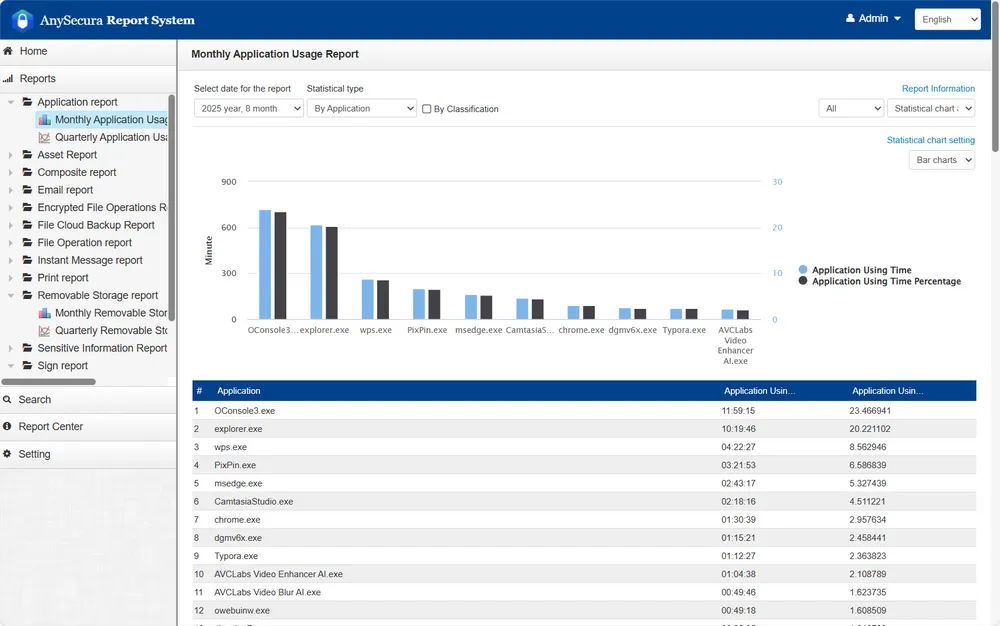
- Endpoint Presence and Application Usage: See when each device logged in and when activity last occurred, then review application usage in bar chart reports — a quick way to understand which tools employees spent time in during a given period.
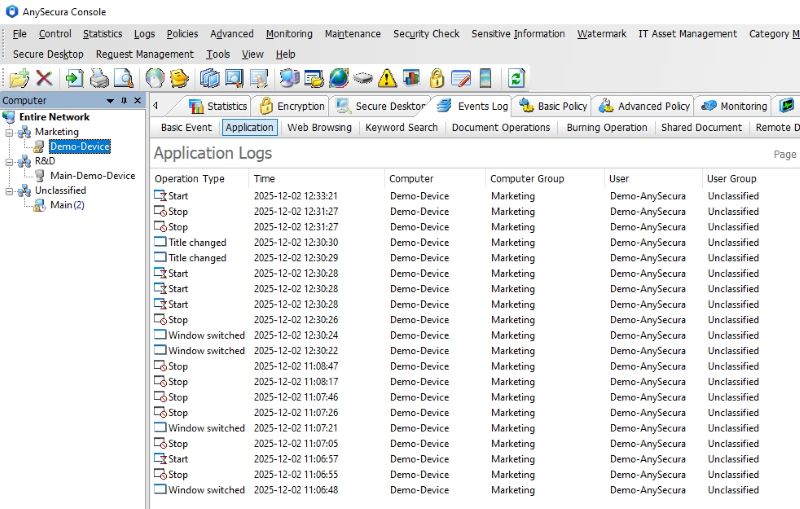
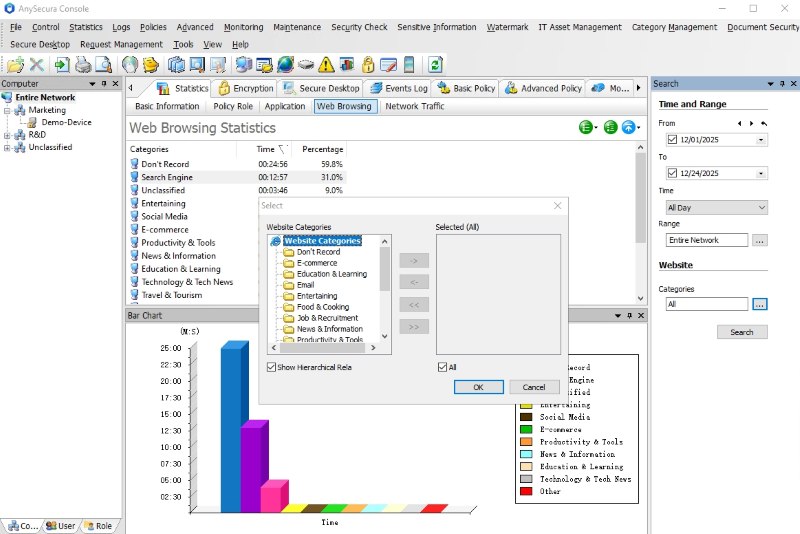
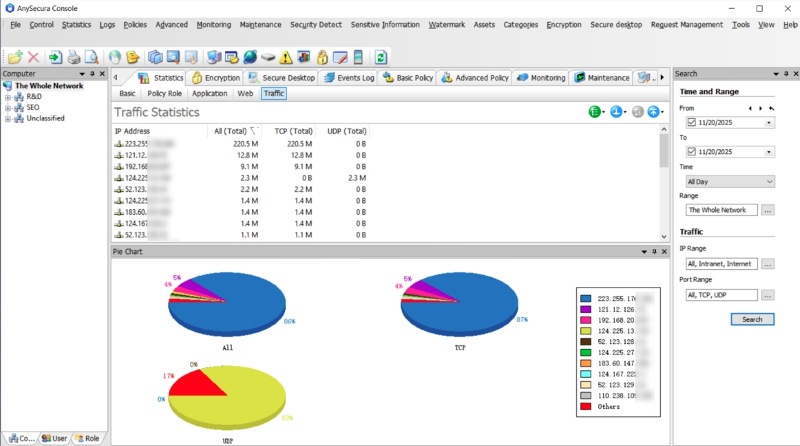
- Usage Statistics Across Apps, Web, and Network: Pull statistical reports on application sessions, website visits, and network traffic — organized in tables that show what was accessed and for how long. Use these records as reference material during reviews rather than standalone performance scores.
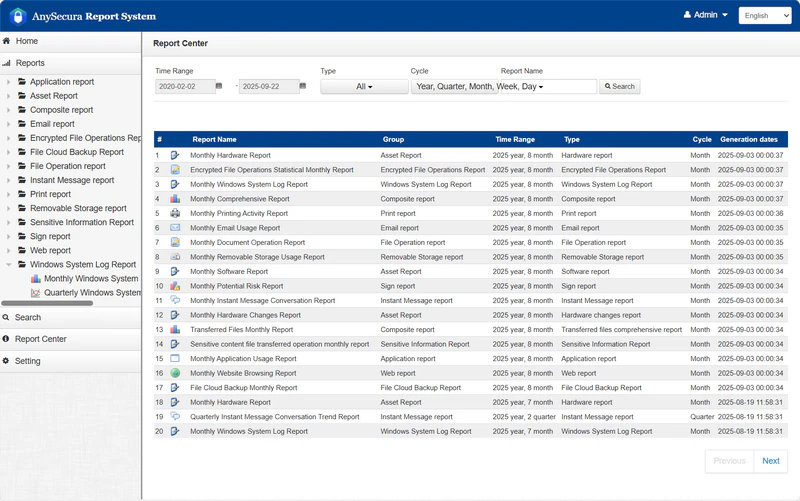
- File and Print Activity Records: Track document operations — creation, edits, copies, and transfers — along with print job logs. When a performance concern involves data handling or document workflow, these records help managers understand what actually happened on the endpoint.
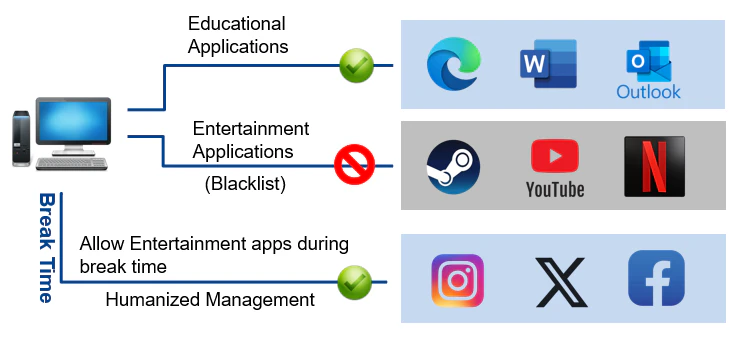
- Policy Enforcement on Risky Behavior: Set rules to block high-risk actions in real time, such as copying sensitive files to removable media, printing restricted documents, or accessing unauthorized applications. Alerts give managers and security teams a chance to respond before an incident escalates — not just review it afterward.
- Remote Team Visibility: For remote teams, AnySecura applies the same monitoring scope across locations — so managers get a consistent view of endpoint activity whether staff work from the office or at home.
- Team-Level Usage Overview: Compare how application usage and active time are distributed across team members — useful for spotting workload imbalances or preparing for group review discussions.
How Organizations Use AnySecura Alongside Performance Reviews
- Define Monitoring Scope: Decide which activity data would actually help your review process — application usage for a dev team, web access for customer support, or login records for shift-based roles. Keep the scope aligned with KPIs from your task or project tools; AnySecura adds context, it does not replace them.
- Enable the Right Modules: Turn on the modules that match each team's needs — work-hour logging, application and web usage reports, document control, or print control. Roles that handle sensitive data may need file and print auditing plus enforcement rules; others may only need usage statistics. Start narrow and expand where the data proves useful.
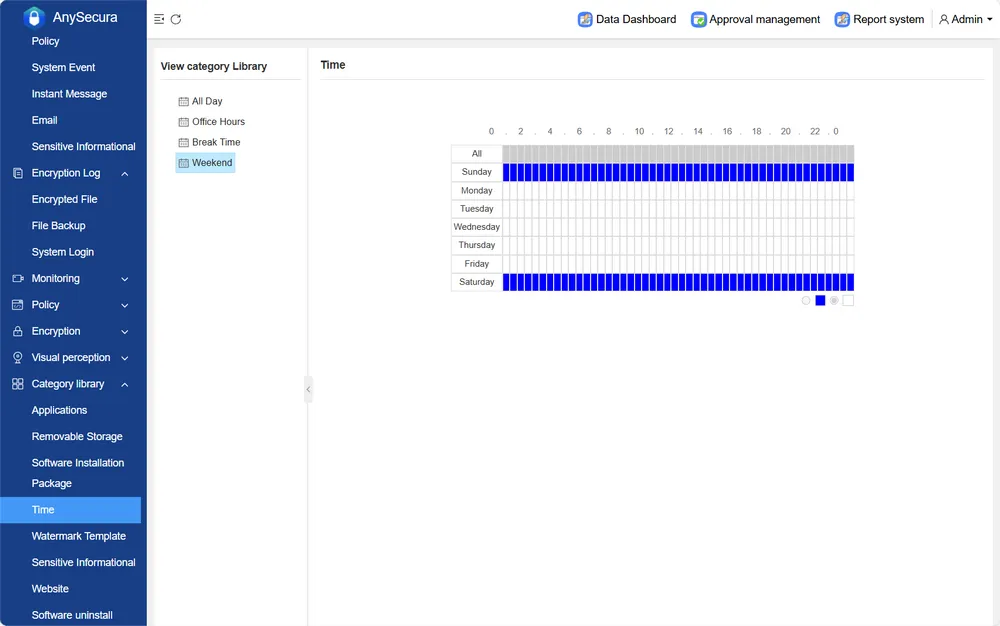
- Filter by Team or Individual: Query reports by department, role, or employee in the management console — so each manager sees only the endpoints and usage data relevant to their team.
- Cross-Reference with Deliverable Data: Before a one-on-one, pull usage statistics from AnySecura and compare them against task completion or project milestones from your other tools. The goal is to explain gaps — not to score activity on its own.
For deployment and technical setup, see our installation guide or computer activity monitoring guide.
Compare 10 free employee monitoring tools by user limits, trial length, and features to find the right fit for your team. Learn more>>
Practical Tips to Monitor Employee Performance Effectively
1. Map Out the Important Data in Each Tool
We recommend monitoring employee performance across four dimensions. These metrics can all be collected using the tools recommended above, so when selecting and implementing tools, it is important to prioritize support for these capabilities.
- Results Metrics (Goals & KPIs): This is the most traditional measurement method, focusing on final output. For example: Was the project delivered on time? Were sales targets achieved? Was the bug rate kept within an acceptable range? Task management tools and project management tools can clearly track the completion status of each goal.
- Process Metrics: Results are often influenced by external factors, while process metrics reveal how employees work. You may focus on the following metrics: task progress speed, number of work-in-progress tasks, requirement change frequency, and cross-department collaboration delays. Time tracking tools, combined with task boards, can quantify task cycles and iteration speed.
- Collaboration & Contribution Metrics: Modern work increasingly relies on teamwork. Through peer reviews, 360-degree feedback, and code review records, organizations can evaluate an employee's influence within the team, communication ability, and knowledge contribution.
- Productivity Signals (Supporting Layer): When output metrics alone do not explain a performance change, productivity signals fill in the gap — how time was spent, which tools were used, and whether workload looks balanced across the team. Endpoint monitoring tools like AnySecura capture these signals from device activity. Use them as supporting context in review conversations, not as standalone scores. Pair with deliverable data from task or project tools. For setup guidance, see how to monitor employee computer activity.
- Work availability: Login and last-activity timestamps indicate when someone was at their workstation — useful when deliverables slip but attendance or hours are in question.
- Time allocation across applications: Usage bar charts show which tools consumed the most time, helping you see whether effort went toward role-relevant work.
- Work tool vs. non-work usage: Application and web usage statistics reveal how device time was distributed — a signal worth checking when output drops without a clear process reason.
- Team workload balance: Comparing active time and application usage across teammates helps spot uneven distribution before individual reviews.
By integrating these data sources, organizations can build a comprehensive "performance profile" for each employee.
Not every metric applies to every role. Aligning indicators with job function keeps monitoring fair and actionable:
- Sales and business development: Quota attainment, win rate, average deal cycle, pipeline coverage ratio, and activity-to-close conversion. Task tools track follow-up tasks; CRM data provides the outcome scorecard.
- Software engineering: Sprint commitment completion, pull request cycle time, defect escape rate (bugs found in production vs. pre-release), and code review participation. Project boards and version-control integrations supply most of this data.
- Customer support: First-response time, average resolution time, SLA compliance rate, customer satisfaction (CSAT) or Net Promoter Score (NPS), and ticket backlog age. Helpdesk platforms typically report these natively.
- Operations and back-office: Process cycle time, error or rework rate, throughput volume, and cross-team handoff delays. Time tracking paired with task management tools works well here.
Review cadence should match the metric type: output KPIs can be checked weekly or monthly, while process signals benefit from shorter cycles — many managers run a 15-minute weekly check-in on task progress and reserve deeper quarterly reviews for goal alignment and career development.
2. Build a Performance Dashboard
You need a unified view to consolidate data scattered across different tools. There are three implementation approaches:
Option A: Use BI Tools
Connect data from various tools via APIs or CSV exports into Power BI, Tableau, or Google Looker Studio to create custom performance dashboards. For example, link task completion data from Jira and code review metrics from GitLab for output tracking, then add activity and usage logs from AnySecura to give managers behavioral context during reviews.
Option B: Leverage Built-in Integrations
Some tools support native integrations. For example, Jira can integrate with Time Doctor via plugins. Asana integrates seamlessly with Everhour, allowing time data to appear directly alongside tasks.
Option C: Manual Aggregation (Suitable for Small Teams)
If you use only a few tools, you can export reports weekly and merge them using Excel Power Query to create a simple weekly reporting template.
You may also use an employee monitoring tool like AnySecura for endpoint activity and usage logs, alongside your task and project management systems for deliverable tracking — keeping each tool focused on what it does best.
3. Set Baselines and Thresholds
Data alone has no meaning; comparison creates meaning. You should establish the following reference frameworks:
- Personal trend baseline: Take the employee's average output over the previous four weeks — on-time rate, tasks completed, or cycle time — and treat that as the baseline. Trigger attention when current performance deviates by ±20%. For example, if an employee's on-time delivery rate was 95% last month and drops to 72% this month, investigate before the next review cycle.
- Team average baseline: Compare with the median of team members in the same role. For example, if the average cycle time for developers is three days, and an employee consistently takes five days, the reason should be investigated.
- Target thresholds: Set according to business objectives. For example, specify that on-time delivery must stay above 90%, code review participation at least ten times per month, or customer ticket resolution within SLA 95% of the time.
4. Key Considerations for Implementation
Avoid Metric Rigidity
Metrics should be reviewed on a fixed schedule and updated when business priorities shift. During early project phases, process indicators (cycle time, blockers) often matter more than output counts; once workflows stabilize, shift emphasis toward deliverable quality and deadline adherence. Hold a quarterly review with team leads and frontline staff to retire targets that no longer reflect real work — rigid KPIs encourage people to optimize for the number instead of the outcome.
Culture First, Tools Later
Establish a culture of trust and feedback before introducing tools. When employees understand that data supports development rather than punishment, they are more likely to engage honestly in the review process — and the insights you gather will be more useful for everyone.
5. Turn Data into Coaching Conversations
Collecting metrics only creates value when managers act on them. A structured one-on-one keeps reviews constructive rather than punitive:
- Lead with outcomes: Open with deliverable data — goals met, deadlines missed, quality issues — before referencing any activity or usage reports.
- Ask before assuming: A drop in on-time delivery may reflect unclear requirements, dependency delays, or personal circumstances. Use data to start the conversation, not to deliver a verdict.
- Co-create next steps: Agree on one or two specific actions — clearer task scoping, workload rebalancing, skill training — and set a follow-up date to check progress.
- Document agreements: Record what was discussed and what each party committed to. This protects both manager and employee and makes the next review cycle more objective.
Research consistently shows that employees who receive regular, specific feedback perform better than those evaluated only during annual reviews. Pair automated dashboards with scheduled check-ins so data triggers timely support, not delayed surprises.
6. Common Mistakes to Avoid
- Treating activity as performance: High screen time or long logged hours do not equal strong results. Always weight deliverables and KPIs above raw usage data.
- Comparing unlike roles: A designer's cycle time cannot be benchmarked against a developer's. Use role-specific baselines and team medians within the same function.
- Collecting data without a feedback loop: Monitoring without regular conversations erodes trust and gives employees no path to improve. Data should feed coaching, not silent scorekeeping.
- Using metrics punitively: Tying surveillance data directly to termination or pay cuts without context or due process creates legal risk and damages morale. Address performance gaps through documented improvement plans first.
- Ignoring context: Seasonal workload spikes, team restructuring, or tool migrations can temporarily skew numbers. Compare trends over several weeks rather than reacting to a single anomalous data point.
Keep Monitoring Fair and Transparent
Performance monitoring works only when employees trust the process. A few simple practices keep reviews constructive and proportionate:
- Tell people upfront: Share what you track, why it matters for their role, and who can see the data — before reviews begin, not after a concern arises.
- Measure outcomes first: Prioritize deliverables, KPIs, and goal progress. Use activity or usage data only as supporting context when output metrics need explanation.
- Keep it role-relevant: Track metrics tied to each job function. Avoid invasive methods — keystroke logging, webcam access, off-hours monitoring — unless a specific security policy requires them.
- Use data to coach, not punish: Pair metrics with regular feedback conversations. Address gaps through improvement plans before escalating to formal disciplinary action.
Privacy rules vary by region and become more detailed when monitoring extends to internet usage, device activity, or remote work. For those scenarios, see our guides on monitoring employee internet usage legally and privacy boundaries for remote staff.
FAQs about Monitoring Employee Performance
Why monitor employee performance?
Monitoring employee performance helps you track the amount of work completed, spot where delays occur, recognize staff who deliver strong results, and step in with guidance when someone struggles. This steady observation improves team efficiency and keeps the company on course toward its targets.
What is the difference between performance monitoring and activity monitoring?
Performance monitoring measures outcomes — goals achieved, deadlines met, quality standards maintained. Activity monitoring records what someone did on a device — apps used, sites visited, screenshots. Activity data can support a performance review when output drops, but it should not replace KPIs and deliverable tracking. Use task and project tools for the scorecard; use activity tools only when you need deeper context. See our dedicated guide on monitoring employee computer activity for the latter.
How often should performance be monitored?
Continuous monitoring is best, using dashboards to track weekly and monthly trends. Combine this with regular one-on-one meetings to provide timely feedback.
AnySecura records endpoint activity continuously and lets managers query usage and work-hour reports on demand from the management console — useful when preparing for a review meeting.
What should managers do when performance data shows a decline?
Start with a private conversation rather than a formal warning. Review outcome metrics first — missed deadlines, quality issues, unmet KPIs — and ask the employee what changed. Common root causes include unclear priorities, capacity overload, skill gaps, or external blockers. Agree on a short improvement plan with specific targets and a check-in date (typically two to four weeks). Document the discussion. If performance does not recover after reasonable support and a documented plan, escalate through your organization's HR process — using aggregated trend data as context, not isolated activity snapshots.
Can employee performance monitoring affect engagement negatively?
Yes, when implemented poorly. Surveillance-heavy approaches with no transparency or feedback loop tend to reduce trust and intrinsic motivation. Monitoring works best when employees know what is tracked, understand why, and see managers use the data to remove obstacles and recognize strong work — not only to identify failures. Involving teams in choosing relevant metrics and reviewing them together during one-on-ones significantly improves acceptance.
Conclusion
Monitoring employee performance is essential for staying on top of your team's progress, and dedicating time to do it well is important. However, spending too much time on it? That's a different story. The key to efficiency lies in using the right tools and the right methods.
When a review needs behavioral context, AnySecura lets you pull endpoint usage and work-hour logs from the management console — freeing you to focus on the conversation that follows. Pair it with your task or project tools for a complete performance picture.


