
On July 14, 2020, a caller who said they were from Twitter's IT help desk talked several employees into typing their credentials into a fake VPN login page. About a day later, attackers had taken over 130 accounts. The state regulator found no evidence that any employee knowingly helped. Most people picture an insider threat as a disgruntled employee stealing files. Insider threat examples like this one show a wider picture: the person with access can be tricked, careless or paid, and the breach can begin with a phone call.
Below are 11 real cases from Department of Justice releases, SEC filings and regulator reports, each with the date, the outcome and a link to the official record. Most stories end with a short box you can take back to your own company: what to watch for and what to do about it. Use them to compare those gaps with your own offboarding, file-transfer and access practices. The facts come from the linked sources. The lessons are ours.

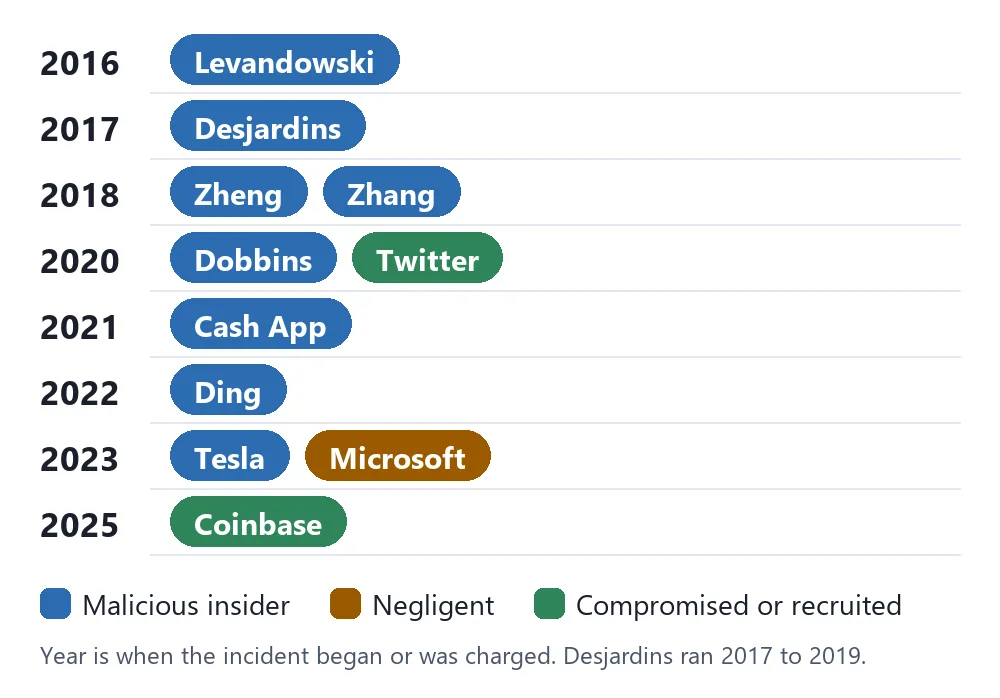
- Three types appear: Malicious insiders who take or destroy data, negligent employees who expose it by mistake, and people whose accounts are tricked or bought by outsiders.
- Negligence is the biggest category: In the 2026 Ponemon Institute and DTEX study of 354 organizations, 53% of incidents involved negligent insiders, 27% malicious insiders and 20% stolen credentials.
- Few cases start with an alert: Of ten cases where the sources say who noticed first, four were found from outside and only two were triggered by the company's own monitoring or security checks.
11 Insider Threat Examples at a Glance
| Case | Year | Type | Outcome |
|---|---|---|---|
| Levandowski / Google | 2016 | Malicious | 18 months; later pardoned |
| Zheng / GE Power | 2018 | Malicious | Convicted of conspiracy; 24 months |
| Zhang / Apple | 2018 | Malicious | Pleaded guilty; 120 days |
| Ding / Google | 2022–2023 | Malicious | Convicted on 14 counts (2026) |
| Dobbins / packaging company | 2020 | Malicious | 1 year and 1 day |
| Cash App Investing / Block | 2021 | Malicious | About 8.2 million customers notified |
| Desjardins | 2017–2019 | Malicious | About 9.7 million people affected |
| Tesla | 2023 | Malicious | 75,735 people affected |
| Coinbase | 2025 | Recruited | Estimated $180–400 million |
| 2020 | Compromised | 130 accounts compromised | |
| Microsoft AI team | 2023 | Negligent | 38TB exposed; token revoked |
What Counts as an Insider Threat?
An insider threat is harm to an organization caused by someone who already has authorized access. CISA's definition covers people who misuse that access intentionally or by accident, and insiders who work with outside actors.
Security teams usually sort cases into three types. Malicious insiders act on purpose, and they account for eight of the cases below. Negligent insiders expose data through a mistake, as Microsoft's AI team did. Compromised or recruited insiders are tricked or paid by outsiders, as at Twitter and Coinbase. Some sources use only two categories, intentional and unintentional, but the controls differ enough that we keep three. For the first type, see what a malicious insider looks like and how to detect one.
Intellectual Property Theft: Four Insider Threat Examples
Intellectual property is what makes a company hard to copy: product designs, source code, manufacturing methods and research. When an employee takes it, the damage is competitive, because someone else could use what the company spent years developing. The four cases below involve a self-driving car project, gas turbine technology, circuit board schematics for an autonomous vehicle and the infrastructure behind Google's AI data centers.
The people who took the files already worked with them, so asking who can open a file doesn't catch the problem. The better question is what happens to the file after someone opens it. These cases span 2016 to 2026.
Anthony Levandowski and Google's self-driving files (2016)
Malicious insider Pleaded guilty DOJ release
Levandowski took the files while he was still working at Google. As he prepared to leave in 2016, he downloaded thousands of files from the company's self-driving car project onto his personal laptop. He pleaded guilty to one of 33 trade secret theft counts, and on August 4, 2020 a judge sentenced him to 18 months, a $95,000 fine and $756,499.22 in restitution. Press reports say he was pardoned on January 20, 2021.
Do this: Require approval for copies to personal devices or removable media, and review departing employees' activity.
Xiaoqing Zheng and GE Power turbine technology (2018)
Malicious insider Convicted of conspiracy Method alleged DOJ release
Prosecutors alleged in 2018 that the stolen files traveled inside a sunset photograph. Zheng, an engineer at GE Power, allegedly hid them in the image's code and emailed it from his GE address to a personal email account. A jury convicted him of conspiracy to commit economic espionage on March 31, 2022, and acquitted him on two economic espionage counts and two trade secret theft counts. He was sentenced to 24 months and fined $7,500.
Do this: Monitor mail to personal addresses and flag unusual attachments.
Xiaolang Zhang and Apple's autonomous vehicle project (2018)
Malicious insider Pleaded guilty DOJ release
The 25-page document at the center of Zhang's case held circuit board schematics for an autonomous vehicle. A federal grand jury indicted him in July 2018, and agents arrested him at San Jose International Airport as he was traveling toward China. He pleaded guilty to one count of theft of trade secrets in 2022 and, according to court documents reported by 9to5Mac, was sentenced in February 2024 to 120 days in prison and $146,984 in restitution. The FBI's affidavit says investigators built the case from Apple's file listings, camera images and badge history, so those records are worth keeping.
Linwei Ding and Google's AI infrastructure (2022–2026)
Malicious insider Convicted by jury DOJ release
Ding's case ran far longer than most. Prosecutors said that between May 2022 and April 2023 he copied more than 1,000 confidential Google files into a personal cloud account, covering the hardware and software behind Google's AI supercomputing data centers. He was also secretly affiliated with two companies based in China. On January 29, 2026, a federal jury in San Francisco convicted him on seven counts of economic espionage and seven counts of theft of trade secrets. The FBI described it as the first conviction on AI-related economic espionage charges.
Do this: Require approval for personal cloud uploads, and run a conflict-of-interest disclosure process.
Sabotage and Access After Termination
A fired employee whose credentials still work doesn't have to break in. Two cases show what that looks like.
Christopher Dobbins and a medical packaging company (2020)
Malicious insider Pleaded guilty DOJ release
Dobbins was fired from a medical packaging company in early March 2020 and still got back in. Before the firing he had created a fake user account. Afterward he logged in with it, then used a second fake account to edit about 115,581 records and delete about 2,371 in the company's electronic shipping system, which delayed shipments of personal protective equipment. He pleaded guilty to reckless damage to a protected computer and received one year and one day in prison and $221,200 in restitution.
Do this: Disable every account a departing employee owns on their last day, and review accounts nobody owns.
Cash App Investing and a former employee (2021)
Malicious insider Company disclosure SEC Form 8-K
A former employee downloaded Cash App Investing customer reports on December 10, 2021. Block's 2022 filing says the employee had regular access to the reports in their past job, but that in this instance the reports were accessed without permission after their employment ended. Block contacted about 8.2 million current and former customers. The reports held full names and brokerage account numbers and, for some customers, portfolio values, holdings or a day of trading activity, but no usernames, passwords, Social Security numbers or bank account information.
Do this: Confirm at every exit that access is removed, and alert on downloads by former employees.
Data Leaks, Recruited Insiders and Stolen Access
These four cases involve long-running copying, a leak to the press, paid support staff and deceived employees.
Desjardins and a 26-month data theft (2017–2019)
Malicious insider Regulator finding Privacy Commissioner of Canada
For at least 26 months, an employee of the Canadian financial group Desjardins took personal information out of the company, and the company did not notice. Marketing staff had copied data from two data warehouses into a shared drive that other employees could open, and the employee then copied it from that drive to a work computer and onto USB keys. The breach affected close to 9.7 million people. The Laval police department notified Desjardins. The Office of the Privacy Commissioner of Canada found weaknesses in access controls, data segregation, and oversight and monitoring, and noted that Desjardins analyzed logs only after incidents were reported and had no user behavior analytics tool at the time.
Do this: Limit who can move restricted data into open folders, log USB copies, and review file activity on a schedule instead of only after an incident.
Tesla and a leak to the press (2023)
Malicious insider Company disclosure State breach notice
Tesla heard about its leak from a reporter. According to the company's notice as quoted in press coverage, the German outlet Handelsblatt told Tesla on May 10, 2023 that it had obtained confidential information, and Tesla said two former employees had misappropriated it. The Maine Attorney General's breach notice lists 75,735 people affected and "Insider wrongdoing" as the cause. Finding out from a journalist is the worst way to learn about a leak, and it is the argument for logging exports of personal data from HR systems.
Coinbase and paid support staff (2025)
Recruited insider Company disclosure SEC Form 8-K
The attacker in the Coinbase case appears to have bought access instead of breaking in. On May 11, 2025, Coinbase received an email from an unknown threat actor demanding money for not disclosing customer data. In its Form 8-K, the company said the actor appears to have obtained the information by paying multiple contractors or employees in support roles outside the United States. Coinbase's own security monitoring had independently detected personnel accessing data without business need in the previous months. The company terminated the personnel involved and did not pay the demand, and it preliminarily estimated $180 million to $400 million in remediation and customer reimbursement costs.
Do this: Limit each support role to the records its tasks need, and alert on bulk lookups by one agent. Alerts alone are not enough: Coinbase's monitoring flagged the access, but the data had already left.
Twitter and a phone-based credential scam (2020)
Compromised insider Regulator finding NY State DFS
The call came in the afternoon of July 14, 2020, and the attack was over in roughly a day. The attackers pretended to be the IT help desk, said there was a VPN problem and directed employees to a fake login page. They entered the stolen credentials on the real site at the same moment, which triggered a multi-factor authentication prompt that some employees approved. They took over 130 accounts and stole about $118,000 in bitcoin. The New York State Department of Financial Services found no evidence that employees knowingly aided them, and noted that Twitter had no chief information security officer since December 2019 and had not added significant compensating controls after moving to remote work.
Do this: Use phishing-resistant authentication, tell staff how the real help desk makes contact, and limit who can reach tools that take over accounts.
Negligent Insider Threat Examples
A negligent insider doesn't intend harm. The Microsoft case shows how far one convenient shortcut can reach.
Microsoft's AI research team and a 38TB exposure (2023)
Negligent insider Researcher disclosure Wiz Research
The link that exposed Microsoft's data was set to expire in 2051. Microsoft's AI research team had published open-source training data on GitHub using a shared access signature (SAS) token, a link that grants access to cloud storage. The token covered the entire storage account and granted full control instead of read-only access. It exposed 38TB of additional private data, including a backup of two employees' workstations and more than 30,000 internal Teams messages from 359 employees. Wiz Research reported the issue on June 22, 2023, and Microsoft revoked the token two days later.
Do this: Limit each link to the files and time needed, and review the inventory on a schedule.
Negligence accounts for more insider incidents than malice. The 2026 Cost of Insider Risks report from Ponemon Institute and DTEX attributes 53% of incidents to negligent insiders, 27% to malicious insiders and 20% to credential theft. It puts the average annual cost of insider risk at $19.5 million in 2025 and the average time to contain an incident at 67 days.
Who Noticed First?
Of these insider threat examples, ten have sources that say who noticed the problem first. Four were found from outside the company, and six from inside.
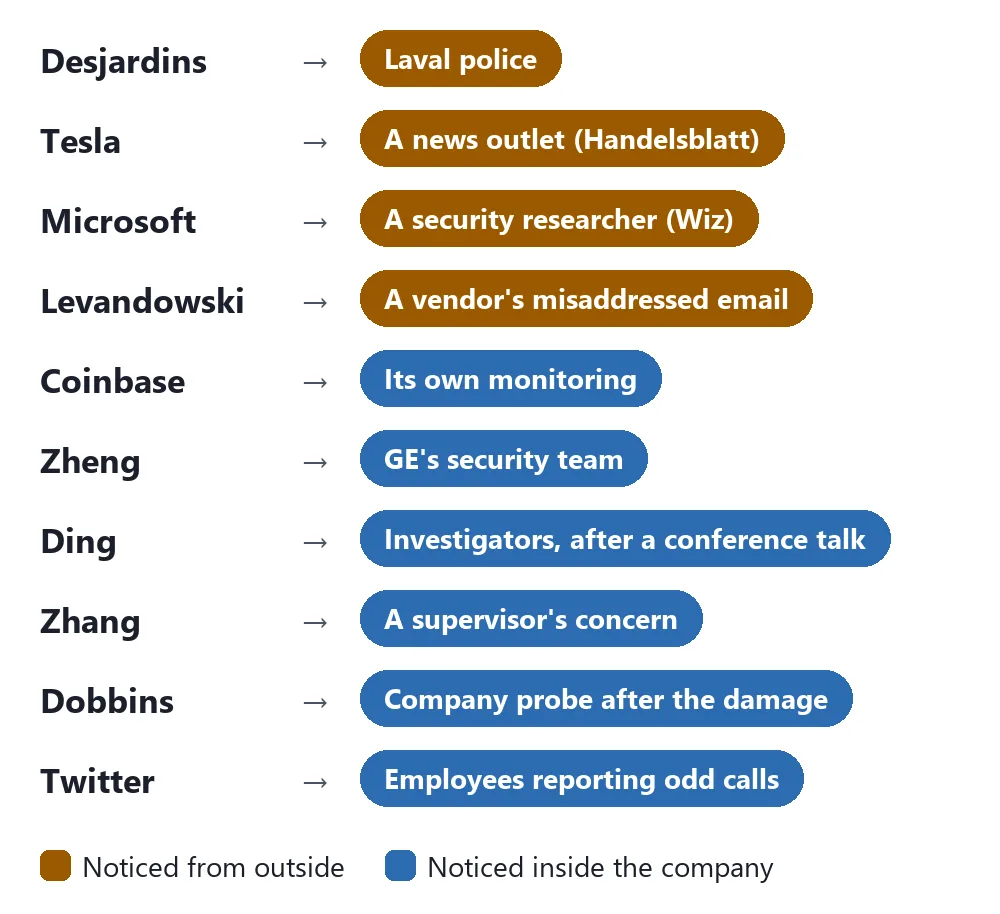
Only two of the six inside finds were triggered by the company's own monitoring or security checks, at Coinbase and GE. The others started with a person noticing something odd, or with damage already done: employees reporting strange calls, a supervisor's concern, a conference talk that prompted a log review, a probe after the sabotage.
The question still applies to your own company: if this happened here, would you hear about it from your own logs first, or from a police officer, a reporter, a colleague or a researcher? These cases are worth learning from, so that your company finds out from its own records before an outsider tells you that its information has already leaked.
Explore 12 practical DLP policy examples, download a free editable Word template, and learn how to implement and enforce DLP rules without disrupting everyday business operations. Learn more>>
Warning Signs Across These Insider Threat Examples
We went back through the 11 cases above and pulled out the warning signs that are worth your attention if you want to prevent a data breach. The table below lists each sign, the cases where it appeared, and the record your company needs to collect in order to see it. For each row, ask yourself: if this happened here today, would we have the record that shows it?
| # | Warning sign | Seen in | Record that would show it | Ask your team |
|---|---|---|---|---|
| 1 | Bulk copying or uploading to a personal device or cloud account | Levandowski, Ding | File operation logs, cloud upload logs | Does anyone review activity during notice periods? |
| 2 | Work files sent to a personal email address | Zheng (alleged) | Email and attachment logs | Can we see the destination, not just the file type? |
| 3 | Access after employment ended, or accounts with no owner | Cash App Investing, Dobbins | Account and access logs, last-login records | Do we disable every account on the last day? |
| 4 | Steady copying to shared drives and USB devices | Desjardins | File and removable media logs | Who can move restricted data, and is it logged? |
| 5 | Data access without a business need | Coinbase | Per-role access logs | Are bulk lookups flagged? |
| 6 | Credentials entered after an unexpected IT call | Authentication prompts, help desk records | Do staff know how the real help desk contacts them? | |
| 7 | Sharing links with broad permissions and long lifetimes | Microsoft | Storage sharing inventory | When did we last review external links? |
| 8 | Data reaching an outsider before any internal alert | Tesla, Desjardins | Export and transfer logs | Would we see an export of personal data before an outsider told us? |
| 9 | Events that investigators had to rebuild from records | Zhang | File listings, badge history, camera images | How long do we keep these records? |
These nine signs only cover what happened in the 11 cases, but they show your team where to look first. If you want the full list, we have already put it together: the free Excel checklist below has 47 indicators, each paired with the log or agent that surfaces it, plus owner and status fields. You can download it and hand it to your security or IT team as it is.
47 insider threat indicators ordered by the CISA critical pathway, each paired with the log or agent that surfaces it. Owner, status and risk fields included. Learn more>>
How to Prevent the Next Case
Spotting a warning sign is only the first step. What stops the next case is closing the gap behind it. The six steps below come from the gaps in these cases, and they follow an employee's time at the company: what they can reach, what they can take out, what they can be tricked into, what happens when they leave, and what you do if something still goes wrong.
Grant Access by Role and Review It
Everything starts with what each person can reach. A bribed or careless employee can only leak what they can reach, so wide access is what makes a breach large (Coinbase, Desjardins). Find out where your restricted data lives, give each role only what its work needs, and have the owner of the data review who has access every quarter. For roles that open many records, like support, cap how many one person can open in an hour.
Log Copies and Encrypt Sensitive Files
Narrow access doesn't stop someone from copying what they are allowed to see, and a copy to a USB drive, an email or a cloud folder leaves no trace unless something records it (Levandowski, Zheng, Desjardins, Ding, Tesla). Decide which files are restricted, log every way they can leave, and ask a manager to approve copies of the restricted ones. Encrypt those files too, so a copy that leaves the company still needs authorization to open, and keep the logs long enough to rebuild an event, say a departed employee's last 12 months.
Audit External Sharing Links
Copies are not the only way data leaves. A sharing link or access token works like a password, and it often outlives the project it was made for (Microsoft). Keep an inventory of external links and tokens with a named owner for each, set expiry in days rather than years, limit each one to a single file or folder, and scan your code repositories for tokens before they go public. Then review the list every month.
Train Staff on Help-Desk Impersonation
Sometimes the person who exposes your data never meant to. An attacker who phones an employee and sounds like IT needs only one successful call (Twitter). Give staff one rule: IT never asks for a password or an MFA approval by phone, so they hang up and call back on the number in the directory. Security keys and passkeys back that rule up, because a push notification can be set off by an attacker typing stolen credentials at the same moment. Thank anyone who reports a strange call, since in several of these cases the first alarm came from a person.
Close Access on the Day Someone Leaves
Every step so far ends on the same day: the day a person leaves. Two of the cases above came down to access that outlived employment (Dobbins, Cash App Investing), because closing access takes HR, IT and the owner of every system, with nobody owning all three. Let HR's record start the process by opening an IT ticket due on the last working day, and cover more than the main login: email, VPN, shared drives, admin roles, API keys and service accounts. Each quarter, check a few leavers' accounts to confirm they were really closed.
Write the Incident Response Plan Before You Need It
Even with all five steps in place, a case can still get through, and a plan written in the middle of an incident is usually too late. Decide beforehand who is called first and who speaks for HR, legal and security, save the evidence before anyone starts cleaning up, and agree when a regulator or customers must be told. Our insider data breach incident response plan template covers the first steps.
Insider Threat Protection with AnySecura
The steps above come down to two jobs: spot the warning signs early, and stop the breach before data leaves. AnySecura's insider risk management solution is built around both. It is a data security platform that combines endpoint DLP, file encryption and device control, with a single agent on each computer and one console for your team.
Spot the warning signs without digging through logs. The warning signs in the table above are scattered across file logs, USB records, email and uploads, so AnySecura brings them into one place and helps your team read them:
- Unified activity visibility – user actions across endpoints, applications, websites, screens and files in one view.
- Behavior anomaly detection – flags unusual file access, repeated copying and unauthorized applications.
- Early risk identification – brings the highest-risk users and the most suspicious activity to the top, before data is compromised.
- Evidence and tracing – every alert is tied to the user, device, file and action behind it, with logs, screen captures, file backups, tracing metadata and digital watermarks as proof.
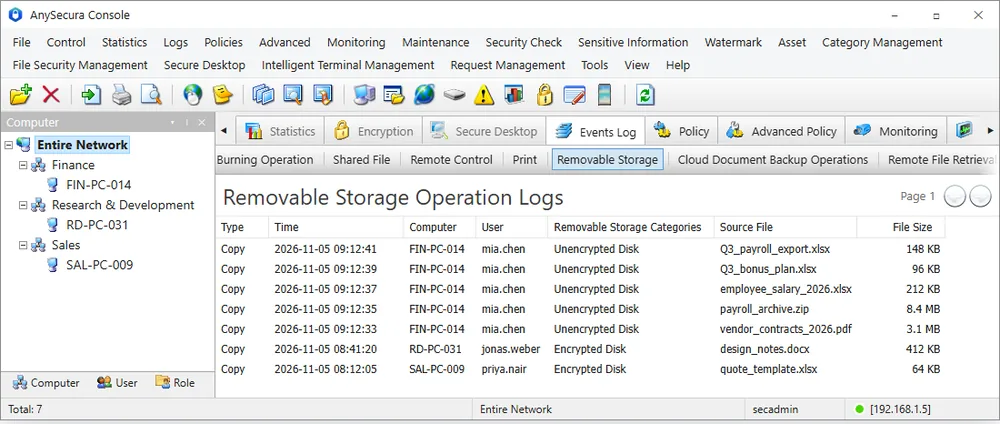
Block the breach in the first place. AnySecura also applies controls at the moment of action, so a risky copy can be stopped before the data has left:
- Role-based access – policies follow identity, role, department, endpoint and data sensitivity, so each person reaches only the data the job needs.
- Multi-channel control – USB transfers, printing, email attachments, instant messaging file sharing, browser uploads and screenshots all run under one policy. Removable Media Control covers the USB side with an approved-drive whitelist, approval for any other drive, and a record of every file copied, changed or deleted.
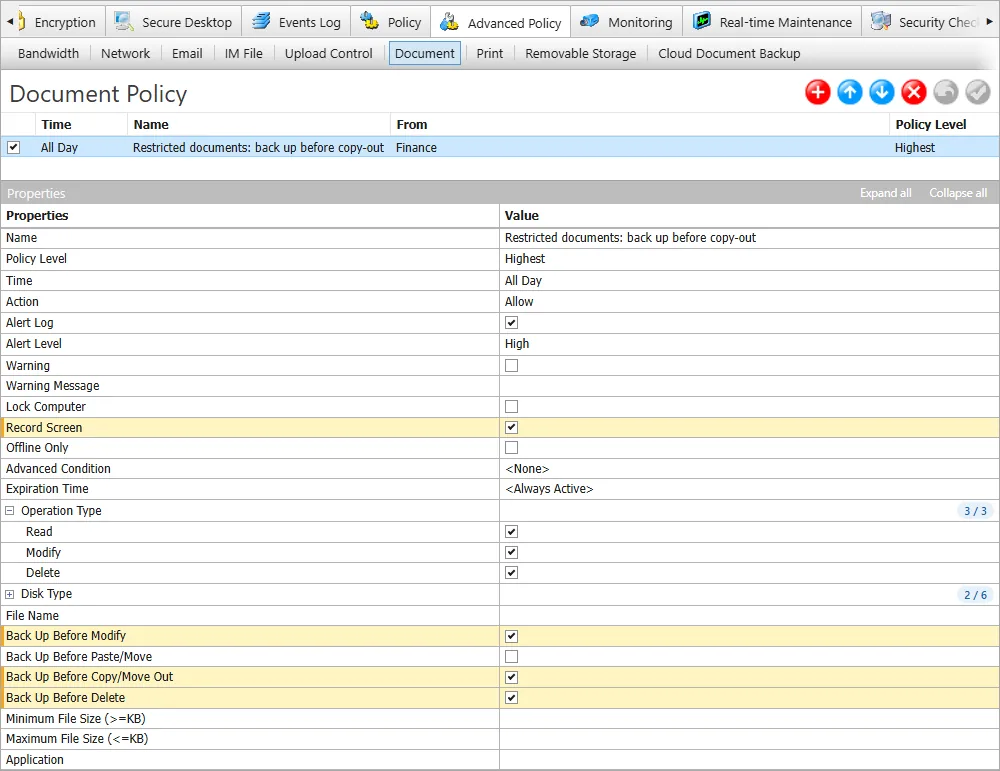
- Tiered responses – depending on how sensitive the file is, the policy can warn the user, ask for approval, log the action or block it, while ordinary work carries on. Document Control adds a backup copy before a sensitive file is changed, moved out or deleted.
- Persistent file encryption – files stay encrypted when they are copied, downloaded, transferred or taken offline, and only approved users and devices can open them. A copy that leaves the company, as in the Tesla case, is still locked.
FAQs About Insider Threat Examples
What are the three types of insider threats?
Malicious insiders act on purpose to take or destroy data, negligent insiders expose data by mistake, and compromised insiders have credentials that outsiders tricked, stole or bought. Dobbins, Microsoft's AI team and Twitter are examples of each. Some sources use only two categories, intentional and unintentional.
What is an example of an unintentional insider threat?
Microsoft's AI research team in 2023. A researcher shared training data using a token that gave access to the whole storage account with full control. That exposed 38TB of private data, though no one set out to leak it.
How does an insider harm national security?
By taking or sharing information that belongs to a government or defense effort. In the Ding case, a federal jury convicted a former Google engineer on seven counts of economic espionage involving AI infrastructure. Zheng was convicted of conspiracy to commit economic espionage involving GE turbine technology.
What are common indicators of an insider threat?
Bulk downloads before a resignation, work files sent to personal accounts, access after employment ends, and data access without a business need. Each shows up in logs, and none proves intent alone.
Conclusion
Across these 11 insider threat examples the same gaps repeat: access that outlived employment, copying that nobody approved, and permissions wider than the job required. Few of the cases started with the company's own monitoring.
Start with your own records. Check whether anyone who has left still has an active account, whether copies to USB, email and cloud storage are logged, and whether sharing links and permissions are reviewed. Then the next case is more likely to be found by your own team than by someone outside.
If you would rather not check all of that by hand, AnySecura can collect those records for you and block risky copies as they happen. Start a free trial, or book a demo and we will show you how it works on your own computers.