
Worried your kid could stumble on adult content, talk to strangers online, play games all night, or accidentally download viruses? You’re not overreacting—these risks are real.
If you want to protect your child without fighting every day over screen time, here are the 9 best parental control software in 2026 to help you keep them online safe on phones, tablets, and computers.
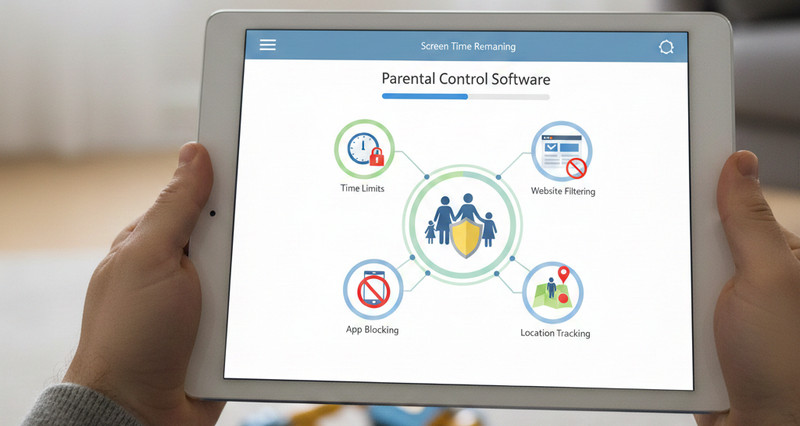
9 Best Parental Control Apps 2026 – Feature Comparison
| Screen Time | App Block | Web Filter | AI Alerts | Location | Anti-Bypass | USB/File Security | System-Level Protection | Free Trial | |
|---|---|---|---|---|---|---|---|---|---|
| AnySecura | ✅ | ✅ | ✅ | ❌ | ❌ | ✅ (Strong) | ✅ (Unique) | ✅ (Unique) | 30-day |
| Bark | ✅ | ✅ | ✅ | ✅ | ✅ | ❌ | ❌ | ❌ | 7-day |
| Qustodio | ✅ | ✅ | ✅ | ✅ | ✅ | ✅ | ❌ | ❌ | Free plan |
| Norton Family | ✅ | ✅ | ✅ | ❌ | ✅ | ❌ | ❌ | ❌ | In Norton 360 |
| FamilyKeeper | ✅ | ✅ | ✅ | ✅ | ✅ | ❌ | ❌ | ❌ | Limited Free ver. |
| FamiSafe | ✅ | ✅ | ✅ | ❌ | ✅ | ❌ | ❌ | ❌ | 3-day |
| Net Nanny | ✅ | ✅ | ✅ | ❌ | ✅ | ❌ | ❌ | ❌ | 14-day refund |
| McAfee Safe Family | ✅ | ✅ | ✅ | ❌ | ✅ | ✅ | ❌ | ❌ | In McAfee+ |
| Aura | ✅ | ✅ | ✅ | ✅ | ✅ | ❌ | ❌ | ❌ | 14-day |
1. AnySecura – Best Windows Parental Control Software 2026
While originally designed for enterprise data security and employee device management, AnySecura parental control software is also an excellent solution for families who want professional-level oversight of Windows PCs.
- Hard to bypass, with real-time alerts and audit logs
- Support app restriction, web filtering, USB/device control, screen recording, file protection
- Can be installed locally or in the cloud; monitor multiple devices
- Helps kids develop healthy computer habits while protecting family data
- 30-day free trial, runs quietly in the background
- Some features require learning and configuration
- Single-PC households may find this excessive
AnySecura gives parents detailed control over how their child’s or family computer is used, going far beyond simple website blocking or basic screen-time limits. You can restrict games, streaming apps, and short-video platforms like YouTube, and set clear schedules for when these apps are allowed. Automatic website monitoring and filtering help block inappropriate or dangerous content, ensuring child online safety at all times.
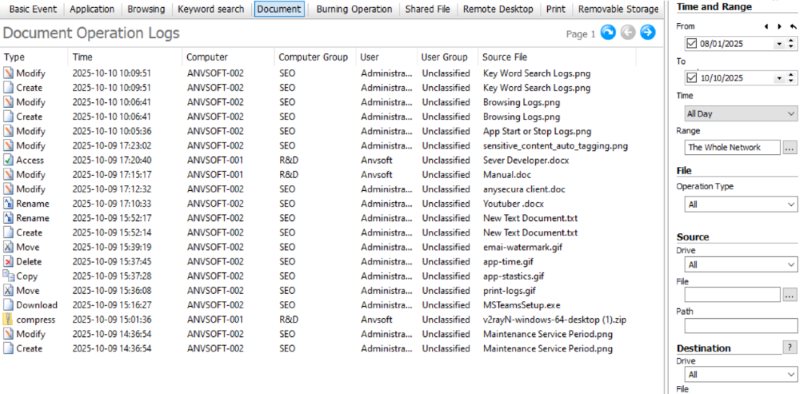
Beyond basic controls, AnySecura provides visibility and security features that many other parental control apps lack. Screen activity recording and usage logs let you understand how the computer is actually being used, so you can guide your children rather than just restrict them. External device management, such as USB control, prevents unsafe file transfers or unapproved software from introducing viruses or system problems. Important family files, photos, and work documents are protected from accidental deletion or modification. In short, it combines parental control and home computer security in a single tool.

You don’t have to worry about it being easily bypassed. Built on a strong enterprise-level security system, AnySecura resists common attempts to disable it, such as ending tasks in Task Manager, deleting files, editing the registry, or disconnecting the network. Suspicious behavior is logged automatically, giving parents confidence in its stability and reliability.
Price: 30-day free trial for full features. Supports both local and cloud-based installation.
Best for: Parents seeking professional-grade parental control software. AnySecura provides deep Windows oversight, robust security, and practical tools to help children develop healthier digital habits while keeping the family’s data safe.
2. Bark – AI-Powered Parental Control App for Online Safety
Bark parental control app help you prevent emotional or social harm rather than just limiting usage time.
- Powerful AI-driven risk detection on social media and games
- Contextual scanning for bullying, self-harm, scams, and violence
- Instant alerts, location tracking, and incognito mode monitoring
- Clear age-appropriate settings
- Cannot independently limit game time on Windows
- Needs device administrator permissions to prevent uninstallation
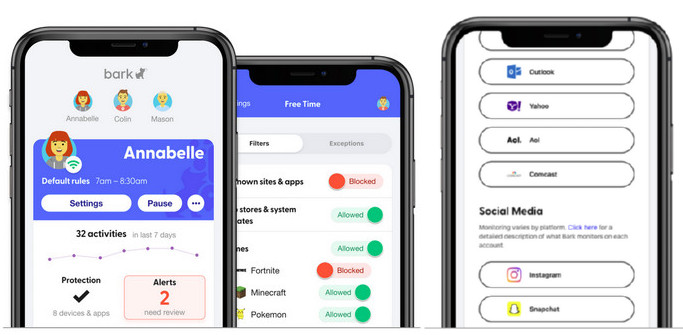
Bark uses advanced AI parental monitoring to scan chats, images, and videos across 30+ platforms like Discord, Instagram, Steam, and YouTube. It doesn’t just detect keywords — it analyzes tone and context, identifying cyberbullying, self-harm signals, scams, threats, and inappropriate content.
When something concerning appears, you receive immediate alerts. You’re not constantly spying — you’re notified only when real risks arise. Bark also monitors browsers and email, blocks harmful websites (even in incognito mode), checks stored photos and videos, and provides GPS tracking with geofencing alerts. Its time controls are more basic compared to AnySecura, but if your biggest fear is online danger or bullying, Bark’s AI risk detection is one of the most advanced parental control apps available.
Price:
- Bark Premium: $14.99/month
- Bark Jr: $5/month or $50/year
- 7-day free trial
Best for: Parents who care most about detecting online risks early
3. Qustodio – Full-Spectrum Parental Control Tools 2026
Qustodio remains one of the best parental control software solutions on the market by delivering strong screen control, solid filtering, and reliable anti-bypass protection.
- All-in-one: screen time, app control, filtering, location, anti-bypass
- Supports multiple children and platforms
- Strong YouTube monitoring and VPN blocking
- Reliable and easy to manage
- Higher cost for large families
- Some advanced features take time to set up
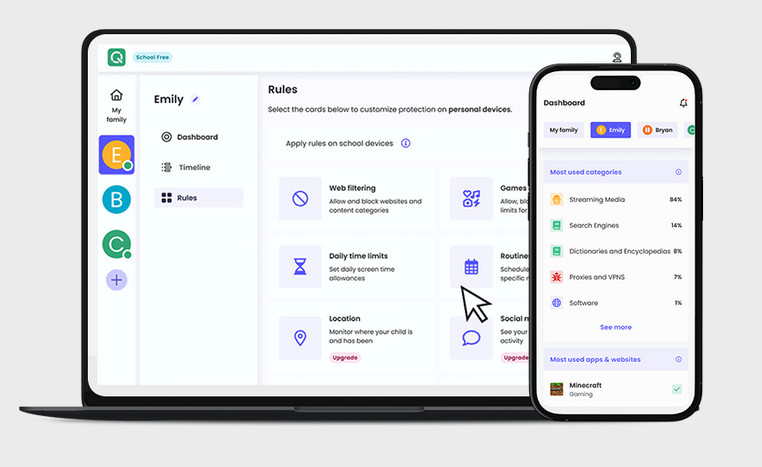
You can set daily screen limits, restrict individual apps and games, block categories, and pause the internet remotely. Its web filtering is robust and actively prevents VPN or private browsing bypass attempts.
YouTube monitoring is the big advantage of Qustodio. It is especially detailed, giving you full visibility into searches and watch history — something many competitors simplify. Qustodio also includes uninstall protection, real-time location tracking, geofencing, SOS alerts, and call & text monitoring. If you’re managing multiple children and devices, the centralized dashboard keeps everything organized. It’s not the cheapest option, but in terms of stability and coverage, it’s consistently reliable.
Price:
- Free plan (1 device)
- 5 devices: ~$54.95/year
- 10 devices: ~$96.95/year
- 15 devices: ~$137.95/year
Best for: Families who want full-spectrum, multi-device control

Learn how to monitor employees working from home, including productivity tracking, basic rules, and how to avoid invading privacy. Learn more>>
4. Norton Family – Trusted Cybersecurity Parental Control Software
Backed by decades of cybersecurity expertise, Norton Family is a strong contender in the parental control solutions market. It combines traditional parental controls with professional-grade online safety, making it perfect for families who care about both web security and responsible digital habits.
- Backed by Norton’s trusted cybersecurity expertise
- Comprehensive features: screen time, app supervision, location tracking, and activity reports
- Age-based presets with flexible customization
- Access requests allow children to request blocked content safely
- Only available with Norton 360; no standalone version
- Anti-bypass and app management weaker than Qustodio
- Lacks advanced AI-based risk detection like Bark
Norton Family enables you to manage multiple devices — Windows PCs, Android, and iOS devices — from a single, user-friendly dashboard. Its core features cover all the areas parents care about: screen time management, app supervision, web filtering, search and YouTube monitoring, location tracking, and activity reporting.
You can set daily or weekly screen limits, schedule app usage windows, and choose from four preset control levels based on your child’s age. If a website is blocked by mistake, your child can send an access request directly to you, giving you control while avoiding unnecessary conflicts. This balance of guidance and autonomy is something your child will appreciate as they grow.
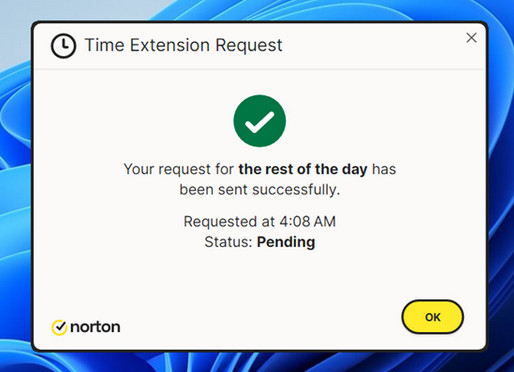
Norton Family's Web filtering feature is strong and can block inappropriate content and phishing attempts with high accuracy. Activity reports provide you with a clear picture of how your child spends time online, including searches, videos, and browsing history — so you can have meaningful conversations rather than just imposing restrictions.
Compared to Qustodio, Norton Family has slightly weaker anti-bypass protection and app management, but its web filtering is more stable, and the security roots make it highly reliable. In addition, it does not offer AI-driven bullying and risk detection.
Price: Included in Norton 360 security plans:
- Standard: ~$49.99/year
- Premium: ~$84.99/year
Best for: Families who want trusted cybersecurity backing, strong web filtering, and balanced parental controls that guide children’s habits
5. FamilyKeeper – Lightweight AI Parental Monitoring App
FamilyKeeper is a lightweight, easy-to-use parental control app that focuses on AI-powered risk alerts and protection rather than strict control. It supports Android, iOS, Windows, and macOS, allowing you to monitor multiple devices and set different rules for each child — perfect if you want effective protection without a complex setup.
- Quick setup with low learning curve
- AI-driven social risk alerts
- Battery tracking for contact reliability
- Affordable, including free and lifetime options
- Light-touch privacy-focused approach
- Less in-depth app control and anti-bypass than Qustodio
- Web filtering and malware protection weaker than Norton Family
- No detailed YouTube monitoring
Its standout feature is AI-based social media monitoring. It can detect signs of cyberbullying, inappropriate interactions, or other unusual online behavior and alert you immediately. This means you don’t have to monitor every chat yourself — FamilyKeeper does the heavy lifting and only notifies you when real risks arise.
You also get practical daily tools:
- Scheduled app blocking and screen time limits
- One-tap internet pause for quick control
- Real-time location tracking and geofencing alerts
- Unique device battery tracking to prevent loss of contact
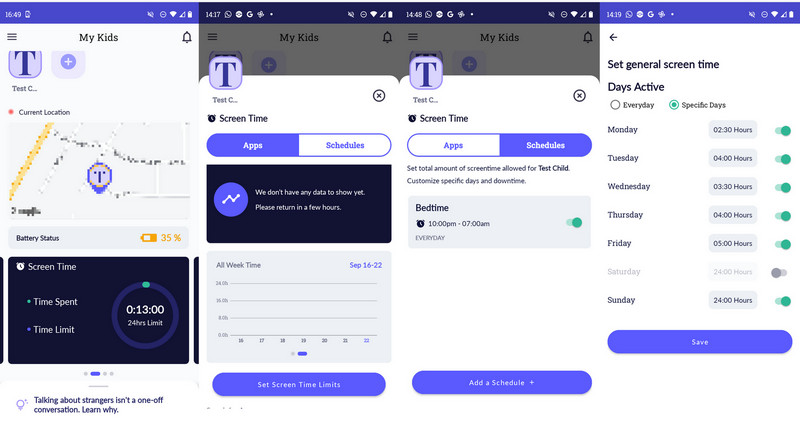
FamilyKeeper takes a lighter-touch approach to privacy: it doesn’t store detailed browsing history and focuses primarily on app usage. Compared to Qustodio, it offers simpler controls and less anti-bypass protection. Compared to Norton Family, web filtering and malicious content blocking are not as robust.
Price:
- Free version: limited features for up to 4 children
- Multi-device annual plan: ~$39.99/year
- Lifetime single-device plan: ~$6.88 (promo)
Best for: Parents who want straightforward setup, practical safety alerts, and privacy-conscious monitoring
6. FamiSafe – Multi-Device Parental Control App
FamiSafe parental control app is ideal for families with multiple devices who want precise control over screen time and device usage. Developed by Wondershare, it emphasizes “smart control + safety protection,” balancing Qustodio’s anti-bypass strength and Norton Family’s security reliability.
- Cross-platform and unlimited devices
- Detailed screen time and app restrictions
- Reward system promotes good habits
- Driving behavior monitoring
- User-friendly interface
- No free version
- Less detailed YouTube monitoring and anti-bypass than Qustodio
- Web filtering categories limited
- Social media monitoring basic
You can manage Android, iOS, Windows, macOS, ChromeOS, and Kindle Fire — one of the most widely compatible parental control software solutions. Create individual rules per child, schedule app locks, and set daily or weekly screen limits. Its reward time system lets children earn extra screen time for completing tasks, reducing arguments and promoting good habits.
Safety features include:
- Real-time location tracking and geofencing with alerts
- SOS alerts for emergencies
- Driving behavior monitoring for teen drivers
- Web filtering, YouTube activity summaries, and app usage monitoring
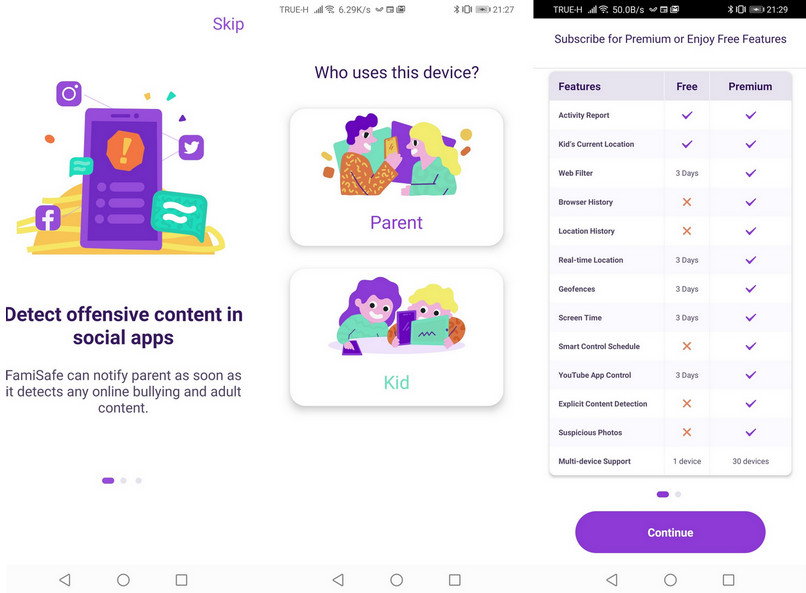
Compared to Qustodio, FamiSafe offers simpler setup and better iOS compatibility but less detailed anti-bypass and YouTube monitoring. Compared to Norton Family, malicious content blocking isn’t as advanced, but unlimited device management makes it ideal for large households.
Price:
- Monthly (5 devices): ~$9.99
- Annual (unlimited devices): ~$59.99
- 3-day trial + 7-day money-back guarantee
Best for: Families managing multiple devices who want structured screen time and practical safety tools
7. Net Nanny – Advanced AI Web Filtering Software
Net Nanny parental control software has long been a leader in AI-powered content filtering. Its philosophy is “see the danger before your child does” — and it delivers on that promise with advanced real-time web analysis.
- Advanced AI web filtering and real-time content analysis
- Blocks profanity for family-safe browsing
- Flexible pricing with standalone plans
- Intuitive interface
- No free version
- Weaker anti-bypass and social monitoring than Qustodio/Bark
- Fewer supported devices than FamiSafe
Net Nanny supports Windows, macOS, Android, and iOS. You can:
- Create individual profiles per child
- Filter websites, profanity, and dangerous content (pornography, violence, drugs, self-harm)
- Manage screen time and app usage
- Monitor YouTube watch history and block channels/keywords
- Track location and set geofencing alerts
Its AI web filter is the strongest selling point: most competitors rely on static blacklists, but Net Nanny analyzes text and context in real time. If you want strict, precise content control, this is one of the best parental control apps available.
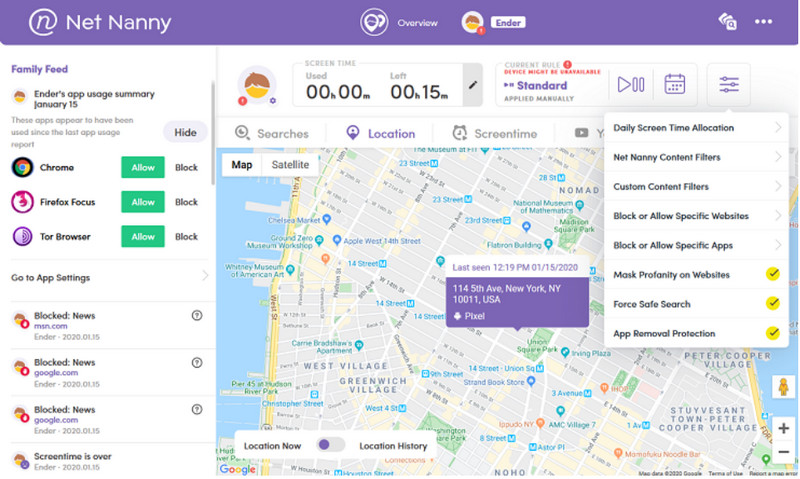
Compared to Qustodio, Net Nanny is stronger at filtering harmful content but has weaker anti-bypass and social monitoring. Compared to FamiSafe, it supports fewer devices but offers more mature content detection technology.
Price:
- Single-device: ~$39.99/year
- 5-device: ~$59.99/year
- 20-device: ~$89.99/year
Best for: Families focused on web content safety and precise filtering
8. McAfee Safe Family – Parental Control Integrated with Antivirus
If you’re already using McAfee antivirus, McAfee Safe Family parental control software integrates seamlessly with existing protection.
- Stable, reliable content blocking and anti-bypass
- Easy-to-use interface
- Works in VPN/incognito
- Flexible age-based controls
- Cost-effective for McAfee users
- No standalone product
- Lacks advanced AI social scanning or detailed YouTube monitoring
- Basic location tracking and geofencing
McAfee Safe Family allows you to:
- Set daily limits and schedule device locks
- Restrict apps by category or individually
- Apply age-based web filtering
- Let children send access requests to blocked sites
- Maintain stability even in incognito or VPN modes
- Prevent app uninstallation
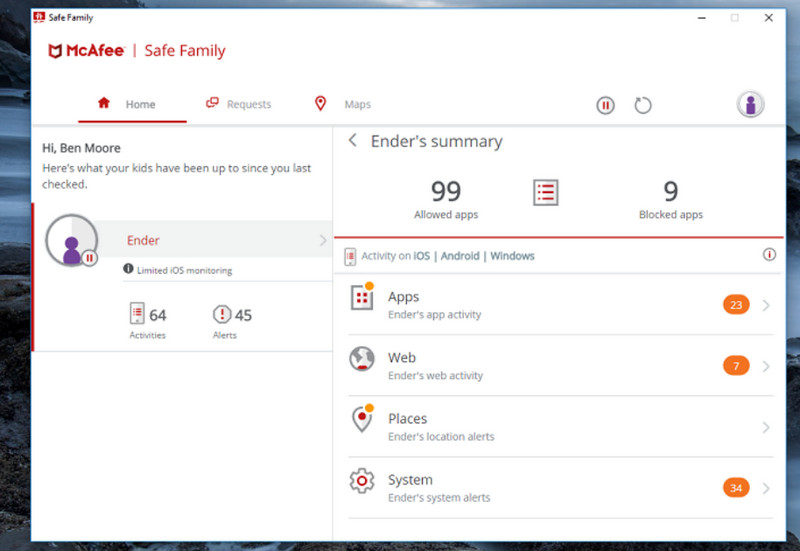
It doesn’t provide AI-based bullying detection or deep YouTube monitoring, but for parents looking for consistent, stable, everyday control, it’s reliable and easy to manage.
Price: Included in McAfee+ plans ($49.99–$139.99/year)
Best for: Families wanting simple, reliable parental controls integrated with antivirus protection
9. Aura – Full-Family Digital Safety & Parental Control
Aura parental control app is more than a standard parental control tool — it protects your entire family’s digital life.
- Game safety monitoring in 200+ online games
- Combines parental control with family identity protection
- Strong anti-phishing/scam detection
- Includes identity theft insurance
- Quick setup and clean interface
- No free version
- Higher cost than specialized parental tools
- Less detailed web and social scanning than Bark or Net Nanny
Alongside traditional controls like web filtering, app limits, and screen time, Aura provides:
- Identity theft monitoring and dark web scanning
- Anti-phishing and scam detection
- Instant alerts for bullying or dangerous chats in 200+ online games
- Identity theft insurance coverage
For children who spend hours in multiplayer online games, Aura’s game chat monitoring is rare and extremely valuable. It combines child protection + full-family security in a single platform.
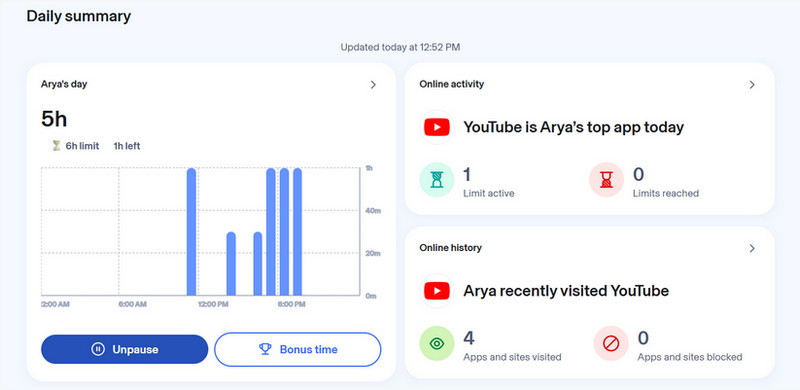
Its limitations: web filtering isn’t as granular as Net Nanny or Qustodio, social media scanning lacks deep AI contextual analysis, and anti-bypass controls aren’t as strong as professional tools.
Price: $149–$239/year, 14-day free trial included
Best for: Families wanting child online safety and full-family identity and financial protection
FAQs about Parental Control Software
1. What is parental control software?
Parental control software helps parents monitor and manage their children’s online activities, block harmful content, and set screen time limits.
2. Can parental control software block inappropriate websites?
Yes. Most parental control software can block specific websites, filter content categories, and restrict apps. Some may also have unique features like data protection and AI-driven text scanning.
3. Can parents monitor remotely?
Yes. Most tools allow remote monitoring and management through a dashboard.
Conclusion
Choosing the right parental control software or app is crucial for keeping child online safety. In 2026, the best tools balance screen time management, AI parental monitoring, and multi-device support. For families who want professional-grade Windows oversight, AnySecura stands out, offering deep PC control, app restrictions, web filtering, and strong anti-bypass protection.
For AI-driven risk alerts, Bark or FamilyKeeper shine, while Qustodio, FamiSafe, Net Nanny, and Norton Family provide reliable multi-device content filtering. Families integrating antivirus or full-family digital protection can consider McAfee Safe Family or Aura. No matter your needs, choosing the right tool ensures safer online experiences, healthier digital habits, and peace of mind.


