
Looking for practical ways to get Discord unblocked? You're not alone. Schools and workplaces are deploying AI-powered firewalls and endpoint detection systems that make old tricks obsolete—but there are still effective ways to unblock Discord and regain access.
This guide covers 8 proven Discord unblocked methods with step-by-step instructions to help you get Discord unblocked quickly and securely.
Disclaimer: This article is for educational and cybersecurity awareness purposes only. You should respect the laws and policies of your school, employer, and country. Bypassing network security measures without authorization may result in disciplinary action.
If you need Discord unblocked right now, here's the fastest path:
- Mobile Hotspot: Turn off the school Wi-Fi and use your phone's 4G/5G data. It bypasses the network entirely—the ultimate way to unblock Discord without detection.
- Web Client: If the app is Discord blocked, go to discord.com/app in your browser. Admins often forget to block the web version, making it a quick way to unblock Discord.
- VPN: If you have admin rights on your laptop, a quality VPN like ProtonVPN or ExpressVPN is your best bet for how to unblock Discord reliably.
8 Methods to Get Discord Unblocked
Below are 8 methods that actually work in 2026 to unblock Discord. We've ranked them based on Difficulty, Anonymity, Speed, and Recommendation.
⚠️ Before You Try Any Method: Getting Discord unblocked is one thing—keeping your account secure is another. Many students lose their accounts to sketchy "unblocker" sites. Read Part 4 for tips on how to protect your account from phishing and malware.
Quick Overview of Different Discord Unblocked Methods
| Method | Difficulty | Anonymity | Speed | Rating | Notes |
|---|---|---|---|---|---|
| VPN | Medium | High | Fast | ⭐⭐⭐⭐⭐ | Best overall |
| Proxy Servers | Medium | Medium | Medium | ⭐⭐⭐⭐ | Great for browser use |
| Encrypted DNS | Easy | Low | Fast | ⭐⭐ | Rarely works alone |
| Discord Web & Mirrors | Easy | None | Fast | ⭐⭐⭐ | Quick fix |
| Browser Extensions | Easy | Low | Medium | ⭐⭐ | Risk of data leaks |
| Remote Desktop | Hard | High | Slow | ⭐⭐⭐ | For locked-down PCs |
| Portable Clients | Medium | None | Fast | ⭐⭐ | Often outdated |
| Mobile Hotspot | Easy | High | Variable | ⭐⭐⭐⭐⭐ | Safest way to unblock Discord |
1. VPN (Virtual Private Network)
A VPN is one of the most reliable ways to unblock Discord on restricted networks. It encrypts your traffic and routes it through a server in another location. To the school firewall, it just looks like encrypted data, not Discord.
How to Set VPN Up to Unblock Discord:
- Choose a reputable VPN: Avoid free ones. Free VPNs often sell your data or are already blocked by Discord's IP ban system. Go with ProtonVPN, ExpressVPN, or Mullvad—these are proven to get Discord unblocked consistently.
- Install: Download the app on your laptop or phone.
- Connect: Open the app and select a server in a country where Discord is unrestricted (usually the US or Europe).
- Open Discord: If it still doesn't work, try the "Stealth" or "Obfuscated" server setting if the VPN offers it—this hides the fact you're using a VPN and helps bypass Discord block measures.
Why protocol matters: Most VPNs default to OpenVPN, which many school firewalls are trained to detect. Switch to WireGuard if your VPN supports it—it's lighter and harder to flag, making it a better Discord VPN solution. ExpressVPN's "Lightway" protocol is another solid option built specifically to avoid detection.
My experience: VPNs work about 90% of the time to unblock Discord. To stay safe while using this method, always enable the "kill switch" feature—it cuts your internet if the VPN drops so your real IP never leaks. Protecting your account starts with choosing a reputable VPN provider; free VPNs often sell your data or are already flagged by Discord's IP ban system.
2. Proxy Servers
Proxies are another effective way to get Discord unblocked without installing software. They act as a middleman—unlike a VPN, they usually don't encrypt all your traffic, but they change your IP address. This is great if you just need to use the Discord website in a browser.
How to Set Proxy Servers:
- Get Proxy Details: You need an IP address and port. Avoid free web proxies found on Google; they're usually slow and often malicious. Paid SOCKS5 proxies are the most reliable for how to unblock Discord—you can get them for about $1/month from sites like Proxy6.net.
- Configure in Browser (Chrome): Go to Settings > System > Open your computer's proxy settings. Turn on "Use a proxy server." Enter the IP and Port.
- Test: Go to discord.com/app. If it loads, you've successfully unblocked Discord.
Better approach: Use Proxy SwitchyOmega, a Chrome extension that lets you toggle proxies on and off without messing with your system settings. Install it, add your proxy details, and switch it on only when you need to bypass Discord block.
Heads up: Proxies often break voice chat due to WebRTC issues. If you need voice, stick to a Discord VPN instead. Also, free HTTP proxies send your traffic in plain text—anyone running that proxy can see your Discord password. Always use SOCKS5 or HTTPS proxies when trying to get Discord unblocked.
3. Encrypted DNS
Schools often block Discord at the DNS level—basically, when you type discord.com, the school's server refuses to tell your computer where to go. Changing your DNS can fix this and unblock Discord without any other tools.
How to Change DNS:
- Open your network settings.
- Change the DNS servers to Cloudflare (1.1.1.1) or Google (8.8.8.8).
- Flush the cache:
- Windows: Open Command Prompt (Admin) and type ipconfig /flushdns
- Mac: Open Terminal and type sudo dscacheutil -flushcache
The catch: This only works if your school is using DNS-based blocking, not IP-based blocking. In my experience, about 1 in 5 school networks are configured this way. It's worth trying because it takes two minutes to see if it will get Discord unblocked, but don't bet the farm on it.
Pro tip: Enable DNS-over-HTTPS (DoH) in your browser settings. Chrome and Firefox both support it. This encrypts your DNS queries so the school can't see what sites you're trying to visit—making it harder for them to block Discord in the first place.
4. Discord Web Client & Mirror Sites
Sometimes the desktop app is Discord blocked, but the Discord web client slips through. This is often the fastest way to unblock Discord if you just need quick access. IT admins are human—they often forget to block all the different URLs Discord uses.
How to Access Discord Web Client or Mirror Sites:
- Open your browser.
- Go to discord.com/app.
- If that's blocked, try discordapp.com (an older URL that still works—sometimes IT teams miss it when trying to block Discord).
- Still blocked? Try canary.discord.com/app or ptb.discord.com/app. These are Discord's testing channels—they use different domains that IT teams often overlook when configuring Discord blocked filters.
Advanced move: If all domains are blocked, try accessing Discord via IP address directly to get Discord unblocked. On a computer where Discord works, run nslookup discord.com in Command Prompt to get the IP, then type that IP into your browser on the blocked network. You'll get a certificate warning—click through it. This works because some firewalls only block domain names, not IP addresses, giving you another way to unblock Discord.
5. Browser Extensions
These are "one-click" solutions in the Chrome Web Store. They act like tiny proxies or lightweight VPNs to help unblock Discord without complex setup.
Warning: I don't fully trust these for getting Discord unblocked. While extensions like "Proxy SwitchyOmega" are legitimate tools for managing proxies, random "Discord Unblocker" extensions often steal your login tokens. I've seen it happen—friends lose their accounts, email addresses changed, Discord Nitro drained. If you're looking for how to unblock Discord safely, extensions are the riskiest option.
Safer options:
- Proxy SwitchyOmega: A proxy manager, not a proxy itself. Pair it with a paid proxy from a reputable source to bypass Discord block.
- Browsec: A free VPN extension with a decent reputation, though the free tier is slow.
- uBlock Origin: An ad blocker that sometimes accidentally bypasses simple Discord blocked pages.
The reality: Browser extensions are a temporary fix at best for how to unblock Discord. Most free VPN extensions are already flagged by school filters, and the ones that aren't will likely get blocked within weeks. Use this method only as a last resort.
6. Remote Desktop (RustDesk/AnyDesk)
This is my go-to "hacker" method for strictly locked school computers where you can't install anything, USB ports are disabled, and even browser extensions are locked down—yet you still need to unblock Discord.
How it works: You leave your home computer on. You install a remote desktop tool (RustDesk is open-source and free). At school, you use the portable version (no install needed) of the remote client to control your home PC. You're technically using Discord at home, just viewing the screen at school. It's a creative way to unblock Discord that IT never sees coming.
How to Access Discord Remotely: Step-by-Step Guide
- At home: Install RustDesk. Note your ID and password. Set your computer to never sleep.
- Before school: Download the RustDesk portable .exe and save it to Google Drive or email it to yourself.
- At school: Download the portable file and run it (no installation required).
- Connect to your home computer and use Discord through the remote window.
Why this works: The school only sees remote desktop traffic, which looks like legitimate IT support software. Discord never touches their network, making this one of the most stealthy Discord unblocked methods.
Pros: Almost impossible to block. Works on any computer with internet access.
Cons: Laggy for voice chat. Fine for text, but don't expect to have smooth voice conversations. Also requires leaving a computer running at home.
Alternative: If RustDesk is blocked, try Chrome Remote Desktop. It runs as a browser extension, and browsers are usually whitelisted. The downside? Google services themselves might be Discord blocked on school networks.
7. Portable/Unzipped Clients
If you can't install software on the school computer, you can run Discord from a USB drive using a "portable" version—another way to unblock Discord without admin rights.
How to Use Protable or Unzipped Clients to Unblock Discord:
- On a home computer, download PortableApps.com Platform.
- Use it to install Discord to a USB drive.
- Plug the USB into the school PC and run DiscordPortable.exe to get Discord unblocked.
The catch: This only works if the school blocks installation but not execution. Many schools use AppLocker, which prevents any .exe from running outside of approved directories like C:\Program Files. If that's the case, this method won't unblock Discord for you.
Alternative: If you can't use a USB drive, try installing Discord to a user directory like C:\Users\YourName\Apps using a command-line package manager like Scoop. This directory is often outside AppLocker's restrictions, giving you another way to unblock Discord.
My take: Portable clients are becoming less reliable as schools tighten endpoint security. I'd only recommend this if you've confirmed that other Discord unblocked methods like VPN or web client don't work.
8. Mobile Hotspot
Using a mobile hotspot is undoubtedly the safest way to unblock Discord with zero detection risk.
How to Use Mobile Hotspot to Access Discord on School PC:
- Turn off the school Wi-Fi on your laptop.
- On your phone, go to Settings > Hotspot & Tethering.
- Connect your laptop to your phone's Wi-Fi or via USB cable.
Why it's the best: You're using your own cellular data. The school network isn't involved at all. No firewall rules, no DPI, no logs. The school IT department can't see anything because your traffic never touches their infrastructure. This is the only method that guarantees you can get Discord unblocked without leaving a trace.
The downside: You'll burn through your data plan if you stream video or do long voice calls. Voice calls use about 60-100 MB per hour; video calls can hit 300-800 MB.
2026 Upgrade: eSIM Backup Data.
If you're worried about using up your main plan's data or don't want data usage showing up on your parents' phone bill, consider buying an eSIM data package from providers like Airalo or Nomad. You can get 1GB for around $4, install it in minutes, and use it exclusively for hotspot traffic. It's separate from your main phone plan—no bill traces, no throttling, and a stealthy way to unblock Discord.
How to Unblock Discord on School Chromebooks
Chromebooks are a special case. ChromeOS is locked down by Google's management software, so most traditional VPNs and portable clients simply won't run.
Why It's Different:
- You can't install .exe or .dmg files like on Windows or Mac
- Most VPN apps aren't available in the Chrome Web Store
- If your school blocked the web version of Discord, your options narrow
What Actually Works:
- Web Proxy (see Method 2) — text only, voice rarely works
- Mobile Hotspot (see Method 8) — the bulletproof option
⚠️ What to Avoid: Developer Mode
You might see tutorials telling you to enable Developer Mode to install Linux apps or VPNs. Don't.
- Most school-managed Chromebooks have this disabled by policy
- Attempting to force it sends a "Security Violation" log to IT
- You could wipe your device and face disciplinary action
Bottom line: Stick to browser-based methods or hotspot. Never try to break ChromeOS's built-in security.
Why Is Discord Blocked by School Wi-Fi and Corporate Networks?
Before trying to unblock Discord, it’s important to understand why schools block it in the first place. It’s not personal — it’s usually a matter of policy. In most cases, schools restrict Discord for three main reasons:
1. Bandwidth Consumption
Discord voice uses UDP protocol, which lacks congestion control. Twenty students in a voice channel can saturate an entire campus internet connection. IT sees "network is slow" and traces it back to Discord.
2. Legal Compliance (CIPA)
The Children's Internet Protection Act (CIPA) requires schools receiving E-rate funding to filter "harmful" content. While Discord itself isn't harmful, its private servers are unmonitored—IT can't audit what students are saying.
3. Classroom Disruption
This is the simplest reason. Teachers see students with headphones on, gaming in Discord voice channels during class. It's a distraction that's hard to control.
Offices Block Discord for Data Security
Corporate IT blocks Discord to prevent data leakage (DLP). Employees might share code, customer lists, or internal documents on Discord servers. IT can't audit those conversations.
This is also the reason why enterprise use solutions like AnySecura. These tools can monitor endpoint activity and flag unauthorized data transfers, with which IT gains visibility into what leaves the network without blocking communication tools entirely.
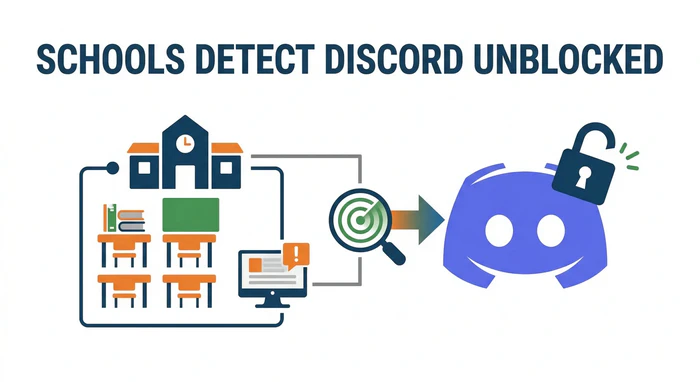
How Schools Detect Discord Unblocked (And How to Avoid Getting Caught)
School IT departments aren't stupid. They have multiple ways to detect students bypassing blocks. Understanding these helps you avoid getting caught.
Detection Method 1: Deep Packet Inspection (DPI)
DPI doesn't just look at "where you're going"—it analyzes the data packets themselves.
Discord's Traffic Fingerprints:
- TLS handshake contains a unique JA3 fingerprint
- STUN protocol (for NAT traversal) has distinctive packet size patterns
How DPI Catches VPNs:
- OpenVPN TLS handshake has recognizable patterns
- WireGuard's keepalive packets (sent every 25 seconds) can be detected
How to Stay Safe and Evade Detection:
- Use Obfuscated/Stealth VPN servers—these repackage traffic to look like normal HTTPS
- Cloudflare WARP does this best—its traffic is indistinguishable from regular Cloudflare CDN traffic
Detection Method 2: DNS Logs
Even with a VPN, many students forget one detail: DNS leaks. When your VPN connection briefly drops, your device falls back to the default DNS (the school's DNS server). If a Discord DNS query happens in that split second, it gets logged.
How to Avoid Detection and Protect Your Privacy:
- Enable Kill Switch in VPN settings—cuts internet if VPN drops
- Force DNS-over-HTTPS even when VPN is disconnected
Detection Method 3: Port & Protocol Analysis
School firewalls flag unusual ports:
- Large UDP traffic on non-standard ports → VPN or VoIP
- Non-HTTPS traffic on TCP 443 → obfuscated VPN
How to Stay Under the Radar Safely:
- Ensure your VPN uses TCP port 443
- Avoid UDP voice traffic on school WiFi—it's the easiest to detect
Detection Method 4: Endpoint Detection & Response (EDR)
If your school issued your laptop, it likely has monitoring software like GoGuardian, AnySecura, or Lightspeed. These can:
- Take screenshots of your screen
- Log every application you install
- Detect VPN processes and report them
How to Evade:
- Do not install VPN software on school-issued devices. Use mobile hotspot or remote desktop instead.
- Check the system tray for suspicious icons (GoGuardian shield icon)
Detection Method 5: AI Behavioral Traffic Analysis (2026 New Threat)
This is the latest evolution. AI models don't need to see your content—they analyze your traffic patterns to guess what you're doing.
What AI Can Detect: Traffic Pattern, Discord Voice, Web Browsing, YouTube:
- Packet interval: Every 20ms, rhythmic vs Random vs Steady
- Packet size: ~200 bytes, constant vs Peaks at 1500 bytes vs Sustained 1500 bytes
- Upload/Download ratio: ~1:1 (bidirectional) vs 1:10 (mostly download) vs 1:50
- Session duration: Hours continuous vs Minutes vs 10–30 minutes
AI models trained on millions of hours of traffic achieve 95%+ accuracy.
How to Evade AI Analysis:
- Strategy 1: Use tools that reshape your traffic to look like normal web browsing:
Original Discord Voice:    █ █ █ █ █ █ █ █ █ █ (regular small packets)
After Traffic Shaping:    ████    ██      ███████    █ (looks like web browsing)
- ExpressVPN Lightway protocol with obfuscation
- Shadowsocks + v2ray-plugin (more technical)
- WireGuard + udp2raw (disguises UDP as TCP)
Tools with traffic shaping:
- Strategy 2: Enable random packet delays in your VPN client if available—breaks the rhythmic patterns AI looks for.
- Strategy 3: Stream a YouTube video (muted) in the background. AI sees multiple traffic types mixed together, making classification harder.
- Strategy 4: AI needs enough samples for confident detection. Keep sessions under 10-15 minutes when possible. Avoid hours-long voice calls.
What Happens If You Get Caught?
Potential Consequences:
- Verbal warning: IT pulls you aside: "Your device is showing unusual traffic"
- MAC address ban: Your device gets blacklisted from school WiFi
- Device confiscation: School-issued laptops get taken for inspection
- Disciplinary action: Detention or honor code violations at some US high schools
How to Respond:
- Play clueless: "I don't know, maybe it was automatic updates?"
- Don't argue: If caught red-handed, admitting fault causes less damage than fighting
- Switch to hotspot: If your MAC gets blocked, hotspot is your only option
Is It Safe to Unblock Discord?
Most students rush to unblock Discord without thinking about the consequences: your account could get hacked, or you might get caught by the school.
The #1 way you lose your account? Sketchy "Discord unblocker" sites. You search for Discord unblocked, click the first link, type in your password—and boom, your account is gone. Within hours, your friends start receiving spam messages asking for Nitro.
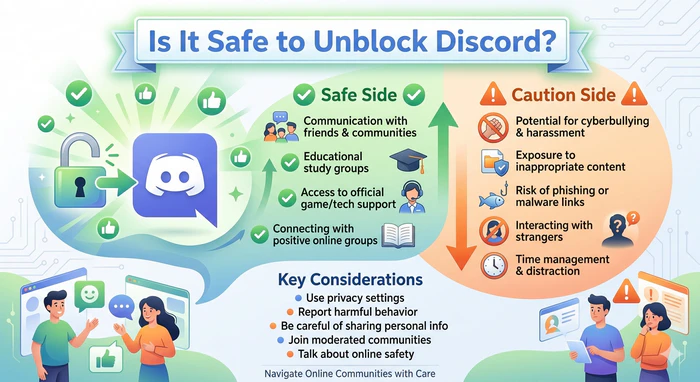
To keep your account secure, watch out for these red flags:
- The URL isn't discord.com
- It asks you to "verify" with your password (Discord never does this)
- A pop-up claims your account is "at risk" and demands your phone number
How to Protect Your Account:
- Turn on two-factor authentication (2FA) with Google Authenticator or Authy. Even if someone steals your password, they can't get in.
- Check Authorized Apps under User Settings. Remove anything that looks suspicious.
If you're using these methods at school, there are real consequences—network bans, device confiscation, and even detention at some schools. So stay under the radar:
- Use a mobile hotspot when possible. No school network logs means no evidence.
- Don't install VPNs on school-issued devices. IT sees everything.
- Keep quiet. Announcing "the VPN works!" in the library is how you get caught.
Bottom line: Protect your account and don't be the loudest person in the room. The safest move? Use a hotspot on your personal device—no traces, no risks.
Why Blocking Websites Isn't Enough Anymore [For Parents or School]
If you're a parent or IT administrator on school, you've likely realized that blocking discord.com is a game of "whack-a-mole." Students are tech-savvy. When they want to get Discord unblocked, they'll find a way—mobile hotspots, encrypted DNS, VPNs, you name it.

Explore a list of 70+ unsafe websites to block and learn effective methods for blocking these sites on your children's computers and mobile phones. Learn more>>
A Better Approach To Guide Children's Behavior: AnySecura
Instead of playing "blocker vs. unblocker," consider creating a safe space where communication is allowed—but risks like malware, data leaks, or inappropriate exposure are kept in check.
This is where AnySecura comes in. It doesn't focus on what students can't see. It focuses on how they use their devices—including whether they're trying to bypass Discord blocks.
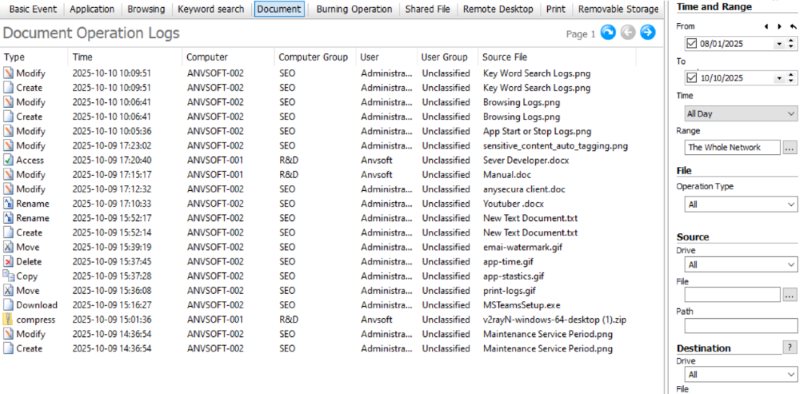
How AnySecura Help You Manage Children's PCs:
- Endpoint monitoring: Flags VPN or proxy use—not to punish, but to open a conversation about why students feel the need to circumvent restrictions in the first place
- App whitelisting: Keeps students focused during class or study time by allowing only approved apps—whether they're trying to access Discord on a restricted network or not
- USB control: Prevents unauthorized software from being introduced via external drives, keeping devices secure without constant oversight
- Remote process detection: Spots tools like RustDesk or AnyDesk used to work around Discord blocks, giving you insight into how students navigate boundaries
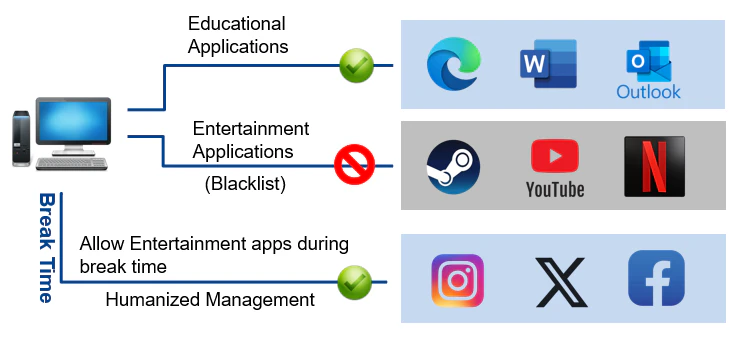
For schools, it's about shifting from reactive blocking to proactive guidance. Set up alerts—not to "catch" students, but to understand when they need better support or clearer expectations.
For parents, AnySecura helps you set healthy time limits, monitor new app installations, and filter content—while still allowing legitimate social apps like Discord during appropriate hours. It's not about spying. It's about staying informed and having the right conversations when boundaries are tested.
The goal isn't to trap students—it's to help them navigate technology responsibly. What they really need isn't a locked-down network. It's guidance they can grow from.
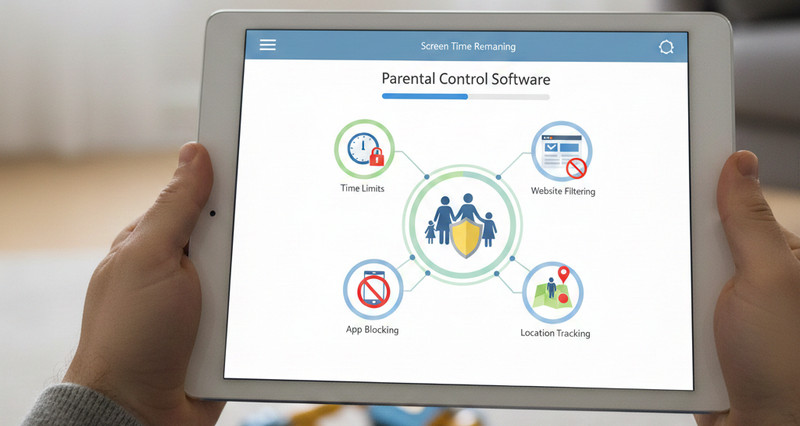
Discover the 9 best parental control software and apps for 2026 to manage screen time, block harmful content, and monitor multiple devices. Learn more>>
FAQ about Discord Unblocked
Can I get Discord unblocked on a school Chromebook?
Yes. If you can’t install apps, use the web client (`discord.com/app`). If the web client is blocked, use a Chrome extension proxy (though these are risky) or switch to mobile hotspot. Avoid putting the Chromebook in "Developer Mode"—it voids the warranty and usually triggers an immediate IT alert.
Will I get in trouble for using a VPN at school?
Possibly. Most school Acceptable Use Policies (AUPs) forbid circumventing network security. If you get caught, the worst-case is usually a warning or confiscation of the device. Use a hotspot if you want zero risk of detection by school IT.
Why is Discord blocked but not other apps?
Discord uses a mix of UDP for voice and specific IP ranges. School firewalls are configured to target these specific protocols. Zoom, for example, is often whitelisted because schools see it as educational, whereas Discord is categorized as "Gaming".
What is the best free way to unblock Discord?
A: The best free method is Mobile Hotspot (using your phone data). If you don’t have data, try Encrypted DNS (changing to 1.1.1.1) first, then try the Web Client. Avoid free VPN apps on mobile—they are often malware.
Does Discord ban accounts for using VPNs?
Not usually. Discord generally allows VPNs. However, if you share a VPN IP address with someone who was spamming, you might get caught in a "false positive" IP ban. If that happens, switching to a different VPN server usually fixes it.
Conclusion
Getting Discord unblocked isn't about doing anything shady—it's about staying connected when your school or workplace overreaches with restrictions. The methods in this guide work, but each has trade-offs: VPNs are fast but can be detected, remote desktop is stealthy but laggy, and mobile hotspot is bulletproof but burns through data. Choose based on your device and risk tolerance.
For parents and IT administrators trying to prevent students from finding ways to unblock Discord, tools like AnySecura offer a more effective approach than playing whack-a-mole with domains. By monitoring endpoint behavior—VPN detection, application whitelisting, and USB control—it shifts the battle from the network to the device itself. Whatever side you're on, understand the trade-offs, protect your account with 2FA, and stay smart. Network filters evolve fast, but knowing your options keeps you in control.


