
How to Use User Permission Templates in Category Management - AnySecura Manual
This guide will show you how to use the User Permission Template feature in AnySecura's Category Management module to create standardized access rules for documents. You'll learn how these templates help administrators enforce consistent security policies across your organization.
We'll then walk through the template library interface, explaining how to create, modify, and manage these permission sets. By the end, you'll be able to efficiently configure precise controls over actions like reading, printing, or modifying documents for any user role.
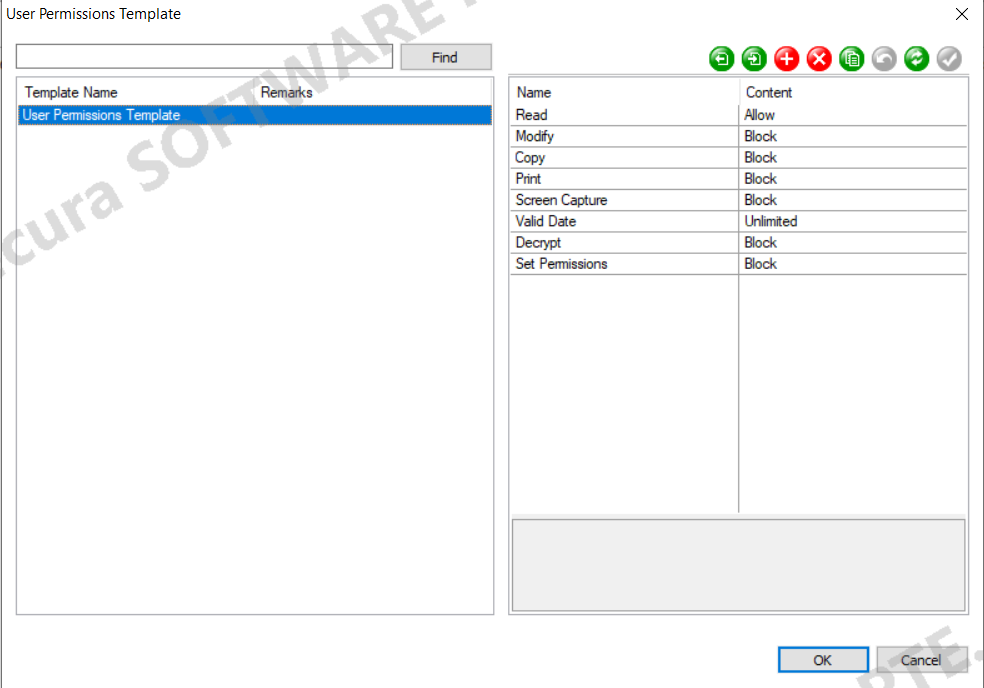
To standardize how users are granted document-related permissions, administrators can predefine document permission templates. When assigning document permission policies to users, these predefined templates can be directly selected. Users can only use the templates set by the administrator to configure their permissions.
Administrators with the "View User Permission Template Library" and "Set User Permission Template Library" permissions can view and manage the permission template library.Navigate to "Category Management → User Permission Template" to open the User Permission Template window.
Function / Button Description
| Icon / Button | Description |
|---|---|
 |
Import a user permission template file. |
 |
Export the user permission template to a file. |
 |
Click to create a new template. |
 |
Click to delete the selected template. |
 |
Click to copy the selected template. |
 |
Cancel the creation or modification of a template. |
 |
Save the template after setting or modifying it; changes take effect only after saving. |
Template Permission Settings
The permissions in a template can be configured as follows, with their respective default settings:
| Property Name | Description |
|---|---|
| Read | Can be set to Block / Allow; default is Allow. |
| Modify | Can be set to Block / Allow; default is Allow. |
| Copy | Can be set to Block / Allow / Not Set; default is Not Set. |
| Can be set to Block / Allow / Not Set; default is Not Set. | |
| Screenshot | Can be set to Block / Allow / Not Set; default is Not Set. |
| Validity Period | Can set the number of valid days; default is Unlimited. |
| Decrypt | Can be set to Block / Not Set; default is Block. |
| Set | Can be set to Block / Allow; default is Block. |