
Document Operation Policy for Data Leak Prevention in AnySecura
This guide will help you master the Document Operation Policy within AnySecura's Policies module, a powerful tool for controlling access to sensitive files. You'll learn how to set clear permissions for reading, modifying, or deleting documents to prevent unauthorized data leaks.
Beyond access control, you'll also discover how to configure automatic backups for critical operations. This ensures your important files are protected from accidental loss or malicious changes, giving you both security and peace of mind.
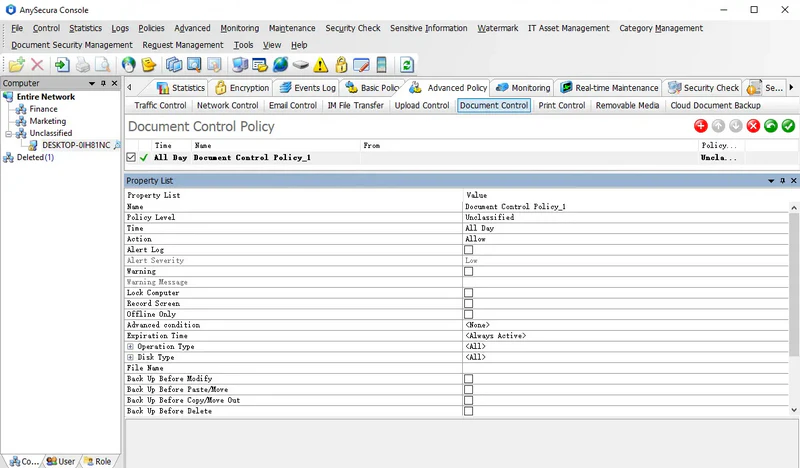
The Document Operation Policy restricts client access to confidential documents to prevent data leaks. It also supports document backup to protect important files from accidental loss.
Policy Attributes:
| Attribute | Description |
|---|---|
| Operation Type | Simplified into Read, Modify, and Delete. Allowing Modify implies Read permission; allowing Delete implies Read and Modify permissions. |
| Read | Grants permission to access the document. |
| Modify | Covers all operations beyond read and delete, including create, rename, edit, copy, move, and restore. Only effective if this option is selected; required for Backup Before Modify and Copy/Move to Backup. |
| Delete | Grants permission to delete documents. Only effective if selected; required for Backup Before Delete. |
| Drive Type | Default is all drive types. At least one must be selected; otherwise, all drives are assumed. Ctrl + A can be used to select/deselect all sub-items. |
| File Name | Specify files to control. Can include paths (e.g., E:\work\* to cover all files in the work folder). Supports wildcards and ";" or "," separators. |
| Backup Before Modify | Backs up files before modification to prevent malicious or accidental changes. |
| Backup Before Paste/Move | Backs up files copied or moved to specified drives, helping track unauthorized transfers of important files. |
| Backup Before Copy/Move Out | Backs up files copied or moved from specified drives, monitoring potential unauthorized exports of sensitive files. |
| Backup Before Delete | Backs up files before deletion to prevent accidental loss of important data. |
| Backup File Size (Min >=KB, Max <=KB) | Sets the size range for files to be backed up, same meaning as in IM File Transfer Policy. |
| Application | Specifies which applications the document operation policy applies to. |
Note:
- When Drive Type is set to CD/DVD, the policy only applies to operations using dedicated burning software.
Policy Example 1
Some important files should not be freely modified by all users. Access can be allowed while restricting modification and deletion.
Setup: Deny Operation Type: Modify and Delete, specify the document name, and select a backup method. Users can only read the specified files.
Policy Example 2
To prevent accidental deletion or modification of critical documents, the administrator can back up specified files during such operations.
Setup: Allow Operation Type: Modify and Delete, specify the document name, and enable backup. Users can use the files normally, but any modifications or deletions are automatically backed up. Backed-up files can be viewed in the Document Operation Log.
Note:
- Enabling backup in document policies may generate a large volume of backup data. It is recommended to precisely target the files to avoid excessive unnecessary backups.