
How to Use Document Tag Logs in Sensitive Information - AnySecura Manual
Understanding how your sensitive documents are tagged and classified is key to maintaining a secure environment. This guide will show you how to use the AnySecura Document Tag Logs to gain that visibility, tracking every automatic policy action and manual tag addition.
You'll learn to navigate the log interface and use its detailed filters. This allows you to quickly pinpoint specific activities, giving you clear insight into your document security posture and helping you ensure compliance.
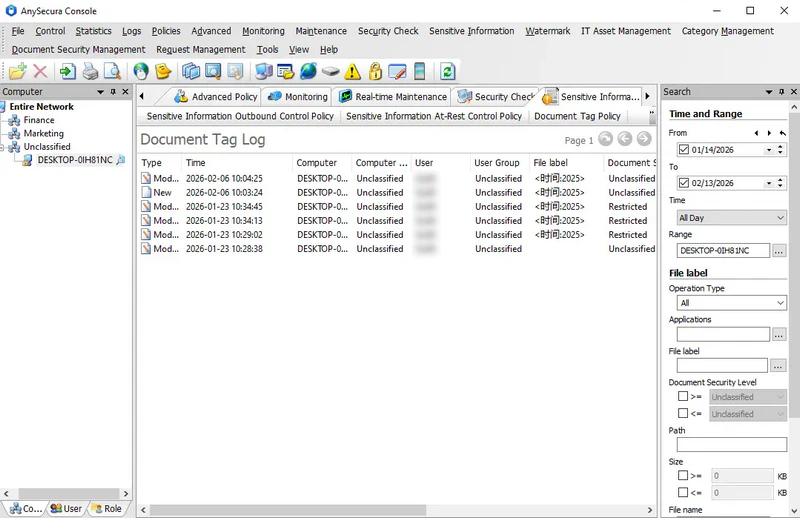
Document tag logs record the addition of document tags and classifications, including logs triggered by document tag policies and manual additions by clients.
Select Sensitive Information → Document Tag Logs to view these logs. The recorded attributes include:
| Attribute Name | Description |
|---|---|
| Type | The type of document tag operation, including creation, modification, or manual setting. |
| Time | The time when the document tag or classification was added. |
| Document Tag | The content of the added document tag. |
| Document Security Level | The added document classification. |
| File Name | The name of the file. |
| Path | The location of the file. |
| File Size | The size of the file. |
| Document ID | A unique identifier automatically assigned when a document tag or classification is added. |
By default, the system displays all document tag logs. Administrators can also apply various filters for targeted queries.
| Query Criteria | Description |
|---|---|
| Time and Range | Standard query filters. |
| Operation Type | By default, all types are included. You can select one or more types from the dropdown, including creation, modification, or manual setting. |
| Document Tag | The content of the document tag. |
| Document Security Level | The classification range of the file. |
| Path | The file's location. |
| Size | The file size range. |
| Document Name | The name of the file. |
| Document ID | A unique identifier automatically assigned when a document tag is added. You can use this ID to retrieve all logs related to the document. |