How to Configure Device Control Policies in AnySecura
Learn how to manage device access and reduce the risk of data leakage with AnySecura.
Watch Now
This guide will help you understand how AnySecura's device control policies act as a powerful gatekeeper for your organization's data. You'll see how these rules standardize access to everything from USB drives to wireless networks, forming a critical barrier against data leakage.
By exploring the specific device categories you can manage, you'll learn to craft precise policies that enhance security without disrupting legitimate work. This knowledge empowers you to confidently configure the AnySecura policy module to meet your unique compliance and protection needs.
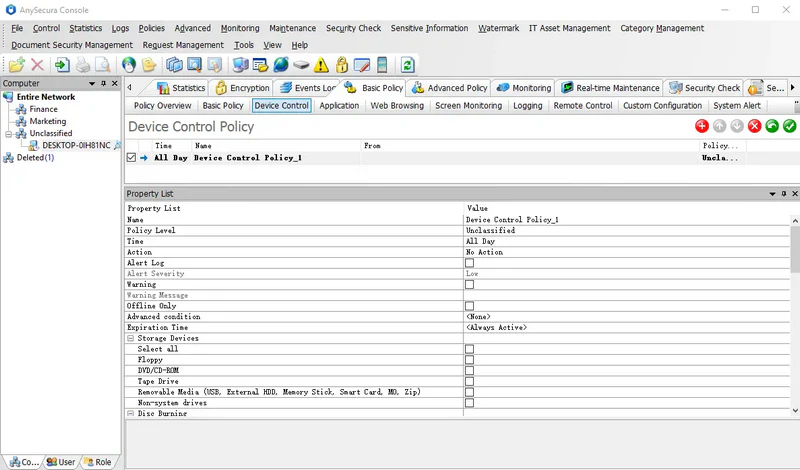
Learn how to manage device access and reduce the risk of data leakage with AnySecura.
Watch NowDevice control policies regulate the use of various computer-related devices within an organization. They help standardize how computers access storage and communication devices, preventing confidential information from being leaked through external devices and enhancing enterprise security and management compliance.
Supported device types include Storage Devices, Communication Interface Devices, Dial-up Devices, USB Devices, Network Devices, and Other Devices.
Storage Devices:
| Device Type | Description |
|---|---|
| Floppy Drive | Controls floppy drives. If disabled, floppy drive access is blocked. |
| CD/DVD Drive | Controls CD-ROM and DVD drives. |
| CD/DVD Burner | Controls the ability to burn discs. |
| Tape Drive | Controls tape drives. |
| Removable Media | Controls storage devices other than internal hard drives (IDE, SCSI, SATA), including USB drives, external hard drives, memory sticks, smart cards, MO, and Zip drives. |
| Non-System Drives | Applies to all drives except the system drive. |
| Portable Devices | Includes devices such as smartphones. |
CD/DVD burning control focuses on restricting disc-burning operations. Supported tools include:
| Device Type | Description |
|---|---|
| Proprietary Burning Tools | AnySecura’s proprietary disc-burning software. |
| Other Burning Tools | Any disc-burning software other than AnySecura’s proprietary tool. |
Mobile smart devices primarily refer to smartphones. Policies can control how these devices connect to client machines. Supported access methods include:
| Device Type | Description |
|---|---|
| Portable Device Mode | Device connects as a portable device. |
| USB Storage Mode | Device connects as a USB mass storage device (some devices may call this "mass storage mode"). |
| Mobile Assistant | Device connects using third-party phone assistant software. |
Communication interface devices include:
| Device Type | Description |
|---|---|
| Serial Port | COM port. |
| Parallel Port | LPT port. |
| USB Controllers | Universal Serial Bus controllers and hubs. |
| SCSI Interface | SCSI and RAID controllers; used by SCSI hard drives. |
| 1394 Controller | IEEE 1394 bus controller (1394 slot), functions similarly to USB. |
| Infrared | Infrared devices. |
| PCMCIA Card | PCMCIA slot, functions similarly to USB controllers. |
| Bluetooth Devices | Bluetooth-enabled devices. |
| Modem | Dial-up device. |
| Direct Cable Connection | Direct connection between two computers via USB, COM, or parallel ports. |
Bluetooth devices include:
| Device Type | Description |
|---|---|
| Bluetooth Mouse | Manages usage of Bluetooth mice |
| Bluetooth Headset | Manages usage of Bluetooth headsets |
| Bluetooth File Transfer | Controls file transfers via Bluetooth devices |
Dial-up connections include:
| Device Type | Description |
|---|---|
| Dial-up Connection | Controls access to dial-up connections |
USB devices include:
| Device Type | Description |
|---|---|
| USB Keyboard | Controls usage of USB keyboards |
| USB Mouse | Controls usage of USB mice |
| USB Modem | Controls usage of USB modems |
| USB Imaging Device/Camera | Controls USB cameras, scanners, and digital cameras |
| USB CD-ROM | Controls USB CD-ROM drives |
| USB Storage | Controls USB storage devices |
| USB Hard Disk | Controls usage of USB hard drives |
| USB Network Adapter | Controls usage of USB network adapters |
| Other USB Devices | Controls USB devices not listed above |
Network devices include:
| Device Type | Description |
|---|---|
| Wireless Network Adapter | Controls usage of wireless network adapters |
| PnP Network Adapter (USB, PCMCIA) | Hot-swappable network adapters |
| Virtual Network Adapter | Non-physical adapters, either motherboard-independent or virtual |
Other devices include:
| Device Type | Description |
|---|---|
| Audio Devices | Sound, video, and game controllers |
| Virtual CD/DVD Drive | Controls usage of virtual CD/DVD drives |
| Wireless Networks | Controls access to specific wireless networks using device descriptions. Leaving the description blank applies to all networks.
|
| Any New Device | Controls any newly connected device. If set to block, all new devices are disabled. |
In some companies, listening to music or watching videos during work hours is prohibited. A device control policy can disable audio devices during this time.
Policy:Select the time range as "Working Hours," set the mode to "Block," and check "Audio Devices" in the device list. Computers with this policy applied will have their sound cards disabled.
To protect sensitive company documents, employees can be restricted from copying files via removable storage or CD/DVD burners.
Policy:Set the mode to "Block" and select the devices to restrict, such as removable drives, floppy disks, CDs, or burners. Computers with this policy applied will be unable to use these devices.
Some companies restrict employees to using only internal wireless networks for management purposes. Administrators can set a device control policy for target computers (e.g., the entire network) as follows:
Example:
SSID=teclink_11|BSSID=aa-77-dd-00-88-ff; SSID=teclink_10; BSSID=aa-ee-dd-00-88-cc
After applying the policy, clients can only connect to the following networks: