
Network Control Policies for Internal Network Security in AnySecura
This guide will help you understand how AnySecura's network control policies act as a precise gatekeeper for your internal network. You'll learn how to define rules that manage which computers can communicate, over which ports, and with whom, effectively blocking unauthorized access and malicious traffic.
By exploring the key attributes like communication direction and group-based rules, you'll see how to tailor these policies to your organization's structure. This allows you to create secure zones, prevent data exfiltration, and ensure that only trusted applications and machines can interact on your network.
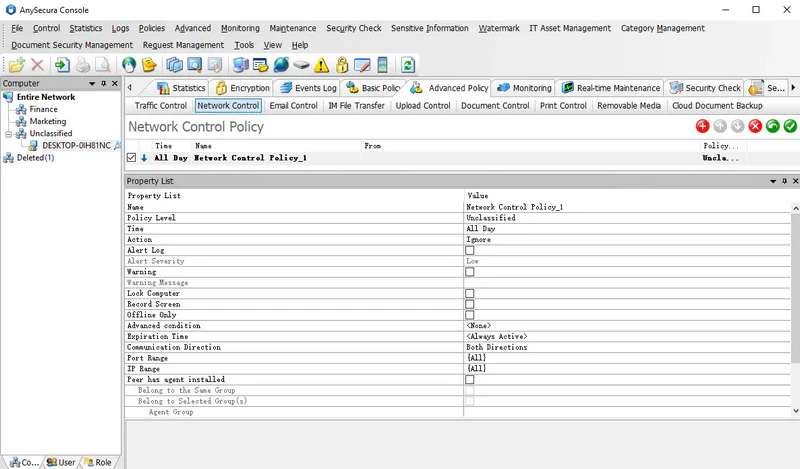
Network control policies manage client machine communications with unauthorized computers, block malicious or download-related ports, prevent virus intrusion, and safeguard internal network security.
These policies apply to computers and are ineffective in user mode. Policy attributes include:
| Policy Attribute | Description |
|---|---|
| Communication Direction | Three options: Bidirectional, Outbound, Inbound. Outbound/Inbound is relative to the client machine; outbound means the client initiates the connection. |
| Port Range | Same as in traffic control policies. |
| IP Range | Same as in traffic control policies. |
| Peer has agent installed | Determines whether the remote machine is a client. Only effective if checked; otherwise, this check is ignored. |
| Same Group | Controls communication between client machines in the same group. "Same group" refers to the group of the client applying the policy, excluding parent or subgroups. |
| Selected Group | Controls communication with client machines in a specified group. Only effective if checked. |
| Agent Group | Specifies the group of the target machine. Required to enable the Include Subgroups option. |
| Include Subgroups | Determines whether subgroups of the specified group are included. |
| Application | Specifies the application allowed to access the network. |
Policy Example 1
To protect internal network security, a company may need to block certain malicious or download-related ports. This can be achieved using a network control policy.
- Policy: Mode = Block
- Settings: Specify the target address range and ports to block, e.g., port 80 or port 21.
- Blocking port 80 prevents clients from accessing websites.
- Blocking port 21 prevents FTP downloads.
Policy Example 2
Some departments may have critical computers that should not be accessed by machines outside the department. Network control policies can enforce this.
Policy Steps:
- Create a policy to Block the address range: Local Area Network.
- Create a policy to Allow communication where: Peer has agent installed + Same Group.
Effect: Machines in the department can only communicate within their group. Before applying this policy, all departmental machines must be placed in the same group. Any machines outside the department without the client installed should have their IPs added to the allow policy.
Policy Example 3
Network control policies can be combined with access detection to prevent external computers from communicating with internal machines.
- For client-installed internal machines: Set network control policies to allow communication only with corporate computers. External machines cannot access these clients.
- For internal machines without the client: Mark them as Protected in access detection and enable access control. External machines will be considered unauthorized and cannot communicate with these protected machines.