
Overview
To improve work efficiency through IT, many enterprises deploy information management systems such as ERP, OA, CRM, and PLM. These systems store critical company data, including customer information, R&D plans, and financial reports, making them highly valuable. The Secure Access Gateway ensures the security of these applications, preventing confidential corporate information from being easily leaked. It provides comprehensive protection for encrypted documents during upload, download, and transmission through upload decryption, download encryption, and communication encryption.
The Secure Access Gateway has two main functions: Application System Protection and Shared File Protection.
Application System Protection
It protects files on servers of applications like OA, PLM, and SVN. Unauthorized users or programs cannot access the protected servers. Authorized users and programs can access normally, with uploaded files decrypted on the server and downloaded files encrypted on local machines.
Shared File Protection
It protects shared file servers, functioning similarly to application system protection. Unauthorized users or programs cannot access protected servers, while authorized users can. Uploaded files to a designated directory on the shared server are decrypted, and downloaded files from that directory are encrypted. Files in other unspecified directories are not processed.
How to Use Bridge Mode in Secure Access Gateway - AnySecura Manual
This guide introduces you to Bridge Mode, a core feature of the AnySecura Secure Access Gateway. You'll see how this mode allows the gateway to be inserted directly into your network, providing control without altering your existing infrastructure.
Understanding this deployment method clarifies how the AnySecura system can seamlessly protect critical servers and gateways, offering a straightforward path to enhanced security with minimal disruption.

The control functionality of the Secure Access Gateway primarily relies on hardware-based gateway devices. There are two working modes for these devices: Bridge Mode and Router Mode.
Bridge Mode
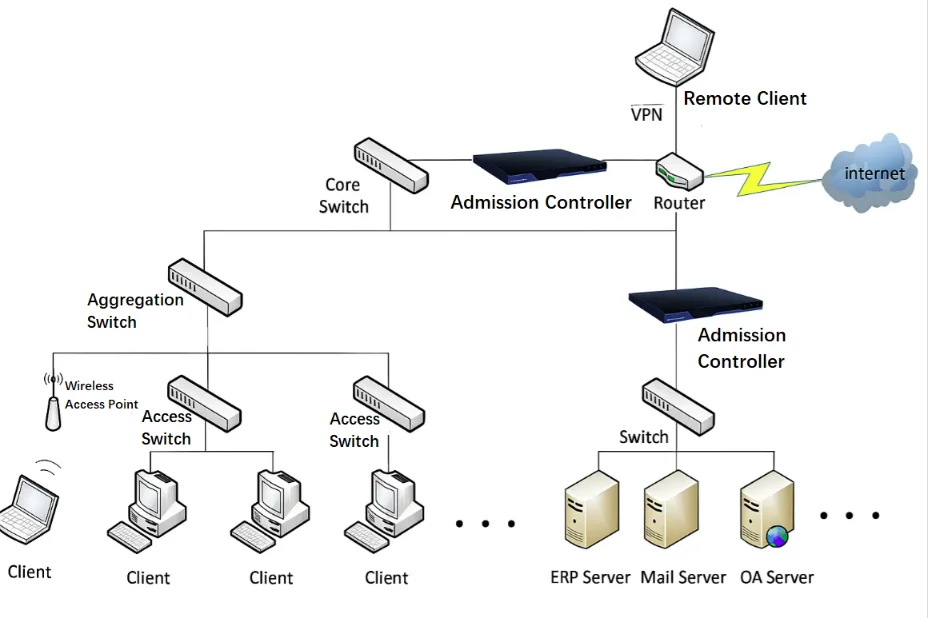
In Bridge Mode, the network structure and configuration remain unchanged. The Secure Access Gateway device is simply inserted into the network at the point where control is needed, typically in front of critical application servers or gateways. This setup allows seamless integration without modifying existing network infrastructure.
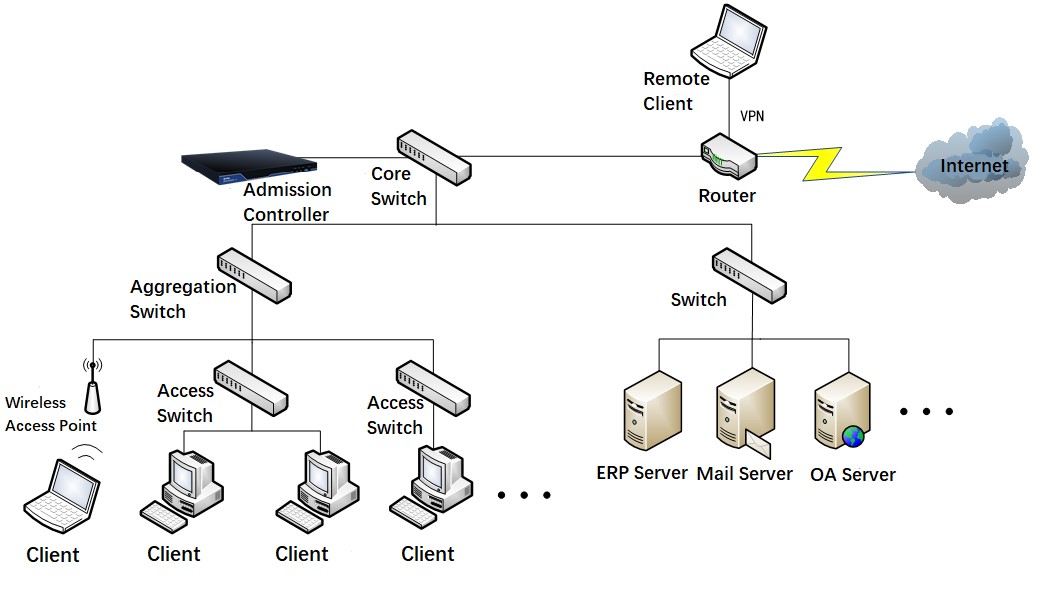
Bypass Control Mode
Routing Mode
Enable policy-based routing on the core switch to control inter-subnet access. This control method does not affect the existing network architecture and requires the core switch to support policy-based routing.
Bypass Mirror Mode
Set up mirror and monitoring ports on the core switch to analyze mirrored traffic for access control. This method does not affect the existing network architecture and requires the core switch to support port mirroring.